8G显存5-10秒延迟的AI语音聊天助手(Qwen3-ASR-0.6B Q8_0(语音识别)+ DeepSeek-R1-7B-Q4-K-M(自然语言推理) + Qwen3-TTS(语音合成))
文章目录
新的技术路线
- 模型部署:Qwen3-ASR-0.6B Q8_0(语音识别)+ DeepSeek-R1-7B-Q4-K-M(自然语言推理) + Qwen3-TTS(语音合成)
- 模型加载机制:
(1) Qwen3-ASR-0.6B Q8_0常驻显存;
(2) 检测到唤醒词时加载DeepSeek-R1-7B,推理完就从显存卸载deepseek模型;
(3) 语音合成前加载Qwen3-TTS模型至显存;
(4) 语音合成完马上卸载Qwen3-TTS,随后加载deepseek模型至显存,同时播放合成后的语音。 - 关键词唤醒语言推理:常驻显存的Qwen3-ASR-0.6B Q8_0检测到关键词[“你好我的小宝贝”, “你好宝贝”, “你好小宝贝”],立刻加载dewpseek模型至显存,同时语音回应“小宝贝来啦!";然后将下个循环检测到的语音文字输入deepseek推理。
- Keyword to Disable Voice Reasoning: The always-resident Qwen3-ASR-0.6B Q8_0 detects keywords [“再见关闭” (Goodbye, close), “关闭小宝贝” (Close, baby), “拜拜小宝贝” (Bye-bye, baby)], immediately unloads the DeepSeek model from VRAM, stops any ongoing Qwen3-TTS speech synthesis and playback, and simultaneously responds with “再见,如果想和我聊天请说你好我的小宝贝唤醒我!” (Goodbye. If you want to chat with me, say “Hello my little baby” to wake me up!).
- 关键词中断deepseek自然语言推理和Qwen3-TTS语音合成及播放:常驻显存的Qwen3-ASR-0.6B Q8_0检测到关键词[“等一等”, “等一下”, “你错了”, “停一下”,“停一停”],中断deepseek推理和Qwen3-TTS的语音合成及播放,立刻从显存中卸载Qwen3-TTS模型,重新进入新的语音识别→自然语言推理→语音合成→语音播放流程。优先级最高.
- 语音播放流畅性优化:
(1) 以deepseek推理出的文字内容中的断句标点符号为基础将文字划分为块;
(2) 若单个块中的文字超过30个字,则以逗号等次级短句符为基础将文字划分为块;
(3) 单个块的文字长度大于3个且小于30个;
(4) 以块为单位输入Qwen3-TTS进行语音合成和语音播放;
(5) 播放语音时不要播报标点符号。 - 关键词开启关闭或关闭deepseek联网:
(1) 常驻显存的Qwen3-ASR-0.6B Q8_0检测到关键词[“允许网络查询”, “允许网络访问”, “开启联网”, “联网搜索”],开启deepseek模型的联网查询功能.
(2) 利用baidusearch库实现联网功能,最多搜索10个网页.
(3) 常驻显存的Qwen3-ASR-0.6B Q8_0检测到关键词"关闭网络", “禁止联网”, “关闭联网”, “断开网络”],关闭deepseek模型的联网查询功能. - 防止回音:在没有检测到关键词中断的情况下,必须要先播放完语音后0.5秒,才能将下一轮循环的Qwen3-ASR-0.6B Q8_0检测到的文字输入给deepseek推理。
- 播放开始服务的提示语音:
(1) 程序开始运行后,先加载Qwen3-ASR-0.6B Q8_0模型至显存;
(2) 然后播放本地语音文件start.wav;
(3) 播放完后再开始Qwen3-ASR-0.6B Q8_0常驻语音检测。 - 减少语音识别误检测:
(1) 指定语音识别为中文;
(2) 利用VAD以及其他参数,尽可能减少人声的误检测;
(3) 若语音识别结果去掉标点符号不足3个字,则认为是无效信息,不予处理. - 报文输出:
(1) 程序处于语音检测状态时,打印用户可以输入的关键词及操作;
(2) 关闭警告信息;
(3) 利用打印命令在模型加载\模型卸载\语音识别结果\deepseek推理结果\语音合成进度\语音播放进度等关键操作开始前后,以及关键操作前后各类状态变量当前值,打印相应的提示信息.
conda 虚拟环境准备
ubuntu 24.04 系统环境
# conda base环境下安装mamba
conda update conda
conda install mamba -n base -c conda-forge
mamba --version  # 验证安装成功

# 创建虚拟环境,python 3.11是最佳选择
mamba create -n voice_chat_fast python=3.11 -y

# 激活虚拟环境
mamba activate voice_chat_fast

# 安装基础工具
# 安装 modelscope,用于下在模型
pip install -U modelscope -i https://pypi.tuna.tsinghua.edu.cn/simple

# 安装transformer生态
pip install transformers accelerate -i https://pypi.tuna.tsinghua.edu.cn/simple

# 音频处理库
pip install sounddevice soundfile librosa pyaudio-i https://pypi.tuna.tsinghua.edu.cn/simple

# base环境下安装
sudo apt install portaudio19-dev python3-pyaudio libportaudio2
sudo apt install ffmpeg

# PyTorch GPU(CUDA 12.4)
# 部署以下模型时先安装一遍
mamba install pytorch torchvision torchaudio pytorch-cuda=12.4 -c pytorch -c nvidia -y
# 模型部署完成后先卸载后来自动安装的pytorh,再安装一遍
pip uninstall torch torchaudio -y
mamba install pytorch torchvision torchaudio pytorch-cuda=12.4 -c pytorch -c nvidia -y
下列所有依赖库的安装,除了必须要用 sudo apt install 安装的,其余最好都在创建并激活的虚拟环境下运行安装命令.
1. Qwen3-ASR-0.6B Q8_0 部署及测试(语音转文字)
1.1 模型下载
# 下载模型
modelscope download --model Qwen/Qwen3-ASR-0.6B --local_dir /home/wyuchen/Documents/voice_chat_fast/models/Qwen3-ASR-0.6B
1.2 依赖库安装
# 特定环境
pip install qwen-asr -i https://pypi.tuna.tsinghua.edu.cn/simple
1.3 语音识别测试
完整的测试运行代码如下:
import torch
from qwen_asr import Qwen3ASRModel

model_path = "models/Qwen3-ASR-0.6B"

print("正在加载 Qwen3-ASR-0.6B 模型...")
model = Qwen3ASRModel.from_pretrained(
    model_path,
    device_map="cuda:0",
    dtype=torch.float16,
)
print("✅ 模型加载成功!")

audio_path = "my_test.wav"

result_list = model.transcribe(audio_path)  # 返回值是列表

# 提取第一个结果
if result_list and len(result_list) > 0:
    first_result = result_list[0]
    # 兼容字典或对象
    if isinstance(first_result, dict):
        text = first_result.get("text", "")
        language = first_result.get("language", "")
    elif hasattr(first_result, "text"):
        text = first_result.text
        language = getattr(first_result, "language", "")
    else:
        text = str(first_result)
        language = ""
    print(f"🎤 识别结果: {text}")
    if language:
        print(f"🌐 检测语言: {language}")
else:
    print("⚠️ 未识别到任何内容")
2. Qwen3-TTS 0.6B 部署及测试(文字转语音)
2.1 模型下载
# 下载 0.6B Base 模型到指定目录
modelscope download --model Qwen/Qwen3-TTS-12Hz-0.6B-Base --local_dir ./Qwen3-TTS-0.6B-Base

2.2 依赖库安装
# base环境
sudo apt install sox libsox-dev

# 特定环境
# 安装 qwen-tts 核心库
pip install -U qwen-tts -i https://pypi.tuna.tsinghua.edu.cn/simple

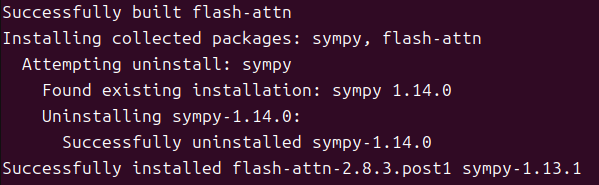
# 可选:安装 FlashAttention 2 加速推理
# 系统装的cuda版本必须和虚拟环境中的pytorch的cuda版本一致
# 编译非常耗时,不推荐安装
pip install -U flash-attn --no-build-isolation -i https://pypi.tuna.tsinghua.edu.cn/simple
2.3 克隆音色及语音合成测试
完整测试代码如下:
import torch
import soundfile as sf
from qwen_tts import Qwen3TTSModel
import os

# ========== 1. 配置 ==========
model_path = "models/Qwen3-TTS-0.6B-Base"          # 模型路径
ref_audio_path = "my_test.wav"                    # 参考音频(仅首次需要)
ref_text = "我是吴杨婷我是小傻瓜"               # 参考音频的转录文本
voice_feature_path = "wangyuchen.pt"                # 保存音色特征的文件

# ========== 2. 加载模型 ==========
model = Qwen3TTSModel.from_pretrained(
    model_path,
    device_map="cuda:0",
    dtype=torch.bfloat16,
    # ttn_implementation="flash_attention_2",   # 若已安装,取消注释
)
print("✅ 模型加载成功!")

# ========== 3. 处理音色特征(提取或加载) ==========
if os.path.exists(voice_feature_path):
    # 已存在特征文件 → 直接加载
    print(f"📂 从 {voice_feature_path} 加载音色特征...")
    voice_prompt = torch.load(voice_feature_path)
else:
    # 不存在 → 提取并保存
    print("🔊 首次运行,提取音色特征...")
    voice_prompt = model.create_voice_clone_prompt(
        ref_audio=ref_audio_path,
        ref_text=ref_text,
    )
    torch.save(voice_prompt, voice_feature_path)
    print(f"✅ 音色特征已保存至 {voice_feature_path}")

# ========== 4. 合成语音 ==========
print("🔄 正在合成语音...")
wavs, sr = model.generate_voice_clone(
    text="你好,这是一段使用克隆音色合成的测试语音。",
    language="Chinese",
    voice_clone_prompt=voice_prompt,       # 直接传入特征,无需再传 ref_audio
)

# ========== 5. 保存音频 ==========
output_path = "cloned_speech.wav"
sf.write(output_path, wavs[0], sr)
print(f"✅ 合成完成! 音频已保存至: {output_path}")
3. deepseek模型部署(自然语言推理)
3.1 下载模型
魔塔社区地址
下载命令如下:
modelscope download --model deepseek-ai/DeepSeek-R1-Distill-Qwen-7B --local_dir /home/wyuchen/Documents/train_deepseek/DeepSeek-R1-Distill-Qwen-7B
下载的模型是原版7B模型,在后续用ollama提取数据时再添加量化参数.
3.2 安装依赖
(1) 如果该虚拟环境不用于训练deepseek
# 安装整个项目的依赖库
(2) 如果该虚拟环境需要训练deepseek
利用Anaconda和Mamba创建深度学习常用四大环境(windows\ubuntu通用)
3.3 安装ollama
(1) 安装ollama库
pip install ollama -i https://pypi.tuna.tsinghua.edu.cn/simple
(2) 安装ollama命令行工具
下载地址 ,下载在页面上的ollama-linux-amd64.tar.zst 以及 linux-install.sh .
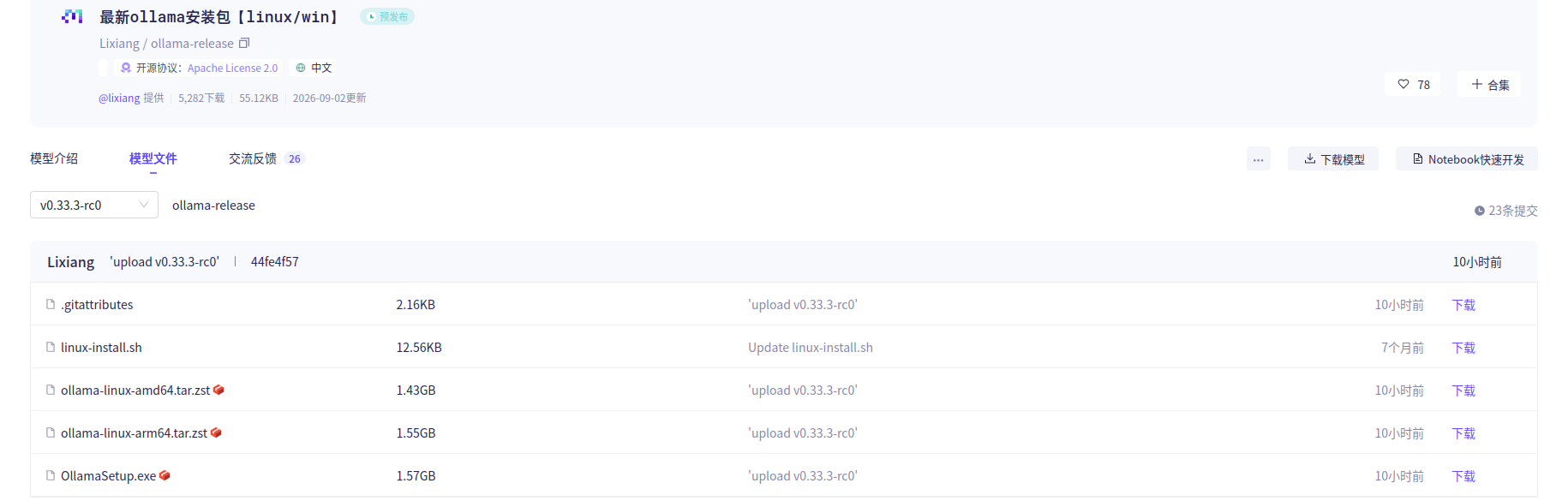 确保上面下载的两个文件在同级目录,运行命令安装:
chmod +x linux-install.sh
sudo ./linux-install.sh

# 验证安装
ollama --version
返回结果:正常
3.4 ollama提取量化模型并启动服务
(1) 创建Modelfile
在guff模型文件或者原版模型文件夹同级目录下创建Modelfile文件,没有任何后缀名,内容如下:
FROM /home/wyuchen/Documents/train_deepseek/deepseek-ai--DeepSeek-R1-Distill-Qwen-7B
(2) ollama提取模型
ollama create deepseekr17Bq4 -q q4_K_M -f E:\Project\train_deepseek\\Modelfile
(3) 验证
# 显示所有提取的模型
ollama list
将项目程序中ollama调用的模型名称换成ollama list已经存在的模型名称:DEEPSEEK_MODEL = “deepseekr17bq4”
ollama 提取本地模型示例(q4_K_M量化)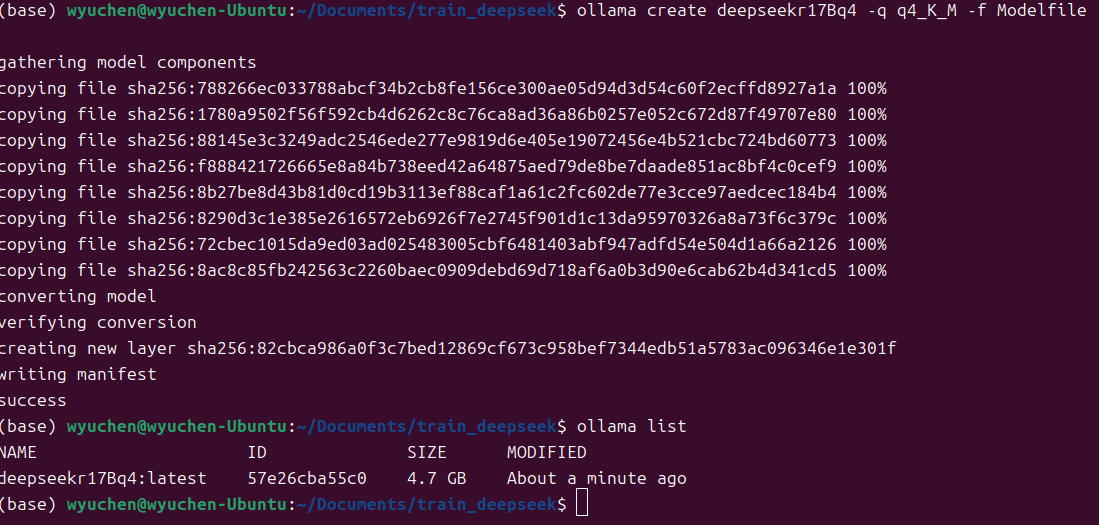
(4) ollama在主程序运行前启动服务
ollama在主程序运行前要在命令行窗口中输入"ollama serve"启动服务
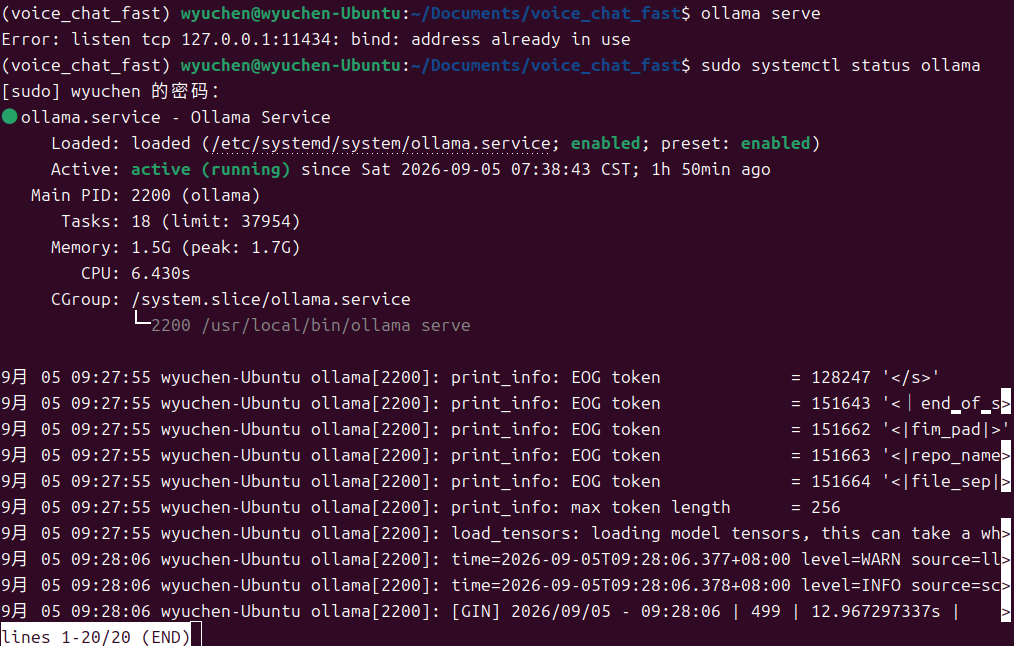
若出现Error: listen tcp 127.0.0.1:11434: bind: address already in use报错,通过以下步骤排查:
# 确认ollama运行状态
sudo systemctl status ollama
# 如果显示 active (running),说明服务正常
# 如果服务没有启动,则通过以下命令重启服务
sudo systemctl restart ollama
3.5 deepseek 联网搜索
免费的duckduckgo-search 联网搜索库在国内访问不了互联网,国内有一些收费的联网搜索API.国内免费的有baidusearch库,但是可能会被反爬虫机制限制.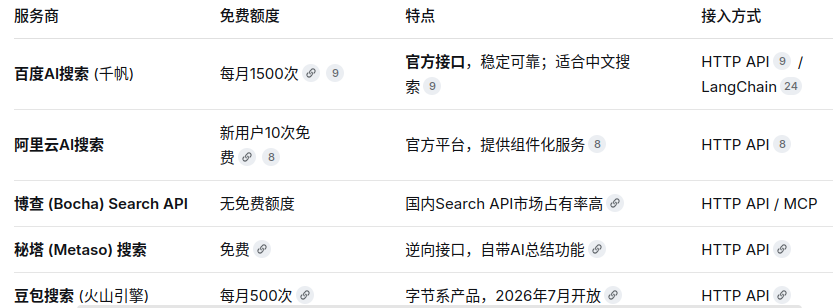
我这里采用baidu-search.
# 安装联网依赖
pip install baidusearch

# 验证安装
baidusearch --help
3.6 deepseek模型的训练
参见我的文章:
部署本地deepseek/Qwen模型并在局域网中多人交互
4. AI智能语音聊天助手项目完整代码
启动前确保ollama服务已经运行,模型了路径以及修改,样本音频文件路径以及修改.显存至少8G.
#!/usr/bin/env python3
# -*- coding: utf-8 -*-
"""
智能语音助手(Ubuntu 24.04)
============================================================
功能需求(对应 function.txt):
1. 模型:Qwen3-ASR-0.6B Q8_0(语音识别,常驻显存)
+ DeepSeek-R1-7B-Q4-K-M(自然语言推理,Ollama 管理显存)
+ Qwen3-TTS(语音合成,按需加载)
2. 显存策略:
- ASR 常驻;
- 唤醒词触发后预加载 DeepSeek 至显存(keep_alive 保活,需求 3);
- DeepSeek 推理完成后立即卸载(keep_alive=0),为 TTS 腾显存(需求 2.2);
- TTS 合成前加载(需求 2.3),整段合成播放结束后卸载;
- TTS 卸载后的播放阶段预加载 DeepSeek,为下一轮推理加速(需求 2.4)。
3. 关键词:唤醒 / 关闭 / 打断(最高优先级)/ 联网开 / 联网关。
4. 分块:断句标点为主、逗号为次、超长硬切,块长 3~30,播放不读标点。
5. 防回音:播放期间只放行打断/关闭词;播放结束后 0.5s 内开始的语音段丢弃。
6. 启动:先播放 start.wav,播放完才开始 ASR 常驻检测。
============================================================
依赖(Ubuntu 24.04):
sudo apt install -y portaudio19-dev
pip install pyaudio sounddevice soundfile numpy torch ollama funasr baidusearch
以及本地库 qwen_asr / qwen_tts(你已具备)
============================================================
"""
import os
import re
import time
import queue
import tempfile
import threading
import warnings
import numpy as np
import soundfile as sf
import sounddevice as sd
import pyaudio
import torch
import ollama
# ---------------- 关闭警告(需求 11.2) ----------------
warnings.filterwarnings("ignore")
os.environ.setdefault("TRANSFORMERS_VERBOSITY", "error")
os.environ.setdefault("TOKENIZERS_PARALLELISM", "false")
try:
import logging
logging.getLogger("funasr").setLevel(logging.ERROR)
logging.getLogger("modelscope").setLevel(logging.ERROR)
except Exception:
pass
from qwen_asr import Qwen3ASRModel
from qwen_tts import Qwen3TTSModel
# ---------------- 联网搜索(可选,需求 7.2) ----------------
try:
from baidusearch import baidusearch
BAIDU_SEARCH_AVAILABLE = True
except ImportError:
BAIDU_SEARCH_AVAILABLE = False
print("⚠️ 未安装 baidusearch,联网搜索不可用。安装:pip install baidusearch")
# ==================== 配置 ====================
ASR_MODEL_PATH = "models/Qwen3-ASR-0.6B"
# 需求为 Q8_0 量化版:若你的 qwen_asr 库支持 GGUF/量化加载,
# 请将 ASR_MODEL_PATH 指向 Q8_0 的 gguf 文件或传入量化参数(如 quant_type="q8_0")。
TTS_MODEL_PATH = "models/Qwen3-TTS-0.6B-Base"
VOICE_PROMPT_PATH = "wangyuchen.pt" # 音色特征(从 my_test.wav 提取)
DEEPSEEK_MODEL = "deepseekr17Bq4" # Ollama 中的 DeepSeek-R1-7B-Q4_K_M 模型名
START_WAV = "start.wav" # 启动提示音
DEEPSEEK_KEEP_ALIVE = 600 # 预加载后 DeepSeek 驻留显存秒数(需求 2.4)
# 录音参数
FORMAT = pyaudio.paInt16
CHANNELS = 1
RATE = 16000
CHUNK = int(RATE * 0.1) # 100ms
# VAD 参数(需求 10.2:尽量降低人声误检)
VAD_THRESHOLD = 0.9 # fsmn-vad 阈值,越高越严格
VAD_FRAME_DURATION = 0.3 # 每次 VAD 判定的音频帧长(秒)
SILENCE_DURATION = 0.6 # 判定语音结束所需的静音时长(秒)
MIN_SPEECH_DURATION = 0.5 # 最短语音段时长,更短视为噪音
ASR_THRESHOLD = 0.8 # # 设置语音识别置信度阈值
VAD_FRAME_SAMPLES = int(RATE * VAD_FRAME_DURATION)
# 修复:原代码 int(0.5/0.8)=0,第一次静音帧就判定语音结束,导致语音段被截断
SILENCE_FRAMES = max(1, int(round(SILENCE_DURATION / VAD_FRAME_DURATION)))
# 关键词(与 function.txt 逐字一致)
WAKE_WORDS = ["你好我的小宝贝", "你好宝贝", "你好小宝贝"]
EXIT_WORDS = ["再见关闭", "关闭小宝贝", "拜拜小宝贝"]
INTERRUPT_WORDS = ["等一等", "等一下", "你错了", "停一下", "停一停"]
NET_SEARCH_WORDS = ["允许网络查询", "允许网络访问", "开启联网", "联网搜索"]
NET_DISABLE_WORDS = ["关闭网络", "禁止联网", "关闭联网", "断开网络"]
# 标点/空白(识别结果清洗与分块共用)
PUNCT_PATTERN = re.compile(r"[,。、!?;:,.!?;:…\s]")
# ==================== 全局状态 ====================
is_running = True
is_playing = False # 是否正在播放语音
is_reasoning = False # DeepSeek 是否正在推理
conversation_active = False # 是否处于对话模式(已被唤醒)
enable_web_search = False # 是否开启联网查询
last_play_end_time = 0.0 # 最近一次播放结束时刻(防回音用)
interrupt_event = threading.Event() # 打断请求(需求 5,最高优先级)
play_epoch = 0 # 播放会话世代号:打断/关闭/清打断标志时+1,作废旧播放线程
_state_lock = threading.Lock()
_ds_lock = threading.Lock() # DeepSeek 预载/卸载互斥
result_queue = queue.Queue()
asr_model = None
tts_manager = None
INPUT_DEVICE_INDEX = None
OUTPUT_DEVICE_INDEX = None
# ==================== 设备选择 ====================
def select_audio_devices():
"""交互式选择录音/播放设备(回车使用默认)"""
p = pyaudio.PyAudio()
print("\n===== 可用的录音设备(麦克风)=====")
input_devices = []
for i in range(p.get_device_count()):
info = p.get_device_info_by_index(i)
if info['maxInputChannels'] > 0:
input_devices.append((i, info['name']))
print(f" [{i}] {info['name']} (输入通道: {info['maxInputChannels']})")
if not input_devices:
print("⚠️ 未找到任何录音设备,将使用默认设备。")
input_choice = None
else:
while True:
try:
choice = input("\n请选择录音设备编号(直接回车使用默认): ").strip()
if choice == "":
input_choice = None
break
idx = int(choice)
if any(idx == dev[0] for dev in input_devices):
input_choice = idx
break
print("⚠️ 编号无效,请重新输入。")
except ValueError:
print("⚠️ 请输入有效数字。")
print("\n===== 可用的播放设备(扬声器/耳机)=====")
output_devices = []
for i in range(p.get_device_count()):
info = p.get_device_info_by_index(i)
if info['maxOutputChannels'] > 0:
output_devices.append((i, info['name']))
print(f" [{i}] {info['name']} (输出通道: {info['maxOutputChannels']})")
if not output_devices:
print("⚠️ 未找到任何播放设备,将使用默认设备。")
output_choice = None
else:
while True:
try:
choice = input("\n请选择播放设备编号(直接回车使用默认): ").strip()
if choice == "":
output_choice = None
break
idx = int(choice)
if any(idx == dev[0] for dev in output_devices):
output_choice = idx
break
print("⚠️ 编号无效,请重新输入。")
except ValueError:
print("⚠️ 请输入有效数字。")
p.terminate()
return input_choice, output_choice
# ==================== ASR 管理(常驻显存,需求 2.1) ====================
class ASRManager:
def __init__(self, model_path):
print("🔊 [ASR] 加载 Qwen3-ASR 模型(常驻显存)...")
self.model = Qwen3ASRModel.from_pretrained(
model_path,
device_map="cuda:0",
dtype=torch.float16, # 若 qwen_asr 支持 Q8_0 量化加载,请改为量化参数
)
if hasattr(self.model, "set_confidence_threshold"):
self.model.set_confidence_threshold(ASR_THRESHOLD)
print("✅ [ASR] 模型加载完成,常驻显存。")
def transcribe(self, audio_path, language="Chinese"):
"""识别音频,返回文本;指定中文(需求 10.1)"""
try:
result_list = self.model.transcribe(audio_path, language=language)
if result_list and len(result_list) > 0:
first = result_list[0]
if isinstance(first, dict):
return first.get("text", "").strip()
if hasattr(first, "text"):
return first.text.strip()
return str(first).strip()
except Exception as e:
print(f"❌ [ASR] 识别错误: {e}")
return ""
# ==================== TTS 管理(按需加载,合成与卸载互斥) ====================
class TTSManager:
def __init__(self, model_path, voice_prompt_path):
self.model_path = model_path
self.voice_prompt = torch.load(voice_prompt_path, map_location="cpu")
self.model = None
self.lock = threading.Lock() # 保护 load/unload/synthesize 互斥
def _load_locked(self):
if self.model is None:
print("🔊 [TTS] 加载 Qwen3-TTS 模型...")
self.model = Qwen3TTSModel.from_pretrained(
self.model_path,
device_map="cuda:0",
dtype=torch.bfloat16,
)
# 音色特征与模型设备对齐,避免 device mismatch
if isinstance(self.voice_prompt, torch.Tensor):
dev = getattr(self.model, "device", "cuda:0")
self.voice_prompt = self.voice_prompt.to(dev)
print("✅ [TTS] 模型加载完成。")
def load(self):
with self.lock:
self._load_locked()
def unload(self):
with self.lock:
if self.model is not None:
print("🧹 [TTS] 卸载模型,释放显存...")
try:
# 确保无在途 CUDA kernel 再释放,避免与 VAD/ASR 的 CUDA
# 调用并发导致驱动层 SIGSEGV(报文实测退出码 139)
torch.cuda.synchronize()
except Exception:
pass
del self.model
self.model = None
import gc
gc.collect()
try:
torch.cuda.empty_cache()
except Exception:
pass
def synthesize(self, text):
"""合成语音;持锁执行,保证合成过程中不会被 unload(修复原版卸载竞态崩溃)"""
with self.lock:
self._load_locked()
with torch.no_grad():
wavs, sr = self.model.generate_voice_clone(
text=text,
language="Chinese",
voice_clone_prompt=self.voice_prompt,
)
audio = wavs[0]
if hasattr(audio, "detach"):
audio = audio.detach().cpu().numpy()
audio = np.asarray(audio)
if audio.dtype not in (np.float32, np.float64):
audio = audio.astype(np.float32)
return audio, sr
# ==================== 分块函数(需求 6) ====================
def split_into_chunks(text, min_chars=3, max_chars=30):
"""
以断句标点(句号/问号/感叹号/省略号)为基础划分块;
块超过 30 字按逗号等次级标点细分;仍超长则硬切兜底;
块长尽量落在 3~30;播放时不播报标点。
"""
if not text or not text.strip():
return []
chunks = []
buffer = ""
def push(buf):
clean = PUNCT_PATTERN.sub("", buf).strip()
if not clean:
return
# 次级标点细分(逗号、顿号、分号、空格)
segments = re.split(r"[,、,;;]", clean)
cur = ""
for seg in segments:
seg = seg.strip()
if not seg:
continue
cur += seg
while len(cur) > max_chars: # 无标点超长句硬切兜底
chunks.append(cur[:max_chars])
cur = cur[max_chars:]
if cur:
chunks.append(cur)
# 主断句符分割
parts = re.split(r"(?<=[。!?…])", text)
for part in parts:
if not part:
continue
buffer += part
if len(PUNCT_PATTERN.sub("", buffer)) >= min_chars or part.endswith(("。", "!", "?", "…")):
push(buffer)
buffer = ""
if buffer:
push(buffer)
# 过短块并入相邻块(避免丢字,如"你好""再见"),再过滤 < min_chars
merged = []
for c in chunks:
if merged and (len(c) < min_chars or len(merged[-1]) < min_chars):
merged[-1] += c
else:
merged.append(c)
return [c for c in merged if len(c) >= min_chars]
# ==================== DeepSeek 显存管理 ====================
def is_deepseek_loaded():
"""查询 Ollama 中 DeepSeek 是否已驻留显存"""
try:
ps = ollama.ps()
for m in ps.models:
name = getattr(m, "model", "") or ""
# 用不带 tag 的模型名精确匹配,避免误判同前缀的其他模型
if name.split(":")[0] == DEEPSEEK_MODEL:
return True
except Exception:
pass
return False
def preload_deepseek():
"""需求 3 / 2.4:将 DeepSeek 加载至显存并保活(后台线程调用)"""
if is_deepseek_loaded():
return
with _ds_lock:
if is_deepseek_loaded():
return
# 显存体检:7B 约需 4.5GB。可用显存不足时跳过预载(推理时按需加载),
# 避免 Vulkan/CUDA 显存分配失败导致 llama-server 崩溃(报文实测退出码 139)
try:
free_bytes, _ = torch.cuda.mem_get_info()
if free_bytes < 5.0 * 1024 ** 3:
print(
f"⚠️ [DeepSeek] 可用显存 {free_bytes / 1024**3:.1f}GB < 5GB,"
"跳过预载,推理时按需加载"
)
return
except Exception:
pass
print("🤖 [DeepSeek] 预加载模型至显存...")
try:
for _ in ollama.chat(
model=DEEPSEEK_MODEL,
messages=[{"role": "user", "content": "。"}],
stream=True,
keep_alive=DEEPSEEK_KEEP_ALIVE,
think=False,
):
pass
print(f"✅ [DeepSeek] 已驻留显存(keep_alive={DEEPSEEK_KEEP_ALIVE}s)")
except TypeError:
# 旧版 ollama-python 不支持 think 参数,自动降级
try:
for _ in ollama.chat(
model=DEEPSEEK_MODEL,
messages=[{"role": "user", "content": "。"}],
stream=True,
keep_alive=DEEPSEEK_KEEP_ALIVE,
):
pass
print(f"✅ [DeepSeek] 已驻留显存(keep_alive={DEEPSEEK_KEEP_ALIVE}s)")
except Exception as e:
print(f"❌ [DeepSeek] 预加载失败: {e}")
except Exception as e:
print(f"❌ [DeepSeek] 预加载失败: {e}")
def unload_deepseek():
"""需求 4:立即从显存卸载 DeepSeek。
修复:若预加载线程正在持锁加载(7B 模型需数十秒),
本函数会在锁上等待其完成,随后立刻卸载,避免"关闭后模型仍驻留显存"。
调用方应放入后台线程,避免阻塞主流程。"""
with _ds_lock: # 先等可能正在进行的预加载完成
if not is_deepseek_loaded():
print("[DeepSeek] 当前不在显存,无需卸载")
return
print("🧹 [DeepSeek] 卸载模型,释放显存...")
try:
for _ in ollama.chat(
model=DEEPSEEK_MODEL,
messages=[{"role": "user", "content": "。"}],
stream=True,
keep_alive=0, # 请求完成后立即卸载
):
pass
print("✅ [DeepSeek] 已卸载")
except Exception as e:
print(f"❌ [DeepSeek] 卸载失败: {e}")
# ==================== 联网搜索(需求 7.2,最多 10 个网页) ====================
def build_search_context(prompt):
if not BAIDU_SEARCH_AVAILABLE:
print("⚠️ baidusearch 未安装,无法联网搜索")
return prompt
try:
results = baidusearch.search(prompt)
except Exception as e:
print(f"🌐 联网搜索异常: {e}")
return prompt
if not results:
print("🌐 未搜索到相关结果")
return prompt
contexts = []
for r in results[:10]:
title = (r.get("title") or "").strip()
body = (r.get("body") or r.get("abstract") or "").strip()
link = (r.get("link") or "").strip()
if title or body:
contexts.append(f"标题:{title}\n摘要:{body}\n链接:{link}")
if not contexts:
print("🌐 搜索结果无有效内容")
return prompt
print(f"🌐 已获取 {len(contexts)} 条网页摘要(最多 10 条)")
return (
"请依据以下联网搜索结果回答用户问题;若信息不足请明确说明。\n\n"
+ "\n\n".join(contexts)
+ f"\n\n用户问题:{prompt}"
)
# ==================== DeepSeek 流式推理(可中断) ====================
def ask_deepseek(prompt, enable_web):
"""DeepSeek 流式推理;打断词可中断;推理完立即卸载(需求 2.2)"""
global is_reasoning
try:
if enable_web:
prompt = build_search_context(prompt)
messages = [{"role": "user", "content": prompt}]
print("🤖 [DeepSeek] 开始推理...")
try:
stream = ollama.chat(
model=DEEPSEEK_MODEL,
messages=messages,
stream=True,#!/usr/bin/env python3
# -*- coding: utf-8 -*-
"""
智能语音助手(Ubuntu 24.04)
============================================================
功能需求(对应 function.txt):
1. 模型:Qwen3-ASR-0.6B Q8_0(语音识别,常驻显存)
+ DeepSeek-R1-7B-Q4-K-M(自然语言推理,Ollama 管理显存)
+ Qwen3-TTS(语音合成,按需加载)
2. 显存策略:
- ASR 常驻;
- 唤醒词触发后预加载 DeepSeek 至显存(keep_alive 保活,需求 3);
- DeepSeek 推理完成后立即卸载(keep_alive=0),为 TTS 腾显存(需求 2.2);
- TTS 合成前加载(需求 2.3),整段合成播放结束后卸载;
- TTS 卸载后的播放阶段预加载 DeepSeek,为下一轮推理加速(需求 2.4)。
3. 关键词:唤醒 / 关闭 / 打断(最高优先级)/ 联网开 / 联网关。
4. 分块:断句标点为主、逗号为次、超长硬切,块长 3~30,播放不读标点。
5. 防回音:播放期间只放行打断/关闭词;播放结束后 0.5s 内开始的语音段丢弃。
6. 启动:先播放 start.wav,播放完才开始 ASR 常驻检测。
============================================================
依赖(Ubuntu 24.04):
sudo apt install -y portaudio19-dev
pip install pyaudio sounddevice soundfile numpy torch ollama funasr baidusearch
以及本地库 qwen_asr / qwen_tts(你已具备)
============================================================
"""
import os
import re
import time
import queue
import tempfile
import threading
import warnings
import numpy as np
import soundfile as sf
import sounddevice as sd
import pyaudio
import torch
import ollama
# ---------------- 关闭警告(需求 11.2) ----------------
warnings.filterwarnings("ignore")
os.environ.setdefault("TRANSFORMERS_VERBOSITY", "error")
os.environ.setdefault("TOKENIZERS_PARALLELISM", "false")
try:
import logging
logging.getLogger("funasr").setLevel(logging.ERROR)
logging.getLogger("modelscope").setLevel(logging.ERROR)
except Exception:
pass
from qwen_asr import Qwen3ASRModel
from qwen_tts import Qwen3TTSModel
# ---------------- 联网搜索(可选,需求 7.2) ----------------
try:
from baidusearch import baidusearch
BAIDU_SEARCH_AVAILABLE = True
except ImportError:
BAIDU_SEARCH_AVAILABLE = False
print("⚠️ 未安装 baidusearch,联网搜索不可用。安装:pip install baidusearch")
# ==================== 配置 ====================
ASR_MODEL_PATH = "models/Qwen3-ASR-0.6B"
# 需求为 Q8_0 量化版:若你的 qwen_asr 库支持 GGUF/量化加载,
# 请将 ASR_MODEL_PATH 指向 Q8_0 的 gguf 文件或传入量化参数(如 quant_type="q8_0")。
TTS_MODEL_PATH = "models/Qwen3-TTS-0.6B-Base"
VOICE_PROMPT_PATH = "wangyuchen.pt" # 音色特征(从 my_test.wav 提取)
DEEPSEEK_MODEL = "deepseekr17Bq4" # Ollama 中的 DeepSeek-R1-7B-Q4_K_M 模型名
START_WAV = "start.wav" # 启动提示音
DEEPSEEK_KEEP_ALIVE = 600 # 预加载后 DeepSeek 驻留显存秒数(需求 2.4)
# 录音参数
FORMAT = pyaudio.paInt16
CHANNELS = 1
RATE = 16000
CHUNK = int(RATE * 0.1) # 100ms
# VAD 参数(需求 10.2:尽量降低人声误检)
VAD_THRESHOLD = 0.9 # fsmn-vad 阈值,越高越严格
VAD_FRAME_DURATION = 0.3 # 每次 VAD 判定的音频帧长(秒)
SILENCE_DURATION = 0.6 # 判定语音结束所需的静音时长(秒)
MIN_SPEECH_DURATION = 0.5 # 最短语音段时长,更短视为噪音
ASR_THRESHOLD = 0.8 # # 设置语音识别置信度阈值
VAD_FRAME_SAMPLES = int(RATE * VAD_FRAME_DURATION)
# 修复:原代码 int(0.5/0.8)=0,第一次静音帧就判定语音结束,导致语音段被截断
SILENCE_FRAMES = max(1, int(round(SILENCE_DURATION / VAD_FRAME_DURATION)))
# 关键词(与 function.txt 逐字一致)
WAKE_WORDS = ["你好我的小宝贝", "你好宝贝", "你好小宝贝"]
EXIT_WORDS = ["再见关闭", "关闭小宝贝", "拜拜小宝贝"]
INTERRUPT_WORDS = ["等一等", "等一下", "你错了", "停一下", "停一停"]
NET_SEARCH_WORDS = ["允许网络查询", "允许网络访问", "开启联网", "联网搜索"]
NET_DISABLE_WORDS = ["关闭网络", "禁止联网", "关闭联网", "断开网络"]
# 标点/空白(识别结果清洗与分块共用)
PUNCT_PATTERN = re.compile(r"[,。、!?;:,.!?;:…\s]")
# ==================== 全局状态 ====================
is_running = True
is_playing = False # 是否正在播放语音
is_reasoning = False # DeepSeek 是否正在推理
conversation_active = False # 是否处于对话模式(已被唤醒)
enable_web_search = False # 是否开启联网查询
last_play_end_time = 0.0 # 最近一次播放结束时刻(防回音用)
interrupt_event = threading.Event() # 打断请求(需求 5,最高优先级)
play_epoch = 0 # 播放会话世代号:打断/关闭/清打断标志时+1,作废旧播放线程
_state_lock = threading.Lock()
_ds_lock = threading.Lock() # DeepSeek 预载/卸载互斥
result_queue = queue.Queue()
asr_model = None
tts_manager = None
INPUT_DEVICE_INDEX = None
OUTPUT_DEVICE_INDEX = None
# ==================== 设备选择 ====================
def select_audio_devices():
"""交互式选择录音/播放设备(回车使用默认)"""
p = pyaudio.PyAudio()
print("\n===== 可用的录音设备(麦克风)=====")
input_devices = []
for i in range(p.get_device_count()):
info = p.get_device_info_by_index(i)
if info['maxInputChannels'] > 0:
input_devices.append((i, info['name']))
print(f" [{i}] {info['name']} (输入通道: {info['maxInputChannels']})")
if not input_devices:
print("⚠️ 未找到任何录音设备,将使用默认设备。")
input_choice = None
else:
while True:
try:
choice = input("\n请选择录音设备编号(直接回车使用默认): ").strip()
if choice == "":
input_choice = None
break
idx = int(choice)
if any(idx == dev[0] for dev in input_devices):
input_choice = idx
break
print("⚠️ 编号无效,请重新输入。")
except ValueError:
print("⚠️ 请输入有效数字。")
print("\n===== 可用的播放设备(扬声器/耳机)=====")
output_devices = []
for i in range(p.get_device_count()):
info = p.get_device_info_by_index(i)
if info['maxOutputChannels'] > 0:
output_devices.append((i, info['name']))
print(f" [{i}] {info['name']} (输出通道: {info['maxOutputChannels']})")
if not output_devices:
print("⚠️ 未找到任何播放设备,将使用默认设备。")
output_choice = None
else:
while True:
try:
choice = input("\n请选择播放设备编号(直接回车使用默认): ").strip()
if choice == "":
output_choice = None
break
idx = int(choice)
if any(idx == dev[0] for dev in output_devices):
output_choice = idx
break
print("⚠️ 编号无效,请重新输入。")
except ValueError:
print("⚠️ 请输入有效数字。")
p.terminate()
return input_choice, output_choice
# ==================== ASR 管理(常驻显存,需求 2.1) ====================
class ASRManager:
def __init__(self, model_path):
print("🔊 [ASR] 加载 Qwen3-ASR 模型(常驻显存)...")
self.model = Qwen3ASRModel.from_pretrained(
model_path,
device_map="cuda:0",
dtype=torch.float16, # 若 qwen_asr 支持 Q8_0 量化加载,请改为量化参数
)
if hasattr(self.model, "set_confidence_threshold"):
self.model.set_confidence_threshold(ASR_THRESHOLD)
print("✅ [ASR] 模型加载完成,常驻显存。")
def transcribe(self, audio_path, language="Chinese"):
"""识别音频,返回文本;指定中文(需求 10.1)"""
try:
result_list = self.model.transcribe(audio_path, language=language)
if result_list and len(result_list) > 0:
first = result_list[0]
if isinstance(first, dict):
return first.get("text", "").strip()
if hasattr(first, "text"):
return first.text.strip()
return str(first).strip()
except Exception as e:
print(f"❌ [ASR] 识别错误: {e}")
return ""
# ==================== TTS 管理(按需加载,合成与卸载互斥) ====================
class TTSManager:
def __init__(self, model_path, voice_prompt_path):
self.model_path = model_path
self.voice_prompt = torch.load(voice_prompt_path, map_location="cpu")
self.model = None
self.lock = threading.Lock() # 保护 load/unload/synthesize 互斥
def _load_locked(self):
if self.model is None:
print("🔊 [TTS] 加载 Qwen3-TTS 模型...")
self.model = Qwen3TTSModel.from_pretrained(
self.model_path,
device_map="cuda:0",
dtype=torch.bfloat16,
)
# 音色特征与模型设备对齐,避免 device mismatch
if isinstance(self.voice_prompt, torch.Tensor):
dev = getattr(self.model, "device", "cuda:0")
self.voice_prompt = self.voice_prompt.to(dev)
print("✅ [TTS] 模型加载完成。")
def load(self):
with self.lock:
self._load_locked()
def unload(self):
with self.lock:
if self.model is not None:
print("🧹 [TTS] 卸载模型,释放显存...")
try:
# 确保无在途 CUDA kernel 再释放,避免与 VAD/ASR 的 CUDA
# 调用并发导致驱动层 SIGSEGV(报文实测退出码 139)
torch.cuda.synchronize()
except Exception:
pass
del self.model
self.model = None
import gc
gc.collect()
try:
torch.cuda.empty_cache()
except Exception:
pass
def synthesize(self, text):
"""合成语音;持锁执行,保证合成过程中不会被 unload(修复原版卸载竞态崩溃)"""
with self.lock:
self._load_locked()
with torch.no_grad():
wavs, sr = self.model.generate_voice_clone(
text=text,
language="Chinese",
voice_clone_prompt=self.voice_prompt,
)
audio = wavs[0]
if hasattr(audio, "detach"):
audio = audio.detach().cpu().numpy()
audio = np.asarray(audio)
if audio.dtype not in (np.float32, np.float64):
audio = audio.astype(np.float32)
return audio, sr
# ==================== 分块函数(需求 6) ====================
def split_into_chunks(text, min_chars=3, max_chars=30):
"""
以断句标点(句号/问号/感叹号/省略号)为基础划分块;
块超过 30 字按逗号等次级标点细分;仍超长则硬切兜底;
块长尽量落在 3~30;播放时不播报标点。
"""
if not text or not text.strip():
return []
chunks = []
buffer = ""
def push(buf):
clean = PUNCT_PATTERN.sub("", buf).strip()
if not clean:
return
# 次级标点细分(逗号、顿号、分号、空格)
segments = re.split(r"[,、,;;]", clean)
cur = ""
for seg in segments:
seg = seg.strip()
if not seg:
continue
cur += seg
while len(cur) > max_chars: # 无标点超长句硬切兜底
chunks.append(cur[:max_chars])
cur = cur[max_chars:]
if cur:
chunks.append(cur)
# 主断句符分割
parts = re.split(r"(?<=[。!?…])", text)
for part in parts:
if not part:
continue
buffer += part
if len(PUNCT_PATTERN.sub("", buffer)) >= min_chars or part.endswith(("。", "!", "?", "…")):
push(buffer)
buffer = ""
if buffer:
push(buffer)
# 过短块并入相邻块(避免丢字,如"你好""再见"),再过滤 < min_chars
merged = []
for c in chunks:
if merged and (len(c) < min_chars or len(merged[-1]) < min_chars):
merged[-1] += c
else:
merged.append(c)
return [c for c in merged if len(c) >= min_chars]
# ==================== DeepSeek 显存管理 ====================
def is_deepseek_loaded():
"""查询 Ollama 中 DeepSeek 是否已驻留显存"""
try:
ps = ollama.ps()
for m in ps.models:
name = getattr(m, "model", "") or ""
# 用不带 tag 的模型名精确匹配,避免误判同前缀的其他模型
if name.split(":")[0] == DEEPSEEK_MODEL:
return True
except Exception:
pass
return False
def preload_deepseek():
"""需求 3 / 2.4:将 DeepSeek 加载至显存并保活(后台线程调用)"""
if is_deepseek_loaded():
return
with _ds_lock:
if is_deepseek_loaded():
return
# 显存体检:7B 约需 4.5GB。可用显存不足时跳过预载(推理时按需加载),
# 避免 Vulkan/CUDA 显存分配失败导致 llama-server 崩溃(报文实测退出码 139)
try:
free_bytes, _ = torch.cuda.mem_get_info()
if free_bytes < 5.0 * 1024 ** 3:
print(
f"⚠️ [DeepSeek] 可用显存 {free_bytes / 1024**3:.1f}GB < 5GB,"
"跳过预载,推理时按需加载"
)
return
except Exception:
pass
print("🤖 [DeepSeek] 预加载模型至显存...")
try:
for _ in ollama.chat(
model=DEEPSEEK_MODEL,
messages=[{"role": "user", "content": "。"}],
stream=True,
keep_alive=DEEPSEEK_KEEP_ALIVE,
think=False,
):
pass
print(f"✅ [DeepSeek] 已驻留显存(keep_alive={DEEPSEEK_KEEP_ALIVE}s)")
except TypeError:
# 旧版 ollama-python 不支持 think 参数,自动降级
try:
for _ in ollama.chat(
model=DEEPSEEK_MODEL,
messages=[{"role": "user", "content": "。"}],
stream=True,
keep_alive=DEEPSEEK_KEEP_ALIVE,
):
pass
print(f"✅ [DeepSeek] 已驻留显存(keep_alive={DEEPSEEK_KEEP_ALIVE}s)")
except Exception as e:
print(f"❌ [DeepSeek] 预加载失败: {e}")
except Exception as e:
print(f"❌ [DeepSeek] 预加载失败: {e}")
def unload_deepseek():
"""需求 4:立即从显存卸载 DeepSeek。
修复:若预加载线程正在持锁加载(7B 模型需数十秒),
本函数会在锁上等待其完成,随后立刻卸载,避免"关闭后模型仍驻留显存"。
调用方应放入后台线程,避免阻塞主流程。"""
with _ds_lock: # 先等可能正在进行的预加载完成
if not is_deepseek_loaded():
print("[DeepSeek] 当前不在显存,无需卸载")
return
print("🧹 [DeepSeek] 卸载模型,释放显存...")
try:
for _ in ollama.chat(
model=DEEPSEEK_MODEL,
messages=[{"role": "user", "content": "。"}],
stream=True,
keep_alive=0, # 请求完成后立即卸载
):
pass
print("✅ [DeepSeek] 已卸载")
except Exception as e:
print(f"❌ [DeepSeek] 卸载失败: {e}")
# ==================== 联网搜索(需求 7.2,最多 10 个网页) ====================
def build_search_context(prompt):
if not BAIDU_SEARCH_AVAILABLE:
print("⚠️ baidusearch 未安装,无法联网搜索")
return prompt
try:
results = baidusearch.search(prompt)
except Exception as e:
print(f"🌐 联网搜索异常: {e}")
return prompt
if not results:
print("🌐 未搜索到相关结果")
return prompt
contexts = []
for r in results[:10]:
title = (r.get("title") or "").strip()
body = (r.get("body") or r.get("abstract") or "").strip()
link = (r.get("link") or "").strip()
if title or body:
contexts.append(f"标题:{title}\n摘要:{body}\n链接:{link}")
if not contexts:
print("🌐 搜索结果无有效内容")
return prompt
print(f"🌐 已获取 {len(contexts)} 条网页摘要(最多 10 条)")
return (
"请依据以下联网搜索结果回答用户问题;若信息不足请明确说明。\n\n"
+ "\n\n".join(contexts)
+ f"\n\n用户问题:{prompt}"
)
# ==================== DeepSeek 流式推理(可中断) ====================
def ask_deepseek(prompt, enable_web):
"""DeepSeek 流式推理;打断词可中断;推理完立即卸载(需求 2.2)"""
global is_reasoning
try:
if enable_web:
prompt = build_search_context(prompt)
messages = [{"role": "user", "content": prompt}]
print("🤖 [DeepSeek] 开始推理...")
try:
stream = ollama.chat(
model=DEEPSEEK_MODEL,
messages=messages,
stream=True,
keep_alive=0, # 需求 2.2:推理完立即卸载,为 TTS 腾显存
think=False, # 抑制思维链(ollama>=0.7),旧版自动降级
)
except TypeError:
stream = ollama.chat(
model=DEEPSEEK_MODEL,
messages=messages,
stream=True,
keep_alive=0,
)
reply_parts = []
for chunk in stream:
if interrupt_event.is_set():
print("⏹️ [DeepSeek] 推理被中断")
break
piece = (chunk.get("message") or {}).get("content") or ""
if piece:
reply_parts.append(piece)
if interrupt_event.is_set():
return
reply = "".join(reply_parts).strip()
if not reply:
print("⚠️ [DeepSeek] 返回为空")
return
print(f"💬 [DeepSeek] 推理结果:{reply if len(reply) <= 100 else reply[:100] + '...'}")
# 分块 → 逐块 TTS 合成 + 播放(需求 6)
chunks = split_into_chunks(reply)
if chunks:
threading.Thread(
target=play_audio_chunks, args=(chunks, tts_manager, True), daemon=True
).start()
else:
print("⚠️ [DeepSeek] 推理结果无有效分块,跳过播放")
except Exception as e:
print(f"❌ [DeepSeek] 调用失败: {e}")
finally:
with _state_lock:
is_reasoning = False
# ==================== 分块播放(支持打断;结束卸载 TTS 并预载 DeepSeek) ====================
def play_audio_chunks(chunks, tts_manager, wait_ds_unload=False):
global is_playing, last_play_end_time
if not chunks:
return
with _state_lock:
my_epoch = play_epoch # 记录本次播放所属的会话世代
is_playing = True
print(f"🔊 [播放] 开始播放({len(chunks)} 块),可说打断词中断")
try:
# 仅推理后启动的播放(wait_ds_unload=True)需要等 DeepSeek 卸载:
# 推理 keep_alive=0 的卸载可能异步完成,若 7B 仍驻留显存就加载/合成 TTS,
# 峰值显存会超限(7.6GB GPU 实测 OOM/卡死)。最多等 5s,超时继续(块级容错兜底)。
# 唤醒/关闭回应的播放不等待——此时 DeepSeek 是预载驻留(keep_alive=600),
# 等待会让"小宝贝来啦/再见"延迟最多 5 秒。
if wait_ds_unload:
for _ in range(50):
if not is_deepseek_loaded():
break
time.sleep(0.1)
for i, chunk in enumerate(chunks):
# 打断事件 或 会话已作废(打断/关闭/新会话发生)→ 立即停止
with _state_lock:
stale = interrupt_event.is_set() or (my_epoch != play_epoch)
if stale:
print("⏹️ [播放] 检测到打断/新会话,停止")
sd.stop()
break
print(f" [块 {i + 1}/{len(chunks)}] 合成中...")
try:
audio, sr = tts_manager.synthesize(chunk) # 持锁合成,卸载安全
except Exception as e:
# 块级容错:单块合成失败(如瞬时显存不足)跳过该块,不中断整个播放
print(f"⚠️ [播放] 块 {i + 1} 合成失败,跳过该块: {e}")
continue
with _state_lock:
stale = interrupt_event.is_set() or (my_epoch != play_epoch)
if stale:
print("⏹️ [播放] 打断/会话作废,跳过本块播放")
sd.stop()
break
print(f" [块 {i + 1}/{len(chunks)}] 播放中...")
sd.play(audio, samplerate=sr)
sd.wait()
except Exception as e:
print(f"❌ [播放] 异常: {e}")
sd.stop()
finally:
# 先记录播放结束时间,再复位 is_playing(修复防回音竞态)
with _state_lock:
aborted = interrupt_event.is_set() or (my_epoch != play_epoch)
by_interrupt = interrupt_event.is_set()
if not (aborted and by_interrupt):
# 正常播放结束 或 会话作废(新对话/回声触发推理):
# 保留真实结束时刻 → 0.5s 防回音窗口生效,拦截播放结束后的回声
# (报文实测:作废时置 0 导致回声被识别成新输入,触发"回声→推理→
# 作废→再回声"死循环)。
# 用户主动打断(aborted 且 interrupt 仍 set):打断分支已把
# last_play_end_time 置 0 以立即接受新输入,此处不覆盖。
last_play_end_time = time.time()
with _state_lock:
is_playing = False
# TTS 卸载与 DeepSeek 预载放后台链式执行:
# ①播放线程 finally 快速返回,减少主线程停留在 GPU 状态切换窗口的时间;
# ②先卸载 TTS 释放显存,再延迟预载 7B,避免同驻显存(原实现顺序
# 会让 7B 加载与 TTS 同驻,小显存 GPU 实测 llama-server OOM 崩溃);
# ③unload 与 synthesize 持同一把锁,与后续对话的 TTS 加载天然串行。
def _unload_then_preload():
tts_manager.unload()
if conversation_active and not aborted:
# 延迟 1s:播放刚结束用户可能立即说话,预载 7B 与 ASR 争 GPU 会卡死语音
time.sleep(1.0)
preload_deepseek()
threading.Thread(target=_unload_then_preload, daemon=True).start()
print(f"🔓 [播放] 结束,TTS 卸载/预载已移交后台(last_play_end_time={last_play_end_time:.2f})")
# ==================== VAD + ASR 工作线程 ====================
def audio_and_asr_worker():
"""VAD 检测 + ASR 识别线程(ASR 常驻);
播放期间继续检测,但只放行打断词/关闭词(需求 5 + 防回音需求 8)。"""
global is_running
p = pyaudio.PyAudio()
try:
stream = p.open(
format=FORMAT,
channels=CHANNELS,
rate=RATE,
input=True,
input_device_index=INPUT_DEVICE_INDEX,
frames_per_buffer=CHUNK,
)
except Exception as e:
print(f"❌ [录音] 打开设备失败: {e}")
p.terminate()
return
try:
from funasr import AutoModel
vad_model = AutoModel(
model="fsmn-vad",
device="cuda:0",
trust_remote_code=True,
disable_update=True,
)
except Exception as e:
print(f"❌ [VAD] 模型加载失败: {e}")
stream.stop_stream()
stream.close()
p.terminate()
return
print("🎤 [VAD] 音频检测线程已启动")
speech_buffer = b""
is_speaking = False
silence_counter = 0
speech_start = 0.0
seg_started_playing = False # 当前语音段开始时刻的播放状态(防回音关键)
frame_buffer = b""
MAX_PLAYING_SEGMENT = int(RATE * 2 * 3.0) # 播放期间语音段累积上限 3s
def handle_segment(buf, playing):
"""识别一段语音并按状态决定是否入队"""
if len(buf) < int(RATE * 2 * MIN_SPEECH_DURATION):
return
audio = np.frombuffer(buf, dtype=np.int16).astype(np.float32) / 32768.0
tmp_path = None
try:
with tempfile.NamedTemporaryFile(suffix=".wav", delete=False) as tmp:
tmp_path = tmp.name
sf.write(tmp_path, audio, RATE)
text = asr_model.transcribe(tmp_path, language="Chinese").strip()
if not text:
return
cleaned = PUNCT_PATTERN.sub("", text)
if len(cleaned) < 3: # 需求 10.3:不足 3 字视为无效
print(f"[ASR] 忽略过短文本: '{text}'")
return
if playing:
# 播放期间只放行打断词/关闭词(需求 5 优先级最高 + 防回音)
if any(w in cleaned for w in INTERRUPT_WORDS) or any(w in cleaned for w in EXIT_WORDS):
result_queue.put(text)
else:
print(f"[ASR] 播放期间忽略(防回音): '{text}'")
else:
result_queue.put(text)
except Exception as e:
print(f"❌ [ASR] 识别错误: {e}")
finally:
if tmp_path:
try:
os.unlink(tmp_path)
except OSError:
pass
while is_running:
try:
data = stream.read(CHUNK, exception_on_overflow=False)
frame_buffer += data
if len(frame_buffer) < VAD_FRAME_SAMPLES * 2:
continue
vad_data = frame_buffer[: VAD_FRAME_SAMPLES * 2]
frame_buffer = frame_buffer[VAD_FRAME_SAMPLES * 2:]
audio_float = np.frombuffer(vad_data, dtype=np.int16).astype(np.float32) / 32768.0
has_speech = False
try:
vad_res = vad_model.generate(
input=[audio_float],
batch_size=1,
disable_pbar=True,
threshold=VAD_THRESHOLD,
)
except TypeError:
# 旧版 funasr 使用 disable_progress
vad_res = vad_model.generate(
input=[audio_float],
batch_size=1,
disable_progress=True,
threshold=VAD_THRESHOLD,
)
except Exception as e:
print(f"[VAD] 异常: {e}")
vad_res = []
for item in vad_res or []:
if item.get("value"):
has_speech = True
break
with _state_lock:
playing = is_playing
if has_speech:
silence_counter = 0
if not is_speaking:
is_speaking = True
speech_start = time.time()
# 防回音(需求 8)关键:在语音段【开始】时刻快照播放状态。
# 回声段总是开始于播放期间,但段结束/ASR 完成时播放线程可能已被
# 作废(is_playing=False)——若用"段结束时刻"判定会把回声当正常
# 输入放行(报文实测:回声被识别成新输入 → 触发推理 → 作废播放
# → 防回音失效 → 再识别回声……死循环)。
with _state_lock:
seg_started_playing = is_playing
speech_buffer = b""
speech_buffer += vad_data
# 播放期间扬声器回音可能持续不断:达到上限强制识别一次,保证打断词能被识别
if playing and len(speech_buffer) >= MAX_PLAYING_SEGMENT:
handle_segment(speech_buffer, playing=True)
speech_buffer = b""
is_speaking = False
silence_counter = 0
seg_started_playing = False
else:
if is_speaking:
silence_counter += 1
speech_buffer += vad_data
if silence_counter >= SILENCE_FRAMES:
is_speaking = False
buf = speech_buffer
speech_buffer = b""
silence_counter = 0
if seg_started_playing:
# 段开始于播放期间:扬声器回声或播放中说话 → 只放行打断/关闭词
handle_segment(buf, playing=True)
elif (speech_start - last_play_end_time) < 0.5:
print(f"[防回音] 语音段处于播放结束后 0.5s 窗口内,忽略")
continue
else:
handle_segment(buf, playing=False)
seg_started_playing = False
except OSError as e:
print(f"❌ [音频] 流错误: {e}")
break
except Exception as e:
# 宽异常兜底:任何意外异常都不能杀死 VAD 线程,否则主循环永远
# 等不到新输入——表现为"所有语音无效"(报文实测)。
print(f"❌ [VAD] 意外异常,线程继续运行: {e}")
time.sleep(0.1)
except Exception as e:
print(f"❌ [音频] 线程异常: {e}")
break
stream.stop_stream()
stream.close()
p.terminate()
print("音频线程已停止。")
# ==================== 状态打印(需求 11.3) ====================
def print_state(tag):
print(
f" [状态·{tag}] conversation_active={conversation_active} "
f"is_playing={is_playing} is_reasoning={is_reasoning} "
f"enable_web_search={enable_web_search} deepseek_loaded={is_deepseek_loaded()}"
)
# ==================== 主程序 ====================
def main():
global asr_model, tts_manager, is_running, is_reasoning, play_epoch, last_play_end_time, is_playing
global conversation_active, enable_web_search
global INPUT_DEVICE_INDEX, OUTPUT_DEVICE_INDEX
print("\n" + "=" * 64)
print("🎙️ 智能语音助手(Qwen3-ASR + DeepSeek-R1 + Qwen3-TTS)")
print("=" * 64)
# 选择录音/播放设备
INPUT_DEVICE_INDEX, OUTPUT_DEVICE_INDEX = select_audio_devices()
print(f"✅ 录音设备 ID: {INPUT_DEVICE_INDEX if INPUT_DEVICE_INDEX is not None else '默认'}")
print(f"✅ 播放设备 ID: {OUTPUT_DEVICE_INDEX if OUTPUT_DEVICE_INDEX is not None else '默认'}")
# 需求 9.1:先加载常驻 ASR 模型
try:
asr_model = ASRManager(ASR_MODEL_PATH)
except Exception as e:
print(f"❌ [ASR] 模型加载失败: {e}")
return
tts_manager = TTSManager(TTS_MODEL_PATH, VOICE_PROMPT_PATH)
# 启动即后台预载 DeepSeek 至显存(在播放 start.wav 之前发起)。
# 此刻 TTS 尚未加载、显存空闲,7B 预载成功率最高;避免唤醒时与
# "小宝贝来啦"的 TTS 合成并发争显存(小显存 GPU 实测会 OOM 导致预载失败)。
# preload_deepseek 双重检查锁幂等:唤醒分支/播放结束再次调用会自动跳过。
threading.Thread(target=preload_deepseek, daemon=True).start()
# 需求 9.2:播放启动提示音 start.wav
if os.path.exists(START_WAV):
try:
data, sr = sf.read(START_WAV)
print(f"🔊 播放启动提示音 {START_WAV} ...")
sd.play(data, samplerate=sr)
sd.wait()
time.sleep(0.3) # 冷却,避免启动音被识别
except Exception as e:
print(f"⚠️ 播放启动音失败: {e}")
# 需求 9.3:start.wav 播放完,再启动 ASR 常驻检测
asr_thread = threading.Thread(target=audio_and_asr_worker, daemon=True)
asr_thread.start()
# 需求 11.1:语音检测状态打印可用关键词及操作
print("\n📢 可用关键词(语音说出):")
print(f" 唤醒: {' / '.join(WAKE_WORDS)}")
print(f" 关闭: {' / '.join(EXIT_WORDS)}")
print(f" 打断: {' / '.join(INTERRUPT_WORDS)}(最高优先级)")
print(f" 开启联网: {' / '.join(NET_SEARCH_WORDS)}")
print(f" 关闭联网: {' / '.join(NET_DISABLE_WORDS)}")
print("=" * 64 + "\n")
try:
while is_running:
key_text = result_queue.get()
if not key_text:
continue
user_text = PUNCT_PATTERN.sub("", key_text).strip()
if len(user_text) < 3:
continue
# --- 1. 打断词(需求 5,最高优先级) ---
if any(w in user_text for w in INTERRUPT_WORDS):
print("⏸️ 检测到打断词:停止 DeepSeek 推理 / TTS 合成 / 语音播放")
with _state_lock:
play_epoch += 1 # 作废旧播放线程
last_play_end_time = 0.0 # 打断后无回音风险,立即接受新输入
is_playing = False # 打断即视为播放结束:播放线程若仍卡在
# 慢合成,is_playing 保持 True 会把后续正常
# 对话当"播放中"吞掉(报文实测),此处直接复位
interrupt_event.set()
sd.stop()
# 需求 5:卸载 TTS(后台执行)。若 TTS 正在合成(持锁),同步等待会
# 阻塞主循环:报文实测——合成慢时主循环卡在 unload,is_playing 一直为
# True,VAD 把所有后续输入当"播放期间"吞掉,打断/关闭/唤醒全部失效,
# 只能 Ctrl+C。播放线程自身 finally 也会卸载,此处仅兜底。
threading.Thread(target=tts_manager.unload, daemon=True).start()
# 打断后播放线程末尾的预载(条件含 not interrupt_event.is_set())会被跳过,
# 立即后台预载 DeepSeek,避免下一轮对话现场加载 7B 造成数十秒等待。
# 无需先 is_deepseek_loaded() 检查:ollama keep_alive=0 的卸载是异步的,
# ps() 瞬时状态不可靠;preload_deepseek 内部有双重检查锁,已加载/加载中自动跳过。
if conversation_active: # 仅在对话模式仍激活时预载;未激活时打断不白占显存
# 延迟 1s 预载:打断后用户可能立即说话,7B 加载(10-30s)与 ASR
# 推理争 GPU 会把 VAD 线程卡死在 transcribe,导致所有语音无效
# (报文实测:打断后立即预载,后续关键词全部无响应)。
threading.Thread(
target=lambda: (time.sleep(1.0), preload_deepseek()), daemon=True
).start()
print_state("打断后")
continue
# --- 2. 唤醒词(需求 3) ---
if any(w in user_text for w in WAKE_WORDS):
if not conversation_active:
conversation_active = True
with _state_lock:
play_epoch += 1 # 作废旧播放线程
interrupt_event.clear()
print("🔊 检测到唤醒词,进入对话模式")
# 需求 3:立刻预加载 DeepSeek 至显存(后台,不阻塞语音回应)
threading.Thread(target=preload_deepseek, daemon=True).start()
reply = "小宝贝来啦!"
chunks = split_into_chunks(reply)
if chunks:
threading.Thread(
target=play_audio_chunks, args=(chunks, tts_manager), daemon=True
).start()
print_state("唤醒后")
else:
print("⚠️ 已在对话模式")
continue
# --- 3. 关闭词(需求 4) ---
if any(w in user_text for w in EXIT_WORDS):
if conversation_active:
conversation_active = False
print("🔇 检测到关闭词:卸载 DeepSeek、停止合成与播放")
with _state_lock:
play_epoch += 1 # 作废旧播放线程
is_playing = False # 同打断分支:避免旧播放线程卡合成时吞掉后续唤醒/指令
interrupt_event.set()
sd.stop()
# 同打断分支:TTS 卸载放后台,避免合成中同步等待锁阻塞主循环
threading.Thread(target=tts_manager.unload, daemon=True).start()
# 需求 4:立即卸载 DeepSeek(后台执行;若预加载仍在进行,
# 会等其完成后立刻卸载,不阻塞"再见"语音回应)
threading.Thread(target=unload_deepseek, daemon=True).start()
interrupt_event.clear()
reply = "再见。如果想和我聊天,请说你好我的小宝贝唤醒我!"
chunks = split_into_chunks(reply)
if chunks:
threading.Thread(
target=play_audio_chunks, args=(chunks, tts_manager), daemon=True
).start()
print_state("关闭后")
else:
print("⚠️ 当前未激活对话模式")
continue
# --- 4. 开启联网(需求 7.1) ---
if any(w in user_text for w in NET_SEARCH_WORDS):
enable_web_search = True
print("🌐 已开启联网查询功能")
continue
# --- 5. 关闭联网(需求 7.3) ---
if any(w in user_text for w in NET_DISABLE_WORDS):
enable_web_search = False
print("🌐 已关闭联网查询功能")
continue
# --- 6. 未激活对话模式则忽略 ---
if not conversation_active:
continue
# --- 7. 防回音(需求 8):播放结束后 0.5s 内的输入不进入推理 ---
with _state_lock:
playing = is_playing
if playing or (time.time() - last_play_end_time) < 0.5:
print(f"[防回音] 距上次播放结束 {time.time() - last_play_end_time:.2f}s,忽略本轮输入")
continue
# --- 8. 正常对话:语音识别 → DeepSeek 推理 → TTS 合成 → 播放 ---
with _state_lock:
if is_reasoning:
print("⚠️ DeepSeek 正在推理,忽略本轮输入")
continue
is_reasoning = True
with _state_lock:
play_epoch += 1 # 作废可能残留的旧播放线程
interrupt_event.clear()
print(f"👤 你说: {user_text}")
try:
threading.Thread(
target=ask_deepseek, args=(user_text, enable_web_search), daemon=True
).start()
except Exception as e:
# 兜底:启动推理线程失败不能卡死主循环(is_reasoning 卡 True
# 会让所有后续输入被"正在推理"忽略 → 所有语音无效)。
print(f"❌ [主循环] 启动推理线程失败: {e}")
with _state_lock:
is_reasoning = False
continue
print_state("推理开始前")
except KeyboardInterrupt:
print("\n👋 收到 Ctrl+C,程序正在退出...")
finally:
is_running = False
interrupt_event.set()
sd.stop()
if tts_manager:
tts_manager.unload()
unload_deepseek()
try:
asr_thread.join(timeout=2)
except Exception:
pass
print("程序已退出。")
if __name__ == "__main__":
main()
keep_alive=0, # 需求 2.2:推理完立即卸载,为 TTS 腾显存
think=False, # 抑制思维链(ollama>=0.7),旧版自动降级
)
except TypeError:
stream = ollama.chat(
model=DEEPSEEK_MODEL,
messages=messages,
stream=True,
keep_alive=0,
)
reply_parts = []
for chunk in stream:
if interrupt_event.is_set():
print("⏹️ [DeepSeek] 推理被中断")
break
piece = (chunk.get("message") or {}).get("content") or ""
if piece:
reply_parts.append(piece)
if interrupt_event.is_set():
return
reply = "".join(reply_parts).strip()
if not reply:
print("⚠️ [DeepSeek] 返回为空")
return
print(f"💬 [DeepSeek] 推理结果:{reply if len(reply) <= 100 else reply[:100] + '...'}")
# 分块 → 逐块 TTS 合成 + 播放(需求 6)
chunks = split_into_chunks(reply)
if chunks:
threading.Thread(
target=play_audio_chunks, args=(chunks, tts_manager, True), daemon=True
).start()
else:
print("⚠️ [DeepSeek] 推理结果无有效分块,跳过播放")
except Exception as e:
print(f"❌ [DeepSeek] 调用失败: {e}")
finally:
with _state_lock:
is_reasoning = False
# ==================== 分块播放(支持打断;结束卸载 TTS 并预载 DeepSeek) ====================
def play_audio_chunks(chunks, tts_manager, wait_ds_unload=False):
global is_playing, last_play_end_time
if not chunks:
return
with _state_lock:
my_epoch = play_epoch # 记录本次播放所属的会话世代
is_playing = True
print(f"🔊 [播放] 开始播放({len(chunks)} 块),可说打断词中断")
try:
# 仅推理后启动的播放(wait_ds_unload=True)需要等 DeepSeek 卸载:
# 推理 keep_alive=0 的卸载可能异步完成,若 7B 仍驻留显存就加载/合成 TTS,
# 峰值显存会超限(7.6GB GPU 实测 OOM/卡死)。最多等 5s,超时继续(块级容错兜底)。
# 唤醒/关闭回应的播放不等待——此时 DeepSeek 是预载驻留(keep_alive=600),
# 等待会让"小宝贝来啦/再见"延迟最多 5 秒。
if wait_ds_unload:
for _ in range(50):
if not is_deepseek_loaded():
break
time.sleep(0.1)
for i, chunk in enumerate(chunks):
# 打断事件 或 会话已作废(打断/关闭/新会话发生)→ 立即停止
with _state_lock:
stale = interrupt_event.is_set() or (my_epoch != play_epoch)
if stale:
print("⏹️ [播放] 检测到打断/新会话,停止")
sd.stop()
break
print(f" [块 {i + 1}/{len(chunks)}] 合成中...")
try:
audio, sr = tts_manager.synthesize(chunk) # 持锁合成,卸载安全
except Exception as e:
# 块级容错:单块合成失败(如瞬时显存不足)跳过该块,不中断整个播放
print(f"⚠️ [播放] 块 {i + 1} 合成失败,跳过该块: {e}")
continue
with _state_lock:
stale = interrupt_event.is_set() or (my_epoch != play_epoch)
if stale:
print("⏹️ [播放] 打断/会话作废,跳过本块播放")
sd.stop()
break
print(f" [块 {i + 1}/{len(chunks)}] 播放中...")
sd.play(audio, samplerate=sr)
sd.wait()
except Exception as e:
print(f"❌ [播放] 异常: {e}")
sd.stop()
finally:
# 先记录播放结束时间,再复位 is_playing(修复防回音竞态)
with _state_lock:
aborted = interrupt_event.is_set() or (my_epoch != play_epoch)
by_interrupt = interrupt_event.is_set()
if not (aborted and by_interrupt):
# 正常播放结束 或 会话作废(新对话/回声触发推理):
# 保留真实结束时刻 → 0.5s 防回音窗口生效,拦截播放结束后的回声
# (报文实测:作废时置 0 导致回声被识别成新输入,触发"回声→推理→
# 作废→再回声"死循环)。
# 用户主动打断(aborted 且 interrupt 仍 set):打断分支已把
# last_play_end_time 置 0 以立即接受新输入,此处不覆盖。
last_play_end_time = time.time()
with _state_lock:
is_playing = False
# TTS 卸载与 DeepSeek 预载放后台链式执行:
# ①播放线程 finally 快速返回,减少主线程停留在 GPU 状态切换窗口的时间;
# ②先卸载 TTS 释放显存,再延迟预载 7B,避免同驻显存(原实现顺序
# 会让 7B 加载与 TTS 同驻,小显存 GPU 实测 llama-server OOM 崩溃);
# ③unload 与 synthesize 持同一把锁,与后续对话的 TTS 加载天然串行。
def _unload_then_preload():
tts_manager.unload()
if conversation_active and not aborted:
# 延迟 1s:播放刚结束用户可能立即说话,预载 7B 与 ASR 争 GPU 会卡死语音
time.sleep(1.0)
preload_deepseek()
threading.Thread(target=_unload_then_preload, daemon=True).start()
print(f"🔓 [播放] 结束,TTS 卸载/预载已移交后台(last_play_end_time={last_play_end_time:.2f})")
# ==================== VAD + ASR 工作线程 ====================
def audio_and_asr_worker():
"""VAD 检测 + ASR 识别线程(ASR 常驻);
播放期间继续检测,但只放行打断词/关闭词(需求 5 + 防回音需求 8)。"""
global is_running
p = pyaudio.PyAudio()
try:
stream = p.open(
format=FORMAT,
channels=CHANNELS,
rate=RATE,
input=True,
input_device_index=INPUT_DEVICE_INDEX,
frames_per_buffer=CHUNK,
)
except Exception as e:
print(f"❌ [录音] 打开设备失败: {e}")
p.terminate()
return
try:
from funasr import AutoModel
vad_model = AutoModel(
model="fsmn-vad",
device="cuda:0",
trust_remote_code=True,
disable_update=True,
)
except Exception as e:
print(f"❌ [VAD] 模型加载失败: {e}")
stream.stop_stream()
stream.close()
p.terminate()
return
print("🎤 [VAD] 音频检测线程已启动")
speech_buffer = b""
is_speaking = False
silence_counter = 0
speech_start = 0.0
seg_started_playing = False # 当前语音段开始时刻的播放状态(防回音关键)
frame_buffer = b""
MAX_PLAYING_SEGMENT = int(RATE * 2 * 3.0) # 播放期间语音段累积上限 3s
def handle_segment(buf, playing):
"""识别一段语音并按状态决定是否入队"""
if len(buf) < int(RATE * 2 * MIN_SPEECH_DURATION):
return
audio = np.frombuffer(buf, dtype=np.int16).astype(np.float32) / 32768.0
tmp_path = None
try:
with tempfile.NamedTemporaryFile(suffix=".wav", delete=False) as tmp:
tmp_path = tmp.name
sf.write(tmp_path, audio, RATE)
text = asr_model.transcribe(tmp_path, language="Chinese").strip()
if not text:
return
cleaned = PUNCT_PATTERN.sub("", text)
if len(cleaned) < 3: # 需求 10.3:不足 3 字视为无效
print(f"[ASR] 忽略过短文本: '{text}'")
return
if playing:
# 播放期间只放行打断词/关闭词(需求 5 优先级最高 + 防回音)
if any(w in cleaned for w in INTERRUPT_WORDS) or any(w in cleaned for w in EXIT_WORDS):
result_queue.put(text)
else:
print(f"[ASR] 播放期间忽略(防回音): '{text}'")
else:
result_queue.put(text)
except Exception as e:
print(f"❌ [ASR] 识别错误: {e}")
finally:
if tmp_path:
try:
os.unlink(tmp_path)
except OSError:
pass
while is_running:
try:
data = stream.read(CHUNK, exception_on_overflow=False)
frame_buffer += data
if len(frame_buffer) < VAD_FRAME_SAMPLES * 2:
continue
vad_data = frame_buffer[: VAD_FRAME_SAMPLES * 2]
frame_buffer = frame_buffer[VAD_FRAME_SAMPLES * 2:]
audio_float = np.frombuffer(vad_data, dtype=np.int16).astype(np.float32) / 32768.0
has_speech = False
try:
vad_res = vad_model.generate(
input=[audio_float],
batch_size=1,
disable_pbar=True,
threshold=VAD_THRESHOLD,
)
except TypeError:
# 旧版 funasr 使用 disable_progress
vad_res = vad_model.generate(
input=[audio_float],
batch_size=1,
disable_progress=True,
threshold=VAD_THRESHOLD,
)
except Exception as e:
print(f"[VAD] 异常: {e}")
vad_res = []
for item in vad_res or []:
if item.get("value"):
has_speech = True
break
with _state_lock:
playing = is_playing
if has_speech:
silence_counter = 0
if not is_speaking:
is_speaking = True
speech_start = time.time()
# 防回音(需求 8)关键:在语音段【开始】时刻快照播放状态。
# 回声段总是开始于播放期间,但段结束/ASR 完成时播放线程可能已被
# 作废(is_playing=False)——若用"段结束时刻"判定会把回声当正常
# 输入放行(报文实测:回声被识别成新输入 → 触发推理 → 作废播放
# → 防回音失效 → 再识别回声……死循环)。
with _state_lock:
seg_started_playing = is_playing
speech_buffer = b""
speech_buffer += vad_data
# 播放期间扬声器回音可能持续不断:达到上限强制识别一次,保证打断词能被识别
if playing and len(speech_buffer) >= MAX_PLAYING_SEGMENT:
handle_segment(speech_buffer, playing=True)
speech_buffer = b""
is_speaking = False
silence_counter = 0
seg_started_playing = False
else:
if is_speaking:
silence_counter += 1
speech_buffer += vad_data
if silence_counter >= SILENCE_FRAMES:
is_speaking = False
buf = speech_buffer
speech_buffer = b""
silence_counter = 0
if seg_started_playing:
# 段开始于播放期间:扬声器回声或播放中说话 → 只放行打断/关闭词
handle_segment(buf, playing=True)
elif (speech_start - last_play_end_time) < 0.5:
print(f"[防回音] 语音段处于播放结束后 0.5s 窗口内,忽略")
continue
else:
handle_segment(buf, playing=False)
seg_started_playing = False
except OSError as e:
print(f"❌ [音频] 流错误: {e}")
break
except Exception as e:
# 宽异常兜底:任何意外异常都不能杀死 VAD 线程,否则主循环永远
# 等不到新输入——表现为"所有语音无效"(报文实测)。
print(f"❌ [VAD] 意外异常,线程继续运行: {e}")
time.sleep(0.1)
except Exception as e:
print(f"❌ [音频] 线程异常: {e}")
break
stream.stop_stream()
stream.close()
p.terminate()
print("音频线程已停止。")
# ==================== 状态打印(需求 11.3) ====================
def print_state(tag):
print(
f" [状态·{tag}] conversation_active={conversation_active} "
f"is_playing={is_playing} is_reasoning={is_reasoning} "
f"enable_web_search={enable_web_search} deepseek_loaded={is_deepseek_loaded()}"
)
# ==================== 主程序 ====================
def main():
global asr_model, tts_manager, is_running, is_reasoning, play_epoch, last_play_end_time, is_playing
global conversation_active, enable_web_search
global INPUT_DEVICE_INDEX, OUTPUT_DEVICE_INDEX
print("\n" + "=" * 64)
print("🎙️ 智能语音助手(Qwen3-ASR + DeepSeek-R1 + Qwen3-TTS)")
print("=" * 64)
# 选择录音/播放设备
INPUT_DEVICE_INDEX, OUTPUT_DEVICE_INDEX = select_audio_devices()
print(f"✅ 录音设备 ID: {INPUT_DEVICE_INDEX if INPUT_DEVICE_INDEX is not None else '默认'}")
print(f"✅ 播放设备 ID: {OUTPUT_DEVICE_INDEX if OUTPUT_DEVICE_INDEX is not None else '默认'}")
# 需求 9.1:先加载常驻 ASR 模型
try:
asr_model = ASRManager(ASR_MODEL_PATH)
except Exception as e:
print(f"❌ [ASR] 模型加载失败: {e}")
return
tts_manager = TTSManager(TTS_MODEL_PATH, VOICE_PROMPT_PATH)
# 启动即后台预载 DeepSeek 至显存(在播放 start.wav 之前发起)。
# 此刻 TTS 尚未加载、显存空闲,7B 预载成功率最高;避免唤醒时与
# "小宝贝来啦"的 TTS 合成并发争显存(小显存 GPU 实测会 OOM 导致预载失败)。
# preload_deepseek 双重检查锁幂等:唤醒分支/播放结束再次调用会自动跳过。
threading.Thread(target=preload_deepseek, daemon=True).start()
# 需求 9.2:播放启动提示音 start.wav
if os.path.exists(START_WAV):
try:
data, sr = sf.read(START_WAV)
print(f"🔊 播放启动提示音 {START_WAV} ...")
sd.play(data, samplerate=sr)
sd.wait()
time.sleep(0.3) # 冷却,避免启动音被识别
except Exception as e:
print(f"⚠️ 播放启动音失败: {e}")
# 需求 9.3:start.wav 播放完,再启动 ASR 常驻检测
asr_thread = threading.Thread(target=audio_and_asr_worker, daemon=True)
asr_thread.start()
# 需求 11.1:语音检测状态打印可用关键词及操作
print("\n📢 可用关键词(语音说出):")
print(f" 唤醒: {' / '.join(WAKE_WORDS)}")
print(f" 关闭: {' / '.join(EXIT_WORDS)}")
print(f" 打断: {' / '.join(INTERRUPT_WORDS)}(最高优先级)")
print(f" 开启联网: {' / '.join(NET_SEARCH_WORDS)}")
print(f" 关闭联网: {' / '.join(NET_DISABLE_WORDS)}")
print("=" * 64 + "\n")
try:
while is_running:
key_text = result_queue.get()
if not key_text:
continue
user_text = PUNCT_PATTERN.sub("", key_text).strip()
if len(user_text) < 3:
continue
# --- 1. 打断词(需求 5,最高优先级) ---
if any(w in user_text for w in INTERRUPT_WORDS):
print("⏸️ 检测到打断词:停止 DeepSeek 推理 / TTS 合成 / 语音播放")
with _state_lock:
play_epoch += 1 # 作废旧播放线程
last_play_end_time = 0.0 # 打断后无回音风险,立即接受新输入
is_playing = False # 打断即视为播放结束:播放线程若仍卡在
# 慢合成,is_playing 保持 True 会把后续正常
# 对话当"播放中"吞掉(报文实测),此处直接复位
interrupt_event.set()
sd.stop()
# 需求 5:卸载 TTS(后台执行)。若 TTS 正在合成(持锁),同步等待会
# 阻塞主循环:报文实测——合成慢时主循环卡在 unload,is_playing 一直为
# True,VAD 把所有后续输入当"播放期间"吞掉,打断/关闭/唤醒全部失效,
# 只能 Ctrl+C。播放线程自身 finally 也会卸载,此处仅兜底。
threading.Thread(target=tts_manager.unload, daemon=True).start()
# 打断后播放线程末尾的预载(条件含 not interrupt_event.is_set())会被跳过,
# 立即后台预载 DeepSeek,避免下一轮对话现场加载 7B 造成数十秒等待。
# 无需先 is_deepseek_loaded() 检查:ollama keep_alive=0 的卸载是异步的,
# ps() 瞬时状态不可靠;preload_deepseek 内部有双重检查锁,已加载/加载中自动跳过。
if conversation_active: # 仅在对话模式仍激活时预载;未激活时打断不白占显存
# 延迟 1s 预载:打断后用户可能立即说话,7B 加载(10-30s)与 ASR
# 推理争 GPU 会把 VAD 线程卡死在 transcribe,导致所有语音无效
# (报文实测:打断后立即预载,后续关键词全部无响应)。
threading.Thread(
target=lambda: (time.sleep(1.0), preload_deepseek()), daemon=True
).start()
print_state("打断后")
continue
# --- 2. 唤醒词(需求 3) ---
if any(w in user_text for w in WAKE_WORDS):
if not conversation_active:
conversation_active = True
with _state_lock:
play_epoch += 1 # 作废旧播放线程
interrupt_event.clear()
print("🔊 检测到唤醒词,进入对话模式")
# 需求 3:立刻预加载 DeepSeek 至显存(后台,不阻塞语音回应)
threading.Thread(target=preload_deepseek, daemon=True).start()
reply = "小宝贝来啦!"
chunks = split_into_chunks(reply)
if chunks:
threading.Thread(
target=play_audio_chunks, args=(chunks, tts_manager), daemon=True
).start()
print_state("唤醒后")
else:
print("⚠️ 已在对话模式")
continue
# --- 3. 关闭词(需求 4) ---
if any(w in user_text for w in EXIT_WORDS):
if conversation_active:
conversation_active = False
print("🔇 检测到关闭词:卸载 DeepSeek、停止合成与播放")
with _state_lock:
play_epoch += 1 # 作废旧播放线程
is_playing = False # 同打断分支:避免旧播放线程卡合成时吞掉后续唤醒/指令
interrupt_event.set()
sd.stop()
# 同打断分支:TTS 卸载放后台,避免合成中同步等待锁阻塞主循环
threading.Thread(target=tts_manager.unload, daemon=True).start()
# 需求 4:立即卸载 DeepSeek(后台执行;若预加载仍在进行,
# 会等其完成后立刻卸载,不阻塞"再见"语音回应)
threading.Thread(target=unload_deepseek, daemon=True).start()
interrupt_event.clear()
reply = "再见。如果想和我聊天,请说你好我的小宝贝唤醒我!"
chunks = split_into_chunks(reply)
if chunks:
threading.Thread(
target=play_audio_chunks, args=(chunks, tts_manager), daemon=True
).start()
print_state("关闭后")
else:
print("⚠️ 当前未激活对话模式")
continue
# --- 4. 开启联网(需求 7.1) ---
if any(w in user_text for w in NET_SEARCH_WORDS):
enable_web_search = True
print("🌐 已开启联网查询功能")
continue
# --- 5. 关闭联网(需求 7.3) ---
if any(w in user_text for w in NET_DISABLE_WORDS):
enable_web_search = False
print("🌐 已关闭联网查询功能")
continue
# --- 6. 未激活对话模式则忽略 ---
if not conversation_active:
continue
# --- 7. 防回音(需求 8):播放结束后 0.5s 内的输入不进入推理 ---
with _state_lock:
playing = is_playing
if playing or (time.time() - last_play_end_time) < 0.5:
print(f"[防回音] 距上次播放结束 {time.time() - last_play_end_time:.2f}s,忽略本轮输入")
continue
# --- 8. 正常对话:语音识别 → DeepSeek 推理 → TTS 合成 → 播放 ---
with _state_lock:
if is_reasoning:
print("⚠️ DeepSeek 正在推理,忽略本轮输入")
continue
is_reasoning = True
with _state_lock:
play_epoch += 1 # 作废可能残留的旧播放线程
interrupt_event.clear()
print(f"👤 你说: {user_text}")
try:
threading.Thread(
target=ask_deepseek, args=(user_text, enable_web_search), daemon=True
).start()
except Exception as e:
# 兜底:启动推理线程失败不能卡死主循环(is_reasoning 卡 True
# 会让所有后续输入被"正在推理"忽略 → 所有语音无效)。
print(f"❌ [主循环] 启动推理线程失败: {e}")
with _state_lock:
is_reasoning = False
continue
print_state("推理开始前")
except KeyboardInterrupt:
print("\n👋 收到 Ctrl+C,程序正在退出...")
finally:
is_running = False
interrupt_event.set()
sd.stop()
if tts_manager:
tts_manager.unload()
unload_deepseek()
try:
asr_thread.join(timeout=2)
except Exception:
pass
print("程序已退出。")
if __name__ == "__main__":
main()
5. 演示视频
8G显存下近乎流畅的自制智能语音聊天助手
6. 后续优化
上RTX4090显卡,三个模型常驻显存,延时更低,而且可以连续对话.

Agent 垂直技术社区,欢迎活跃、内容共建。
更多推荐


 5
5 0
0- 0


 已为社区贡献1条内容

所有评论(0)