Redis 进阶实战:Java 操作与项目集成思路详解
·
上一期我们介绍了 Redis 的安装步骤、核心数据类型以及常用命令。接下来,我们将深入探讨如何在 Java 应用中使用 Redis。
在 Spring 项目中,可以通过 Spring Data Redis 模块实现与 Redis 的无缝整合。Spring Data Redis 对 Redis 的操作进行了高度封装,提供了简洁统一的 API,极大地简化了数据的存取过程,使开发者能够更加高效、便捷地在 Spring 应用中集成和使用 Redis。
1. 环境搭建
首先在项目中引入依赖:
<dependency>
    <groupId>org.springframework.boot</groupId>
    <artifactId>spring-boot-starter-data-redis</artifactId>
</dependency>
2. 代码
接下来我们在 Test 测试文件中进行演示每一种数据句类型的操作方式:
1. 字符串
import org.junit.jupiter.api.Test;
import org.springframework.beans.factory.annotation.Autowired;
import org.springframework.boot.test.context.SpringBootTest;
import org.springframework.data.redis.core.RedisTemplate;

@SpringBootTest
public class RedisTest {

    @Autowired
    private RedisTemplate<String, String> redisTemplate;

    /**
     * 操作字符串类型的数据
     */
    @Test
    public void testString() {

        // 普通的 set 方法
        redisTemplate.opsForValue().set("name", "zhangsan");
        // 获取 key 为 name 的 value
        System.out.println(redisTemplate.opsForValue().get("name"));

        // 设置带有过期时间的 key,20 秒后过期
        redisTemplate.opsForValue().set("code", "123qwe",20, TimeUnit.SECONDS);
        System.out.println(redisTemplate.opsForValue().get("code"));

        // setnx 当指定的键 key 不存在时,会将 key 的值设置为 value,返回 true,否则返回false(不能覆盖原有值)
        System.out.println(redisTemplate.opsForValue().setIfAbsent("age", 10));  // 返回 true
        System.out.println(redisTemplate.opsForValue().setIfAbsent("age", 20);   // 返回 false

    }
}
2. 哈希
import org.junit.jupiter.api.Test;
import org.springframework.beans.factory.annotation.Autowired;
import org.springframework.boot.test.context.SpringBootTest;
import org.springframework.data.redis.core.RedisTemplate;

@SpringBootTest
public class RedisTest {

    @Autowired
    private RedisTemplate<String, String> redisTemplate;

    @Test
    public void testHash() {

        redisTemplate.opsForHash().put("info", "name", "zhangsan");
        redisTemplate.opsForHash().put("info", "age", "10");
        // info 中 key 为 name 的 value
        System.out.println(redisTemplate.opsForHash().get("info", "name"));

        // 获取 info 中所有的 key
        Set<Object> keys = redisTemplate.opsForHash().keys("info");
        System.out.println(keys);

        // 获取 info 中所有的 value
        List<Object> values = redisTemplate.opsForHash().values("info");
        System.out.println(values);

        // 删除 info 中的 key 为 age 的键值对
        redisTemplate.opsForHash().delete("info", "age");

        Set<Object> keys = redisTemplate.opsForHash().keys("info");
        System.out.println(keys);
    }
}
3.列表
import org.junit.jupiter.api.Test;
import org.springframework.beans.factory.annotation.Autowired;
import org.springframework.boot.test.context.SpringBootTest;
import org.springframework.data.redis.core.RedisTemplate;

@SpringBootTest
public class RedisTest {

    @Autowired
    private RedisTemplate<String, String> redisTemplate;

    /**
     * 操作列表类型的数据
     */
    @Test
    public void testList() {

        // 插入多个值
        redisTemplate.opsForList().leftPushAll("list", "a", "b", "c");

        // 在列表左边插入一个值
        redisTemplate.opsForList().leftPush("list", "d");

        // 获取列表中的数据
        System.out.println(redisTemplate.opsForList().range("list", 0, -1));

        // 删除左边第一个元素并返回删除元素
        System.out.println(redisTemplate.opsForList().leftPop("list"));

        // 获取列表的长度
        System.out.println(redisTemplate.opsForList().size("list"));
    }
}
4. 无序集合
import org.junit.jupiter.api.Test;
import org.springframework.beans.factory.annotation.Autowired;
import org.springframework.boot.test.context.SpringBootTest;
import org.springframework.data.redis.core.RedisTemplate;

@SpringBootTest
public class RedisTest {

    @Autowired
    private RedisTemplate<String, String> redisTemplate;

    /**
     * 操作集合类型的数据
     */
    @Test
    public void testSet() {
        // 添加数据
        redisTemplate.opsForSet().add("set1", "a", "b", "c", "a");
        redisTemplate.opsForSet().add("set2", "a", "b", "x", "y");

        // 获取集合中的所有成员
        Set<String> members = redisTemplate.opsForSet().members("set1");
        System.out.println(members);

        // 获取集合大小
        long size = redisTemplate.opsForSet().size("set1");
        System.out.println(size);

        // 求 set1 与 set2 的交集
        Set<String> intersection = redisTemplate.opsForSet().intersect("set1", "set2");
        System.out.println("交集:" + intersection);

        // 求 set1 与 set2 并集
        Set<String> union = redisTemplate.opsForSet().union("set1", "set2");
        System.out.println("并集:" + union);
    }
}
5. 有序集合
import org.junit.jupiter.api.Test;
import org.springframework.beans.factory.annotation.Autowired;
import org.springframework.boot.test.context.SpringBootTest;
import org.springframework.data.redis.core.RedisTemplate;

@SpringBootTest
public class RedisTest {

    @Autowired
    private RedisTemplate<String, String> redisTemplate;

    /**
     * 操作有序集合类型的数据
     */
    @Test
    public void testZset() {

        // 添加数据
        redisTemplate.opsForZSet().add("zset", "a", 1);
        redisTemplate.opsForZSet().add("zset", "b", 10);
        redisTemplate.opsForZSet().add("zset", "c", 20);

        // 获取集合中的所有成员
        Set<String> members = redisTemplate.opsForZSet().range("zset", 0, -1);
        System.out.println(members);

        // 给 a 成员的分数增加10
        redisTemplate.opsForZSet().incrementScore("zset", "a", 10);

        // 删除a、b两个成员
        redisTemplate.opsForZSet().remove("zset", "a", "b");
    }
}
6. 通用命令
import org.junit.jupiter.api.Test;
import org.springframework.beans.factory.annotation.Autowired;
import org.springframework.boot.test.context.SpringBootTest;
import org.springframework.data.redis.core.RedisTemplate;

@SpringBootTest
public class RedisTest {

    @Autowired
    private RedisTemplate<String, String> redisTemplate;

    /**
     * 通用命令操作
     */
    @Test
    public void testCommon() {
        // 获取所有key
        Set<String> keys = redisTemplate.keys("*");
        System.out.println(keys);

        // 判断key是否存在
        Boolean bool = redisTemplate.hasKey("age");
        System.out.println(bool);

        // 获取key的类型
        DataType type = redisTemplate.type("set");
        System.out.println(type.name());

        // 删除key
        redisTemplate.delete("set");
    }

}
3. 案例
1. 序列化
在项目中使用 Redis 进行数据缓存时,通常需要先将 Java 对象序列化为字节流存储,待读取时再反序列化还原为对象。
若要将对象直接存储到 Redis,该类必须实现 Serializable 接口,否则会抛出序列化异常。
然而,如果类未实现 Serializable 接口,则必须在程序中显式配置 Redis 的序列化方式,通过 JSON 格式进行序列化与反序列化,从而避免对 Serializable 接口的依赖。
在项目中一般都是使用显式配置 Redis 的序列化方式:
@Configuration
@EnableCaching
public class RedisConfig extends CachingConfigurerSupport {

    @Bean
    public RedisTemplate<Object, Object> redisTemplate(RedisConnectionFactory connectionFactory) {
        RedisTemplate<Object, Object> template = new RedisTemplate<>();
        template.setConnectionFactory(connectionFactory);

        // 使用 Jackson2JsonRedisSerializer 序列化
        Jackson2JsonRedisSerializer<Object> serializer = new Jackson2JsonRedisSerializer<>(Object.class);
        ObjectMapper om = new ObjectMapper();
        om.setVisibility(PropertyAccessor.ALL, JsonAutoDetect.Visibility.ANY);
        om.activateDefaultTyping(LazyAwareObjectMapper.DefaultTyping.NON_FINAL, JsonTypeInfo.As.PROPERTY);
        serializer.setObjectMapper(om);

        template.setKeySerializer(new StringRedisSerializer());
        template.setValueSerializer(serializer);
        template.setHashKeySerializer(new StringRedisSerializer());
        template.setHashValueSerializer(serializer);

        template.afterPropertiesSet();
        return template;
    }
}
然后在项目中就可以使用 redis 对与一些数据进行缓存了。那么在项目中那些数据需要加入缓存呢?如下:
| 特征 | 说明 |
|---|---|
| 读多写少 | 被频繁读取,但不经常修改 |
| 访问热点集中 | 少量数据被大量访问(如热门商品、首页信息) |
| 相对静态 | 数据变化频率低,允许短暂的不一致 |
| 查询耗时较长 | 从数据库或远程服务获取成本高 |
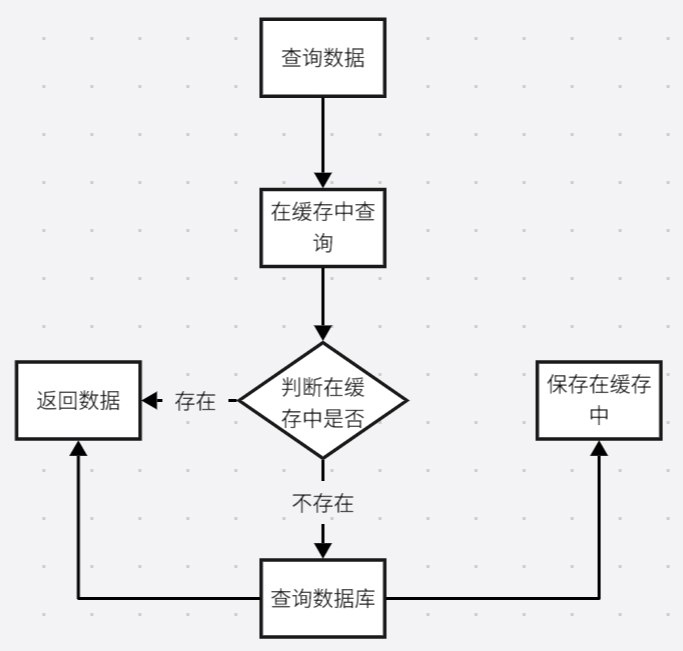
2. 缓存思路
3. 数据同步思路
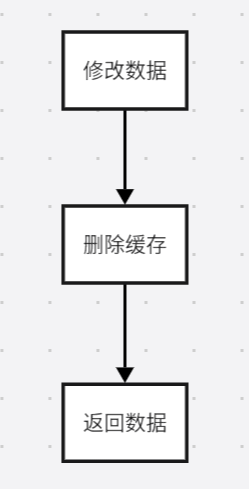
按照以上思路尽可以在项目中添加缓存了,切记修改数据后一定要更新缓存内容。

Agent 垂直技术社区,欢迎活跃、内容共建。
更多推荐


 14
14 0
0- 0


 已为社区贡献3条内容

所有评论(0)