【python3零基础入门】No8.装饰器:面向切面编程在 Python 中的最佳落地方式
·
1. 装饰器的本质
1.1 装饰器是什么
装饰器是一个 接收函数并返回新函数的高阶函数。
核心思想:
不修改原函数代码、不改变调用方式,却能增强功能。
1.2 为什么需要装饰器
- 给函数增加日志
- 统计执行时间
- 权限校验
- 缓存结果
- 参数校验
- AOP(面向切面编程)
2. 最基础的装饰器
def my_decorator(func):
    """
    装饰器函数:
    - 参数 func:被装饰的原函数
    - 返回 wrapper:包装后的新函数
    """
    def wrapper():
        """
        wrapper 是真正被调用的函数:
        - 在这里可以添加额外逻辑
        - 再调用原函数 func()
        """
        print("【装饰器】原函数执行前的逻辑")

        # 调用原函数
        func()

        print("【装饰器】原函数执行后的逻辑")

    # 返回包装后的函数
    return wrapper


@my_decorator  # 等价于:say_hello = my_decorator(say_hello)
def say_hello():
    """原始函数:打印一句话"""
    print("Hello!")


say_hello()
执行流程
- Python 看到
@my_decorator - 自动执行:
say_hello = my_decorator(say_hello) - 调用
say_hello()实际执行的是wrapper()
输出
【装饰器】原函数执行前的逻辑
Hello!
【装饰器】原函数执行后的逻辑
3. 装饰器处理参数(*args, **kwargs)
参数传递方式:
def my_decorator(func):
    """
    装饰器:能处理任意参数的函数
    """
    def wrapper(*args, **kwargs):
        """
        wrapper:
        - *args:位置参数
        - **kwargs:关键字参数
        """
        print("【装饰器】调用前")

        # 调用原函数,并接收返回值
        result = func(*args, **kwargs)

        print("【装饰器】调用后")

        # 返回原函数的返回值
        return result

    return wrapper


@my_decorator
def greet(name, age):
    """带参数的函数"""
    print(f"Hello, {name}. You are {age} years old.")


greet("wubinbin", 20)
4. 装饰器本身带参数(装饰器工厂)
def repeat(num_times):
    """
    装饰器工厂:
    - num_times:指定原函数需要执行多少次
    - 返回真正的装饰器 decorator
    """
    def decorator(func):
        """
        真正的装饰器:
        - 参数 func:被装饰的函数
        """
        def wrapper(*args, **kwargs):
            """
            wrapper:
            - 执行 func 多次
            """
            for i in range(num_times):
                print(f"第 {i+1} 次执行 {func.__name__}()")
                func(*args, **kwargs)
        return wrapper

    return decorator


@repeat(3)  # say_hello = repeat(3)(say_hello)
def say_hello():
    print("Hello!")


say_hello()
5. 类装饰器
-
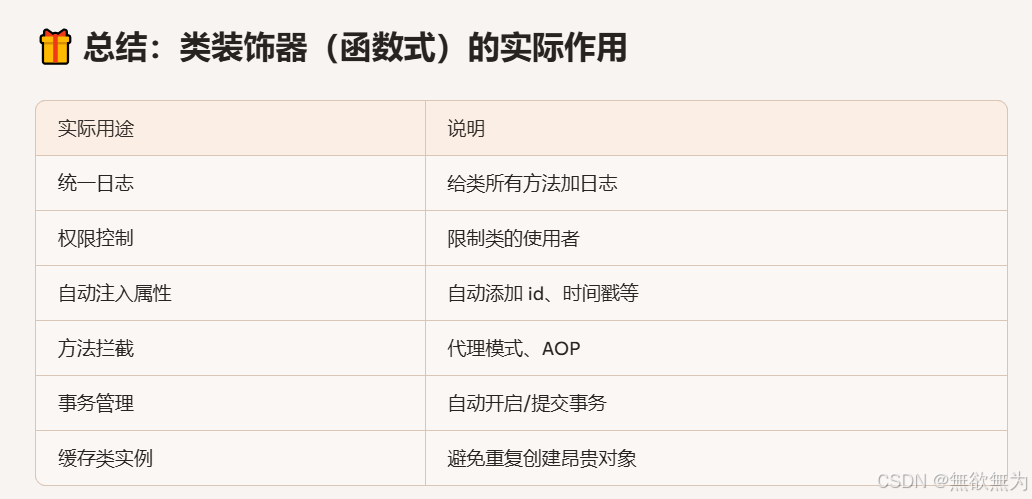
类装饰器(函数式)本质上是:
接收一个类 → 返回一个增强后的新类
-
它的核心能力是:
在不修改原类代码的前提下,为类添加功能、拦截行为、统一管理逻辑。
这在真实项目中非常有用,尤其是当你不能修改原类(第三方库、老代码)时。
-
实际用途:
-
后端服务统一日志
-
调试复杂类
-
监控方法调用频率
-
例如:给类的所有方法统一加日志(AOP 思想)
例如你有一个业务类:
class Service:
    def create(self):
        print("creating...")

    def delete(self):
        print("deleting...")
你想给所有方法加日志,但又不想一个个改。
用类装饰器:
def log_class(cls):
    class Wrapper:
        def __init__(self, *args, **kwargs):
            self.obj = cls(*args, **kwargs)

        def __getattr__(self, name):
            attr = getattr(self.obj, name)
            if callable(attr):
                def wrapper(*args, **kwargs):
                    print(f"[LOG] 调用方法:{name}")
                    return attr(*args, **kwargs)
                return wrapper
            return attr
    return Wrapper

@log_class
class Service:
    def create(self):
        print("creating...")

    def delete(self):
        print("deleting...")
7. 内置装饰器(
常见的内置装饰器:
@staticmethod@classmethod@property
示例:
class User:
    """
    演示 Python 内置装饰器:
    - @staticmethod
    - @classmethod
    - @property
    """

    count = 0  # 类属性

    @staticmethod
    def help():
        """
        静态方法:
        - 不需要实例
        - 不需要访问类属性
        """
        print("This is help info")

    @classmethod
    def create(cls):
        """
        类方法:
        - 第一个参数是 cls(类本身)
        - 可以访问类属性
        """
        cls.count += 1
        return cls()

    def __init__(self):
        self._name = None

    @property
    def name(self):
        """
        将方法变为属性:
        - obj.name 自动调用此方法
        """
        return self._name

    @name.setter
    def name(self, value):
        """
        属性 setter:
        - obj.name = value 自动调用此方法
        """
        print("setting name")
        self._name = value


u = User.create()
u.name = "wubinbin"
print(u.name)
7. 多个装饰器叠加(执行顺序)
执行顺序:从下往上执行
@decorator1
@decorator2
def func():
    pass
先2后1,等价于:
func = decorator1(decorator2(func))
8. 实战示例合集(可直接运行)
8.1 记录执行时间
import time
from functools import wraps

def timer(func):
    @wraps(func)
    def wrapper(*args, **kwargs):
        start = time.time()
        result = func(*args, **kwargs)
        print(f"{func.__name__} took {time.time() - start:.4f}s")
        return result
    return wrapper

@timer
def slow():
    time.sleep(1)

slow()
8.2 权限校验
def require_admin(func):
    @wraps(func)
    def wrapper(user, *args, **kwargs):
        if not user.get("is_admin"):
            raise PermissionError("Not allowed")
        return func(user, *args, **kwargs)
    return wrapper

@require_admin
def delete_user(user, uid):
    print(f"delete {uid}")
8.3 缓存(简单版)
def cache(func):
    memo = {}
    @wraps(func)
    def wrapper(*args):
        if args not in memo:
            memo[args] = func(*args)
        return memo[args]
    return wrapper

@cache
def add(a, b):
    print("calculating...")
    return a + b

print(add(1, 2))
print(add(1, 2))  # 不会再次计算
9. 装饰器使用中的常见问题汇总
9.1 忘记 wraps
导致函数名变成 wrapper
→ 使用 @wraps(func)
9.2 装饰器顺序错误
多个装饰器叠加时要注意执行顺序
9.3 装饰器返回值丢失
wrapper 必须 return 原函数结果
9.4 装饰器内部异常吞掉
要注意 try/except 的使用

Agent 垂直技术社区,欢迎活跃、内容共建。
更多推荐

 11
11 0
0- 0


 已为社区贡献1条内容

所有评论(0)