PyTorch详解知识点讲解
PyTorch详解知识点讲解
知识导图
PyTorch详解
├── PyTorch基础
│   ├── 框架的概念与安装
│   └── 发展历史
├── 张量基础
│   ├── 张量的核心概念
│   └── 张量的创建方法
├── 张量转换
│   ├── 元素类型转换
│   └── 与NumPy/标量的互转
├── 张量运算
│   ├── 数值计算
│   ├── 运算函数
│   └── 索引操作
└── 形状与拼接
    ├── 形状操作
    └── 张量拼接
核心名词解释
-
PyTorch:Meta 推出的深度学习框架,基于 Python,支持动态图,GPU 加速,是学术界的主流框架,用于构建、训练和部署深度学习模型。
-
张量 (Tensor):PyTorch 的核心数据结构,是同类型元素的多维矩阵,支持 GPU 加速,是深度学习的基础数据载体。
-
CUDA:NVIDIA 的并行计算平台,PyTorch 通过它实现张量的 GPU 加速,让深度学习模型可以高效运行。
-
自动求导:PyTorch 的核心能力,自动对张量的运算进行求导,用来训练神经网络。
-
torch.tensor:根据指定的数据创建张量的方法,可以指定数据类型。
-
torch.Tensor:根据形状创建张量的基础类,也可以用来创建指定数据的张量。
-
reshape:修改张量形状的方法,在不改变数据的前提下调整维度。
-
squeeze/unsqueeze:用来删除或添加长度为 1 的维度,实现维度的增减。
-
torch.cat:张量拼接方法,在已有维度上拼接,不增加维度数。
-
torch.stack:张量拼接方法,在新的维度上拼接,会增加维度数。
一、PyTorch 基础认知
本章节学习目标:
了解 PyTorch 的基本概念
掌握 PyTorch 的安装方法
1.1 什么是 PyTorch
PyTorch 一个基于 Python 语言的深度学习框架,它将数据封装成张量(Tensor)来进行处理。
PyTorch 提供了灵活且高效的工具,用于构建、训练和部署机器学习和深度学习模型。
PyTorch 广泛应用于学术研究和工业界,特别是在计算机视觉、自然语言处理、强化学习等领域。
PyTorch 的安装命令:
pip install torch -i https://pypi.tuna.tsinghua.edu.cn/simple

1.2 PyTorch 的发展历史
-
2016 年:Facebook 正式发布了 PyTorch 的第一个版本
-
2018 年:PyTorch 发布了 1.0 版本,标志着其正式进入生产级应用阶段

二、张量的基础
本章节学习目标:
掌握张量创建方法
知道线性和随机张量的创建方法
知道 0-1 张量的创建方法
知道张量元素类型的转换方法
2.1 什么是张量
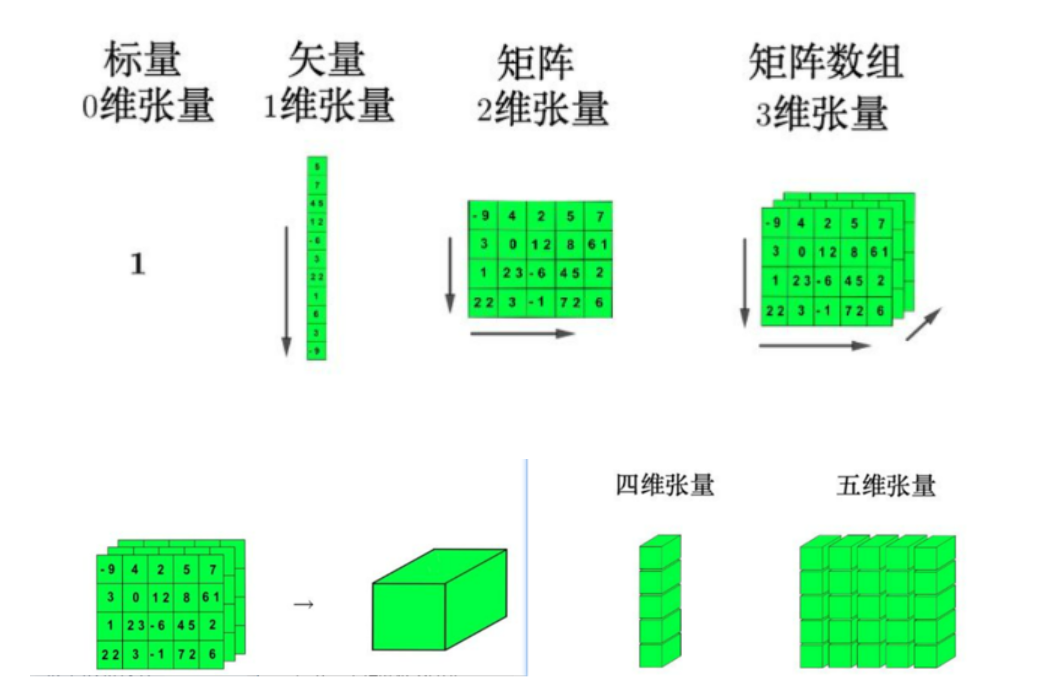
PyTorch 中的张量就是元素为同一种数据类型的多维矩阵。在 PyTorch 中,张量以 "类" 的形式封装起来,对张量的一些运算、处理的方法被封装在类中。
PyTorch 张量与 NumPy 数组类似,但 PyTorch 的张量具有 GPU 加速的能力(通过 CUDA),这使得深度学习模型能够高效地在 GPU 上运行。
PyTorch 提供了对张量的强大支持,可以进行高效的数值计算、矩阵操作、自动求导等。
张量是 PyTorch 中的核心数据抽象,PyTorch 支持各种张量子类型。通常地,一维张量称为向量 / 矢量(vector),二维张量称为矩阵(matrix)。
2.2 张量的创建方式
基础创建
-
torch\.tensor:根据指定数据创建张量 -
torch\.Tensor:根据形状创建张量,其也可用来创建指定数据的张量 -
torch\.IntTensor、torch\.FloatTensor、torch\.DoubleTensor:创建指定类型的张量
线性和随机张量
-
torch\.arange\(\)和torch\.linspace\(\):创建线性张量 -
torch\.random\.initial\_seed\(\)和torch\.random\.manual\_seed\(\):随机种子设置 -
torch\.rand/randn\(\):创建随机浮点类型张量 -
torch\.randint\(low, high, size=\(\)\):创建随机整数类型张量
0、1、指定值张量
-
torch\.ones和torch\.ones\_like:创建全 1 张量 -
torch\.zeros和torch\.zeros\_like:创建全 0 张量 -
torch\.full和torch\.full\_like:创建全为指定值张量
*# 张量创建的多种方式*
import torch
*# TODO 1.基础方式*
t1 = torch.tensor(data=[1,2,3])
print(t1,type(t1),t1.dtype,t1.shape,t1.ndim,t1.size())
*# 具体数值内容,对象类型,数据类型,形状,维度数量,t1.shape=t1.size()*
print('---------------')
t2 = torch.tensor(data=[[1,2],[3,4]])
print(t2,type(t2),t2.dtype,t2.shape,t2.ndim,t2.size())
print('================')
t3 = torch.Tensor(data=[1,2,3])
print(t3 ,type(t1),t3 .dtype,t3 .shape,t3 .ndim,t3 .size())
"""
torch.tensor会自动根据你输入的数据推导类型,非常符合直觉:***
而torch.Tensor不管你输入什么,强制把所有数据转成float32,哪怕你输入的是整数,也会莫名其妙给你转成浮点数:
"""
print('#####################')

*# TODO 2 线性方式*
t4 = torch.arange(start=1,end=10,step=2)
print(t4,type(t4),t4.dtype,t4.shape,t4.ndim,t4.size())
*# tensor([1, 3, 5, 7, 9]) <class 'torch.Tensor'> torch.int64 torch.Size([5]) 1 torch.Size([5])*
t5 = torch.linspace(start=1,end=10,steps=2) *# todo 它的默认类型:不管你输入的是不是整数,它默认生成float32类型的张量*
print(t5,type(t5),t5.dtype,t5.shape,t5.ndim,t5.size())
*# tensor([ 1., 10.]) <class 'torch.Tensor'> torch.float32 torch.Size([2]) 1 torch.Size([2])*
print('***********')
*# TODO 3 随机张量*
t6 = torch.rand(4) *# 区间0-1*
print(t6)
*# tensor([0.3685, 0.0547, 0.6088, 0.4374])*
print('---------')
t7 = torch.randn(size=(2,3)) *# 正态分布有正负值分布*
print(t7)
*# tensor([[-0.4392,  0.3773,  0.6372],*
*#         [ 0.7758,  0.5383,  1.7198]])*
print('---------')
t8 = torch.randint(low=1,high=10,size=(4,5)) *# low:随机数的最小值(包含,也就是随机数可以等于它)# :随机数的最大值(不包含,也就是随机数必须小于它)*
print(t8)
*# tensor([[5, 3, 5, 4, 6],*
*#         [2, 8, 2, 9, 8],*
*#         [5, 7, 9, 5, 5],*
*#         [4, 4, 7, 8, 4]])*
*# TODO 4 指定值张量*
t9 = torch.zeros(size=(2,3))
print(t9)
*# tensor([[0., 0., 0.],*
*#         [0., 0., 0.]])*
print('---------')
t10 = torch.ones(size=(3,2))
print(t10)
*# tensor([[1., 1.],*
*#         [1., 1.],*
*#         [1., 1.]])*
print('---------')
t11 = torch.zeros_like(t10)
print(t11)
*# tensor([[0., 0.],*
*#         [0., 0.],*
*#         [0., 0.]])*
print('---------')
t12 = torch.ones_like(t9)
print(t12)
*# tensor([[1., 1., 1.],*
*#         [1., 1., 1.]])*
print('---------')
t13 = torch.full(size=(2,3),fill_value=2)
print(t13)
*# tensor([[2, 2, 2],*
*#         [2, 2, 2]])*
print('---------')
t14 = torch.full_like(t13,fill_value=3)
print(t14)
*# tensor([[3, 3, 3],*
*#         [3, 3, 3]])*
2.3 张量元素类型转换
可以通过以下方法转换张量的元素类型:
-
data\.short\(\)/int\(\)/long\(\)/half\(\)/float\(\)/double\(\) -
data\.type\(torch\.short/int/long/half/float/double\)
import torch
*# 创建张量*
t = torch.zeros(size=(2,3))
print(t.dtype)
print('===============')
*# torch.float32*
*# 元素类型转换*
*# TODO 方式1 :类型函数 指定类型*
t1 = t.byte() *# 这里的byte 是一个函数*
print(t1.dtype)
print('###########')
*# torch.uint8*
print(t.byte().dtype)
*# torch.uint8*
print(t.short().dtype)
*# torch.int16*
print(t.int().dtype)
*# torch.*
print(t.long().dtype)
print('-------')
*#torch.int64*
print(t.half().dtype)
*#torch.float16*
print(t.float().dtype)
*# torch.float32*
print(t.double().dtype)
*#torch.float64*
print('-------------------')
*# TODO 2 type 指定类型*
print(t.type(torch.int8).dtype)
*# torch.int8*
print(t.type(torch.float16).dtype)
*# torch.float16*
print('$$$')
print(t.type(torch.short).dtype)
*#  torch.int16*
print('--------------------')
*# TODO 3 to 指定类型*
print(t.to(torch.int8).dtype)
*# torch.int8*
三、张量的类型转换
本章节学习目标:
掌握张量转换为 Numpy 数组的方法
掌握 Numpy 数组转换为张量的方法
掌握标量张量和数字转换方法
3.1 张量和 NumPy 互转
-
张量转换为 numpy 数组
-
data\_tensor\.numpy\(\):共享内存 -
data\_tensor\.numpy\(\)\.copy\(\):不共享内存
-
-
numpy 转换为张量
-
torch\.from\_numpy\(data\_numpy\):共享内存 -
torch\.tensor\(data\_numpy\):不共享内存
*# TODO 张量和numpy数组的互转* import numpy import numpy as np import torch *# todo 1 numpy 转换为张量* *# 创建numpy数组* my_numpy = np.array(([1,2,3])) print(my_numpy,type(my_numpy)) *# [1 2 3] <class 'numpy.ndarray'>* *# todo torch.from_numpy():将numpy数组装换为张量,会共享内存* t1 =torch.from_numpy(my_numpy) print(t1,type(t1)) *# todo *******不合适*********** my_numpy[0]=100 print(my_numpy,t1) *# [100 2 3] tensor([100, 2, 3])* *# tensor([1, 2, 3]) <class 'torch.Tensor'>* *# todo torch.tenser():将numpy数组装换为张量,不会共享内存* t2 =torch.tensor(my_numpy) print(t2,type(t2)) *# tensor([100, 2, 3]) <class 'torch.Tensor'>* my_numpy[1]=200 print(my_numpy,t2) *# [100 200 3] tensor([100, 2, 3])* print('-----------------') *# todo 2 张量转换为numpy* *# 创建张量组* my_tensor = torch.tensor([1,2,3]) print(my_tensor,type(my_tensor)) *# tensor([1, 2, 3]) <class 'torch.Tensor'>* *# todo numpy():将张量转换为numpy数组,会共享内存* n1 = my_tensor.numpy() print(n1,type(n1)) *# [1 2 3] <class 'numpy.ndarray'>* my_tensor[0] = 100 print(my_tensor, n1) *# tensor([100, 2, 3]) [100 2 3]* print('---------------------') *# todo numpy().copy():将张量装换位numpy数组,不会共享* n2=my_tensor.numpy().copy() print(n2,type(n2)) *# [100 2 3] <class 'numpy.ndarray'>* my_tensor[1] = 200 print(my_tensor, n2) *# tensor([100, 200, 3]) [100 2 3]* -
3.2 张量和标量互转
-
torch\.tensor\(标量\):将数字转换为标量张量 -
tensor\.item\(\):将标量张量转换为 Python 数字
import torch
*# todo 1.标量转张量*
*# 创建一个标量*
a=10
print(a,type(a))
*# 10 <class 'int'>*
t1 = torch.tensor(a)
print(t1,type(t1))
*# tensor(10) <class 'torch.Tensor'>*
print('------------')
*# todo 2 张量转标量*
t2 = torch.tensor(10)
print(t2,type(t2),t2.ndim)
*# tensor(10) <class 'torch.Tensor'> 0*
a2 = t2.item()  *# todo .item():标量张量转普通 Python 数字*
print(a2,type(a2))
*# 10 <class 'int'>*
print('----')
t3 =torch.tensor([10])
print(t3,type(t3),t3.ndim)
*# tensor([10]) <class 'torch.Tensor'> 1*
a3 = t3.item()
print(a3,type(a3))
*# 10 <class 'int'>*
print('##')
t4 = torch.tensor([[10]])
print(t4,type(t4),t4.ndim)
*# tensor([[10]]) <class 'torch.Tensor'> 2*
a4 = t4.item()
print(a4,type(a4))
*# 10 <class 'int'>*
print('===========')
t5 = torch.tensor([10,20,30,40])
print(t5, type(t5), t5.ndim)
*# tensor([10, 20, 30, 40]) <class 'torch.Tensor'> 1*
*# 2. 链式调用:先求均值,再把结果转成普通Python数字*
a5 = t5.mean().item() *# 这个函数的作用是对张量的元素做平均值计算:默认会把张量里所有元素加总,再除以元素的个数,得到整体的平均值*
print(a5, type(a5))
*# 这行的输出:*
*# 25.0 <class 'float'>*
"""
torch.tensor(5):标量张量,0 维,shape=[],ndim=0
torch.tensor([5]):单个元素的一维张量,1 维,shape=[1],ndim=1
这两个是不一样的哦~
"""
四、张量的数值计算
本章节学习目标:
掌握张量基本运算
掌握张量矩阵乘法运算
4.1 基本运算
- 基础运算
可以直接使用运算符:\+\-\*/
也可以使用对应的函数:add、sub、mul、div、neg
带下划线的版本是原地操作:add\_、sub\_、mul\_、div\_、neg\_
import torch
t1 = torch.tensor( data=[1, 2, 3], dtype=torch.float32 )
print(t1, t1.dtype)
*# 输出:tensor([1., 2., 3.]) torch.float32*
print('-逐元素运算--')
print(t1 + 2) *# 每个元素都加2 → tensor([3., 4., 5.])*
print(t1 - 2) *# 每个元素都减2 → tensor([-1.,  0.,  1.])*
print(t1 * 2) *# 每个元素都乘2 → tensor([2., 4., 6.])*
print(t1 / 2) *# 每个元素都除2 → tensor([0.5, 1.0, 1.5])*
print('==函数式的运算写法==') *# todo 这些函数也不会修改原张量,返回的是新张量。*
print(torch.add(t1, 2)) *# 和 t1+2 完全一样 → tensor([3.,4.,5.])*
print(torch.sub(t1, 2)) *# 和 t1-2 完全一样 → tensor([-1.,0.,1.])*
print(torch.mul(t1, 2)) *# 和 t1*2 完全一样 → tensor([2.,4.,6.])*
print(torch.div(t1, 2)) *# 和 t1/2 完全一样 → tensor([0.5,1.,1.5])*
print('-------核心!原位运算(in-place operation)-----------')
*# todo PyTorch 的统一规则:所有带下划线的方法,都是原位操作,会直接修改原张量的数据;不带下划线的,都是返回新张量,原张量不变*
*# 原来的t1是 [1.,2.,3.]*
t1.add_(2)
*# 这行是原位加2:直接把t1自己的每个元素加2,原张量被直接修改了!*
print(t1) *# 输出:tensor([3., 4., 5.]),原t1已经变了!*

*# 现在t1变成了[3.,4.,5.],再做原位减2*
t1.sub_(2)
print(t1) *# 输出:tensor([1., 2., 3.]),原t1又被改回原来的数了*

t1.mul_(2)
print(t1) *# 输出:tensor([2., 4., 6.]),原张量再被修改*

t1.div_(2) *#todo 注意这里强制要求int不能做除法:*
"""# 原位除法div_是直接修改原张量的数据,它不能修改原张量的类型
—— 原张量是 int,就只能存 int,不能存 float,所以普通的浮点除法会把整数变成浮点数,原位操作做不到,就会报错:
"""
print(t1) *# 输出:tensor([1., 2., 3.]),原张量又改回去了*
-
矩阵乘法
-
@:矩阵乘法运算符 -
matmul:矩阵乘法函数
*#TODO 演示通用方式:@ 和.matmul()* import torch *# 创建张量* t1 = torch.tensor([[1,2],[3,4],[5,6]]) t2 = torch.tensor([[2,1],[1,3],[3,4]]) print(t1.shape,t2.shape) *# torch.Size([3, 2]) torch.Size([3, 2])* *# 矩阵乘法* result = t1.T@t2 print(result) *# tensor([[20, 30],* *# [26, 38]])* result=torch.matmul(t1.T,t2) print(result) *# tensor([[20, 30],* *# [26, 38]])* print('-------------------') print(t1 @ t2.T) *# tensor([[ 4, 7, 11],* *# [10, 15, 25],* *# [16, 23, 39]])* print(torch.matmul(t1, t2.T)) *# tensor([[ 4, 7, 11],* *# [10, 15, 25],* *# [16, 23, 39]])* -
五、张量的运算函数
本章节学习目标:
- 掌握张量相关的运算函数
PyTorch 为每个张量封装很多实用的计算函数,包括:
-
均值
-
平方根
-
求和
-
指数计算
-
对数计算
等等
常用的运算函数有:sum、mean、sqrt、pow、exp、log等。
*# 常见的运算函数*
import math
import torch
print('---------原生math库的函数--------------')
*# Python 原生math库的函数 : 它只会处理普通的单个数字*
print(math.e)    *# 自然常数e,约2.71828*
print(math.pi)   *# 圆周率π,约3.14159*
print(math.sqrt(4)) *# 开根号,得到2.0*
print(math.log(4))  *# 自然对数ln(4) =1.3862943611198906*
*# ...其他的对数、指数、三角函数都是同理*
print('-----------PyTorch 的运算函数------------')
*#TODO  PyTorch 的运算函数:和 math 的函数功能一模一样,但是可以处理张量,而且支持批量运算、GPU 加速、自动求导:*
t1 = torch.tensor(4)
print(torch.sqrt(t1)) *# 开根号,和math.sqrt一样,但是可以作用在张量上 # tensor(2.)*
print(torch.log(t1))  *# 自然对数 # tensor(1.3863)*
*# ...其他的对数、指数、三角函数都是同理*
*#TODO 比如你有一个大的张量,你可以一次性对所有元素做运算,不用循环:*
t = torch.tensor([1,2,3,4])
print(torch.sqrt(t)) *# 一次性对所有元素开根号:tensor([1., 1.4142, 1.7321, 2.])*
*# *** 这就是为什么深度学习里都用 PyTorch 的函数,而不是 math 的,它能批量处理张量。*
print('-----------聚合函数的dim参数------------')
t2 = torch.tensor([[[1, 2], [3, 4]],[[2, 1], [1, 3]]])
print(t2) *# t2是个 3 维张量,shape 是[2,2,2],相当于两个 2x2 的小矩阵:*
*# tensor([[[1, 2],*
*#          [3, 4]],*
*#*
*#         [[2, 1],*
*#          [1, 3]]])*
print(t2.shape) *# torch.Size([2, 2, 2])*
print(torch.sum(t2))
*# 所有元素加总:1+2+3+4+2+1+1+3=17,得到标量*

print(torch.sum(t2, dim=0))
*# 压缩第0维:把两个小矩阵加起来,结果:*
*# tensor([[3, 3],*
*#         [4, 7]])*

print(torch.sum(t2, dim=1))
*# 压缩第1维:把每个小矩阵的行加起来,结果:*
*# tensor([[4, 6],*
*#         [3, 4]])*

print(torch.sum(t2, dim=2))
*# 压缩第2维:把每个小矩阵的列加起来,结果:*
*# tensor([[3, 7],*
*#         [3, 4]])*
print('-----------------------------------')
t3 = torch.tensor([[1, 2], [3, 4]])
print(t3.shape) *# torch.Size([2, 2])*
"""
(维度0,维度1)
   1   2
   3   4
"""
print(torch.sum(t3))
print(torch.sum(t3, dim=0))  *# 压缩行维度:[1+3, 2+4] = [4,6]*
print(torch.sum(t3, dim=1)) *# 压缩列维度:[1+2, 3+4] = [3,7]*
六、张量的索引操作
本章节学习目标:
掌握简单行列索引的使用
掌握列表索引的使用
掌握范围索引的使用
知道布尔索引的使用
知道多维索引的使用
在操作张量时,经常需要去获取某些元素就进行处理或者修改操作,PyTorch 的索引操作格式为:张量\[行,列\]
行和列的表示形式可以是:
-
单索引
-
列表索引
-
切片(范围)索引
-
布尔索引
*# TODO 张量索引的格式: 张量名[行索引,列索引]*
import torch
*# 创建张量*
*# 提前设置随机种子,确保结果可复现*
torch.manual_seed(6)
t = torch.randint(low=0,high=10,size=(4,4))
print(t)
*# tensor([[0, 1, 3, 2],*
*#         [4, 7, 7, 6],*
*#         [4, 8, 7, 9],*
*#         [5, 5, 7, 2]])*
*# todo 1 单索引*
*# 需求:获取第一行数据*
print(t[0])
print(t[0, :])
*# tensor([0, 1, 3, 2])*
*#获取第一列数据*
print(t[:, 0])
*# tensor([0, 4, 4, 5])*
print('----------------')
*# todo 2 列表索引的方式:连续不连续都可以*
*# 获取第1,3行数据*
print(t[[0, 2],])
print(t[[0, 2],:])
*# tensor([[0, 1, 3, 2],*
*#         [4, 8, 7, 9]])*
*# 获取第1,3列数据*
print(t[:, [0, 2]])
*# tensor([[0, 3],*
*#         [4, 7],*
*#         [4, 7],*
*#         [5, 7]])*
print('----------------')
*# todo 3 切片索引方式:连续索引*
*# 需求:获取第1,2,3行数据*
print(t[0:3, ])
print(t[0:3, :])
*# tensor([[0, 1, 3, 2],*
*#         [4, 7, 7, 6],*
*#         [4, 8, 7, 9]])*
*# 需求:获取第1,2,3列数据*
print(t[:, 0:3])
*# tensor([[0, 1, 3],*
*#         [4, 7, 7],*
*#         [4, 8, 7],*
*#         [5, 5, 7]])*
print('----------------')
*# 思考:当需求没有直接提到需要获取哪几行哪几列的时候,需要条件判断获取布尔索引*
*# todo 4 。布尔索引的方式:条件判断得到布尔索引*
*# 需求获取小于5的数据*
print(t<5) *# 先获取满足小于5的布尔索引*
*# tensor([[ True,  True,  True,  True],*
*#         [ True, False, False, False],*
*#         [ True, False, False, False],*
*#         [False, False, False,  True]])*
print(t[t<5])
*# tensor([0, 1, 3, 2, 4, 4, 2])*
print('------------')
*# 需求:获取第1行数据大于0的数据*
print(t[0])
*#  tensor([0, 1, 3, 2])*
print(t[0]>0)
*#  tensor([False,  True,  True,  True])*
print(t[t[0] > 0])
print(t[0][t[0] > 0]) *# 方式一:获取第一行数据大于0的数据*
*# tensor([1, 3, 2])*
print(t[0, t[0] > 0]) *# 方式二:获取第一行数据大于0的数据*
*# tensor([1, 3, 2])*

# 张量的三维索引
*# 导包*
import torch
*# 设置随机种子*
torch.manual_seed(1)
*# 创建张量*
t = torch.randint(low=1,high=10,size=(3,4,5))
print(t)
*# tensor([[[5, 6, 1, 6, 8],*
*#          [2, 3, 6, 9, 1],*
*#          [3, 4, 2, 9, 5],*
*#          [1, 4, 7, 3, 8]],*
*#*
*#         [[7, 7, 9, 8, 7],*
*#          [1, 8, 9, 9, 5],*
*#          [6, 3, 7, 7, 8],*
*#          [7, 9, 7, 3, 3]],*
*#*
*#         [[7, 6, 6, 6, 1],*
*#          [7, 1, 7, 3, 5],*
*#          [4, 4, 5, 7, 1],*
*#          [8, 6, 9, 4, 4]]])*
print('------------')
*# 张量名[0轴,1轴,2轴]*
*# 需求:获取0轴第一个*
print(t[0, :, :])
print(t[0])
*# tensor([[5, 6, 1, 6, 8],*
*#         [2, 3, 6, 9, 1],*
*#         [3, 4, 2, 9, 5],*
*#         [1, 4, 7, 3, 8]])*
print('-------------------')
*# 需求:获取1轴第一个*
print(t[:, 0, :])
print(t[:, 0])
*# tensor([[5, 6, 1, 6, 8],*
*#         [7, 7, 9, 8, 7],*
*#         [7, 6, 6, 6, 1]])*
print('-------------------')
*# 需求:获取2轴第一个*
print(t[:, :, 0])
*# tensor([[5, 2, 3, 1],*
*#         [7, 1, 6, 7],*
*#         [7, 7, 4, 8]])*
七、张量的形状操作
本章节学习目标:
- 掌握
reshape\(\)、squeze\(\)、unsqueeze\(\)、transpose\(\)、permute\(\)等函数使用
形状操作函数对比
| 函数 | 作用 | 特点 |
|---|---|---|
| reshape() | 修改张量的维度 | 不改变数据,调整形状,支持非连续张量 |
| squeeze() | 删除长度为 1 的维度 | 降维,自动去掉长度为 1 的维度 |
| unsqueeze() | 添加长度为 1 的维度 | 升维,手动指定要添加的维度 |
| transpose() | 交换两个维度 | 交换指定的两个维度的顺序 |
| permute() | 重新排列所有维度 | 可以一次性调整所有维度的顺序 |
| view() | 修改张量的形状 | 只支持连续的张量,非连续需要配合 contiguous () |
各个函数的详细介绍:
-
reshape:函数可以在保证张量数据不变的前提下改变数据的维度,将其转换成指定的形状。
-
squeeze 和 unsqueeze:squeeze 删除长度为 1 的维度,unsqueeze 添加长度为 1 的维度,用来调整维度。
-
transpose 和 permute:transpose 交换两个维度,permute 可以一次性调整所有维度的顺序。
-
view 和 contiguous:view 也可以修改形状,但只支持连续的张量,非连续的需要先调用 contiguous () 让内存连续。
*# 导包*
import torch
*# TODO 1.shape 和reshape*
*# 创建张量*
torch.manual_seed(6)
t = torch.randint(low=1,high=10,size=(12,))
*# shape*
print(t,t.shape)
print('---------------')
*# tensor([9, 7, 7, 3, 8, 1, 3, 4, 2, 1, 6, 8]) torch.Size([12])*
t1 = t.reshape(3,4)
print(t1,t1.shape,t1.ndim)
*#  tensor([[9, 7, 7, 3],*
*#         [8, 1, 3, 4],*
*#         [2, 1, 6, 8]]) torch.Size([3, 4]) 2*
print('--------------------')
t2 = t.reshape(1,1,12)
print(t2,t2.shape,t2.ndim)
*#  tensor([[[9, 7, 7, 3, 8, 1, 3, 4, 2, 1, 6, 8]]]) torch.Size([1, 1, 12]) 3*
print('--------------------')
t3 = t.reshape(12,1,1)
*# tensor([[[9]],*
*#*
*#         [[7]],*
*#*
*#         [[7]],*
*#*
*#         [[3]],*
*#*
*#         [[8]],*
*#*
*#         [[1]],*
*#*
*#         [[3]],*
*#*
*#         [[4]],*
*#*
*#         [[2]],*
*#*
*#         [[1]],*
*#*
*#         [[6]],*
*#*
*#         [[8]]]) torch.Size([12, 1, 1]) 3*
print(t3,t3.shape,t3.ndim)
print('----------------------------')
*# todo 2 squeeze :删除维度值为1 的维度,长度大于 1 的维度它碰都不会碰*
new_t1 = t1.squeeze()
print(new_t1,new_t1.shape,new_t1.ndim)
*# tensor([[9, 7, 7, 3],*
*#         [8, 1, 3, 4],*
*#         [2, 1, 6, 8]]) torch.Size([3, 4]) 2*
print('##############################')
new_t2 = t2.squeeze()
print(new_t2,new_t2.shape,new_t2.ndim)
*# tensor([9, 7, 7, 3, 8, 1, 3, 4, 2, 1, 6, 8]) torch.Size([12]) 1 <- tensor([[[9, 7, 7, 3, 8, 1, 3, 4, 2, 1, 6, 8]]]) torch.Size([1, 1, 12]) 3*
print('##############################')
new_t3 = t3.squeeze()
print(new_t3,new_t3.shape,new_t3.ndim)
*# tensor([9, 7, 7, 3, 8, 1, 3, 4, 2, 1, 6, 8]) torch.Size([12]) 1*
print('##############################')
new_t4 = t3.squeeze(dim=1)
print(new_t4,new_t4.shape,new_t4.ndim)
*# tensor([[9],*
*#         [7],*
*#         [7],*
*#         [3],*
*#         [8],*
*#         [1],*
*#         [3],*
*#         [4],*
*#         [2],*
*#         [1],*
*#         [6],*
*#         [8]]) torch.Size([12, 1]) 2*
print('##############################')
*# todo unsqueeze,它是反过来的:给你的张量加一个长度为 1 的空维度*
t_un = t.unsqueeze(dim=0)
print(t_un,t_un.shape,t_un.ndim) *# torch.Size([1,2,3]),加了个空盒子*
*# tensor([[9, 7, 7, 3, 8, 1, 3, 4, 2, 1, 6, 8]]) torch.Size([1, 12]) 2*
*# 导包*
import torch
*# TODO 1.shape 和reshape*
*# 创建张量*
torch.manual_seed(6)
t = torch.randint(low=1,high=10,size=(12,))
print(t,t.shape)
print('---------------')
*# tensor([9, 7, 7, 3, 8, 1, 3, 4, 2, 1, 6, 8]) torch.Size([12])*
t1 = t.view(3,4)
print(t1,t1.shape,t1.ndim)
*#  tensor([[9, 7, 7, 3],*
*#         [8, 1, 3, 4],*
*#         [2, 1, 6, 8]]) torch.Size([3, 4]) 2*
print('--------------------')
t2 = t.view(1,1,12)
print(t2,t2.shape,t2.ndim)
*#  tensor([[[9, 7, 7, 3, 8, 1, 3, 4, 2, 1, 6, 8]]]) torch.Size([1, 1, 12]) 3*
print('--------------------')
t3 = t.view(12,1,1)
print(t3,t3.shape,t3.ndim)
*# tensor([[[9]],*
*#*
*#         [[7]],*
*#*
*#         [[7]],*
*#*
*#         [[3]],*
*#*
*#         [[8]],*
*#*
*#         [[1]],*
*#*
*#         [[3]],*
*#*
*#         [[4]],*
*#*
*#         [[2]],*
*#*
*#         [[1]],*
*#*
*#         [[6]],*
*#*
*#         [[8]]]) torch.Size([12, 1, 1]) 3*
print('----------------------------')
*# TODO is_contiguous:判断是否是连续张量*
print(t,t.shape,t.ndim)
*# tensor([9, 7, 7, 3, 8, 1, 3, 4, 2, 1, 6, 8]) torch.Size([12]) 1*
print(t.is_contiguous())
*# True*
print(t3.is_contiguous())
*# True*
print('=============================')
*# 创建新的张量*
torch.manual_seed(6)
t = torch.randint(low = 1,high=10,size=(2,3,4))
print(t.shape,t.is_contiguous(),t)
*# torch.Size([2, 3, 4]) True tensor([[[9, 7, 7, 3],*
*#          [8, 1, 3, 4],*
*#          [2, 1, 6, 8]],*
*#*
*#         [[8, 6, 8, 6],*
*#          [4, 3, 2, 5],*
*#          [7, 4, 6, 9]]])*
print('***************')
*# TODO transpose():一次交换2个*
t1 = t.transpose(dim0=1,dim1=0).transpose(dim0=1,dim1=2)
print(t1.shape,t1.is_contiguous(),t1)
*# torch.Size([3, 4, 2]) False tensor([[[9, 8],*
*#          [7, 6],*
*#          [7, 8],*
*#          [3, 6]],*
*#*
*#         [[8, 4],*
*#          [1, 3],*
*#          [3, 2],*
*#          [4, 5]],*
*#*
*#         [[2, 7],*
*#          [1, 4],*
*#          [6, 6],*
*#          [8, 9]]])*
print('===================================')
*# TODO permute():一次交换多少*
t2 = t.permute(dims=(1,2,0))
print(t2.shape,t2.is_contiguous(),t2)
*# torch.Size([3, 4, 2]) False tensor([[[9, 8],*
*#          [7, 6],*
*#          [7, 8],*
*#          [3, 6]],*
*#*
*#         [[8, 4],*
*#          [1, 3],*
*#          [3, 2],*
*#          [4, 5]],*
*#*
*#         [[2, 7],*
*#          [1, 4],*
*#          [6, 6],*
*#          [8, 9]]])*
print('========================')
print(t2.reshape(3,8)) *# 成功*
*# print(t2.view(3,8)) # 不成功,因为t2已经不连续了*
print('========================')
*# TODO 如何把不连续等张量变成连续张量*
new_t2 = t2.contiguous()
print(new_t2.shape,new_t2.is_contiguous(),new_t2)
*# torch.Size([3, 4, 2]) True tensor([[[9, 8],*
*#          [7, 6],*
*#          [7, 8],*
*#          [3, 6]],*
*#*
*#         [[8, 4],*
*#          [1, 3],*
*#          [3, 2],*
*#          [4, 5]],*
*#*
*#         [[2, 7],*
*#          [1, 4],*
*#          [6, 6],*
*#          [8, 9]]])*
八、张量的拼接操作
本章节学习目标:
掌握
torch\.cat\(\)使用掌握
torch\.stack\(\)使用
拼接函数对比
| 函数 | 作用 | 特点 |
|---|---|---|
| torch.cat() | 在已有维度上拼接 | 不增加维度数,输入张量的其他维度必须相同 |
| torch.stack() | 在新维度上拼接 | 会增加一个新的维度,输入张量的形状必须完全相同 |
各函数的详细介绍
-
torch.cat()
函数可以将多个张量根据指定的维度拼接起来,不改变维度数。
示例代码:import torch data1 = torch.randint(0, 10, [1, 2, 3]) data2 = torch.randint(0, 10, [1, 2, 3]) # 按0维度拼接 new_data = torch.cat([data1, data2], dim=0) -
torch.stack()
函数会在一个新的维度上连接一系列张量,这会增加一个新维度,并且所有输入张量的形状必须完全相同。
示例代码:import torch data1 = torch.randint(0, 10, [2, 3]) data2 = torch.randint(0, 10, [2, 3]) # 在0维度上拼接 new_data = torch.stack([data1, data2], dim=0)
*# TODO cat():拼接两个张量,维度数不变*
import torch
torch.manual_seed(6)
t1 = torch.randint(low=1,high=5,size=(3,4))
t2 = torch.randint(low=1,high=5,size=(3,4))
t3 = torch.randint(low=1,high=5,size=(2,5))
print(t1)
*# tensor([[3, 2, 4, 1],*
*#         [3, 2, 4, 3],*
*#         [1, 3, 2, 2]])*
print(t2)
*# tensor([[4, 2, 2, 3],*
*#         [4, 2, 1, 3],*
*#         [1, 2, 1, 3]])*
*# todo 拼接*
cat_t2 = torch.cat([t1,t2]) *# 默认拼接最外层*
print(cat_t2,cat_t2.shape,cat_t2.ndim)
*# tensor([[3, 2, 4, 1],*
*#         [3, 2, 4, 3],*
*#         [1, 3, 2, 2],*
*#         [4, 2, 2, 3],*
*#         [4, 2, 1, 3],*
*#         [1, 2, 1, 3]]) torch.Size([6, 4]) 2*
print('------------------')
cat_t3 = torch.cat([t1,t2],dim=1) *# 默认拼接最外层*
print(cat_t3,cat_t3.shape,cat_t3.ndim)
*# tensor([[3, 2, 4, 1, 4, 2, 2, 3],*
*#         [3, 2, 4, 3, 4, 2, 1, 3],*
*#         [1, 3, 2, 2, 1, 2, 1, 3]]) torch.Size([3, 8]) 2*
print('------------------')
*# todo 注意cat():除了拼接的维度,其他维度必须一致*
*# cat_t4 =torch.cat([t1,t3])*
*# print(cat_t4,cat_t4.shape,cat_t4.ndim)  # 不成功*
*# todo stack():拼接两个张量,维度数改变,指定维度拼接,两个张量维度必须一致*
stack1 = torch.stack([t1,t2],dim=0)
print(stack1,stack1.shape,stack1.ndim)
*#  tensor([[[3, 2, 4, 1],*
*#          [3, 2, 4, 3],*
*#          [1, 3, 2, 2]],*
*#*
*#         [[4, 2, 2, 3],*
*#          [4, 2, 1, 3],*
*#          [1, 2, 1, 3]]]) torch.Size([2, 3, 4]) 3*

Agent 垂直技术社区,欢迎活跃、内容共建。
更多推荐

 9
9 0
0- 0


 已为社区贡献6条内容

所有评论(0)