React:组件实例三大核心
·
简单组件【函数式组件】和复杂组件【类式组件】的区别?
复杂组件:组件有状态(state)
简单组件:没有state
1.state状态

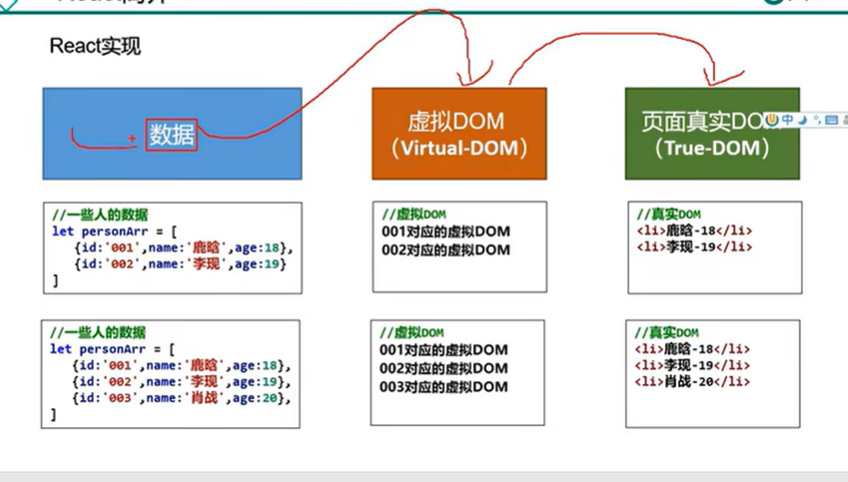
类和模块的内部,默认就是严格模式,所以不需要使用"use strict"指定运行模式
案例
<!DOCTYPE html>
<html lang="en">

<head>
  <meta charset="UTF-8">
  <meta name="viewport" content="width=device-width, initial-scale=1.0">
  <title>Document</title>
</head>

<body>
  <div id="test"></div>
  <script type="text/javascript" src="../js/react.development.js"></script>
  <!-- 引入 react-dom,用于支持react操作dom  全局对象:ReactDOM-->
  <script type="text/javascript" src="../js/react-dom.development.js"></script>
  <!-- 引入babel -->
  <script type="text/javascript" src="../js//babel.min.js"></script>

  <script type="text/babel">

    class MyComponent extends React.Component {
      //构造器调用几次?执行一次
      constructor(props) {
        super(props)
        this.state = { isHot: false, wind: '风' }
        //解决changeWeather中this指向问题
        this.changeWeather = this.changeWeather.bind(this)
      }
      // render调用几次?1 + n次【n是状态更新的次数】
      render() {
        const { isHot, wind } = this.state
        return <h1 onClick={this.changeWeather}>今天天气很{isHot ? '炎热' : '凉爽'}, {wind}好</h1>
      }
      //构造器调用几次?点几次调几次
      changeWeather() {
        //由于changeWeather是作为onClick的回调,所以不是通过实例调用的,是直接调用
        //类中的方法默认开启局部的严格模式,所以changeWeather中的this为undefined

        //严重注意:state不可以直接更改
        // this.state.isHot = !(this.state.isHot)
        //注意:要用setState更新状态,且更新是一种合并,不是替换
        const isHot = this.state.isHot
        this.setState({ isHot: !isHot })
        console.log(this.state.isHot)//直接改值,react不认
      }
    }

    ReactDOM.render(<MyComponent />, document.getElementById('test'))


  </script>
</body>

</html>
state简写方式
知识点补充:
 class Car {
      constructor(name, price) {
        this.name = name
        this.price = price
      }
      // 类中可以直接写复制语句,如下怠慢的含义是:给Car的实例对象添加一个属性,名为a,值为1
      a = 1
    }

    const c1 = new Car('奔驰c63', 199)
    const c2 = new Car('宝马', 299)

    console.log(c1)
    console.log(c2)
代码简化:
 class Weather extends React.Component {
      constructor(props) {
        super(props)
        // this.state = { isHot: true, wind: '风' }
        // this.changeWeather = this.changeWeather.bind(this)
      }

      state = { isHot: true, wind: '风' } //改到这里

      render() {
        const { isHot, wind } = this.state
        return <h1 onClick={this.changeWeather}>今天天气{isHot ? '炎热' : '凉快'}, {wind}也{isHot ? '炎热' : '凉快'}</h1>
      }

      // changeWeather() {
      //   const isHot = this.state.isHot
      //   this.setState({ isHot: !isHot })
      // }

      changeWeather = () => { //箭头函数this指向外层作用域
        const isHot = this.state.isHot
        this.setState({ isHot: !isHot })
      }
    }
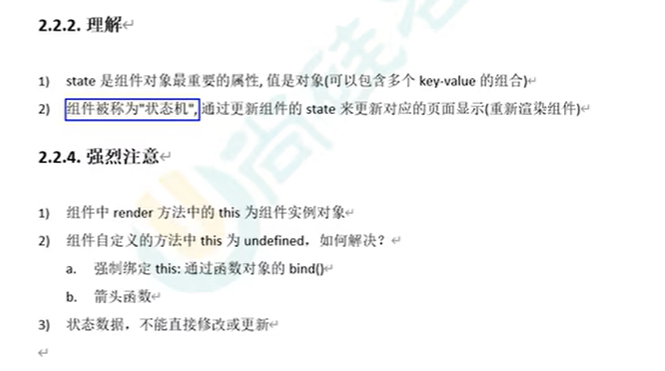
总结state
2.props
简单应用:
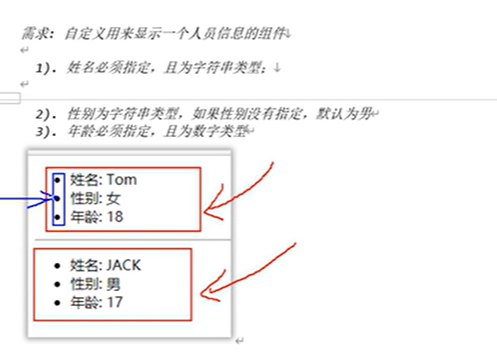
class Person extends React.Component {
      render() {
        console.log(this)
        const { name, age, sex } = this.props
        return (
          <ul>
            <li>姓名:{name}</li>
            <li>性别:{sex}</li>
            <li>年龄:{age}</li>
          </ul>
        )
      }
    }


    //渲染组件
    ReactDOM.render(<Person name="tom" age="18" sex="女" />, document.getElementById('test1'))
    ReactDOM.render(<Person name="jerry" age="12" sex="男" />, document.getElementById('test2'))
    ReactDOM.render(<Person name="xixi" age="19" sex="女" />, document.getElementById('test3'))
props限制类型和设定默认值
<!DOCTYPE html>
<html lang="en">

<head>
  <meta charset="UTF-8">
  <meta name="viewport" content="width=device-width, initial-scale=1.0">
  <title>Document</title>
</head>

<body>
  <div id="test1"></div>
  <div id="test2"></div>
  <div id="test3"></div>
  <script type="text/javascript" src="../js/react.development.js"></script>
  <!-- 引入 react-dom,用于支持react操作dom  全局对象:ReactDOM-->
  <script type="text/javascript" src="../js/react-dom.development.js"></script>
  <!-- 引入babel -->
  <script type="text/javascript" src="../js//babel.min.js"></script>


  <!-- 引入prop=types,用于对组件标签属性进行限制 -->
  <script type="text/javascript" src="../js/prop-types.js"></script>
  <script type="text/babel">
    class Person extends React.Component {
      render() {
        console.log(this)
        const { name, age, sex } = this.props
        return (
          <ul>
            <li>姓名:{name}</li>
            <li>性别:{sex}</li>
            <li>年龄:{age}</li>
          </ul>
        )
      }
    }
    //类型
    Person.propTypes = {
      name: PropTypes.string.isRequired,
      sex: PropTypes.string,
      speak: PropTypes.func//要用func不用function(function是关键字,会冲突)

    }
    //默认值
    Person.defaultProps = {
      sex: '未知',
      age: 18
    }

    //渲染组件
    ReactDOM.render(<Person speak={speak} name="tom" age="18" sex="女" />, document.getElementById('test1'))
    ReactDOM.render(<Person name="jerry" age="12" sex="男" />, document.getElementById('test2'))
    ReactDOM.render(<Person name="xixi" age="19" sex="女" />, document.getElementById('test3'))

    function speak() {
      console.log('我正在说')
    }
  </script>
</body>

</html>
简写:
const p = { name: '张三', age: 18, sex: '女' }
    ReactDOM.render(<Person {...p} />, document.getElementById('test1'))
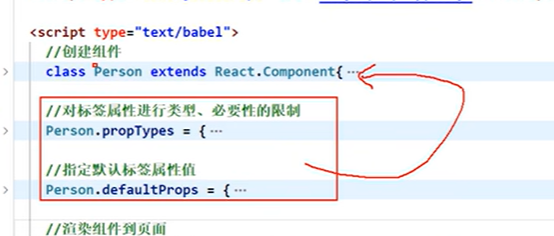
    class Person extends React.Component {
      render() {
        console.log(this)
        const { name, age, sex } = this.props
        return (
          <ul>
            <li>姓名:{name}</li>
            <li>性别:{sex}</li>
            <li>年龄:{age}</li>
          </ul>
        )
      }


      //类型
      static propTypes = {
        name: PropTypes.string.isRequired,
        sex: PropTypes.string,
        speak: PropTypes.func//要用func不用function(function是关键字,会冲突)

      }
      //默认值
      static defaultProps = {
        sex: '未知',
        age: 18
      }
    }
注意事项:
1.props是只读的
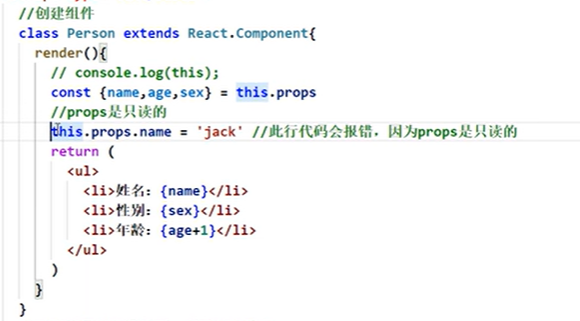
2. 构造器是否接受props,是否传递于props,取决于:是否希望在构造器中通过this访问props
   constructor(props) {
        super(props)
        //构造器是否接受props,是否传递于props,取决于:是否希望在构造器中通过this访问props
        console.log('constructor', this.props) //不接不传会出现undefined
      }
函数式组件使用props
正确用法 (Person.propTypes):
直接在函数组件上设置propTypes属性
React会读取这个属性进行props验证
这是React官方推荐的方式
错误用法 (Person.prototype.propTypes):
在函数组件的原型上设置propTypes
React不会检查原型链上的propTypes属性
这种设置完全无效,不会进行任何props验证
结论:
对于函数组件,必须使用
Person.propTypes而不是Person.prototype.propTypes对于类组件,应该使用静态属性
static propTypes = {...},这实际上也是添加到类本身上
    function Person(props) {
      const { name, age, sex } = props
      return (
        <ul>
          <li>姓名:{name}</li>
          <li>性别:{sex}</li>
          <li>年龄:{age}</li>
        </ul>
      )
    }
    Person.propTypes = {
      name: PropTypes.string.isRequired,
    }
    Person.defaultProps = {
      age: 18,
      sex: '男'
    }
    //渲染组件
    ReactDOM.render(<Person name="tom" age="18" />, document.getElementById('test1'))
3.refs
字符串形式的ref:【不推荐】
为什么不推荐:
存在效率问题,可能会在未来版本移除
<!DOCTYPE html>
<html lang="en">
<head>
<meta charset="UTF-8">
<meta name="viewport" content="width=device-width, initial-scale=1.0">
<title>Document</title>
</head>
<body>
<div id="test1"></div>
<div id="test2"></div>
<div id="test3"></div>
<script type="text/javascript" src="../js/react.development.js"></script>
<!-- 引入 react-dom,用于支持react操作dom 全局对象:ReactDOM-->
<script type="text/javascript" src="../js/react-dom.development.js"></script>
<!-- 引入babel -->
<script type="text/javascript" src="../js//babel.min.js"></script>
<!-- 引入prop=types,用于对组件标签属性进行限制 -->
<script type="text/javascript" src="../js/prop-types.js"></script>
<script type="text/babel">
class Demo extends React.Component {
showData = () => {
const { input1 } = this.refs
alert(input1.value)
}
showData2 = () => {
const { input2 } = this.refs
alert(input2.value)
}
render() {
return (
<div>
<input ref="input1" type="text" placeholder="点击按钮提示数据" />
<button onClick={this.showData}>点我提示数据</button>
<input ref="input2" onBlur={this.showData2} type="text" placeholder="失去焦点提示数据" />
</div>
)
}
}
ReactDOM.render(<Demo />, document.getElementById('test1'))
</script>
</body>
</html>

回调函数形式的ref:
class Demo extends React.Component {
showData = () => {
const { input1 } = this
alert(input1.value)
}
render() {
return (
<div>
<input ref={(c) => { this.input1 = c }} type="text" placeholder="点击按钮提示数据" />
<button onClick={this.showData}>点我提示数据</button>
</div>
)
}
}
ReactDOM.render(<Demo />, document.getElementById('test1'))
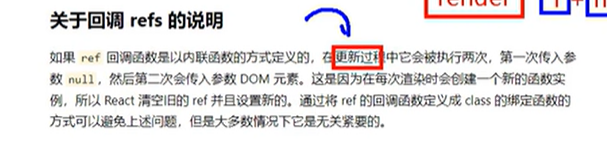
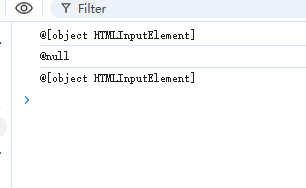
更新:state变化
内联回调函数=》更新的时候执行两次render【写这个就可以】
因为内联回调函数是临时的,执行完内存回收
class Demo extends React.Component {
state = { isHot: true }
showData = () => {
const { input1 } = this
alert(input1.value)
}
changeWeather = () => {
const isHot = this.state.isHot
this.setState({ isHot: !isHot })
}
render() {
// 看似是更新,实际上是先删除旧的再添加新的【保证没有缓存】
const { isHot } = this.state
return (
<div>
<input ref={(c) => { this.input1 = c; console.log('@' + c); }} type="text" placeholder="点击按钮提示数据" />
<button onClick={this.showData}>点我提示数据</button>
<span onClick={this.changeWeather}>{isHot ? '炎热' : '凉快'}</span>
</div>
)
}
}
ReactDOM.render(<Demo />, document.getElementById('test1'))
外联形式的回调函数
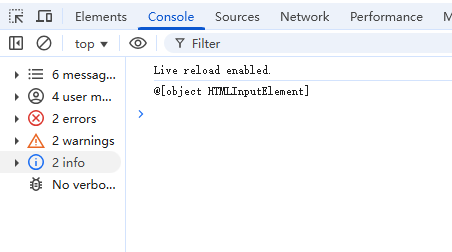
更新时不调,因为知道saveInout不是一个新函数
class Demo extends React.Component {
state = { isHot: true }
showData = () => {
const { input1 } = this
alert(input1.value)
}
changeWeather = () => {
const isHot = this.state.isHot
this.setState({ isHot: !isHot })
}
//外联形式的回调函数
saveInput = (c) => {
this.input1 = c;
console.log('@' + c);
}
render() {
// 看似是更新,实际上是先删除旧的再添加新的【保证没有缓存】
const { isHot } = this.state
return (
<div>
{/*<input ref={(c) => { this.input1 = c; console.log('@' + c); }} type="text" placeholder="点击按钮提示数据" /> */}
<input ref={this.saveInput} type="text" placeholder="点击按钮提示数据" />
<button onClick={this.showData}>点我提示数据</button>
<span onClick={this.changeWeather}>{isHot ? '炎热' : '凉快'}</span>
</div>
)
}
}
ReactDOM.render(<Demo />, document.getElementById('test1'))
createRef
<!DOCTYPE html>
<html lang="en">
<head>
<meta charset="UTF-8">
<meta name="viewport" content="width=device-width, initial-scale=1.0">
<title>Document</title>
</head>
<body>
<div id="test1"></div>
<div id="test2"></div>
<div id="test3"></div>
<script type="text/javascript" src="../js/react.development.js"></script>
<!-- 引入 react-dom,用于支持react操作dom 全局对象:ReactDOM-->
<script type="text/javascript" src="../js/react-dom.development.js"></script>
<!-- 引入babel -->
<script type="text/javascript" src="../js//babel.min.js"></script>
<!-- 引入prop=types,用于对组件标签属性进行限制 -->
<script type="text/javascript" src="../js/prop-types.js"></script>
<script type="text/babel">
class Demo extends React.Component {
// React.createRef调用后可以返回一个容器,该容器可以存储被ref所标识的节点,该容器是专人专用的【只能存一个】
myRef = React.createRef()
showData = () => {
console.log(this.myRef.current.value)
}
render() {
return (
<div>
<input ref={this.myRef} type="text" placeholder="点击按钮提示数据" />
<button onClick={this.showData}>点我提示数据</button>
</div>
)
}
}
ReactDOM.render(<Demo />, document.getElementById('test1'))
</script>
</body>
</html>

Agent 垂直技术社区,欢迎活跃、内容共建。
更多推荐


 3
3 0
0- 0


 已为社区贡献2条内容

所有评论(0)