【React】组件生命周期和脚手架
·
组件生命周期
ReactDOM.render()渲染组件后发生了什么?
- React解析组件标签,找到对应组件
- 发现组件是类定义的,随后new出来该类的实例,并通过该实例调用到原型上的render方法
- 讲render返回的虚拟Dom转为真实Dom,随后呈现在页面
旧生命周期
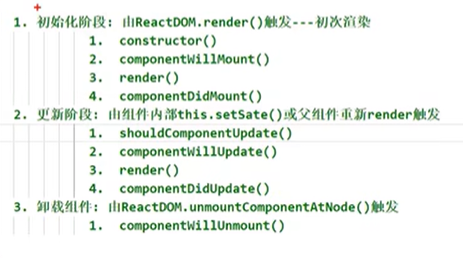
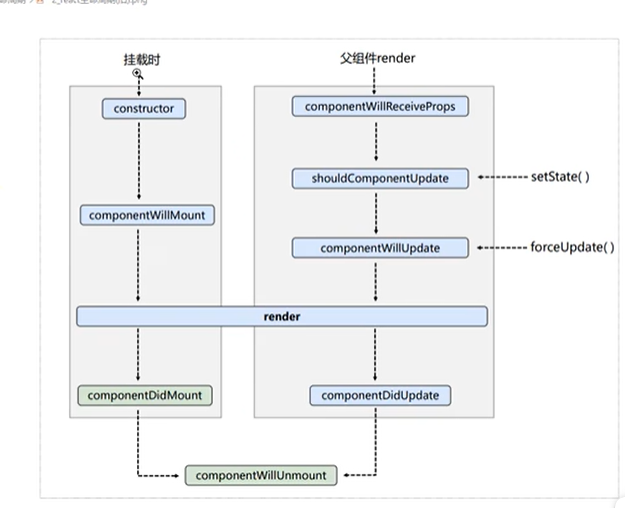
- 其中,shouldComponentUpdate,控制组件更新的阀门
- return true则打开,return false 则关闭,默认为true
<body>
  <div id="test"></div>
  <script type="text/javascript" src="../js/react.development.js"></script>
  <script type="text/javascript" src="../js/react-dom.development.js"></script>
  <script type="text/javascript" src="../js/babel.min.js">
  </script>
  <script type="text/babel">
    // 创建组件
    class Life extends React.Component {
      state = {opacity:1}
      // 卸载组件
      delbtn = () => {
        ReactDOM.unmountComponentAtNode(document.getElementById('test'))
      }
      // 组件挂完毕
      componentDidMount(){
       this.timer = setInterval(() => {
          let {opacity} = this.state
          opacity -= 0.1
          if (opacity<=0) {
            opacity=1
          }
          this.setState({opacity})
        }, 200);
      }
      // 组件将要卸载
      componentWillUnmount(){
        clearInterval(this.timer)
      }
      // 初始化渲染和状态更新之后
      render() {
        return (
          <div>
            <h2 style={{opacity:this.state.opacity}}>文字渐变</h2>
            <div onClick={this.delbtn}>按钮</div>
          </div>
        )
      }
    }
    ReactDOM.render(<Life />, document.getElementById('test'))
  </script>
</body>
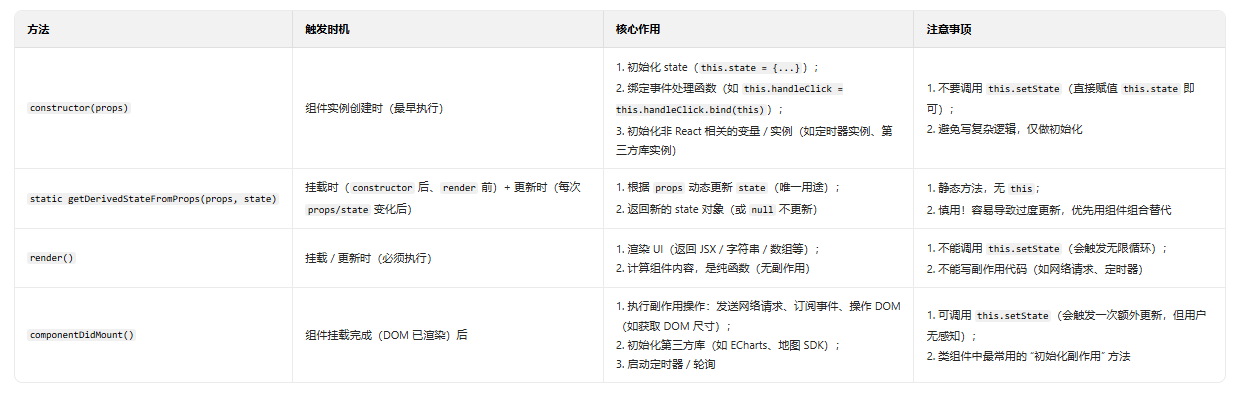
类组件新生命周期
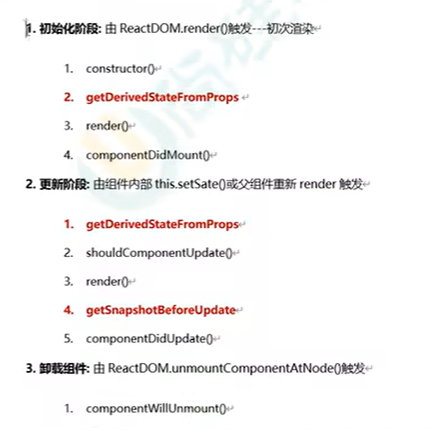
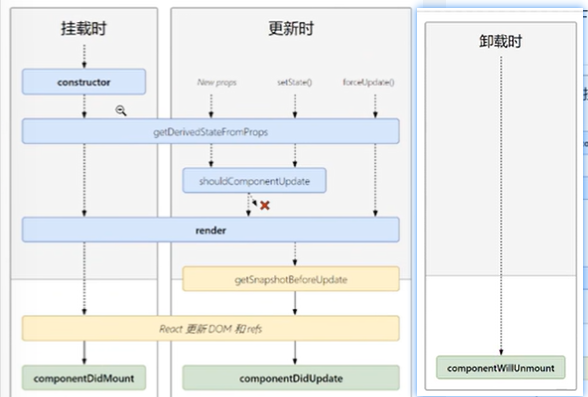
挂载阶段
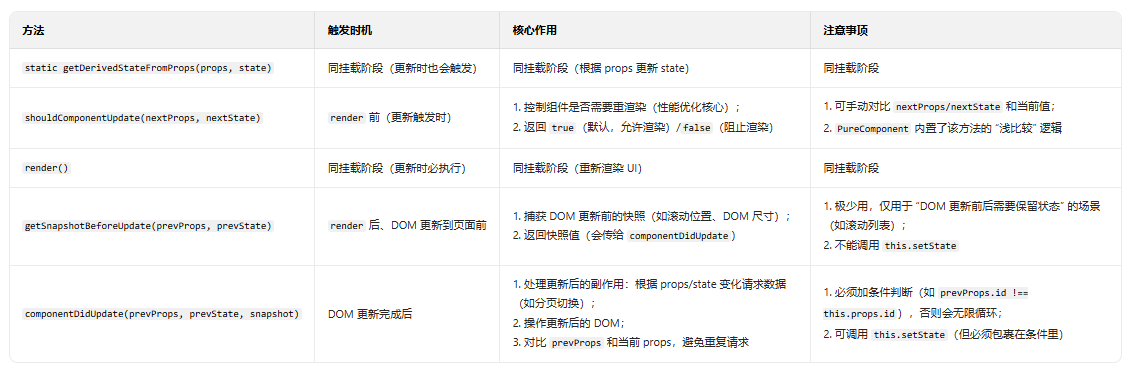
更新阶段(props/state 变化触发重新渲染)
- 该阶段方法每次更新都会触发(除非被 shouldComponentUpdate 阻止),核心是控制更新逻辑、处理更新后的副作用。
卸载阶段(组件从 DOM 中移除)
- 该阶段方法仅执行一次,核心是清理副作用,避免内存泄漏。

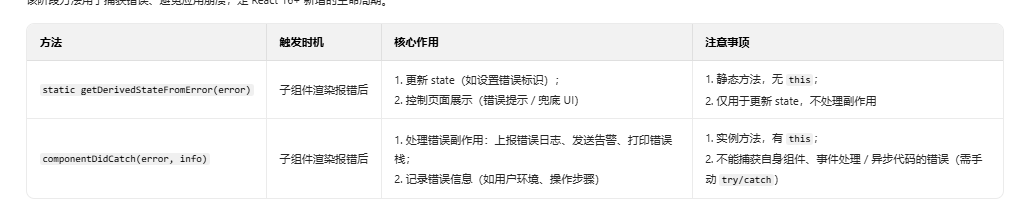
错误处理阶段
- 该阶段方法用于捕获错误、避免应用崩溃,是 React 16+ 新增的生命周期。
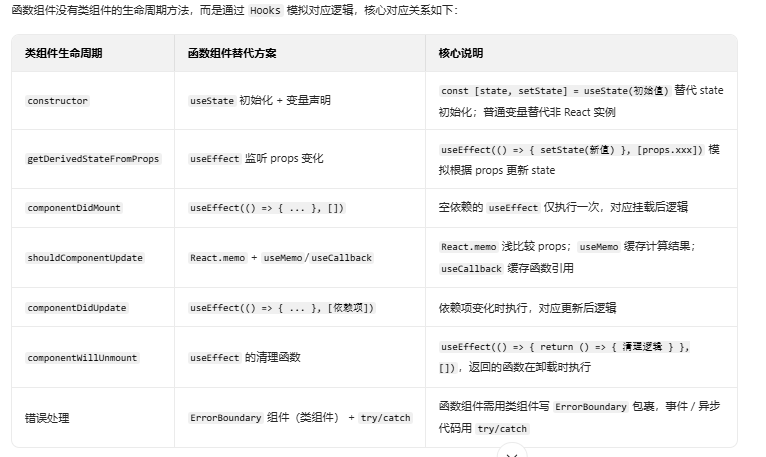
函数组件对应的生命周期
react 脚手架
- 使用create-react-app创建react应用
- 整体技术架构react+webpack+es6+eslint
- 模块化,组件化,工程化
- 步骤:
- 全局安装:npm install -g create-react-app
- create-react-app hello-react
页面文件介绍
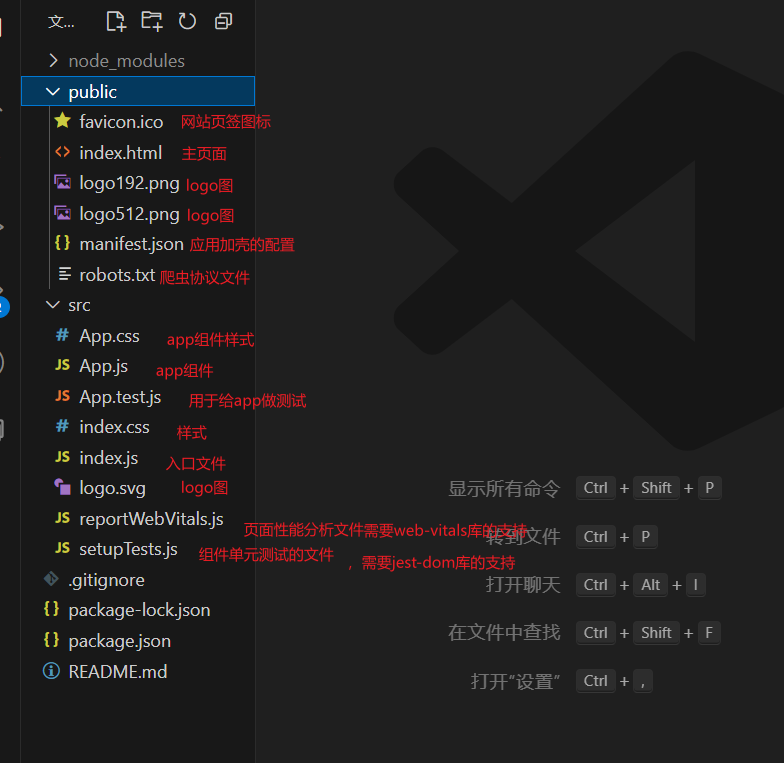
public的index.html内容介绍
<!DOCTYPE html>
<html lang="en">
  <head>
    <meta charset="utf-8" />
    <!-- %PUBLIC_URL%,代表public文件目录 -->
    <link rel="icon" href="%PUBLIC_URL%/favicon.ico" />
    <meta name="viewport" content="width=device-width, initial-scale=1" />
    <!-- 用于配置游览器页签喝地址栏颜色,仅针对安卓手机游览器 -->
    <meta name="theme-color" content="#000000" />
    <meta
      name="description"
      content="Web site created using create-react-app"
    />
    <!-- 用于添加到主屏幕的图标,仅支持苹果手机 -->
    <link rel="apple-touch-icon" href="%PUBLIC_URL%/logo192.png" />
    <!-- 加壳配置文件,类似套壳变安卓应用,变苹果应用 -->
    <link rel="manifest" href="%PUBLIC_URL%/manifest.json" />
    <title>React App</title>
  </head>
  <body>
    <!-- 当你游览器不支持js运行的时候展示 -->
    <noscript>You need to enable JavaScript to run this app.</noscript>
    <!-- 容器 -->
    <div id="root"></div>
  </body>
</html>
普通css样式
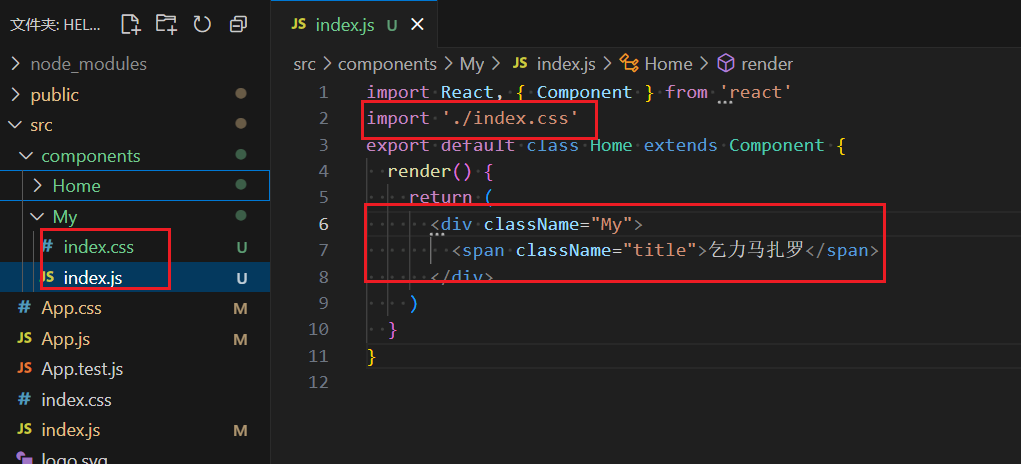
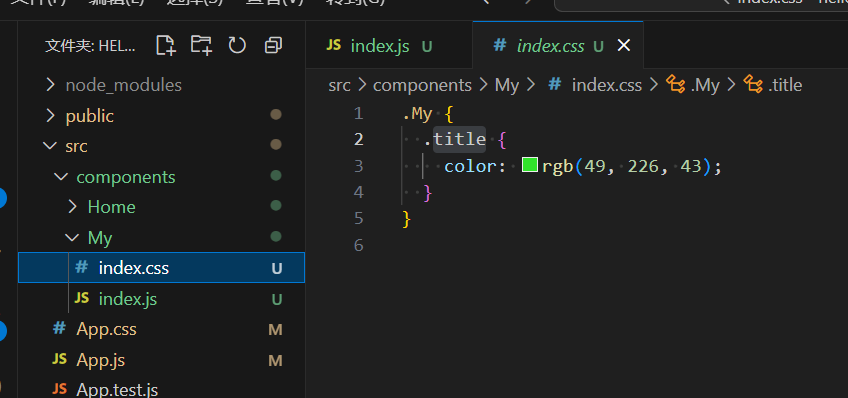
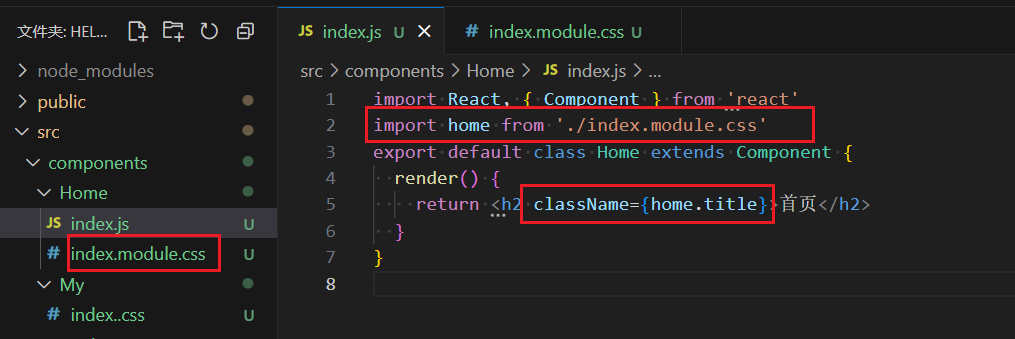
css样式模块化
vscode插件安装,可一键生成通用模板代码
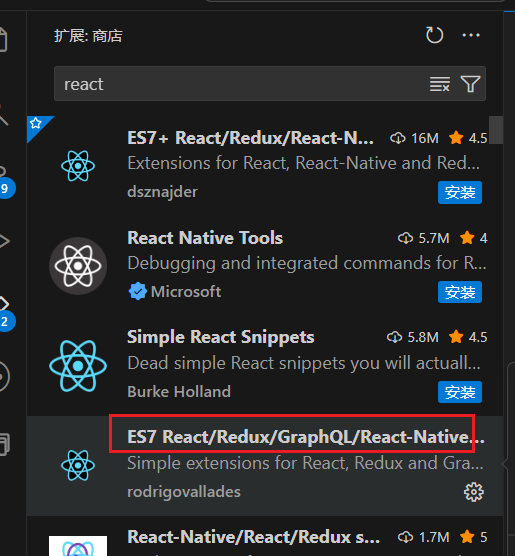
- rcc是类组件
- rfc是函数组件
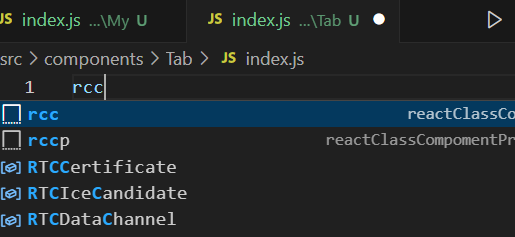
import React, { Component } from 'react'

export default class index extends Component {
  render() {
    return (
      <div>

      </div>
    )
  }
}
函数组件使用state和方法
- 不允许出现this
import logo from './logo.svg'
import './App.css'
import Header from './components/Header'
import Main from './components/Main'
import Footer from './components/Footer'
import { useState } from 'react'
// 函数组件使用state和修改state的数据
// 不允许出现this
function App() {
  const [todos, setTodos] = useState([
    { id: 1, name: '乞力马扎罗', check: 1 },
    { id: 2, name: '打代码', check: 0 },
    { id: 3, name: '搞钱', check: 0 },
  ])
  // editsudo用于新增数据
  const editsudo = (value) => {
    // 追加新数据
    const newtodos = [value, ...todos]
    // 更新数据
    setTodos(newtodos)
  }
  // checksudo用于修改状态
  const checksudo = (id, check) => {
    const newtodos = todos.map((item) => {
      if (item.id == id) {
        return { ...item, check: check }
      } else {
        return item
      }
    })
    setTodos(newtodos)
  }
  // delsudo用于删除某个数据
  const delsudo = (id) => {
    const newtodos = todos.filter((item) => item.id !== id)
    setTodos(newtodos)
  }
  //全选/反选
  const checkAll = (check) => {
    const newtodos = todos.map((item) => {
      return {
        ...item,
        check: check,
      }
    })
    setTodos(newtodos)
  }
  //清除所选
  const handleClear = () => {
    const newtodos = todos.filter((item) => !item.check)
    setTodos(newtodos)
  }
  return (
    <div className="App">
      <div className="todo-container">
        <div className="todo-wrap">
          <Header editsudo={editsudo} />
          <Main todos={todos} checksudo={checksudo} delsudo={delsudo} />
          <Footer todos={todos} checkAll={checkAll} handleClear={handleClear} />
        </div>
      </div>
    </div>
  )
}

export default App
类组件使用state和方法
- 类组件的 state 必须定义在 constructor 构造函数中
- 或者与 render 同级
import React, { Component } from 'react'
import PropTypes from 'prop-types'
import './index.css'
// 类组件使用state和修改state的数据
// 类组件的 state 必须定义在 constructor 构造函数中
export default class Home extends Component {
  state = {
    mouse: false,
  }
  // 对接收的props进行:类型,必要性的限制
  static propTypes = {
    checksudo: PropTypes.func.isRequired,
  }
  // 类里面使用函数方式1,事件处理函数定义在类顶层(与 render 同级), 直接修改状态,无需返回函数
  // 鼠标移入移出事件
  handleMouse = (flag) => {
    this.setState({
      mouse: flag,
    })
  }
  // 类里面使用函数方式2,勾选/取消勾选
  handleCheck = (id) => {
    return (e) => {
      // 想修改父组件的值,让父组件传函数进来
      this.props.checksudo(id, e.target.checked)
    }
  }
  // 删除事件
  handleDelete = (id) => {
    if (window.confirm('确定删除吗?')) {
      this.props.delsudo(id)
    }
  }
  // 方式2
  render() {
    const { todo } = this.props
    const { mouse } = this.state
    return (
      <li
        className="li-bar"
        // 1. 修正样式对象语法(外层加 {},内部是样式对象)
        style={{
          backgroundColor: mouse ? '#c8e7d4' : '#fff',
        }}
        // 2. 修正事件绑定:传递函数引用(用箭头函数包裹,避免立即执行)
        onMouseEnter={() => this.handleMouse(true)}
        onMouseLeave={() => this.handleMouse(false)}
        // checked必须和onChange一起使用
      >
        <label>
          <input
            type="checkbox"
            checked={todo.check}
            onChange={this.handleCheck(todo.id)}
          />
          <span>{todo.name}</span>
        </label>
        <button
          className="btn btn-danger"
          style={{ display: mouse ? 'block' : 'none' }}
          onClick={() => this.handleDelete(todo.id)}
        >
          删除
        </button>
      </li>
    )
  }
}
react ajax
- 前端需要通过ajax请求与后台进行交互
- react应用中需要集成第三方ajax库和自己封装
- 常用的ajaz请求库,jquery,axios
反向代理配置(前端配置的情况)
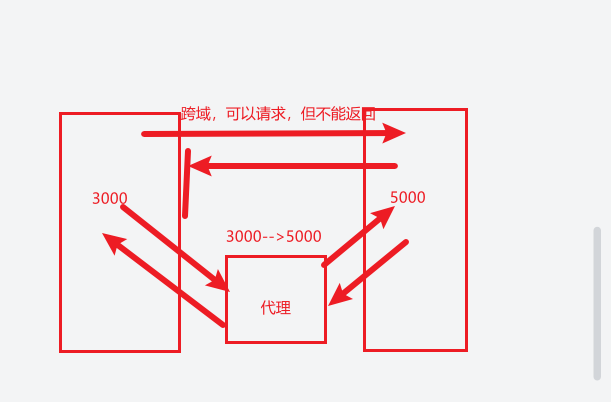
- Create React App 在启动时,会自动检测项目src目录下是否存在setupProxy.js文件:
- 1,src下新建setupProxy.js(使用的时候不用引入)
const { createProxyMiddleware } = require('http-proxy-middleware') // 注意:新版包名已变更

module.exports = function (app) {
  app.use(
    '/api1',
    createProxyMiddleware({
      // 新版需用createProxyMiddleware方法
      target: 'http://localhost:5000', // 目标服务器地址
      changeOrigin: true, // 允许跨域(修改请求头中的Host,本示例中,不加,服务器收到的是3000,加了,收到的是5000,适用于服务器严格一点的 )
      pathRewrite: { '^/api1': '' }, // 去掉请求路径中的/api1前缀
    })
  )
  app.use(
    '/api2',
    createProxyMiddleware({
      target: 'http://localhost:5001',
      changeOrigin: true,
      pathRewrite: { '^/api2': '' },
    })
  )
  app.use(
    '/api1',
    createProxyMiddleware({
      // 新版需用createProxyMiddleware方法
      target: 'http://localhost:5000', // 目标服务器地址
      changeOrigin: true, // 允许跨域(修改请求头中的Host)
      pathRewrite: { '^/api1': '' }, // 去掉请求路径中的/api1前缀
    })
  )
}
- 页面使用
import { useState } from 'react'
import axios from 'axios'
function App() {
  const [students, setStudents] = useState([])
  const getStudentList = () => {
    axios
      .get('http://localhost:3000/api1/students')
      .then((response) => {
        setStudents(response.data) // 存储数据到状态
      })
      .catch((error) => {
        console.error('请求失败:', error)
      })
  }
  const getCars = () => {
    axios
      .get('http://localhost:3000/api2/cars')
      .then((response) => {
        setStudents(response.data) // 存储数据到状态
      })
      .catch((error) => {
        console.error('请求失败:', error)
      })
  }
  return (
    <div className="App">
      <button onClick={getStudentList}>获取学生数据</button>
      <button onClick={getCars}>获取car数据</button>
    </div>
  )
}

export default App
消息订阅与发布(兄弟组件传值)
- 工具库:PubSubJS
- 下载npm i pubsub-js
接收消息
import React, { useEffect, useCallback } from 'react'
import PubSub from 'pubsub-js'
const Main = () => {
  // 用 useCallback 缓存回调函数,仅在依赖变化时重建
  const gettitleName = useCallback((msg, params) => {
    console.log(msg, params);
  }, []); // 无依赖,仅创建一次

  useEffect(() => {
    const token = PubSub.subscribe('getTitle', gettitleName);
    return () => PubSub.unsubscribe(token);
  }, [gettitleName]); // 函数引用变了,useEffect 会重新执行
  return (
    <div>
      1111
    </div>
  )
}

export default Main
发送消息
import React from 'react'
import PubSub from 'pubsub-js'
const Nev = () => {
  function handleTitle(params) {
    PubSub.publish('getTitle', {
      name: '乞力马扎罗',
      title: '传递参数',
    })
  }
  return (
    <div>
      2222
      <button onClick={handleTitle}>兄弟传参</button>
    </div>
  )
}

export default Nev

Agent 垂直技术社区,欢迎活跃、内容共建。
更多推荐



 8
8 0
0- 0


 已为社区贡献4条内容

所有评论(0)