Grok api 接入 agent 代码篇,Java 从 0 构建 AI Agent,王仕宇的 Agent 实践
·
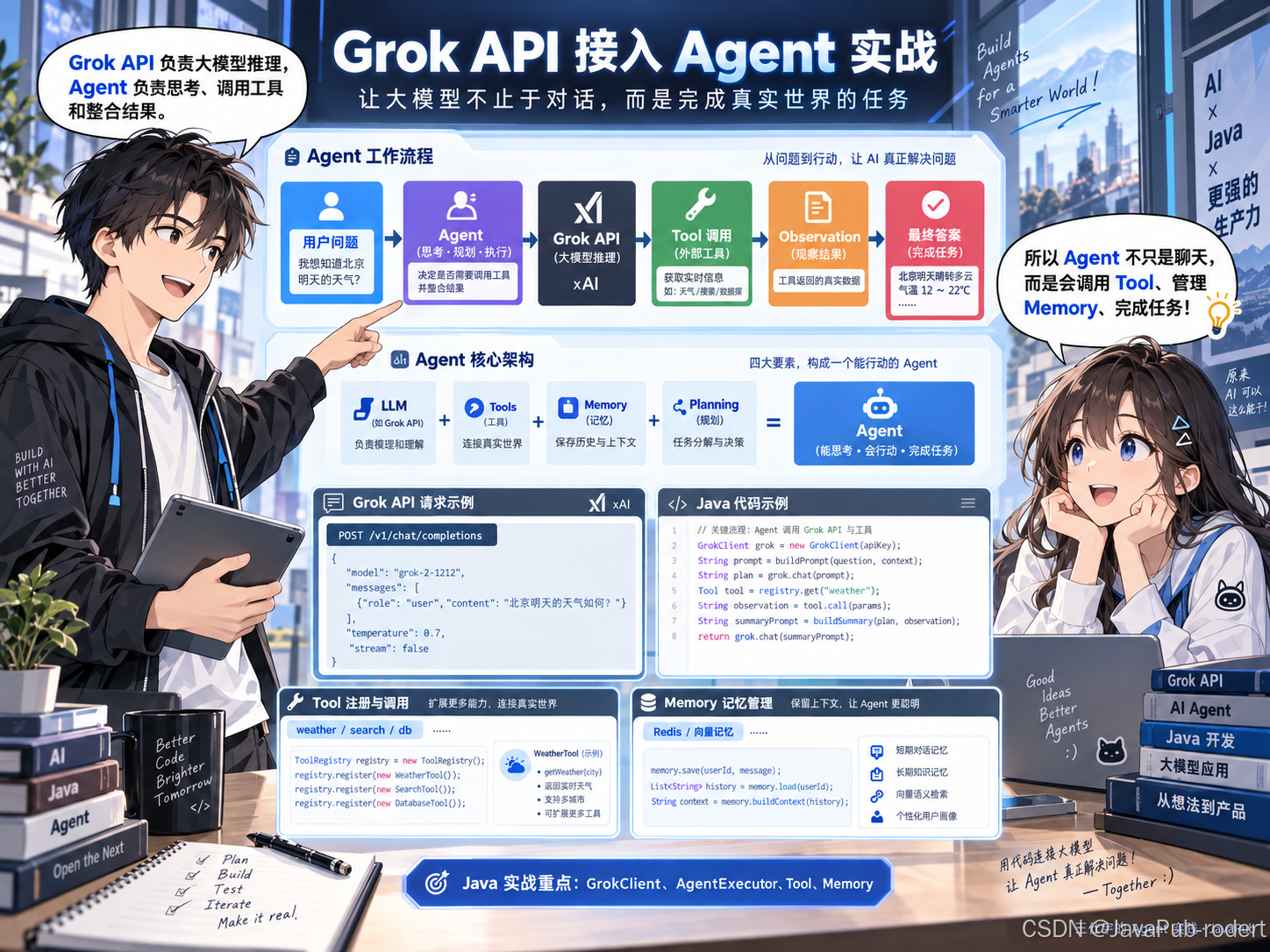
王仕宇的 Agent 实践
一、什么是 Agent
传统大模型调用:
用户 -> API -> LLM -> 回复
Agent:
用户目标
   |
   v
Agent
   |
   +---- 思考 Reasoning
   |
   +---- 调用 Tool
   |
   +---- 获取结果 Observation
   |
   +---- 再次推理
   |
   v
最终答案
Agent 的核心组成:
- LLM:负责理解和推理
- Tool:负责执行真实动作
- Memory:负责保存上下文
- Planning:负责任务拆解
二、Grok API 介绍
Grok API 使用 OpenAI 兼容接口。
API 地址
Base URL:

https://api.x.ai/v1
认证方式:
Authorization: Bearer YOUR_API_KEY
Chat Completions 接口
请求:
POST /v1/chat/completions
Header:
Authorization: Bearer YOUR_API_KEY
Content-Type: application/json
请求参数:
{
  "model":"grok-3",
  "messages":[
    {
      "role":"system",
      "content":"你是一个AI Agent"
    },
    {
      "role":"user",
      "content":"什么是Agent"
    }
  ],
  "temperature":0.7,
  "stream":false
}
参数说明:
参数 说明
model 模型名称
messages 上下文消息
temperature 创造性
stream 是否开启流式输出
返回:
{
 "choices":[
  {
   "message":{
    "role":"assistant",
    "content":"Agent是一种..."
   }
  }
 ]
}
三、Java 项目结构
grok-agent-demo

├── GrokClient.java

├── AgentExecutor.java

├── Tool.java

├── ToolRegistry.java

├── WeatherTool.java

└── Controller.java
四、Java 调用 Grok API
Maven依赖
<dependency>
    <groupId>org.springframework.boot</groupId>
    <artifactId>
    spring-boot-starter-web
    </artifactId>
</dependency>


<dependency>
    <groupId>
    com.fasterxml.jackson.core
    </groupId>
    <artifactId>
    jackson-databind
    </artifactId>
</dependency>
五、封装 Grok Client
@Component
public class GrokClient {


    private final HttpClient client =
            HttpClient.newHttpClient();


    private final ObjectMapper mapper =
            new ObjectMapper();


    private final String apiKey;


    public GrokClient(){

        this.apiKey =
        System.getenv("GROK_API_KEY");

    }


    public String chat(String message)
            throws Exception {


        Map<String,Object> body =
        new HashMap<>();


        body.put(
        "model",
        "grok-3"
        );


        body.put(
        "messages",
        List.of(
          Map.of(
          "role",
          "user",
          "content",
          message
          )
        ));


        String json =
        mapper.writeValueAsString(body);


        HttpRequest request =
        HttpRequest.newBuilder()

        .uri(
        URI.create(
        "https://api.x.ai/v1/chat/completions"
        ))

        .header(
        "Authorization",
        "Bearer "+apiKey
        )

        .header(
        "Content-Type",
        "application/json"
        )

        .POST(
        HttpRequest.BodyPublishers
        .ofString(json)
        )

        .build();


        HttpResponse<String> response =
        client.send(
        request,
        HttpResponse.BodyHandlers.ofString()
        );


        return response.body();

    }

}
六、Agent核心执行流程
Agent采用 ReAct 思想:
Thought

↓

Action

↓

Observation

↓

Answer
代码:
@Component
public class AgentExecutor {


private final GrokClient grok;


public AgentExecutor(
GrokClient grok){

this.grok=grok;

}


public String execute(
String task
)throws Exception{


String prompt="""

你是一个AI Agent。

任务:

%s


请:

1. 分析任务

2. 判断是否需要工具

3. 执行步骤

4. 输出结果


""".formatted(task);


return grok.chat(prompt);


}

}
七、Tool系统设计
Agent最大的价值:
调用外部能力。
接口:
public interface Tool {


String name();


String execute(String input);


}
八、天气查询 Tool
@Component
public class WeatherTool
implements Tool{


@Override
public String name(){

return "weather";

}


@Override
public String execute(
String city){


return city+
" 今天晴天,温度25℃";


}


}
九、Tool注册中心
@Component
public class ToolRegistry{


private Map<String,Tool> tools =
new HashMap<>();


public ToolRegistry(
List<Tool> list){


for(Tool tool:list){

tools.put(
tool.name(),
tool
);

}

}


public Tool get(
String name){

return tools.get(name);

}

}
十、Agent调用工具
执行流程:
用户问题

↓

Grok分析

↓

需要工具

↓

调用WeatherTool

↓

返回结果

↓

Grok总结
核心代码:
if(thinking.contains("weather")){


Tool tool =
registry.get(
"weather"
);


String result =
tool.execute(
"北京"
);


return grok.chat(
"根据结果回答:"
+
result
);


}
十一、Memory设计
Agent需要长期记忆。
简单实现:
@Component
public class Memory {


private List<String> history =
new ArrayList<>();


public void add(String msg){

history.add(msg);

}


public String context(){

return String.join(
"\n",
history
);

}

}
生产环境一般使用:
- Redis
- 向量数据库
- Milvus
- Elasticsearch
十二、生产级Agent架构
             用户

              |

        Agent Service

              |

    ---------------------

    |          |         |

   LLM       Tool     Memory

    |          |         |

  Grok      API      Redis
技术栈:
模块 方案
模型 Grok/GPT/Claude
后端 Spring Boot
缓存 Redis
向量库 Milvus
协议 MCP
任务调度 Temporal
十三、总结
一个完整 Agent:
LLM

+

Tool

+

Memory

+

Planning

=

Agent
未来的软件开发模式:
从:
人写代码,机器执行
变成:
人描述目标,Agent完成任务
------ 王仕宇 JavaPub

Agent 垂直技术社区,欢迎活跃、内容共建。
更多推荐


 6
6 0
0- 0


 已为社区贡献16条内容

所有评论(0)