RAG Agentic实战教程:从0到1无缝融合本地知识与实时网络信息
你是不是经常希望你的AI能够做的不仅仅是重复它已经知道的东西?作为一名花费无数时间改进和调整AI系统的人,我可以告诉你,传统的模型虽然令人印象深刻,但常常感觉它们被困在一个信息茧房里,只能处理训练时输入的内容。而Agentic RAG的出现正是为了解决这个问题。
在智能体RAG中,智能体人工智能的决策能力与检索增强生成(RAG)的适应性相结合。它们共同构成了一个能够独立访问、推理和生成相关信息的系统。
Agentic RAG 项目概述
让我一步一步地向您介绍我们正在构建的内容。这一切都是为了创建一个基于此处所示架构的 RAG 流水线:
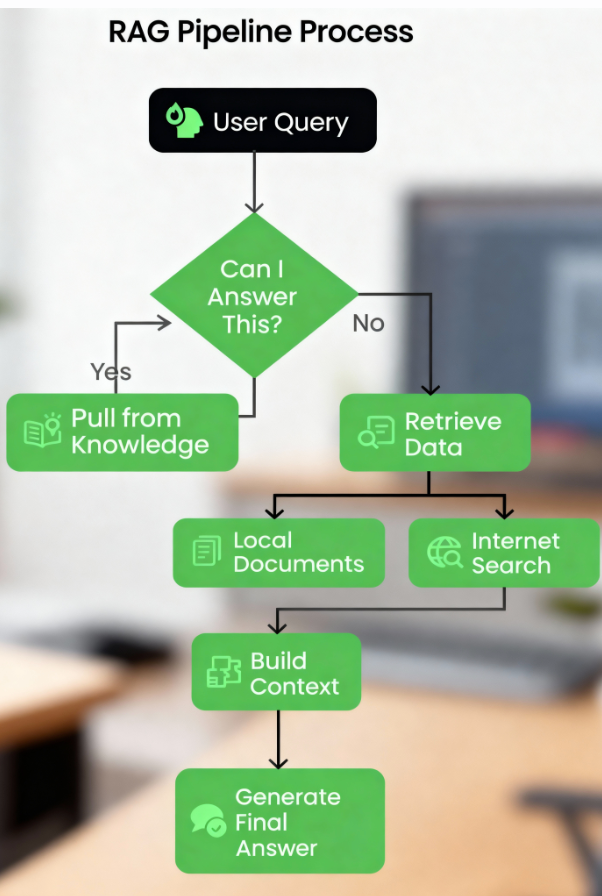
步骤 1:用户查询
无论是简单的查询还是复杂的问题,一切都始于用户提出的问题。这正是启动我们工作流程的火花。
步骤 2:路由查询
接下来,系统会检查:我可以回答这个问题吗?
是的?它利用现有知识并立即给出答案。
不行?那就得深入挖掘了!查询将被路由到下一步。
步骤 3:检索数据
如果答案无法立即获得,该流程会深入研究两个可能的来源:
- 本地文档:我们将使用预处理过的 PDF 作为知识库,系统将从中搜索相关信息块。
- 互联网搜索:如果需要更多背景信息,管道可以连接到外部资源以抓取最新信息。
步骤 4:构建背景
无论数据来源是 PDF 文件还是网页,检索到的数据都会被整合到一个连贯的上下文中。你可以把它想象成先收集好所有拼图碎片,然后再把它们拼起来。
步骤 5:生成最终答案
最后,将这些上下文信息传递给大型语言模型(LLM),以生成清晰准确的答案。这不仅仅是检索数据,更重要的是理解数据并以最佳方式呈现数据。
到最后,我们将拥有一个智能、高效的 RAG 管道,能够根据真实世界的上下文动态响应查询。
本地数据源
首先,我将使用一份真实世界的文档作为本地数据源。我们将使用的文档正是《生成式人工智能原理》(文末有获取该pdf方式)。它包含大量宝贵的见解,因此非常适合作为我们流程的测试用例。
以下是您入门所需的所有步骤。
先决条件
在深入探讨之前,您需要做好以下几项准备:
- Groq API 密钥:您需要一个 Groq API 密钥,可以从这里获取:Groq API 控制台
- Gemini API 密钥:Gemini 可帮助您与代理进行编排,Groq 的响应速度极快,但可能会受到当前速率限制的影响:Gemini API 控制台
也可以通过通过这篇文章本地搭建模型 不用云端!Ollama 帮你在笔记本部署Qwen3,保姆级教程 - Serper.dev API 密钥:我们将使用 Serper.dev 来实现所有互联网搜索功能。请在此处获取您的 API 密钥:Serper.dev API 密钥
安装软件包
让我们确保已安装正确的工具。打开终端并运行以下命令来安装必要的 Python 包:
pip
install
 langchain-groq faiss-cpu crewai serper pypdf2 python-dotenv setuptools sentence-transformers huggingface distutils
建立环境
密钥和软件包准备就绪后,就可以开始使用了!我建议将 API 密钥保存在文件中.env或代码库中。以下是文件示例.env:
import
 os
from
 dotenv

import
 load_dotenv
from
 langchain
.
vectorstores

import
 FAISS
from
 langchain
.
document_loaders

import
 PyPDFLoader

from
 langchain
.
text_splitter
import
 RecursiveCharacterTextSplitter

from
 langchain_huggingface
.
embeddings
import
 HuggingFaceEmbeddings

from
 langchain_groq
import
 ChatGroq

from
 crewai_tools
import
 SerperDevTool

from
 crewai
import
 Agent
,
 Task
,
 Crew
,
 LLM

load_dotenv
(
)

GROQ_API_KEY
=
 os
.
getenv
(
"GROQ_API_KEY"
)

SERPER_API_KEY
=
 os
.
getenv
(
"SERPER_API_KEY"
)

GEMINI
=
os
.
getenv
(
"GEMINI"
)
我加载了环境变量,这样就可以安全地管理 API 密钥和敏感数据,而无需将它们硬编码到脚本中。这确保了脚本的安全,并且.env如果需要,我可以在一个地方(文件)更改密钥。
简而言之,这些导入的包和函数的作用如下:
- os:提供操作系统接口实用程序。
- dotenv:从文件中加载环境变量。
.env - FAISS:用于相似性搜索和检索的向量存储。
- PyPDFLoader:从PDF文档中提取文本内容。
- RecursiveCharacterTextSplitter:递归地将文本分割成易于管理的块。
- HuggingFaceEmbeddings:使用 HuggingFace 模型生成文本嵌入。
- ChatGroq:由 Groq 硬件加速支持的聊天界面。
- SerperDevTool:用于执行网络搜索的工具。
- ScrapeWebsiteTool:从网页中提取数据。
- 智能体:定义具有角色和目标的 AI 实体。
- 任务:代表智能体的具体目标或行动。
- 团队:协调代理人和任务,以实现协调的工作流程。
- LLM:用于生成文本响应的大型语言模型接口。
初始化LLM
我们首先初始化两个语言模型:
llm对于路由和生成答案等一般任务,我们将使用该llama-3.3-70b-specdec模型。crew_llm具体来说,对于网络爬虫代理,因为它需要略微不同的配置(例如,为了获得更具创意的输出结果,需要设置温度)。我们将使用该gemini/gemini-1.5-flash模型。
# Initialize LLM

llm
=
 ChatGroq
(

    model
=
"llama-3.3-70b-specdec"
,

    temperature
=
0
,

    max_tokens
=
500
,

    timeout
=
None
,

    max_retries
=
2
,

)

crew_llm
=
 LLM
(

    model
=
"gemini/gemini-1.5-flash"
,

    api_key
=
GEMINI
,

    max_tokens
=
500
,

    temperature
=
0.7

)
添加决策者
下面的函数check_local_knowledge()充当决策者的角色。我创建了一个提示框,其中传递了用户查询和一些本地上下文信息(来自 PDF)。模型会返回“是”或“否”,告诉我它是否拥有足够的本地信息来回答查询。如果没有,我们将使用网络爬虫。
def
check_local_knowledge
(
query
,
 context
)
:

"""Router function to determine if we can answer from local knowledge"""

    prompt
=
'''Role: Question-Answering Assistant
Task: Determine whether the system can answer the user's question based on the provided text.
Instructions:
    - Analyze the text and identify if it contains the necessary information to answer the user's question.
    - Provide a clear and concise response indicating whether the system can answer the question or not.
    - Your response should include only a single word. Nothing else, no other text, information, header/footer.
Output Format:
    - Answer: Yes/No
Study the below examples and based on that, respond to the last question.
Examples:
    Input:
        Text: The capital of France is Paris.
        User Question: What is the capital of France?
    Expected Output:
        Answer: Yes
    Input:
        Text: The population of the United States is over 330 million.
        User Question: What is the population of China?
    Expected Output:
        Answer: No
    Input:
        User Question: {query}
        Text: {text}
'''

    formatted_prompt
=
 prompt
.
format
(
text
=
context
,
 query
=
query
)

    response
=
 llm
.
invoke
(
formatted_prompt
)

return
 response
.
content
.
strip
(
)
.
lower
(
)
==
"yes"
网络搜索和抓取代理
crewai接下来,我们使用库设置了一个网络搜索和抓取代理。该代理使用搜索工具(SerperDevTool)查找与用户查询相关的文章。任务描述确保代理知道要检索什么内容,并总结相关的网络内容。这就像派遣一个专门的工人从互联网上获取数据。
然后,该get_web_content()函数运行网络爬虫代理。它将查询作为输入,并检索最相关文章的简洁摘要。它返回原始结果,如果路由器认为我们没有足够的本地信息,则该结果将成为我们的上下文。
def
setup_web_scraping_agent
(
)
:

"""Setup the web scraping agent and related components"""

    search_tool
=
 SerperDevTool
(
)
# Tool for performing web searches

    scrape_website
=
 ScrapeWebsiteTool
(
)
# Tool for extracting data from websites

# Define the web search agent

    web_search_agent
=
 Agent
(

        role
=
"Expert Web Search Agent"
,

        goal
=
"Identify and retrieve relevant web data for user queries"
,

        backstory
=
"An expert in identifying valuable web sources for the user's needs"
,

        allow_delegation
=
False
,

        verbose
=
True
,

        llm
=
crew_llm

)

# Define the web scraping agent

    web_scraper_agent
=
 Agent
(

        role
=
"Expert Web Scraper Agent"
,

        goal
=
"Extract and analyze content from specific web pages identified by the search agent"
,

        backstory
=
"A highly skilled web scraper, capable of analyzing and summarizing website content accurately"
,

        allow_delegation
=
False
,

        verbose
=
True
,

        llm
=
crew_llm

)

# Define the web search task

    search_task
=
 Task
(

        description
=
(

"Identify the most relevant web page or article for the topic: '{topic}'. "

"Use all available tools to search for and provide a link to a web page "

"that contains valuable information about the topic. Keep your response concise."

)
,

        expected_output
=
(

"A concise summary of the most relevant web page or article for '{topic}', "

"including the link to the source and key points from the content."

)
,

        tools
=
[
search_tool
]
,

        agent
=
web_search_agent
,

)

# Define the web scraping task

    scraping_task
=
 Task
(

        description
=
(

"Extract and analyze data from the given web page or website. Focus on the key sections "

"that provide insights into the topic: '{topic}'. Use all available tools to retrieve the content, "

"and summarize the key findings in a concise manner."

)
,

        expected_output
=
(

"A detailed summary of the content from the given web page or website, highlighting the key insights "

"and explaining their relevance to the topic: '{topic}'. Ensure clarity and conciseness."

)
,

        tools
=
[
scrape_website
]
,

        agent
=
web_scraper_agent
,

)

# Define the crew to manage agents and tasks

    crew
=
 Crew
(

        agents
=
[
web_search_agent
,
 web_scraper_agent
]
,

        tasks
=
[
search_task
,
 scraping_task
]
,

        verbose
=
1
,

        memory
=
False
,

)

return
 crew

def
get_web_content
(
query
)
:

"""Get content from web scraping"""

    crew
=
 setup_web_scraping_agent
(
)

    result
=
 crew
.
kickoff
(
inputs
=
{
"topic"
:
 query
}
)

return
 result
.
raw
创建矢量数据库
该setup_vector_db()函数用于从 PDF 文件建立矢量数据库。以下是我的操作步骤:
- 加载 PDF:我以前用它
PyPDFLoader来提取内容。 - 将文本分块:我使用 . 将 PDF 内容分割成更小的块(1000 个字符,重叠 50 个字符)
RecursiveCharacterTextSplitter。这使得数据易于管理和搜索。 - 创建向量数据库:我使用句子转换器模型嵌入了文本块,并将它们存储在FAISS向量数据库中。这使我能够高效地搜索相关文本。
之后,该get_local_content()函数会查询向量数据库,找到与用户查询最相关的 5 个数据块,并将这些数据块合并成一个包含上下文信息的字符串。
def
setup_vector_db
(
pdf_path
)
:

"""Setup vector database from PDF"""

# Load and chunk PDF

    loader
=
 PyPDFLoader
(
pdf_path
)

    documents
=
 loader
.
load
(
)

    text_splitter
=
 RecursiveCharacterTextSplitter
(

        chunk_size
=
1000
,

        chunk_overlap
=
50

)

    chunks
=
 text_splitter
.
split_documents
(
documents
)

# Create vector database

    embeddings
=
 HuggingFaceEmbeddings
(

        model_name
=
"sentence-transformers/all-mpnet-base-v2"

)

    vector_db
=
 FAISS
.
from_documents
(
chunks
,
 embeddings
)

return
 vector_db

def
get_local_content
(
vector_db
,
 query
)
:

"""Get content from vector database"""

    docs
=
 vector_db
.
similarity_search
(
query
,
 k
=
5
)

return
" "
.
join
(
[
doc
.
page_content
for
 doc
in
 docs
]
)
生成最终答案
一旦我获取了上下文信息(来自本地文档或网络爬虫),我便将其与用户的查询一起传递给语言模型。语言模型会将上下文和查询以对话形式结合起来,生成最终答案。
以下是主要查询处理流程:
- 路由:我用它
check_local_knowledge()来决定本地 PDF 内容是否有足够的数据来回答查询。
- 如果“是” ,则从向量数据库中获取相关数据块。
- 如果答案是“否” ,我会从网络上搜索相关文章。
- 最终答案:一旦我获得了上下文,我就将其传递给 LLM 以生成最终答案。
def
generate_final_answer
(
context
,
 query
)
:

"""Generate final answer using LLM"""

    messages
=
[

(

"system"
,

"You are a helpful assistant. Use the provided context to answer the query accurately."
,

)
,

(
"system"
,
f"Context: {context}"
)
,

(
"human"
,
 query
)
,

]

    response
=
 llm
.
invoke
(
messages
)

return
 response
.
content

def
process_query
(
query
,
 vector_db
,
 local_context
)
:

"""Main function to process user query"""

print
(
f"Processing query: {query}"
)

# Step 1: Check if we can answer from local knowledge

    can_answer_locally
=
 check_local_knowledge
(
query
,
 local_context
)

print
(
f"Can answer locally: {can_answer_locally}"
)

# Step 2: Get context either from local DB or web

if
 can_answer_locally
:

        context
=
 get_local_content
(
vector_db
,
 query
)

print
(
"Retrieved context from local documents"
)

else
:

        context
=
 get_web_content
(
query
)

print
(
"Retrieved context from web scraping"
)

# Step 3: Generate final answer

    answer
=
 generate_final_answer
(
context
,
 query
)

return
 answer
最后,我们用main()函数将所有内容联系起来:
def
main
(
)
:

# Setup

    pdf_path
=
"genai-principles.pdf"

# Initialize vector database

print
(
"Setting up vector database..."
)

    vector_db
=
 setup_vector_db
(
pdf_path
)

# Get initial context from PDF for routing

    local_context
=
 get_local_content
(
vector_db
,
""
)

# Example usage

    query
=
"What is Agentic RAG?"

    result
=
 process_query
(
query
,
 vector_db
,
 local_context
)

print
(
"\nFinal Answer:"
)

print
(
result
)

if
 __name__
==
"__main__"
:

    main
(
)
以上,我们:
- 建立矢量数据库:加载并处理 PDF。
- 初始化本地上下文:我们从 PDF 中获取了一些通用内容,作为上下文传递给路由器。
- 运行示例查询:我们运行了一个示例查询(
"What is Agentic RAG?"),并打印了最终结果。
这是程序的输出结果:
Agentic RAG is a technique for building Large Language Model (LLM) powered applications that incorporates AI agents. It is an extension of the traditional Retrieval-Augmented Generation (RAG) approach, which uses an external knowledge source to provide the LLM with relevant context and reduce hallucinations.

In traditional RAG pipelines, the retrieval component is typically composed of an embedding model and a vector database, and the generative component is an LLM. At inference time, the user query is used to run a similarity search over the indexed documents to retrieve the most similar documents to the query and provide the LLM with additional context.

Agentic RAG, on the other hand, introduces AI agents that are designed to interact with the user query and provide additional context to the LLM. These agents can be thought of as "virtual assistants" that help the LLM to better understand the user's intent and retrieve relevant documents.

The key components of Agentic RAG include:

1.
 AI agents: These are the virtual assistants that interact with the user query and provide additional context to the LLM.

2.
 Retrieval component: This is the component that retrieves the most similar documents to the user query.

3.
 Generative component: This is the component that uses the retrieved documents to generate the final output.

Agentic RAG has several benefits, including:

1.
 Improved accuracy: By providing additional context to the LLM, Agentic RAG can improve the accuracy of the generated output.

2.
 Enhanced user experience: Agentic RAG can help to reduce the complexity of the user interface and provide a more natural and intuitive experience.

3.
 Increased flexibility: Agentic RAG can be easily extended to support new use cases and applications.

However, Agentic RAG also has some limitations, including:

1.
 Increased complexity: Agentic RAG requires additional components and infrastructure, which can increase the complexity of the system.

2.
 Higher computational requirements: Agentic RAG requires more computational resources to handle the additional complexity of the AI agents and the retrieval component.

3.
 Training requirements: Agentic RAG requires more data and training to learn the behaviour of the AI agents and the retrieval component.
输出结果说明
当我提出“什么是 Agentic RAG?”这个问题时(这个问题在提供的文档中并未明确说明),系统展现了其灵活性和智能性。crewAI 代理正确地路由了查询,并利用了路由器对外部上下文必要性的理解。这些代理协同工作,从网络上抓取最相关的文章,分析其内容,并生成了信息充分的回复。
该系统清晰地解释了代理 RAG、其组成部分(AI 代理、检索和生成元素)、优势(准确性、用户体验和灵活性)以及局限性(复杂性、计算需求和训练要求)。
这凸显了该管道动态获取上下文并提供精确、简洁和有价值的见解的能力,即使面对超出其初始数据集的查询也是如此。
结论
我们构建的流程是一个动态的多步骤流程,它结合现有知识和外部知识,能够高效地处理用户查询。
该系统能够动态适应各种查询,并提供准确、易用的答案。通过整合本地数据、实时网络搜索和流畅的用户界面,RAG流程已被证明是适用于实际应用的强大而实用的解决方案。接下来,您可以尝试使用我们介绍的工作流程构建自己的应用。
这里给大家精心整理了一份全面的AI大模型学习资源,包括:AI大模型全套学习路线图(从入门到实战)、精品AI大模型学习书籍手册、视频教程、实战学习、面试题等,资料免费分享!
👇👇扫码免费领取全部内容👇👇
1. 成长路线图&学习规划
要学习一门新的技术,作为新手一定要先学习成长路线图,方向不对,努力白费。
这里,我们为新手和想要进一步提升的专业人士准备了一份详细的学习成长路线图和规划。可以说是最科学最系统的学习成长路线。

2. 大模型经典PDF书籍
书籍和学习文档资料是学习大模型过程中必不可少的,我们精选了一系列深入探讨大模型技术的书籍和学习文档,它们由领域内的顶尖专家撰写,内容全面、深入、详尽,为你学习大模型提供坚实的理论基础。(书籍含电子版PDF)

3. 大模型视频教程
对于很多自学或者没有基础的同学来说,书籍这些纯文字类的学习教材会觉得比较晦涩难以理解,因此,我们提供了丰富的大模型视频教程,以动态、形象的方式展示技术概念,帮助你更快、更轻松地掌握核心知识。

4. 2026行业报告
行业分析主要包括对不同行业的现状、趋势、问题、机会等进行系统地调研和评估,以了解哪些行业更适合引入大模型的技术和应用,以及在哪些方面可以发挥大模型的优势。
5. 大模型项目实战
学以致用 ,当你的理论知识积累到一定程度,就需要通过项目实战,在实际操作中检验和巩固你所学到的知识,同时为你找工作和职业发展打下坚实的基础。

6. 大模型面试题
面试不仅是技术的较量,更需要充分的准备。
在你已经掌握了大模型技术之后,就需要开始准备面试,我们将提供精心整理的大模型面试题库,涵盖当前面试中可能遇到的各种技术问题,让你在面试中游刃有余。

7. 资料领取:全套内容免费抱走,学 AI 不用再找第二份
不管你是 0 基础想入门 AI 大模型,还是有基础想冲刺大厂、了解行业趋势,这份资料都能满足你!
现在只需按照提示操作,就能免费领取:
👇👇扫码免费领取全部内容👇👇

Agent 垂直技术社区,欢迎活跃、内容共建。
更多推荐


 8
8 0
0- 0


 已为社区贡献112条内容

所有评论(0)