Tool Use:Agent 是如何调用工具的
Tool Use:Agent 是如何调用工具的
我们已经知道 AgentLoop 通过一个循环让 LLM 持续行动(参见博客主页《AgentLoop:一个循环如何让 LLM 持续行动》)。循环中有一行关键代码——执行工具。但我们从来没细说过:LLM 输出的只是一段文字,“我要调用 bash 工具,执行 ls -la”,这和真正执行命令之间,还差着十万八千里。
问题来了:LLM 的输出里只写了工具的名字和参数,代码是怎么知道该调用哪个函数的?
打个比方,你是一个新员工,老板说"用公司的报销系统提交这笔费用"。你知道要"报销",但你不知道报销系统的入口在哪、该怎么操作。这时候你需要一本《员工手册》,上面写着:报销系统 → 找财务部的张三 → 填写报销单。你拿着手册找到对应的人,把事情办了。
Agent 调用工具的过程,和这个一模一样。那本"员工手册",就是工具注册表。
工具注册表:一本"员工手册"
LLM 能力很强,但它输出的只是一个工具调用请求——“我要用 xxx 工具,参数是 yyy”。它不知道这个工具具体怎么执行,就像新员工知道要"报销"但不知道找谁。
所以我们需要一个中间层,把工具名和实际执行函数对应起来。这个中间层就是工具注册表,本质上就是一个字典:
TOOL_REGISTRY = {
    "bash": execute_bash,
    "read_file": read_file,
    "write_file": write_file,
}
key 是工具的名字(字符串),value 是对应的执行函数。就这么简单。
当 LLM 说"我要调用 bash",我们拿着 "bash" 去字典里查,找到 execute_bash 函数,然后调用它。这就是工具调用的全部核心逻辑。
三步走:从定义到执行
整个工具调用的过程可以拆成三步:
LLM 输出 "调用 bash,参数 ls -la"
          │
          ▼
    第一步:定义工具(注册到注册表)
          │
          ▼
    第二步:查找工具(从注册表中取出函数)
          │
          ▼
    第三步:执行工具(调用函数,拿到结果)
下面一步一步来看。
第一步:定义工具
定义工具分两件事:写一个执行函数,把它注册到注册表。
import subprocess

# 1. 写执行函数:接收参数,做实际的事
def execute_bash(command: str) -> str:
    result = subprocess.run(command, shell=True, capture_output=True, text=True)
    return result.stdout or result.stderr

# 2. 注册到注册表:工具名 → 函数
TOOL_REGISTRY = {
    "bash": execute_bash,
}
注意这里其实有两层"定义"。一层是给 LLM 看的——告诉模型有哪些工具可用、每个工具需要什么参数(这部分我们在上一篇 AgentLoop 里见过,就是 tools=[bash_tool] 里的 JSON Schema)。另一层是给代码看的——告诉代码"当 LLM 要调 bash 时,该执行哪个函数"。
我们这里重点讲的是第二层,也就是注册表这一层。
第二步:查找工具
LLM 返回了一个工具调用请求,里面带着工具名。我们拿着这个名字去注册表里查:
tool_name = "bash"          # LLM 输出的工具名
handler = TOOL_REGISTRY.get(tool_name)  # 从注册表中查找
# handler 现在就是 execute_bash 函数
一行代码搞定。如果工具名写错了或者不存在,get() 会返回 None,我们可以做兜底处理。
第三步:执行工具
拿到函数之后,把 LLM 提供的参数传进去调用就行:
command = "ls -la"              # LLM 输出的参数
output = handler(command)       # 等价于 execute_bash("ls -la")
# output 就是命令的执行结果
三步合在一起,完整的工具调用过程是这样的:
import subprocess

# 定义执行函数
def execute_bash(command: str) -> str:
    result = subprocess.run(command, shell=True, capture_output=True, text=True)
    return result.stdout or result.stderr

# 注册表
TOOL_REGISTRY = {
    "bash": execute_bash,
}

# 模拟一次工具调用
tool_name = "bash"                   # LLM 说要调 bash
tool_input = {"command": "ls -la"}   # LLM 给的参数

# 查找 + 执行
handler = TOOL_REGISTRY.get(tool_name)
output = handler(**tool_input)       # execute_bash(command="ls -la")

print(output)
从 LLM 的文字输出,到真正执行命令,中间就是查了一张表。 没有什么魔法。
完整示例:多工具注册
一个 Agent 不可能只有一个工具。我们来实现一个支持多个工具的注册表,然后把它放进 AgentLoop 里跑一圈。
import subprocess
import json

# ========== 工具执行函数 ==========

def execute_bash(command: str) -> str:
    """执行 bash 命令"""
    result = subprocess.run(command, shell=True, capture_output=True, text=True)
    return result.stdout or result.stderr

def read_file(file_path: str) -> str:
    """读取文件内容"""
    with open(file_path, "r", encoding="utf-8") as f:
        return f.read()

def write_file(file_path: str, content: str) -> str:
    """写入文件"""
    with open(file_path, "w", encoding="utf-8") as f:
        f.write(content)
    return f"写入成功:{file_path}"

# ========== 工具注册表 ==========

TOOL_REGISTRY = {
    "bash": execute_bash,
    "read_file": read_file,
    "write_file": write_file,
}

# ========== 工具执行器 ==========

def dispatch_tool(tool_name: str, tool_input: dict) -> str:
    """根据工具名查找并执行"""
    handler = TOOL_REGISTRY.get(tool_name)
    if not handler:
        return f"未知工具:{tool_name}"
    return handler(**tool_input)
dispatch_tool 是整个工具调用的核心函数。它做的事情用一句话概括:拿着工具名去注册表查到函数,把参数传进去执行,返回结果。
来测试一下:
# LLM 想执行 bash 命令
result = dispatch_tool("bash", {"command": "echo hello"})
print(result)  # 输出: hello

# LLM 想读文件
result = dispatch_tool("read_file", {"file_path": "test.txt"})
print(result)  # 输出: 文件内容

# LLM 想调一个不存在的工具
result = dispatch_tool("fly", {"where": "moon"})
print(result)  # 输出: 未知工具:fly
放进 AgentLoop 里
把工具注册表和 AgentLoop 结合起来,整个流程就完整了。回顾一下 AgentLoop 的结构:
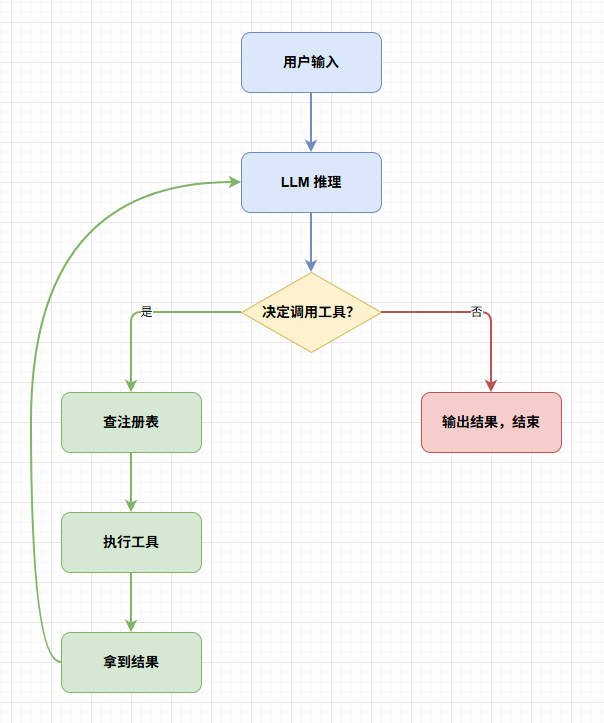
把 dispatch_tool 嵌入循环,代码是这样的:
from anthropic import Anthropic

client = Anthropic()

# 工具定义(给 LLM 看的)
tools_definition = [
    {
        "name": "bash",
        "description": "执行 bash shell 命令",
        "input_schema": {
            "type": "object",
            "properties": {
                "command": {"type": "string", "description": "要执行的命令"}
            },
            "required": ["command"]
        }
    },
    {
        "name": "read_file",
        "description": "读取文件内容",
        "input_schema": {
            "type": "object",
            "properties": {
                "file_path": {"type": "string", "description": "文件路径"}
            },
            "required": ["file_path"]
        }
    }
]

# 工具注册表(给代码用的)
TOOL_REGISTRY = {
    "bash": execute_bash,
    "read_file": read_file,
}

def dispatch_tool(tool_name: str, tool_input: dict) -> str:
    handler = TOOL_REGISTRY.get(tool_name)
    if not handler:
        return f"未知工具:{tool_name}"
    return handler(**tool_input)

# AgentLoop 主循环
def agent_loop(query: str):
    messages = [{"role": "user", "content": query}]

    for turn in range(20):
        resp = client.messages.create(
            model="claude-sonnet-4-20250514",
            messages=messages,
            tools=tools_definition,
            max_tokens=4096,
        )
        messages.append({"role": "assistant", "content": resp.content})

        # 没调工具,任务完成
        if resp.stop_reason != "tool_use":
            break

        # 处理每一个工具调用
        tool_results = []
        for block in resp.content:
            if block.type == "tool_use":
                # 关键:从注册表查找并执行
                output = dispatch_tool(block.name, block.input)
                tool_results.append({
                    "type": "tool_result",
                    "tool_use_id": block.id,
                    "content": output,
                })

        messages.append({"role": "user", "content": tool_results})
流程走一遍:
用户: "帮我看下 test.txt 有没有内容"
    │
    ▼
LLM 第一轮: 调用 read_file(file_path="test.txt")
    │
    ▼
dispatch_tool("read_file", {"file_path": "test.txt"})
  → TOOL_REGISTRY["read_file"]  →  read_file 函数
  → 返回文件内容
    │
    ▼
LLM 第二轮: "文件内容是 xxx"(不调工具,结束)
关键就在 dispatch_tool 这一行。 LLM 不知道 read_file 函数在哪、怎么实现的,它只需要说出工具名。代码端通过注册表查找到对应的函数并执行。两者通过"工具名"这个字符串作为桥梁连接起来。
两层定义的关系
到这里你可能发现了一个问题:工具似乎定义了两遍?tools_definition 里定义了一遍(给 LLM 看的 JSON Schema),TOOL_REGISTRY 里又定义了一遍(给代码用的函数映射)。
确实如此。这两层定义各管各的:
| 层 | 给谁看 | 内容 | 作用 |
|---|---|---|---|
| JSON Schema | LLM | 工具名、描述、参数格式 | 让模型知道有什么工具、怎么用 |
| 注册表 | 代码 | 工具名 → 执行函数 | 让代码知道该调哪个函数 |
它们通过工具名这个字符串关联起来。LLM 输出的 block.name 和注册表的 key 必须一致,否则就查不到。
为什么不能合并成一个?因为 LLM 需要的是描述性的信息(这个工具干什么、参数是什么类型),而代码需要的是可执行的函数引用。两者的格式完全不同,所以必须分开定义。当然,实际框架中会做一些封装让两者保持同步,但从原理上理解,它们就是两个独立的东西。
没有注册表会怎样
你可能会想:不用注册表行不行?直接写一堆 if-else 不也一样?
if tool_name == "bash":
    output = execute_bash(**tool_input)
elif tool_name == "read_file":
    output = read_file(**tool_input)
elif tool_name == "write_file":
    output = write_file(**tool_input)
else:
    output = "未知工具"
能跑,但有几个问题:
扩展性差。 每加一个工具,就得改一次 if-else。工具多了之后,这个函数会变成一坨又长又难维护的面条代码。
注册表的本质是策略模式。 把"选择执行哪个函数"这件事从代码逻辑中剥离出来,变成一张表。新增工具只需要往表里加一行,不需要改执行逻辑。这和我们用字典代替 switch-case 是同一个思路。
| 方式 | 新增工具 | 可维护性 | 可读性 |
|---|---|---|---|
| if-else | 改主逻辑 | 差 | 工具少还行,多了就乱 |
| 注册表 | 加一行 KV | 好 | 清晰,一眼看到所有工具 |
和真实 Agent 框架的对应
Claude Code 的源码里也有类似的结构。它用 TypeScript 写的,但思路一模一样:
工具定义(给 LLM)   →  tools 数组,包含 JSON Schema
工具注册表(给代码)  →  TOOL_HANDLERS 对象,包含执行函数
工具调度器            →  根据 tool_use.name 查找 handler 并执行
你在各种 Agent 框架(LangChain、AutoGPT、Claude Code)里看到的 Tool Use 实现,剥开封装,核心都是这个:一个注册表 + 一个查找执行的过程。
小结
Agent 调用工具的过程,说白了就三步:定义、查找、执行。LLM 负责决定"用什么工具、传什么参数",注册表负责"根据名字找到对应的函数",代码负责"调用函数拿到结果"。三者通过工具名这个字符串串在一起。
从软件工程的角度看,工具注册表就是策略模式的一个简单应用——把"做什么"和"怎么做"解耦,通过一张映射表连接。这个模式在后端开发中随处可见:路由注册、中间件注册、事件监听……Agent 的工具注册表,和 Express 的 app.get('/api', handler) 本质上是同一件事。
理解了工具注册表,你就理解了 Agent 调用工具的全部机制。下次看到 Agent 说"我要调用某某工具"的时候,你就知道它背后发生了什么:查了一张表,调了一个函数,仅此而已。
注:本文参考了 GitHub 开源学习项目:learn-claude-code。这是一个非常优秀的学习资源,推荐读者结合项目内容一同学习。

Agent 垂直技术社区,欢迎活跃、内容共建。
更多推荐
 21
21 0
0- 0


 已为社区贡献2条内容

所有评论(0)