|
# -*- coding: utf-8 -*-
"""
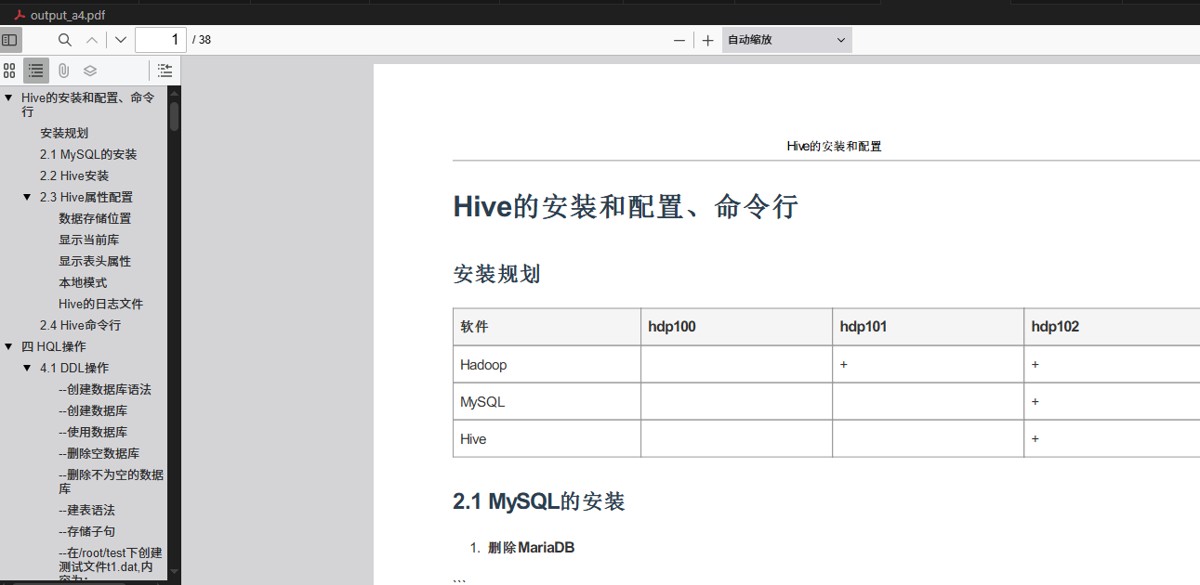
A4 打印友好版 PDF 一键生成脚本(完整版)
功能:
1. 从 md.md 自动生成 PDF
2. 支持中文字体、表格、代码块
3. 带页眉(标题 + 下划线)、页脚(页码 + 上划线)
4. 自动适应 A4 页面,不裁切尾部
5. 自动生成 header.html 和 footer.html
"""
import os
import markdown
import pdfkit
import tempfile
# -------------------------------
# 配置参数(请修改这里)
# -------------------------------
source_md_file = "md.md" # 源 Markdown 文件
output_pdf_file = "output_a4.pdf" # 输出 PDF 文件名
wkhtmltopdf_path = r"C:\Program Files\wkhtmltopdf\bin\wkhtmltopdf.exe" # 修改为你的路径
# 页眉页脚内容
header_title = "Hive的安装和配置" # 页眉标题
footer_text = "第 [page] 页 / 共 [topage] 页" # 页脚页码(wkhtmltopdf 自动替换)
# -------------------------------
# 检查 wkhtmltopdf
# -------------------------------
if not os.path.exists(wkhtmltopdf_path):
print(f"错误:未找到 wkhtmltopdf 可执行文件!")
print(f"请确认路径正确:{wkhtmltopdf_path}")
print("下载地址:https://wkhtmltopdf.org/downloads.html")
exit(1)
# -------------------------------
# 检查 Markdown 文件
# -------------------------------
if not os.path.exists(source_md_file):
print(f"错误:找不到源 Markdown 文件:{source_md_file}")
print("请确保 md.md 与脚本在同一目录")
exit(1)
# -------------------------------
# 读取 Markdown 并转 HTML
# -------------------------------
print("正在读取 Markdown 文件...")
with open(source_md_file, "r", encoding="utf-8") as f:
md_text = f.read()
html_content = markdown.markdown(
md_text,
extensions=["tables", "fenced_code", "nl2br", "toc"]
)
# -------------------------------
# 临时目录:自动生成 header.html 和 footer.html
# -------------------------------
temp_dir = tempfile.mkdtemp(prefix="pdf_gen_")
header_path = os.path.join(temp_dir, "header.html")
footer_path = os.path.join(temp_dir, "footer.html")
# 生成 header.html(带下划线)
header_html = f"""<!DOCTYPE html>
<html><head><meta charset="utf-8"><style>
body {{ margin:0; padding:0; font-family:"Microsoft YaHei","SimSun",sans-serif; font-size:10pt; }}
.c {{ text-align:center; padding:5px 0; }}
.line {{ border-bottom:1px solid #999; margin-top:4px; }}
</style></head><body>
<div class="c">{header_title}</div>
<div class="line"></div>
</body></html>"""
# 生成 footer.html(带上划线)
# 生成 footer.html(带 JS 动态页码)
footer_html = """<!DOCTYPE html>
<html><head><meta charset="utf-8"><style>
body {margin:0;padding:0;font-family:"Microsoft YaHei","SimSun",sans-serif;font-size:10pt;text-align:center;}
.line {border-top:1px solid #999;margin:4px 0;}
</style>
<script>
function subst() {
var vars = {};
location.search.substring(1).split("&").forEach(function(p){
var pair = p.split("="); vars[pair[0]] = decodeURIComponent(pair[1]);
});
return vars;
}
document.addEventListener('DOMContentLoaded', function(){
var v = subst();
var el = document.getElementById('pageInfo');
if(el) el.innerHTML = '第 ' + v.page + ' 页 / 共 ' + v.topage + ' 页';
});
</script>
</head><body>
<div class="line"></div>
<div id="pageInfo" style="padding:5px 0;"></div>
</body></html>"""
with open(header_path, "w", encoding="utf-8") as f:
f.write(header_html)
with open(footer_path, "w", encoding="utf-8") as f:
f.write(footer_html)
print(f"临时页眉页脚已生成:{temp_dir}")
# -------------------------------
# 完整 HTML 页面
# -------------------------------
full_html = f"""<!DOCTYPE html>
<html>
<head>
<meta charset="utf-8">
<title>{header_title}</title>
<style>
@page {{
size: A4;
margin: 27mm 18mm 27mm 18mm; /* 上右下左,为页眉页脚留空间 */
}}
body {{
font-family: "Microsoft YaHei", "SimSun", "Arial", sans-serif;
line-height: 1.7;
margin: 0;
color: #333;
}}
h1, h2, h3, h4 {{ color: #2c3e50; margin-top: 1.2em; page-break-after: avoid; }}
table {{ border-collapse: collapse; width: 100%; margin: 10px 0; page-break-inside: auto; }}
th, td {{ border: 1px solid #999; padding: 8px; text-align: left; }}
th {{ background-color: #f5f5f5; font-weight: bold; }}
pre, code {{
background: #f8f8f8;
border-radius: 4px;
page-break-inside: avoid;
font-family: Consolas, "Courier New", monospace;
}}
pre {{ padding: 12px; overflow: auto; }}
code {{ padding: 2px 6px; font-size: 90%; }}
p, ul, ol, blockquote {{ page-break-inside: avoid; }}
</style>
</head>
<body>
{html_content}
</body>
</html>"""
# -------------------------------
# PDF 配置
# -------------------------------
print("正在配置 PDF 生成参数...")
config = pdfkit.configuration(wkhtmltopdf=wkhtmltopdf_path)
options = {
'page-size': 'A4',
'margin-top': '27mm',
'margin-bottom': '27mm',
'margin-left': '18mm',
'margin-right': '18mm',
'zoom': '0.95',
'encoding': 'UTF-8',
'enable-local-file-access': None,
# 自定义页眉页脚(带线)
'header-html': header_path,
'header-spacing': '5',
'footer-html': footer_path,
'footer-spacing': '5',
# 必须添加以下三行
'enable-javascript': None,
'javascript-delay': '500',
'no-stop-slow-scripts': None,
}
# -------------------------------
# 生成 PDF
# -------------------------------
print("正在生成 PDF,请稍候...")
try:
pdfkit.from_string(
full_html,
output_pdf_file,
configuration=config,
options=options
)
print(f"PDF 生成成功!")
print(f"文件:{os.path.abspath(output_pdf_file)}")
print(f"页眉页脚临时文件可删除:{temp_dir}")
except Exception as e:
print(f"PDF 生成失败:{e}")
exit(1)
# -------------------------------
# 结束提示
# -------------------------------
print("\n" + "="*50)
print("所有任务完成!")
print("1. 打开 output_a4.pdf 即可查看打印效果")
print("2. 支持直接打印,A4 完美适配")
print("3. 页眉有下划线,页脚有上划线,专业美观")
print("="*50)
|

 0
0 0
0


 已为社区贡献7条内容

所有评论(0)