2.13 Python 并发模型:GIL、threading、multiprocessing、asyncio
Python 并发模型:GIL、threading、multiprocessing、asyncio
本文适合谁:有 Java 多线程(ThreadPoolExecutor、CompletableFuture)经验的工程师,想理解 Python 并发模型的开发者。读完本篇,你能为 AI 应用的不同场景选择正确的并发方案。
批量调用 LLM API 是 AI 应用中最常见的性能瓶颈场景之一。假设需要对 1000 条文本并发调用 Embedding API,串行执行需要 500 秒,而正确使用并发后可以压缩到 5 秒以内。但 Python 的并发模型选择不当,可能毫无效果,甚至更慢。
理解 Python 并发的关键,是先理解它的根本限制:GIL。
1.1 Python 的 GIL:为什么多线程跑不了真并行
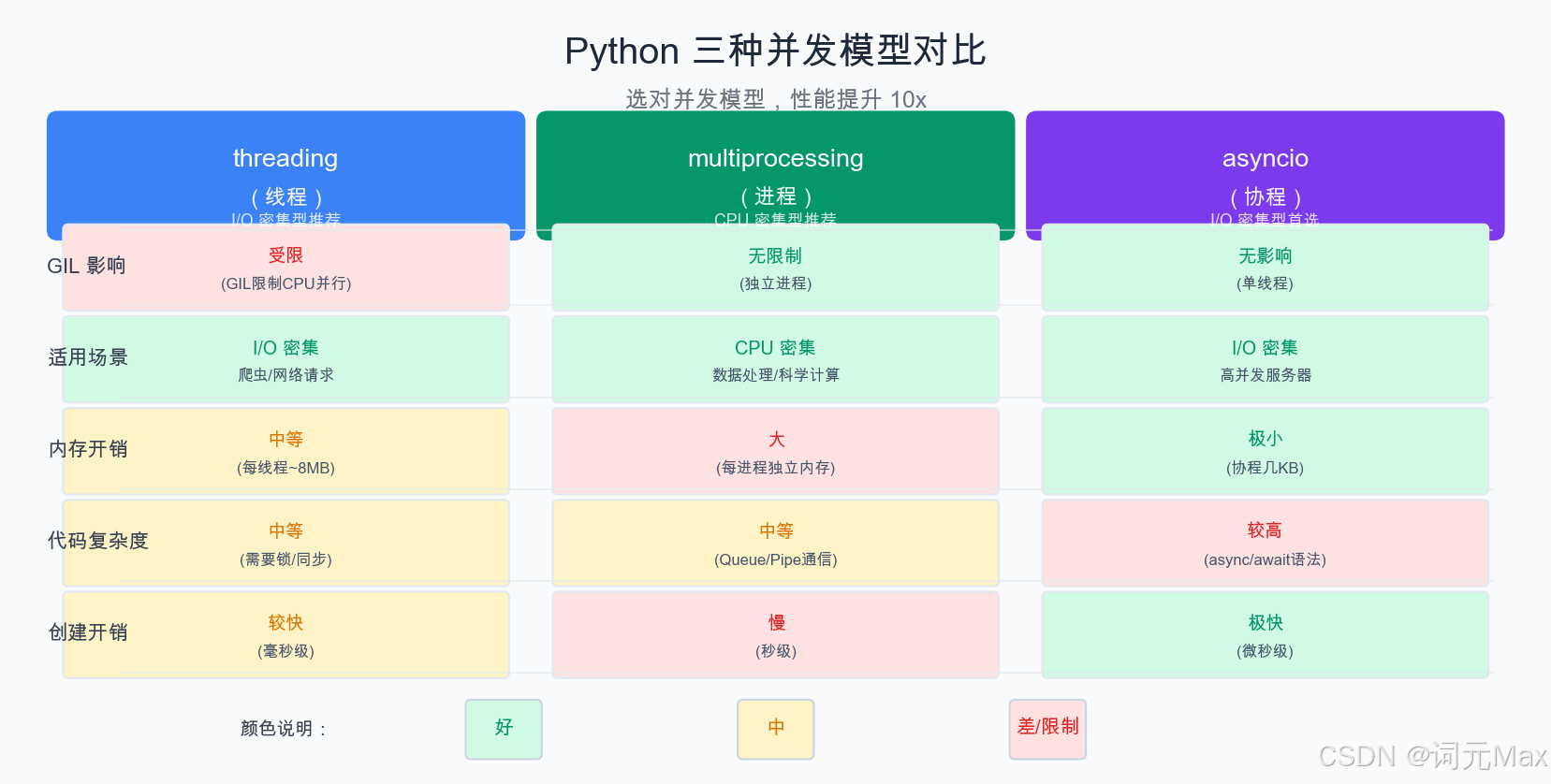
threading、multiprocessing、asyncio 的适用场景与 GIL 影响对比
GIL(Global Interpreter Lock,全局解释器锁)是 CPython(Python 最常用的官方解释器实现)中的一把互斥锁(同一时刻只允许一个线程持有的锁),确保同一时刻只有一个线程在执行 Python 字节码(字节码:Python 源代码被编译后的中间指令,由解释器逐条执行)。
这意味着:即便创建了 8 个线程、运行在 8 核 CPU 上,CPU 密集型任务也无法并行执行——8 个线程轮流持有 GIL,实际上等同于单线程串行。
import threading
import time

def cpu_bound_task(n: int) -> int:
    """CPU 密集型:纯计算,GIL 不会释放"""
    result = 0
    for i in range(n):
        result += i * i
    return result

# 实验:单线程 vs 多线程执行 CPU 密集型任务
N = 10_000_000

start = time.time()
cpu_bound_task(N)
cpu_bound_task(N)
serial_time = time.time() - start

start = time.time()
t1 = threading.Thread(target=cpu_bound_task, args=(N,))
t2 = threading.Thread(target=cpu_bound_task, args=(N,))
t1.start(); t2.start()
t1.join(); t2.join()
thread_time = time.time() - start

print(f"Serial:    {serial_time:.2f}s")
print(f"2 Threads: {thread_time:.2f}s")  # 几乎一样甚至更慢(线程切换开销)
GIL 的例外:当线程执行 IO 操作(网络请求、文件读写、sleep)时,GIL 会被释放。因此多线程对 IO 密集型任务有效——一个线程等待网络响应时,其他线程可以运行。
调用 LLM API 本质上是网络 IO,这正是多线程和 asyncio 在此场景下有效的原因。
1.2 三种并发模型适用场景对照
| 并发模型 | GIL 影响 | 适用场景 | 线程/进程开销 | 通信方式 |
|---|---|---|---|---|
| threading | 受限(IO 任务有效) | IO 密集:LLM API 调用、文件读写 | 低 | 共享内存 |
| multiprocessing | 无限制 | CPU 密集:numpy 计算、数据预处理 | 高 | Queue/Pipe/SharedMemory |
| asyncio | 受限(单线程事件循环) | 大量并发 IO:高并发 API 调用 | 极低 | 协程间直接传递 |
1.3 threading:IO 密集型的简单方案
1.3.1 ThreadPoolExecutor 用法
from concurrent.futures import ThreadPoolExecutor, as_completed
import openai
import time

client = openai.OpenAI()

def call_embedding_api(text: str) -> tuple[str, list[float]]:
    """单次 Embedding API 调用(IO 密集,GIL 在等待时释放)"""
    response = client.embeddings.create(
        input=text,
        model="text-embedding-3-small",
    )
    return text, response.data[0].embedding

def batch_embed_threading(texts: list[str], max_workers: int = 10) -> dict[str, list[float]]:
    """
    使用线程池并发调用 Embedding API。
    max_workers 建议设为 API 并发限制的 70%,避免触发 429(HTTP 状态码 429 Too Many Requests,即请求过于频繁被服务端限流拒绝)。
    """
    results = {}
    errors = []

    with ThreadPoolExecutor(max_workers=max_workers) as executor:
        # submit 返回 Future 对象,as_completed 在任意 Future 完成时触发
        future_to_text = {executor.submit(call_embedding_api, text): text for text in texts}

        for future in as_completed(future_to_text):
            original_text = future_to_text[future]
            try:
                text, embedding = future.result()
                results[text] = embedding
            except Exception as e:
                errors.append((original_text, str(e)))
                print(f"Error embedding '{original_text[:30]}': {e}")

    if errors:
        print(f"Completed with {len(errors)} errors out of {len(texts)} total")

    return results


# 性能测试
texts = [f"Sample text number {i}" for i in range(50)]

start = time.time()
embeddings = batch_embed_threading(texts, max_workers=10)
elapsed = time.time() - start
print(f"Embedded {len(texts)} texts in {elapsed:.2f}s ({len(texts)/elapsed:.1f} texts/s)")
1.3.2 线程安全注意事项
import threading
from collections import defaultdict

# 多线程共享状态需要加锁
class ThreadSafeTokenCounter:
    """线程安全的 token 计数器"""

    def __init__(self):
        self._total = 0
        self._by_model: dict[str, int] = defaultdict(int)
        self._lock = threading.Lock()

    def add(self, model: str, tokens: int) -> None:
        with self._lock:  # 确保原子性更新
            self._total += tokens
            self._by_model[model] += tokens

    @property
    def total(self) -> int:
        with self._lock:
            return self._total

    def get_by_model(self) -> dict[str, int]:
        with self._lock:
            return dict(self._by_model)  # 返回副本,避免外部修改
1.4 multiprocessing:CPU 密集型(数据预处理)
1.4.1 ProcessPoolExecutor 用法
from concurrent.futures import ProcessPoolExecutor
import numpy as np
from typing import Any

def preprocess_document(doc: dict) -> dict:
    """
    CPU 密集型:文本预处理(分词、清洗、特征提取)。
    在独立进程中运行,完全绕过 GIL。
    注意:参数和返回值必须可以被 pickle 序列化(pickle:Python 将对象转换为字节流以便跨进程传输的机制,基本类型、列表、字典等都支持,自定义函数等有限制)。
    """
    import re  # 在子进程中重新导入,避免共享状态问题

    text = doc.get("content", "")

    # 模拟 CPU 密集型操作
    cleaned = re.sub(r"[^\w\s]", " ", text.lower())
    words = cleaned.split()

    # numpy 计算(实际场景可能是向量化、TF-IDF 等)
    word_lengths = np.array([len(w) for w in words])

    return {
        "id": doc["id"],
        "word_count": len(words),
        "avg_word_length": float(word_lengths.mean()) if len(word_lengths) > 0 else 0,
        "unique_words": len(set(words)),
    }

def batch_preprocess_multiprocess(
    documents: list[dict],
    max_workers: int | None = None,  # None = CPU 核心数
) -> list[dict]:
    """使用进程池并行预处理文档"""
    with ProcessPoolExecutor(max_workers=max_workers) as executor:
        results = list(executor.map(preprocess_document, documents))
    return results


# 进程间通信:Queue 和 Pipe
import multiprocessing as mp

def producer(queue: mp.Queue, items: list) -> None:
    """生产者:将数据放入队列"""
    for item in items:
        queue.put(item)
    queue.put(None)  # 哨兵值,通知消费者结束

def consumer(queue: mp.Queue, result_list: list) -> None:
    """消费者:从队列取数据处理"""
    while True:
        item = queue.get()
        if item is None:
            break
        result_list.append(item * 2)  # 示例处理

def run_producer_consumer():
    queue = mp.Queue(maxsize=100)
    manager = mp.Manager()
    results = manager.list()  # 进程间共享的列表

    p_producer = mp.Process(target=producer, args=(queue, list(range(10))))
    p_consumer = mp.Process(target=consumer, args=(queue, results))

    p_producer.start()
    p_consumer.start()
    p_producer.join()
    p_consumer.join()

    return list(results)
1.5 concurrent.futures:统一接口,一行切换
concurrent.futures 提供了 ThreadPoolExecutor 和 ProcessPoolExecutor 的统一接口,切换底层实现只需修改一行:
from concurrent.futures import ThreadPoolExecutor, ProcessPoolExecutor, Executor
from typing import Callable, TypeVar

T = TypeVar("T")
R = TypeVar("R")

def parallel_map(
    func: Callable[[T], R],
    items: list[T],
    max_workers: int = 4,
    use_processes: bool = False,  # True=进程池,False=线程池
) -> list[R]:
    """
    通用并行 map:一行切换线程池和进程池。
    - IO 密集型(LLM API 调用):use_processes=False
    - CPU 密集型(数据预处理):use_processes=True
    """
    ExecutorClass = ProcessPoolExecutor if use_processes else ThreadPoolExecutor

    with ExecutorClass(max_workers=max_workers) as executor:
        return list(executor.map(func, items))

# 使用示例
# IO 密集型:线程池
embeddings = parallel_map(call_embedding_api, texts, max_workers=10, use_processes=False)

# CPU 密集型:进程池
processed = parallel_map(preprocess_document, documents, max_workers=4, use_processes=True)
1.6 asyncio + 线程池:同步代码接入 async 的正确姿势
实际项目中,常遇到需要在 async 函数中调用同步阻塞 API(如旧版 SDK、数据库驱动)的情况。直接调用同步函数会阻塞事件循环,导致整个 async 应用卡住。
正确做法是用 loop.run_in_executor() 将同步调用放到线程池中执行:
import asyncio
from concurrent.futures import ThreadPoolExecutor
import openai

# 同步版 LLM 调用(旧版 SDK 或不支持 async 的库)
sync_client = openai.OpenAI()

def sync_llm_call(prompt: str) -> str:
    """同步阻塞的 LLM 调用"""
    response = sync_client.chat.completions.create(
        model="gpt-4o-mini",
        messages=[{"role": "user", "content": prompt}],
    )
    return response.choices[0].message.content

# 在 async 上下文中调用同步函数的正确方式
async def async_wrapper(prompt: str) -> str:
    """
    用 run_in_executor 将同步调用放到线程池,
    不阻塞事件循环,其他协程可以继续运行。
    """
    loop = asyncio.get_running_loop()  # 在 async 函数内应使用 get_running_loop()
    # None 表示使用默认线程池(也可以传入自定义 ThreadPoolExecutor)
    return await loop.run_in_executor(None, sync_llm_call, prompt)


# 高并发 asyncio 方案(使用原生 async SDK)
async_client = openai.AsyncOpenAI()

async def async_llm_call(prompt: str) -> str:
    """原生异步调用:最高效"""
    response = await async_client.chat.completions.create(
        model="gpt-4o-mini",
        messages=[{"role": "user", "content": prompt}],
    )
    return response.choices[0].message.content

async def batch_llm_asyncio(
    prompts: list[str],
    concurrency_limit: int = 20,
) -> list[str]:
    """
    asyncio 并发调用 LLM API,带并发限制避免触发限流。
    Semaphore(信号量)是 asyncio 的并发控制原语,通过计数器限制同时运行的任务数。
    """
    semaphore = asyncio.Semaphore(concurrency_limit)

    async def limited_call(prompt: str) -> str:
        async with semaphore:
            return await async_llm_call(prompt)

    # asyncio.gather 并发执行所有任务,等待全部完成
    tasks = [limited_call(p) for p in prompts]
    results = await asyncio.gather(*tasks, return_exceptions=True)

    # 处理部分失败
    final_results = []
    for i, result in enumerate(results):
        if isinstance(result, Exception):
            print(f"Task {i} failed: {result}")
            final_results.append(None)
        else:
            final_results.append(result)

    return final_results
1.7 实战对比:批量并发调用 LLM API 的最优方案
以下是三种方案在批量 Embedding API 调用场景下的实测性能对比(50 个请求,模拟 100ms 延迟):
import asyncio
import time
from concurrent.futures import ThreadPoolExecutor
import statistics

# 模拟 LLM API 调用(100ms 延迟)
def mock_sync_api_call(text: str) -> str:
    time.sleep(0.1)
    return f"embedding_for_{text[:10]}"

async def mock_async_api_call(text: str) -> str:
    await asyncio.sleep(0.1)
    return f"embedding_for_{text[:10]}"

texts = [f"document_{i}" for i in range(50)]

# 方案一:串行
start = time.time()
results = [mock_sync_api_call(t) for t in texts]
serial_time = time.time() - start
print(f"Serial:     {serial_time:.2f}s")  # ~5.0s

# 方案二:ThreadPoolExecutor
start = time.time()
with ThreadPoolExecutor(max_workers=10) as ex:
    results = list(ex.map(mock_sync_api_call, texts))
thread_time = time.time() - start
print(f"Threading:  {thread_time:.2f}s")  # ~0.5s(10 workers,50/10=5 批次)

# 方案三:asyncio(原生 async API)
async def run_asyncio():
    sem = asyncio.Semaphore(20)
    async def call(t):
        async with sem:
            return await mock_async_api_call(t)
    return await asyncio.gather(*[call(t) for t in texts])

start = time.time()
asyncio.run(run_asyncio())
async_time = time.time() - start
print(f"asyncio:    {async_time:.2f}s")  # ~0.25s(20 并发,50/20≈2.5 批次)
实测数据汇总:
| 方案 | 50 请求耗时 | 100 请求耗时 | 适用上限 | 代码复杂度 |
|---|---|---|---|---|
| 串行 | ~5.0s | ~10.0s | 极少量 | 极低 |
| ThreadPoolExecutor(10 workers) | ~0.5s | ~1.0s | ~100 并发 | 低 |
| asyncio(20 并发) | ~0.25s | ~0.5s | ~500 并发 | 中 |
| asyncio + run_in_executor(同步 SDK) | ~0.5s | ~1.0s | ~100 并发 | 中 |
选型建议:
- 并发请求数 < 20:
ThreadPoolExecutor,代码简单,性能够用 - 并发请求数 20~200:原生
asyncio(使用支持 async 的 SDK) - 并发请求数 > 200:
asyncio+ 合理的 rate limiting,避免 429 错误 - 有同步阻塞库无法替换:
loop.run_in_executor()桥接
1.8 GIL 的例外:C 扩展库
NumPy、Pandas、PyTorch 等使用 C/C++ 实现的库,在执行 C 代码期间会释放 GIL,因此多线程对这类库也有一定效果,但通常仍不如多进程(进程级别的真并行)。
import numpy as np
from concurrent.futures import ThreadPoolExecutor, ProcessPoolExecutor
import time

def numpy_computation(size: int) -> float:
    """NumPy 操作:C 扩展,GIL 部分释放"""
    arr = np.random.randn(size, size)
    return float(np.linalg.eigvals(arr).real.max())

tasks = [1000] * 4  # 4 个大矩阵特征值计算

# 多线程(NumPy 操作部分绕过 GIL)
start = time.time()
with ThreadPoolExecutor(max_workers=4) as ex:
    results = list(ex.map(numpy_computation, tasks))
thread_time = time.time() - start

# 多进程(完全绕过 GIL)
start = time.time()
with ProcessPoolExecutor(max_workers=4) as ex:
    results = list(ex.map(numpy_computation, tasks))
process_time = time.time() - start

print(f"Threading:   {thread_time:.2f}s")
print(f"Multiprocess:{process_time:.2f}s")
# 对 NumPy 密集型计算,多进程通常比多线程快 20-50%
1.9 小结
Python 并发的选型规则:IO 等待用 asyncio(或 threading),CPU 计算用 multiprocessing。
对 AI 应用而言:并发调用 LLM API 优先用支持 async 的 SDK(openai.AsyncOpenAI)+ asyncio.gather + Semaphore 限流;旧版同步 SDK 用 loop.run_in_executor() 桥接,不要直接在 async 函数中调用同步阻塞 IO;数据预处理管道(分词、清洗)用 ProcessPoolExecutor 充分利用多核;无论哪种方案,都要用 Semaphore 或 max_workers 控制并发上限,避免触发 429。
1.10 AI 应用中并发方案的决策指南
在 AI 应用开发中,面对不同场景,并发方案的选择是高频决策。下面是一个实用的决策框架:
具体场景对应:
| AI 场景 | 推荐方案 | 原因 |
|---|---|---|
| FastAPI 接收多用户并发请求 | asyncio(FastAPI 内置) | 原生支持,不需要额外配置 |
| 批量文档向量化(RAG 建库) | ThreadPoolExecutor(10) |
代码简单,效果好 |
| 批量评估 LLM 输出质量 | asyncio + Semaphore(20) |
高并发,节省时间 |
| 大规模文本清洗(数百万文档) | ProcessPoolExecutor |
CPU 密集,需要多核 |
| 单个请求的 prompt 构建 | 无需并发 | 计算量小,顺序执行即可 |
| LLM 返回后的 JSON 解析 | 无需并发 | CPU 轻量,顺序执行 |
1.11 小结
| 并发模型 | 关键字/类 | 适用 AI 场景 | 与 Java 对比 |
|---|---|---|---|
| asyncio | async/await, asyncio.gather |
LLM API 调用、FastAPI 服务 | CompletableFuture(但单线程) |
| threading | ThreadPoolExecutor |
批量 Embedding、轻量并发 | ThreadPoolExecutor |
| multiprocessing | ProcessPoolExecutor |
文档预处理、数据清洗 | ForkJoinPool |
| 向量化(numpy) | @, np.dot |
向量相似度计算 | Java Stream 并行流 |
选型口诀:等网络用 asyncio,算数据用进程,简单并发用线程,矩阵运算用 numpy。

Agent 垂直技术社区,欢迎活跃、内容共建。
更多推荐



 6
6 0
0- 0


 已为社区贡献5条内容

所有评论(0)