Python实现sql列级血缘解析
·
数据治理工作中需要明确数据库各个层级间的字段对应关系,尝试用python sqllineage包处理获得列级别的血缘关系
代码如下:
# -*- coding: utf-8 -*-
# author: zs

from sqllineage.runner import LineageRunner
import pandas as pd
from datetime import datetime
import os
import re
import sqlparse


def write_lineage_to_excel(lineage_list, excel_path, sql_source=None, sheet_name='Sheet1'):
    """
    将列级血缘列表写入 Excel 文件(增量追加)

    参数:
        lineage_list: sqllineage 返回的列级血缘列表(get_column_lineage() 的结果)
        excel_path:   Excel 文件路径
        sql_source:   可选,标识 SQL 来源(如文件名或 SQL 摘要),将作为一列记录
        sheet_name:   工作表名称,默认 'Sheet1'
    """
    # 构建新数据行列表
    new_rows = []
    for lineage in lineage_list:
        upstream_cols = lineage[:-1]  # 上游列(可能多个)
        downstream_col = lineage[-1]  # 下游列

        # 将多个上游列合并为一个字符串,用分号分隔
        upstream_str = '; '.join([str(col) for col in upstream_cols])
        downstream_str = str(downstream_col)

        new_rows.append({
            'source_columns': upstream_str,
            'target_column': downstream_str,
            'sql_source': sql_source if sql_source else '',
            'timestamp': datetime.now().strftime('%Y-%m-%d %H:%M:%S')
        })

    if not new_rows:
        print("没有血缘数据可写入")
        return

    new_df = pd.DataFrame(new_rows)

    # 判断文件是否存在,执行增量写入或新建
    if os.path.isfile(excel_path):
        # 文件已存在:读取原有数据,追加新数据
        try:
            existing_df = pd.read_excel(excel_path, sheet_name=sheet_name, engine='openpyxl')
            # 合并新旧数据(保留所有行,如需去重可添加 drop_duplicates)
            combined_df = pd.concat([existing_df, new_df], ignore_index=True)
            # 可选:根据指定列去重(例如去除完全相同的血缘记录)
            combined_df.drop_duplicates(subset=['source_columns','target_column','sql_source'], keep='last', inplace=True)
        except Exception as e:
            print(f"读取现有 Excel 文件失败,将新建文件:{e}")
            combined_df = new_df
    else:
        # 文件不存在:直接使用新数据
        combined_df = new_df

    # 写入 Excel(使用 openpyxl 引擎支持 .xlsx)
    with pd.ExcelWriter(excel_path, engine='openpyxl', mode='w') as writer:
        combined_df.to_excel(writer, sheet_name=sheet_name, index=False)
    print(f"血缘结果已写入 {excel_path},共 {len(combined_df)} 行(新增 {len(new_rows)} 行)")


def remove_sql_comments_sqlparse(sql):
    """
    使用 sqlparse 去除 SQL 中的注释,保留字符串内容。
    需要安装:pip install sqlparse
    """
    # 解析 SQL 并格式化(strip_comments=True 会移除注释)
    formatted = sqlparse.format(sql, strip_comments=True)
    # 可选:去除多余空行
    return '\n'.join(line for line in formatted.splitlines() if line.strip())


# ========== 主程序示例 ==========
if __name__ == "__main__":
    # 待解析的 SQL(可改为读取文件)
    sql_text_source = """
    INSERT INTO dws.sales_summary (product_id, total_amount, sale_date)
    SELECT
        product_id,
        SUM(amount) AS total_amount,
        DATE(order_time) AS sale_date
    FROM ods.orders
    WHERE status = 'completed'
    GROUP BY product_id, DATE(order_time);
    """

    # 写入 Excel 路径/文件名
    excel_file = r"D:\JetBrains\PyCharm_project\column_lineage.xlsx"

    # 处理读取的SQL去掉注释
    sql_text = remove_sql_comments_sqlparse(sql_text_source)

    # 正则表达式模式:
    #   insert into   - 字面匹配,不区分大小写(通过 re.IGNORECASE)
    #   .*?           - 非贪婪匹配任意字符(包括换行,因为使用了 re.DOTALL),直到第一个分号
    #   ;             - 字面分号
    pattern = r'insert into.*?;'

    # 使用 re.findall 查找所有匹配
    # flags:
    #   re.IGNORECASE - 忽略大小写,匹配 INSERT INTO、Insert Into 等
    #   re.DOTALL     - 让点号(.)匹配包括换行符在内的任意字符,实现跨行匹配
    matches = re.findall(pattern, sql_text, flags=re.IGNORECASE | re.DOTALL)

    for sql in matches:
        # 1. 解析列级血缘
        #   可选的 dialect 参数指定 SQL 方言,如 'hive', 'sparksql', 'mysql' 等,默认为 'ansi'
        runner = LineageRunner(sql, dialect='ansi')
        column_lineages = runner.get_column_lineage()

        # 2. 打印到控制台
        print("列级血缘解析结果:")
        for lineage in column_lineages:
            upstream = ', '.join([str(col) for col in lineage[:-1]])
            downstream = str(lineage[-1])
            print(f"下游列: {downstream}  <--  上游列: {upstream}")

        # 3. 写入 Excel(增量追加)
        # sql_source 可传入 SQL 文件路径或标识,这里用固定字符串示例
        write_lineage_to_excel(column_lineages, excel_file, sql_source="example_query.sql")

    print("处理完成")
简单测试后效果看着还是可以的
excel结果:

之后进行复杂一点的sql测试发现一下问题:
1.对于嵌套2层以上子查询的表,源头表名没有拿到只拿到了表别名
2.对于子查询是select * 的写法无法获取到表名只拿到了表别名
3.对于只拿到表别名的字段还需要返回sql语句确认是哪张表,但是在复杂嵌套sql里可能有多个相同的别名
注意:主要的解析逻辑只能一次处理一段insert into逻辑 所以本逻辑里先把SQL文件读取后用正则提取每一段insert into逻辑(提取insert into逻辑是以insert into为开头;为结尾的,如果SQL不加;会获取不到)
添加读取指定文件夹内的所有文件遍历处理
# -*- coding: utf-8 -*-
# author: zs

from sqllineage.runner import LineageRunner
import pandas as pd
from datetime import datetime
import os
import re
import sqlparse
from pathlib import Path


def write_lineage_to_excel(lineage_list, excel_path, sql_source=None, sheet_name='Sheet1'):
    """
    将列级血缘列表写入 Excel 文件(增量追加)

    参数:
        lineage_list: sqllineage 返回的列级血缘列表(get_column_lineage() 的结果)
        excel_path:   Excel 文件路径
        sql_source:   可选,标识 SQL 来源(如文件名或 SQL 摘要),将作为一列记录
        sheet_name:   工作表名称,默认 'Sheet1'
    """
    # 构建新数据行列表
    new_rows = []
    for lineage in lineage_list:
        upstream_cols = lineage[:-1]  # 上游列(可能多个)
        downstream_col = lineage[-1]  # 下游列

        # 将多个上游列合并为一个字符串,用分号分隔
        upstream_str = '; '.join([str(col) for col in upstream_cols])
        downstream_str = str(downstream_col)

        new_rows.append({
            'source_columns': upstream_str,
            'target_column': downstream_str,
            'sql_source': sql_source if sql_source else '',
            'timestamp': datetime.now().strftime('%Y-%m-%d %H:%M:%S')
        })

    if not new_rows:
        print("没有血缘数据可写入")
        return

    new_df = pd.DataFrame(new_rows)

    # 判断文件是否存在,执行增量写入或新建
    if os.path.isfile(excel_path):
        # 文件已存在:读取原有数据,追加新数据
        try:
            existing_df = pd.read_excel(excel_path, sheet_name=sheet_name, engine='openpyxl')
            # 合并新旧数据(保留所有行,如需去重可添加 drop_duplicates)
            combined_df = pd.concat([existing_df, new_df], ignore_index=True)
            # 可选:根据指定列去重(例如去除完全相同的血缘记录)
            combined_df.drop_duplicates(subset=['source_columns','target_column','sql_source'], keep='last', inplace=True)
        except Exception as e:
            print(f"读取现有 Excel 文件失败,将新建文件:{e}")
            combined_df = new_df
    else:
        # 文件不存在:直接使用新数据
        combined_df = new_df

    # 写入 Excel(使用 openpyxl 引擎支持 .xlsx)
    with pd.ExcelWriter(excel_path, engine='openpyxl', mode='w') as writer:
        combined_df.to_excel(writer, sheet_name=sheet_name, index=False)
    print(f"血缘结果已写入 {excel_path},共 {len(combined_df)} 行(新增 {len(new_rows)} 行)")


def remove_sql_comments_sqlparse(sql):
    """
    使用 sqlparse 去除 SQL 中的注释,保留字符串内容。
    需要安装:pip install sqlparse
    """
    # 解析 SQL 并格式化(strip_comments=True 会移除注释)
    formatted = sqlparse.format(sql, strip_comments=True)
    # 可选:去除多余空行
    return '\n'.join(line for line in formatted.splitlines() if line.strip())


def read_all_files_in_directory(directory_path, file_extension=None, encoding='utf-8'):
    """
    读取指定目录下所有文件的内容(可选按扩展名过滤)

    参数:
        directory_path : str 或 Path - 要读取的目录路径
        file_extension : str, 可选 - 如果提供,只读取该扩展名的文件(如 '.txt')
        encoding       : str - 文件编码,默认 utf-8

    返回:
        一个字典,键为文件名,值为文件内容(字符串)
    """
    # 将路径转换为Path对象以便操作
    base_path = Path(directory_path)

    # 检查目录是否存在
    if not base_path.exists():
        raise FileNotFoundError(f"目录不存在: {directory_path}")
    if not base_path.is_dir():
        raise NotADirectoryError(f"路径不是目录: {directory_path}")

    # 存储文件名和内容的字典
    files_content = {}

    # 遍历目录中的条目
    for item in base_path.iterdir():
        # 只处理文件,跳过子目录
        if item.is_file():
            # 如果指定了扩展名,检查是否匹配
            if file_extension and item.suffix.lower() != file_extension.lower():
                continue

            try:
                # 方法1:一次性读取整个文件内容(适合小文件)
                with open(item, 'r', encoding=encoding) as f:
                    content = f.read()

                # 方法2:如果需要逐行处理,可以使用以下循环(注释掉上面,改用下面)
                # content_lines = []
                # with open(item, 'r', encoding=encoding) as f:
                #     for line in f:
                #         # 对每一行进行处理(例如去除首尾空白)
                #         line = line.strip()
                #         if line:  # 只保留非空行
                #             content_lines.append(line)
                # content = '\n'.join(content_lines)

                files_content[item.name] = content
                print(f"成功读取: {item.name}")
            except Exception as e:
                print(f"读取文件 {item.name} 时出错: {e}")
                files_content[item.name] = None  # 或根据需要跳过

    return files_content


# ========== 主程序示例 ==========
if __name__ == "__main__":

    directory = r"D:\JetBrains\PyCharm_project\pythonProject\sql_texts"  # 替换为你的目录路径

    # 读取所有文件 (不限制扩展名)
    all_files = read_all_files_in_directory(directory)
    # 可选:只读取 .txt 文件
    # txt_files = read_all_files_in_directory(directory, file_extension='.txt')
    # print(f"读取了 {len(txt_files)} 个 .txt 文件")

    # 写入 Excel 路径/文件名
    excel_file = r"D:\JetBrains\PyCharm_project\column_lineage.xlsx"

    for filename, content in all_files.items():
        if content is not None:
            print(f"\n--- {filename}  ---")
            # 处理读取的SQL去掉注释
            sql_text = remove_sql_comments_sqlparse(content)

            # 正则表达式模式:
            #   insert into   - 字面匹配,不区分大小写(通过 re.IGNORECASE)
            #   .*?           - 非贪婪匹配任意字符(包括换行,因为使用了 re.DOTALL),直到第一个分号
            #   ;             - 字面分号
            pattern = r'insert into.*?;'

            # 使用 re.findall 查找所有匹配
            # flags:
            #   re.IGNORECASE - 忽略大小写,匹配 INSERT INTO、Insert Into 等
            #   re.DOTALL     - 让点号(.)匹配包括换行符在内的任意字符,实现跨行匹配
            matches = re.findall(pattern, sql_text, flags=re.IGNORECASE | re.DOTALL)

            for sql in matches:
                # 1. 解析列级血缘
                #   可选的 dialect 参数指定 SQL 方言,如 'hive', 'sparksql', 'mysql' 等,默认为 'ansi'
                runner = LineageRunner(sql, dialect='ansi')
                column_lineages = runner.get_column_lineage()

                # 2. 打印到控制台
                print("列级血缘解析结果:")
                for lineage in column_lineages:
                    upstream = ', '.join([str(col) for col in lineage[:-1]])
                    downstream = str(lineage[-1])
                    print(f"下游列: {downstream}  <--  上游列: {upstream}")

                # 3. 写入 Excel(增量追加)
                # sql_source 可传入 SQL 文件路径或标识,这里用固定字符串示例
                write_lineage_to_excel(column_lineages, excel_file, filename)
        else:
            print(f"\n--- {filename} 读取失败 ---")

    print("处理完成")
路径D:\JetBrains\PyCharm_project\pythonProject\sql_texts下文件如图:

运行结果:
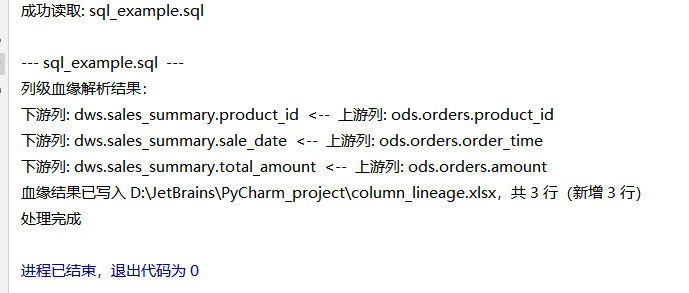
excel文件内容:


Agent 垂直技术社区,欢迎活跃、内容共建。
更多推荐


 0
0 0
0- 0


 已为社区贡献1条内容

所有评论(0)