精准语义+高保真!智谱开源首个工业级图像生成模型GLM-Image:海报、PPT、科普图生成轻松搞定
·
GLM-Image 是一种图像生成模型,采用混合自回归+扩散解码器架构。
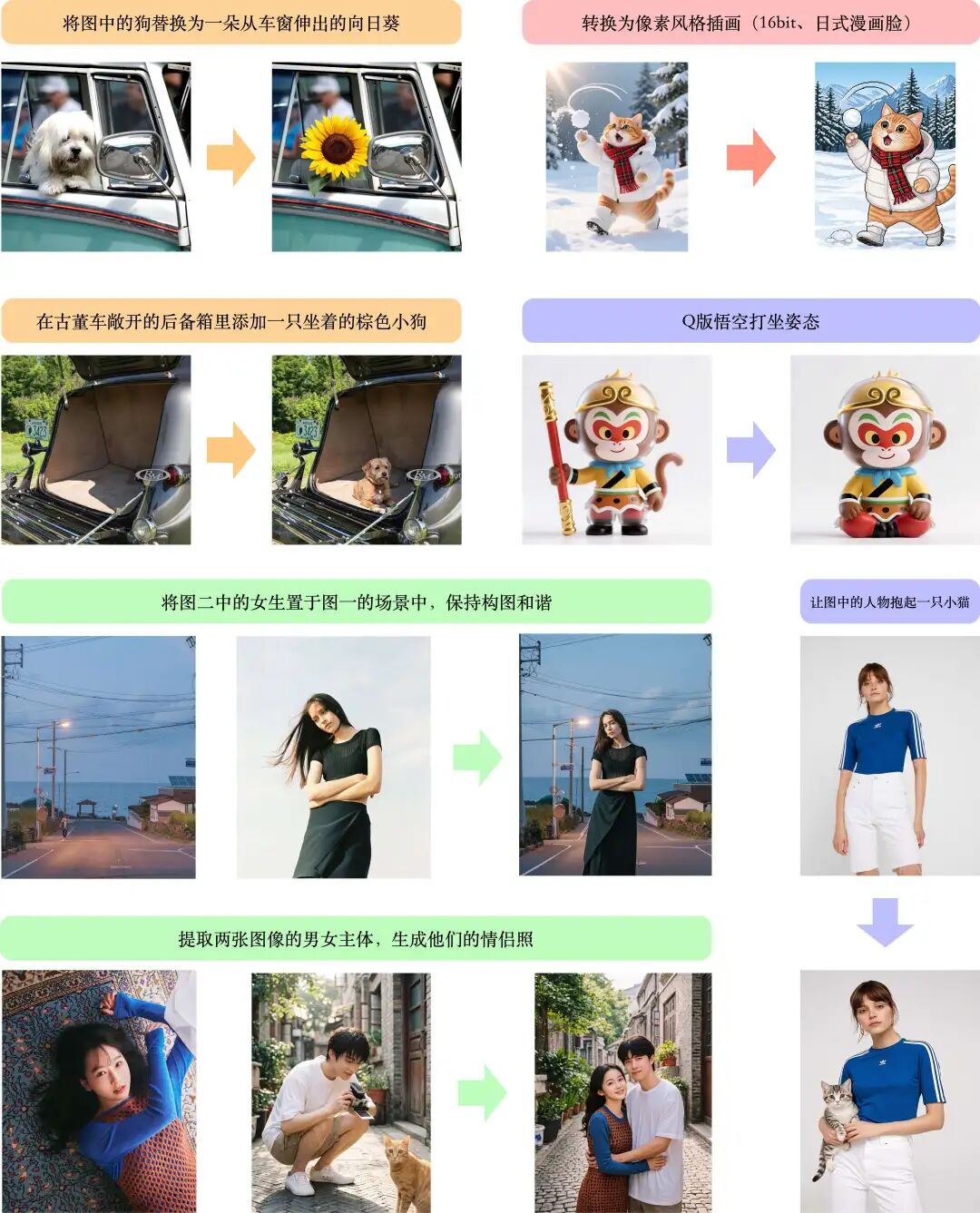
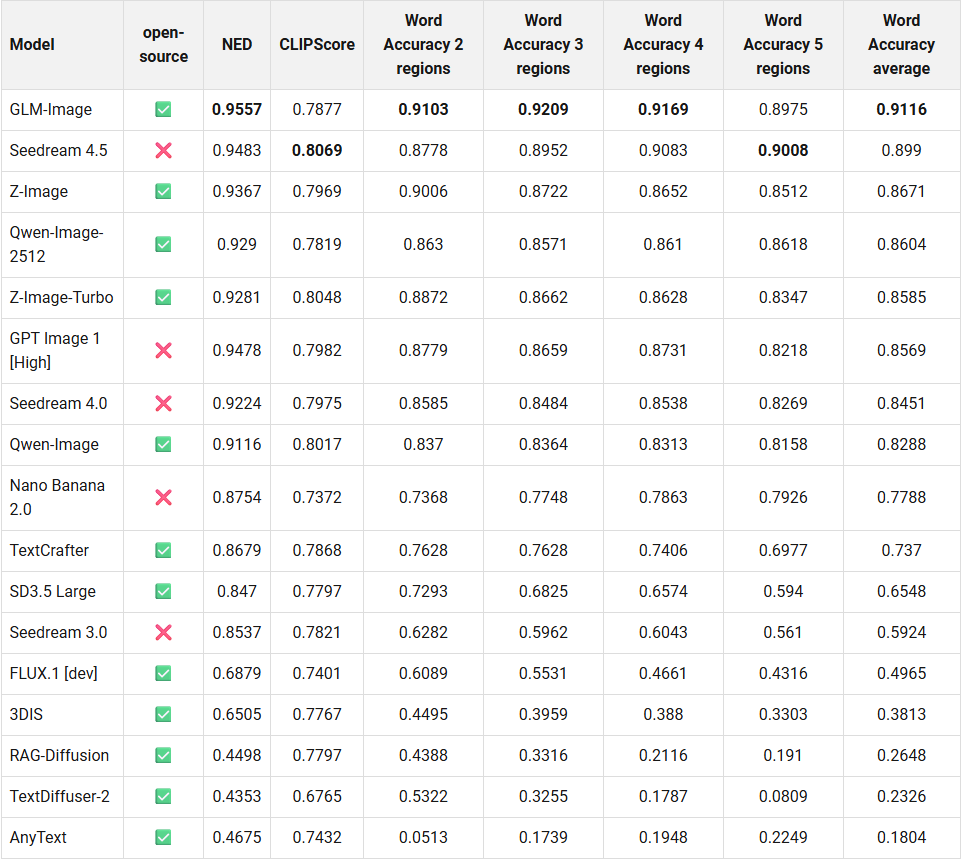
近日,智谱开源了首个工业级离散自回归图像生成模型 GLM-Image,GLM-Image 采用混合架构,将自回归模块与扩散解码器相结合。自回归部分部分基于 GLM-4-9B-0414 并由其初始化,该模型拥有 90 亿个参数;而扩散解码器则遵循 CogView4 的思路,采用单流 DiT 结构,拥有 70 亿个参数。在整体图像生成质量方面,GLM-Image 与主流的潜在扩散方法相符,但在文本渲染和知识密集型生成场景中展现出显著优势。它在需要精确语义理解和复杂信息表达的任务中表现尤为出色,同时保持了高保真度和细粒度细节生成的强大能力。除了文本到图像的生成之外,GLM-Image 还支持丰富的图像到图像任务,包括图像编辑、风格迁移、身份保持生成和多主体一致性等。
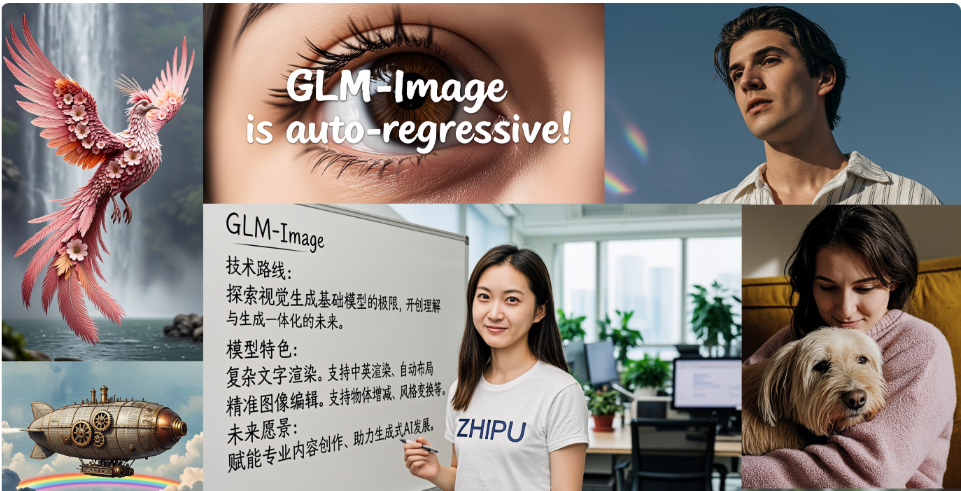
效果展示
文生图
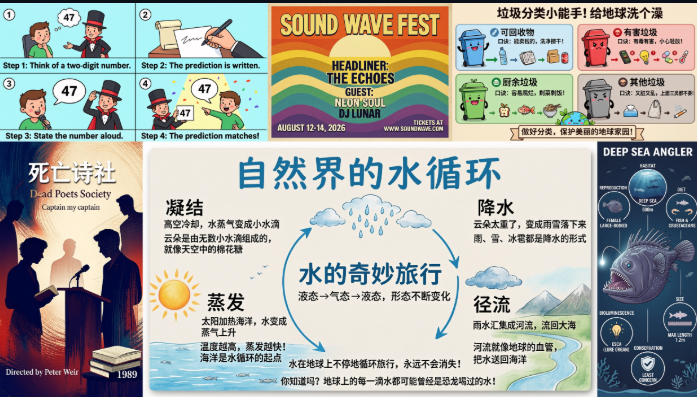
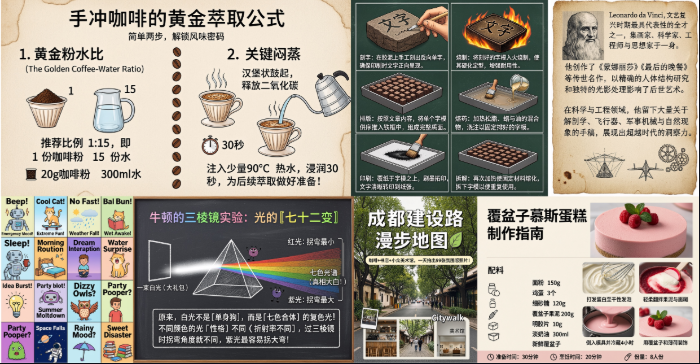
图生图
相关链接
- 博客:https://docs.z.ai/guides/image/glm-image
- 主页:https://z.ai/blog/glm-image
- 模型:
- https://modelscope.cn/models/ZhipuAI/GLM-Image
- https://huggingface.co/zai-org/GLM-Image
介绍
GLM-Image 是一种图像生成模型,采用混合自回归+扩散解码器架构。在整体图像生成质量方面,GLM-Image 与主流的潜在扩散方法相符,但在文本渲染和知识密集型生成场景中展现出显著优势。它在需要精确语义理解和复杂信息表达的任务中表现尤为出色,同时保持了高保真度和细粒度细节生成的强大能力。除了文本到图像的生成之外,GLM-Image 还支持丰富的图像到图像任务,包括图像编辑、风格迁移、身份保持生成和多主体一致性等。
方法概述
- 模型架构:混合自回归+扩散解码器设计。
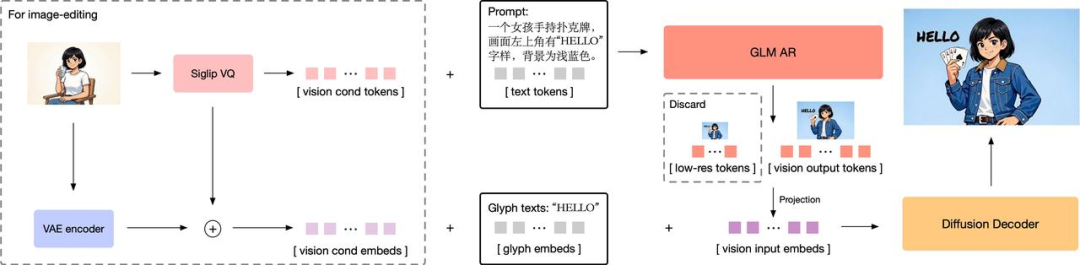
- 自回归生成器:一个基于GLM-4-9B-0414初始化的 9B 参数模型,并扩展了词汇表以包含视觉标记。该模型首先生成约 256 个标记的紧凑编码,然后扩展到 1K 至 4K 个标记,对应于 1K 至 2K 的高分辨率图像输出。
- 扩散解码器:一种基于单流 DiT 架构的 7B 参数解码器,用于潜在空间图像解码。它配备了字形编码器文本模块,显著提高了图像中文本的渲染精度。
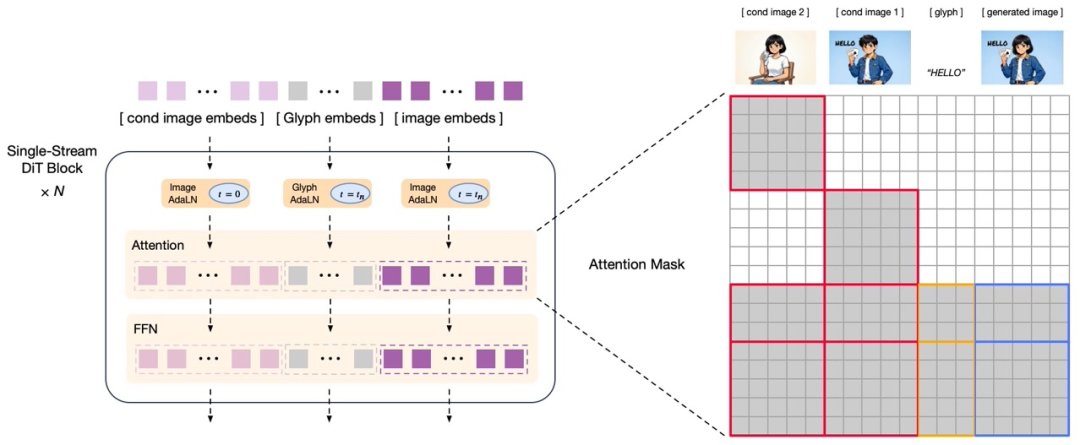
- 训练后采用解耦强化学习:该模型引入了使用 GRPO 算法的细粒度模块化反馈策略,从而显著提高了语义理解和视觉细节质量。
- 自回归模块:提供低频反馈信号,侧重于美学和语义一致性,从而提高指令遵循性和艺术表现力。
- 解码器模块:提供高频反馈,以提高细节保真度和文本准确性,从而实现高度逼真的纹理以及更精确的文本渲染。
GLM-Image 支持在单个模型中同时生成文本到图像和图像到图像。
- 文本转图像:根据文本描述生成高细节图像,在信息密集的场景中表现尤为出色。
- 图像到图像:支持多种任务,包括图像编辑、风格迁移、多主体一致性以及人物和物体的身份保留生成。
评估指标
文本渲染基准测试
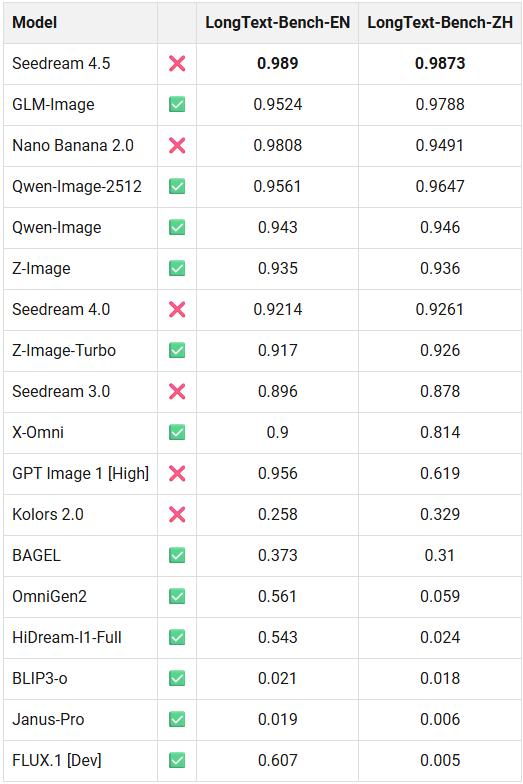
长文本基准测试
快速入门
pip install git+https://github.com/huggingface/transformers.git
pip install git+https://github.com/huggingface/diffusers.git
文本转图像生成
import torch
from diffusers.pipelines.glm_image import GlmImagePipeline

pipe = GlmImagePipeline.from_pretrained("zai-org/GLM-Image", torch_dtype=torch.bfloat16, device_map="cuda")
prompt = "A beautifully designed modern food magazine style dessert recipe illustration, themed around a raspberry mousse cake. The overall layout is clean and bright, divided into four main areas: the top left features a bold black title 'Raspberry Mousse Cake Recipe Guide', with a soft-lit close-up photo of the finished cake on the right, showcasing a light pink cake adorned with fresh raspberries and mint leaves; the bottom left contains an ingredient list section, titled 'Ingredients' in a simple font, listing 'Flour 150g', 'Eggs 3', 'Sugar 120g', 'Raspberry puree 200g', 'Gelatin sheets 10g', 'Whipping cream 300ml', and 'Fresh raspberries', each accompanied by minimalist line icons (like a flour bag, eggs, sugar jar, etc.); the bottom right displays four equally sized step boxes, each containing high-definition macro photos and corresponding instructions, arranged from top to bottom as follows: Step 1 shows a whisk whipping white foam (with the instruction 'Whip egg whites to stiff peaks'), Step 2 shows a red-and-white mixture being folded with a spatula (with the instruction 'Gently fold in the puree and batter'), Step 3 shows pink liquid being poured into a round mold (with the instruction 'Pour into mold and chill for 4 hours'), Step 4 shows the finished cake decorated with raspberries and mint leaves (with the instruction 'Decorate with raspberries and mint'); a light brown information bar runs along the bottom edge, with icons on the left representing 'Preparation time: 30 minutes', 'Cooking time: 20 minutes', and 'Servings: 8'. The overall color scheme is dominated by creamy white and light pink, with a subtle paper texture in the background, featuring compact and orderly text and image layout with clear information hierarchy."
image = pipe(
    prompt=prompt,
    height=32 * 32,
    width=36 * 32,
    num_inference_steps=50,
    guidance_scale=1.5,
    generator=torch.Generator(device="cuda").manual_seed(42),
).images[0]

image.save("output_t2i.png")
图生图
import torch
from diffusers.pipelines.glm_image import GlmImagePipeline
from PIL import Image

pipe = GlmImagePipeline.from_pretrained("zai-org/GLM-Image", torch_dtype=torch.bfloat16, device_map="cuda")
image_path = "cond.jpg"
prompt = "Replace the background of the snow forest with an underground station featuring an automatic escalator."
image = Image.open(image_path).convert("RGB")
image = pipe(
    prompt=prompt,
    image=[image],  # can input multiple images for multi-image-to-image generation such as [image, image1]
    height=33 * 32, # Must set height even it is same as input image
    width=32 * 32, # Must set width even it is same as input image
    num_inference_steps=50,
    guidance_scale=1.5,
    generator=torch.Generator(device="cuda").manual_seed(42),
).images[0]

image.save("output_i2i.png")
Agent 垂直技术社区,欢迎活跃、内容共建。
更多推荐
 6
6 0
0- 0


 已为社区贡献62条内容

所有评论(0)