【个人学习||agent底层】01创建基础的发送和模型建立联系
·
创建基础的发送
agent的模型一般大都由服务商提供,而agent功能是让本机和服务商的模型建立联系,因此第一步是简单的建立联系
本文以deepseek为例
https://api-docs.deepseek.com/zh-cn/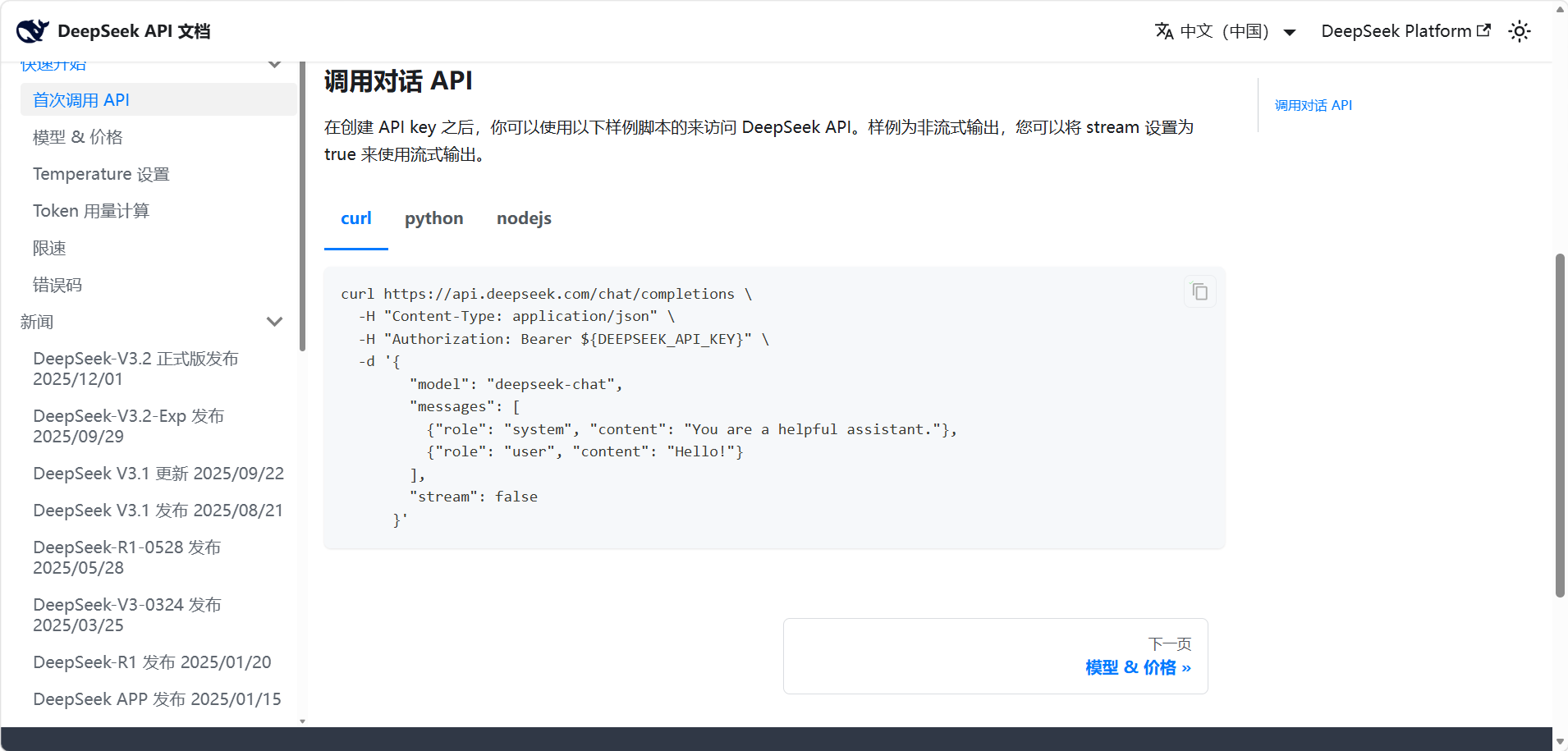
也就是说我们发送的http应该和他要求的一样
Maven依赖
jackson
<dependency>
    <groupId>com.fasterxml.jackson.core</groupId>
    <artifactId>jackson-databind</artifactId>
    <version>2.18.2</version>
</dependency>
代码编写
思路
java代码需要转为http,发给服务商,再把服务商返回的转回java代码
需要ObjectMapper mapper,实现java和json的转换
需要HttpClient httpClient,实现http的收发
deepseek为例,官方文档要求定义key,mode,url
public class DPAgent {

    public static final String API_KEY = "sk-";
    public static final String API_URL = "https://api.deepseek.com/v1/chat/completions";
    public static final String MODEL = "deepseek-chat";

    //jackson的类,将java代码转为json和把jso解析为java
    private static final ObjectMapper mapper = new ObjectMapper();
    //http发送器
    private static final HttpClient httpClient = HttpClient.newHttpClient();
    //字符串构建
    static final StringBuilder stringBu = new StringBuilder();
}
定义主函数,用来接受终端的用户输入
    public static void main(String[] args) throws Exception {
        while (true) {
            Scanner input = new Scanner(System.in);
            System.out.print("我: ");
            String Prompt = input.nextLine();
            DPAgent.chat(Prompt);
        }
    }
    //发送函数
    public static void chat(String Prompt) throws Exception {
        String input = """
                用户问题:%s
                规则:对话形式回答简洁明了步捏找数据
                """.formatted(Prompt);

        //放入字符串构建器
        stringBu.append(input);

        //用Map创建http请求
        Map<String, Object> body = new HashMap<>();
        body.put("model", MODEL);
        body.put("messages",
                new Object[]{
                        Map.of(
                                "role", "user",
                                "content", stringBu.toString())
                }
        );
        body.put("temperature", 0.1);


        //用 ObjectMapper  把Map 转成json格式的字符串
        String json = mapper.writeValueAsString(body);

        //创建Http请求对象
        HttpRequest request = HttpRequest.newBuilder()
                .uri(URI.create(API_URL))
                .header("Authorization", "Bearer " + API_KEY)
                .header("Content-Type", "application/json")
                .POST(HttpRequest.BodyPublishers.ofString(json))
                .build();

        // 用HttpClient 发送请求对象,并且得到响应对象
        HttpResponse<String> resp = httpClient.send(request,
                HttpResponse.BodyHandlers.ofString());

        //输出结果
        System.out.println(resp.body());

    }
总代码
public class DPAgent {
    public static final String API_KEY = "sk-";
    public static final String API_URL = "https://api.deepseek.com/v1/chat/completions";
    public static final String MODEL = "deepseek-chat";

    private static final ObjectMapper mapper = new ObjectMapper();
    private static final HttpClient httpClient = HttpClient.newHttpClient();
    static final StringBuilder stringBu = new StringBuilder();

    public static void main(String[] args) throws Exception {
        while (true) {
            Scanner input = new Scanner(System.in);
            System.out.print("我: ");
            String Prompt = input.nextLine();
            DPAgent.chat(Prompt);
        }
    }

    public static void chat(String Prompt) throws Exception {
        String input = """
                用户问题:%s
                规则:对话形式回答简洁明了步捏找数据
                """.formatted(Prompt);

        stringBu.append(input);

        //创建http请求
        Map<String, Object> body = new HashMap<>();
        body.put("model", MODEL);
        body.put("messages",
                new Object[]{
                        Map.of(
                                "role", "user",
                                "content", stringBu.toString())
                }
        );
        body.put("temperature", 0.1);
        //用 ObjectMapper  把Map 转成json格式的字符串
        String json = mapper.writeValueAsString(body);
        //创建Http请求对象(和文档匹配)
        HttpRequest request = HttpRequest.newBuilder()
                .uri(URI.create(API_URL))
                .header("Authorization", "Bearer " + API_KEY)
                .header("Content-Type", "application/json")
                .POST(HttpRequest.BodyPublishers.ofString(json))
                .build();

        // 用HttpClient 发送请求对象,并且得到响应对象
        HttpResponse<String> resp = httpClient.send(request,
                HttpResponse.BodyHandlers.ofString());
        System.out.println(resp.body());

    }
}
最终结果


Agent 垂直技术社区,欢迎活跃、内容共建。
更多推荐


 0
0 0
0- 0


 已为社区贡献3条内容

所有评论(0)