大模型测试方法
前言
随着这几年大模型的发展,笔者旁边越来越多的AI从业者承认(笔者从很久前就承认了) 做好大模型只属于极少数 大脑算力超标的人的工作。对于更多的人,最重要的是关注如何把大模型用好。
而用好大模型的一个前提是,掌握对于大模型的测试方法。本文会侧重于记录业界主流的 对于大模型推理服务的 测试方法。
vLLM benchmarks.serve
vllm是目前市占率最高的开源大模型推理引擎, benchmarks.serve是 vLLM 官方自带的性能基准测试工具,专门用来测试 vLLM 推理服务的吞吐量、延迟、并发能力。关键指标有:
-
吞吐:
req/s(每秒请求数)、token/s(每秒生成 tokens) -
延迟:
-
TTFT(Time To First Token): 首字延迟(用户感知最关键)
-
TPOT (Time Per Output Token) : 每生成token耗时
-
ITL(Inter Token Latency): token间延迟
-
P95/P99 尾延迟:极端情况表现(决定用户体验下限)
-
调用示例如下:
# 最大输入token为1024,最大输出token为1024,并发数为26
# vllm bench serve \
    --backend openai-chat \
    --base-url http://100.124.110.110:8008 \
    --endpoint /v1/chat/completions \
    --dataset-name random \
    --model test \
    --tokenizer /data/Qwen/Qwen3.5-397B-A17B-w8a8-mtp/Qwen3.5-397B-A17B-w8a8-mtp/ \
    --seed 1024 \
    --random-input-len 1024 \
    --random-output-len 1024 \
    --num-prompts 104 \
    --max-concurrency 26 \
    --request-rate inf \
    --metric-percentiles 95,99 \
    --trust-remote-code \
    --save-result \
    --result-filename /workspace/bench_1k1k_concurrency26.json
INFO 04-03 02:36:14 [__init__.py:44] Available plugins for group vllm.platform_plugins:
INFO 04-03 02:36:14 [__init__.py:46] - ascend -> vllm_ascend:register
INFO 04-03 02:36:14 [__init__.py:49] All plugins in this group will be loaded. Set `VLLM_PLUGINS` to control which plugins to load.
INFO 04-03 02:36:14 [__init__.py:239] Platform plugin ascend is activated
INFO 04-03 02:36:23 [__init__.py:110] Registered model loader `<class 'vllm_ascend.model_loader.netloader.netloader.ModelNetLoaderElastic'>` with load format `netloader`
INFO 04-03 02:36:23 [__init__.py:110] Registered model loader `<class 'vllm_ascend.model_loader.rfork.rfork_loader.RForkModelLoader'>` with load format `rfork`
Namespace(subparser='bench', bench_type='serve', dispatch_function=<function BenchmarkServingSubcommand.cmd at 0xffff0d3a8540>, trust_remote_code=True, seed=1024, num_prompts=104, dataset_name='random', no_stream=False, dataset_path=None, no_oversample=False, skip_chat_template=False, enable_multimodal_chat=False, disable_shuffle=False, custom_output_len=256, spec_bench_output_len=256, spec_bench_category=None, sonnet_input_len=550, sonnet_output_len=150, sonnet_prefix_len=200, sharegpt_output_len=None, blazedit_min_distance=0.0, blazedit_max_distance=1.0, asr_max_audio_len_sec=inf, asr_min_audio_len_sec=0.0, random_input_len=1024, random_output_len=1024, random_range_ratio=0.0, random_prefix_len=0, random_batch_size=1, no_reranker=False, random_mm_base_items_per_request=1, random_mm_num_mm_items_range_ratio=0.0, random_mm_limit_mm_per_prompt={'image': 255, 'video': 1}, random_mm_bucket_config={(256, 256, 1): 0.5, (720, 1280, 1): 0.5, (720, 1280, 16): 0.0}, hf_subset=None, hf_split=None, hf_name=None, hf_output_len=None, prefix_repetition_prefix_len=256, prefix_repetition_suffix_len=256, prefix_repetition_num_prefixes=10, prefix_repetition_output_len=128, label=None, backend='openai-chat', base_url='http://100.124.17.133:8008', host='127.0.0.1', port=8000, endpoint='/v1/chat/completions', header=None, max_concurrency=26, model='test', input_len=None, output_len=None, tokenizer='/data/Qwen/Qwen3.5-397B-A17B-w8a8-mtp/Qwen3.5-397B-A17B-w8a8-mtp/', tokenizer_mode='auto', use_beam_search=False, logprobs=None, request_rate=inf, burstiness=1.0, disable_tqdm=False, num_warmups=0, profile=False, save_result=True, save_detailed=False, append_result=False, metadata=None, result_dir=None, result_filename='/workspace/bench_1k1k_concurrency26.json', ignore_eos=False, percentile_metrics=None, metric_percentiles='95,99', goodput=None, request_id_prefix='bench-29601d17-', top_p=None, top_k=None, min_p=None, temperature=None, frequency_penalty=None, presence_penalty=None, repetition_penalty=None, served_model_name=None, lora_modules=None, ramp_up_strategy=None, ramp_up_start_rps=None, ramp_up_end_rps=None, ready_check_timeout_sec=0, extra_body=None, skip_tokenizer_init=False, insecure=False, plot_timeline=False, timeline_itl_thresholds=[25.0, 50.0], plot_dataset_stats=False)
INFO 04-03 02:36:25 [datasets.py:631] Sampling input_len from [1024, 1024] and output_len from [1024, 1024]
WARNING: vllm bench serve no longer sets temperature==0 (greedy) in requests by default. The default will be determined on the server side and can be model/API specific. For the old behavior, include --temperature=0.
Starting initial single prompt test run...
Skipping endpoint ready check.
Starting main benchmark run...
Traffic request rate: inf
Burstiness factor: 1.0 (Poisson process)
Maximum request concurrency: 26
100%|████████████████████████████████████████████████████████████████████████████████████████████████████████████████████████████████████████████████████████████████████████████| 104/104 [04:03<00:00,  2.34s/it]
tip: install termplotlib and gnuplot to plot the metrics
============ Serving Benchmark Result ============
Successful requests:                     104
Failed requests:                         0
Maximum request concurrency:             26
Benchmark duration (s):                  243.64
Total input tokens:                      106496
Total generated tokens:                  106496
Request throughput (req/s):              0.43
Output token throughput (tok/s):         437.10
Peak output token throughput (tok/s):    520.00
Peak concurrent requests:                45.00
Total token throughput (tok/s):          874.20
---------------Time to First Token----------------
Mean TTFT (ms):                          2486.02
Median TTFT (ms):                        2457.77
P95 TTFT (ms):                           4266.63
P99 TTFT (ms):                           4273.27
-----Time per Output Token (excl. 1st token)------
Mean TPOT (ms):                          57.09
Median TPOT (ms):                        57.04
P95 TPOT (ms):                           58.37
P99 TPOT (ms):                           58.89
---------------Inter-token Latency----------------
Mean ITL (ms):                           57.11
Median ITL (ms):                         55.33
P95 ITL (ms):                            59.11
P99 ITL (ms):                            67.50
==================================================
AISBench
AISBench是由中国电子技术标准化研究院发起的,华为、浪潮等企业参与共建的 大模型 / 服务器性能与精度评测基准。上手使用方式,可参照 https://github.com/AISBench/benchmark
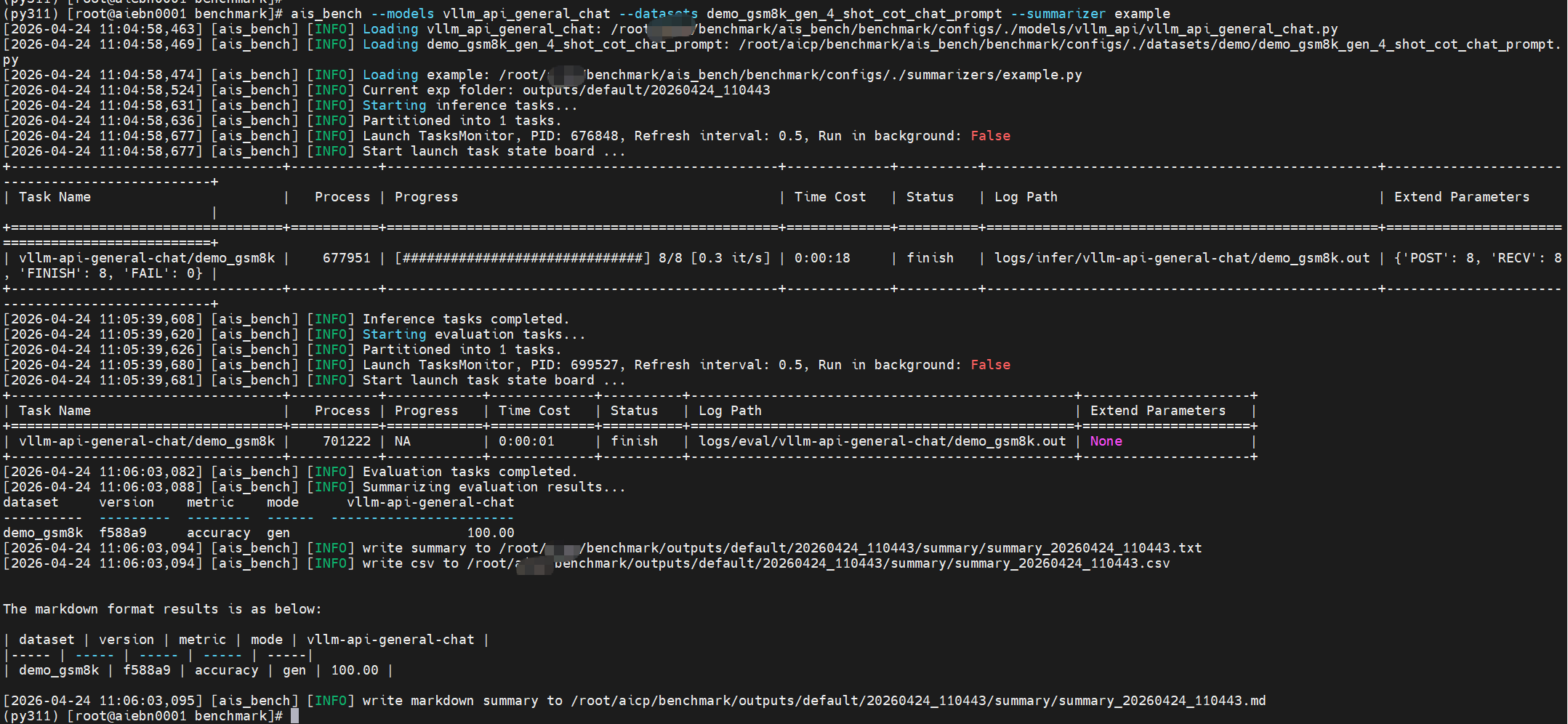
AISBench 也原生支持 vLLM 服务压测,可参照上述代码仓库的“readme”,完成安装及配置文件编辑后,运行下面的命令进行 第一次评测。
ais_bench --models vllm_api_general_chat --datasets demo_gsm8k_gen_4_shot_cot_chat_prompt --summarizer example如出现报错,且日志文件出现如下内容
FileExistsError: Dataset path: /root/ais_bench/benchmark/datasets/utils/../../../../ais_bench/datasets/gsm8k is not exist! 可参考 https://gitee.com/aisbench/benchmark/blob/master/ais_bench/benchmark/configs/datasets/demo/README.md
完成数据集下载,再重新运行。

Agent 垂直技术社区,欢迎活跃、内容共建。
更多推荐


 7
7 0
0- 0


 已为社区贡献1条内容

所有评论(0)