uniapp 自用的搜索
·
项目的每一个页面基本都有搜索,输入框、日期选择、下拉框、还有tag选择。
每一个页面都写一套觉得有些麻烦,所以想写一个组件,根据不同的类型显示不同。在此记录一下
页面大概是这样,这是一个比较完整的搜索,四种都有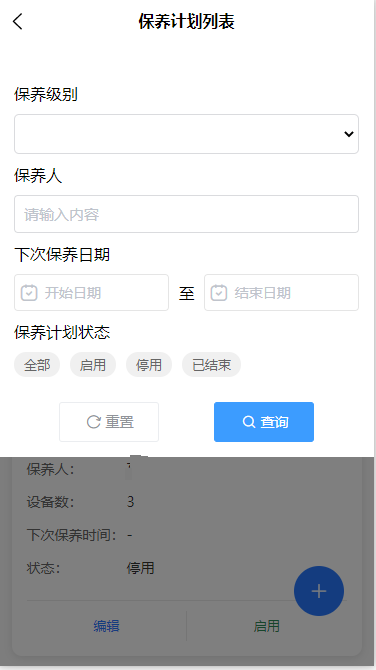
创建了一个filter-search的组件页面,在组件里用接收到的type类型来判断显示哪个。
<template>
    <view class="search-panel">
        <view class="popup-class">
            <u--form labelPosition="left" :model="filterForm" ref="filterForm" class="filter-form">
                <view>
                    <!-- 动态渲染表单项 -->
                    <template v-for="(item, index) in formConfig" :key="index">
                        <!-- 输入框类型 -->
                        <view class="input-container m-b-20" v-if="item.type === 'input'">
                            <text>{{ item.text }}</text>
                            <u--input class="input-class m-t-20" v-model="filterForm[item.field]" placeholder="请输入内容"
                                border="surround" @change="(value) => confirmInput(value, item)"></u--input>
                        </view>

                        <!-- 日期选择类型 -->

                        <view class="m-t-20" v-if="item.type === 'date'">
                            <text class="m-b-20">{{item.text}}</text>
                            <view class="dis-flex" style="padding-top: 20rpx;">
                                <view class="data-one">
                                    <uni-datetime-picker placeholder="开始日期" class="input-class"
                                        v-model="filterForm[item.field].start" type="date"></uni-datetime-picker>
                                </view>
                                <text class="data-text">至</text>
                                <view class="data-one">
                                    <uni-datetime-picker placeholder="结束日期" class="input-class"
                                        v-model="filterForm[item.field].end" type="date"></uni-datetime-picker>
                                </view>
                            </view>

                        </view>

                        <view class="m-t-20" v-if="item.type === 'tag'">
                            <text>{{ item.text }}</text>

                            <view class="tag-group">
                                <text v-for="(item, index) in item.tags" :key="index" class="tag"
                                    :class="{ active: activeTag === item }" @click="toggleTag(item)">
                                    {{ item }}
                                </text>
                            </view>
                        </view>

                        <!-- 下拉框 -->
                        <view class="m-t-20" v-if="item.type === 'select'">
                            <text>{{ item.text }}</text>
                            <view class="m-t-20 m-b-20">
                                <select class="select-style" v-model="filterForm[item.field]"
                                    @change="(value) => handleSelectChange(value, item)">
                                    <!-- <option value="" disabled selected hidden class="placeholder-option">请选择</option> -->
                                    <option v-for="option in selectOptions" :key="option.value" :value="option.value">
                                        {{ option.label }}
                                    </option>
                                </select>
                            </view>
                        </view>
                    </template>

                    <my-search-button-vue @resetChange="resetChange" @handelChange="handelChange" />
                </view>
            </u--form>
        </view>
    </view>
</template>

<script>
    export default {
        components: {
            myTagsVue,
            myInputVue,
            myCalendarVue,
            mySearchButtonVue,
            rkTypeVue
        },
        props: {
            // 接收外部传入的表单配置
            formConfig: {
                type: Array,
                default: () => []
            },
            formData: {
                type: Object,
                default: () => {}
            }
        },
        data() {
            return {
                dateRange: [],
                showMaintenanceLevelPicker: false,
                resetKey: 0,
                filterForm: this.initFilterForm(), // 同步初始化
                show: false,
                currentSelect: 'start', // 当前选择的日期类型
                tags: [],
                activeTag: null, // 用于记录当前激活的标签
                // 下拉框数据
                selectOptions: [],
            };
        },
        watch: {
            formData: {
                deep: true,
                immediate: true,
                handler(newVal) {
                    if (newVal) {
                        this.filterForm = this.initFilterForm();
                    }
                }
            }
        },

        methods: {
            handleDateChange(e) {
                console.log('日期范围变化:', e)
                // 可以在这里处理日期变化逻辑
            },
            initFilterForm() {
                const form = {};
                this.formConfig.forEach(item => {
                    if (this.formData && this.formData[item.field] !== undefined) {
                        if (item.type === 'date') {
                            form[item.field] = {
                                start: this.formData[item.field]?.start || '',
                                end: this.formData[item.field]?.end || ''
                            };
                        } else if (item.type === 'tag') {
                            form[item.field] = this.formData[item.field] || '';
                            this.activeTag = item.tags.includes(this.formData[item.field]) ?
                                this.formData[item.field] : null;
                        } else if (item.type === 'select') {
                            form[item.field] = this.formData[item.field] || '';
                            // 确保 options 正确设置
                            this.selectOptions = item.options || [];
                        } else {
                            form[item.field] = this.formData[item.field] || '';
                        }
                    } else {
                        if (item.type === 'date') {
                            form[item.field] = {
                                start: item.value?.start || '',
                                end: item.value?.end || ''
                            };
                        } else if (item.type === 'tag') {
                            form[item.field] = item.value || '';
                            this.activeTag = null;
                        } else if (item.type === 'select') {
                            form[item.field] = item.value || '';
                            // 确保 options 正确设置
                            this.selectOptions = item.options || [];
                        } else {
                            form[item.field] = item.value || '';
                        }
                    }
                });
                return form;
            },

            // 显示日期选择
            // openCalendar(type) {
            //     this.currentSelect = type;
            //     this.show = true;
            // },
            // 日期确定
            // confirm(value, item, index) {
            //     this.filterForm[item.field]['start'] = value[0]
            //     this.filterForm[item.field]['end'] = value[1]
            // },
            // 输入框
            confirmInput(value, item) {
                this.filterForm[item.field] = value[0]
            },
            // 标签选择
            toggleTag(tag) {
                const tagName = this.formConfig.find(item => item.type === 'tag')
                this.filterForm[tagName.field] = tag
                this.activeTag = this.activeTag === tag ? null : tag; // 切换激活状态
            },
            // 下拉框选择
            handleSelectChange(value, item) {
                const selectName = this.formConfig.find(item => item.type === 'select')
                this.filterForm[selectName.field] = this.filterForm[item.field]
            },
            // 重置
            resetChange() {
                // Reset to formData if available, otherwise to defaults
                this.filterForm = this.initFilterForm();

                // Additional reset for tags if no formData
                if (!this.formData) {
                    const tagField = this.formConfig.find(item => item.type === 'tag');
                    if (tagField) {
                        this.activeTag = null;
                    }
                }

                this.$emit('reset');
                this.resetKey += 1;

            },
            // 查询
            handelChange() {
                console.log(this.filterForm, 'this.filterForm')
                this.$emit('submit', this.filterForm);
            },
        }
    }
</script>

<style scoped>
    .search-panel {
        width: 100%;
    }

    .filter-buttons {
        display: flex;
        justify-content: flex-end;
        margin-top: 40rpx;
    }

    .popup-class {
        padding: 30rpx;
        margin-top: 30rpx;
    }

    .data-one {
        width: 45%;
    }

    .data-text {
        width: 10%;
        text-align: center;
        margin: auto;
    }

    .tag-group {
        flex: 1;
        display: flex;
        flex-wrap: wrap;
        padding-top: 20rpx;
    }

    .tag {
        padding: 8rpx 20rpx;
        margin-right: 20rpx;
        margin-bottom: 10rpx;
        border-radius: 30rpx;
        background-color: #f0f0f0;
        color: #666;
        font-size: 26rpx;
        cursor: pointer;
    }

    .tag.active {
        background-color: #007aff;
        color: #fff;
    }

    .select-style {
        width: 100%;
        border: 1px solid #dadbde;
        height: 80rpx;
        border-radius: 10rpx;
    }

    .select-style option:disabled {
        color: #999 !important;
    }
</style>
引用页面使用 ,传给组件一个名为searchFormConfig的数组,里面包括type,filed、text、value等。
<filter-search-vue v-if="showFilterPanel" :formData="formData" :formConfig="searchFormConfig"
            @submit="handleSearchSubmit" @reset="handleReset"></filter-search-vue>
 async created() {
            // 先获取保养级别数据
            const byjbOptions = await this.getByjb();

            // 然后初始化 searchFormConfig
            this.searchFormConfig = [{
                    type: 'select',
                    field: 'maintenance_level_id',
                    text: '保养级别',
                    value: '',
                    options: byjbOptions.map(item => ({
                        label: item.name,
                        value: item._id.$oid // 根据实际数据结构调整
                    }))
                },
                {
                    type: 'input',
                    field: 'charge_name_list',
                    text: '保养人',
                    value: ''
                },
                {
                    type: 'date',
                    field: 'next_date',
                    text: '下次保养日期',
                    value: {
                        start: '',
                        end: ''
                    }
                },
                {
                    type: 'tag',
                    field: 'status',
                    text: '保养计划状态',
                    value: '', // 默认选中值
                    tags: ['全部', '启用', '停用', '已结束'],
                }
            ];
        },
 handleSearchSubmit(formData) {
                console.log(formData, 'formDataformData')
                this.formData = formData; // 更新搜索条件
                this.showFilterPanel = false;
                this.initData(); // 重新加载数据
            },
            handleReset() {
                this.formData = { // 重置为初始状态
                    status: '',
                    maintenance_level_id: '',
                    charge_name_list: [],
                    next_date: {
                        start: '',
                        end: ''
                    }
                };
                this.initData();

            },

Agent 垂直技术社区,欢迎活跃、内容共建。
更多推荐


 5
5 0
0- 0


 已为社区贡献1条内容

所有评论(0)