Jquery、Vue 、Ajax、axios、Fetch区别
·
Jquery、Vue
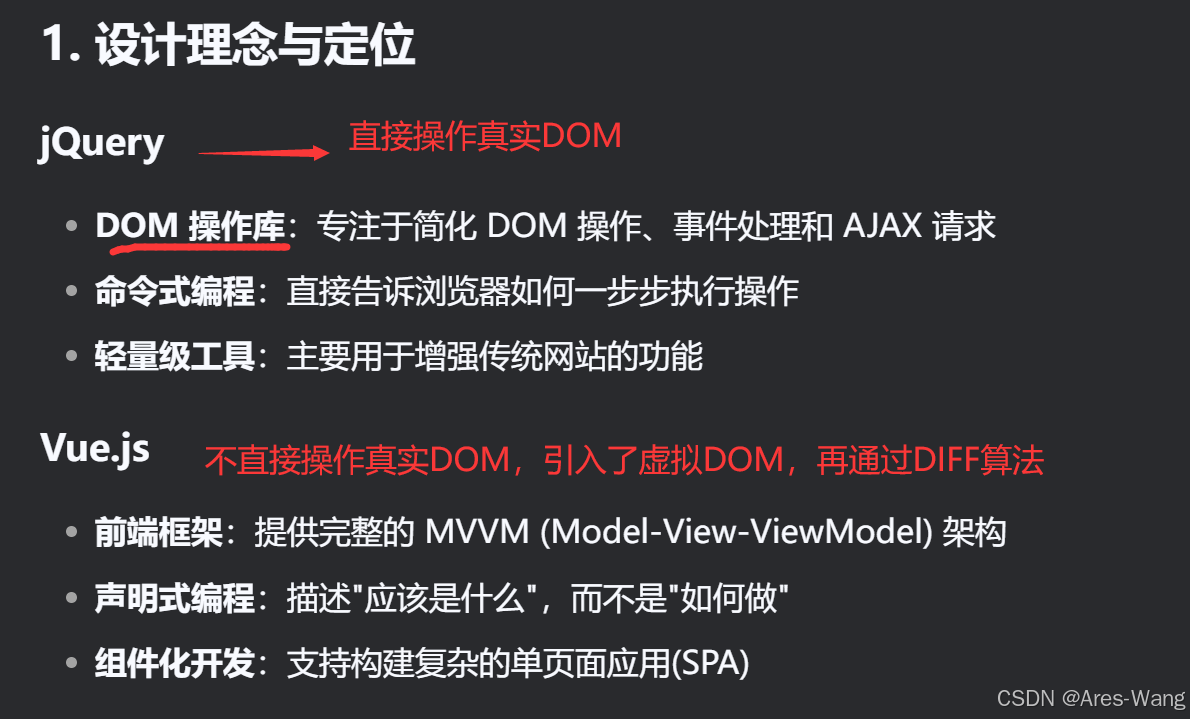
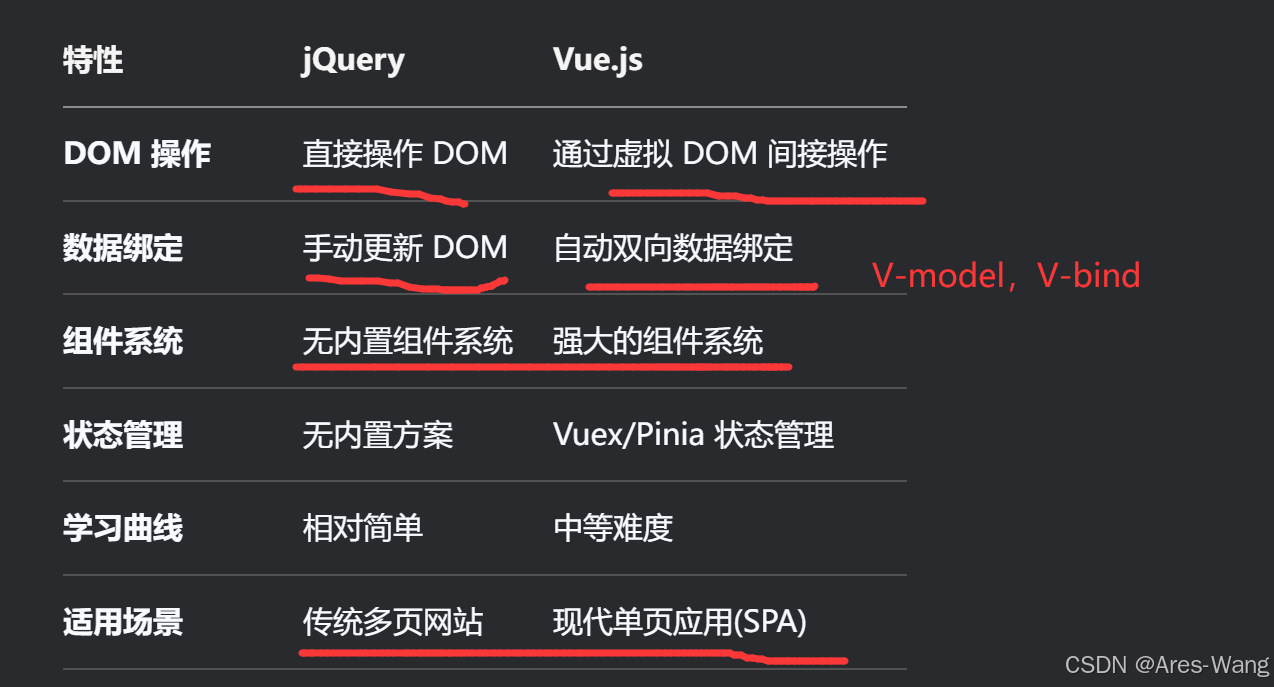

jQuery Ajax 与 Vue 中 Axios 的对比
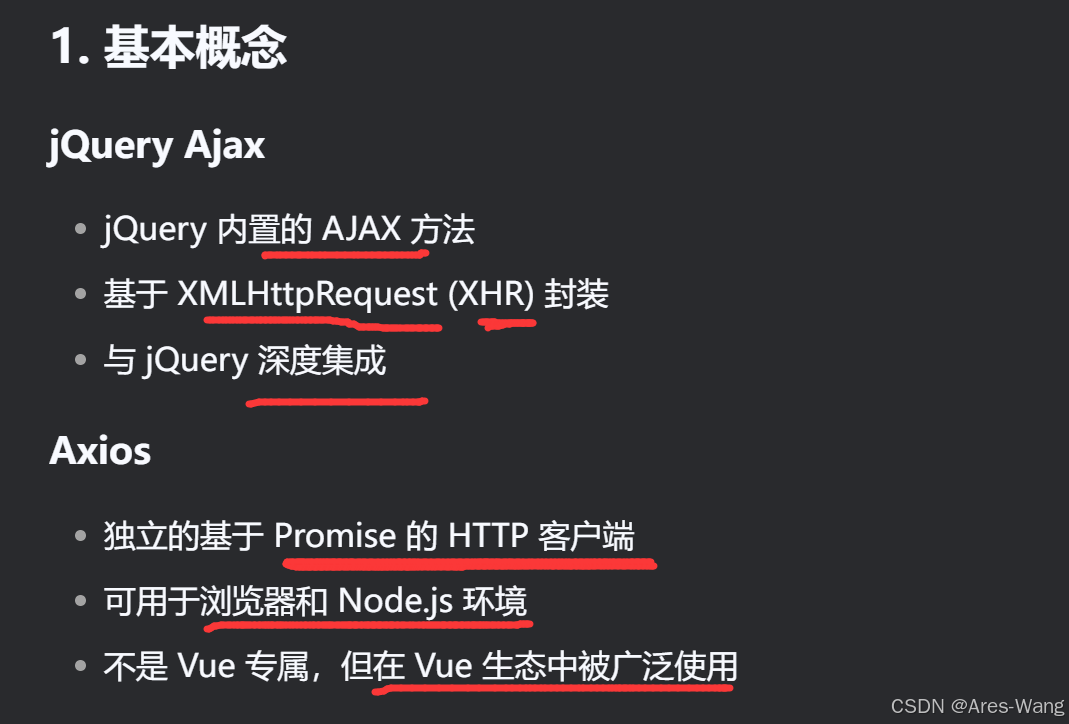
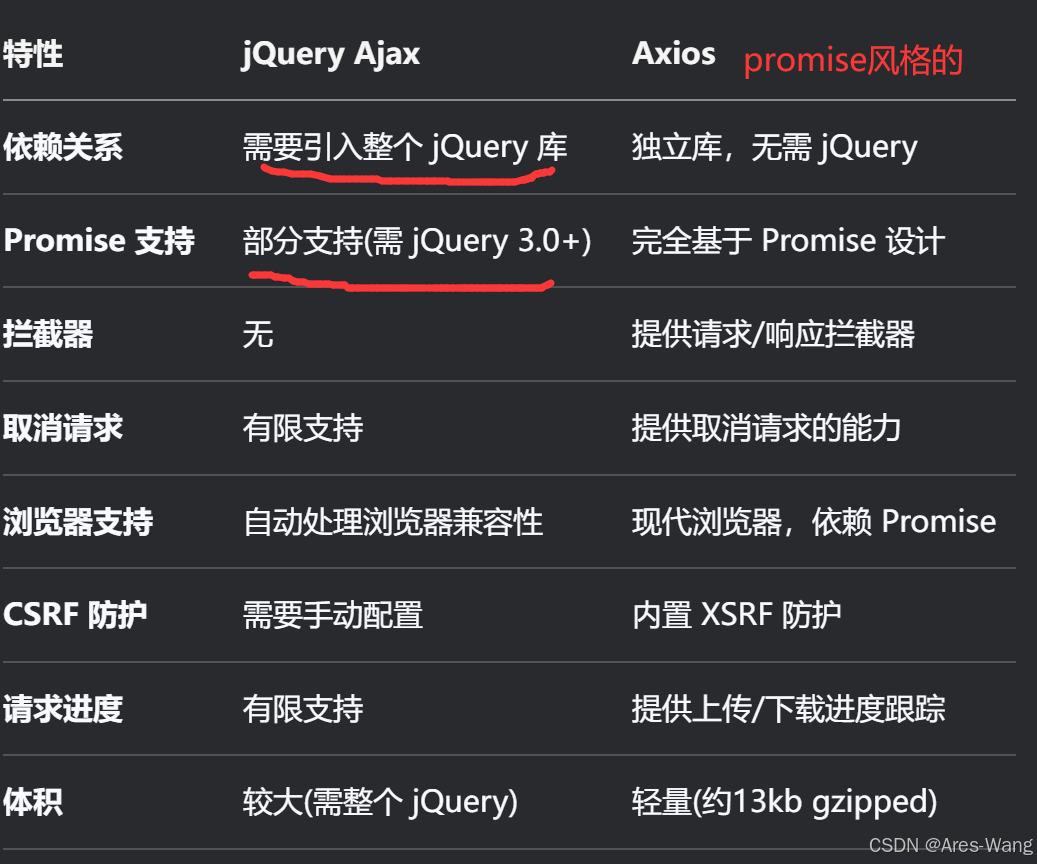
## Ajax (get请求)
$.ajax({
  url: '/api/data',
  method: 'GET',
  success: function(response) {
    console.log(response);
  },
  error: function(error) {
    console.error(error);
  }
});
## promise风格的Axios
#   axios get请求
axios.get('/api/data')
  .then(response => {
    console.log(response.data);
  })
  .catch(error => {
    console.error(error);
  });
## Ajax  post请求
$.ajax({
  url: '/api/data',
  method: 'POST',
  data: { name: 'John', age: 30 },
  success: function(response) {
    console.log(response);
  }
});
## axios post 请求
axios.post('/api/data', { name: 'John', age: 30 })
  .then(response => {
    console.log(response.data);
  });
Axios 独有的拦截器功能,类似于.Core 中的中间件
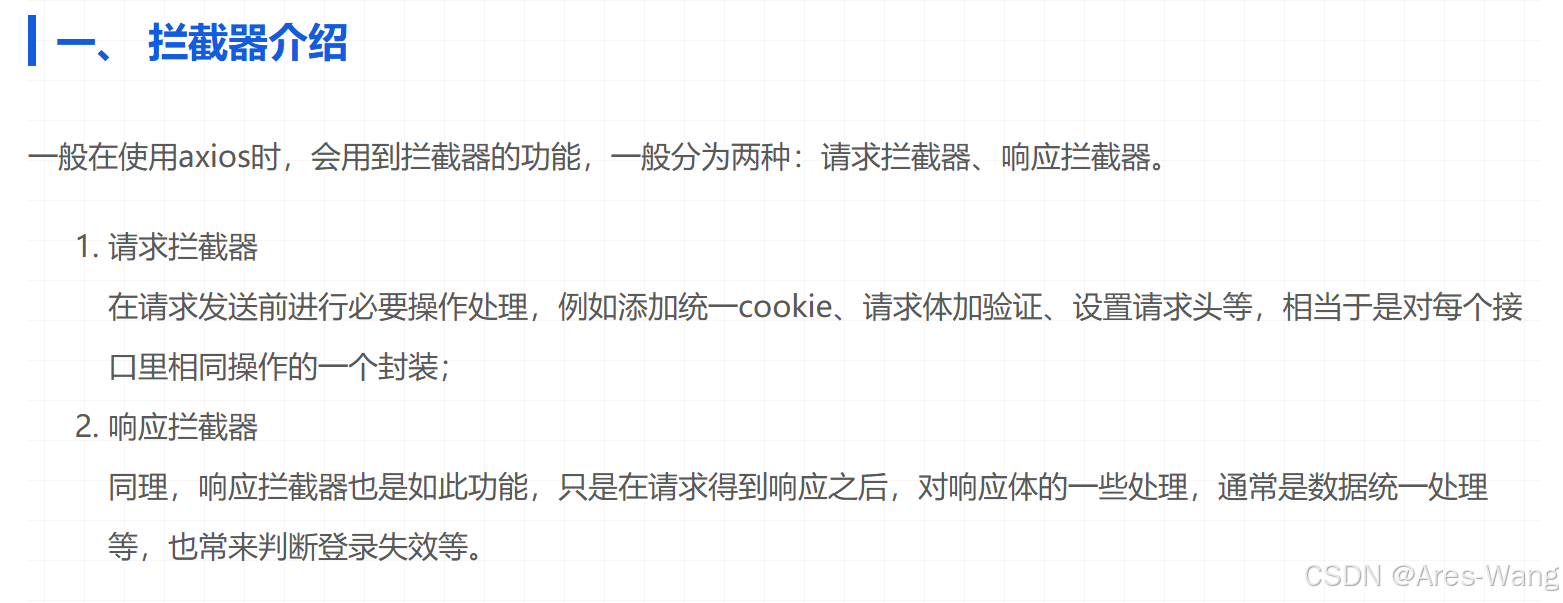
// 请求拦截器 use(两个参数)
axios.interceptors.request.use(req=> {
  // 在发送请求前做些什么
  req.headers.Authorization = 'Bearer token';
  return req;
}, err => {
    // 在请求错误时要做的事儿
    ...
    // 该返回的数据则是axios.catch(err)中接收的数据
    return Promise.reject(err)
})


// 响应拦截器 use(两个参数)
axios.interceptors.response.use(
  res => {
    // 对响应数据做点什么
   // 该返回的数据则是axios.then(res)中接收的数据
    return res;
  },
  err => {
    // 对响应错误做点什么
    // 该返回的数据则是axios.catch(err)中接收的数据
    return Promise.reject(err);
  }
);


const source = axios.CancelToken.source();

axios.get('/api/data', {
  cancelToken: source.token
}).catch(thrown => {
  if (axios.isCancel(thrown)) {
    console.log('Request canceled', thrown.message);
  } else {
    // 处理其他错误
  }
});

// 取消请求
source.cancel('Operation canceled by the user.');


//还可以通过传递一个 executor 函数到 CancelToken 的构造函数来创建 cancel token
var CancelToken = axios.CancelToken;
var cancel;

axios.get('/user/12345', {
  cancelToken: new CancelToken(function executor(c) {
    // executor 函数接收一个 cancel 函数作为参数
    cancel = c;
  })
});

// 取消请求
cancel();
##  在Vue中使用
// 通常在 main.js 中全局配置
import axios from 'axios';

axios.defaults.baseURL = 'https://api.example.com';
axios.defaults.headers.common['Authorization'] = AUTH_TOKEN;

// 在组件中使用
export default {
  data() {
    return {
      users: []
    }
  },
  created() {
    axios.get('/users')
      .then(response => {
        this.users = response.data;
      })
      .catch(error => {
        console.error(error);
      });
  }
}
import axios from 'axios';
// 第一种:局限性比较大
axios.defaults.timeout = 1000;
axios.defaults.baseURL = 'xxxxx';

// 第二种:实例配置
let instance = axios.create({
    baseURL: 'xxxxx',
    timeout: 1000,  // 超时,401
})
// 创建完后修改
instance.defaults.timeout = 3000

// 第三种:发起请求时修改配置、
instance.get('/xxx',{
    timeout: 5000
})

// 这三种修改配置方法的优先级如下:请求配置 > 实例配置 > 全局配置
// 请求拦截器
instance.interceptors.request.use(req=>{}, err=>{});
// 响应拦截器
instance.interceptors.reponse.use(req=>{}, err=>{});
//////////////////////////////////////
axios 请求配置,响应配置
// 请求配置   这些是创建请求时可以用的配置选项。只有 url 是必需的。如果没有指定 method,请求将默认使用 get 方法。
{
  // `url` 是用于请求的服务器 URL
  url: '/user',

  // `method` 是创建请求时使用的方法
  method: 'get', // 默认是 get

  // `baseURL` 将自动加在 `url` 前面,除非 `url` 是一个绝对 URL。
  // 它可以通过设置一个 `baseURL` 便于为 axios 实例的方法传递相对 URL
  baseURL: 'https://some-domain.com/api/',

  // `transformRequest` 允许在向服务器发送前,修改请求数据
  // 只能用在 'PUT', 'POST' 和 'PATCH' 这几个请求方法
  // 后面数组中的函数必须返回一个字符串,或 ArrayBuffer,或 Stream
  transformRequest: [function (data) {
    // 对 data 进行任意转换处理

    return data;
  }],

  // `transformResponse` 在传递给 then/catch 前,允许修改响应数据
  transformResponse: [function (data) {
    // 对 data 进行任意转换处理

    return data;
  }],

  // `headers` 是即将被发送的自定义请求头
  headers: {'X-Requested-With': 'XMLHttpRequest'},

  // `params` 是即将与请求一起发送的 URL 参数
  // 必须是一个无格式对象(plain object)或 URLSearchParams 对象
  params: {
    ID: 12345
  },

  // `paramsSerializer` 是一个负责 `params` 序列化的函数
  // (e.g. https://www.npmjs.com/package/qs, http://api.jquery.com/jquery.param/)
  paramsSerializer: function(params) {
    return Qs.stringify(params, {arrayFormat: 'brackets'})
  },

  // `data` 是作为请求主体被发送的数据
  // 只适用于这些请求方法 'PUT', 'POST', 和 'PATCH'
  // 在没有设置 `transformRequest` 时,必须是以下类型之一:
  // - string, plain object, ArrayBuffer, ArrayBufferView, URLSearchParams
  // - 浏览器专属:FormData, File, Blob
  // - Node 专属: Stream
  data: {
    firstName: 'Fred'
  },

  // `timeout` 指定请求超时的毫秒数(0 表示无超时时间)
  // 如果请求话费了超过 `timeout` 的时间,请求将被中断
  timeout: 1000,

  // `withCredentials` 表示跨域请求时是否需要使用凭证
  withCredentials: false, // 默认的

  // `adapter` 允许自定义处理请求,以使测试更轻松
  // 返回一个 promise 并应用一个有效的响应 (查阅 [response docs](#response-api)).
  adapter: function (config) {
    /* ... */
  },

  // `auth` 表示应该使用 HTTP 基础验证,并提供凭据
  // 这将设置一个 `Authorization` 头,覆写掉现有的任意使用 `headers` 设置的自定义 `Authorization`头
  auth: {
    username: 'janedoe',
    password: 's00pers3cret'
  },

  // `responseType` 表示服务器响应的数据类型,可以是 'arraybuffer', 'blob', 'document', 'json', 'text', 'stream'
  responseType: 'json', // 默认的

  // `xsrfCookieName` 是用作 xsrf token 的值的cookie的名称
  xsrfCookieName: 'XSRF-TOKEN', // default

  // `xsrfHeaderName` 是承载 xsrf token 的值的 HTTP 头的名称
  xsrfHeaderName: 'X-XSRF-TOKEN', // 默认的

  // `onUploadProgress` 允许为上传处理进度事件
  onUploadProgress: function (progressEvent) {
    // 对原生进度事件的处理
  },

  // `onDownloadProgress` 允许为下载处理进度事件
  onDownloadProgress: function (progressEvent) {
    // 对原生进度事件的处理
  },

  // `maxContentLength` 定义允许的响应内容的最大尺寸
  maxContentLength: 2000,

  // `validateStatus` 定义对于给定的HTTP 响应状态码是 resolve 或 reject  promise 。如果 `validateStatus` 返回 `true` (或者设置为 `null` 或 `undefined`),promise 将被 resolve; 否则,promise 将被 rejecte
  validateStatus: function (status) {
    return status >= 200 && status < 300; // 默认的
  },

  // `maxRedirects` 定义在 node.js 中 follow 的最大重定向数目
  // 如果设置为0,将不会 follow 任何重定向
  maxRedirects: 5, // 默认的

  // `httpAgent` 和 `httpsAgent` 分别在 node.js 中用于定义在执行 http 和 https 时使用的自定义代理。允许像这样配置选项:
  // `keepAlive` 默认没有启用
  httpAgent: new http.Agent({ keepAlive: true }),
  httpsAgent: new https.Agent({ keepAlive: true }),

  // 'proxy' 定义代理服务器的主机名称和端口
  // `auth` 表示 HTTP 基础验证应当用于连接代理,并提供凭据
  // 这将会设置一个 `Proxy-Authorization` 头,覆写掉已有的通过使用 `header` 设置的自定义 `Proxy-Authorization` 头。
  proxy: {
    host: '127.0.0.1',
    port: 9000,
    auth: : {
      username: 'mikeymike',
      password: 'rapunz3l'
    }
  },

  // `cancelToken` 指定用于取消请求的 cancel token
  // (查看后面的 Cancellation 这节了解更多)
  cancelToken: new CancelToken(function (cancel) {
  })
}
// 某个请求的响应包含以下信息
{
  // `data` 由服务器提供的响应
  data: {},

  // `status` 来自服务器响应的 HTTP 状态码
  status: 200,

  // `statusText` 来自服务器响应的 HTTP 状态信息
  statusText: 'OK',

  // `headers` 服务器响应的头
  headers: {},

  // `config` 是为请求提供的配置信息
  config: {}
}
Axios 取消 请求
// 方式一
const CancelToken = axios.CancelToken;
const source = CancelToken.source();

axios.get('xxxx', {
  cancelToken: source.token
})
// 取消请求 (请求原因是可选的)
source.cancel('主动取消请求');

// 方式二
const CancelToken = axios.CancelToken;
let cancel;

axios.get('xxxx', {
  cancelToken: new CancelToken(function executor(c) {
    cancel = c;
  })
});
cancel('主动取消请求');
fetch api
fetch ajax axios
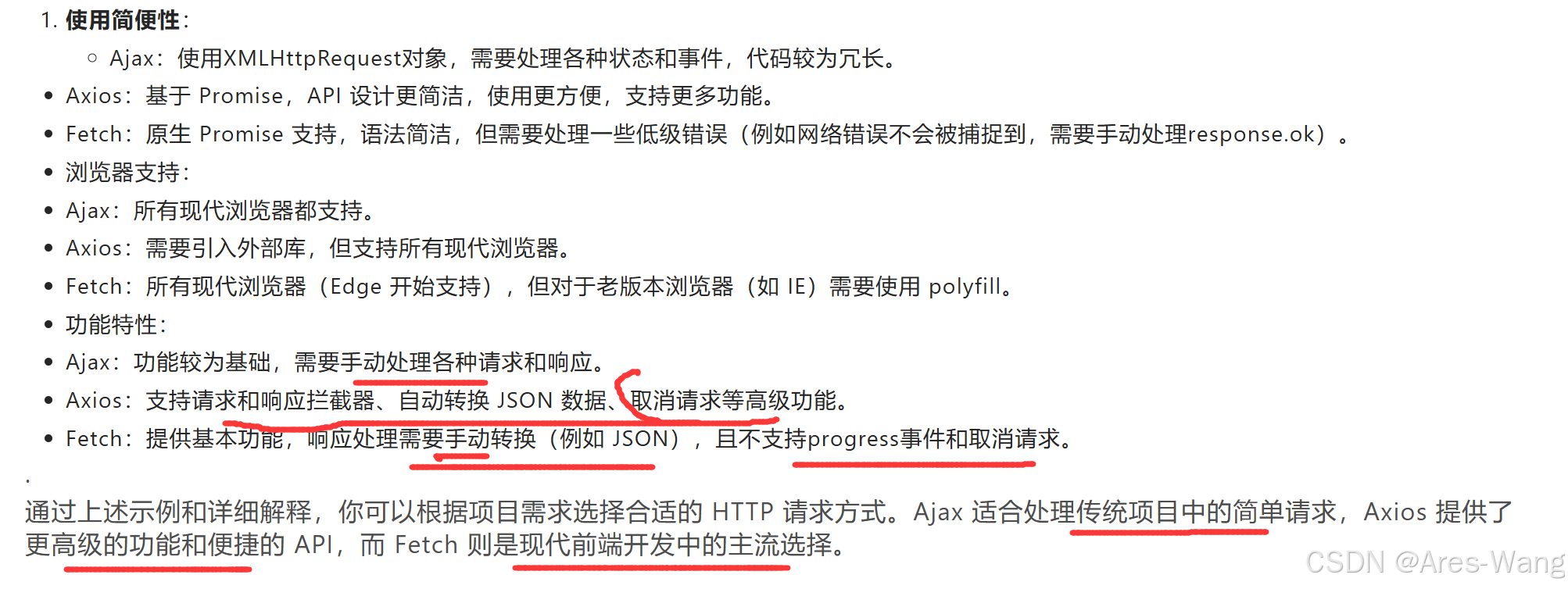
前端 JavaScript 开发中,进行 HTTP 请求的三种主要方式是 Ajax、Axios 和 Fetch
-
Ajax
Ajax(Asynchronous JavaScript and XML)是一种使用 JavaScript 和 XML 进行异步网页更新的技术。尽管其名称中包含 XML,但它可以处理多种数据格式,包括 JSON、HTML 和纯文本。传统上,Ajax 使用的是XMLHttpRequest对象。 -
Axios
Axios 是一个基于 Promise 的 HTTP 库,可以用于浏览器和 Node.js。它具有简单易用的 API,支持拦截请求和响应、取消请求、自动转换 JSON 数据等功能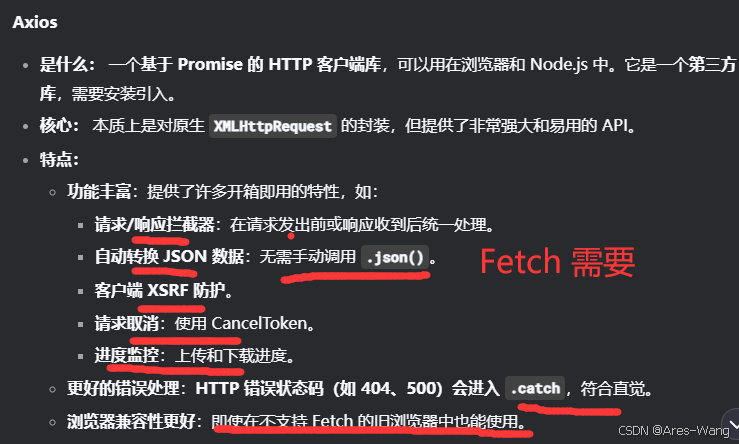
// Axios 实现 (需要先引入 axios 库)
axios.get('https://api.example.com/data')
  .then(response => {
    console.log(response.data); // 数据在 response.data 中  自定 json转换  不需要像fetch  response.json()
  })
  .catch(error => {
    console.error('Error:', error); // 网络错误和HTTP错误都会到这里
  });
- Fetch
Fetch API 是现代浏览器中用来替代XMLHttpRequest的,提供了一个更强大和灵活的方式来发起网络请求。它基于 Promise,语法更加简洁。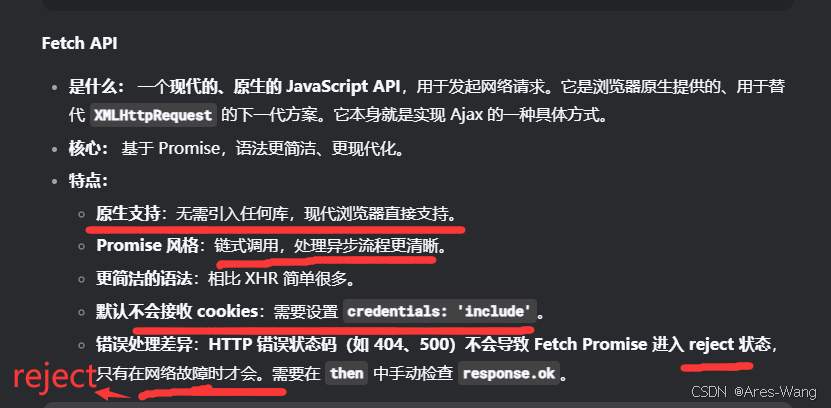

Agent 垂直技术社区,欢迎活跃、内容共建。
更多推荐

 3
3 0
0- 0


 已为社区贡献27条内容

所有评论(0)