python--PySpark入门--04--数据计算
·
python–PySpark入门–04–数据计算
1、map方法
- RDD对象内置的成员方法 也叫 算子
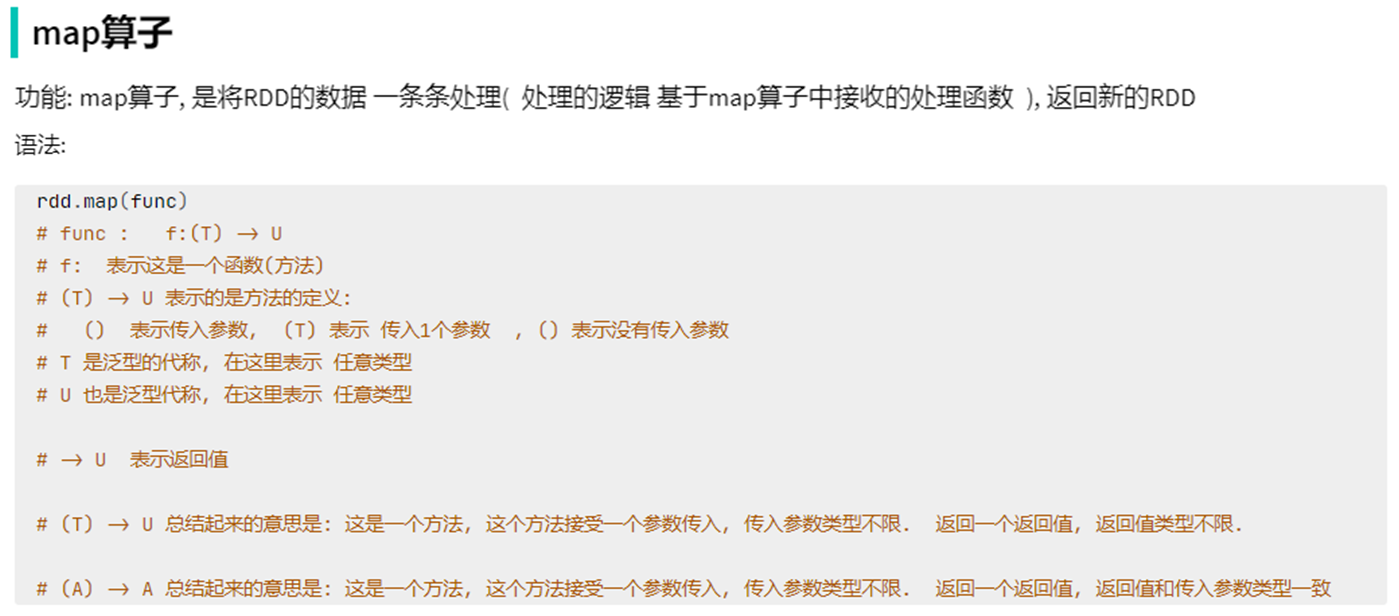
- map算子 接受一个处理函数(可用lambda表达式快速编写),对RDD内的元素逐个处理,并返回一个新的RDD
1.1、map算子
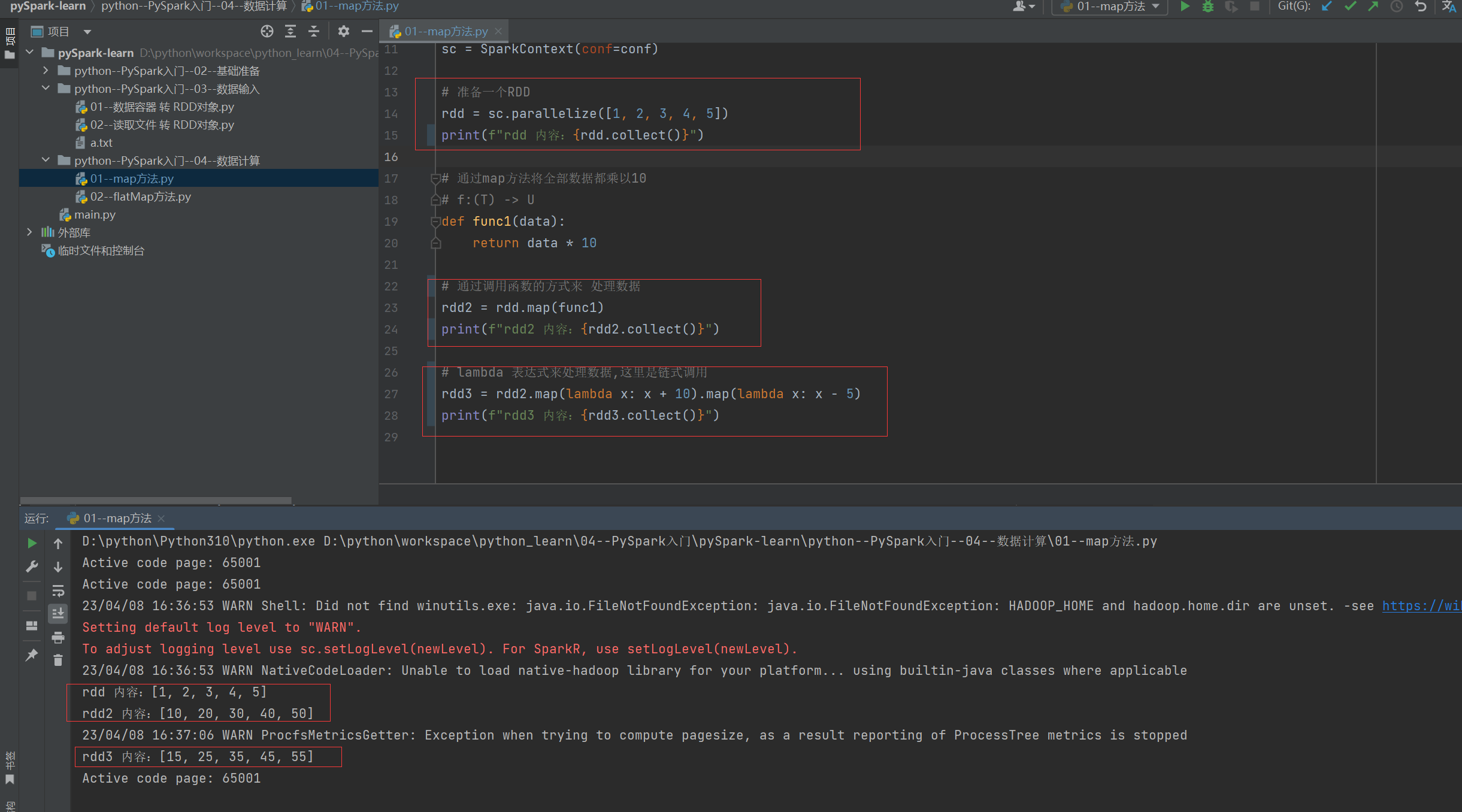
1.2、案例
"""
演示RDD的map成员方法的使用
"""
from pyspark import SparkConf, SparkContext

import os
os.environ['PYSPARK_PYTHON'] = "D://python//Python310//python.exe"

# 构建 Spark 执行环境
conf = SparkConf().setMaster("local[*]").setAppName("test_spark")
sc = SparkContext(conf=conf)

# 准备一个RDD
rdd = sc.parallelize([1, 2, 3, 4, 5])
print(f"rdd 内容:{rdd.collect()}")

# 通过map方法将全部数据都乘以10
# f:(T) -> U
def func1(data):
    return data * 10

# 通过调用函数的方式来 处理数据
rdd2 = rdd.map(func1)
print(f"rdd2 内容:{rdd2.collect()}")

# lambda 表达式来处理数据,这里是链式调用
rdd3 = rdd2.map(lambda x: x + 10).map(lambda x: x - 5)
print(f"rdd3 内容:{rdd3.collect()}")
2、flatMap方法
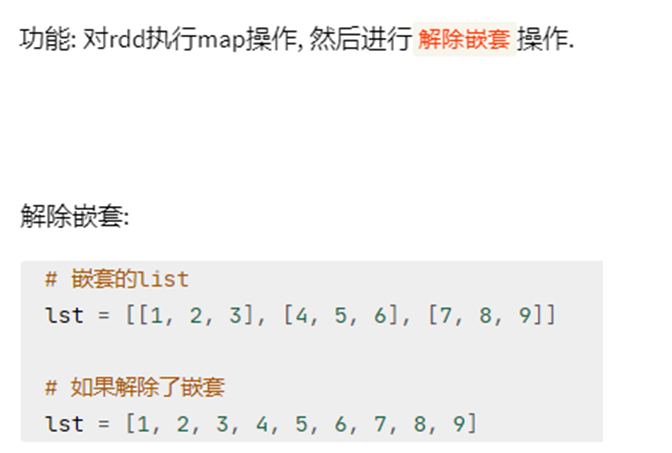
- 计算逻辑和map一样
- 可以比map多出,解除一层嵌套的功能
2.1、flatMap 算子
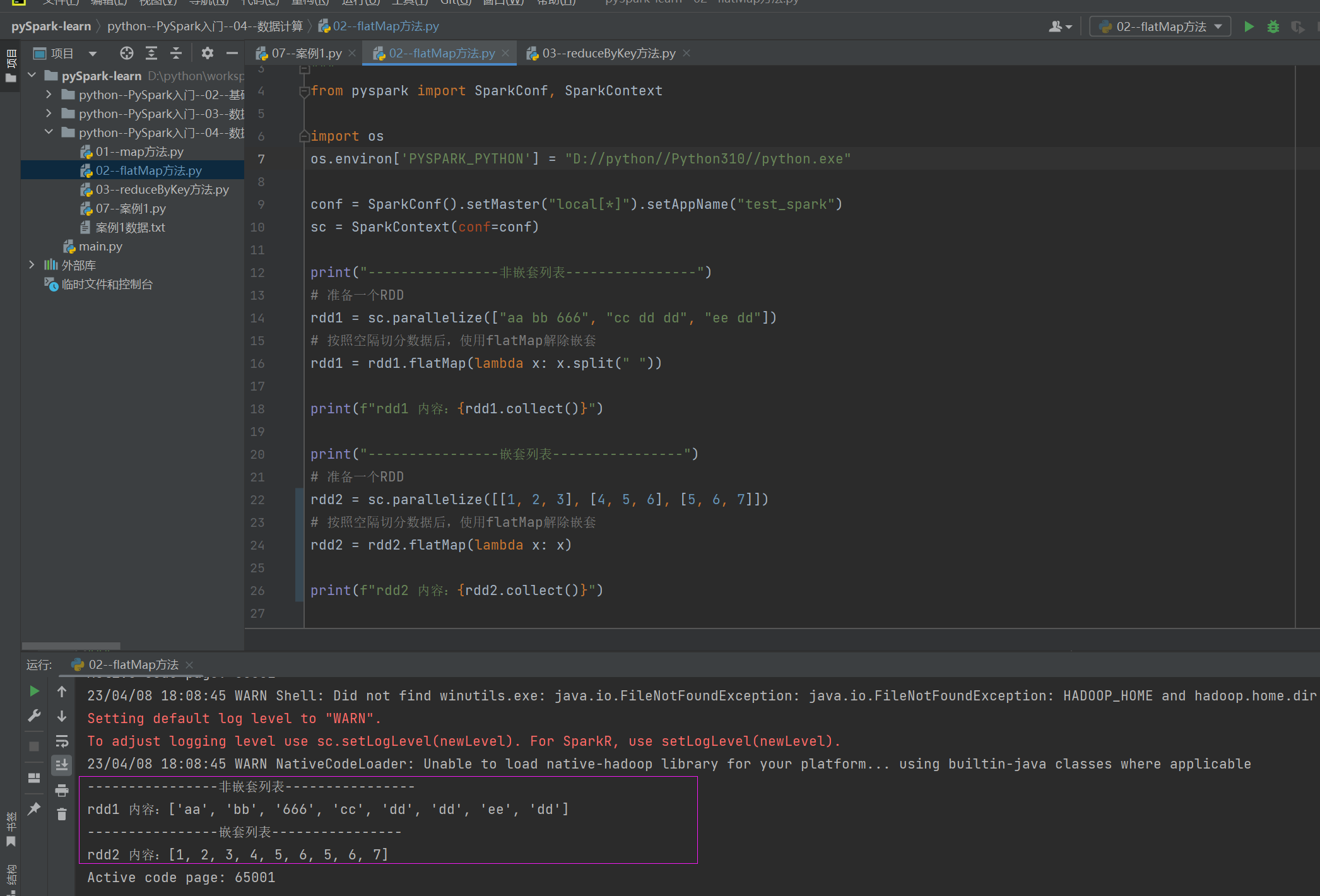
2.2、案例
"""
演示RDD的flatMap成员方法的使用
"""
from pyspark import SparkConf, SparkContext

import os
os.environ['PYSPARK_PYTHON'] = "D://python//Python310//python.exe"

conf = SparkConf().setMaster("local[*]").setAppName("test_spark")
sc = SparkContext(conf=conf)

print("----------------非嵌套列表----------------")
# 准备一个RDD
rdd1 = sc.parallelize(["aa bb 666", "cc dd dd", "ee dd"])
# 按照空隔切分数据后,使用flatMap解除嵌套
rdd1 = rdd1.flatMap(lambda x: x.split(" "))

print(f"rdd1 内容:{rdd1.collect()}")

print("----------------嵌套列表----------------")
# 准备一个RDD
rdd2 = sc.parallelize([[1, 2, 3], [4, 5, 6], [5, 6, 7]])
# 按照空隔切分数据后,使用flatMap解除嵌套
rdd2 = rdd2.flatMap(lambda x: x)

print(f"rdd2 内容:{rdd2.collect()}")
3、reduceByKey方法
3.1、reduceByKey 算子
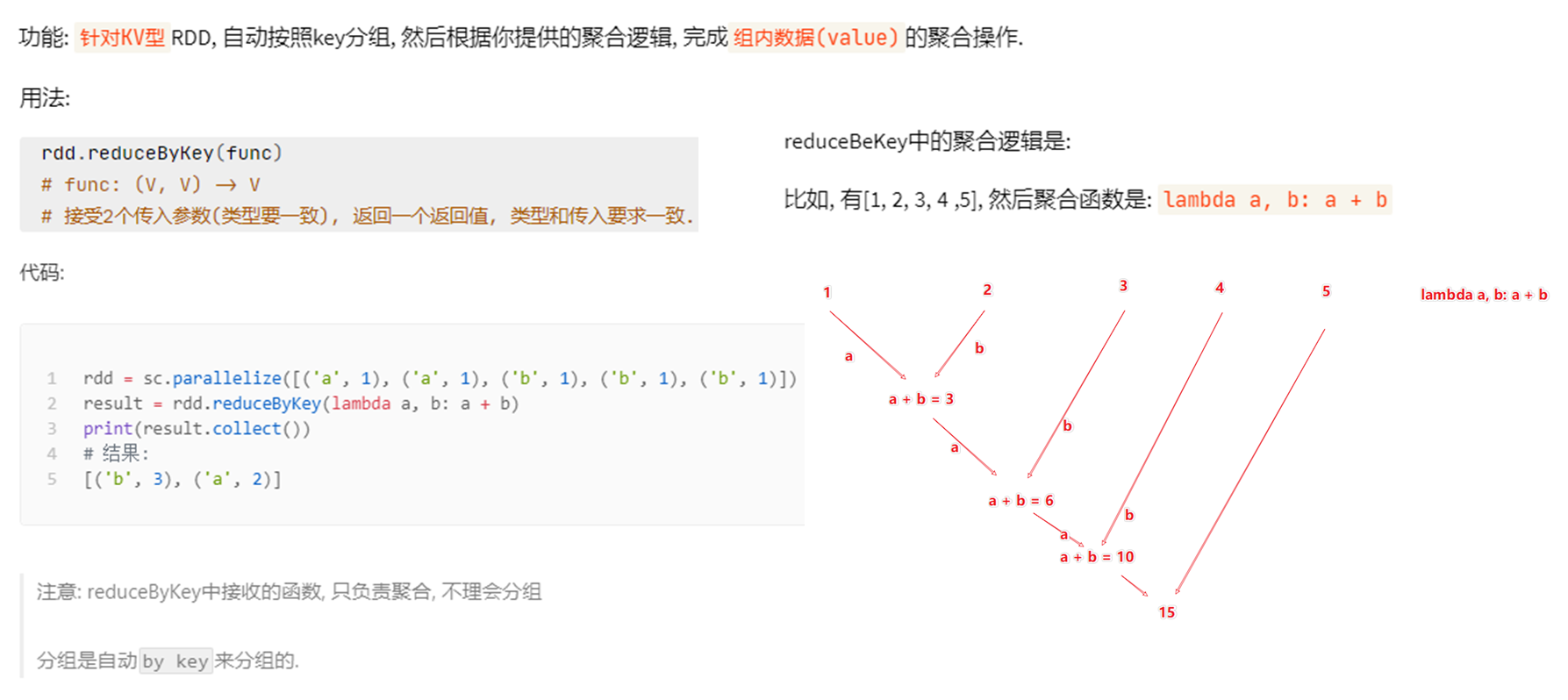
3.2、案例
"""
演示RDD的reduceByKey成员方法的使用
"""
from pyspark import SparkConf, SparkContext

import os

os.environ['PYSPARK_PYTHON'] = "D://python//Python310//python.exe"
conf = SparkConf().setMaster("local[*]").setAppName("test_spark")
sc = SparkContext(conf=conf)

# 准备一个RDD
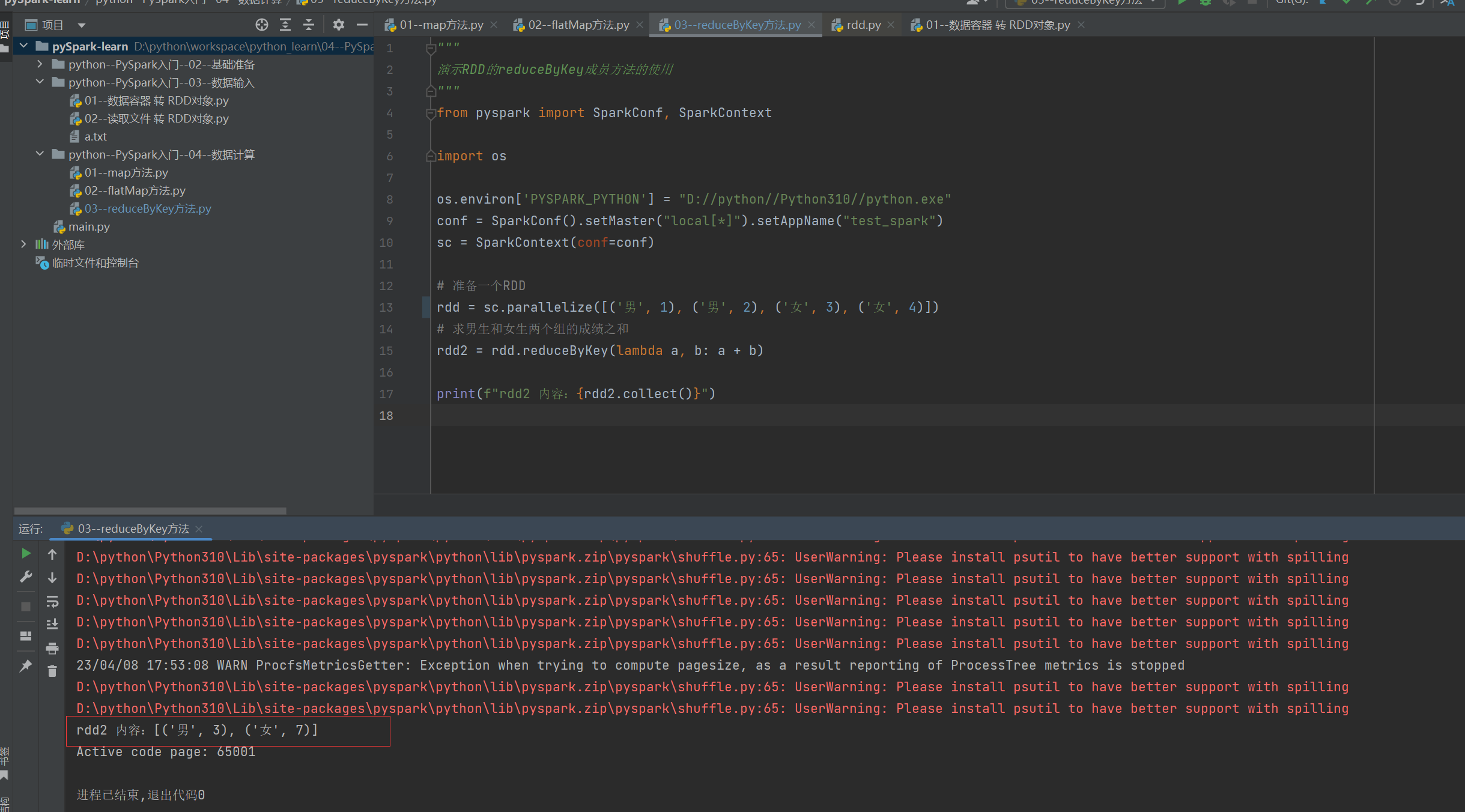
rdd = sc.parallelize([('男', 1), ('男', 2), ('女', 3), ('女', 4)])
# 求男生和女生两个组的成绩之和
rdd2 = rdd.reduceByKey(lambda a, b: a + b)

print(f"rdd2 内容:{rdd2.collect()}")
4、filter方法
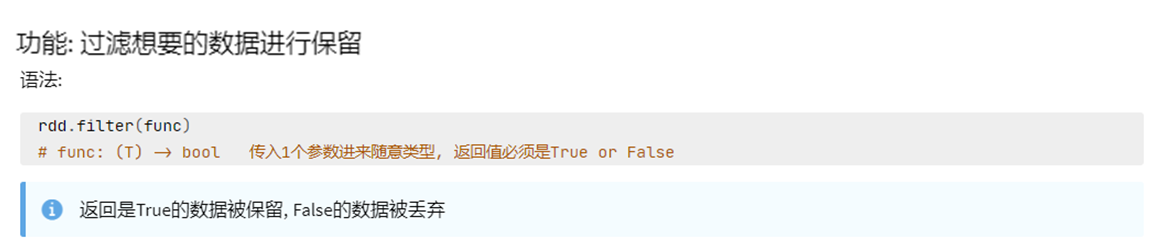
- 接受一个处理函数,可用lambda快速编写
- 函数对RDD数据逐个处理
- True:数据被保留
- Flase:数据被丢弃
4.1、filter 算子
4.2、案例
"""
演示RDD的filter成员方法的使用
"""
from pyspark import SparkConf, SparkContext
import os
os.environ['PYSPARK_PYTHON'] = "D://python//Python310//python.exe"

conf = SparkConf().setMaster("local[*]").setAppName("test_spark")
sc = SparkContext(conf=conf)

# 准备一个RDD
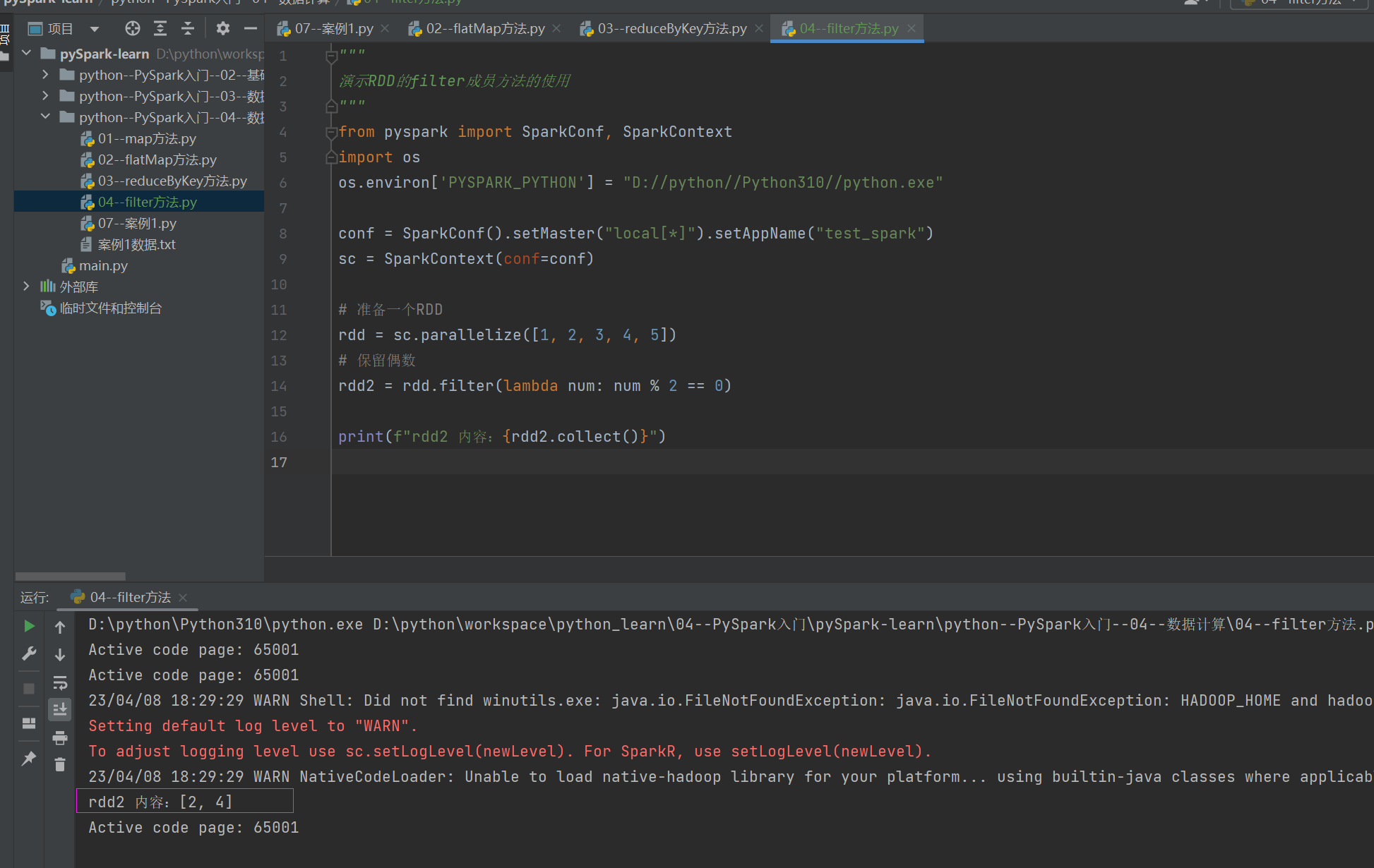
rdd = sc.parallelize([1, 2, 3, 4, 5])
# 保留偶数
rdd2 = rdd.filter(lambda num: num % 2 == 0)

print(f"rdd2 内容:{rdd2.collect()}")
5、distinct方法
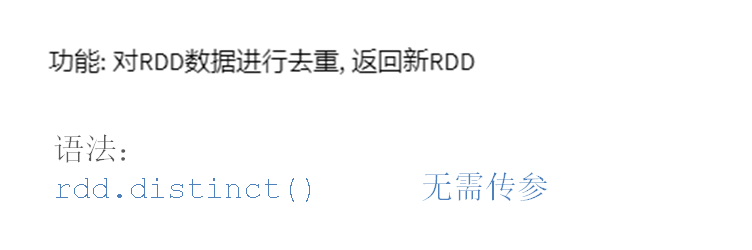
5.1、distinct 算子
5.2、案例
"""
演示RDD的distinct成员方法的使用
"""
from pyspark import SparkConf, SparkContext
import os
os.environ['PYSPARK_PYTHON'] = "D://python//Python310//python.exe"


conf = SparkConf().setMaster("local[*]").setAppName("test_spark")
sc = SparkContext(conf=conf)

# 准备一个RDD
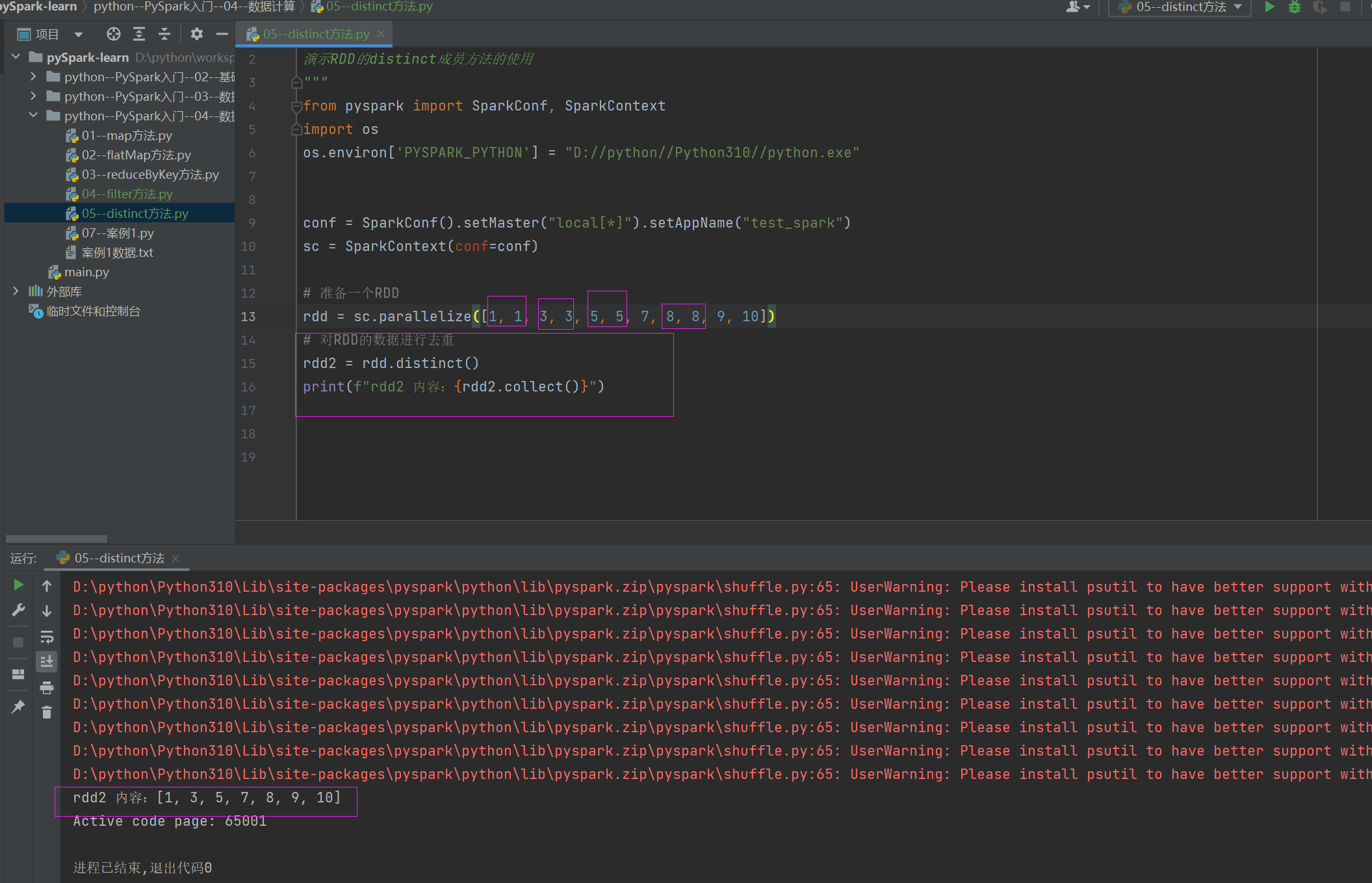
rdd = sc.parallelize([1, 1, 3, 3, 5, 5, 7, 8, 8, 9, 10])
# 对RDD的数据进行去重
rdd2 = rdd.distinct()
print(f"rdd2 内容:{rdd2.collect()}")
6、sortBy方法
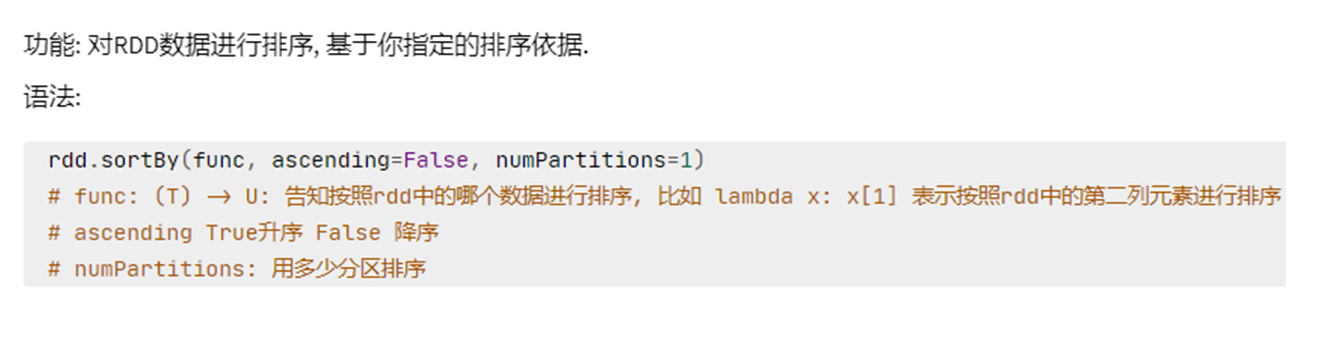
- 接收一个排序依据 的函数,可用lambda快速编写
- 可以控制升序或降序
- 全局排序需要设置分区数为1
6.1、sortBy 算子
6.2、案例
"""
演示RDD的sortBy成员方法的使用
"""

from pyspark import SparkConf, SparkContext
import os

os.environ['PYSPARK_PYTHON'] = "D://python//Python310//python.exe"

conf = SparkConf().setMaster("local[*]").setAppName("test_spark")
sc = SparkContext(conf=conf)

# 1. 读取数据文件
rdd = sc.textFile("案例1数据.txt")
# 2. 取出全部单词
word_rdd = rdd.flatMap(lambda x: x.split(" "))
print(f"word_rdd 内容:{word_rdd.collect()}")

# 3. 将所有单词都转换成二元元组,单词为Key,value设置为1
word_with_one_rdd = word_rdd.map(lambda word: (word, 1))
print(f"word_with_one_rdd 内容:{word_with_one_rdd.collect()}")

# 4. 分组并求和
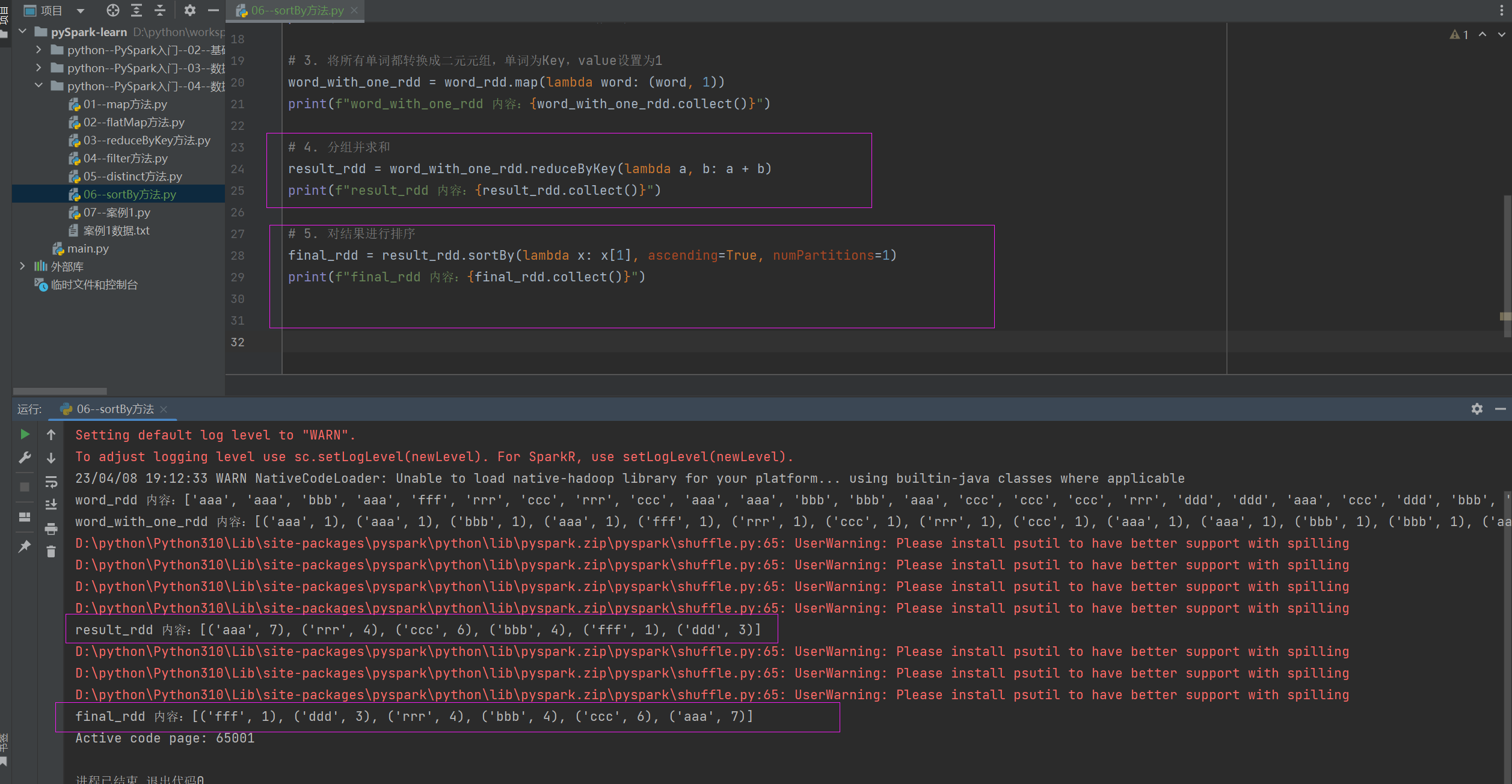
result_rdd = word_with_one_rdd.reduceByKey(lambda a, b: a + b)
print(f"result_rdd 内容:{result_rdd.collect()}")

# 5. 对结果进行排序
final_rdd = result_rdd.sortBy(lambda x: x[1], ascending=True, numPartitions=1)
print(f"final_rdd 内容:{final_rdd.collect()}")
7、综合案例
7.1、案例1
- 读取文件
- 统计文件内,单词的出现数量
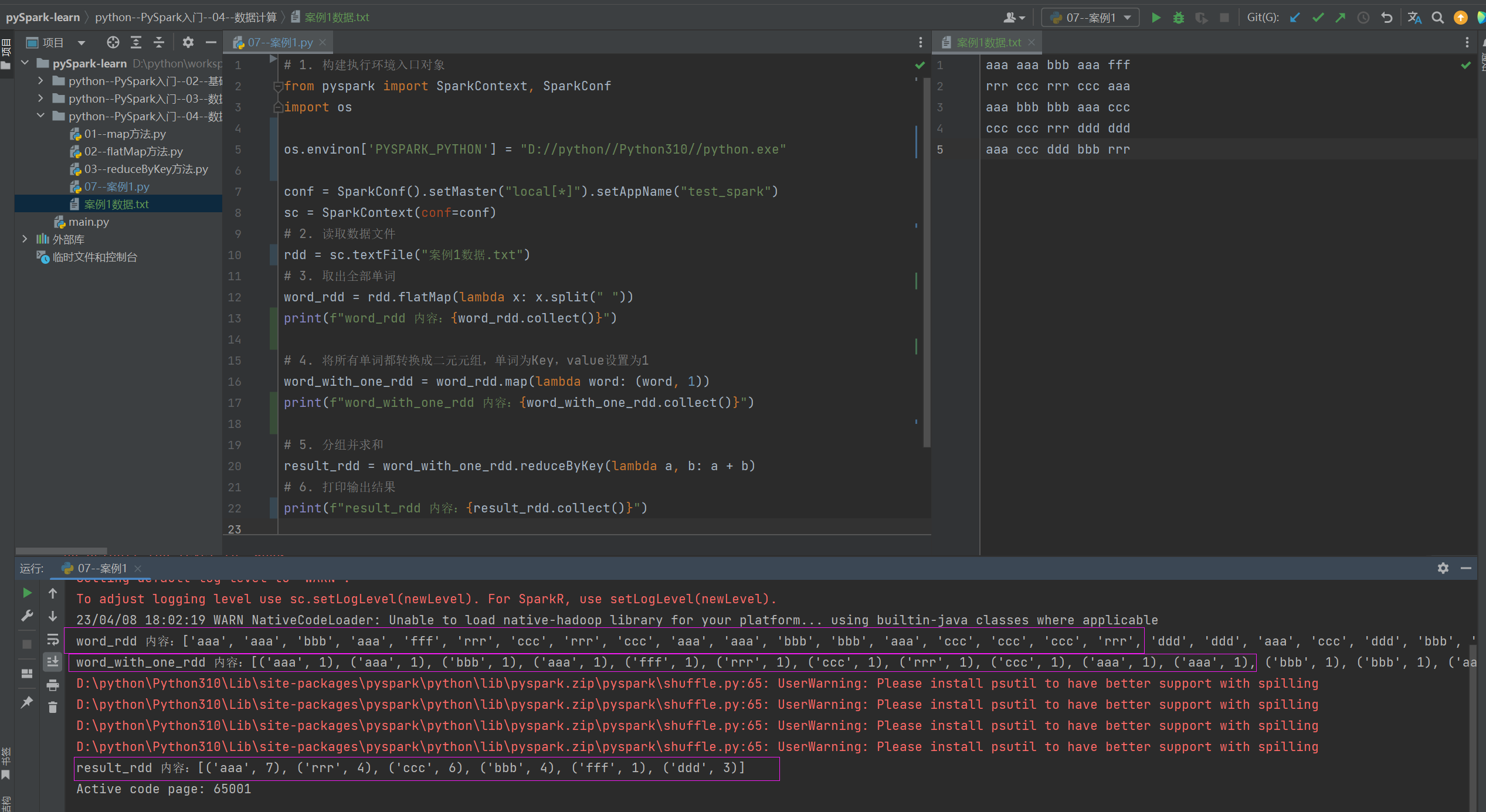
# 1. 构建执行环境入口对象
from pyspark import SparkContext, SparkConf
import os

os.environ['PYSPARK_PYTHON'] = "D://python//Python310//python.exe"

conf = SparkConf().setMaster("local[*]").setAppName("test_spark")
sc = SparkContext(conf=conf)
# 2. 读取数据文件
rdd = sc.textFile("案例1数据.txt")
# 3. 取出全部单词
word_rdd = rdd.flatMap(lambda x: x.split(" "))
print(f"word_rdd 内容:{word_rdd.collect()}")

# 4. 将所有单词都转换成二元元组,单词为Key,value设置为1
word_with_one_rdd = word_rdd.map(lambda word: (word, 1))
print(f"word_with_one_rdd 内容:{word_with_one_rdd.collect()}")

# 5. 分组并求和
result_rdd = word_with_one_rdd.reduceByKey(lambda a, b: a + b)
# 6. 打印输出结果
print(f"result_rdd 内容:{result_rdd.collect()}")
7.2、案例2
复制以下内容到文件中,使用Spark读取文件进行以下计算
- 计算 各个城市销售额排名,从大到小
- 计算 全部城市,有哪些商品类别在售卖
- 计算 北京市有哪些商品类别在售卖
{"id":1,"timestamp":"2019-05-08T01:03.00Z","category":"平板电脑","areaName":"北京","money":"1450"}|{"id":2,"timestamp":"2019-05-08T01:01.00Z","category":"手机","areaName":"北京","money":"1450"}|{"id":3,"timestamp":"2019-05-08T01:03.00Z","category":"手机","areaName":"北京","money":"8412"}
{"id":4,"timestamp":"2019-05-08T05:01.00Z","category":"电脑","areaName":"上海","money":"1513"}|{"id":5,"timestamp":"2019-05-08T01:03.00Z","category":"家电","areaName":"北京","money":"1550"}|{"id":6,"timestamp":"2019-05-08T01:01.00Z","category":"电脑","areaName":"杭州","money":"1550"}
{"id":7,"timestamp":"2019-05-08T01:03.00Z","category":"电脑","areaName":"北京","money":"5611"}|{"id":8,"timestamp":"2019-05-08T03:01.00Z","category":"家电","areaName":"北京","money":"4410"}|{"id":9,"timestamp":"2019-05-08T01:03.00Z","category":"家具","areaName":"郑州","money":"1120"}
{"id":10,"timestamp":"2019-05-08T01:01.00Z","category":"家具","areaName":"北京","money":"6661"}|{"id":11,"timestamp":"2019-05-08T05:03.00Z","category":"家具","areaName":"杭州","money":"1230"}|{"id":12,"timestamp":"2019-05-08T01:01.00Z","category":"书籍","areaName":"北京","money":"5550"}
{"id":13,"timestamp":"2019-05-08T01:03.00Z","category":"书籍","areaName":"北京","money":"5550"}|{"id":14,"timestamp":"2019-05-08T01:01.00Z","category":"电脑","areaName":"北京","money":"1261"}|{"id":15,"timestamp":"2019-05-08T03:03.00Z","category":"电脑","areaName":"杭州","money":"6660"}
{"id":16,"timestamp":"2019-05-08T01:01.00Z","category":"电脑","areaName":"天津","money":"6660"}|{"id":17,"timestamp":"2019-05-08T01:03.00Z","category":"书籍","areaName":"北京","money":"9000"}|{"id":18,"timestamp":"2019-05-08T05:01.00Z","category":"书籍","areaName":"北京","money":"1230"}
{"id":19,"timestamp":"2019-05-08T01:03.00Z","category":"电脑","areaName":"杭州","money":"5551"}|{"id":20,"timestamp":"2019-05-08T01:01.00Z","category":"电脑","areaName":"北京","money":"2450"}
{"id":21,"timestamp":"2019-05-08T01:03.00Z","category":"食品","areaName":"北京","money":"5520"}|{"id":22,"timestamp":"2019-05-08T01:01.00Z","category":"食品","areaName":"北京","money":"6650"}
{"id":23,"timestamp":"2019-05-08T01:03.00Z","category":"服饰","areaName":"杭州","money":"1240"}|{"id":24,"timestamp":"2019-05-08T01:01.00Z","category":"食品","areaName":"天津","money":"5600"}
{"id":25,"timestamp":"2019-05-08T01:03.00Z","category":"食品","areaName":"北京","money":"7801"}|{"id":26,"timestamp":"2019-05-08T01:01.00Z","category":"服饰","areaName":"北京","money":"9000"}
{"id":27,"timestamp":"2019-05-08T01:03.00Z","category":"服饰","areaName":"杭州","money":"5600"}|{"id":28,"timestamp":"2019-05-08T01:01.00Z","category":"食品","areaName":"北京","money":"8000"}|{"id":29,"timestamp":"2019-05-08T02:03.00Z","category":"服饰","areaName":"杭州","money":"7000"}
7.2.1、代码
"""
完成练习案例:JSON商品统计
需求:
1. 各个城市销售额排名,从大到小
2. 全部城市,有哪些商品类别在售卖
3. 北京市有哪些商品类别在售卖
"""
from pyspark import SparkConf, SparkContext
import json
import os

os.environ['PYSPARK_PYTHON'] = "D://python//Python310//python.exe"

conf = SparkConf().setMaster("local[*]").setAppName("test_spark")
sc = SparkContext(conf=conf)

# TODO 需求1: 城市销售额排名
# 1.1 读取文件得到RDD
file_rdd = sc.textFile("案例2数据.txt")

# 1.2 取出一个个JSON字符串
json_str_rdd = file_rdd.flatMap(lambda x: x.split("|"))
print(f"json_str_rdd 内容:{json_str_rdd.collect()}")

# 1.3 将一个个JSON字符串转换为字典
dict_rdd = json_str_rdd.map(lambda x: json.loads(x))
print(f"dict_rdd 内容:{dict_rdd.collect()}")

# 1.4 取出城市和销售额数据
# (城市,销售额)
city_with_money_rdd = dict_rdd.map(lambda x: (x['areaName'], int(x['money'])))
print(f"city_with_money_rdd 内容:{city_with_money_rdd.collect()}")

# 1.5 按城市分组按销售额聚合
city_result_rdd = city_with_money_rdd.reduceByKey(lambda a, b: a + b)
print(f"city_result_rdd 内容:{city_result_rdd.collect()}")

# 1.6 按销售额聚合结果进行排序
result1_rdd = city_result_rdd.sortBy(lambda x: x[1], ascending=False, numPartitions=1)
print("需求1的结果:", result1_rdd.collect())

# TODO 需求2: 全部城市有哪些商品类别在售卖
# 2.1 取出全部的商品类别,且去重
category_rdd = dict_rdd.map(lambda x: x['category']).distinct()
print("需求2的结果:", category_rdd.collect())


# TODO 需求3: 北京市有哪些商品类别在售卖
# 3.1 过滤北京市的数据
beijing_data_rdd = dict_rdd.filter(lambda x: x['areaName'] == '北京')
# 3.2 取出全部商品类别,且去重
result3_rdd = beijing_data_rdd.map(lambda x: x['category']).distinct()
print("需求3的结果:", result3_rdd.collect())


输出:


json_str_rdd 内容:['{"id":1,"timestamp":"2019-05-08T01:03.00Z","category":"平板电脑","areaName":"北京","money":"1450"}', '{"id":2,"timestamp":"2019-05-08T01:01.00Z","category":"手机","areaName":"北京","money":"1450"}', '{"id":3,"timestamp":"2019-05-08T01:03.00Z","category":"手机","areaName":"北京","money":"8412"}', '{"id":4,"timestamp":"2019-05-08T05:01.00Z","category":"电脑","areaName":"上海","money":"1513"}', '{"id":5,"timestamp":"2019-05-08T01:03.00Z","category":"家电","areaName":"北京","money":"1550"}', '{"id":6,"timestamp":"2019-05-08T01:01.00Z","category":"电脑","areaName":"杭州","money":"1550"}', '{"id":7,"timestamp":"2019-05-08T01:03.00Z","category":"电脑","areaName":"北京","money":"5611"}', '{"id":8,"timestamp":"2019-05-08T03:01.00Z","category":"家电","areaName":"北京","money":"4410"}', '{"id":9,"timestamp":"2019-05-08T01:03.00Z","category":"家具","areaName":"郑州","money":"1120"}', '{"id":10,"timestamp":"2019-05-08T01:01.00Z","category":"家具","areaName":"北京","money":"6661"}', '{"id":11,"timestamp":"2019-05-08T05:03.00Z","category":"家具","areaName":"杭州","money":"1230"}', '{"id":12,"timestamp":"2019-05-08T01:01.00Z","category":"书籍","areaName":"北京","money":"5550"}', '{"id":13,"timestamp":"2019-05-08T01:03.00Z","category":"书籍","areaName":"北京","money":"5550"}', '{"id":14,"timestamp":"2019-05-08T01:01.00Z","category":"电脑","areaName":"北京","money":"1261"}', '{"id":15,"timestamp":"2019-05-08T03:03.00Z","category":"电脑","areaName":"杭州","money":"6660"}', '{"id":16,"timestamp":"2019-05-08T01:01.00Z","category":"电脑","areaName":"天津","money":"6660"}', '{"id":17,"timestamp":"2019-05-08T01:03.00Z","category":"书籍","areaName":"北京","money":"9000"}', '{"id":18,"timestamp":"2019-05-08T05:01.00Z","category":"书籍","areaName":"北京","money":"1230"}', '{"id":19,"timestamp":"2019-05-08T01:03.00Z","category":"电脑","areaName":"杭州","money":"5551"}', '{"id":20,"timestamp":"2019-05-08T01:01.00Z","category":"电脑","areaName":"北京","money":"2450"}', '{"id":21,"timestamp":"2019-05-08T01:03.00Z","category":"食品","areaName":"北京","money":"5520"}', '{"id":22,"timestamp":"2019-05-08T01:01.00Z","category":"食品","areaName":"北京","money":"6650"}', '{"id":23,"timestamp":"2019-05-08T01:03.00Z","category":"服饰","areaName":"杭州","money":"1240"}', '{"id":24,"timestamp":"2019-05-08T01:01.00Z","category":"食品","areaName":"天津","money":"5600"}', '{"id":25,"timestamp":"2019-05-08T01:03.00Z","category":"食品","areaName":"北京","money":"7801"}', '{"id":26,"timestamp":"2019-05-08T01:01.00Z","category":"服饰","areaName":"北京","money":"9000"}', '{"id":27,"timestamp":"2019-05-08T01:03.00Z","category":"服饰","areaName":"杭州","money":"5600"}', '{"id":28,"timestamp":"2019-05-08T01:01.00Z","category":"食品","areaName":"北京","money":"8000"}', '{"id":29,"timestamp":"2019-05-08T02:03.00Z","category":"服饰","areaName":"杭州","money":"7000"}']

dict_rdd 内容:[{'id': 1, 'timestamp': '2019-05-08T01:03.00Z', 'category': '平板电脑', 'areaName': '北京', 'money': '1450'}, {'id': 2, 'timestamp': '2019-05-08T01:01.00Z', 'category': '手机', 'areaName': '北京', 'money': '1450'}, {'id': 3, 'timestamp': '2019-05-08T01:03.00Z', 'category': '手机', 'areaName': '北京', 'money': '8412'}, {'id': 4, 'timestamp': '2019-05-08T05:01.00Z', 'category': '电脑', 'areaName': '上海', 'money': '1513'}, {'id': 5, 'timestamp': '2019-05-08T01:03.00Z', 'category': '家电', 'areaName': '北京', 'money': '1550'}, {'id': 6, 'timestamp': '2019-05-08T01:01.00Z', 'category': '电脑', 'areaName': '杭州', 'money': '1550'}, {'id': 7, 'timestamp': '2019-05-08T01:03.00Z', 'category': '电脑', 'areaName': '北京', 'money': '5611'}, {'id': 8, 'timestamp': '2019-05-08T03:01.00Z', 'category': '家电', 'areaName': '北京', 'money': '4410'}, {'id': 9, 'timestamp': '2019-05-08T01:03.00Z', 'category': '家具', 'areaName': '郑州', 'money': '1120'}, {'id': 10, 'timestamp': '2019-05-08T01:01.00Z', 'category': '家具', 'areaName': '北京', 'money': '6661'}, {'id': 11, 'timestamp': '2019-05-08T05:03.00Z', 'category': '家具', 'areaName': '杭州', 'money': '1230'}, {'id': 12, 'timestamp': '2019-05-08T01:01.00Z', 'category': '书籍', 'areaName': '北京', 'money': '5550'}, {'id': 13, 'timestamp': '2019-05-08T01:03.00Z', 'category': '书籍', 'areaName': '北京', 'money': '5550'}, {'id': 14, 'timestamp': '2019-05-08T01:01.00Z', 'category': '电脑', 'areaName': '北京', 'money': '1261'}, {'id': 15, 'timestamp': '2019-05-08T03:03.00Z', 'category': '电脑', 'areaName': '杭州', 'money': '6660'}, {'id': 16, 'timestamp': '2019-05-08T01:01.00Z', 'category': '电脑', 'areaName': '天津', 'money': '6660'}, {'id': 17, 'timestamp': '2019-05-08T01:03.00Z', 'category': '书籍', 'areaName': '北京', 'money': '9000'}, {'id': 18, 'timestamp': '2019-05-08T05:01.00Z', 'category': '书籍', 'areaName': '北京', 'money': '1230'}, {'id': 19, 'timestamp': '2019-05-08T01:03.00Z', 'category': '电脑', 'areaName': '杭州', 'money': '5551'}, {'id': 20, 'timestamp': '2019-05-08T01:01.00Z', 'category': '电脑', 'areaName': '北京', 'money': '2450'}, {'id': 21, 'timestamp': '2019-05-08T01:03.00Z', 'category': '食品', 'areaName': '北京', 'money': '5520'}, {'id': 22, 'timestamp': '2019-05-08T01:01.00Z', 'category': '食品', 'areaName': '北京', 'money': '6650'}, {'id': 23, 'timestamp': '2019-05-08T01:03.00Z', 'category': '服饰', 'areaName': '杭州', 'money': '1240'}, {'id': 24, 'timestamp': '2019-05-08T01:01.00Z', 'category': '食品', 'areaName': '天津', 'money': '5600'}, {'id': 25, 'timestamp': '2019-05-08T01:03.00Z', 'category': '食品', 'areaName': '北京', 'money': '7801'}, {'id': 26, 'timestamp': '2019-05-08T01:01.00Z', 'category': '服饰', 'areaName': '北京', 'money': '9000'}, {'id': 27, 'timestamp': '2019-05-08T01:03.00Z', 'category': '服饰', 'areaName': '杭州', 'money': '5600'}, {'id': 28, 'timestamp': '2019-05-08T01:01.00Z', 'category': '食品', 'areaName': '北京', 'money': '8000'}, {'id': 29, 'timestamp': '2019-05-08T02:03.00Z', 'category': '服饰', 'areaName': '杭州', 'money': '7000'}]
city_with_money_rdd 内容:[('北京', 1450), ('北京', 1450), ('北京', 8412), ('上海', 1513), ('北京', 1550), ('杭州', 1550), ('北京', 5611), ('北京', 4410), ('郑州', 1120), ('北京', 6661), ('杭州', 1230), ('北京', 5550), ('北京', 5550), ('北京', 1261), ('杭州', 6660), ('天津', 6660), ('北京', 9000), ('北京', 1230), ('杭州', 5551), ('北京', 2450), ('北京', 5520), ('北京', 6650), ('杭州', 1240), ('天津', 5600), ('北京', 7801), ('北京', 9000), ('杭州', 5600), ('北京', 8000), ('杭州', 7000)]


city_result_rdd 内容:[('杭州', 28831), ('天津', 12260), ('北京', 91556), ('上海', 1513), ('郑州', 1120)]


需求1的结果: [('北京', 91556), ('杭州', 28831), ('天津', 12260), ('上海', 1513), ('郑州', 1120)]

需求2的结果: ['平板电脑', '家电', '书籍', '手机', '电脑', '家具', '食品', '服饰']

需求3的结果: ['平板电脑', '家电', '书籍', '手机', '电脑', '家具', '食品', '服饰']

Agent 垂直技术社区,欢迎活跃、内容共建。
更多推荐
 5
5 0
0- 0


 已为社区贡献42条内容

所有评论(0)