uniapp 录音功能实现以及上传blob文件无后缀名,服务端报错无效的后缀名文件解决办法
·
录音功能
先上组件代码,仅供参考,自行根据需求修改
<template>
	<view class="b_f p_20 mb_20">
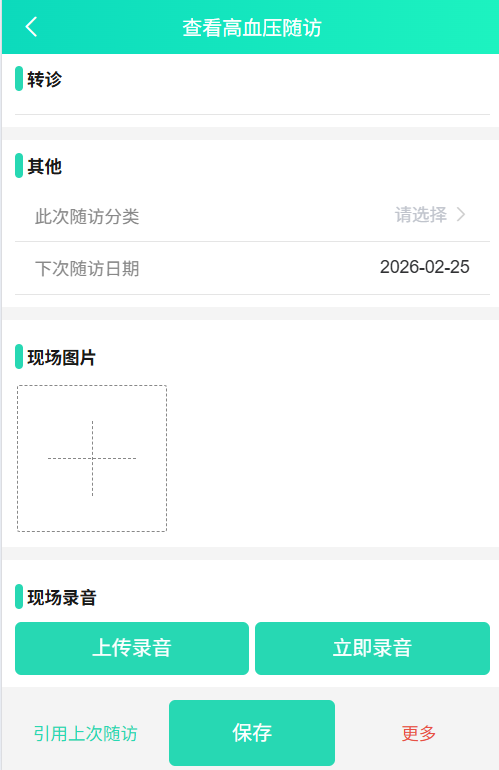
		<view class="title_3 fw_700">现场录音</view>
		<view class="f_aic_fdc">
			<image v-if="isRecording" id="blinking-image" src="/static/images/record.png"></image>
			<view v-if="isRecording" class="mb_5">正在录音中... {{ duration }}秒</view>
			<audio v-if="this.audioData.filePath && !isRecording" :src="this.audioData.filePath" controls class="mb_5"></audio>
		</view>
		<view class="f_aic_jcsb">
			<view class="btn mr_10" @click="chooseRecord">上传录音</view>
			<view class="btn" @click="recordImmediately">{{ isRecording ? '停止录音' : '立即录音'}}</view>
		</view>
	</view>
</template>

<script>
	import storage from '@/utils/storage.js';
	import {
		getAudio
	} from '@/api/image.js';
	import {
		environment
	} from '@/config/environment.js'

	export default {
		props: {
			rhrId: {
				type: [String, Number],
				default: ''
			},
			dataId: {
				type: [String, Number],
				default: ''
			},
		},
		data() {
			return {
				BASEAPI: getApp().globalData.BASEAPI,
				isRecording: false,
				// H5 录音对象
				mediaRecorder: null,
				audioChunks: [],
				recordFilePath: '',
				audioData: {},
				recordFileList: [],
				duration: 0,
				timer: null,
				// 小程序和APP录音对象
				recorderManager: null
			};
		},
		onLoad() {
		  // #ifdef MP-WEIXIN || APP-PLUS
		  this.init();
		  // #endif
		},
		created() {
			this.getAudioFile();
		},
		methods: {
			async getAudioFile() {
				try {
					let res = await getAudio(this.dataId);
					this.audioData = res.data;
				} catch {
					uni.hideLoading();
				}
			},
			init() {
				// 获取全局的录音管理器
				this.recorderManager = uni.getRecorderManager();

				this.recorderManager.onStart(() => {
				  console.log('录音开始');
				});

				this.recorderManager.onStop(res => {
				  this.recordFilePath = res.tempFilePath;
				  let formData = {
					  rhrId: this.rhrId,
					  dataId: this.dataId
				  }
				  // this.isRecording = false;
				  clearInterval(this.timer);
				  this.uploadAudio(this.recordFilePath, 2);
				  console.log('录音停止', res.tempFilePath);
				});

				this.recorderManager.onError(res => {
				  console.error('录音错误:', res);
				  // this.isRecording = false;
				  clearInterval(this.timer);
				  uni.showToast({
				    title: '录音失败',
				    icon: 'none'
				  });
				});
			},
			// 立即录音
			recordImmediately() {
				this.isRecording = !this.isRecording;
				if (this.isRecording) {
					this.startRecording();
				} else {
					this.stopRecording();
				}
			},
			async startRecording() {
			  // #ifdef H5
			  this.startH5Record();
			  // #endif

			  // #ifdef MP-WEIXIN
			  this.startMiniProgramRecord('mp3');
			  // #endif

			  // #ifdef APP-PLUS
			  this.startMiniProgramRecord('wav');
			  // #endif
			},
			stopRecording() {
				// #ifdef H5
				this.stopH5Record();
				// #endif

				// #ifdef MP-WEIXIN || APP-PLUS
				this.stopMiniProgramRecord();
				// #endif
			},
			async startH5Record() {
				// H5端实现
				  if (navigator.mediaDevices && navigator.mediaDevices.getUserMedia) {
					  try {
						const stream = await navigator.mediaDevices.getUserMedia({ audio: true });
						this.mediaRecorder = new MediaRecorder(stream);
						this.mediaRecorder.ondataavailable = (event) => {
						  this.audioChunks.push(event.data);
						};
						this.mediaRecorder.onstop = async () => {
						  const audioBlob = new Blob(this.audioChunks, { type: 'audio/wav' });
						  // this.recordFilePath = URL.createObjectURL(audioBlob);
                          //this.uploadAudio(this.recordFilePath, 2);
						  // 这里需要把blob文件获取后缀名,重新创建文件,否则传入后端没有后缀名
						  const extension = this.getFileExtension(audioBlob.type);
						  const fileName = `recording_${Date.now()}.${extension}`;
						  const newFile = new File([audioBlob], fileName, { type: 'audio/wav' });

						  this.uploadAudio(newFile, 1);
						};
						this.mediaRecorder.start();
						// this.isRecording = true;
						this.duration = 0;
						this.timer = setInterval(() => {
						  this.duration++;
						}, 1000);
					  } catch (error) {
						console.error('获取麦克风权限失败:', error);
					  }
				  } else {
					uni.showToast({
					  title: '浏览器不支持录音',
					  icon: 'none'
					});
				}
			},
			stopH5Record() {
				if (this.mediaRecorder) {
				  this.mediaRecorder.stop();
				  // this.isRecording = false;
				  clearInterval(this.timer);
				}
			},
			startMiniProgramRecord(type) {
				this.recorderManager.start({
				  format: type, // 录音格式,可选 aac/mp3/wav
				});

				// this.isRecording = true;
				this.duration = 0;
				this.timer = setInterval(() => {
				  this.duration++;
				}, 1000);
			},
			stopMiniProgramRecord() {
				console.log('录音结束', this.recorderManager);
				this.recorderManager.stop();
				// this.isRecording = false;
				clearInterval(this.timer);
			},
			// 选择文件上传
			chooseRecord(audioBlob) {
				uni.chooseFile({
				  count: 1, //默认100
				  extension:['.wav', '.mp3', '.aac'],
					success: res => {
						console.log(JSON.stringify(res.tempFilePaths));
						this.uploadAudio(res.tempFilePaths[0], 2);
					},
					fail: err => {
						if (err.errMsg == "chooseFile:fail cancel") {
							uni.$u.toast('取消上传');
						} else {
						    uni.$u.toast('上传失败');
						}
					}
				});
			},
			// 上传录音
			uploadAudio(url, type) {
				const formData = {
					rhrId: this.rhrId,
				    dataId: this.dataId
				}
				let filePath = url;
				uni.showLoading({
					title: '上传中'
				});
				// 判断是传的1 文件还是2 临时文件路径
				if (type == 1) {
					uni.uploadFile({
					  url: this.BASEAPI + '/phip-phr/file/uploadAudio',
					  file: filePath,
					  name: 'audio',
					  header: {
					  	Authorization: storage.get('AccessToken')
					  },
					  formData: formData,
					  success: (res) => {
						uni.hideLoading()
						uni.$u.toast('上传成功');
						this.getAudioFile();
					    console.log('上传成功:', res);
					  },
					  fail: (err) => {
						uni.hideLoading()
						uni.$u.toast('上传失败');
					    console.error('上传失败:', err);
					  }
					});
				} else {
					uni.uploadFile({
					  url: this.BASEAPI + '/phip-phr/file/uploadAudio',
					  filePath: filePath,
					  name: 'audio',
					  header: {
					  	Authorization: storage.get('AccessToken')
					  },
					  formData: formData,
					  success: (res) => {
						uni.hideLoading()
						uni.$u.toast('上传成功');
						this.getAudioFile();
					    console.log('上传成功:', res);
					  },
					  fail: (err) => {
						uni.hideLoading()
						uni.$u.toast('上传失败');
					    console.error('上传失败:', err);
					  }
					});
				}
			},
			// 获取文件扩展名
			getFileExtension(mimeType) {
			  const extensions = {
			    "audio/webm": "webm",
			    "audio/ogg": "ogg",
			    "audio/mp4": "mp4",
			    "audio/mpeg": "mp3",
			    "audio/wav": "wav",
			  };
			  return extensions[mimeType] || "webm";
			}
		},
		beforeDestroy() {
		  if (this.recorderManager && this.isRecording) {
		    this.recorderManager.stop();
		  }
		  clearInterval(this.timer);
		  this.stopH5Record();
		}
	};
</script>

<style lang="scss" scoped>
	.opinion-image {
		display: flex;
		flex-wrap: wrap;
		width: 100%;
	}

	.image {
		width: 30vw;
		height: 29.5vw;
		margin: 5rpx;
		border-radius: 5rpx;
		overflow: hidden;
		position: relative;
	}

	.image-content {
		width: 100%;
		height: 100%;
	}

	.image-del {
		position: absolute;
		top: 10rpx;
		right: 10rpx;
		width: 40rpx;
		height: 40rpx;
		color: #fff;
		background-color: rgba(0, 0, 0, 0.3);
		border-radius: 20rpx;
		text-align: center;
		line-height: 40rpx;
	}

	.image-select {
		display: flex;
		justify-content: center;
		align-items: center;
		border: 1rpx dashed #888;
		border-radius: 5rpx;
	}

	// .image-select i {
	// 	width: 4vw;
	// 	height: 4vw;
	// 	line-height: 4vw;
	// 	text-align: center;
	// 	font-size: 35rpx;
	// 	font-weight: 300;
	// }
	.cross {
		position: relative;
		width: 200px;
		height: 200px;
	}

	.cross::before,
	.cross::after {
		content: '';
		position: absolute;
	}

	.cross::before {
		top: 50%;
		left: 20%;
		height: 0px;
		width: 60%;
		border-top: 1rpx dashed #888;
	}

	.cross::after {
		top: 35%;
		left: 50%;
		height: 30%;
		width: 0px;
		border-right: 1rpx dashed #888;
	}

	.btn {
		flex: 1;
		height: 80rpx;
		line-height: 80rpx;
		background: #27d8b3;
		border-radius: 5px;
		color: #fff;
		font-size: 16px;
		text-align: center;
	}

	/* 定义一个名为 'blink' 的关键帧 */
	@keyframes blink {
	  0%, 100% {
	    opacity: 1; /* 完全不透明 */
	  }
	  50% {
	    opacity: 0.2; /* 半透明 */
	  }
	}


	#blinking-image {
	  animation: blink 2s infinite;
	  width: 130rpx;
	  height: 100rpx;
	}
</style>
问题
在做一个uniapp 移动 h5 项目时,遇到一个需要上传录音的需求,一是可以点击上传录音,二是需要立即录音。上传录音直接通过 uni.chooseFile 选择文件上传没有问题(文件是直接有后缀名的),但是点击立即录音,直接生成的 blob 文件传给后端则是无后缀名的。类似 file-1735458785
这样的格式
解决办法
在 uni-app 的 H5 环境中,通过 uni.uploadFile() 上传 Blob 类型的文件时,确实可能会遇到文件没有后缀扩展名的问题。这个问题会导致服务端无法正确判断文件类型和进行有效处理。为了完美解决这个问题,可以使用以下方法确保文件上传时带上正确的扩展名
- 使用
Blob的 MIME 类型判断扩展名:通过Blob对象的type属性来获取文件的 MIME 类型。根据 MIME 类型推测文件的扩展名(例如:image/png对应.png,image/jpeg对应.jpg)。 - 通过
File对象上传文件:将Blob转换为File对象,给文件指定正确的文件名和扩展名,然后再进行上传。
1. 获取 Blob 的 MIME 类型
首先,获取 Blob 的 MIME 类型,并根据 MIME 类型为文件添加合适的扩展名。
function getFileExtensionFromMimeType(mimeType) {
  const mimeTypes = {
    'image/png': 'png',
    'image/jpeg': 'jpg',
    'image/gif': 'gif',
    'image/webp': 'webp',
    'image/bmp': 'bmp',
    'image/tiff': 'tiff',
  };

  return mimeTypes[mimeType] || 'unknown';
}
2. 创建带扩展名的 File 对象
通过 Blob 的 type 属性获取 MIME 类型,并根据 MIME 类型生成文件的扩展名,然后创建一个新的 File 对象。
function createFileWithExtension(blob) {
  const mimeType = blob.type;
  const extension = getFileExtensionFromMimeType(mimeType);

  // 为文件生成一个随机文件名或者基于当前时间戳的文件名
  const fileName = `image_${new Date().getTime()}.${extension}`;

  // 创建一个新的 File 对象
  return new File([blob], fileName, { type: mimeType });
}
3. 使用 uni.uploadFile() 上传文件
通过将 Blob 转换为 File 对象后,使用 uni.uploadFile() 方法上传文件。
function uploadBlobImage(blob) {
  // 创建带有扩展名的文件对象
  const file = createFileWithExtension(blob);

  // 上传文件
  uni.uploadFile({
    url: 'https://your-upload-api-url.com',  // 替换为你的上传接口
    file: file,  // 直接传入 File 对象
    name: 'file',  // 后端接收文件的字段名
    formData: {
      rhrId: '12345',  // 你可以添加其他表单数据
    },
    success: (res) => {
      console.log('上传成功', res);
    },
    fail: (err) => {
      console.error('上传失败', err);
    }
  });
}
这样录音完成后,上传的就是自定义设置的文件名字啦

Agent 垂直技术社区,欢迎活跃、内容共建。
更多推荐


 4
4 0
0- 0


 已为社区贡献1条内容

所有评论(0)