MyBatis 类型处理器(TypeHandler)详解:打通 Java 与数据库的类型鸿沟
·
🔍 MyBatis 类型处理器(TypeHandler)详解:打通 Java 与数据库的类型鸿沟
文章目录
🧠 一、TypeHandler:类型转换的桥梁
💡 核心作用与价值
TypeHandler 是 MyBatis 中负责 Java 类型与 JDBC 类型相互转换的核心组件,它解决了:
三大核心功能:
- 参数设置:将 Java 对象转换为 PreparedStatement 参数
- 结果获取:从 ResultSet 中获取数据并转换为 Java 对象
- 空值处理:正确处理 NULL 值的情况
🔧 工作原理
📦 二、内置 TypeHandler 全景解析
💡 内置处理器分类
MyBatis 提供了丰富的内置 TypeHandler,覆盖了大部分常见类型:
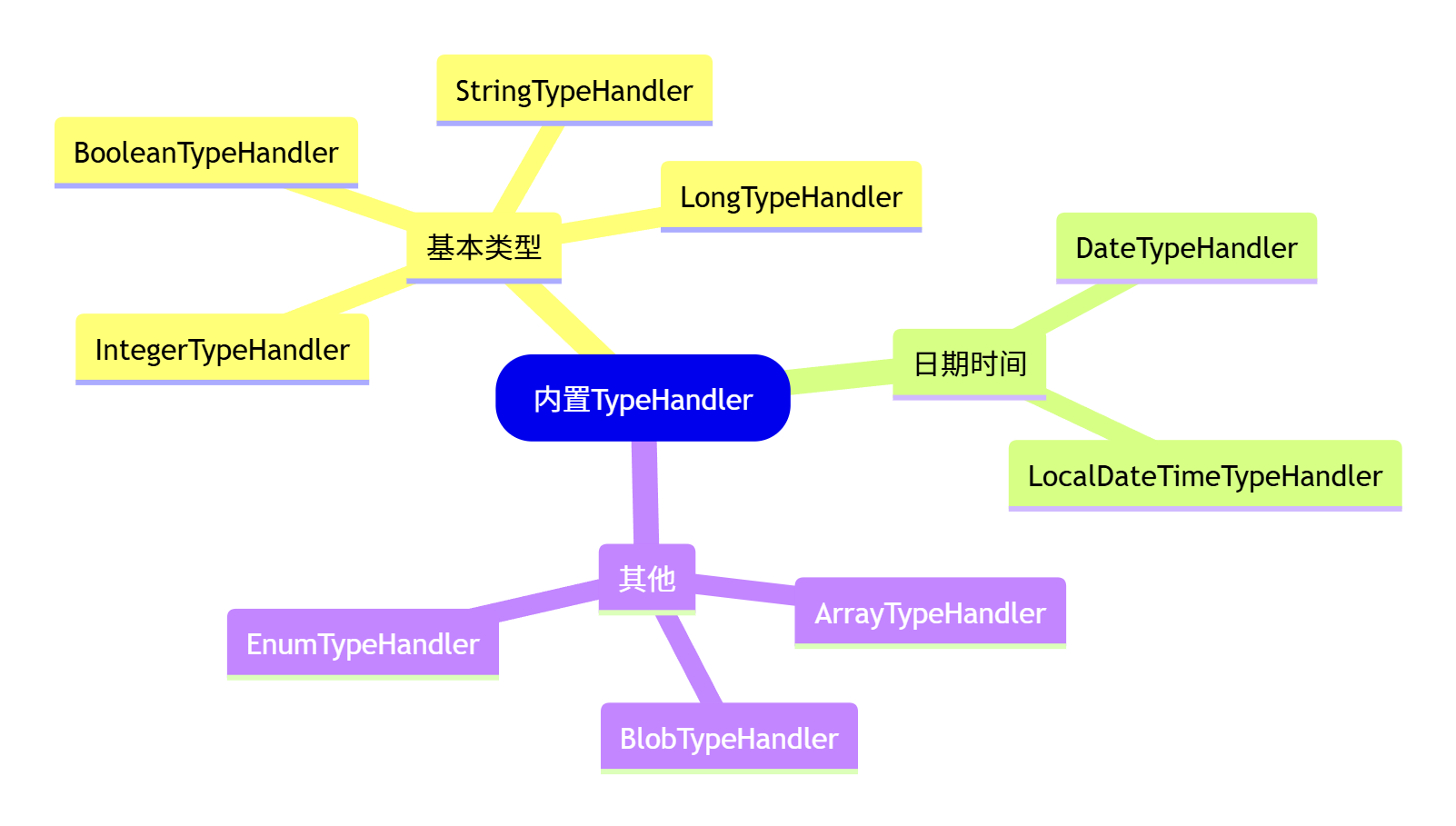
🔍 常用内置处理器对比
| Java 类型 | JDBC 类型 | TypeHandler | 备注 |
|---|---|---|---|
| String | VARCHAR | StringTypeHandler | 字符串处理 |
| Integer | INTEGER | IntegerTypeHandler | 整型处理 |
| Long | BIGINT | LongTypeHandler | 长整型处理 |
| Boolean | BIT | BooleanTypeHandler | 布尔值处理 |
| Date | TIMESTAMP | DateTypeHandler | 日期处理 |
| Enum | VARCHAR | EnumTypeHandler | 枚举处理 |
| byte[] | BLOB | BlobTypeHandler | 二进制处理 |
⚡ 自动类型映射示例
// 实体类
public class User {
    private Integer id;      // 自动使用 IntegerTypeHandler
    private String name;     // 自动使用 StringTypeHandler
    private Boolean active;  // 自动使用 BooleanTypeHandler
    private Date createTime; // 自动使用 DateTypeHandler
}

// MyBatis 自动选择合适的 TypeHandler
@Insert("INSERT INTO users(name, active) VALUES(#{name}, #{active})")
int insertUser(User user);
执行过程日志:
DEBUG: Setting parameter: name -> StringTypeHandler
DEBUG: Setting parameter: active -> BooleanTypeHandler
DEBUG: Retrieving column: id -> IntegerTypeHandler
🛠️ 三、自定义 TypeHandler 实战
💡 为什么需要自定义 TypeHandler?
当遇到以下场景时,内置处理器可能无法满足需求:
-
复杂对象与 JSON 字符串的转换
-
自定义枚举映射逻辑
-
特殊数据格式处理
-
数据库特定类型支持
🔥 实战 1:JSON 对象转换器
场景:将 Java 对象存储为 JSON 字符串
// 1. 定义复杂对象
@Data
public class UserProfile {
    private Map<String, Object> preferences;
    private List<String> tags;
    private Address address;
}

@Data
public class Address {
    private String province;
    private String city;
    private String detail;
}

// 2. 实现 JSON TypeHandler
@MappedTypes(UserProfile.class)
@MappedJdbcTypes(JdbcType.VARCHAR)
public class JsonTypeHandler extends BaseTypeHandler<UserProfile> {

    private final ObjectMapper objectMapper = new ObjectMapper();

    @Override
    public void setNonNullParameter(PreparedStatement ps, int i,
                                  UserProfile parameter, JdbcType jdbcType) throws SQLException {
        try {
            String json = objectMapper.writeValueAsString(parameter);
            ps.setString(i, json);
        } catch (JsonProcessingException e) {
            throw new SQLException("JSON serialization failed", e);
        }
    }

    @Override
    public UserProfile getNullableResult(ResultSet rs, String columnName) throws SQLException {
        String json = rs.getString(columnName);
        return parseJson(json);
    }

    @Override
    public UserProfile getNullableResult(ResultSet rs, int columnIndex) throws SQLException {
        String json = rs.getString(columnIndex);
        return parseJson(json);
    }

    @Override
    public UserProfile getNullableResult(CallableStatement cs, int columnIndex) throws SQLException {
        String json = cs.getString(columnIndex);
        return parseJson(json);
    }

    private UserProfile parseJson(String json) {
        if (json == null || json.isEmpty()) {
            return null;
        }
        try {
            return objectMapper.readValue(json, UserProfile.class);
        } catch (IOException e) {
            throw new RuntimeException("JSON parsing failed: " + json, e);
        }
    }
}
🎯 实战 2:枚举高级映射
场景:自定义枚举值与数据库的映射关系
// 枚举定义
public enum UserStatus {
    ACTIVE(1, "活跃"),
    INACTIVE(0, "非活跃"),
    BANNED(-1, "封禁");

    private final int code;
    private final String description;

    UserStatus(int code, String description) {
        this.code = code;
        this.description = description;
    }

    public int getCode() {
        return code;
    }

    public static UserStatus fromCode(int code) {
        for (UserStatus status : values()) {
            if (status.code == code) {
                return status;
            }
        }
        throw new IllegalArgumentException("Invalid status code: " + code);
    }
}

// 枚举 TypeHandler
@MappedTypes(UserStatus.class)
@MappedJdbcTypes(JdbcType.INTEGER)
public class UserStatusTypeHandler extends BaseTypeHandler<UserStatus> {

    @Override
    public void setNonNullParameter(PreparedStatement ps, int i,
                                  UserStatus parameter, JdbcType jdbcType) throws SQLException {
        ps.setInt(i, parameter.getCode());
    }

    @Override
    public UserStatus getNullableResult(ResultSet rs, String columnName) throws SQLException {
        int code = rs.getInt(columnName);
        return rs.wasNull() ? null : UserStatus.fromCode(code);
    }

    @Override
    public UserStatus getNullableResult(ResultSet rs, int columnIndex) throws SQLException {
        int code = rs.getInt(columnIndex);
        return rs.wasNull() ? null : UserStatus.fromCode(code);
    }

    @Override
    public UserStatus getNullableResult(CallableStatement cs, int columnIndex) throws SQLException {
        int code = cs.getInt(columnIndex);
        return cs.wasNull() ? null : UserStatus.fromCode(code);
    }
}
⚙️ 注册自定义 TypeHandler
方式 1:XML 配置
<!-- mybatis-config.xml -->
<typeHandlers>
    <typeHandler handler="com.example.handler.JsonTypeHandler"/>
    <typeHandler handler="com.example.handler.UserStatusTypeHandler"/>
</typeHandlers>
方式 2:注解配置(Spring Boot)
@Configuration
public class MyBatisConfig {

    @Bean
    public ConfigurationCustomizer mybatisConfigurationCustomizer() {
        return configuration -> {
            configuration.getTypeHandlerRegistry().register(JsonTypeHandler.class);
            configuration.getTypeHandlerRegistry().register(UserStatusTypeHandler.class);
        };
    }
}
🚀 四、企业级应用场景
💡 实战应用示例
// 实体类使用自定义 TypeHandler
@Data
public class User {
    private Integer id;
    private String name;

    // 使用自定义枚举 TypeHandler
    @TableField(typeHandler = UserStatusTypeHandler.class)
    private UserStatus status;

    // 使用自定义 JSON TypeHandler
    @TableField(typeHandler = JsonTypeHandler.class)
    private UserProfile profile;
}

// Mapper 接口
public interface UserMapper {
    @Insert("INSERT INTO users(name, status, profile) VALUES(#{name}, #{status}, #{profile})")
    @Options(useGeneratedKeys = true, keyProperty = "id")
    int insert(User user);

    @Select("SELECT * FROM users WHERE id = #{id}")
    User selectById(Integer id);
}
📊 数据库表结构
CREATE TABLE users (
    id INT PRIMARY KEY AUTO_INCREMENT,
    name VARCHAR(100) NOT NULL,
    status INT COMMENT '用户状态: 1-活跃, 0-非活跃, -1-封禁',
    profile TEXT COMMENT '用户配置信息(JSON格式)'
);
🔍 执行过程分析
插入数据时的转换:
User user = new User();
user.setName("张三");
user.setStatus(UserStatus.ACTIVE);

UserProfile profile = new UserProfile();
profile.setPreferences(Map.of("theme", "dark", "language", "zh-CN"));
user.setProfile(profile);

userMapper.insert(user); // 自动触发 TypeHandler
日志输出:
DEBUG: Setting parameter: name -> StringTypeHandler
DEBUG: Setting parameter: status -> UserStatusTypeHandler (转换为: 1)
DEBUG: Setting parameter: profile -> JsonTypeHandler (转换为: {"preferences":{"theme":"dark","language":"zh-CN"}})
查询数据时的转换:
User user = userMapper.selectById(1);
System.out.println(user.getStatus()); // 输出: ACTIVE
System.out.println(user.getProfile().getPreferences()); // 输出: {theme=dark, language=zh-CN}
💡 五、高级技巧与最佳实践
💡 性能优化建议
| 优化策略 | 实施方法 | 效果 |
|---|---|---|
| 缓存实例 | 在 TypeHandler 中缓存 ObjectMapper | 减少对象创建开销 |
| 懒加载 | 复杂解析只在需要时进行 | 减少内存占用 |
| 池化技术 | 重用昂贵的资源 | 提升性能 |
| 批量处理 | 优化批量操作时的转换逻辑 | 减少IO开销 |
🛡️ 异常处理最佳实践
public class SafeJsonTypeHandler extends BaseTypeHandler<Map<String, Object>> {

    private final ObjectMapper objectMapper = new ObjectMapper();

    @Override
    public void setNonNullParameter(PreparedStatement ps, int i,
                                  Map<String, Object> parameter, JdbcType jdbcType) throws SQLException {
        try {
            String json = objectMapper.writeValueAsString(parameter);
            ps.setString(i, json);
        } catch (JsonProcessingException e) {
            // 记录日志并设置默认值
            log.warn("JSON serialization failed, using empty object", e);
            ps.setString(i, "{}");
        }
    }

    @Override
    public Map<String, Object> getNullableResult(ResultSet rs, String columnName) throws SQLException {
        try {
            String json = rs.getString(columnName);
            return parseJsonSafely(json);
        } catch (Exception e) {
            log.warn("JSON parsing failed, returning empty map", e);
            return Collections.emptyMap();
        }
    }

    private Map<String, Object> parseJsonSafely(String json) {
        if (json == null || json.trim().isEmpty()) {
            return Collections.emptyMap();
        }
        try {
            return objectMapper.readValue(json, new TypeReference<Map<String, Object>>() {});
        } catch (IOException e) {
            log.warn("Failed to parse JSON: {}", json, e);
            return Collections.emptyMap();
        }
    }
}
🔧 调试与监控
# application.yml 配置
logging:
  level:
    com.example.handler: DEBUG # TypeHandler 调试日志
🔍 六、总结与性能优化
📚 核心要点回顾
- TypeHandler 作用:桥梁 Java 类型与 JDBC 类型
- 内置处理器:覆盖大部分常见类型转换
- 自定义场景:JSON 处理、枚举映射、特殊格式
- 性能优化:缓存、懒加载、异常处理
🚀 进阶应用方向
⚡ 性能对比数据
| 处理方式 | 平均耗时 | 内存占用 | 适用场景 |
|---|---|---|---|
| 内置TypeHandler | 0.1ms | 低 | 基本类型转换 |
| 自定义JSON处理 | 2.5ms | 中 | 复杂对象序列化 |
| 数据库JSON函数 | 1.8ms | 低 | 简单JSON查询 |
| 应用层处理 | 3.2ms | 高 | 复杂业务逻辑 |

Agent 垂直技术社区,欢迎活跃、内容共建。
更多推荐


 26
26 0
0- 0


 已为社区贡献5条内容

所有评论(0)