【RelayMQ】基于 Java 实现轻量级消息队列(四)
目录
本文章主要介绍:数据存储模块中的硬盘消息存储
一. 设计思路
消息涉及高频率的访问不会涉及复杂的修改和删除,为了提高效率,所以采用文件存储的方式
目录样式:
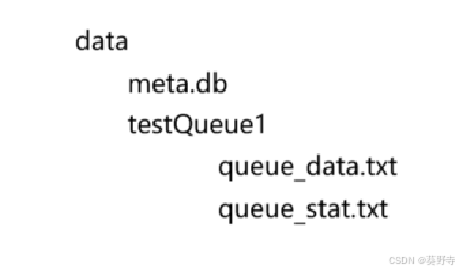
队列中存储消息,消息依附于队列,所以文件存储的目录是对应的队列名,队列目录下还会存在两个文件:
- queue_data.txt :用于存放消息的内容
- queue_stat.txt :用户保存消息的统计信息
创建文件和目录方法
//    创建目录
    private String getQueueDir(String queueName){
        return "./data/"+queueName;
    }

//    存放数据(.bin,.dat)
    private String getQueueDataPath(String queueName){
        return getQueueDir(queueName)+"/queue_data.txt";
    }

//    存放状态信息
    private String getQueueStatPath(String queueName){
        return getQueueDir(queueName)+"/queue_stat.txt";
    }
二. queue_data.txt
queue_data用于存储消息的内容,一个文件可以存储若干个消息,每一个消息都使用二进制存储
如果一股脑的存入,则会出现粘包问题,取出的数据无法识别
粘包问题
这里采用引用消息长度的方式解决粘包问题
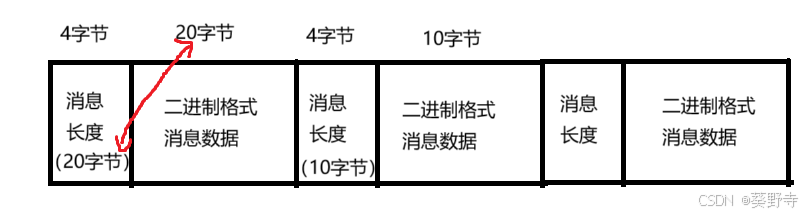
消息长度:占据4字节,用于描述消息数据的大小为多少
消息数据:这里采用二进制存储(考虑数据兼容和数据量)
对于消息队列服务器来说,消息是需要增加和删除的
- 生成者生成消息,则增加消息
- 消费者消费消息,则减少消息
整个消息文件类似于顺序表的结构
- 增加消息,我们可以采用尾插法
- 删除消息:删除最后一个消息还好,如果是中间元素的删除,则会涉及元素的搬运
避免删除的开销太大,这里的删除采用的是逻辑删除的方式
- isValid==1:表示有效数据
- isValid==0;表示无效数据
垃圾回收
随着不断使用,文件中的消息会越来越多,并且大部分都是无效数据,这时候就需要进行垃圾回收
使用复制算法,针对消息数据中的垃圾进行回收

使用复制的方法,最好是用在当前有效数据很少,无效数据多的情况下
遍历数据,将有效数据复制转移到另一半空间中,遍历完成后,删除这一半空间中的所有数据
什么时候GC?
如果GC太频繁,带给系统的开销会太大,如果GC频率太低,一次GC消耗的时间会很长
这里规定当消息数目超过2000,并且有效数据数目小于总消息数量的一半,才会触发一次GC
为了更好的统计消息文件中有效数据和总数据的个数,所以引入queue_stat.txt存储统计信息
三. queue_stat.txt
使用这个文件存储消息的统计信息
其中存在两个元素
- 总消息的个数:totalCount
- 有效消息个数:ValidCount
    static public class Stat{
        public int totalCount;
        public int ValidCount;
    }
两个数据中间使用 \t 来存储
四. queue_data方法实现
这里主要有两个方法:消息写入文件和删除消息
文件消息写入
- 检查要写入的文件是否存在
- 将消息转为二进制数据并获取消息的长度
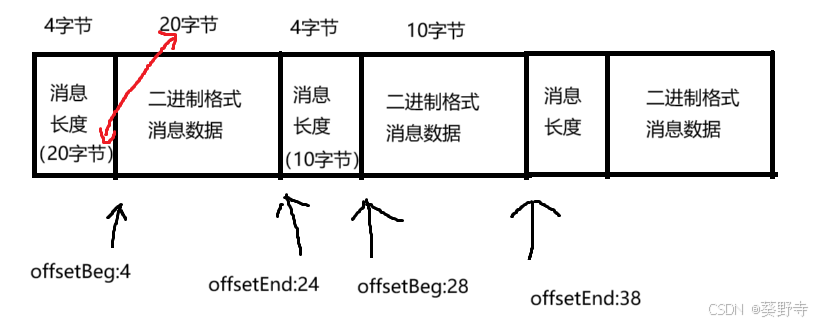
- 设置消息在文件中的起始位置和结束位置
- 按照规定的格式写入(长度+内容)
- 更新统计文件
    /*
    * 将消息写入文件(本质上是放入队列中)
    * */
    public void sendMessage(MSGQueue queue, Message message) throws MqException, IOException {
//       1. 放入的前提条件,文件必须存在(队列名和文件名一致)
        if (!checkFilesExist(queue.getName())) {
            throw new MqException("[MessageFileManager 文件不存在]");
        }
//     2. (序列化)  将消息转换为2进制
        byte[] bytes = BinaryTool.toBytes(message);
//     3.   规定写入消息在文件中的格式
        //消息的内容
        synchronized (queue) {
            File dataFile = new File(getQueueDataPath(queue.getName()));
            message.setOffsetBeg(dataFile.length() + 4);
            message.setOffsetEnd(dataFile.length() + 4 + bytes.length);
            //消息的头(内容的长度)
//        4.执行数据内容的写入
            try (OutputStream outputStream = new FileOutputStream(dataFile, true)) {
                try (DataOutputStream dataOutputStream = new DataOutputStream(outputStream)) {
                    //写入头(包含数据长度)不能直接写入数值,否则就是说占用1个字节
                    //这个方法本质上是将int中的4个字节,一个字节一个字节写入
                    dataOutputStream.writeInt(bytes.length);
                    dataOutputStream.write(bytes);
                }
            }
//       5.更新统计文件
            Stat stat = readStat(queue.getName());
            stat.totalCount += 1;
            stat.ValidCount += 1;
            writeStat(queue.getName(), stat);
        }
    }
注意:并没有将offsetBeg和offsetEnd的值写入硬盘中,而是采用实时计算的方式
消息逻辑删除
- 从文件中取出二进制消息
- 将消息反序列化
- 修改消息中的删除位
- 将消息序列化并放回文件中
- 更新统计文件
    public void deleteMessage(MSGQueue queue,Message message) throws IOException, ClassNotFoundException {
        synchronized (queue) {
//        1.从文件中取出数据
            try (RandomAccessFile randomAccessFile = new RandomAccessFile(getQueueDataPath(queue.getName()), "rw")) {

                System.out.println(queue.getName());

                long fileLength = randomAccessFile.length();
                long offsetBeg = message.getOffsetBeg();
                long offsetEnd = message.getOffsetEnd();

                if (offsetBeg < 0 || offsetEnd > fileLength || offsetEnd <= offsetBeg) {
                    throw new IOException("Invalid message offsets: offsetBeg=" + offsetBeg + ", offsetEnd=" + offsetEnd + ", fileLength=" + fileLength);
                }

                int length = (int) (offsetEnd - offsetBeg);

                byte[] bytes = new byte[(int) (message.getOffsetEnd() - message.getOffsetBeg())];
                randomAccessFile.seek(message.getOffsetBeg());
                //从这个光标开始,一直读,直到填充满
                randomAccessFile.readFully(bytes);
//        2.将读出的数据进行反序列化
                Message message1 = (Message) BinaryTool.fromBytes(bytes);
//        3.将文件中的删除位修改
                message1.setIsValid((byte) 0x0);
//        4.将数据放回文件
                byte[] bytes1 = BinaryTool.toBytes(message1);
                randomAccessFile.seek(message.getOffsetBeg());
                randomAccessFile.write(bytes1);
            }
//        5.更新统计文件
            Stat stat = readStat(queue.getName());
            if (stat.ValidCount > 0) {
                stat.ValidCount -= 1;
            }
            writeStat(queue.getName(), stat);

        }
    }
数据全部加载到内存
- 创建出一个链表
- 将消息读取出来并进行反序列化
- 判断是否有效
- 然后读取到链表中
- 循环读取
    public LinkedList<Message> loadAllMessageFromQueue(String queue) throws IOException, MqException, ClassNotFoundException {
        LinkedList<Message> messages = new LinkedList<>();
        try(InputStream inputStream = new FileInputStream(getQueueDataPath(queue))){
            try(DataInputStream dataInputStream = new DataInputStream(inputStream)){
                long currentOffSet = 0;
                while(true){
//                    1.读取当前长度
                    //先读取四个字节(这四个字节表明长度是多少)
                    int messageSize = dataInputStream.readInt();
                    byte[] bytes = new byte[messageSize];
//                    2.根据长度读取消息数据
                    //返回实际读取了多少
                    int size = dataInputStream.read(bytes);
//                    3.进行判断格式是否有误,实际读取到的和四个字节中的是否一致
                    if(size!=messageSize){
                        throw new MqException("[MessageFileManager]文件数据格式有误");
                    }
//                    4.进行反序列化
                    //将读取到的数据进行反序列化
                    Message message = (Message) BinaryTool.fromBytes(bytes);
//                    5.判断是不是无效数据(如果不是有效数据,直接跳过)
                    if(message.getIsValid()!=0x1){
                        currentOffSet +=(4+messageSize);
                        continue;
                    }
//                    6.光标需要移动
                    message.setOffsetBeg(currentOffSet+4);
                    message.setOffsetEnd(currentOffSet+4+messageSize);
                    currentOffSet +=(4+messageSize);
                    messages.add(message);
                }
            }catch (EOFException e){
                //这里的异常并不是真的异常,还是借助异常来处理逻辑
//                DataInputStream类在读取完所有的数据之后,会抛出EOF异常,借用这个异常实现读取完成逻辑
                System.out.println("文件读取完成");
            }
        }
        return messages;
    }
五. queue_stat 方法实现
统计文件的读取
由于使用 \t 进行间隔,使用scanner,nextInt() 进行读取
    /*
    * 读出相关信息(文本文件,直接使用scanner进行读取)
    * */
    private Stat readStat(String queueName){
        Stat stat = new Stat();
        try(InputStream inputStream = new FileInputStream(getQueueStatPath(queueName))){
            Scanner scanner = new Scanner(inputStream);
            stat.totalCount = scanner.nextInt();
            stat.ValidCount = scanner.nextInt();
            return stat;
        } catch (IOException e) {
            e.printStackTrace();
        }
        return null;
    }
统计文件的修改
将要写入的stat数据按照规定的格式写入文件中
    /*
    * 写操作
    * */
    private void writeStat(String queueName,Stat stat){
        try(OutputStream outputStream = new FileOutputStream(getQueueStatPath(queueName))){
            PrintWriter printWriter = new PrintWriter(outputStream);
            printWriter.write(stat.totalCount+"\t"+ stat.ValidCount);
//            刷新缓存
            printWriter.flush();
        } catch (IOException e) {
            e.printStackTrace();
        }
    }
注意:别忘了冲刷缓冲区
六. 垃圾回收
创建一个新文件用于存储数据
    /*
    * 垃圾回收机制——创建新的暂时存储数据文件
    * */
    public String getQueueDataNewPath(String queueName){
        return getQueueDir(queueName)+"/queue_data_new_file.txt";
    }
判断是否需要GC
    /*
    * 垃圾回收机制——检查是否需要垃圾回收(有效数据占总数据的一半)
    * */
    public boolean checkGC(String queueName){
        Stat stat = readStat(queueName);
        if(stat.totalCount>2000 && (double) stat.ValidCount /(double) stat.totalCount>0.5){
            return true;
        }
        return false;
    }
实现垃圾回收
- 先创建出新文件
- 将有效数据读取到新文件中
- 删除原来的旧文件
- 将新文件进行改名
- 更新统计
    public void gc(MSGQueue queue) throws MqException, IOException, ClassNotFoundException {
        synchronized (queue){
            long gcBegin = System.currentTimeMillis();
//            1.先创建出新文件
            File queueDataNewFile = new File(getQueueDataNewPath(queue.getName()));
            //判断是否存在
            if(queueDataNewFile.exists()){
                throw new MqException("[MessageFileManage] 垃圾回收中新文件已存在,不能继续创建,queueName = "+queue.getName());
            }
            boolean ok = queueDataNewFile.createNewFile();
            if(!ok){
                throw new MqException("[MessageFileManage] 垃圾回收中新文件创建失败,queueName = "+queue.getName());
            }
//            2.将有效数据读取到新文件中
            //取出有效文件
            LinkedList<Message> messages = loadAllMessageFromQueue(queue.getName());
            //执行写入操作
            try(OutputStream outputStream = new FileOutputStream(queueDataNewFile)){
                try(DataOutputStream dataOutputStream = new DataOutputStream(outputStream)){
                    for(Message message:messages){
                        byte[] bytes = BinaryTool.toBytes(message);
                        dataOutputStream.writeInt(bytes.length);
                        dataOutputStream.write(bytes);
                    }
                }
            }
//            3.删除原来的旧文件
            File queueDataOldFile = new File(getQueueDataPath(queue.getName()));
            ok = queueDataOldFile.delete();
            if(!ok){
                throw new MqException("[MessageFileManage] 垃圾回收中删除旧文件失败,queueName = "+queue.getName());
            }
//            4.将新文件进行改名
            ok = queueDataNewFile.renameTo(queueDataOldFile);
            if(!ok){
                throw new MqException("[MessageFileManage] 垃圾回收中新文件改名失败,queueName = "+queue.getName());
            }
//            5.更新统计
            Stat stat = readStat(queue.getName());
            stat.ValidCount = messages.size();
            stat.totalCount = messages.size();
            writeStat(queue.getName(),stat);

            long gcEnd = System.currentTimeMillis();
            System.out.println("[MessageFileManage] 垃圾回收结束,queueName = " + queue.getName() + ",用时" + (gcEnd - gcBegin) + "ms");
        }
    }
七. 封装方法
检查文件:查看目录下的文件是否存在
    /*
    * 检查目录下的文件是否存在
    * */
    private boolean checkFilesExist(String queueFile){
        File dataFile = new File(getQueueDataPath(queueFile));
        if(!dataFile.exists()){
            return false;
        }
        File statFile = new File(getQueueStatPath(queueFile));
        if(!statFile.exists()){
            return false;
        }
        return true;
    }
文件初始化:创建出队列的目录,数据文件,统计文件和初始化统计文件
    /*
    * 文件初始化(真正的创建文件)
    * */
    public void createQueueFile(String queueName) throws IOException {
//        创建目录
        File baseFile = new File(getQueueDir(queueName));
        if(!baseFile.exists()){
            boolean ok = baseFile.mkdirs();
            if(!ok){
                throw new IOException("创建目录失败"+baseFile.getAbsoluteFile());
            }
        }
//        创建数据文件
        File queueDataFile = new File(getQueueDataPath(queueName));
        if(!queueDataFile.exists()){
            boolean ok = queueDataFile.createNewFile();
            if(!ok){
                throw new IOException("创建数据失败"+queueDataFile.getAbsoluteFile());
            }
        }
//        创建统计文件
        File queueStatFile = new File(getQueueStatPath(queueName));
        if(!queueStatFile.exists()){
            boolean ok = queueStatFile.createNewFile();
            if(!ok){
                throw new IOException("创建统计失败"+queueStatFile.getAbsoluteFile());
            }
        }
//        统计文件分配参数
        Stat stat = new Stat();
        stat.ValidCount = 0;
        stat.totalCount = 0;
        writeStat(queueName,stat);
    }
删除目录:删除文件和对应的目录(先删除文件,后删除目录)
    /*
    * 删除目录(先删除文件,后删除目录)
    * */
    public void destroyFile(String queueName) throws IOException {
        File dataFile = new File(getQueueDataPath(queueName));
        boolean ok1 = dataFile.delete();
        File statFile = new File(getQueueStatPath(queueName));
        boolean ok2 = statFile.delete();
        File baseFile = new File(getQueueDir(queueName));
        boolean ok3 = baseFile.delete();
        if(!ok1 || !ok2 || !ok3){
            throw new IOException("目录删除失败"+baseFile.getAbsoluteFile());
        }
    }
Agent 垂直技术社区,欢迎活跃、内容共建。
更多推荐


 23
23 0
0- 0


 已为社区贡献3条内容

所有评论(0)