Python 语法笔记
print()函数
a=100 # 变量a的值为100
b=50 # 变量b的值为50
print(90) # 输出数字90
print(a) # 输出变量a的值100
print(a*b) # 输出a*b的运算结果

print('北京欢迎你!')
print("北京欢迎你!")
print('''北京欢迎你!''') # 字符串要加引号
print("""北京欢迎你!""") # 相同的输出结果  北京欢迎你!

print('b')
print(chr(98)) #使用chr()将98转换成ASCII表中的字符
print(ord('加'))
print(ord('油'))
print(chr(21152),chr(27833)) #chr()与ord()一一对应
python内部采用unicode编码,双字节16位
输出结果:
90
100
5000
北京欢迎你!
北京欢迎你!
北京欢迎你!
北京欢迎你!
b
b
21152
27833
加 油
print('加油',end='-->')
print('你好啊') # 由于第二句没有修改结束符,输出会出现空行
输出结果:

连接符的使用
print('加油'+'2025')
连接符只能连接字符串
运行结果:
加油2025
打开文件函数open('文件名','操作')
fp=open('note.txt','w') #打开文件 w->write fp是变量名称,其不
                        #是文件本身,只是一个与文件交互的接口
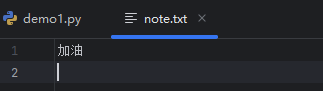
print('加油',file=fp) #将“加油”写入note.txt文件中
fp.close() # 关闭文件
运行结果:
输入函数input
x=input('提示文字')
无论输入的数据是什么,x的数据类型都是字符串类型
num=input('请输入您的年龄:')
print('您的年龄是:'+num) # 连接成功说明num是字符串类型
num=int(num) # 使用内置函数将num转换成整数类型
print('您的年龄是:',num) # 此时num已经转换成整数类型,不加连接符
输出结果:
您的年龄是:10
您的年龄是: 10
python中的注释
在python编程中第一行“#coding=utf-8”不参与逻辑运行,只是向解释器注明编码方式。普通注释会被完全忽略,而 #coding=utf-8 是解释器 “认识” 的特殊指令,会被当作配置信息处理。
#多行注释
'''
加油
加油
'''
"""
加油
加油
"""
代码缩进
类定义、函数定义、流程控制语句以及异常处理语句等行尾的冒号和下一行的缩进表示一个代码块的开始,而缩进结束,则表示一个代码块的结束。通过缩进来体现语句间的逻辑关系
#类的定义
class Student:
    pass

#函数的定义
def fun():
    pass
pass前的缩进时自动的
保留字与标识符
import keyword # 获取关键字列表
print(keyword.kwlist) # 打印保留字
print(len(keyword.kwlist)) # 获取保留字的个数

'''
输出结果:
['False', 'None', 'True', 'and', 'as', 'assert', 'async', 'await', 'break', 'class', 'continue', 'def', 'del', 'elif', 'else', 'except', 'finally', 'for', 'from', 'global', 'if', 'import', 'in', 'is', 'lambda', 'nonlocal', 'not', 'or', 'pass', 'raise', 'return', 'try', 'while', 'with', 'yield']
35
'''
保留字不允许作为变量名称且严格区分大小写。
常量命名全部采用大写字母;使用单下划线“_”开头的模块变量或函数时受保护的,在使用“from xxx import*”语句从模块中导入时,这些模块变量或函数不能被导入;使用双下划线“__”开头的实例变量或方法时类私有的;以双下划线开头或结尾时python的专用标识,例如:_init_()表示初始化函数。
变量与常量
#变量的定义
my_age = 8 # 创建一个整形变量my_age,并为其赋值位8

my_name = 'Li Ming' #字符串类型变量

print('我的年龄是:',my_age)
print('my_age的数据类型是:',type(my_age))

#python动态修改变量的数据类型,通过不同类型的赋值可以直接修改
my_age = '今天没吃午饭'
print('my_age的数据类型是:',type(my_age))

#在python允许多个变量指向同一个值
no=number=1024
print(no,number)
print(id(no))
print(id(number)) # id()查看对象的内存地址

'''
输出结果:
我的年龄是: 8
my_age的数据类型是: <class 'int'>
my_age的数据类型是: <class 'str'>
1024 1024
2444773078032
2444773078032

'''
常量使用大写字母定义
pi = 3.1415 #定义了一个变量
PI = 3.1415 #定义了一个常量,不要去修改
数值类型
x = 123+456j
print('实数部分:',x.real)
print('虚数部分:',x.imag)

x=10
y=10.0

print('x的数据类型:',type(x))
print('y的数据类型:',type(y))

print(round(0.1+0.2,1))# 1表示保留一位小数


'''
输出结果:
实数部分: 123.0
虚数部分: 456.0
x的数据类型: <class 'int'>
y的数据类型: <class 'float'>
0.3

'''
字符串类型
city = '保定'
address = '保定市莲池区灵雨寺街'
print(city,address)

#多行字符串
info = '''地址:保定市莲池区灵雨寺街
    收件人:李明
    手机号:15682158612
'''
print(info)

info1 = """地址:保定市莲池区灵雨寺街
    收件人:李明
    手机号:15682158612
"""
print(info1)


"""
输出结果:
保定 保定市莲池区灵雨寺街
地址:保定市莲池区灵雨寺街
    收件人:李明
    手机号:15682158612

地址:保定市莲池区灵雨寺街
    收件人:李明
    手机号:15682158612

"""
字符串的切片和索引
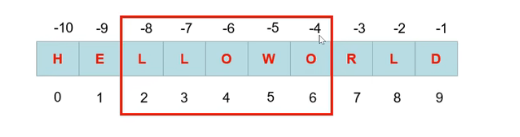
s = 'HELLOWORD'
print(s[0],s[-10]) # 序号0和序号-10表示的是同一个字符
print('北京欢迎你'[4]) # 获取字符串中索引为4
print('北京欢迎你'[-1])
print('-------------------')
print(s[2:7]) # 从2开始到7结束不包含7
print(s[-8:-3]) # 反向递减
print(s[:5]) # 默认从0开始
print(s[5:]) # 默认切到字符串的结尾

'''
输出结果:
H H
你
你
-------------------
LLOWO
LLOWO
HELLO
WORLD

'''
对的字符串操作
x = '保定市'
y = '莲池区灵雨寺街'
print(x+y) # 连接两字符串
print(x*10) # 复制字符串10次

print('莲池区' in y) # True
print('保定市' in y) # False

'''
输出结果:
保定市莲池区灵雨寺街
保定市保定市保定市保定市保定市保定市保定市保定市保定市保定市
True
False

'''
布尔类型
布尔值为False的情况:
False或者None;
数值中的0,包含0,0.0,虚数0;
空序列,包含空字符串、空元组、空列表、空字典、空集合;
自定义对象的实例,该对象的 bool() 返回False或 len() 返回0
数据类型间的转换
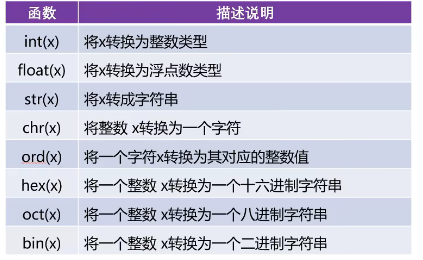
eval函数
功能:执行一个字符串类型的表达式。去掉字符串左右的引号,若字符串是变量名称则输出变量所指代内容。
s = '3.14+3'
print(s,type(s))
x = eval(s) # 使用eval函数去掉s这个字符串中左右的引号,执行加法运算
print(x,type(x))

# eval函数经常与input函数一起使用,用来获取用户输入的数值
age = eval(input('请输入您的年龄:')) # 将字符串类型转成了int类型,相当于int(age)
print(age,type(age))

heigh = eval(input('请输入您的身高:'))
print(heigh,type(heigh))

hello = '加油'
print(hello)
print(eval('hello')) # 去掉引号就变成了hello这个变量所以输出结果为“加油”
#print(eval('加油'))  NameError: name '加油' is not defined
'''
输出结果:
3.14+3 <class 'str'>
6.140000000000001 <class 'float'>
请输入您的年龄:18
18 <class 'int'>
请输入您的身高:199.9
199.9 <class 'float'>
加油
加油

'''
算数运算符
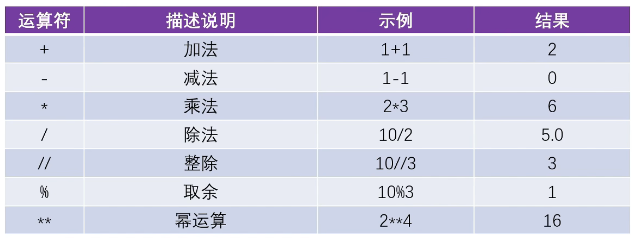
赋值运算符
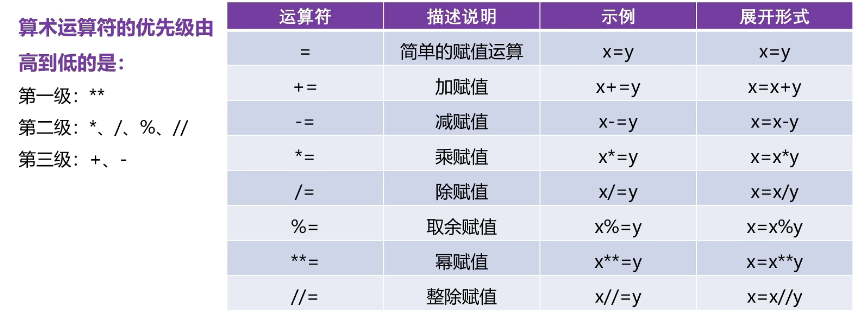
支持链式赋值:
a=b=c=100
系列解包赋值:
a,b=10,20 # 相当于a=10 b=20
交换两变量的值:
a,b=b,a # 将b的值给a,a的值给b
比较运算符
输出布尔值。
逻辑运算符
依据布尔值再去进行运算,结果任然是布尔值。(and、or、ont)
位运算符
按位与:&
按位或:|
按位取反:~
左移位:<< 溢出低位全部补零。
右移位:>> 原数值高位是1,右移溢出就在高位全部补1;同理。
遍历循环for
for i in 'hello':
    print(i)
# rang()函数,产生一个(n,m)的整数序列,包含n但不包含m
for i in range(1,11):
    print(i)

#计算累加和
s = 0
for i in range(1,11):
    s += i
print('累加和结果:',s)

'''
输出结果:
h
e
l
l
o
1
2
3
4
5
6
7
8
9
10
累加和结果: 55
'''
#for循环的扩展形式

#计算累加和
s = 0
for i in range(1,11):
    s += i
else:
    print('累加和结果:',s) # 循环正常执行10次才会输出累加结果

'''
输出结果:
累加和结果: 55

'''
while无限循环
#1-100间的累加和
s = 0 # 存储累加结果
i = 1 # (1)初始化变量
while i < 100: # (2)条件判断
    s+=i # (3)语句块
    i+=1 # (4)改变变量
print(s)

'''
初始化i,判断i,计算i,改变i无限循环的四个步骤
'''
(1)初始化变量(2)条件判断(3)语句块(4)改变变量
始终改变的是一个变量的值
break在循环中的使用
s = 0
i = 1
while i < 11:
    s = s + i
    if s>20:
        print("累加和大于20的当前数是:",i)
       # break # 跳出循环
    i+=1

print('------使用break退出循环---------')
s = 0
i = 1
while i < 11:
    s = s + i
    if s>20:
        print("累加和大于20的当前数是:",i)
        break # 跳出循环
    i+=1
'''
输出结果:
累加和大于20的当前数是: 6
累加和大于20的当前数是: 7
累加和大于20的当前数是: 8
累加和大于20的当前数是: 9
累加和大于20的当前数是: 10
------使用break退出循环---------
累加和大于20的当前数是: 6

'''
在遍历循环中的使用
for i in 'hello':
    if i == 'e':
        break
    print(i)
'''
输出结果:
h

'''
continue在循环中的使用
功能:跳过本次循环的后续语句,执行新的循环
s = 0
for i in range(1,101):
    if i%2==1:
        continue
    s+=i
print('1到100间的偶数和:',s)
'''
输出结果:
1到100间的偶数和: 2550

'''
空语句pass
# 语句完整不会报错
if True:
    pass


# 语句不完整会报错

if True:

# IndentationError: expected an indented block after 'if' statement on line 1
序列的索引和切片
正向索引与反向索引
# 正向索引
s = 'helloworld'
for i in range(0,len(s)):
    print(i,s[i],end='\t\t')
print('\n-------------')

#反向索引
for i in range(-10,0):
    print(i,s[i],end='\t\t')

#正向与反向索引同一个字符
print('\n',s[9],s[-1])

'''
输出结果:
0 h		1 e		2 l		3 l		4 o		5 w		6 o		7 r		8 l		9 d
-------------
-10 h		-9 e		-8 l		-7 l		-6 o		-5 w		-4 o		-3 r		-2 l		-1 d
 d d

'''
s = 'helloworld'
#切片操作
s1 = s[0:5:2] # 索引从0开始到5结束(不包含5)步长为2
print(s1)

#步长为负数
print(s[::-1]) # 反向索引
#替换上一行语句
print(s[-1:-11:-1])
'''
输出结果:
hlo
dlrowolleh
dlrowolleh

'''
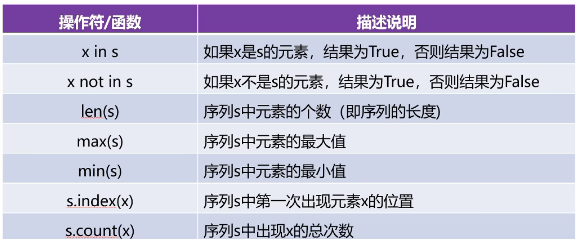
序列的相关操作
列表
创建方式
(1)列表名=[element1,element2,.....,elementN]
(2)列表名=list(序列)
#创建列表
lst = ['hello','world',78,893,73]
print(lst)

#创建列表
lst2 = list('helloworld')
lst3 = list(range(1,10,2))
print(lst2)
print(lst3)

#列表是序列中的一种,对序列的操作符、运算符、函数均可使用
print(lst2+lst3+lst) # 执行序列相加操作
print(lst*3) # 相乘操作
print(len(lst)) # 序列的长度
print(max(lst2)) # 序列中的最大值,按照assiic码表
print(min(lst2)) # 序列中的最小值

print(lst2.count('o')) # 统计o的个数
print(lst2.index('o')) # o在列表中第一次出现的位置

'''
输出结果:
['hello', 'world', 78, 893, 73]
['h', 'e', 'l', 'l', 'o', 'w', 'o', 'r', 'l', 'd']
[1, 3, 5, 7, 9]
['h', 'e', 'l', 'l', 'o', 'w', 'o', 'r', 'l', 'd', 1, 3, 5, 7, 9, 'hello', 'world', 78, 893, 73]
['hello', 'world', 78, 893, 73, 'hello', 'world', 78, 893, 73, 'hello', 'world', 78, 893, 73]
5
w
d
2
4
'''
删除列表
lst = [10,20,89]
print(lst)
del lst # 删除列表
print(lst)

'''
报错:
由于已经将列表删除所以print语句报错
NameError: name 'lst' is not defined. Did you mean: 'list'?
'''
enumerate()函数
功能:遍历列表元素
lst = ['hello','world','gbhef','wfwy']
#使用遍历循环for遍历列表元素
for item in lst: # item就是lst中的每一个元素
    print(item)

#使用for循环,rang()函数,len()函数,根据索引进行遍历
for i in range(0,len(lst)):
    print(i,'-->',lst[i])

# 使用enumerate()函数进行遍历
for index,item in enumerate(lst):
#index代表enumerate函数返回的序号,而这个序号恰好等于列表中的索引值
#item代表列表中的元素值
    print(index,item) # index是序号不是索引

#手动修改序号的起始值
for index,item in enumerate(lst,start=1):
    print(index,item)

for index,item in enumerate(lst,1):
    print(index,item)

'''
输出结果:
hello
world
gbhef
wfwy
0 --> hello
1 --> world
2 --> gbhef
3 --> wfwy
0 hello
1 world
2 gbhef
3 wfwy
1 hello
2 world
3 gbhef
4 wfwy
1 hello
2 world
3 gbhef
4 wfwy

'''
列表的特有操作
列表元素个数可变但内存地址不变
lst = ['gdy','ygwe','y7wey','hfew']
print('原列表',lst,id(lst)) # id()输出原列表地址

print('增加元素操作')
lst.append('jni')
print('增加元素后',lst,id(lst))

print('使用insert(_index,x)在指定的index位置上插入元素x')
lst.insert(1,'456')
print(lst)

print('#列表元素的删除操作')
lst.remove('ygwe')
print('删除元素后的列表:',lst,id(lst))

print('#使用pop(index)根据索引将元素取出。然后再删除')
print(lst.pop(1))
print(lst)

print('#清除列表中所有元素clear()')
#lst.clear()
#print(lst,id(lst))

print('#列表的反向')
lst.reverse()
print(lst)

print('#列表的拷贝将产生一个新的列表对象')
new_lst = lst.copy()
print(lst,id(lst))
print(new_lst,id(new_lst)) #产生的新列表地址改变

print(';列表的修改操作依据索引修改')
lst[1] = 'uuu'
print(lst)
'''
输出结果:
原列表 ['gdy', 'ygwe', 'y7wey', 'hfew'] 2111289468288
增加元素操作
增加元素后 ['gdy', 'ygwe', 'y7wey', 'hfew', 'jni'] 2111289468288
使用insert(_index,x)在指定的index位置上插入元素x
['gdy', '456', 'ygwe', 'y7wey', 'hfew', 'jni']
#列表元素的删除操作
删除元素后的列表: ['gdy', '456', 'y7wey', 'hfew', 'jni'] 2111289468288
#使用pop(index)根据索引将元素取出。然后再删除
456
['gdy', 'y7wey', 'hfew', 'jni']
#清除列表中所有元素clear()
#列表的反向
['jni', 'hfew', 'y7wey', 'gdy']
#列表的拷贝将产生一个新的列表对象
['jni', 'hfew', 'y7wey', 'gdy'] 2111289468288
['jni', 'hfew', 'y7wey', 'gdy'] 2111289277440
;列表的修改操作依据索引修改
['jni', 'uuu', 'y7wey', 'gdy']

'''
列表的排序:
(1)列表对象的sort方法
lst.sort(ksy=None,reverse=False) #key表示排序规则,reverse表示排序方式(默认升序)
lst = [45,87,16,398,489]
print('原列表',lst)

print('排序,默认升序')
lst.sort() # 排序是在原列表的基础上排序,不会产生新的列表
print('升序:',lst)

print('降序排列')
lst.sort(reverse=True)
print('降序:',lst)

lst1 = ['banana','apple','Cat','Dog']
print('原列表',lst1)
print('升序排列,先排大写,再排小写')
lst1.sort()
print('升序排列:',lst1)

print('降序排列,先排小写,再排大写')
lst1.sort(reverse=True)
print('降序',lst1)

print('忽略大小写比较')
lst1.sort(key=str.lower) # 自己制定规则全部转为小写,lower是参数不加括号,调用才加括号
print(lst1)
'''
输出结果:
原列表 [45, 87, 16, 398, 489]
排序,默认升序
升序: [16, 45, 87, 398, 489]
降序排列
降序: [489, 398, 87, 45, 16]
原列表 ['banana', 'apple', 'Cat', 'Dog']
升序排列,先排大写,再排小写
升序排列: ['Cat', 'Dog', 'apple', 'banana']
降序排列,先排小写,再排大写
降序 ['banana', 'apple', 'Dog', 'Cat']
忽略大小写比较
['apple', 'banana', 'Cat', 'Dog']

'''
(2)内置函数sorted()
sorted(iterable,ksy=None,reverse=False)#iterable表示排序对象
一维列表的生成
import random
lst = [item for item in range(1,10)]
print(lst)

lst = [random.randint(1,100) for _ in range(10)] # 产生随机数
print(lst)

print('从列表中选择符合条件的元素组成新的列表')
lst = [i for i in range(10) if i%2 == 0]
print(lst)

'''
输出结果:
[1, 2, 3, 4, 5, 6, 7, 8, 9]
[37, 47, 37, 18, 2, 72, 82, 57, 62, 7]
从列表中选择符合条件的元素组成新的列表
[0, 2, 4, 6, 8]

'''
遍历二维列表
为什么会先遍历行再遍历列:二维列表就是列表中的列表
print('创建二维列表')
lst=[
    ['城市','环比','同比'], # 第一行
    ['北京','102','56'], # 第二行
    ['上海','65','564'],
    ['深圳','62','686']
]
print(lst)


print('遍历二维列表使用双层for循环')
for row in lst:#行
    for item in row: # 列
        print(item,end='\t')
    print()#换行操作

print('4行5列的二维列表')
lst1 = [[j for j in range(5)] for i in range(4)]
print(lst1)

'''
输出结果:
遍历二维列表使用双层for循环
城市	环比	同比
北京	102	56
上海	65	564
深圳	62	686
4行5列的二维列表
[[0, 1, 2, 3, 4], [0, 1, 2, 3, 4], [0, 1, 2, 3, 4], [0, 1, 2, 3, 4]]

'''
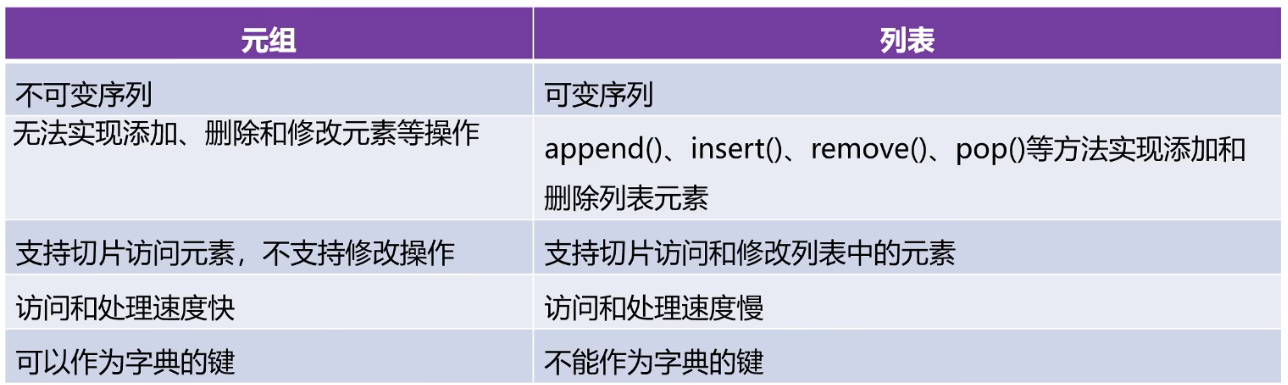
元组
元组是不可变序列;元组中只有一个元素时逗号也不能省略
元组的创建
(1)使用()直接创建元组
元组名 = (element1,element2,.....,elementN)
(2)使用内置函数tuple()创建元组
元组名 = tuple(序列)
删除元组:
del 元组名
t = ('hello','[12,43,653]','dog','cat')
print(t) # 顺序执行所以会执行此句

t = tuple('helloworld')
print(t)

t = tuple([12,43,653])
print(t)

print('12在元组中是否存在',(12 in t))
print('12在元组中是不存在',(12 not in t))
print('最大值',max(t))
print('最小值',min(t))
print('len',len(t))
print('t.index',t.index(12))
print('t.count("12")',t.count(12))

y = (10,)#逗号不能省否则就不是元组类型
print(type(y))

del t
print(t)
'''
输出结果:
('hello', '[12,43,653]', 'dog', 'cat')
('h', 'e', 'l', 'l', 'o', 'w', 'o', 'r', 'l', 'd')
(12, 43, 653)
12在元组中是否存在 True
12在元组中是不存在 False
最大值 653
最小值 12
len 3
t.index 0
t.count("12") 1
<class 'tuple'>
Traceback (most recent call last):
  File "D:\pythonprj\chap2\demo1.py", line 22, in <module>
    print(t)
          ^
NameError: name 't' is not defined

'''
元组的遍历
t = ('hello','[12,43,653]','dog','cat')

#根据索引访问元组
print(t[0])
t2 = t[0:3:2] # 元组支持切片操作
print(t2)

#元组的遍历
for item in t:
    print(item)

for i in range(len(t)):
    print(i,t[i])
#使用enumerate()函数
for index,item in enumerate(t):
    print(index,item)

for index,item in enumerate(t,start=11):
    print(index,item)

'''
输出结果:
hello
('hello', 'dog')
hello
[12,43,653]
dog
cat
0 hello
1 [12,43,653]
2 dog
3 cat
0 hello
1 [12,43,653]
2 dog
3 cat
11 hello
12 [12,43,653]
13 dog
14 cat
'''
元组生成式
t = (i for i in range(1,4)) #t的返回值是生成器对象而不是元组,所以输出的是生成器对象的内存地址信息<generator object <genexpr> at 0x000002E159225B40>
print(t)

#遍历法一:转换成元组类型再输出
# t = tuple(t)
# print(t)
# for item in t:
#     print(item)

#遍历法二:使用__next__()逐个元素输出,此法是在不是元组类型时使用
print(t.__next__())
print(t.__next__())
print(t.__next__())

'''
输出结果:
<generator object <genexpr> at 0x000002E159225B40>
1
2
3

'''
字典
字典是无序的,第一个存到字典中的数据并不一定在第一位;key是唯一的,value可以不唯一;同列表一样是可变数据类型,可以进行增删改的操作;要求key是不可变数据类型,所以列表不能作为key的数据类型
创建方式
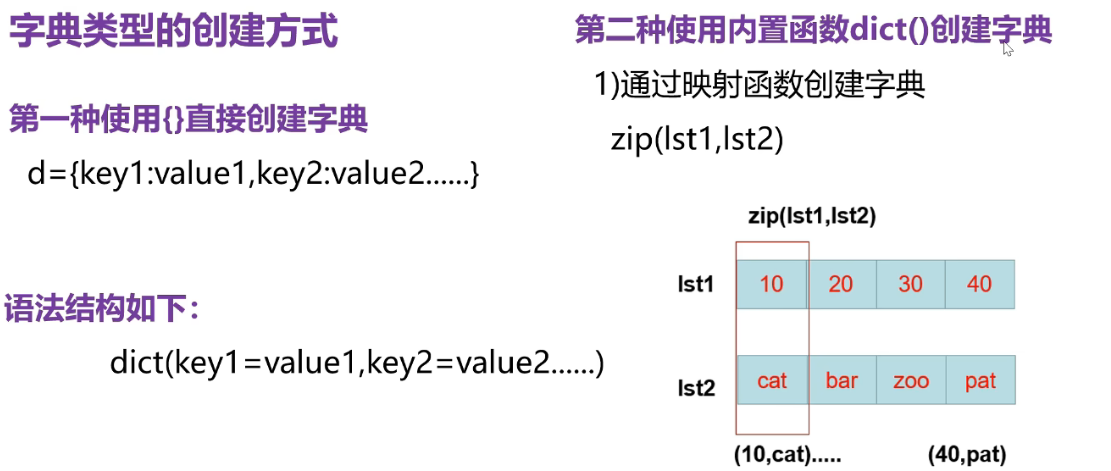
d = {10:'cat',20:'dog',30:'zoo',20:'boy'}
print(d) # key相同时,value的值进行了覆盖

# zip函数创建
lst1 = [10,20,30,40]
lst2 = ['cat','dog','boy','car']
zipobj = zip(lst1,lst2) #由于zip函数返回的是一个zip对象所以不会显示映射内容
print(zipobj) # <zip object at 0x0000024B1DB7D680>
#由于映射内容为zip对象所以没有看到映射内容,使用dict函数将其转化成字典再输出
d = dict(zipobj)
print(d)

#使用参数创建字典
d = dict(cat=10,dog=20) # 左边是ket,右边是value
print(d)

t = (10,20,30,40) # 元组是不可变数据类型所以可以作为key
print({t:10}) # t是ket,10是value

#列表是可变数据类型,不能作为key
# lst1 = [10,20,30,40]
# print({lst:10}) # name 'lst' is not defined. Did you mean: 'lst1'?

# 字典属于序列
print('max',max(d))
print('min',min(d))
print('len',len(d))

'''
输出结果:
{10: 'cat', 20: 'boy', 30: 'zoo'}
<zip object at 0x0000011BE6033FC0>
{10: 'cat', 20: 'dog', 30: 'boy', 40: 'car'}
{'cat': 10, 'dog': 20}
{(10, 20, 30, 40): 10}
max dog
min cat
len 2

'''
字典的遍历
d = {'hello':10,'world':20,'python':30}
#访问字典中的元素
#(1)使用d[key]
print(d['hello'])
#(2)d.get(key)
print(d.get('hello'))

print(d.get('boy','不存在')) #可定义不存在输出

#字典的遍历
for item in d.items():
    print(item) # key=value组成一个元素
#分别获取key和value
for key,value in d.items():
    print(key,':',value)
'''
输出结果:
10
10
不存在
('hello', 10)
('world', 20)
('python', 30)
hello : 10
world : 20
python : 30

'''
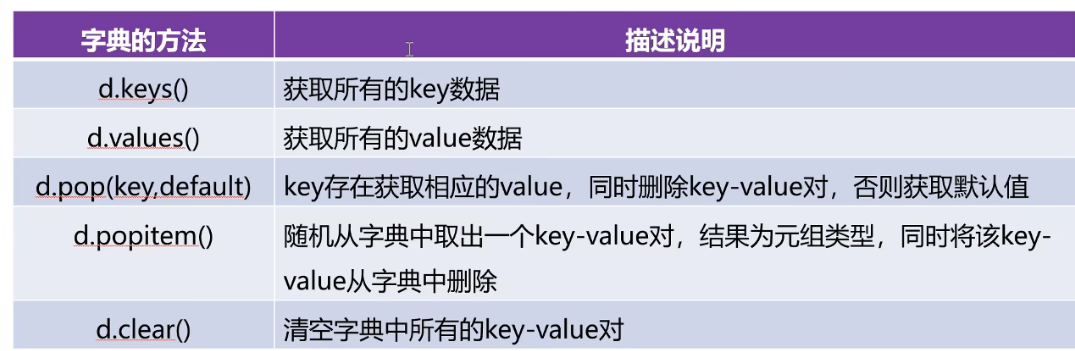
phython当中一切皆对象,每一个对象都有一个布尔值,空字典、空列表、空元组的布尔值为False
字典生成式
import random # 开启random模块
d = {item:random.randint(1,100) for item in range(4)} # 使用randint函数产生范围内的整数
print(d)

#创建两个列表
lst = [1001,1002,1003]
lst2 = ['李明','小帅','小美']
#从右往左读:使用zip函数配对,然后遍历所生成的zip对象,每次取一个元组key作为键值,value作为对应的值
d = {key:value for key, value in zip(lst,lst2)} # 由zip函数进行配对生成一个zip对象
print(d)
'''
输出结果:
{0: 58, 1: 4, 2: 16, 3: 76}
{1001: '李明', 1002: '小帅', 1003: '小美'}

'''
集合
可变序列;不可重复;无序
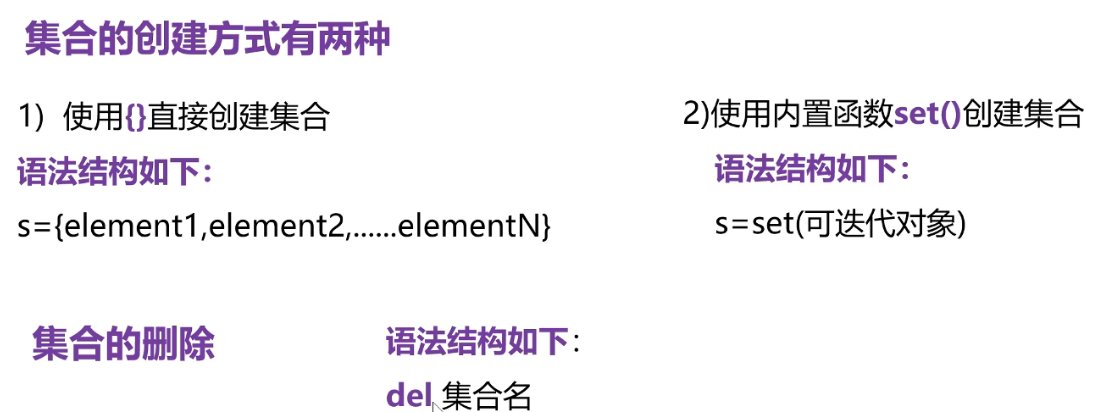
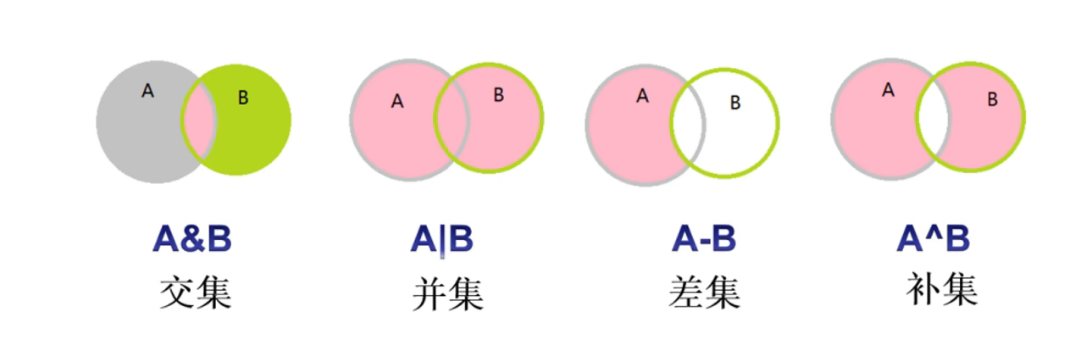
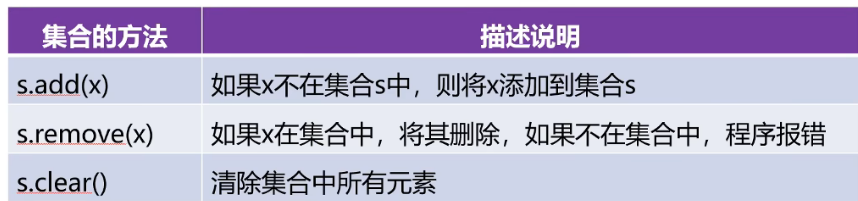
phython 3.11特性
结构模型匹配
data = eval(input('请输入要匹配的数据:'))
match data:
    case {'name':'lim','age':20}:
        print('字典')
    case [10,20,30]:
        print('列表')
    case (10,20,30):
        print('元组')
    case _:
        print('相当于多重if中的else') #给输入加引号就不会因为eval函数将字符串转为变量名而报错


'''
输出结果:
请输入要匹配的数据:{'name':'lim','age':20}
字典
------------------------------
请输入要匹配的数据:hello
NameError: name 'hello' is not defined. Did you mean: 'help'?
------------------------------
请输入要匹配的数据:'hello'
相当于多重if中的else

'''
字典合并运算符
|
字符串的常用方法
#大小写转换
s1 = 'HelloWorld'
new_s2 = s1.upper()
new_s3 = s1.lower() #结果是一个新的字符串
print(s1,new_s2,new_s3)

#字符串的分隔
e_mail = 'bdwif@163.com'
lst = e_mail.split('@')
print('邮箱名',lst[0],'服务器域名',lst[1])

print(s1.count('o')) #统计o出现的次数
#检索操作
print(s1.find('o')) #o在字符串中首次出现的位置
print(s1.find('p')) #-1就表示没有找到

print(s1.index('o'))
#print(s1.index('p')) #substring not found index没有找到会报错

#判断前缀后缀
print(s1.startswith('H'))
print(s1.startswith('P'))
print('deno.py'.endswith('.py'))
print('text.txt'.endswith('.txt'))
'''
输出结果:
HelloWorld HELLOWORLD helloworld
邮箱名 bdwif 服务器域名 163.com
2
4
-1
4
True
False
True
True

'''
s = 'HelloWorld'
#字符串的替换
new_s = s.replace('o','你好',1) #默认全部替换,最后的参数是替换次数,产生的是新的字符串
print(new_s)

#字符串在指定宽度内居中
print(s.center(20))
print(s.center(20,'$'))

#去掉字符串左右的空格
s = '     Hello    World      '
print(s.strip())
print(s.lstrip()) #去掉left的空格
print(s.rstrip()) #去掉right的空格

#去掉指定的字符
s3 = 'dl-helloworld'
print(s3.rstrip('ld')) #与顺序无关
print(s3.lstrip('dl'))
print(s3.rstrip('ld'))
'''
输出结果:
Hell你好World
     HelloWorld
$$$$$HelloWorld$$$$$
Hello    World
Hello    World
     Hello    World
dl-hellowor
-helloworld
dl-hellowor

'''
格式化字符串的三种方式
#(1)使用占位符进行格式化
name = '小帅'
age = 18
score = 99.5
print('姓名:%s,年龄:%d,成绩:%.1f' % (name, age, score))
#(2)f-string 用{}来代替被替换的位置
print(f'姓名:{name},年龄:{age},分数:{score}')
#(3)使用字符串的format方法
#0、1、2指的是format中的索引序号
print('姓名:{0},年龄:{1},分数:{2}'.format(name, age, score))
print('姓名:{2},年龄:{1},分数:{0}'.format(score, age, name))

'''
输出结果:
姓名:小帅,年龄:18,成绩:99.5
姓名:小帅,年龄:18,分数:99.5
姓名:小帅,年龄:18,分数:99.5
姓名:小帅,年龄:18,分数:99.5
'''
format字符串格式控制
format函数功能:格式化字符串
: 是引导符, 0表示该参数是format函数的第0个参数
s = 'helloworld'
print('{0:@<20}'.format(s)) #字符串的显示宽度为20,左对齐,空白用*填充
print('{0:@>20}'.format(s)) #右对齐
print('{0:@^20}'.format(s)) #居中
#千位分隔符(只适用于整数和浮点数)
print('{0:,}'.format(16548426)) #三位一逗  :是引导符 0表示是format函数的第0个参数
print('{0:,}'.format(16548426.4869))
#浮点数小数部分的精度
print('{0:.2f}'.format(3.4869))
#字符串类型 .表示最大的显示长度
print('{0:.2}'.format('helloworld'))
#整数类型的进制转换
a = 156
print('二进制:{0:b},十进制:{0:d},十六进制:{0:x},八进制:{0:o},十六进制:{0:X},'.format(a))
#浮点数类型的进制转换
b = 3.14484
print('{0:.2f},{0:.2E},{0:.2e},{0:.2%}'.format(b))

#
'''
输出结果:
helloworld@@@@@@@@@@
@@@@@@@@@@helloworld
@@@@@helloworld@@@@@
16,548,426
16,548,426.4869
3.49
he
二进制:10011100,十进制:156,十六进制:9c,八进制:234,十六进制:9C,
3.14,3.14E+00,3.14e+00,314.48%

'''
字符串的编码与解码
s = '大家晚上好'
scode_gbk = s.encode('gbk',errors='ignore')
# gbk汉字占两字节 errors参数默认strict,还有ignore和replace;encoding默认参数utf-8
print(scode_gbk)
#解码
print(bytes.decode(scode_gbk,'gbk'))
'''
输出结果:
b'\xb4\xf3\xbc\xd2\xcd\xed\xc9\xcf\xba\xc3'
大家晚上好
'''
数据的验证
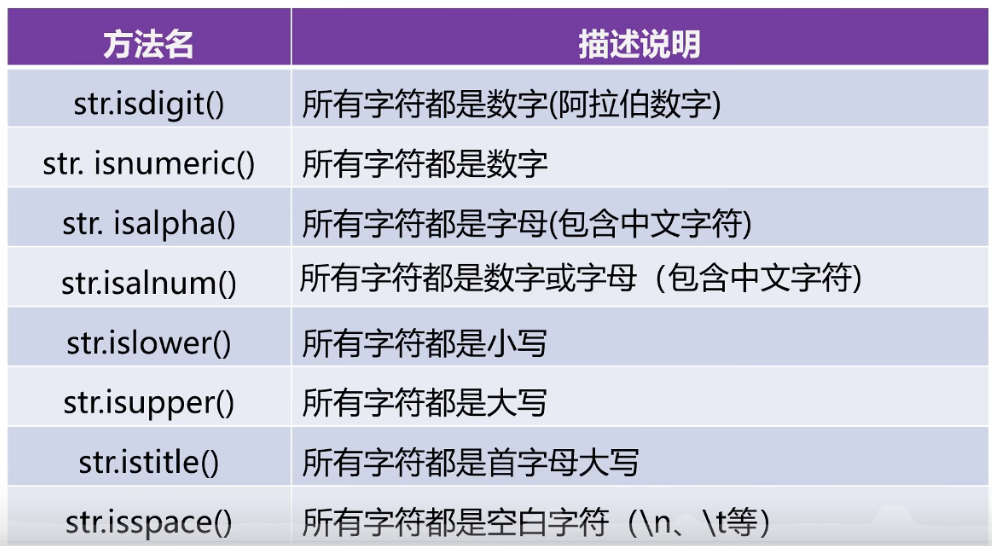
字符串的拼接
s1 = 'hello'
s2 = 'world'
#(1)使用+进行拼接
print(s1+s2)
#(2)使用join()
print(''.join([s1,s2]))#使用空字符串连接
print('@'.join(['hello','world','python']))
#(3)直接拼接
print('helllo''world')
#(4)使用格式化字符串
print('%s%s' % (s1,s2)) # 占位符 格式化运算符 元组
print(f'{s1}{s2}') #f-string
print('{0}{1}'.format(s1,s1))
'''
输出结果:
helloworld
helloworld
hello@world@python
hellloworld
helloworld
helloworld
hellohello

'''
字符串的去重操作
s = 'swfefwefewefodsdjfeweuwe'
#(1)
new_s = ''
for item in s:
    if item not in new_s:
        new_s+=item
print(new_s)
#(2)使用索引加not in
new_s2 = ''
for i in range(len(s)):
    if s[i] not in new_s2:
        new_s2+=s[i]
print(new_s2)
#(3)集合去重+列表拼接
new_s3 = set(s) #字符串转换成一个集合
lst = list(new_s3)
lst.sort(key=s.index) #按照字符串s中字符出现的顺序对列表lst进行排序
print(''.join(lst)) #再拼接

'''
输出结果:
swfeodju
swfeodju
swfeodju

'''
正则表达式
元字符
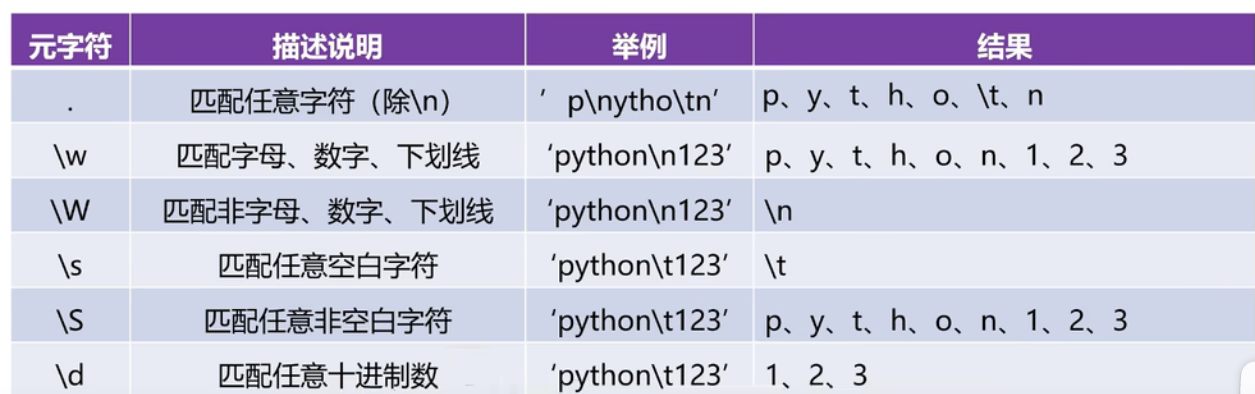
限定符
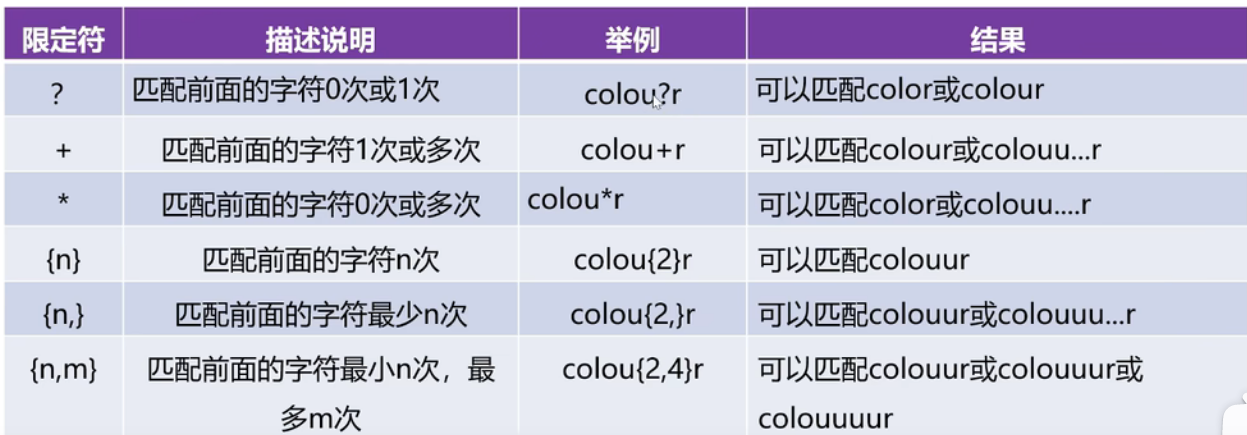
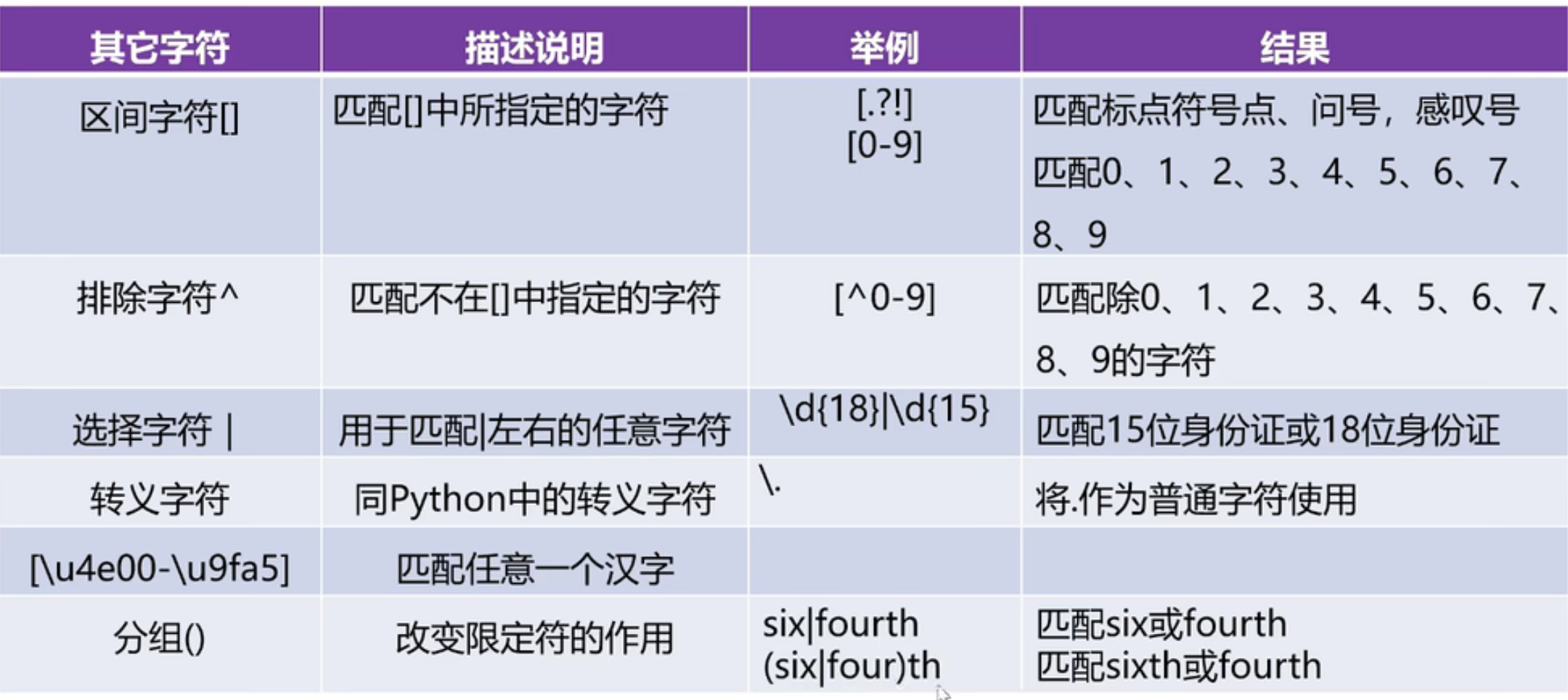
re模块
re模块的功能:用来实现正则表达式
match函数的使用
用于从字符串的额开始位置进行匹配。如果开始位置匹配成功,结果为match对象,否则结果为None。
与search函数区别:
match函数只在字符串的开头位置进行匹配,而search函数会匹配整个字符串
import re #导入re模块
#定义匹配模式
pattern = r'\d\.\d+' # +限定符,\d 0-9数字出现一次或多次;在字符串前加 r 表示 raw string(原始字符串)
s = '3.14 is approximately equal to pi'
match = re.match(pattern, s) #使用re模块中的match函数
print(match)

print('匹配值的起始位置:',match.start())
print('匹配值的结束位置:',match.end())
print('匹配区间的位置元素:',match.span())
print('待匹配的字符串:',match.string)
print('匹配的数据:',match.group())

'''
输出结果:
<re.Match object; span=(0, 4), match='3.14'>
匹配值的起始位置: 0
匹配值的结束位置: 4
匹配区间的位置元素: (0, 4)
待匹配的字符串: 3.14 is approximately equal to pi
匹配的数据: 3.14

'''
search函数
用于整个字符串中搜索第一个匹配的值,如果匹配成功,结果为match对象,否则结果为None
import re
pattern = r'\d\.\d+'
s = '3.14 and 3.1415 is approximately equal to pi '
match = re.search(pattern, s)
print(match)
'''
输出结果:
<re.Match object; span=(0, 4), match='3.14'>

'''
findall函数
用于整个字符串搜索所有符合正则表达式的值,结果是一个列表类型
import re
pattern = r'\d\.\d+'
s = '3.14 and 3.1415 is approximately equal to pi '
match = re.findall(pattern, s)
print(match,type(match))

'''
输出结果:
['3.14', '3.1415'] <class 'list'>
'''
sub函数
用于实现对字符串中指定字符串的替换
import re
pattern = r'黑客|破解|反爬'
s = '我想学习phython,想破解一些vip视频,phython可以实现无底线反爬吗?'
new_s = re.sub(pattern,'XXX',s)
print(new_s)

'''
输出结果:
我想学习phython,想XXX一些vip视频,phython可以实现无底线XXX吗?
'''
split函数
分隔字符串
import re
pattern = r'[?=]'
s = 'https://cn.bing.com/search?=0&pq=%E7%99%BE%E5%BA%A6&sc=17-2&sk=&cvid'
new_s = re.split(pattern,s)
print(new_s)

'''
输出结果:
['https://cn.bing.com/search', '', '0&pq', '%E7%99%BE%E5%BA%A6&sc', '17-2&sk', '&cvid']
'''
异常处理
try...except....except语法结构:
try:
可能会抛出异常的代码
except 异常类型A:
报错后执行的代码
except 异常类型B:
报错后执行的代码
try:
    num1 = int(input('请输入一个整数:'))
    num2 = int(input('请输入另一个整数:'))
    result = num1/num2
    print('结果:',result)
except ValueError: # 捕获异常
    print('不能将字符串转成整数')
except ZeroDivisionError:
    print('除数不能为零')
except BaseException:
    print('为知异常')
'''
输出结果:
请输入一个整数:10
请输入另一个整数:0
除数不能为零
'''
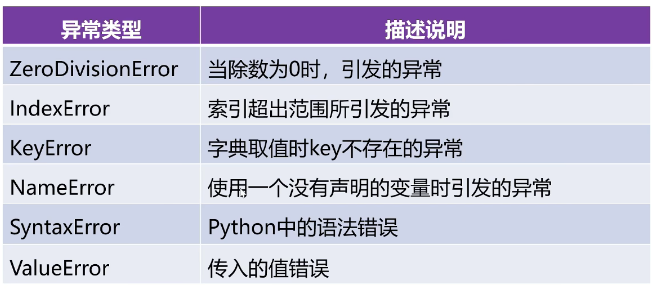
ValueError、ZeroDivision、ErrorBaseException均为phython标准库的一部分
try...except..else...finally的语法结构:
try:
可能会抛出异常的代码
except:
报错后执行的代码
else:
没有抛出异常要执行的代码
finally:
无论是否异常都要执行的代码
raise关键字的使用
手动创建并抛出异常
try:
    gender = input('请输入您的性别:')
    if gender!='男' and gender!='女':
        raise Exception('性别只能是男或女')
    else:
        print('您的性别是:',gender)
except Exception as e: #将异常对象赋值给变量e
    print(e)
#Exception 是 Python 中大多数异常的基类,几乎能捕获所有标准错误
'''
输出结果:
请输入您的性别:a
性别只能是男或女

'''
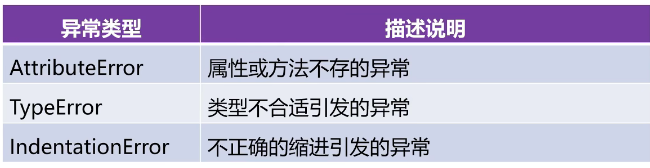
常见的异常类型
函数的定义及调用
在混合使用关键字传参与位置传参时。位置传参要在前,关键字传参在后,否则会报错
def happy_birthday(name,age):
    print("祝"+name+str(age)+"岁生日快乐") # 使用+拼接只能发生在相同类型之间

happy_birthday('小帅','18')

'''
输出结果:
祝小帅18岁生日快乐
'''
可变参数
个数可变的位置参数和个数可变的关键字参数
# 个数可变的位置参数加*
def fun(*para):
    print(type(para))
    for item in para:
        print(item)
#函数调用时可接收任意个实际参数,并放到一个元组中
fun(1,2,3)
fun([1,2,3,4,5])
fun(*[1,2,3,4,5]) #加*相当于解包操作

# 数量可变的关键字参数
def fun2(**kypara):
    print(type(kypara))
    for key,value in kypara.items():
        print(key,'----',value)

#for key in kypara: #在字典中遍历键
#for key,value in kypara: #错误写法

fun2(name='小帅',age=18,height=181)
d={'name':'小帅','age':18,'height':181}
fun2(**d) #d是字典,直接作为参数传入要进行系列解包操作
'''
输出结果:
<class 'tuple'>
1
2
3
<class 'tuple'>
[1, 2, 3, 4, 5]
<class 'tuple'>
1
2
3
4
5
<class 'dict'>
name ---- 小帅
age ---- 18
height ---- 181
<class 'dict'>
name ---- 小帅
age ---- 18
height ---- 181
'''
函数的返回值
# 无返回值
def calc(a,b):
    print(a+b)
calc(2,3)
print(calc(2,3)) #这里先执行了calc中的print函数输出5,又执行了此行print函数输出函数返回值

#含多个返回值的函数
def get_sum(num):
    s = 0
    s_even = 0
    s_odd = 0
    for i in range(1,num+1):
        if i % 2 != 0:
            s_odd = s_odd + i
        else:
            s_even = s_even + i
        s = s + i
    return s,s_even,s_odd

result = get_sum(10) #使用变量存储返回值
print(result,type(result))

#解包赋值
a,b,c = get_sum(10)
print(a,b,c,type(a),type(b),type(c))


'''
输出结果:
5
5
None
(55, 30, 25) <class 'tuple'>
55 30 25 <class 'int'> <class 'int'> <class 'int'>

'''
变量范围
对于名称相同的全局变量和局部变量,局部变量的优先级高;使用关键字global声明局部变量可将其变成全局变量,且声明和赋值必须分开执行;
匿名函数lambda
指没有名字的函数,这种函数只能使用一次,一般是在函数的函数体只有一句代码且只有一个返回值时,可以使用匿名函数来化简
def calc(a,b):
    return a+b
print(calc(1,2))
#匿名函数
s = lambda a,b:a+b #s就表示一个匿名函数
print(type(s))
print(s(1,2))
print('-'*10)
lst = [10,20,30,40,50]
for i in range(len(lst)):
    result = lambda x:x[i]
    print(lst[i])
result(lst)
print(type(result))

'''
输出结果:
3
<class 'function'>
3
----------
10
20
30
40
50
<class 'function'>

'''
递归函数
def fac(n):
    if n == 1:
        return 1
    else:
        return n * fac(n - 1) #自己调用自己
print(fac(5))
'''
输出结果:
120
'''
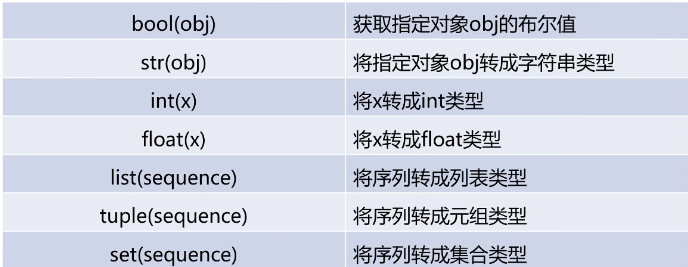
常用类型转换函数
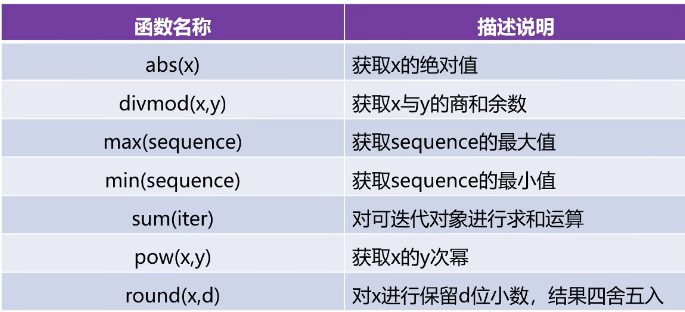
数学函数
迭代器操作函数
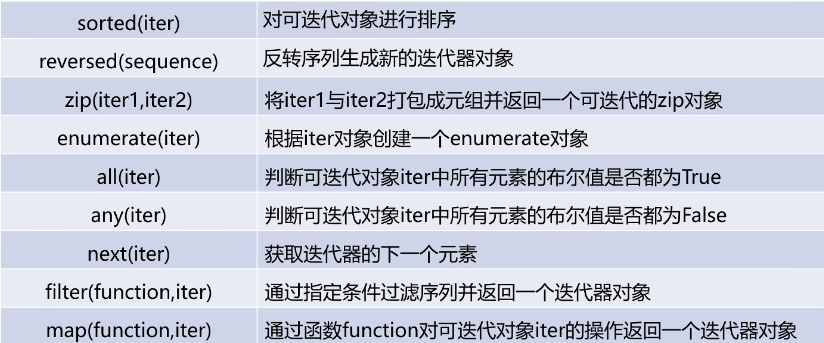
迭代器iterator是phython中可以被for循环遍历的对象
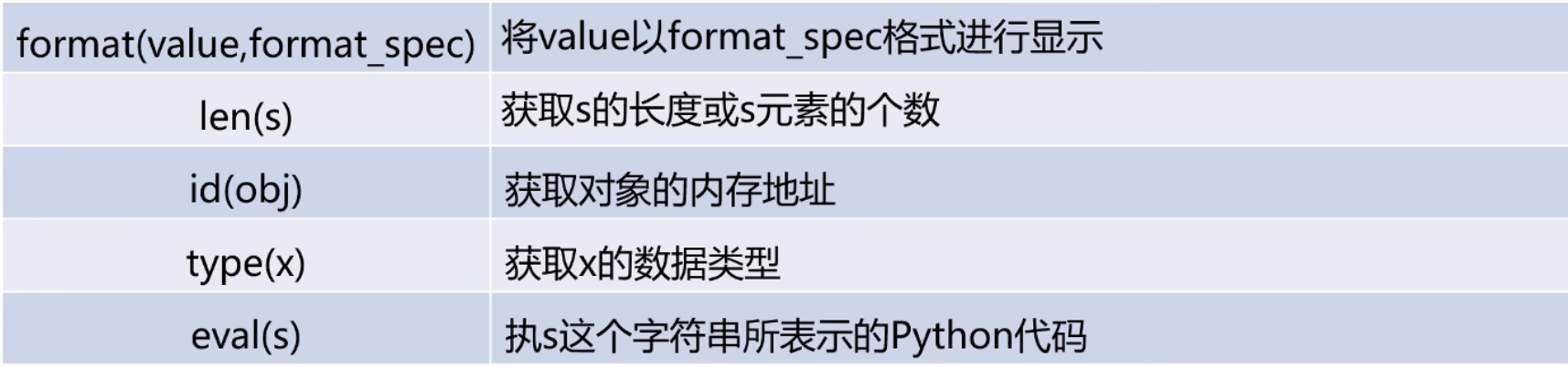
其他函数

Agent 垂直技术社区,欢迎活跃、内容共建。
更多推荐


 14
14 0
0- 0


 已为社区贡献1条内容

所有评论(0)