vue-element-plus-admin(vue3)二次开发入门指南(9)-用Tauri v2打包成windows桌面程序(exe)访问后端自签名https API 问题
当我们根据 二次开发入门指南(8)中的教程把.env.win 的VITE_API_BASE_PATH=https://{你的IP}:9200 配置文件如下 这里设置的是IP是127.0.0.1
# 环境
VITE_NODE_ENV=production

# 接口前缀
VITE_API_BASE_PATH=https://127.0.0.1:9200

# 打包路径
VITE_BASE_PATH=/dist-win/

# 是否删除debugger
VITE_DROP_DEBUGGER=false

# 是否删除console.log
VITE_DROP_CONSOLE=false

# 是否sourcemap
VITE_SOURCEMAP=true

# 输出路径
VITE_OUT_DIR=dist-win

# 标题
VITE_APP_TITLE=二次开发测试

# 是否包分析
VITE_USE_BUNDLE_ANALYZER=false

# 是否全量引入element-plus样式
VITE_USE_ALL_ELEMENT_PLUS_STYLE=false

# 是否开启mock
VITE_USE_MOCK=true

# 是否切割css
VITE_USE_CSS_SPLIT=true

# 是否使用在线图标
VITE_USE_ONLINE_ICON=true

# 是否隐藏全局设置按钮
VITE_HIDE_GLOBAL_SETTING=false
访问自签名https web服务会报下面错误
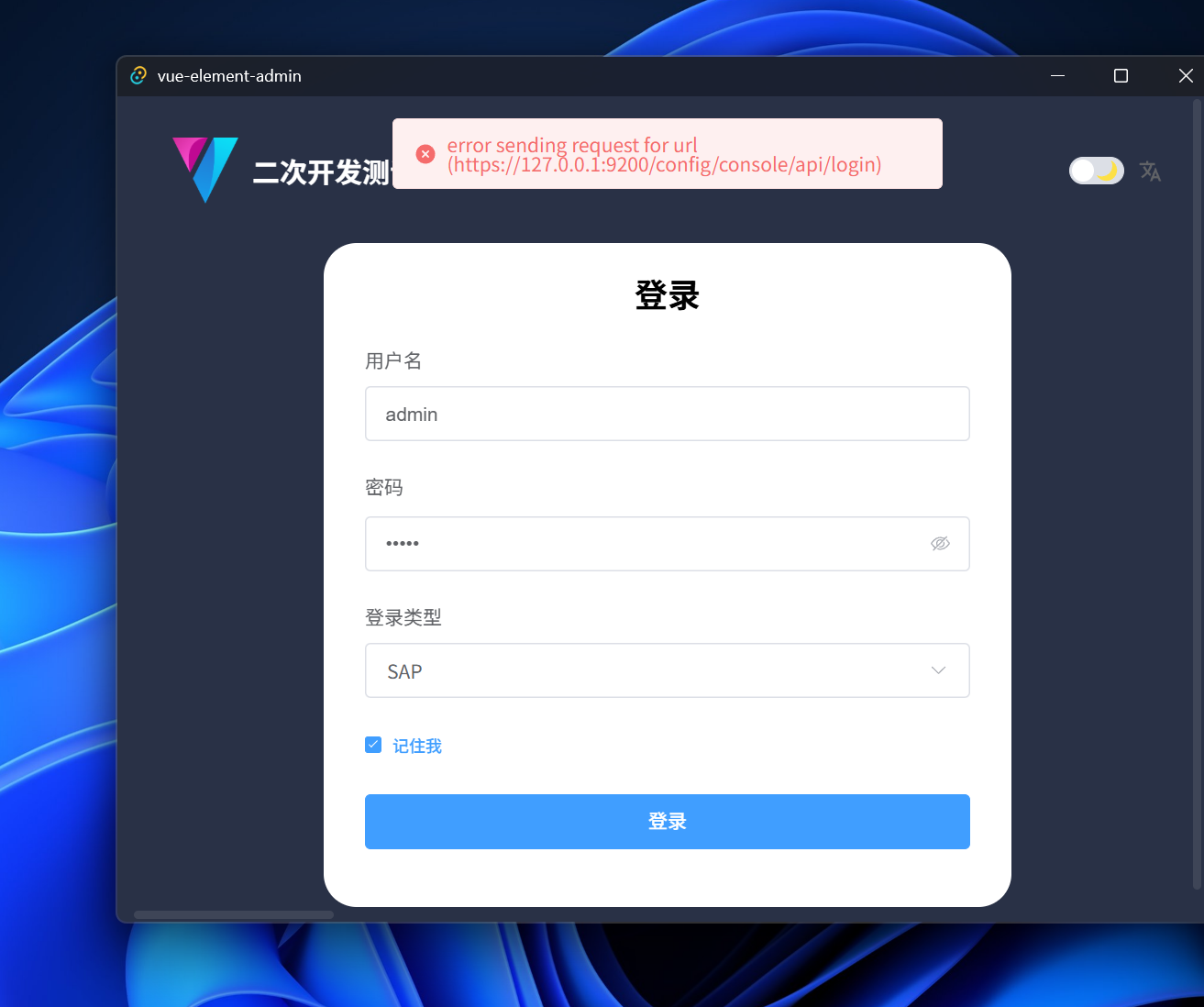
因为vue-element-plus-admin使用的axios做为封装API请求基础框架,无法直接使用tauri的tauri-plugin-http,根据二次开发入门指南(8)中的教程中的依赖,我们使用的是axios-tauri-api-adapter 是2.0.6 ,使用的tauri-plugin-http v2.3.0来达到访问后端API的目的。当我们把后端地址改为自签名的https地址时候,由于无法做服务器验证所以会发生此错误。
通过观察 tauri-plugin-http v2.3.0的代码command.rs和index.ts,
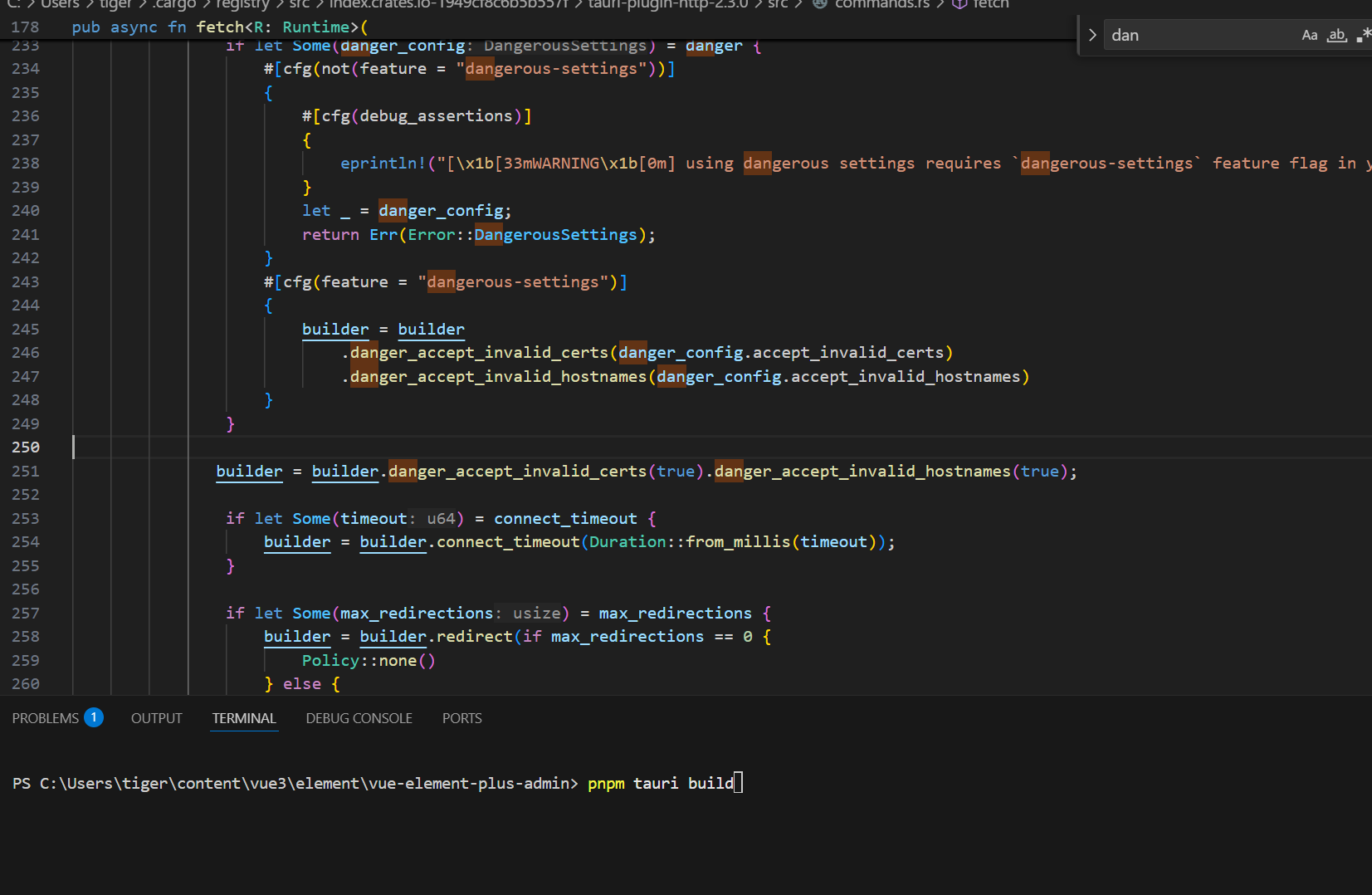
command.rs 在C:\Users\{用户}\.cargo\registry\src\{你的index码}\tauri-plugin-http-2.3.0\src\ 文件夹下,如下图233-250行
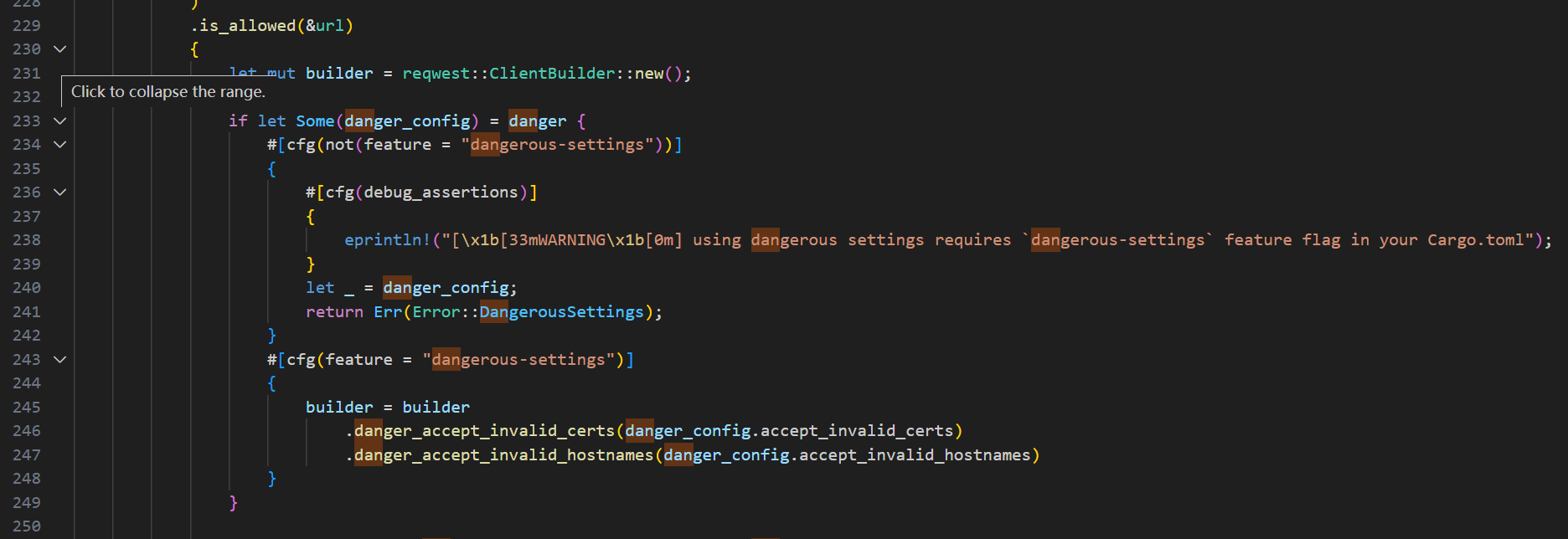
我们可以通过条件编译的方式编译出实现访问自签名的功能 tauri-plugin-http
index.ts在 C:\Users\{用户}\.cargo\registry\src\{你的index码}\tauri-plugin-http-2.3.0\guest-js\ 文件夹下如下图
// Copyright 2019-2023 Tauri Programme within The Commons Conservancy
// SPDX-License-Identifier: Apache-2.0
// SPDX-License-Identifier: MIT

/**
 * Make HTTP requests with the Rust backend.
 *
 * ## Security
 *
 * This API has a scope configuration that forces you to restrict the URLs that can be accessed using glob patterns.
 *
 * For instance, this scope configuration only allows making HTTP requests to all subdomains for `tauri.app` except for `https://private.tauri.app`:
 * ```json
 * {
 *   "permissions": [
 *     {
 *       "identifier": "http:default",
 *       "allow": [{ "url": "https://*.tauri.app" }],
 *       "deny": [{ "url": "https://private.tauri.app" }]
 *     }
 *   ]
 * }
 * ```
 * Trying to execute any API with a URL not configured on the scope results in a promise rejection due to denied access.
 *
 * @module
 */

import { invoke } from '@tauri-apps/api/core'

/**
 * Configuration of a proxy that a Client should pass requests to.
 *
 * @since 2.0.0
 */
export interface Proxy {
  /**
   * Proxy all traffic to the passed URL.
   */
  all?: string | ProxyConfig
  /**
   * Proxy all HTTP traffic to the passed URL.
   */
  http?: string | ProxyConfig
  /**
   * Proxy all HTTPS traffic to the passed URL.
   */
  https?: string | ProxyConfig
}

export interface ProxyConfig {
  /**
   * The URL of the proxy server.
   */
  url: string
  /**
   * Set the `Proxy-Authorization` header using Basic auth.
   */
  basicAuth?: {
    username: string
    password: string
  }
  /**
   * A configuration for filtering out requests that shouldn't be proxied.
   * Entries are expected to be comma-separated (whitespace between entries is ignored)
   */
  noProxy?: string
}

/**
 * Options to configure the Rust client used to make fetch requests
 *
 * @since 2.0.0
 */
export interface ClientOptions {
  /**
   * Defines the maximum number of redirects the client should follow.
   * If set to 0, no redirects will be followed.
   */
  maxRedirections?: number
  /** Timeout in milliseconds */
  connectTimeout?: number
  /**
   * Configuration of a proxy that a Client should pass requests to.
   */
  proxy?: Proxy
  /**
   * Configuration for dangerous settings on the client such as disabling SSL verification.
   */
  danger?: DangerousSettings
}

/**
 * Configuration for dangerous settings on the client such as disabling SSL verification.
 *
 * @since 2.3.0
 */
export interface DangerousSettings {
  /**
   * Disables SSL verification.
   */
  acceptInvalidCerts?: boolean
  /**
   * Disables hostname verification.
   */
  acceptInvalidHostnames?: boolean
}

const ERROR_REQUEST_CANCELLED = 'Request canceled'

/**
 * Fetch a resource from the network. It returns a `Promise` that resolves to the
 * `Response` to that `Request`, whether it is successful or not.
 *
 * @example
 * ```typescript
 * const response = await fetch("http://my.json.host/data.json");
 * console.log(response.status);  // e.g. 200
 * console.log(response.statusText); // e.g. "OK"
 * const jsonData = await response.json();
 * ```
 *
 * @since 2.0.0
 */
export async function fetch(
  input: URL | Request | string,
  init?: RequestInit & ClientOptions
): Promise<Response> {
  // abort early here if needed
  const signal = init?.signal
  if (signal?.aborted) {
    throw new Error(ERROR_REQUEST_CANCELLED)
  }

  const maxRedirections = init?.maxRedirections
  const connectTimeout = init?.connectTimeout
  const proxy = init?.proxy
  const danger = init?.danger

  // Remove these fields before creating the request
  if (init) {
    delete init.maxRedirections
    delete init.connectTimeout
    delete init.proxy
    delete init.danger
  }

  const headers = init?.headers
    ? init.headers instanceof Headers
      ? init.headers
      : new Headers(init.headers)
    : new Headers()

  const req = new Request(input, init)
  const buffer = await req.arrayBuffer()
  const data =
    buffer.byteLength !== 0 ? Array.from(new Uint8Array(buffer)) : null

  // append new headers created by the browser `Request` implementation,
  // if not already declared by the caller of this function
  for (const [key, value] of req.headers) {
    if (!headers.get(key)) {
      headers.set(key, value)
    }
  }

  const headersArray =
    headers instanceof Headers
      ? Array.from(headers.entries())
      : Array.isArray(headers)
        ? headers
        : Object.entries(headers)

  // eslint-disable-next-line @typescript-eslint/no-unsafe-assignment
  const mappedHeaders: Array<[string, string]> = headersArray.map(
    ([name, val]) => [
      name,
      // we need to ensure we have all header values as strings
      // eslint-disable-next-line
      typeof val === 'string' ? val : (val as any).toString()
    ]
  )

  // abort early here if needed
  if (signal?.aborted) {
    throw new Error(ERROR_REQUEST_CANCELLED)
  }

  const rid = await invoke<number>('plugin:http|fetch', {
    clientConfig: {
      method: req.method,
      url: req.url,
      headers: mappedHeaders,
      data,
      maxRedirections,
      connectTimeout,
      proxy,
      danger
    }
  })

  const abort = () => invoke('plugin:http|fetch_cancel', { rid })

  // abort early here if needed
  if (signal?.aborted) {
    // we don't care about the result of this proimse
    // eslint-disable-next-line @typescript-eslint/no-floating-promises
    abort()
    throw new Error(ERROR_REQUEST_CANCELLED)
  }

  signal?.addEventListener('abort', () => void abort())

  interface FetchSendResponse {
    status: number
    statusText: string
    headers: [[string, string]]
    url: string
    rid: number
  }

  const {
    status,
    statusText,
    url,
    headers: responseHeaders,
    rid: responseRid
  } = await invoke<FetchSendResponse>('plugin:http|fetch_send', {
    rid
  })

  const body = await invoke<ArrayBuffer | number[]>(
    'plugin:http|fetch_read_body',
    {
      rid: responseRid
    }
  )

  const res = new Response(
    body instanceof ArrayBuffer && body.byteLength !== 0
      ? body
      : body instanceof Array && body.length > 0
        ? new Uint8Array(body)
        : null,
    {
      status,
      statusText
    }
  )

  // url and headers are read only properties
  // but seems like we can set them like this
  //
  // we define theme like this, because using `Response`
  // constructor, it removes url and some headers
  // like `set-cookie` headers
  Object.defineProperty(res, 'url', { value: url })
  Object.defineProperty(res, 'headers', {
    value: new Headers(responseHeaders)
  })

  return res
}
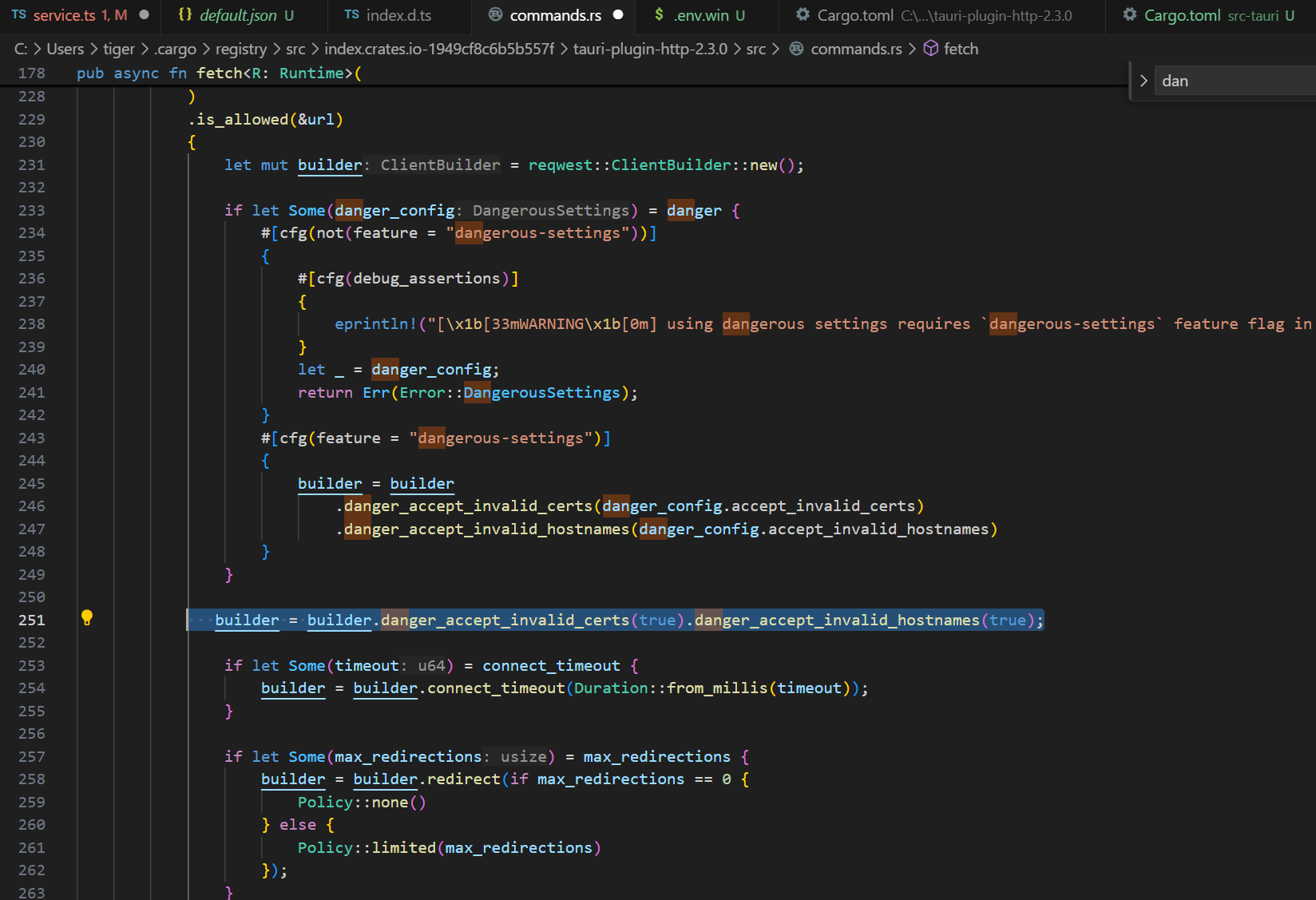
前端调用时候,通过设置ClientOptions 里面的danger :DangerousSettings选项来实现调用自签名的https后端API,但是我们使用的是axios-tauri-api-adapter来调用tauri-plugin-http,无法实现这种方式的调用,那我们只能通过修改command.rs的方式来实现调用自签名的https(对host和签名不作验证),修改如下,在C:\Users\{用户}\.cargo\registry\src\{你的index码}\tauri-plugin-http-2.3.0\src\command.rs的250行添加一行
builder = builder.danger_accept_invalid_certs(true).danger_accept_invalid_hostnames(true);
如下图所示
修改完保存后,需要在vscode里删掉vue-element-plus-admin\src-tauri\target 文件夹,以防止有缓存
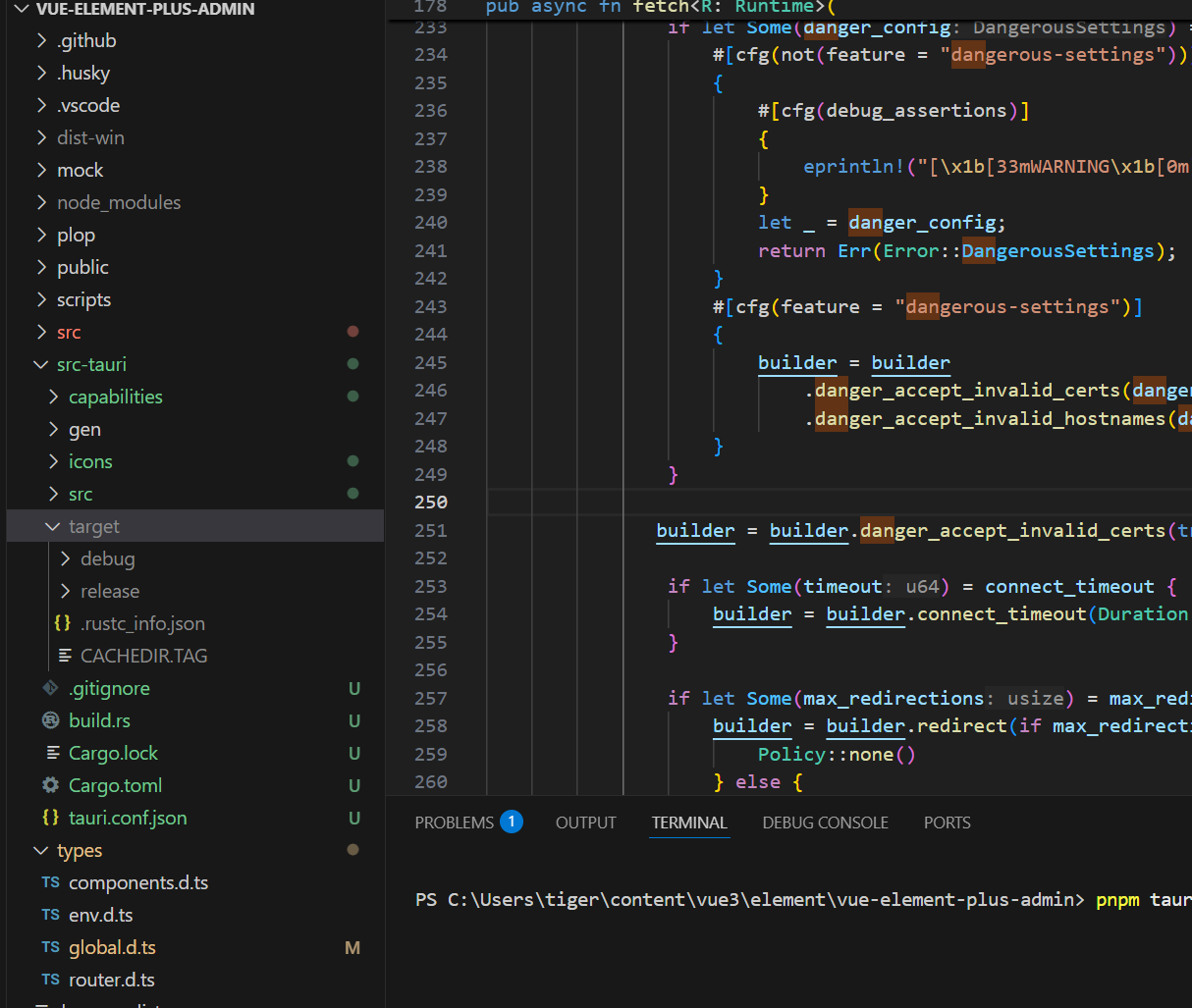
然后在终端里执行打包命令如下图
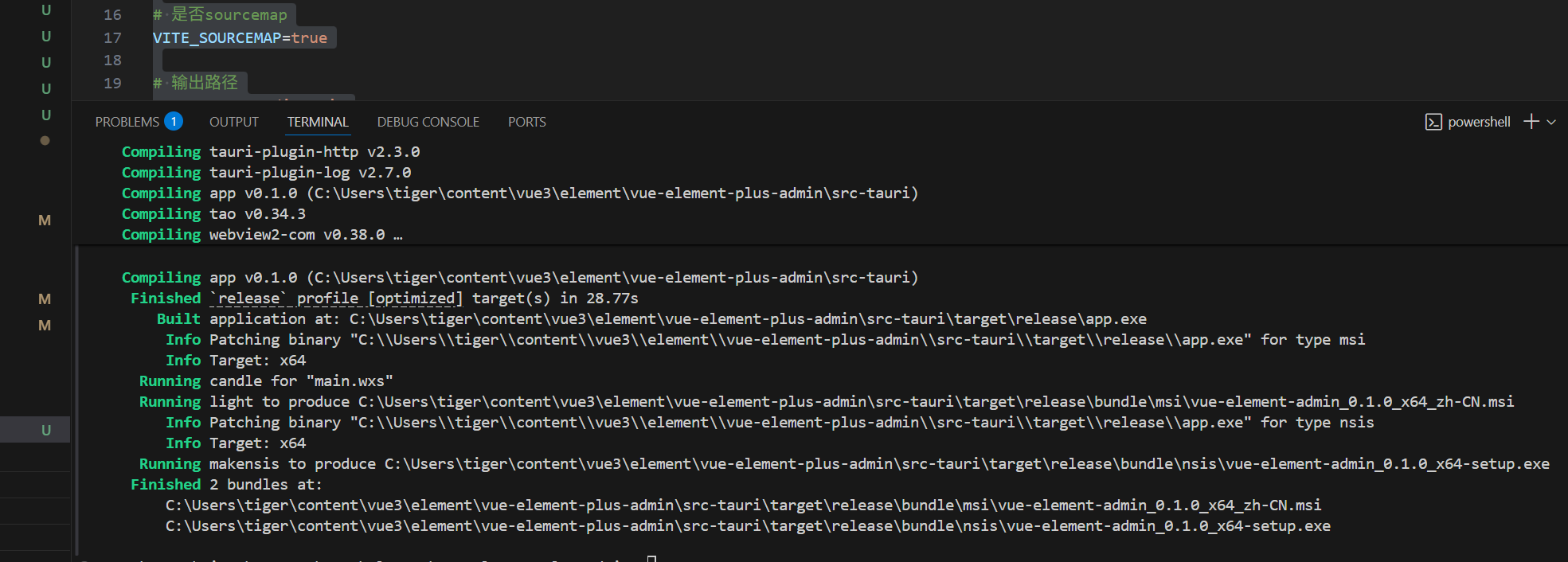
执行完打包命令得到的window安装包就能正确使用自签名的https的后端API了
如下图所示

Agent 垂直技术社区,欢迎活跃、内容共建。
更多推荐



 3
3 0
0- 0


 已为社区贡献8条内容

所有评论(0)