php 接收base64 图片数据并以十六进制数据存入数据库(同步解决图片黑底问题)
·
项目需求:需要将签名数据存入远程sqlserver数据库,同时数据库字段是image类型,存入的是十六进制数据
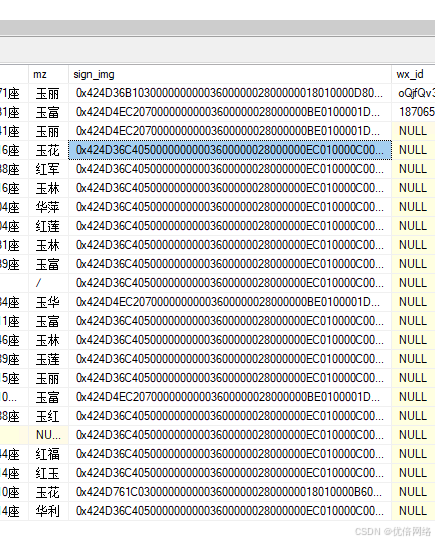
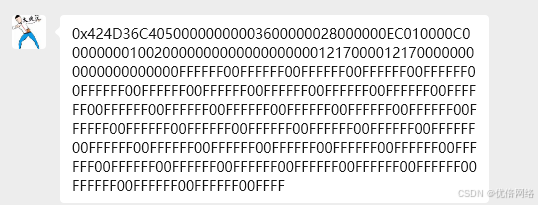
踩坑多个,先后遇到转出的数据全是0000,以及转出的数据变成黑底无法显示,最后采用截前三万字符导致只显示一点图片问题,最终得出以下最终算法
public function sub_sign(){
    $sign_image = $this->request->post('sign_image');
    // 处理Base64 PNG并转换为BMP
    $bmpData = $this->processBase64PNG($sign_image);

    // 转换为十六进制
    $hexData = bin2hex($bmpData);

    // 验证BMP格式(应该以424D开头)
    if (substr($hexData, 0, 4) !== '424d') {
        $this->error(__('生成的BMP格式不正确'));
    }

    //$hexData 即为十六进制的图片数据
}

public function processBase64PNG($base64Data) {
    // 移除Base64前缀(如果存在)
    if (strpos($base64Data, 'base64,') !== false) {
        $base64Data = substr($base64Data, strpos($base64Data, 'base64,') + 7);
    }

    // 解码Base64数据
    $imageData = base64_decode($base64Data);
    if ($imageData === false) {
        throw new Exception("Base64解码失败");
    }

    // 保存为临时文件进行处理
    $tempFile = tempnam(sys_get_temp_dir(), 'png_');
    file_put_contents($tempFile, $imageData);
    $result = $this->convertPNGToBMP($tempFile);

    return $result;
}

/**
 * 修复的PNG转BMP方法
 */
private function convertPNGToBMP($pngFilePath) {
    // 创建PNG图像资源
    $pngImage = imagecreatefrompng($pngFilePath);
    if ($pngImage === false) {
        $this->error(__('无法创建PNG图像资源'));
    }

    // 获取图像尺寸
    $width = imagesx($pngImage);
    $height = imagesy($pngImage);

    // 创建新的真彩色图像(移除Alpha通道)
    $bmpImage = imagecreatetruecolor($width, $height);

    // 设置白色背景(解决黑色背景问题)
    $white = imagecolorallocate($bmpImage, 255, 255, 255);
    imagefill($bmpImage, 0, 0, $white);

    // 关键修复:禁用Alpha混合,确保完全覆盖背景
    imagealphablending($bmpImage, true);
    imagesavealpha($bmpImage, false);

    // 复制图像数据(这会自动处理透明度)
    imagecopy($bmpImage, $pngImage, 0, 0, 0, 0, $width, $height);

    // 生成BMP数据
    $bmpData = $this->createCorrectBMPData($bmpImage, $width, $height);

    // 释放内存
    imagedestroy($pngImage);
    imagedestroy($bmpImage);

    return $bmpData;
}

/**
 * 修复的BMP数据生成方法
 */
private function createCorrectBMPData($image, $width, $height) {
    // BMP文件头 (14字节)
    $fileSize = 54 + (($width * 3 + $this->getPadding($width)) * $height);

    $fileHeader = "BM"; // 签名
    $fileHeader .= pack("V", $fileSize); // 文件大小
    $fileHeader .= pack("V", 0); // 保留
    $fileHeader .= pack("V", 54); // 像素数据偏移量

    // BMP信息头 (40字节) - 使用正确的值
    $infoHeader = pack("V", 40);        // 信息头大小
    $infoHeader .= pack("V", $width);   // 宽度
    $infoHeader .= pack("V", $height);  // 高度
    $infoHeader .= pack("v", 1);        // 平面数
    $infoHeader .= pack("v", 24);       // 每像素位数 (24位真彩色)
    $infoHeader .= pack("V", 0);        // 压缩方式 (BI_RGB)
    $infoHeader .= pack("V", 0);        // 图像数据大小 (可为0)
    $infoHeader .= pack("V", 2835);     // 水平分辨率
    $infoHeader .= pack("V", 2835);     // 垂直分辨率
    $infoHeader .= pack("V", 0);        // 使用的颜色数
    $infoHeader .= pack("V", 0);        // 重要颜色数

    // 像素数据 - 关键修复:正确的BGR顺序和行对齐
    $pixelData = "";

    // BMP存储顺序是从下到上
    for ($y = $height - 1; $y >= 0; $y--) {
        $rowData = "";

        for ($x = 0; $x < $width; $x++) {
            $rgb = imagecolorat($image, $x, $y);
            $r = ($rgb >> 16) & 0xFF;
            $g = ($rgb >> 8) & 0xFF;
            $b = $rgb & 0xFF;

            // BMP使用BGR顺序(不是RGB!)
            $rowData .= pack("C", $b); // 蓝色
            $rowData .= pack("C", $g); // 绿色
            $rowData .= pack("C", $r); // 红色
        }

        // 行对齐:每行必须是4字节的倍数
        $paddingSize = $this->getPadding($width);
        if ($paddingSize > 0) {
            $rowData .= str_repeat(pack("C", 0), $paddingSize);
        }

        $pixelData .= $rowData;
    }
    return $fileHeader . $infoHeader . $pixelData;
}

/**
 * 计算行对齐填充字节数
 */
private function getPadding($width) {
    $bytesPerPixel = 3; // 24位 = 3字节
    $rowSize = $width * $bytesPerPixel;
    return (4 - ($rowSize % 4)) % 4;
}
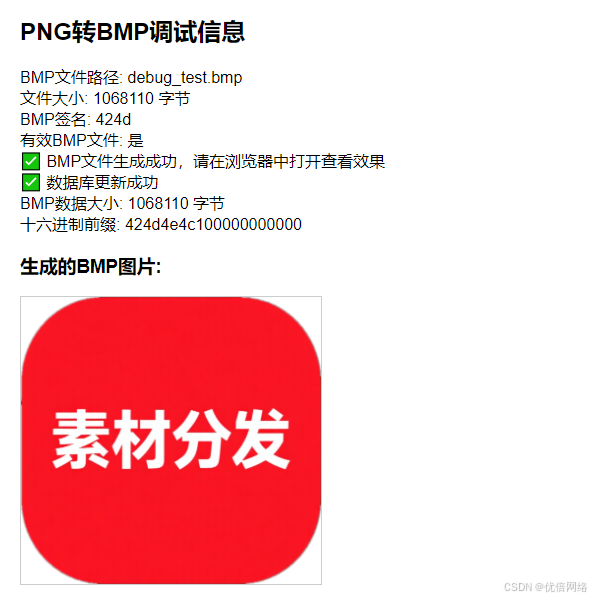
最终运行效果

Agent 垂直技术社区,欢迎活跃、内容共建。
更多推荐



 3
3 0
0- 0


 已为社区贡献1条内容

所有评论(0)