vue3 实现一个数组项在水平轴上按照奇偶数项分别上下排列
·
组件完整代码:
<template>
  <div class="h-full">
    <div class="h-full scroll-container">
      <div class="flex flex-row mt-[60rem]">
        <div v-for="(ele, i) in DataList" :key="'i'+i" class="grid-item flex flex-col items-center">
          <div class="grid-top h-[162rem] pt-[21rem]">
            <div class="grid-img flex justify-center">
              <NuxtImg :src="ele.img" alt="alt" class="object-cover" />
            </div>
          </div>
          <div class="grid-line flex flex-col">
            <div class="relative h-[50rem]">
              <div class="t-line">
                <svg xmlns="http://www.w3.org/2000/svg" width="2rem" height="52rem" viewBox="0 0 2 52" fill="none">
                  <path d="M1 51L1 1" stroke="#FF4500" stroke-linecap="round" />
                </svg>
              </div>
            </div>
            <div class="relative">
              <svg xmlns="http://www.w3.org/2000/svg" width="100%" height="2rem" viewBox="0 0 1055 2" fill="none">
                <path d="M-91 1H1054" stroke="#0000FF" stroke-linecap="round" />
              </svg>
              <div class="w-[18rem] h-[18rem] absolute left-[50%] ml-[-9rem] mt-[-9rem]">
                <svg xmlns="http://www.w3.org/2000/svg" width="18rem" height="18rem" viewBox="0 0 49 49" fill="none">
                  <g filter="url(#filter0_di_1963_1519)">
                    <circle cx="24.5" cy="24.5" r="11.5" fill="#03BBBF" />
                    <circle cx="24.5" cy="24.5" r="9.58333" stroke="white" stroke-width="3.83333" />
                  </g>
                  <defs>
                    <filter id="filter0_di_1963_1519" x="0.222222" y="0.222222" width="48.5556" height="48.5556" filterUnits="userSpaceOnUse" color-interpolation-filters="sRGB">
                      <feFlood flood-opacity="0" result="BackgroundImageFix" />
                      <feColorMatrix in="SourceAlpha" type="matrix" values="0 0 0 0 0 0 0 0 0 0 0 0 0 0 0 0 0 0 127 0" result="hardAlpha" />
                      <feOffset />
                      <feGaussianBlur stdDeviation="6.38889" />
                      <feComposite in2="hardAlpha" operator="out" />
                      <feColorMatrix type="matrix" values="0 0 0 0 1 0 0 0 0 1 0 0 0 0 1 0 0 0 1 0" />
                      <feBlend mode="normal" in2="BackgroundImageFix" result="effect1_dropShadow_1963_1519" />
                      <feBlend mode="normal" in="SourceGraphic" in2="effect1_dropShadow_1963_1519" result="shape" />
                      <feColorMatrix in="SourceAlpha" type="matrix" values="0 0 0 0 0 0 0 0 0 0 0 0 0 0 0 0 0 0 127 0" result="hardAlpha" />
                      <feOffset />
                      <feGaussianBlur stdDeviation="7.53889" />
                      <feComposite in2="hardAlpha" operator="arithmetic" k2="-1" k3="1" />
                      <feColorMatrix type="matrix" values="0 0 0 0 1 0 0 0 0 1 0 0 0 0 1 0 0 0 1 0" />
                      <feBlend mode="normal" in2="shape" result="effect2_innerShadow_1963_1519" />
                    </filter>
                  </defs>
                </svg>
              </div>
            </div>
          </div>
          <div class="grid-bot h-[162rem] flex">
            <div>
              <div class="b-title">{{ ele.title }}</div>
              <div class="b-desc">{{ ele.desc }}</div>
            </div>
          </div>
        </div>
      </div>
    </div>
  </div>
</template>

<script lang="ts" setup>
const DataList = ref([
  {
    title: 'Pic title 1',
    desc: 'Pic desc 1',
    img: 'https://picsum.photos/400/300?random=1',
  },
  {
    title: 'Pic title 2',
    desc: 'Pic desc 2',
    img: 'https://picsum.photos/400/300?random=2',
  },
  {
    title: 'Pic title 3',
    desc: 'Pic desc 3',
    img: 'https://picsum.photos/400/300?random=3',
  },
  {
    title: 'Pic title 4',
    desc: 'Pic desc 4',
    img: 'https://picsum.photos/400/300?random=4',
  },
  {
    title: 'Pic title 5',
    desc: 'Pic desc 5',
    img: 'https://picsum.photos/400/300?random=5',
  },
])
</script>
<style scoped>
.scroll-container {
  background-color: darkseagreen;
  /* background-image: url('https://picsum.photos/400/300?random=0'); */
  background-size: cover;
  background-repeat: no-repeat;
  background-position: center;
  width: 100%;
  height: 100%;
  max-width: 100vw; /* 固定为视口宽度,避免内容撑宽页面 */

  padding: 80rem 0 96rem 0;
}

.line-wapper {
  width: 100%;
  height: 2rem;
  background-color: #b5b5b5;
}

.grid-item {
  text-align: center;
  flex: 1;
}

.grid-item:nth-child(2n) {
  margin-top: 50rem;
  flex-direction: column-reverse;
}

.grid-top {
  border-radius: 16rem;
  background: linear-gradient(
    323deg,
    rgba(255, 255, 255, 0.7) -20.1%,
    rgba(255, 255, 255, 0.28) 136.24%
  );
}

.grid-img {
  width: 121rem;
  height: 121rem;
}

.grid-img img {
  width: 100%;
  height: auto;
}

.grid-item:nth-child(2n) .grid-line {
  flex-direction: column-reverse;
}

.grid-item:nth-child(2n + 1) .grid-bot {
  padding-top: 22rem;
}

.grid-item:nth-child(2n) .grid-bot {
  padding-bottom: 22rem;
  align-items: flex-end;
}

.b-title {
  margin-bottom: 4rem;
  @apply text-[#1A1C20] text-[20rem] leading-[140%] tracking-[-0.2rem];
  font-family: PoppinsZN-600;
}

.b-desc {
  @apply text-[rgba(26,28,32,0.45)] text-[12rem] leading-[130%] tracking-[-0.12rem] opacity-65;
  font-family: PoppinsZN-600;
}

.t-line {
  position: absolute;
  left: 50%; /* 将元素左边缘定位到父容器50%的位置 */
  transform: translateX(-50%); /* 向左移动自身宽度的50%,实现水平居中 */
}
</style>
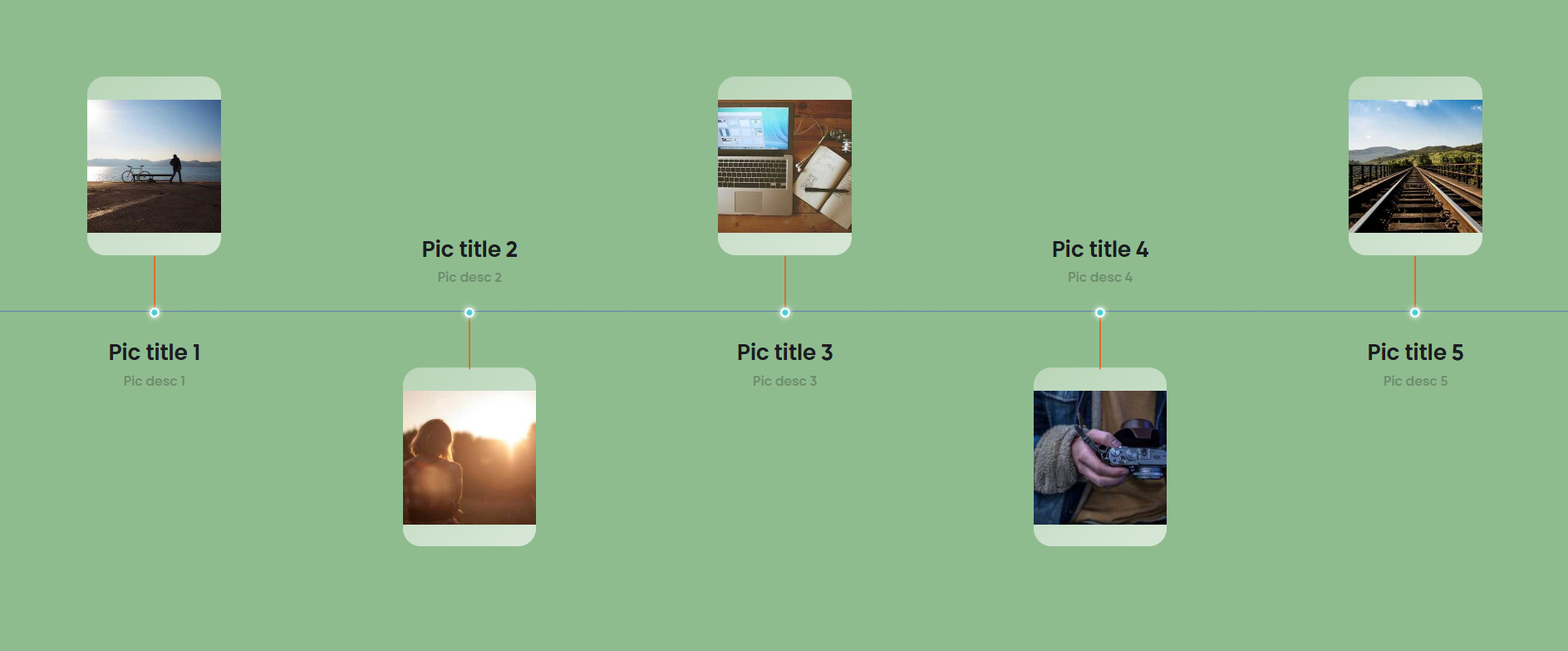
页面效果如下:

Agent 垂直技术社区,欢迎活跃、内容共建。
更多推荐


 29
29 0
0- 0


 已为社区贡献1条内容

所有评论(0)