【JavaFX基础】 java.lang.NullPointerException: Location is required路径找不到问题解决方法之一
·
一、问题描述
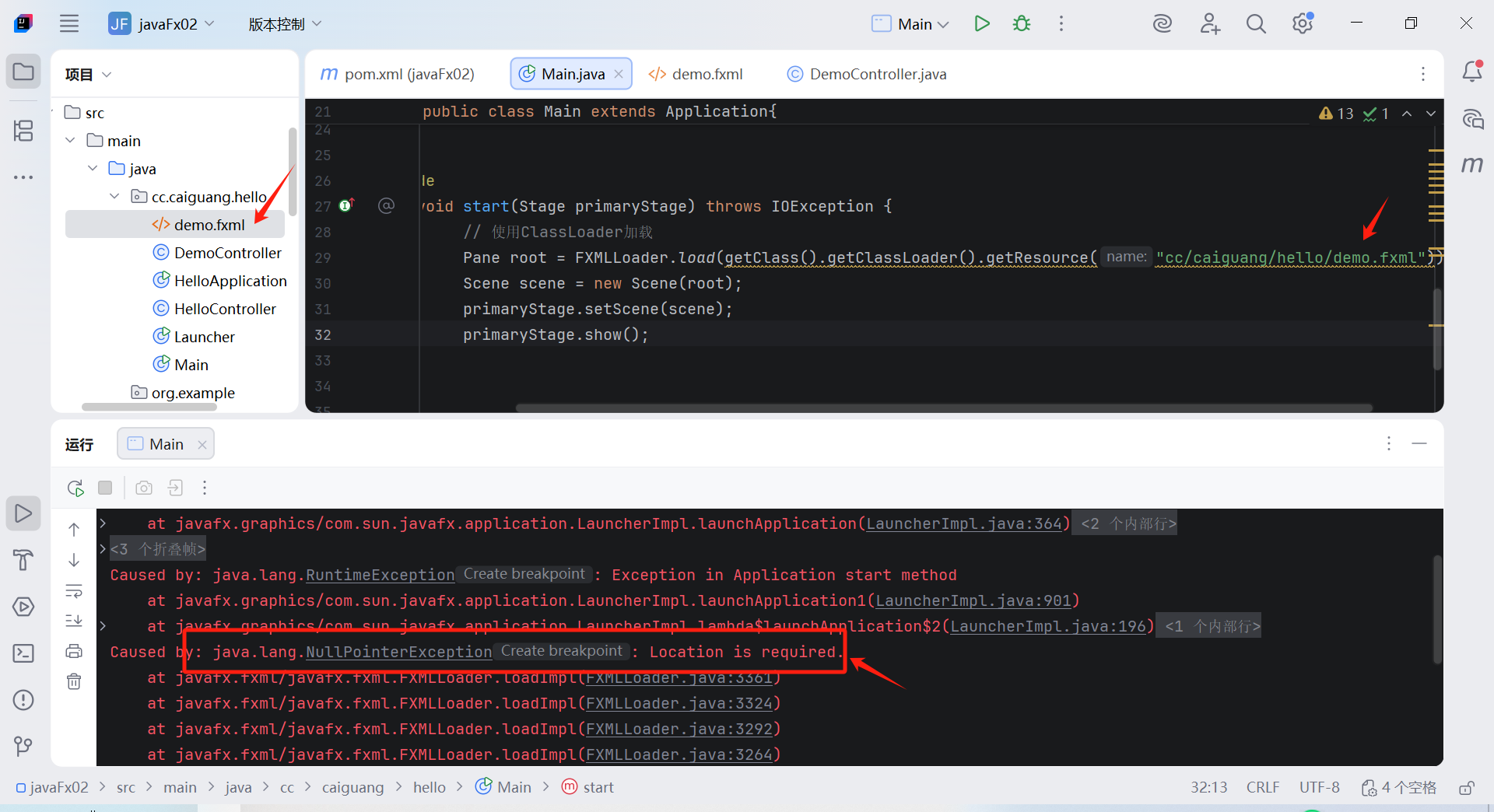
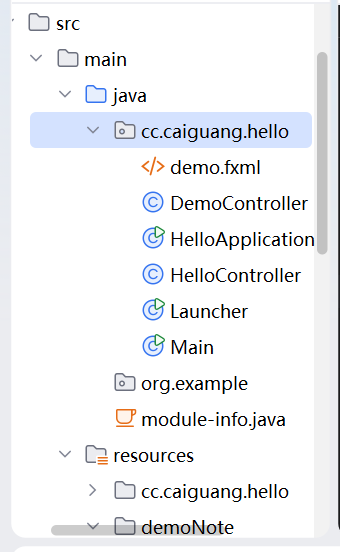 文件路径Main.java与demo.fxml在同一个目录下,运行以下代码,报错“ java.lang.NullPointerException: Location is required”
package cc.caiguang.hello;
import javafx.application.Application;
import javafx.fxml.FXMLLoader;
import javafx.scene.Parent;
import javafx.scene.Scene;
import javafx.scene.control.Button;
import javafx.scene.control.Label;
import javafx.scene.image.Image;
import javafx.scene.image.ImageView;
import javafx.scene.layout.AnchorPane;
import javafx.scene.layout.Pane;
import javafx.scene.layout.StackPane;
import javafx.scene.text.Font;
import javafx.scene.text.FontWeight;
import javafx.stage.Stage;

import java.net.URL;
import java.util.Objects;
public class Main extends Application {
    public static void main(String[] args) {
        Application.launch(args);
    }

    @Override
    public void start(Stage primaryStage) throws Exception {
        Pane root = FXMLLoader.load(getClass().getResource("demo.fxml"));
        Scene scene = new Scene(root, 500, 500);
        primaryStage.setScene(scene);
        primaryStage.show();
    }
}
二、尝试的解决方法
测试代码1:
package cc.caiguang.hello;
import javafx.application.Application;
import javafx.fxml.FXMLLoader;
import javafx.scene.Parent;
import javafx.scene.Scene;
import javafx.scene.control.Button;
import javafx.scene.control.Label;
import javafx.scene.image.Image;
import javafx.scene.image.ImageView;
import javafx.scene.layout.AnchorPane;
import javafx.scene.layout.Pane;
import javafx.scene.layout.StackPane;
import javafx.scene.text.Font;
import javafx.scene.text.FontWeight;
import javafx.stage.Stage;

import java.net.URL;
import java.util.Objects;

public class Main extends Application{
    public static void main(String[] args){
        launch(args);
    }

    @Override
    public void start(Stage primaryStage) throws Exception{
       //Pane root = FXMLLoader.load(Objects.requireNonNull(getClass().getResource("demo.fxml")));
        //Pane root = FXMLLoader.load(getClass().getResource("/demo.fxml"));//方法1:
        // 方法2:使用try-catch处理异常
        //Parent root = FXMLLoader.load(Objects.requireNonNull(
        //        getClass().getResource("demo.fxml"), "FXML文件未找到"));
        // 直接加载同一包下的fxml文件
        try {
            // 先调试查看问题
            System.out.println("当前类路径: " + getClass().getResource("."));
            System.out.println("查找文件: demo.fxml");

            URL fxmlUrl = getClass().getResource("demo.fxml");
            System.out.println("找到的URL: " + fxmlUrl);

            if (fxmlUrl == null) {
                // 尝试其他可能的位置
                System.out.println("尝试绝对路径...");
                fxmlUrl = getClass().getResource("/cc/caiguang/hello/demo.fxml");
                System.out.println("绝对路径URL: " + fxmlUrl);

                if (fxmlUrl == null) {
                    System.out.println("FXML文件未找到,请检查文件位置");
                    // 创建临时界面继续测试
                    createTempUI(primaryStage);
                    return;
                }
            }
            Pane root = FXMLLoader.load(fxmlUrl);
            Scene scene = new Scene(root);
            primaryStage.setScene(scene);
            primaryStage.show();

        } catch (Exception e) {
            e.printStackTrace();
            createTempUI(primaryStage); // 出错时显示临时界面
        }
    }

    private void createTempUI(Stage stage) {
        Button btn = new Button("FXML加载失败,但程序在运行");
        StackPane root = new StackPane(btn);
        Scene scene = new Scene(root, 300, 200);
        stage.setScene(scene);
        stage.show();
    }
}
输出结果说明getClass().getResource(".")返回null说明类加载器找不到当前类的位置,两种路径都返回null 说明资源文件根本不在类路径中。
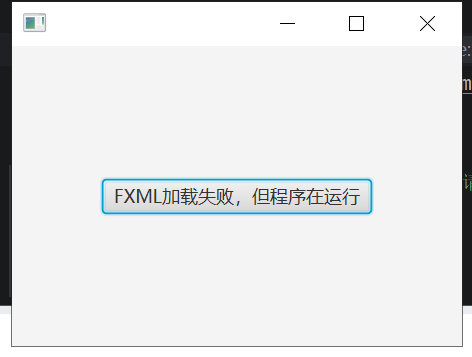
当前类路径: null
查找文件: demo.fxml
找到的URL: null
尝试绝对路径...
绝对路径URL: null
FXML文件未找到,请检查文件位置

进程已结束,退出代码为 0
我的demo.fxml 和 Main.java在同一目录下,所以考虑问题可能是构建工具没有将.fxml文件复制到输出目录。
尝试代码2:
教程视频弹幕中有网友提到需将“getClass().getResource("demo.fxml")”改为“getClass().getClassLoader().getResource("demo.fxml")”,尝试如下: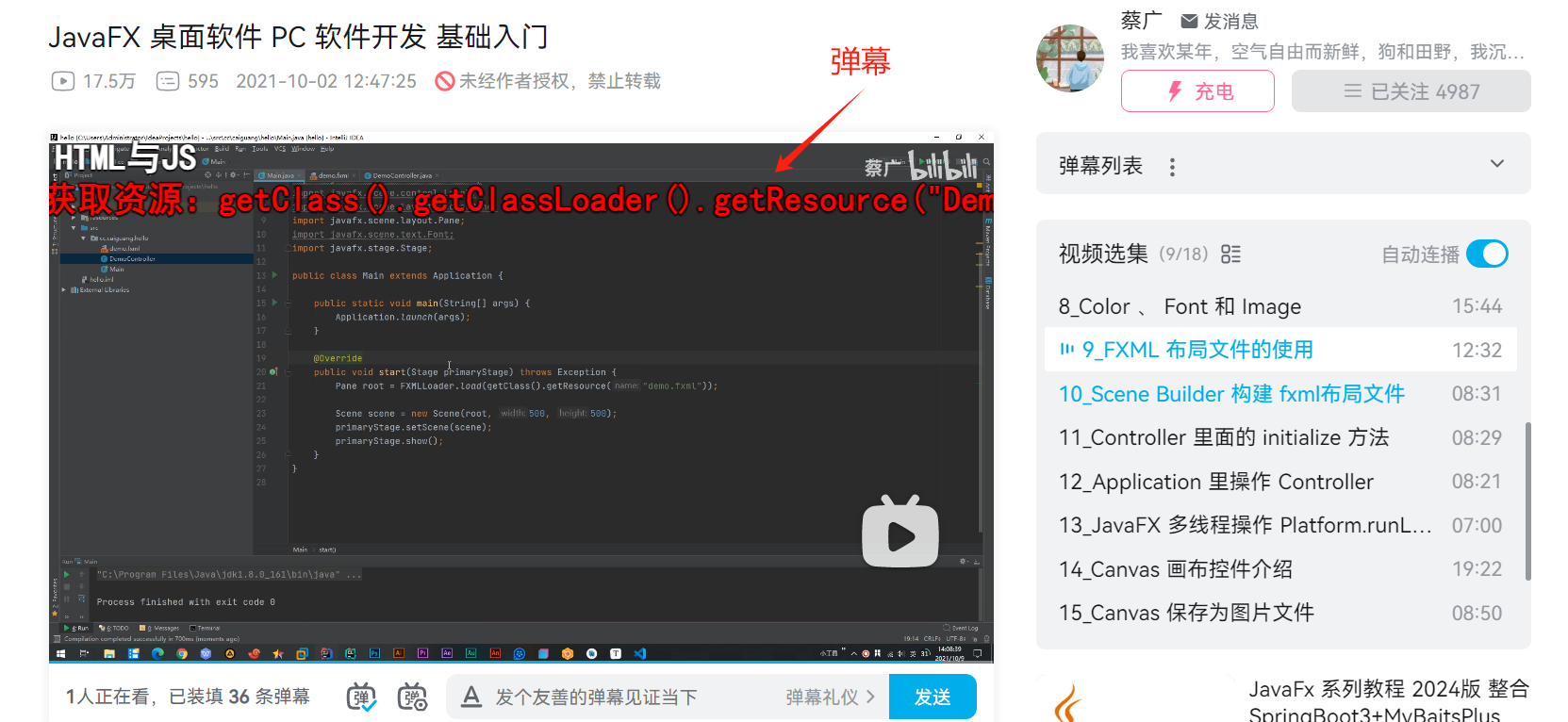
package cc.caiguang.hello;
import javafx.application.Application;
import javafx.fxml.FXMLLoader;
import javafx.scene.Parent;
import javafx.scene.Scene;
import javafx.scene.control.Button;
import javafx.scene.control.Label;
import javafx.scene.image.Image;
import javafx.scene.image.ImageView;
import javafx.scene.layout.AnchorPane;
import javafx.scene.layout.Pane;
import javafx.scene.layout.StackPane;
import javafx.scene.text.Font;
import javafx.scene.text.FontWeight;
import javafx.stage.Stage;

import java.net.URL;
import java.util.Objects;
public class Main extends Application {
    public static void main(String[] args) {
        Application.launch(args);
    }

    @Override
    public void start(Stage primaryStage) throws Exception {
        Pane root = FXMLLoader.load(getClass().getClassLoader().getResource("demo.fxml"));
        Scene scene = new Scene(root, 500, 500);
        primaryStage.setScene(scene);
        primaryStage.show();
    }
}
三、可行的解决方法
搜索到博主CTimet的一篇教程https://blog.csdn.net/DYxiao666/article/details/127344572
博主提到,IDEA判断这个文件是否属于资源文件只看它在不在resources资源目录下,如果不在,IDEA会把这个后缀非.java的文件忽视,将导致在load的时候找不到fxml文件。且由于FXMLLoader的构造器参数是个URL,因此在报错时并不会指出找不到fxml文件。
于是我将demo.fxml移动到resources目录下,此时正常运行了!感谢!!!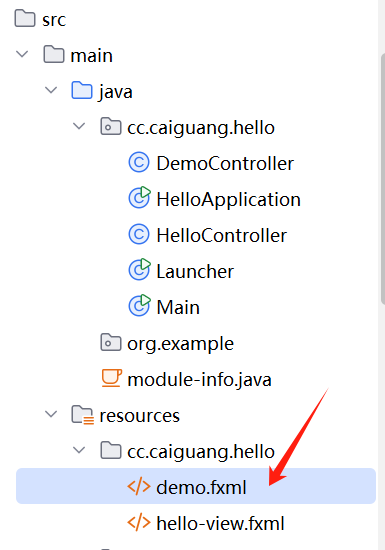
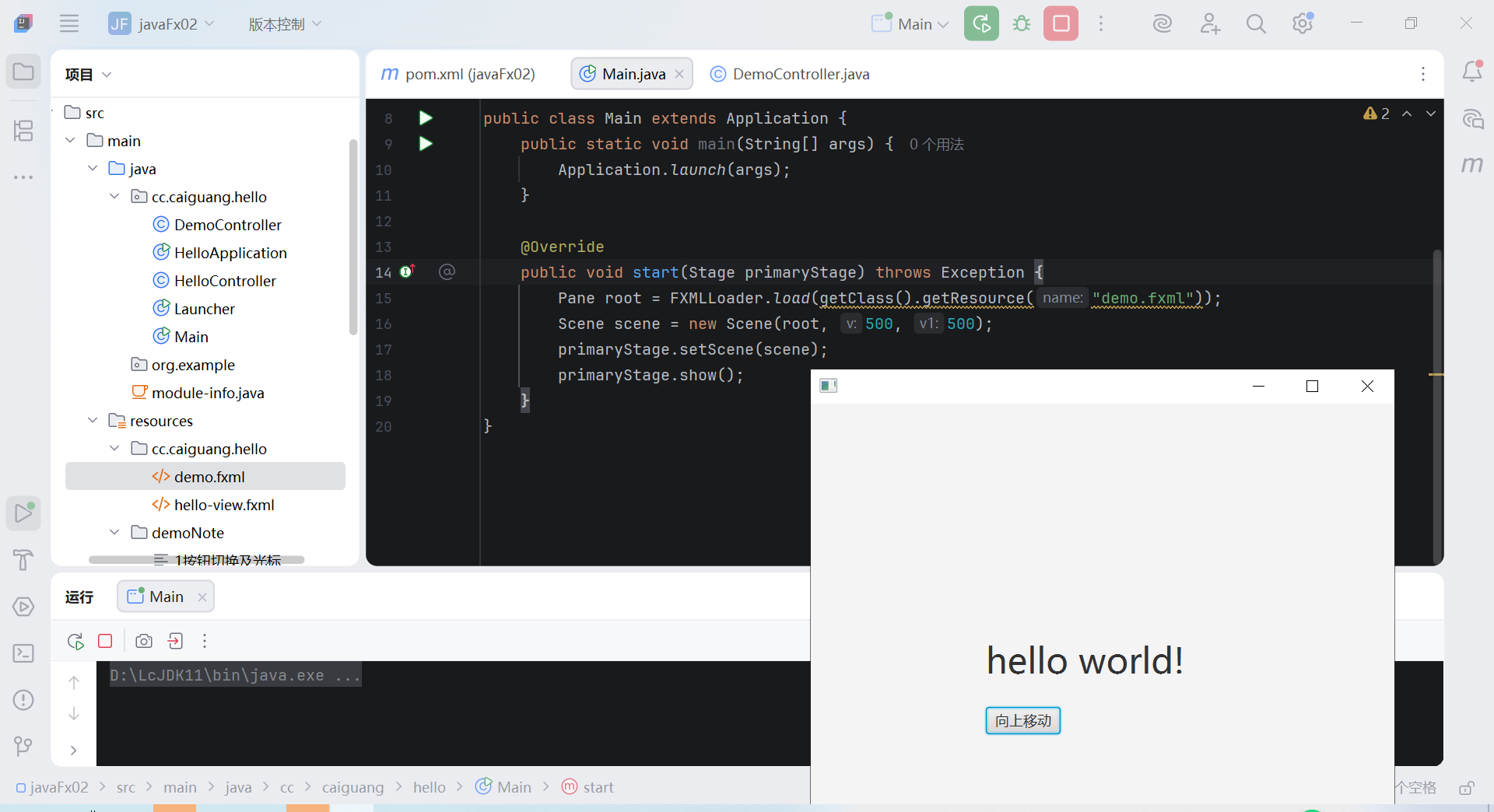
package cc.caiguang.hello;
import javafx.application.Application;
import javafx.fxml.FXMLLoader;
import javafx.scene.Scene;
import javafx.scene.layout.Pane;
import javafx.stage.Stage;

public class Main extends Application {
    public static void main(String[] args) {
        Application.launch(args);
    }

    @Override
    public void start(Stage primaryStage) throws Exception {
        Pane root = FXMLLoader.load(getClass().getResource("demo.fxml"));
        Scene scene = new Scene(root, 500, 500);
        primaryStage.setScene(scene);
        primaryStage.show();
    }
}注:博主提到将目录名改为resources是没用的,需要创建,参考下图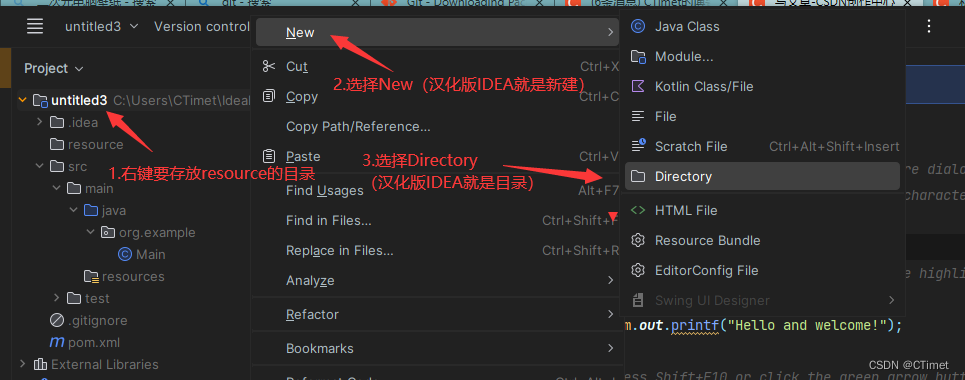

Agent 垂直技术社区,欢迎活跃、内容共建。
更多推荐


 4
4 0
0- 0


 已为社区贡献3条内容

所有评论(0)