c++中的steady_clock、system_clock、high_resolution_clock
目录
3.std::chrono::high_resolution_clock
3. std::chrono::high_resolution_clock
1.std::chrono::steady_clock
std::chrono::steady_clock - cppreference.com
Class
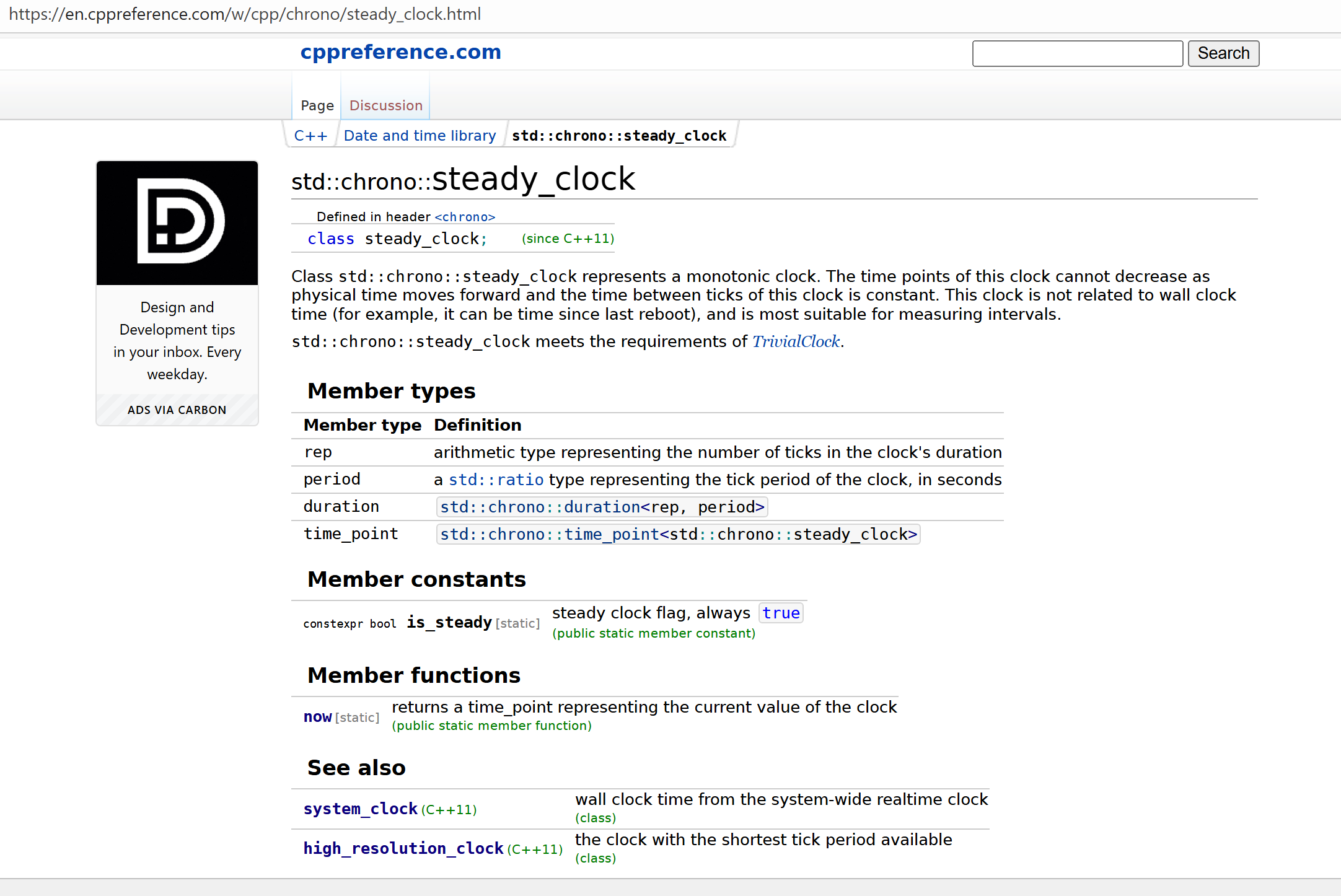
std::chrono::steady_clockrepresents a monotonic clock. The time points of this clock cannot decrease as physical time moves forward and the time between ticks of this clock is constant. This clock is not related to wall clock time (for example, it can be time since last reboot), and is most suitable for measuring intervals.
std::chrono::steady_clockmeets the requirements of TrivialClock.类 std::chrono::steady_clock 表示一个单调时钟。随着物理时间的流逝,这个时钟的时间点不会减少,并且该时钟的滴答时间间隔是恒定的。这个时钟与实际时间无关(例如,它可以表示自上次重启以来的时间),最适合用于测量时间间隔。std::chrono::steady_clock 满足 TrivialClock 的要求。
Member types
Member type Definition reparithmetic type representing the number of ticks in the clock's duration perioda std::ratio type representing the tick period of the clock, in seconds durationstd::chrono::duration<rep, period> time_pointstd::chrono::time_point<std::chrono::steady_clock> arithmetic type representing the number of ticks in the clock's duration
表示时钟持续时间内滴答数的算术类型
period a std::ratio type representing the tick period of the clock, in seconds
period 是一个 std::ratio 类型,表示时钟的滴答周期,以秒为单位
2.std::chrono::system_clock
std::chrono::system_clock - cppreference.com
Class
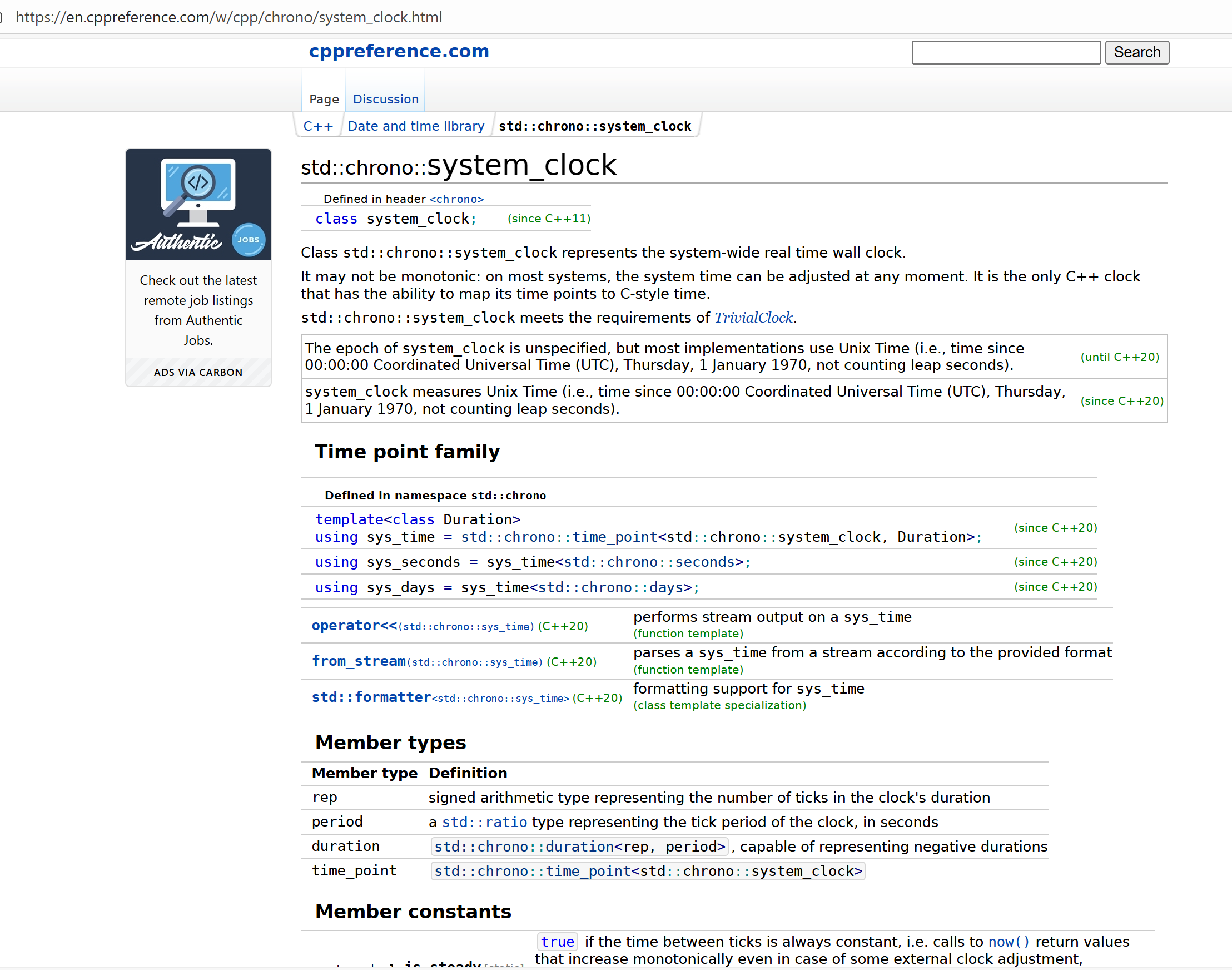
std::chrono::system_clockrepresents the system-wide real time wall clock.It may not be monotonic: on most systems, the system time can be adjusted at any moment. It is the only C++ clock that has the ability to map its time points to C-style time.
std::chrono::system_clockmeets the requirements of TrivialClock.类 std::chrono::system_clock 表示系统范围的实时时钟。它可能不是单调的:在大多数系统上,系统时间可以随时调整。它是唯一一个能够将其时间点映射到 C 风格时间的 C++时钟。std::chrono::system_clock 满足 TrivialClock 的要求。
The epoch of
system_clockis unspecified, but most implementations use Unix Time (i.e., time since 00:00:00 Coordinated Universal Time (UTC), Thursday, 1 January 1970, not counting leap seconds).system_clock 的纪元未指定,但大多数实现使用 Unix 时间(即自协调世界时(UTC)1970 年 1 月 1 日星期四 00:00:00 起的时间,不包括闰秒)。
(until C++20)
system_clockmeasures Unix Time (i.e., time since 00:00:00 Coordinated Universal Time (UTC), Thursday, 1 January 1970, not counting leap seconds).system_clock 测量 Unix 时间(即自协调世界时(UTC)1970 年 1 月 1 日星期四 00:00:00 起经过的时间,不计闰秒)。
(since C++20)
The
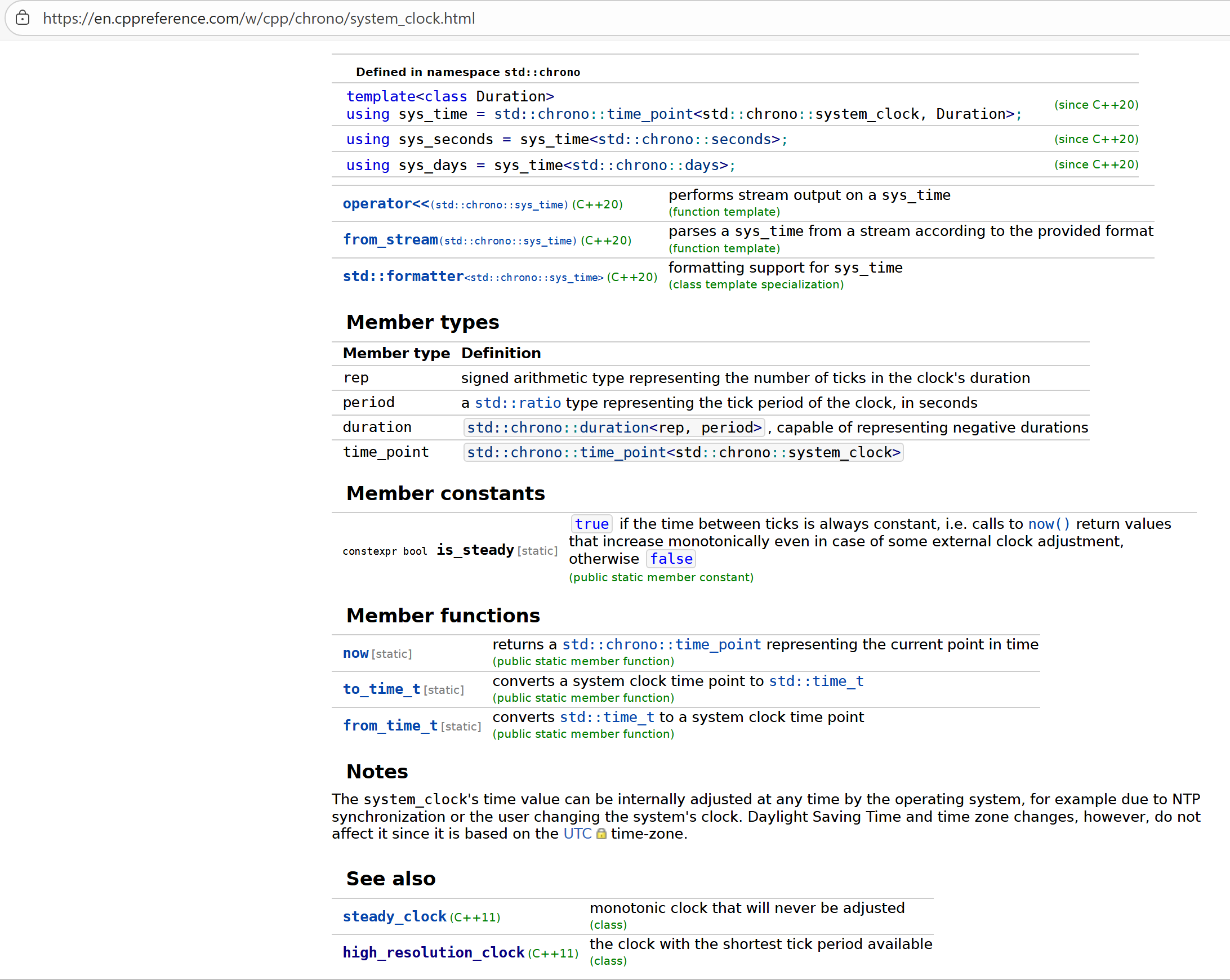
system_clock's time value can be internally adjusted at any time by the operating system, for example due to NTP synchronization or the user changing the system's clock. Daylight Saving Time and time zone changes, however, do not affect it since it is based on the UTC time-zone.操作系统可以在任何时候内部调整 system_clock 的时间值,例如由于 NTP 同步或用户更改系统时钟。然而,夏令时和时区的更改不会影响它,因为它是基于 UTC 时区的。
3.std::chrono::high_resolution_clock
std::chrono::high_resolution_clock - cppreference.com
Class
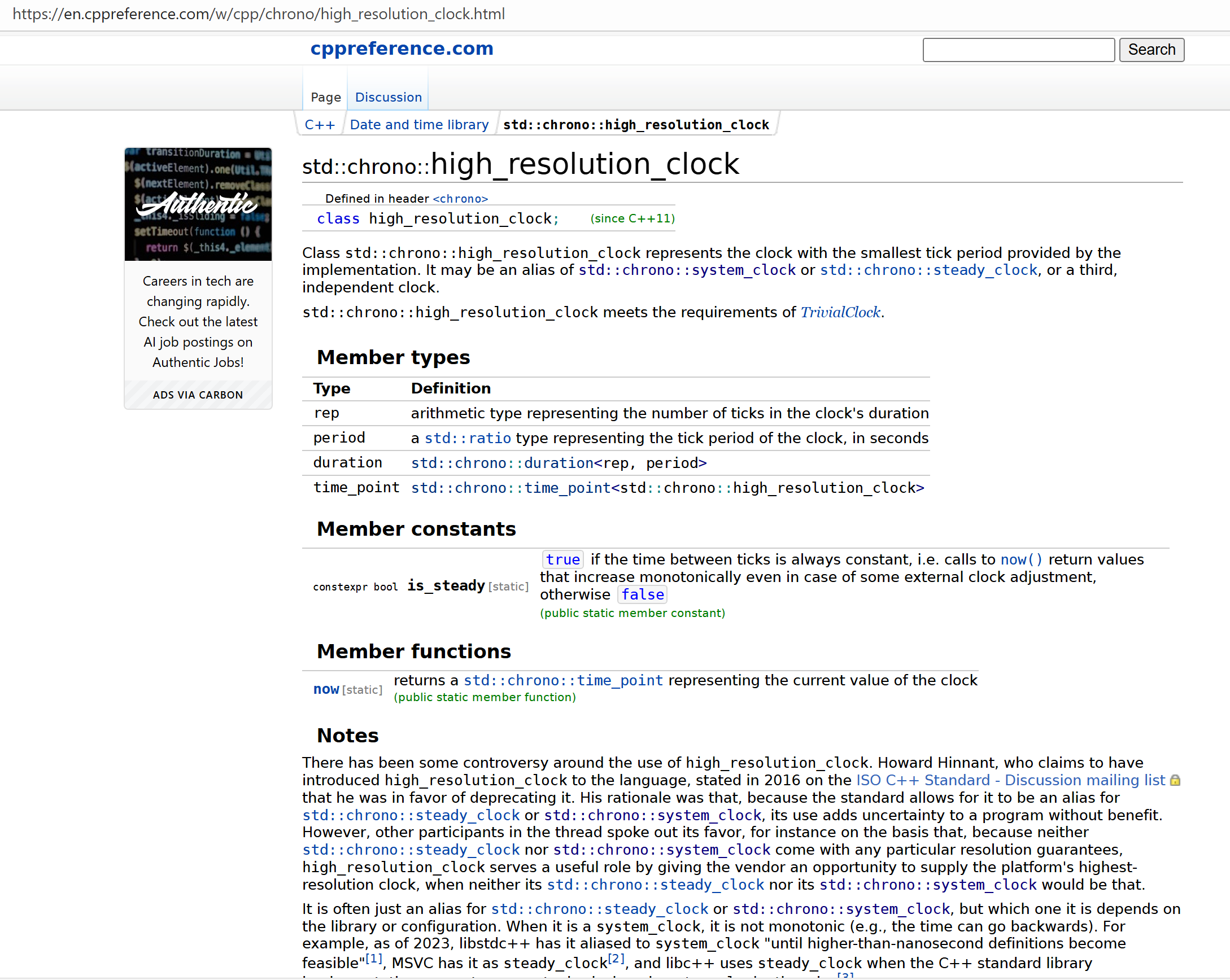
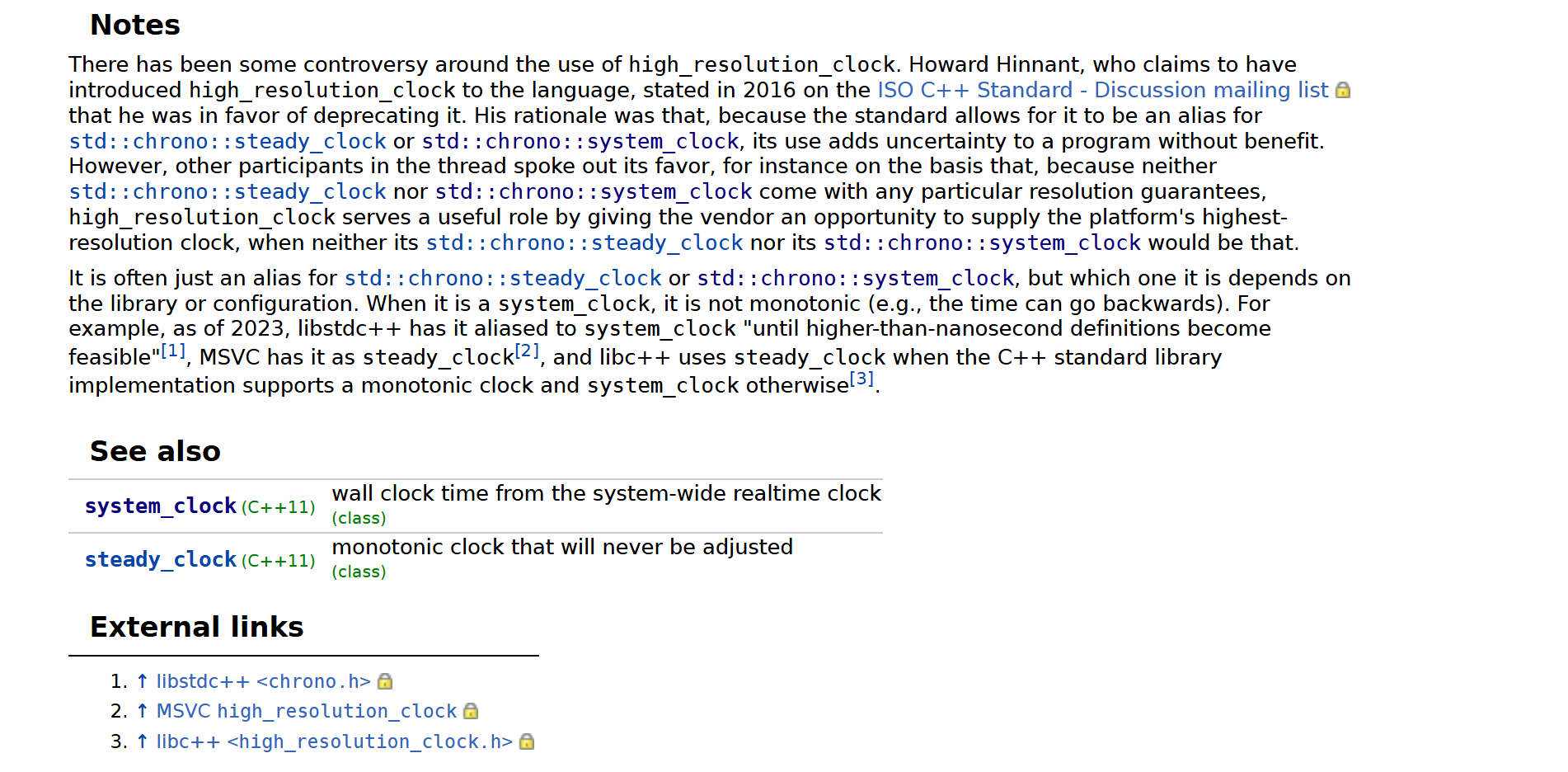
std::chrono::high_resolution_clockrepresents the clock with the smallest tick period provided by the implementation. It may be an alias of std::chrono::system_clock or std::chrono::steady_clock, or a third, independent clock.
std::chrono::high_resolution_clockmeets the requirements of TrivialClock.类 std::chrono::high_resolution_clock 表示由实现提供的最小计时周期的时钟。它可能是 std::chrono::system_clock 或 std::chrono::steady_clock 的别名,或者是第三种独立的时钟。std::chrono::high_resolution_clock 满足 TrivialClock 的要求。
There has been some controversy around the use of
high_resolution_clock. Howard Hinnant, who claims to have introducedhigh_resolution_clockto the language, stated in 2016 on the ISO C++ Standard - Discussion mailing list that he was in favor of deprecating it. His rationale was that, because the standard allows for it to be an alias for std::chrono::steady_clock or std::chrono::system_clock, its use adds uncertainty to a program without benefit. However, other participants in the thread spoke out its favor, for instance on the basis that, because neither std::chrono::steady_clock nor std::chrono::system_clock come with any particular resolution guarantees,high_resolution_clockserves a useful role by giving the vendor an opportunity to supply the platform's highest-resolution clock, when neither its std::chrono::steady_clock nor its std::chrono::system_clock would be that.It is often just an alias for std::chrono::steady_clock or std::chrono::system_clock, but which one it is depends on the library or configuration. When it is a
system_clock, it is not monotonic (e.g., the time can go backwards). For example, as of 2023, libstdc++ has it aliased tosystem_clock"until higher-than-nanosecond definitions become feasible"[1], MSVC has it assteady_clock[2], and libc++ usessteady_clockwhen the C++ standard library implementation supports a monotonic clock andsystem_clockotherwise[3].关于
high_resolution_clock的使用一直存在一些争议。据称是将high_resolution_clock引入该语言的霍华德・欣南特(Howard Hinnant),曾于 2016 年在 ISO C++ 标准讨论邮件列表中表示,他支持将其弃用。他的理由是,由于标准允许它作为std::chrono::steady_clock或std::chrono::system_clock的别名,使用它会给程序带来不确定性,且毫无益处。不过,该讨论线程中的其他参与者则表达了对它的支持,例如他们认为:由于std::chrono::steady_clock和std::chrono::system_clock都没有任何特定的分辨率保证,而当厂商的std::chrono::steady_clock和std::chrono::system_clock都无法提供平台最高分辨率时钟时,high_resolution_clock能为厂商提供机会,让其提供平台的最高分辨率时钟,因此具有实用价值。
high_resolution_clock通常只是std::chrono::steady_clock或std::chrono::system_clock的别名,但具体是哪一个,取决于所用的库或配置。当它是system_clock的别名时,它不具备单调性(例如,时间可能会倒退)。举例来说,截至 2023 年:
- libstdc++ 库将其别名化为
system_clock,“直到高于纳秒级的定义变得可行”[1];- MSVC(微软视觉 C++ 编译器)将其作为
steady_clock的别名 [2];- libc++ 库则会根据情况选择:若 C++ 标准库实现支持单调时钟,则将其作为
steady_clock的别名;否则,将其作为system_clock的别名 [3]。
4.对比
一、核心特性对比
| 特性 | steady_clock(稳定时钟) | system_clock(系统时钟) | high_resolution_clock(高分辨率时钟) |
|---|---|---|---|
| 时间来源 | 基于系统单调计时器(不受系统时间调整影响) | 基于系统实时时钟(与操作系统显示的 “当前时间” 同步) | 无固定来源,通常是 steady_clock 或 system_clock 的别名 |
| 单调性 | 必然单调(时间只增不减,不受时区 / 夏令时 / 手动调整影响) | 不保证单调(可能因系统时间校准、手动修改而倒退) | 取决于实际别名:若为 steady_clock 则单调,若为 system_clock 则可能不单调 |
| 分辨率 | 中等(通常为微秒级,不同平台有差异) | 中等(通常为微秒级,与系统时间精度一致) | 最高(理论上是平台支持的最高分辨率,如纳秒级) |
| 与日历时间的关联 | 无(时间值是相对于某个固定起点的计数,无实际日期意义) | 有(可转换为 std::time_t,对应真实的年 / 月 / 日 / 时) | 无(若为 system_clock 别名则可关联,否则不可) |
| 跨平台一致性 | 行为一致(标准强制要求单调) | 行为一致(与系统时间绑定) | 不一致(不同编译器 / 库实现可能别名不同) |
二、使用场景
1. std::chrono::steady_clock
- 最佳场景:测量时间间隔(如性能计时、超时判断)。例:计算一段代码的执行耗时、实现定时器(确保不会因系统时间调整而错乱)。
- 优势:单调性保证,适合需要 “可靠时间差” 的场景。
- 示例:
#include <chrono>
using namespace std::chrono;

auto start = steady_clock::now();  // 记录开始时间
// 执行耗时操作...
auto end = steady_clock::now();
auto duration = duration_cast<microseconds>(end - start);  // 计算间隔(微秒)
2. std::chrono::system_clock
- 最佳场景:获取当前日历时间(如日志时间戳、显示当前日期时间)。例:记录事件发生的具体时间(如 “2024-10-21 15:30:00”)。
- 优势:可直接转换为人类可读的日历时间。
- 示例:
auto now = system_clock::now();
std::time_t now_time = system_clock::to_time_t(now);  // 转换为传统时间类型
std::cout << "当前时间: " << std::ctime(&now_time);  // 输出:Wed Oct 21 15:30:00 2024
3. std::chrono::high_resolution_clock
- 最佳场景:需要最高精度计时,且可接受平台差异的场景。例:对时间精度要求极高的微基准测试(micro-benchmark)。
- 注意事项:
- 由于可能是
system_clock的别名(如 libstdc++),若依赖单调性需谨慎。 - 跨平台代码建议优先使用
steady_clock(保证单调)或显式检查其实现(如通过std::is_same判断是否为steady_clock别名)。
- 由于可能是
- 示例:
auto start = high_resolution_clock::now();
// 高精度计时操作...
auto end = high_resolution_clock::now();
#include <iostream>
#include <chrono>
#include <thread>  // 用于睡眠函数演示时间间隔
#include <ctime>   // 用于转换系统时间为字符串

int main() {
    // 1. std::chrono::steady_clock 示例:测量时间间隔(不受系统时间影响)
    std::cout << "=== 测试 steady_clock(稳定时钟) ===" << std::endl;
    auto steady_start = std::chrono::steady_clock::now();

    // 模拟耗时操作(睡眠500毫秒)
    std::this_thread::sleep_for(std::chrono::milliseconds(500));

    auto steady_end = std::chrono::steady_clock::now();
    // 计算时间间隔(转换为毫秒和微秒)
    auto steady_ms = std::chrono::duration_cast<std::chrono::milliseconds>(steady_end - steady_start).count();
    auto steady_us = std::chrono::duration_cast<std::chrono::microseconds>(steady_end - steady_start).count();
    std::cout << "耗时: " << steady_ms << " 毫秒 (" << steady_us << " 微秒)" << std::endl << std::endl;


    // 2. std::chrono::system_clock 示例:获取当前日历时间
    std::cout << "=== 测试 system_clock(系统时钟) ===" << std::endl;
    auto system_now = std::chrono::system_clock::now();

    // 转换为可阅读的日历时间
    std::time_t system_time = std::chrono::system_clock::to_time_t(system_now);
    std::cout << "当前系统时间: " << std::ctime(&system_time);  // 包含换行
    // 转换为毫秒级时间戳(自1970-01-01 00:00:00以来的毫秒数)
    auto system_ms = std::chrono::duration_cast<std::chrono::milliseconds>(system_now.time_since_epoch()).count();
    std::cout << "时间戳(毫秒): " << system_ms << std::endl << std::endl;


    // 3. std::chrono::high_resolution_clock 示例:高精度计时
    std::cout << "=== 测试 high_resolution_clock(高分辨率时钟) ===" << std::endl;
    auto high_res_start = std::chrono::high_resolution_clock::now();

    // 模拟短时间操作(空循环,约几百纳秒)
    volatile int x = 0;  // volatile 防止编译器优化掉空循环
    for (int i = 0; i < 10000; ++i) {
        x += i;
    }

    auto high_res_end = std::chrono::high_resolution_clock::now();
    // 计算高精度时间间隔(转换为纳秒)
    auto high_res_ns = std::chrono::duration_cast<std::chrono::nanoseconds>(high_res_end - high_res_start).count();
    std::cout << "短操作耗时: " << high_res_ns << " 纳秒" << std::endl;


    // 附加:检查 high_resolution_clock 的实际类型(平台相关)
    std::cout << "\n=== high_resolution_clock 实际类型 ===" << std::endl;
    if (std::is_same_v<std::chrono::high_resolution_clock, std::chrono::steady_clock>) {
        std::cout << "当前平台:high_resolution_clock 是 steady_clock 的别名(支持单调)" << std::endl;
    } else if (std::is_same_v<std::chrono::high_resolution_clock, std::chrono::system_clock>) {
        std::cout << "当前平台:high_resolution_clock 是 system_clock 的别名(可能不单调)" << std::endl;
    } else {
        std::cout << "当前平台:high_resolution_clock 是独立实现" << std::endl;
    }

    return 0;
}
输出:(不同平台/时间 会有差异)
=== 测试 steady_clock(稳定时钟) ===
耗时: 500 毫秒 (500259 微秒)

=== 测试 system_clock(系统时钟) ===
当前系统时间: Tue Oct 21 16:49:37 2025
时间戳(毫秒): 1761036577518

=== 测试 high_resolution_clock(高分辨率时钟) ===
短操作耗时: 8744 纳秒

=== high_resolution_clock 实际类型 ===
当前平台:high_resolution_clock 是 system_clock 的别名(可能不单调)
三、总结建议
- 优先用
steady_clock:只要涉及 “时间间隔测量”(如性能测试、超时),它是最安全的选择(单调性 + 跨平台一致)。 - 用
system_clock处理日历时间:需要与真实日期时间关联时(如日志、时间戳),必须用它。 - 谨慎使用
high_resolution_clock:仅在对精度要求极高,且能接受平台差异时使用;跨平台代码建议避免,或先通过编译期检查确认其实现(如是否为steady_clock别名)。

Agent 垂直技术社区,欢迎活跃、内容共建。
更多推荐


 18
18 0
0- 0


 已为社区贡献1条内容

所有评论(0)