Ant-design-vue 3.xx版本修改快捷键的显示位置,自定义快捷键
目录
一、问题
1.ui给了设计图,需要把快捷键显示在最左侧。看着ant-design-vue的文档上快捷键确实显示在最左侧。
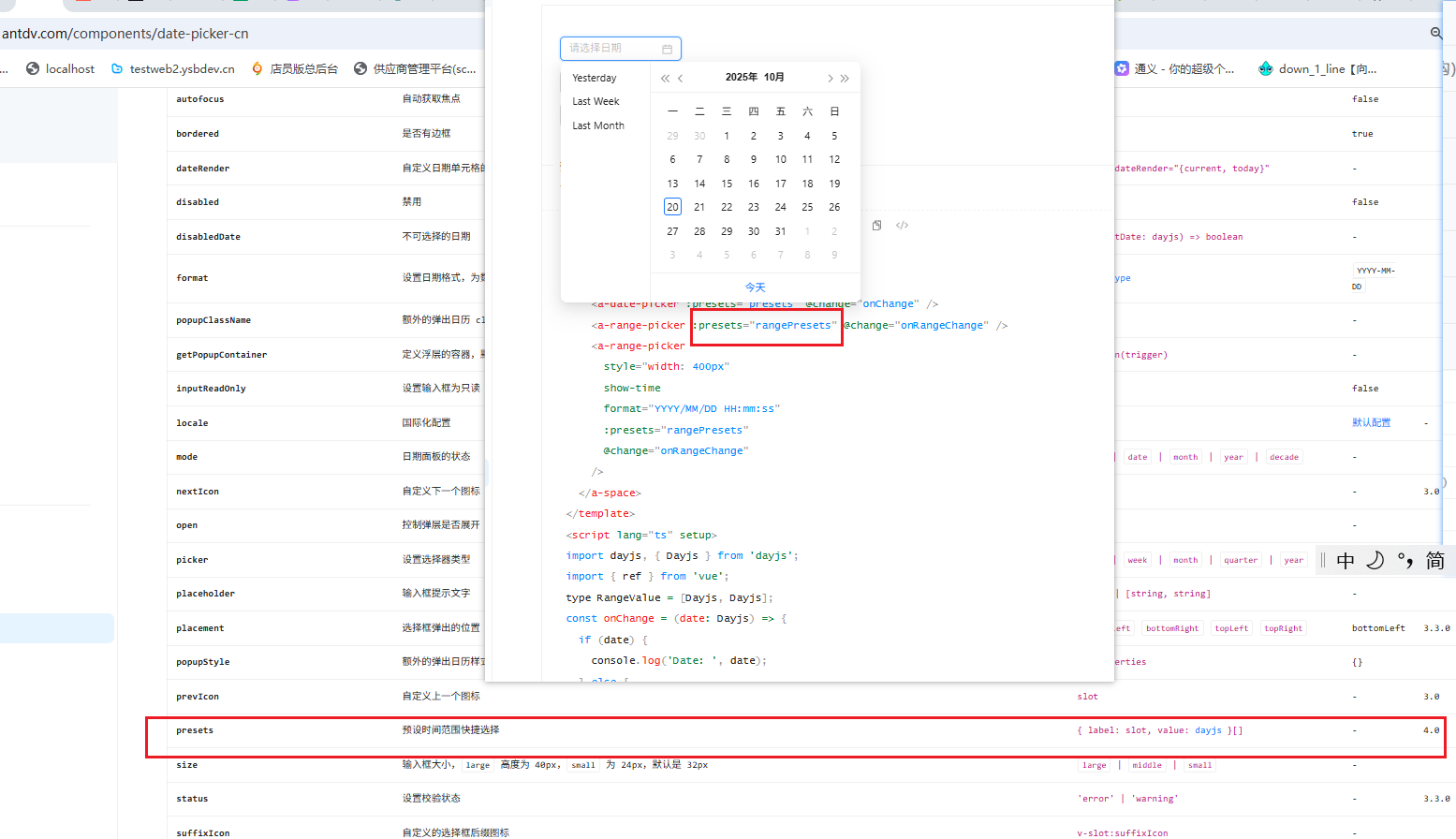
2.但是为啥我写了不显示呢?突然发现标了一个版本号,只有4.0及以上才是默认在左侧的。可以用presets来设置快捷键。
3.3.xx的本版只能用ranges来配置快捷键,同时默认快捷键是现在在最下面的。左右没有插槽
二、解决方法
1.因为除了左右布局,ui中还有一些额外的样式,基于原来的结构修改实在是太麻烦了,只能基于 renderExtraFooter插槽二次开发,把这个插槽改成左右布局,在这个插槽里面渲染快捷键
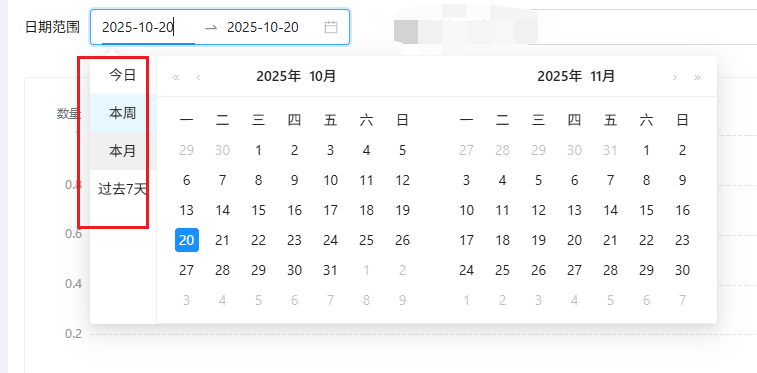
2.基于上述分析针对ant-design-vue 3.xx写了一个组件,可以自定义 快捷键显示的位置。默认左侧显示;可以设置右侧显示或者不显示。
1)具体代码如下:
<template>
  <!-- 日期选择——自定义快捷选择位置(默认显示在最左侧) -->
  <ARangePicker
    v-model:value="innerValue"
    :class="className"
    :placeholder="placeholder"
    :allow-clear="allowClear"
    v-bind="attrs"
    :dropdown-class-name="`${position ? `shortcuts-range-picker-popup-${position}` : ''}`"
  >
    <template #renderExtraFooter>
      <ul class="ranges">
        <li
          v-for="item in rangesList"
          :key="item.label"
          class="ant-picker-preset"
          :class="{ active: currentShortCutsValue?.label === item.label }"
          @click="handleClick(item)"
        >
          <span class="range-picker-item">{{ item.label }}</span>
        </li>
      </ul>
      <slot name="renderExtraFooter" />
    </template>
    <template v-for="slot in slots" :key="slot">
      <slot v-if="slot?.name" :name="slot.name" />
    </template>
  </ARangePicker>
</template>

<script lang="ts" setup>
import { computed, useAttrs, useSlots } from 'vue'
import { getTimeRanges } from '@/utils/format'
import type { Dayjs } from 'dayjs'
import { useVModel } from '@vueuse/core'
interface Props {
  value?: [Dayjs, Dayjs] | undefined
  className?: string
  placeholder?: [string, string]
  allowClear?: boolean
  timeRangeType?: 'order' | 'variety'
  position?: 'left' | 'right' | ''
}

const props = withDefaults(defineProps<Props>(), {
  className: 'w-[260px]',
  placeholder: () => ['开始日期', '结束日期'],
  allowClear: false,
  timeRangeType: 'variety',
  position: 'left'
})

const emit = defineEmits<{
  'update:value': [value: [Dayjs, Dayjs] | undefined]
}>()

const innerValue = useVModel(props, 'value', emit)
const attrs = useAttrs()
const slots = useSlots()

defineOptions({
  inheritAttrs: false
})

// 计算时间范围快捷选项(对象形式,供 ranges 使用)
const ranges = computed(() => getTimeRanges(props.timeRangeType))

// 计算列表形式,供自定义 footer 渲染
const rangesList = computed(() => {
  const obj = ranges.value as Record<string, [Dayjs, Dayjs]>
  return Object.keys(obj).map((label) => ({ label, value: obj[label] }))
})

const currentShortCutsValue = ref()
function handleClick(item: { label: string; value: [Dayjs, Dayjs] }) {
  innerValue.value = item.value
  currentShortCutsValue.value = item
}
</script>

<style lang="less">
[class*='shortcuts-range-picker-popup'] {
  .ant-picker-panel-container {
    display: flex;
    .ant-picker-footer {
      min-width: auto;
      @apply px-0;
      .ant-picker-footer-extra {
        @apply px-0;
        .ant-picker-preset {
          @apply cursor-pointer  whitespace-nowrap break-keep px-2 text-center;
          &:hover {
            @apply bg-cbg04;
          }
          &.active {
            @apply bg-cb01;
          }
        }
      }
    }
  }
}
.shortcuts-range-picker-popup-right {
  .ant-picker-panel-container {
    .ant-picker-footer {
      border-left: 1px solid #f0f0f0;
    }
  }
}
.shortcuts-range-picker-popup-left {
  .ant-picker-panel-container {
    flex-direction: row-reverse;

    .ant-picker-footer {
      border-right: 1px solid #f0f0f0;
    }
  }
}
</style>
/**
 * 时间筛选快捷键
 */

type RangeValue = [Dayjs, Dayjs]
export function getTimeRanges(type: 'order' | 'variety' = 'order') {
  const startOfToday = dayjs().startOf('day')
  let shortcutsTimeRanges = {}
  switch (type) {
    case 'order':
      shortcutsTimeRanges = {
        近3月: [startOfToday.subtract(3, 'month'), dayjs().endOf('day')] as RangeValue,
        近6月: [startOfToday.subtract(6, 'month'), dayjs().endOf('day')] as RangeValue,
        半年前: [
          startOfToday.subtract(3, 'year').subtract(6, 'month'),
          dayjs().subtract(6, 'month').endOf('day').subtract(1, 'day')
        ] as RangeValue
      }
      break
    case 'variety':
      shortcutsTimeRanges = {
        今日: [startOfToday, startOfToday] as RangeValue,
        本周: [dayjs().startOf('week'), startOfToday] as RangeValue,
        本月: [dayjs().startOf('month'), startOfToday] as RangeValue,
        过去7天: [dayjs().subtract(7, 'day'), startOfToday.subtract(1, 'day')] as RangeValue
      }
      break
  }

  return shortcutsTimeRanges
}
2)效果图如下:
3.注意:
1)避免全局样式污染,需要给ARangePicker添加一个自定义类,3.xx的版本需要通过 dropdowClassName属性添加
2)如需修改其他样式,可以自行在style标签中修改
3)开发时,对于第三方库的文档需要先切换到对应版本。避免因为不同版本属性名称修改,使用错误。(package.json中可以查看使用的版本)
4)选中项的判断:此处不能使用value值是否相等判断,因为不同快捷键的逻辑可能会重合,比如上述:今天和本周的逻辑就有可能重合。必须使用label来判断,Object中的key是唯一的。
三、总结
1.对于 ant-design-vue 3.xx的版本,官方没有提供对应的插槽。需要自定义快捷键及显示位置左右布局。需要自己修改 renderExtraFooter的样式。同理,ant-design-vue 4.xx想要上下布局快捷键,也可以自己修改样式。
/*
希望对你有帮助!
如有错误,欢迎指正,谢谢!
*/

Agent 垂直技术社区,欢迎活跃、内容共建。
更多推荐



 3
3 0
0- 0


 已为社区贡献3条内容

所有评论(0)