源码篇 Vue Router 4 上篇
电梯
Vue 源码
Vue Router 4 源码
vue-router 是 vue 官方指定的路由管理库,本文所用的 Vue Router 4 是针对 Vue3 框架
准备工作
1.拉取源码
git clone https://github.com/hao-kuai/vue-router4.git
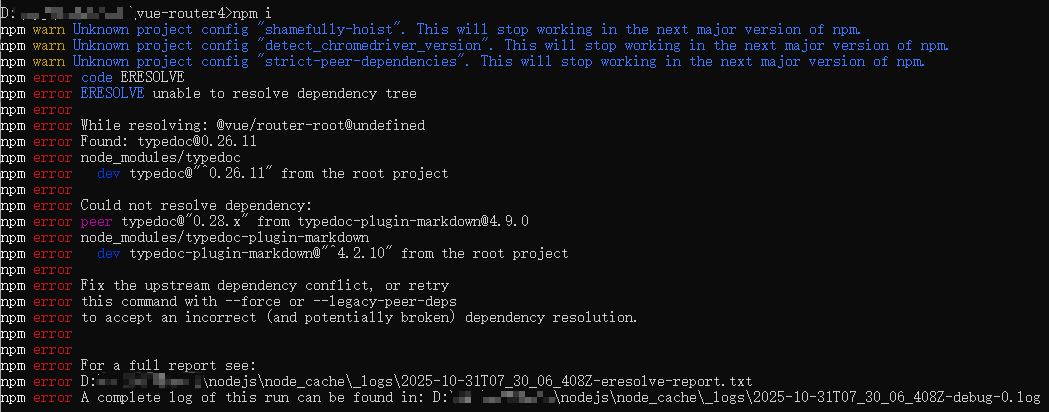
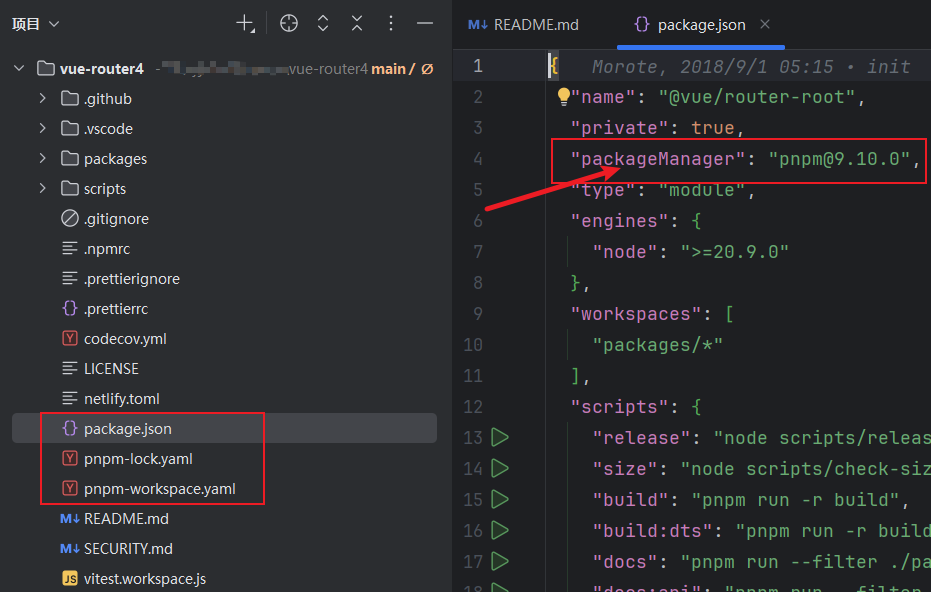
如果我们执行 npm i 会出现如图的情况,这是因为 vue-router 的源码仓库使用的是 pnpm,而用 npm 安装时出现了依赖冲突,如下图所示:
步骤:
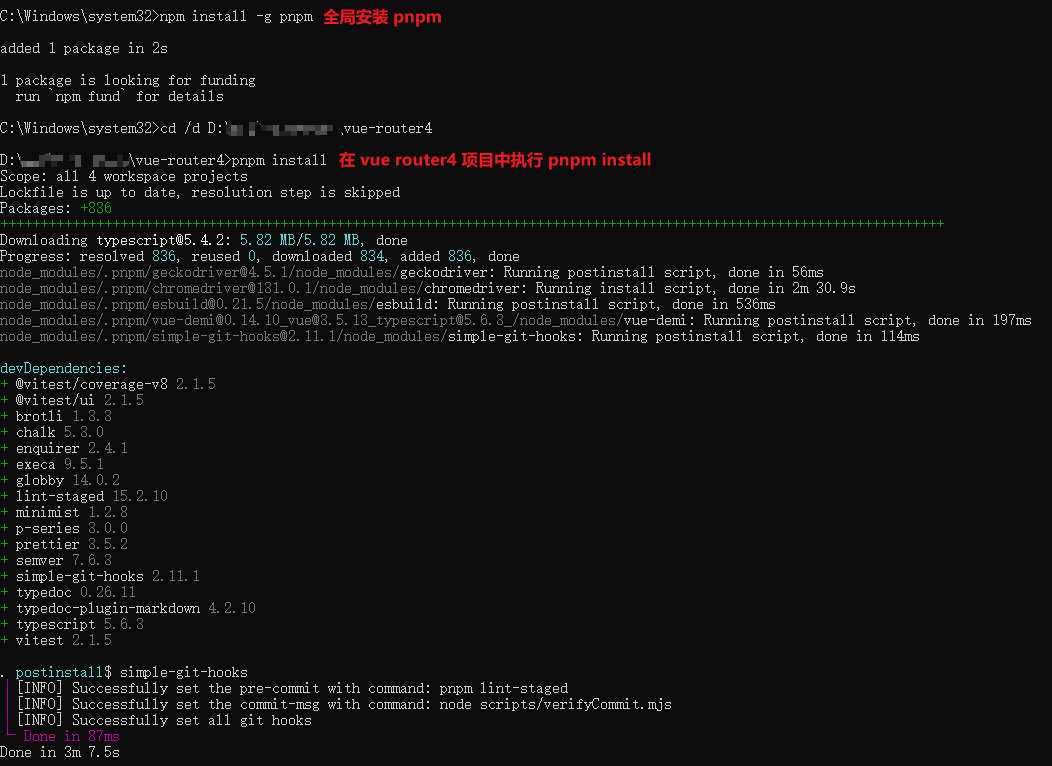
1.全局安装 pnpm(要用管理员身份运行 cmd)
npm install -g pnpm2.在 vue-router 源码目录下执行
pnpm install
3.执行启动命令
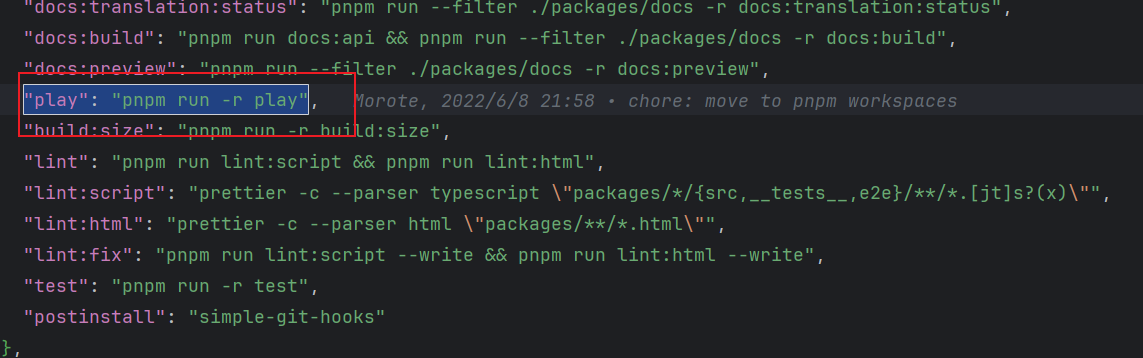
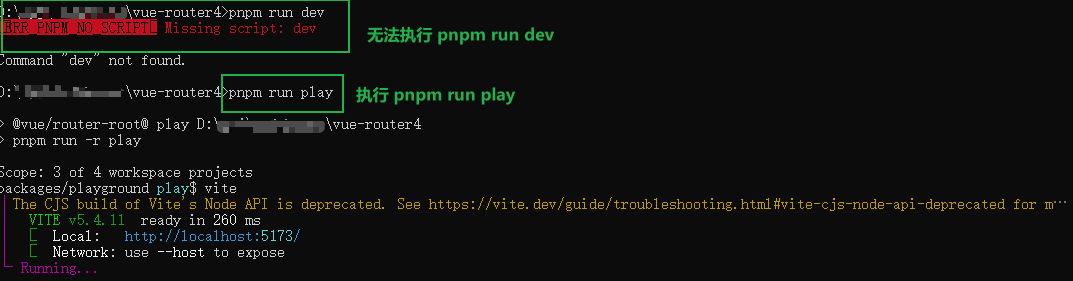
这里也不执行 pnpm run dev,如图中所示:
需要执行如下命令启动项目:
pnpm run play
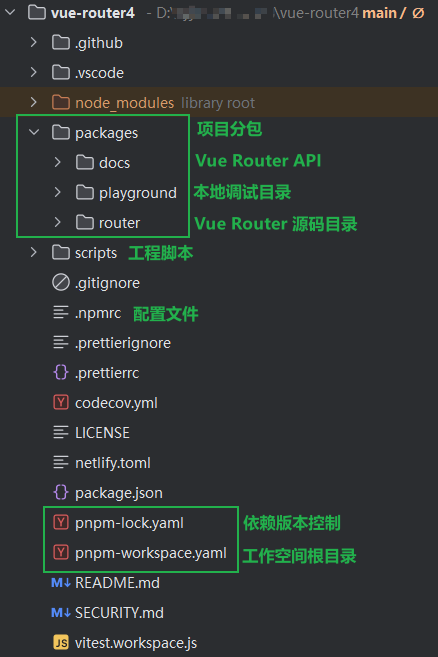
2.项目目录
正文
以 Vue Router4 最基础使用示例来说,在 index.js 中定义,创建并挂载 Vue 应用:
import { createApp } from 'vue'
import { createRouter, createWebHistory } from 'vue-router'
import Home from './Home.vue'
import About from './About.vue'

const routes = [
  {
    name: 'Home',
    path: '/',
    component: Home
  },
  {
    name: 'About',
    path: '/about',
    component: About
  }
]

const router = createRouter({
  history: createWebHistory(),
  routes
})

const app = createApp({})
app.use(router)
app.mount('#app')
接下来在 Home.vue 文件中使用:
import { useRouter } from 'vue-router'

const router = useRouter()
router.push({ name: 'About' })
在我们配置路由时,用到了 const router = createRouter(options),其中 createRouter 在 Vue Router 起到关键性作用,因此我们从这里作为切入点。
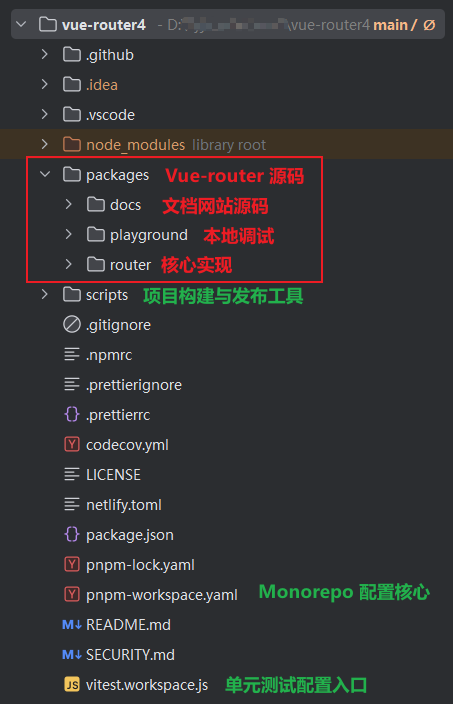
开始之前先了解一下主要的工程文件:
1.什么是 createRouter
createRouter(options) 用来创建一个 Vue Router 实例,将 URL 与你定义的路由表关联起来,再把这个实例通过 app.use(router) 安装到 Vue 应用中。下面我们将用到以下三个文件中的源码:
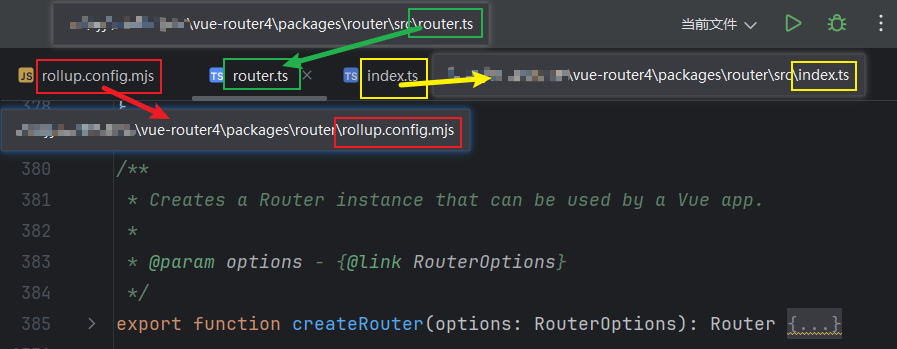
首先在 router.ts 文件中找到 createRouter 方法

简单来说, RouterOptions 是输入,在我们创建路由时传入配置项;Router 是输出,由createRouter 返回,包含了路由实例和常用的内置方法。
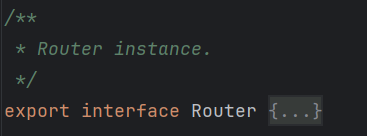
在 router.ts 中找到下图这个位置,可以看到 Router 完整的定义接口:
简化版如下,我们直接在代码中利用注释解释:
export interface Router {
  // 源码中已注释,这里即为路由历史管理器
  readonly history: RouterHistory
  // 当前正在激活的路由对象(Ref 响应式引用),包含 路径、参数、query、meta 等
  readonly currentRoute: Ref<RouteLocationNormalizedLoaded>
  // 创建时传入的配置对象
  readonly options: RouterOptions
  // 内部标识是否正在监听浏览器的导航事件
  listening: boolean

  // 动态添加新路由
  // 例:router.addRoute('user', { path: 'profile', component: UserProfile })
  addRoute(parentName: RouteRecordName, route: RouteRecordRaw): () => void
  addRoute(route: RouteRecordRaw): () => void

  // 根据路由名称删除一个动态路由
  // 例:router.removeRoute('admin')
  removeRoute(name: NonNullable<RouteRecordNameGeneric>): void

  // 判断是否存在某个命名路由
  // 例:if (router.hasRoute('about')) router.push({ name: 'about' })
  hasRoute(name: NonNullable<RouteRecordNameGeneric>): boolean

  // 获取当前注册的所有路由记录数组
  // 例:console.log(router.getRoutes().map(r => r.path))
  getRoutes(): RouteRecord[]

  // 清空所有已注册的路由(不常用)
  clearRoutes(): void

  // 解析路径字符串或对象,返回标准化后的路由信息(不会触发导航)
  resolve: (to, currentLocation?)

  // 执行导航
  push(to: RouteLocationRaw): Promise<NavigationFailure | void | undefined>
  replace(to: RouteLocationRaw): Promise<NavigationFailure | void | undefined>

  // 历史操作
  back(): ReturnType<Router['go']>
  go(delta: number): void

  // 注册全局导航守卫
  beforeEach(guard: NavigationGuardWithThis<undefined>): () => void
  beforeResolve(guard: NavigationGuardWithThis<undefined>): () => void
  afterEach(guard: NavigationHookAfter): () => void

  // 捕获导航时的错误
  onError(handler: _ErrorListener): () => void

  // 等待路由异步解析完毕(常用于挂载前)
  // 如果路由中有懒加载组件或异步导航守卫,isReady() 会等待它们完成
  isReady(): Promise<void>

  // 将路由插件安装到 Vue 应用(被 app.use(router) 自动调用的内部方法)
  install(app: App): void
}
2.createRouterMatcher、RouterMatcher、matcher
进入 createRouter 之后第一行就是使用 createRouterMatcher
export function createRouter(options: RouterOptions): Router {
  const matcher = createRouterMatcher(options.routes, options)
  ...
}
进入 packages/router/src/matcher/index.ts:
import { createRouterMatcher, PathParserOptions } from './matcher'找到 createRouterMatcher 内部定义如下,最终返回的对象 RouterMatcher 包含一组操作方法:
export function createRouterMatcher(
  routes: Readonly<RouteRecordRaw[]>,
  globalOptions: PathParserOptions
): RouterMatcher
也就是说,createRouter() 接收传入的 options(包含 routes、history 等配置),其中 routes 部分会交由 createRouterMatcher() 进行标准化与索引构建,生成一个 matcher 对象(RouterMatcher 接口定义了 matcher 能做的事),Router 实例基于 matcher 的底层能力,对外提供路由注册、解析与导航等高层 API
举例说明,当我们定义了如下配置时:
const routes = [
  { path: '/', component: Home },
  { path: '/about', component: About },
  { path: '/users/:id', component: User },
]
createRouterMatcher(routes) 会把这些配置转换成内部高效的数据结构,在运行时:
- 快速匹配路径 /about → About
- 解析动态参数 /users/123 → { id: '123' }
- 支持嵌套路由、别名、添加删除路由
- 提供路由反解析功能(router.resolve())
createRouterMatcher 内部操作详细解析:
1.解析路由配置 → 创建 RouteRecord
createRouterMatcher 会遍历用户传入的 routes 数组(RouteRecordRaw[]),调用内部的 addRoute() 函数,为每一个路由生成一个标准化的结构:
interface RouteRecord {
  path: string                // 标准化路径
  record: RouteRecordRaw      // 原始配置
  parent?: RouteRecord        // 父级(用于嵌套路由)
  children?: RouteRecord[]    // 子级
  alias: string[]             // 路径别名
  matcher: PathMatcher        // 路径解析器(正则 + 参数提取)
}
2.创建路径匹配器 PathMatcher
Vue Router 内部不会直接用字符串去匹配路径,而是生成一个 [ 路径解析器 ],比如:/users/:id会被转换成下面的结构:
{
  re: /^\/users\/([^/]+?)$/i,
  keys: ['id'],
  parse(path) => { id: '123' },
  stringify(params) => '/users/123'
}
这部分逻辑在:packages/router/src/matcher/pathMatcher.ts
3.返回操作 API
export interface RouterMatcher {
  addRoute: (record: RouteRecordRaw, parent?: RouteRecordMatcher) => () => void
  removeRoute(matcher: RouteRecordMatcher): void
  removeRoute(name: NonNullable<RouteRecordNameGeneric>): void
  clearRoutes: () => void
  getRoutes: () => RouteRecordMatcher[]
  getRecordMatcher: (
    name: NonNullable<RouteRecordNameGeneric>
  ) => RouteRecordMatcher | undefined
  resolve: (
    location: MatcherLocationRaw,
    currentLocation: MatcherLocation
  ) => MatcherLocation
}
这里值得我们分出下面一个单独的模块来说。
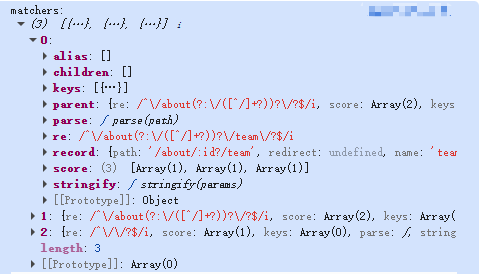
如何查看 matchers 列表完整结构?
使用如下示例即可:
import { createRouterMatcher } from 'vue-router'

const options = {
  routes: [
    {
      path: '/',
      name: 'home',
      component: { template: '<div>Home</div>' },
    },
    {
      path: '/about/:id?',
      name: 'about',
      component: { template: '<div>About</div>' },
      children: [
        {
          path: 'team',
          name: 'team',
          component: { template: '<div>Team</div>' },
        },
      ],
    },
  ]
}

console.log('matchers:', createRouterMatcher(options.routes, options).getRoutes())
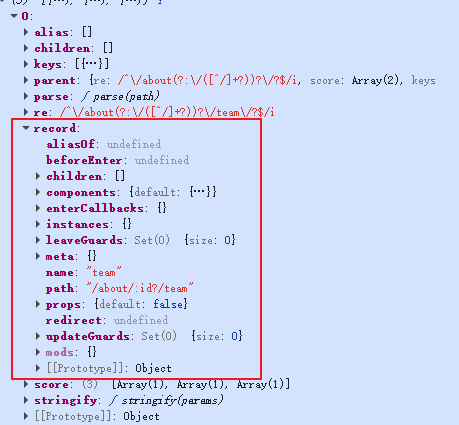
其中的 record 是通过 router.getRoute() 获得的对象,是每条路由的“配置描述对象”,它保存了该路由的元数据、组件、守卫、别名、路径等信息。
3.RouterMatcher 的功能矩阵
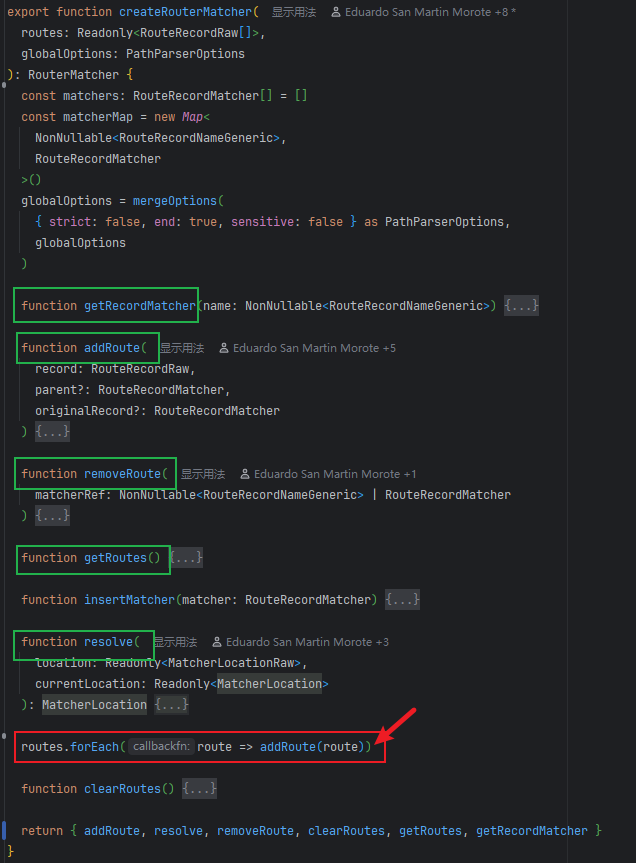
接下来,我们将对 addRoute,removeRoute,getRoutes,getRecordMatcher,resolve 这5个方法进行分析。首先找到源码位置:packages/router/src/matcher/index.ts
1.addRoute
标红区域的是 Vue Router 路由系统初始化的关键一步:
routes.forEach(route => addRoute(route))这里我们先来看这部分的简化版代码:
export function createRouterMatcher(routes, globalOptions) {
  const matchers: RouteRecordMatcher[] = []
  const matcherMap = new Map()

  function addRoute(record: RouteRecordRaw, parent?: RouteRecordMatcher) {
    const normalizedRecord = normalizeRouteRecord(record)
    const matcher = createRouteRecordMatcher(normalizedRecord, parent)
    insertMatcher(matcher)

    // 递归添加子路由
    if (record.children) {
      record.children.forEach(child => addRoute(child, matcher))
    }
  }

  // 初始化阶段
  routes.forEach(route => addRoute(route))

  return { addRoute, ... }
}
假设我们传入的路由配置是这样的:
const routes = [
  {
    path: '/',
    name: 'home',
    component: Home,
  },
  {
    path: '/user',
    component: UserLayout,
    children: [
      { path: '', name: 'user', component: UserList },
      { path: ':id', name: 'user-detail', component: UserDetail },
    ],
  },
]
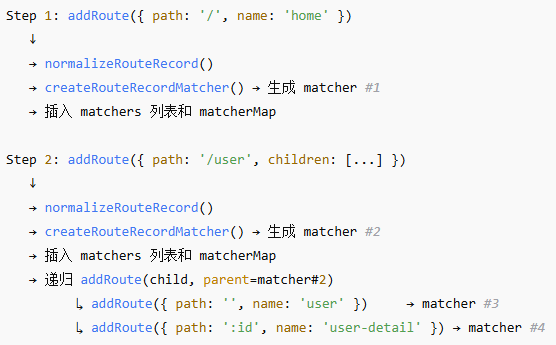
我们执行 routes.forEach(route => addRoute(route)),内部过程如图:
- matchers 列表中保存了所有可匹配路由的解析对象
- 每个 matcher 都包含 record、parent、children 等关系
- matcherMap 则以路由名为键快速定位对应的 matcher
执行完这行后,createRouterMatcher() 内部的状态大致如下:
matchers = [
  { record: { path: '/', name: 'home', ... }, parent: undefined, children: [] },
  {
    record: { path: '/user', ... },
    parent: undefined,
    children: [
      { record: { path: '/user', name: 'user', ... }, parent: [Circular] },
      { record: { path: '/user/:id', name: 'user-detail', ... }, parent: [Circular] },
    ]
  }
]
matcherMap = Map {
  'home' → matcher#1,
  'user' → matcher#3,
  'user-detail' → matcher#4
}
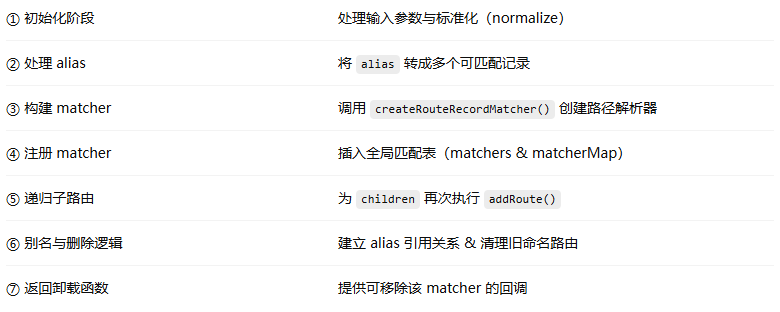
了解 addRoute() 的作用之后,我们分模块拆分看它的实现过程:
1.初始化阶段
const isRootAdd = !originalRecord
const mainNormalizedRecord = normalizeRouteRecord(record)

if (__DEV__) {
  checkChildMissingNameWithEmptyPath(mainNormalizedRecord, parent)
}

mainNormalizedRecord.aliasOf = originalRecord && originalRecord.record
const options: PathParserOptions = mergeOptions(globalOptions, record)
解析:
- isRootAdd: 判断当前添加的是「顶层路由」还是「子路由/别名」
- normalizeRouteRecord: 将用户配置(path, component, children 等)标准化为统一的 RouteRecordNormalized
- aliasOf: 如果当前是 alias 的一部分,指向原始记录
- mergeOptions: 合并全局路径匹配规则(strict, sensitive, end 等)
目的:准备好一个整洁且标准的路由描述对象。
2.处理 alias(路由别名)
const normalizedRecords: RouteRecordNormalized[] = [mainNormalizedRecord]
if ('alias' in record) {
  const aliases = typeof record.alias === 'string' ? [record.alias] : record.alias!
  for (const alias of aliases) {
    normalizedRecords.push(
      normalizeRouteRecord(
        assign({}, mainNormalizedRecord, {
          components: originalRecord
            ? originalRecord.record.components
            : mainNormalizedRecord.components,
          path: alias,
          aliasOf: originalRecord
            ? originalRecord.record
            : mainNormalizedRecord,
        })
      )
    )
  }
}
解析:
Vue Router 支持:{ path: '/home', alias: '/index' },/index 实际上是 /home 的「镜像」。上述逻辑为每一个 alias 路径创建新的 RouteRecordNormalized,但会共享相同的组件、meta、守卫等配置。
目的:构建出「主路由 + 所有别名路由」的完整列表,以便后续统一注册。3.构建 matcher(核心)
for (const normalizedRecord of normalizedRecords) {
  const { path } = normalizedRecord

  if (parent && path[0] !== '/') {
    const parentPath = parent.record.path
    const connectingSlash =
      parentPath[parentPath.length - 1] === '/' ? '' : '/'
    normalizedRecord.path = parent.record.path + (path && connectingSlash + path)
  }

  ...

  matcher = createRouteRecordMatcher(normalizedRecord, parent, options)
  ...
}
解析:
如果当前是子路由(children),且不是绝对路径,就拼接上父路径。
parent = '/user'
child  = 'detail' → '/user/detail'
调用:
createRouteRecordMatcher(normalizedRecord, parent, options)会返回一个结构:
{ record: RouteRecord, parent: RouteRecordMatcher | undefined, children: [], re: /正则表达式/, keys: [{ name: 'id', optional: false }], parse(path): params, stringify(params): path }目的:为每个路由创建完整的路径解析器和匹配逻辑。
4.注册 matcher(加入全局表)
if (isMatchable(matcher)) {
  insertMatcher(matcher)
}
解析:
insertMatcher() 会根据路径优先级排序(长路径靠前),存入 matchers 数组。如有 name,就注册到 matcherMap(用于 name 定位)
目的:让这个 matcher 能在 resolve() 和 push() 中被查找到。5.递归处理子路由
if (mainNormalizedRecord.children) {
  const children = mainNormalizedRecord.children
  for (let i = 0; i < children.length; i++) {
    addRoute(
      children[i],
      matcher,
      originalRecord && originalRecord.children[i]
    )
  }
}
解析:
- 若存在 children,则递归调用 addRoute()
- matcher 被作为 parent 传入,形成父子层级
目的:构建路由树,使 router.resolve() 能正确匹配嵌套路由
6.处理别名引用与重复名称清理
if (originalRecord) {
  originalRecord.alias.push(matcher)
} else {
  originalMatcher = originalMatcher || matcher
  if (originalMatcher !== matcher) originalMatcher.alias.push(matcher)

  if (isRootAdd && record.name && !isAliasRecord(matcher)) {
    removeRoute(record.name)
  }
}
解析:
- 如果当前是 alias,则将它登记到 originalRecord.alias 中
- 对于 root route,如果重名了,会先执行 removeRoute() 移除旧的定义
目的:保证路由命名唯一性,避免冲突;同时建立 alias → original 的反向引用关系
7.返回卸载函数(动态删除路由)
return originalMatcher
  ? () => { removeRoute(originalMatcher!) }
  : noop
解析:
addRoute() 返回一个函数,可用来移除此路由(及其所有 alias)
供运行时动态路由使用:
const remove = router.addRoute({...})
remove() // 动态卸载
8.总结:
addRoute() 是 Vue Router 的“路由编译器”:它把用户的 routes 配置树转译为一棵由 RouteRecordMatcher 节点组成的“路由匹配树”,每个节点都能根据正则匹配、参数解析、别名映射来完成导航匹配。
2.removeRoute
function removeRoute(
    matcherRef: NonNullable<RouteRecordNameGeneric> | RouteRecordMatcher
  ) {
    if (isRouteName(matcherRef)) {
      const matcher = matcherMap.get(matcherRef)
      if (matcher) {
        matcherMap.delete(matcherRef)
        matchers.splice(matchers.indexOf(matcher), 1)
        matcher.children.forEach(removeRoute)
        matcher.alias.forEach(removeRoute)
      }
    } else {
      const index = matchers.indexOf(matcherRef)
      if (index > -1) {
        matchers.splice(index, 1)
        if (matcherRef.record.name) matcherMap.delete(matcherRef.record.name)
        matcherRef.children.forEach(removeRoute)
        matcherRef.alias.forEach(removeRoute)
      }
    }
  }
它的作用是从路由匹配系统中移除指定路由(无论是通过 name 还是 matcher 对象),并递归清除其子路由与别名。
Vue Router 允许两种移除方式:
// 按名称删除
router.removeRoute('user')

// 或按 matcher 对象删除(内部使用)
removeRoute(matcher)
removeRoute()
├── [A] 如果参数是 name(字符串)→ 根据 matcherMap 查找 matcher 并删除
└── [B] 如果参数是 matcher 对象 → 直接在 matchers 中查找并删除
3.getRoutes
function getRoutes() {
    return matchers
}
它用于 返回「当前 router 内部所有已注册路由」的匹配器列表。
在 Vue Router 4 中,所有的路由定义(包括嵌套路由和别名)都会被标准化(normalize)为一个内部结构:(packages/router/src/matcher/pathMatcher.ts)
export interface RouteRecordMatcher extends PathParser {
  record: RouteRecord
  parent: RouteRecordMatcher | undefined
  children: RouteRecordMatcher[]
  alias: RouteRecordMatcher[]
}
而 matchers 就是保存这些对象的全局数组:(packages/router/src/matcher/index.ts)
const matchers: RouteRecordMatcher[] = []这个数组由以下操作维护:
- addRoute() 会往里面添加 matcher
- removeRoute() 会从里面移除
- getRoutes() 会原样返回当前所有 matcher
4.getRecordMatcher
function getRecordMatcher(name: RouteRecordName) { return matcherMap.get(name) }前置概念:matcherMap 是什么?(前文在 addRoute() 部分也有遇到,这里详细说明)
在 createRouterMatcher() 中有这样一段初始化代码:
const matcherMap = new Map<
  NonNullable<RouteRecordNameGeneric>,
  RouteRecordMatcher
>()
这就说明:
- matcherMap 是一个 Map 映射表
- 键(key)是路由的名称(RouteRecordName)
- 值(value)是一个 RouteRecordMatcher 实例
它用来快速查找某个路由对应的匹配规则对象(matcher)
这意味着,一个 RouteRecordMatcher 就是一个「可匹配路径的路由节点对象」
export interface RouteRecordMatcher extends PathParser {
  record: RouteRecord
  parent: RouteRecordMatcher | undefined
  children: RouteRecordMatcher[]
  alias: RouteRecordMatcher[]
}
这时,我们再看这行代码:
return matcherMap.get(name)就很好理解,这是从 matcherMap 中取出指定 name 对应的 RouteRecordMatcher 对象
如果把这段逻辑展开,可以理解为:
function getRecordMatcher(name) {
  // 在路由映射表中查找路由匹配器
  const matcher = matcherMap.get(name)

  // 如果找到则返回 RouteRecordMatcher 对象,否则返回 undefined
  return matcher
}
为了更直观的理解 resolve() 的执行过程,在开始分析它的代码前,先举个例子。
我们的路由配置定义如下:
const routes = [
  {
    path: '/',
    name: 'home',
    component: () => import('@/views/Home.vue'),
  },
  {
    path: '/user/:id',
    name: 'user',
    component: () => import('@/views/User.vue'),
    children: [
      {
        path: 'posts',
        name: 'user-posts',
        component: () => import('@/views/UserPosts.vue'),
      },
    ],
  },
]
这时我们调用了:
router.resolve({ name: 'user-posts', params: { id: 12 } })resolve() 将会这样执行:
1.判断匹配方式
if ('name' in location && location.name) {
  matcher = matcherMap.get('user-posts')
}
根据路由名 'user-posts' 从 matcherMap 中拿到对应的 RouteRecordMatcher 对象。
2.检查参数有效性
在开发模式下(__DEV__ 为 true),Vue Router 会检查传入的参数是否匹配路由定义的参数:
- 'user-posts' 路由路径是 /user/:id/posts
- 要求 params 必须含有 { id: ... },传入 { id: 12 } 正确
3.生成路径
path = matcher.stringify(params)将模板路径 /user/:id/posts 转换为实际路径字符串 /user/12/posts
4.组装 matched 树
matcher 是子路由 user-posts 的匹配器,它有一个 parent 指针,指向父路由 user。
Vue Router 会递归向上收集所有层级的路由:const matched = [] let parentMatcher = matcher while (parentMatcher) { matched.unshift(parentMatcher.record) parentMatcher = parentMatcher.parent }结果为:
matched = [
  { name: 'user', path: '/user/:id' },
  { name: 'user-posts', path: 'posts' }
]
5.合并 meta 信息
如果两层路由都定义了 meta 字段,会合并到一起:meta = mergeMetaFields(matched)最终返回对象如下:
{
  name: "user-posts",
  path: "/user/12/posts",
  params: { id: 12 },
  matched: [
    {
      path: "/user/:id",
      name: "user",
      component: () => import('@/views/User.vue')
    },
    {
      path: "posts",
      name: "user-posts",
      component: () => import('@/views/UserPosts.vue')
    }
  ],
  meta: {}
}
延伸举例,通过 path 匹配,如果改成:router.resolve({ path: '/user/12/posts' }),流程则是:
- 遍历所有 matchers
- 找到正则能匹配的那个(/^\/user\/([^/]+?)\/posts\/?$/)
- 解析出 params = { id: "12" }
- 生成与上面几乎一样的 MatcherLocation 对象
5.resolve
通过上面的举例,我们知道 resolve() 会根据目标 location 解析出一个完整的路由匹配结果,最终返回一个标准化的 MatcherLocation 对象。
通俗解释:把你想去的路由信息(可能是 name 或 path)转换成完整的、可用于跳转的路由对象。
接下来,我们总结一下源码的执行过程:
function resolve(
    location: Readonly<MatcherLocationRaw>,
    currentLocation: Readonly<MatcherLocation>
  ): MatcherLocation {
    let matcher: RouteRecordMatcher | undefined
    let params: PathParams = {}
    let path: MatcherLocation['path']
    let name: MatcherLocation['name']

    if ('name' in location && location.name) {
      matcher = matcherMap.get(location.name)

      if (!matcher)
        throw createRouterError<MatcherError>(ErrorTypes.MATCHER_NOT_FOUND, {
          location,
        })

      if (__DEV__) {
        const invalidParams: string[] = Object.keys(
          location.params || {}
        ).filter(paramName => !matcher!.keys.find(k => k.name === paramName))

        if (invalidParams.length) {
          warn(
            `Discarded invalid param(s) "${invalidParams.join(
              '", "'
            )}" when navigating. See https://github.com/vuejs/router/blob/main/packages/router/CHANGELOG.md#414-2022-08-22 for more details.`
          )
        }
      }

      name = matcher.record.name
      params = assign(
        paramsFromLocation(
          currentLocation.params,
          matcher.keys
            .filter(k => !k.optional)
            .concat(
              matcher.parent ? matcher.parent.keys.filter(k => k.optional) : []
            )
            .map(k => k.name)
        ),
        location.params &&
          paramsFromLocation(
            location.params,
            matcher.keys.map(k => k.name)
          )
      )
      path = matcher.stringify(params)
    } else if (location.path != null) {
      path = location.path

      if (__DEV__ && !path.startsWith('/')) {
        warn(
          `The Matcher cannot resolve relative paths but received "${path}". Unless you directly called \`matcher.resolve("${path}")\`, this is probably a bug in vue-router. Please open an issue at https://github.com/vuejs/router/issues/new/choose.`
        )
      }

      matcher = matchers.find(m => m.re.test(path))

      if (matcher) {
        params = matcher.parse(path)!
        name = matcher.record.name
      }
    } else {
      matcher = currentLocation.name
        ? matcherMap.get(currentLocation.name)
        : matchers.find(m => m.re.test(currentLocation.path))
      if (!matcher)
        throw createRouterError<MatcherError>(ErrorTypes.MATCHER_NOT_FOUND, {
          location,
          currentLocation,
        })
      name = matcher.record.name
      params = assign({}, currentLocation.params, location.params)
      path = matcher.stringify(params)
    }

    const matched: MatcherLocation['matched'] = []
    let parentMatcher: RouteRecordMatcher | undefined = matcher
    while (parentMatcher) {
      matched.unshift(parentMatcher.record)
      parentMatcher = parentMatcher.parent
    }

    return {
      name,
      path,
      params,
      matched,
      meta: mergeMetaFields(matched),
    }
  }
1.如果 location 里有 name
if ('name' in location && location.name)
- 根据 location.name 从 matcherMap 找到对应的路由记录 (matcher)
- 如果找不到,抛出 MATCHER_NOT_FOUND 错误
- (开发模式)检查 location.params 中是否包含无效的参数名(即不在 matcher.keys 里定义的 param),若有则警告
- 合并参数:
- 从 currentLocation 提取必需参数
- 再用 location.params 覆盖
- 用 matcher.stringify(params) 生成最终的路径 path
- 记录路由名 name = matcher.record.name
2.如果 location 里有 path
else if (location.path != null)
- 直接取 location.path
- 开发模式下检查是否以 / 开头,否则发出警告
- 在所有 matchers 中找出正则能匹配此路径的 matcher
- 如果找到:
- 解析路径中的参数:params = matcher.parse(path)!
- 保存对应的路由名:name = matcher.record.name
3.如果都没有
else {
  matcher = currentLocation.name
    ? matcherMap.get(currentLocation.name)
    : matchers.find(m => m.re.test(currentLocation.path))
  ...
}
- 回退使用当前路由 (currentLocation) 的 matcher
- 若找不到 matcher,则抛出 MATCHER_NOT_FOUND
- 合并当前路由的 params 与新的 params
- 用 matcher 重新 stringify 出新的路径
题外话
在拉取源码的时候,遇到了一个之前没遇到过的问题,我执行如下命令:
git clone https://github.com/hao-kuai/vue-router4.git拉取了一阵,之后提示我:
fatal: unable to access 'https://github.com/hao-kuai/vue-router4.git/': Failed t
o connect to github.com port 443 after 21072 ms: Could not connect to server
这里是因为我开了 vpn 与我配置的国内镜像不匹配导致,关闭 vpn 即可
本篇小结
本篇作为 Vue Router4 源码篇的第一篇,我们分析了 createRouter 的原理,了解了createRouterMatcher、RouterMatcher、matcher 的关系,探索了 RouterMatcher 的功能矩阵,接下来,我们将围绕 Router History、导航守卫 展开。

Agent 垂直技术社区,欢迎活跃、内容共建。
更多推荐


 28
28 0
0- 0


 已为社区贡献6条内容

所有评论(0)