Vue3+Vite+TypeScript+Element Plus开发-26.Element-Plus 表单校验的“配置化封装 + 自定义插件入口”
系列文章
Vue3+Vite+TypeScript+Element Plus开发 https://blog.csdn.net/sen_shan/category_12933362.html
25.参数配置文件https://blog.csdn.net/sen_shan/article/details/147390831
文章目录
目录
前言
本文介绍了一个基于 ElementPlus 的表单校验系统实现方案。
通过构建校验函数工厂(buildValidator)将配置规则转换为校验函数,支持必填、长度、数值范围和自定义校验。
核心特点包括:
采用白名单机制(validatorPool)管理自定义校验函数
通过 factory 函数统一处理各类校验规则 校验顺序:必填→长度→数字范围→自定义校验 支持在运行时动态注册校验函数 实现上分为三个模块: validators 存放具体校验逻辑 validatorPool 作为白名单管理校验函数 。
自定义函数
建立src\validators\index.ts文件
// 纯 TS 函数,完全符合 ElementPlus 自定义校验签名
export function nameValidator(_: any, value: string, cb: Function) {
  const val = (value || '').trim();
  if (!/^[A-Za-z0-9]+$/.test(val)) {
    return cb(new Error('姓名只能包含字母和数字'));
  }
  cb();
}

// 如果有其他函数,一起导出
export function idCardValidator(_: any, value: string, cb: Function) {
  if (!/^\d{17}[\dX]$/i.test(value)) {
    return cb(new Error('身份证格式错误'));
  }
  cb();
}
白名单池
建立src\utils\validatorPool.ts
// validatorPool.ts  白名单池
import { nameValidator, idCardValidator } from '@/validators/index';

// 白名单:后端 rule_value 只能出现这里的 key
export const validatorPool: Record<string, Function> = {
  nameValidator,   // 字符串 ↔ 函数 映射
  idCardValidator,
  // 后续再加...
};


/*
export const validatorPool: Record<string, Function> = {
  nameValidator: (_: any, v: string, cb: Function) =>
    /^[A-Za-z0-9]+$/.test(v) ? cb() : cb(new Error('只能字母数字')),
};
*/
异步校验函数
建立src\utils\buildValidator.ts
// buildValidator.ts
import { validatorPool } from '@/utils/validatorPool';

export function buildValidator(ruleObj: any) {
  return (_: any, value: any, cb: Function) => {
    const val = value === null || value === undefined ? '' : String(value).trim();
    console.log('val', val);
    console.log('ruleObj', ruleObj);
    // 1. 必填
    if (ruleObj.required && !val) {
      return cb(new Error(`${ruleObj.fieldName}不能为空`));
    }
    if (!ruleObj.required && !val) return cb();


    // 3. 通用规则
    const len = val.length;
    if (ruleObj.min !== undefined && len < ruleObj.min) {
      return cb(new Error(`长度不能小于 ${ruleObj.min}`));
    }
    if (ruleObj.max !== undefined && len > ruleObj.max) {
      return cb(new Error(`长度不能超过 ${ruleObj.max}`));
    }
    if (ruleObj.numeric) {
      const n = Number(val);
      if (isNaN(n)) return cb(new Error('必须是数字'));
      if (ruleObj.min !== undefined && n < ruleObj.min) return cb(new Error(`不能小于 ${ruleObj.min}`));
      if (ruleObj.max !== undefined && n > ruleObj.max) return cb(new Error(`不能大于 ${ruleObj.max}`));
    }
        // 2. 自定义函数(白名单)
    if (ruleObj.custFunction) {
      const fn = validatorPool[ruleObj.custFunction];
      console.log('fn', fn);
      if (!fn) return cb(new Error(`未知函数 ${ruleObj.custFunction}`));
      return fn(_, val, cb);
    }
    cb();
  };
}
buildValidator 是一个“规则配置 → 异步校验函数”的工厂函数:
你扔给它一个 ruleObj 配置,它返回一个符合 async-validator (Element-Plus 表单、ElFormItem 等)签名的校验函数 (_: any, value: any, cb: Function) => void ,用来一次性完成 必填、长度、数值范围、自定义逻辑 四项检查。
逐项拆解
1. 入参
ruleObj 里可以带:
required 是否必填
fieldName 字段中文名(报错时用)
min / max 最小/最大长度或数值
numeric 是否必须是数字
custFunction 字符串,对应 validatorPool 里的“白名单函数”名
2. 返回值
一个符合 Element-Plus 表单校验签名的函数,内部会:
a. 把 null/undefined 统一当成空字符串处理并 trim() 。
b. 按顺序做 4 类检查,任意一步失败就 cb(new Error(...)) 立即返回;全部通过才 cb() 成功。
3. 检查顺序(代码里序号虽跳了,但执行顺序如下)
① 必填校验 → ② 长度校验 → ③ 数字校验(含范围)→ ④ 自定义函数(白名单)
4. 自定义函数(白名单)机制
只有 ruleObj.custFunction 有值时才触发。
运行时去 validatorPool 里找同名函数,找不到就报“未知函数”。
找到后把 (_, val, cb) 原样交给它,相当于“插件”扩展,可做任意异步/同步复杂校验。
表单校验
原代码:
Validation: {

      validator: nameValidator,

      trigger: "blur",

    },
改为:
"Validation": {
        "required": true,
        "min": 3,
        "max": 20,
        "pattern": "^[A-Za-z0-9]+$",
        "custFunction": "nameValidator",
      "trigger": "blur",
    },
重点代码改写;
import { ref,computed } from "vue";
import { buildValidator } from '@/utils/buildValidator';
import { validatorPool } from '@/utils/validatorPool'
import { nameValidator } from '@/validators/index';
/* 运行时把页面函数塞进池子(同名覆盖无妨) */
validatorPool.nameValidator = nameValidator

/* // 主表单的校验函数
const nameValidator = (rule: any, value: any, callback: any) => {
  if (value && value.length < 3) {
    callback(new Error("姓名长度不能小于3"));
  } else {
    callback();
  }
}; */


const fieldsList = ref([
  {
    "field": "name",
    "label": "姓名",
    "width": 200,
    "hide": false,
    "ReadOnly": false,
    "InputType": "text",
    "IsNull": false,
    "Validation": {
        "required": true,
        "min": 3,
        "max": 20,
        "pattern": "^[A-Za-z0-9]+$",
        "custFunction": "nameValidator",
      "trigger": "blur",
    },
  },
  {
    "field": "age",
    "label": "年龄",
    "width": 200,
    "hide": false,
    "ReadOnly": false,
    "InputType": "text",
    "IsNull": true,
  },
  {
    "field": "gender",
    "label": "性别",
    "width": 200,
    "hide": false,
    "ReadOnly": false,
    "InputType": "select",
    "options": [
      { "label": "男", "value": "male" },
      { "label": "女", "value": "female" },
    ],
    "IsNull": false,
  },
  {
    "field": "birthDate",
    "label": "出生日期",
    "width": 200,
    "hide": false,
    "ReadOnly": false,
    "InputType": "date",
    "IsNull": true,
  },
]);

/* 统一转义 */
/* 转换后给模板用的字段列表 */
const fields = computed(() =>
  fieldsList.value.map(f => ({
    ...f,
    Validation: f.Validation
      ? {
          validator: buildValidator({ ...f.Validation, fieldName: f.label }),
          trigger: f.Validation.trigger || 'blur'
        }
      : undefined
  }))
)


console.log('fields',fields.value)
原来nameValidator需要删除,否则会冲突
完整代码如下:
<template>
  <div>
    <el-button type="primary" @click="handleAdd">新增</el-button>
    <el-button type="success" @click="handleEdit">编辑</el-button>
    <el-button type="info" @click="handleDetailAdd">明细新增</el-button>
    <el-dialog
      v-model="dialogVisible"
      title="表单操作"
      width="50%"
      :before-close="handleClose"
    >
      <FormComponent
        ref="formComponentRef"
        :fields="fields"
        v-model:data="formData"
        @update:data="handleFormDataUpdate"
      ></FormComponent>
      <template #footer>
        <span class="dialog-footer">
          <el-button @click="handleCancel">取消</el-button>
          <el-button type="primary" @click="handleSave">保存</el-button>
        </span>
      </template>
    </el-dialog>
    <el-dialog
      v-model="detailDialogVisible"
      title="明细新增"
      width="50%"
      :before-close="handleDetailClose"
    >
      <FormComponent
        ref="detailFormComponentRef"
        :fields="detailFields"
        v-model:data="detailFormData"
        @update:data="handleDetailFormDataUpdate"
      ></FormComponent>
      <template #footer>
        <span class="dialog-footer">
          <el-button @click="handleDetailCancel">取消</el-button>
          <el-button type="primary" @click="handleDetailSave">保存</el-button>
        </span>
      </template>
    </el-dialog>
  </div>
</template>

<script lang="ts" setup>
import { ref,computed } from "vue";
import FormComponent from "@/components/ActionFormCont.vue";
import { buildValidator } from '@/utils/buildValidator';
import { validatorPool } from '@/utils/validatorPool'
import { nameValidator } from '@/validators/index';
/* 运行时把页面函数塞进池子(同名覆盖无妨) */
validatorPool.nameValidator = nameValidator

const formComponentRef = ref(null);
const detailFormComponentRef = ref(null);
const formData = ref({});
const detailFormData = ref({});
const dialogVisible = ref(false);
const detailDialogVisible = ref(false);

/* // 主表单的校验函数
const nameValidator = (rule: any, value: any, callback: any) => {
  if (value && value.length < 3) {
    callback(new Error("姓名长度不能小于3"));
  } else {
    callback();
  }
}; */

// 明细表单的校验函数
const detailNameValidator = (rule: any, value: any, callback: any) => {
  if (value && value.length < 3) {
    callback(new Error("明细名称长度不能小于3"));
  } else {
    callback();
  }
};

const fieldsList = ref([
  {
    "field": "name",
    "label": "姓名",
    "width": 200,
    "hide": false,
    "ReadOnly": false,
    "InputType": "text",
    "IsNull": false,
    "Validation": {
        "required": true,
        "min": 3,
        "max": 20,
        "pattern": "^[A-Za-z0-9]+$",
        "custFunction": "nameValidator",
      "trigger": "blur",
    },
  },
  {
    "field": "age",
    "label": "年龄",
    "width": 200,
    "hide": false,
    "ReadOnly": false,
    "InputType": "text",
    "IsNull": true,
  },
  {
    "field": "gender",
    "label": "性别",
    "width": 200,
    "hide": false,
    "ReadOnly": false,
    "InputType": "select",
    "options": [
      { "label": "男", "value": "male" },
      { "label": "女", "value": "female" },
    ],
    "IsNull": false,
  },
  {
    "field": "birthDate",
    "label": "出生日期",
    "width": 200,
    "hide": false,
    "ReadOnly": false,
    "InputType": "date",
    "IsNull": true,
  },
]);

/* 统一转义 */
/* 转换后给模板用的字段列表 */
const fields = computed(() =>
  fieldsList.value.map(f => ({
    ...f,
    Validation: f.Validation
      ? {
          validator: buildValidator({ ...f.Validation, fieldName: f.label }),
          trigger: f.Validation.trigger || 'blur'
        }
      : undefined
  }))
)


console.log('fields',fields.value)


const detailFields = ref([
  {
    prop: "detailName",
    label: "明细名称",
    width: 200,
    hide: false,
    ReadOnly: false,
    InputType: "text",
    IsNull: false,
    Validation: {
      validator: detailNameValidator,
      trigger: "blur",
    },
  },
  {
    prop: "detailAmount",
    label: "明细金额",
    width: 200,
    hide: false,
    ReadOnly: false,
    InputType: "text",
    IsNull: true,
  },
]);

const handleAdd = () => {
  formData.value = {
    name: "默认姓名",
    age: "",
    gender: "",
    birthDate: "",
  };
  dialogVisible.value = true;
};

const handleEdit = () => {
  formData.value = {
    name: "张三",
    age: "25",
    gender: "male",
    birthDate: "2025-04-09",
  };
  dialogVisible.value = true;
};

const handleDetailAdd = () => {
  detailFormData.value = {
    detailName: "默认明细名称",
    detailAmount: "100",
  };
  detailDialogVisible.value = true;
};

const handleSave = () => {
  (formComponentRef.value as any).$refs.formRef.validate((valid: boolean, errors: any) => {
    if (valid) {
      const latestFormData = { ...formData.value };
      console.log("保存的数据:", latestFormData);
      alert("保存成功");
      dialogVisible.value = false;
    } else {
      const errorMessages = Object.values(errors).map((error: any) => error.message).join("\n");
      alert(`表单校验失败:\n${errorMessages}`);
    }
  });
};

const handleDetailSave = () => {
  (detailFormComponentRef.value as any).$refs.formRef.validate((valid: boolean, errors: any) => {
    if (valid) {
      const latestDetailFormData = { ...detailFormData.value };
      console.log("明细保存的数据:", latestDetailFormData);
      alert("明细保存成功");
      detailDialogVisible.value = false;
    } else {
      const errorMessages = Object.values(errors).map((error: any) => error.message).join("\n");
      alert(`明细表单校验失败:\n${errorMessages}`);
    }
  });
};

const handleCancel = () => {
  dialogVisible.value = false;
};

const handleDetailCancel = () => {
  detailDialogVisible.value = false;
};

const handleClose = (done: () => void) => {
  dialogVisible.value = false;
  done();
};

const handleDetailClose = (done: () => void) => {
  detailDialogVisible.value = false;
  done();
};

const handleFormDataUpdate = (newData: any) => {
  formData.value = { ...newData };
};

const handleDetailFormDataUpdate = (newData: any) => {
  detailFormData.value = { ...newData };
};
</script>
自定义From组件
修改components\ActionFormCont.vue
<template>
    <el-form
      ref="formRef"
      :model="formData"
      label-width="120px"
      :rules="rules"
      class="form"
    >
      <div v-for="item in fields" :key="item.field">
        <el-form-item
          v-if="!item.hide"
          :label="item.label"
          :prop="item.field"
          :rules="item.rules"
        >
          <el-input
            v-if="item.InputType === 'text'"
            v-model="formData[item.field]"
            :disabled="item.ReadOnly"
            :placeholder="`请输入${item.label}`"
          ></el-input>
          <el-select
            v-else-if="item.InputType === 'select'"
            v-model="formData[item.field]"
            :disabled="item.ReadOnly"
            placeholder="请选择"
          >
            <el-option
              v-for="option in item.options"
              :key="option.value"
              :label="option.label"
              :value="option.value"
            ></el-option>
          </el-select>
          <el-date-picker
            v-else-if="item.InputType === 'date'"
            v-model="formData[item.field]"
            :disabled="item.ReadOnly"
            type="date"
            placeholder="选择日期"
            @change="formatDate(item.field, $event)"
          ></el-date-picker>
        </el-form-item>
      </div>
    </el-form>
  </template>

  <script lang="ts" setup>
  import { ref, watch, PropType, defineEmits } from "vue";
  import type { FormInstance } from "element-plus";

  interface Field {
    field: string;
    label: string;
    width?: number;
    hide?: boolean;
    ReadOnly?: boolean;
    InputType: "text" | "select" | "date";
    IsNull?: boolean;
    Validation?: any; // 校验规则
    //rules?:any;
    options?: { label: string; value: any }[];
  }

  const props = defineProps({
    fields: {
      type: Array as PropType<Field[]>,
      required: true,
    },
    data: {
      type: Object,
      default: () => ({}),
    },
  });

  const emit = defineEmits(["update:data"]);
  const formRef = ref<FormInstance | null>(null);
  const formData = ref({ ...props.data });

  watch(() => props.data, (newValue) => {
    formData.value = { ...newValue };
  }, { deep: true });

  watch(formData, (newValue) => {
    emit("update:data", newValue);
  }, { deep: true });

  const rules = props.fields.reduce((acc, field) => {
    acc[field.field] = [];
    if (!field.IsNull) {
      acc[field.field].push({
        required: true,
        message: `${field.label}不能为空`,
        trigger: "blur",
      });
    }
    if (field.Validation) {
      //acc[field.field].push(field.Validation);
      acc[field.field].push(field.Validation);
    }
    return acc;
  }, {} as Record<string, any>);

  const formatDate = (field: string, date: Date) => {
    if (date) {
      formData.value[field] = `${date.getFullYear()}-${String(date.getMonth() + 1).padStart(2, '0')}-${String(date.getDate()).padStart(2, '0')}`;
    } else {
      formData.value[field] = '';
    }
  };
  </script>

  <style scoped>
  .form {
    max-width: 600px;
    margin: 0 auto;
  }
  </style>
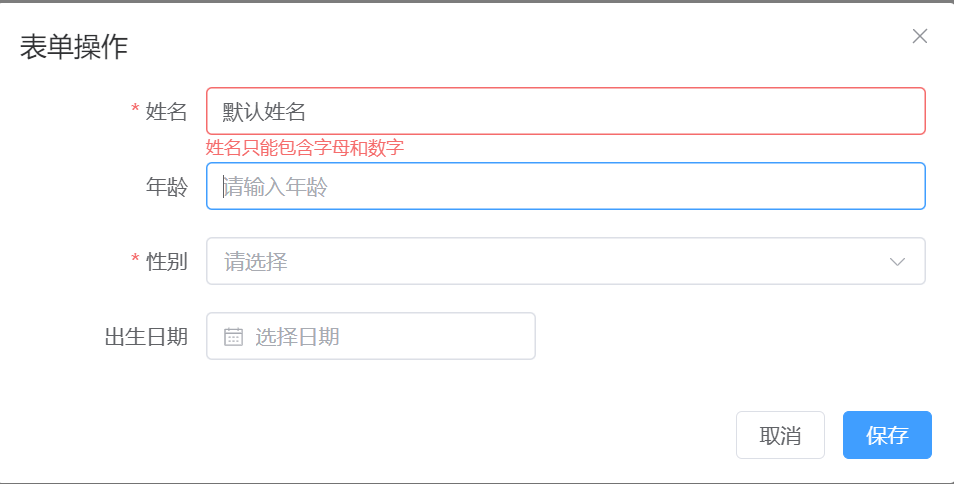
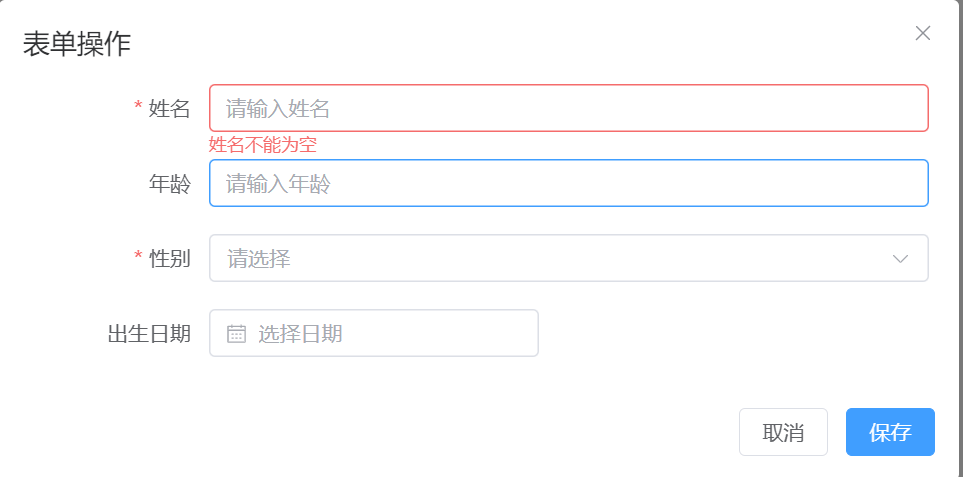
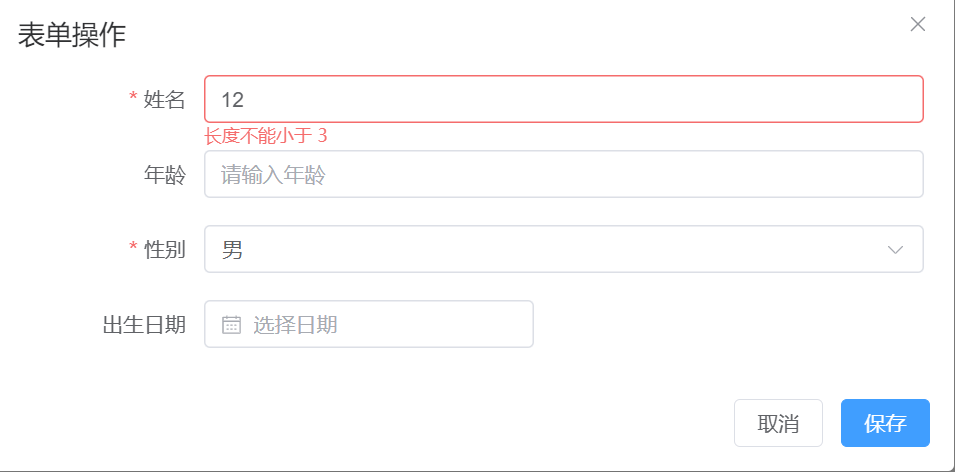
测试与验证

Agent 垂直技术社区,欢迎活跃、内容共建。
更多推荐


 20
20 0
0- 0


 已为社区贡献2条内容

所有评论(0)