解决 pip install insightface 安装报错 fatal error C1083: 无法打开包括文件: “Python.h”: No such file or directory
·
问题
在使用命令安装insightface 库进行人脸识别时报错,错误信息:
  copying insightface\thirdparty\face3d\mesh\cython\mesh_core_cython.pyx -> build\lib.win-amd64-cpython-39\insightface\thirdparty\face3d\mesh\cython
      copying insightface\thirdparty\face3d\mesh\cython\setup.py -> build\lib.win-amd64-cpython-39\insightface\thirdparty\face3d\mesh\cython
      running build_ext
      building 'insightface.thirdparty.face3d.mesh.cython.mesh_core_cython' extension
      creating build\temp.win-amd64-cpython-39\Release\insightface\thirdparty\face3d\mesh\cython
      "D:\devsoft\Microsoft Visual Studio\2022\Community\VC\Tools\MSVC\14.44.35207\bin\HostX86\x64\cl.exe" /c /nologo /O2 /W3 /GL /DNDEBUG /MD -Iinsightface/thirdparty/face3d/mesh/cython -IC:\Users\zhubayi\AppData\Local\Temp\pip-build-env-fbx8lwdw\overlay\Lib\site-packages\numpy\_core\include -ID:\code\idea
projects\face-recognition\.venv\include -ID:\code\ideaprojects\face-recognition\.venv\Scripts\include -ID:\code\ideaprojects\face-recognition\.venv\Scripts\Include "-ID:\devsoft\Microsoft Visual Studio\2022\Community\VC\Tools\MSVC\14.44.35207\include" "-ID:\devsoft\Microsoft Visual Studio\2022\Community\VC\
Tools\MSVC\14.44.35207\ATLMFC\include" "-ID:\devsoft\Microsoft Visual Studio\2022\Community\VC\Auxiliary\VS\include" "-ID:\Windows Kits\10\include\10.0.26100.0\ucrt" "-ID:\Windows Kits\10\\include\10.0.26100.0\\um" "-ID:\Windows Kits\10\\include\10.0.26100.0\\shared" "-ID:\Windows Kits\10\\include\10.0.26100.0\\winrt" "-ID:\Windows Kits\10\\include\10.0.26100.0\\cppwinrt" "-IC:\Program Files (x86)\Windows Kits\NETFXSDK\4.8\include\um" /EHsc /Tpinsightface/thirdparty/face3d/mesh/cython/mesh_core.cpp /Fobuild\temp.win-amd64-cpython-39\Release\insightface\thirdparty\face3d\mesh\cython\mesh_core.obj
      mesh_core.cpp
      insightface/thirdparty/face3d/mesh/cython/mesh_core.cpp(147): warning C4244: “=”: 从“int”转换到“float”,可能丢失数据
      insightface/thirdparty/face3d/mesh/cython/mesh_core.cpp(147): warning C4244: “=”: 从“int”转换到“float”,可能丢失数据
      insightface/thirdparty/face3d/mesh/cython/mesh_core.cpp(210): warning C4244: “=”: 从“int”转换到“float”,可能丢失数据
      insightface/thirdparty/face3d/mesh/cython/mesh_core.cpp(210): warning C4244: “=”: 从“int”转换到“float”,可能丢失数据
      insightface/thirdparty/face3d/mesh/cython/mesh_core.cpp(294): warning C4244: “=”: 从“int”转换到“float”,可能丢失数据
      insightface/thirdparty/face3d/mesh/cython/mesh_core.cpp(294): warning C4244: “=”: 从“int”转换到“float”,可能丢失数据
      "D:\devsoft\Microsoft Visual Studio\2022\Community\VC\Tools\MSVC\14.44.35207\bin\HostX86\x64\cl.exe" /c /nologo /O2 /W3 /GL /DNDEBUG /MD -Iinsightface/thirdparty/face3d/mesh/cython -IC:\Users\zhubayi\AppData\Local\Temp\pip-build-env-fbx8lwdw\overlay\Lib\site-packages\numpy\_core\include -ID:\code\idea
projects\face-recognition\.venv\include -ID:\code\ideaprojects\face-recognition\.venv\Scripts\include -ID:\code\ideaprojects\face-recognition\.venv\Scripts\Include "-ID:\devsoft\Microsoft Visual Studio\2022\Community\VC\Tools\MSVC\14.44.35207\include" "-ID:\devsoft\Microsoft Visual Studio\2022\Community\VC\
Tools\MSVC\14.44.35207\ATLMFC\include" "-ID:\devsoft\Microsoft Visual Studio\2022\Community\VC\Auxiliary\VS\include" "-ID:\Windows Kits\10\include\10.0.26100.0\ucrt" "-ID:\Windows Kits\10\\include\10.0.26100.0\\um" "-ID:\Windows Kits\10\\include\10.0.26100.0\\shared" "-ID:\Windows Kits\10\\include\10.0.26100.0\\winrt" "-ID:\Windows Kits\10\\include\10.0.26100.0\\cppwinrt" "-IC:\Program Files (x86)\Windows Kits\NETFXSDK\4.8\include\um" /EHsc /Tpinsightface/thirdparty/face3d/mesh/cython/mesh_core_cython.cpp /Fobuild\temp.win-amd64-cpython-39\Release\insightface\thirdparty\face3d\mesh\cython\mesh_core_cython.obj
      mesh_core_cython.cpp
      insightface/thirdparty/face3d/mesh/cython/mesh_core_cython.cpp(39): fatal error C1083: 无法打开包括文件: “Python.h”: No such file or directory
      error: command 'D:\\devsoft\\Microsoft Visual Studio\\2022\\Community\\VC\\Tools\\MSVC\\14.44.35207\\bin\\HostX86\\x64\\cl.exe' failed with exit code 2
      [end of output]

  note: This error originates from a subprocess, and is likely not a problem with pip.
  ERROR: Failed building wheel for insightface
Failed to build insightface
原因
这个错误是因为在编译insightface的C++扩展时,无法找到Python.h头文件。这通常是因为没有安装Python的开发版本(在Windows上通常是缺少Python的头文件和库)或者没有正确设置环境变量,因为我是安装的编译好的二进制文件,随所以是没有Python.h头文件。
在Windows上,Python.h通常包含在Python的安装目录下的include文件夹中。错误信息中显示无法打开包括文件: “Python.h”,说明编译器没有找到这个文件。
解决办法
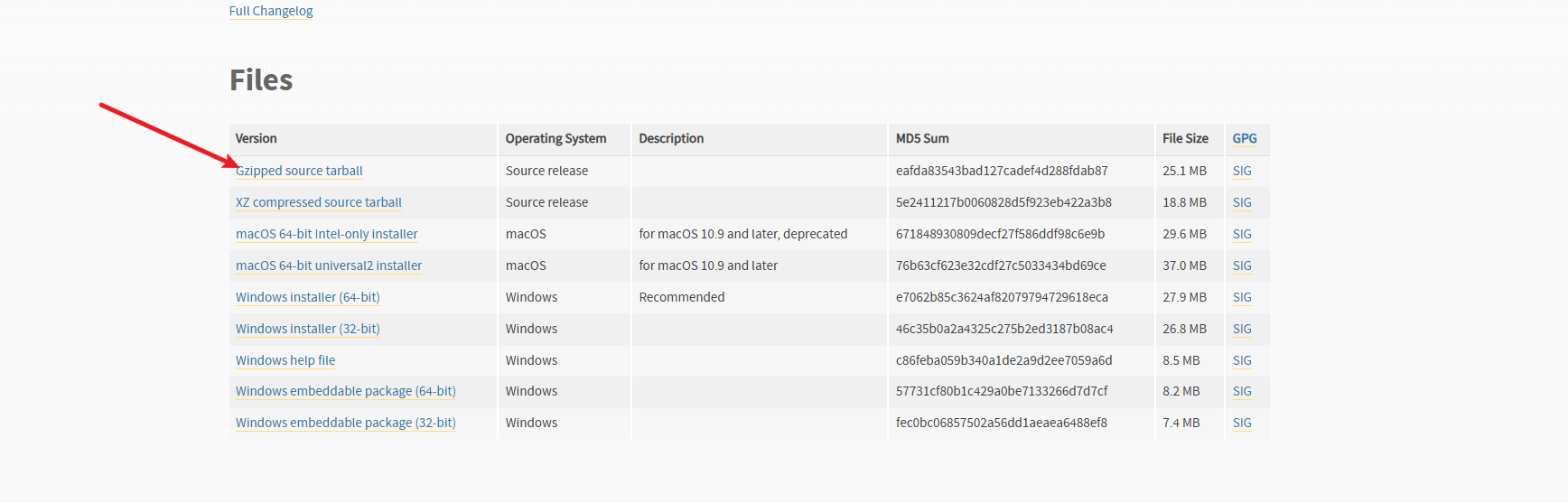
1.去官网下载与环境相同版本python源码 https://www.python.org/downloads/windows/
因为我是3.9.13版本的python所以需要去下载相同版本的python源码
(.venv) PS D:\code\ideaprojects> python --version
Python 3.9.13
(.venv) PS D:\code\ideaprojects>
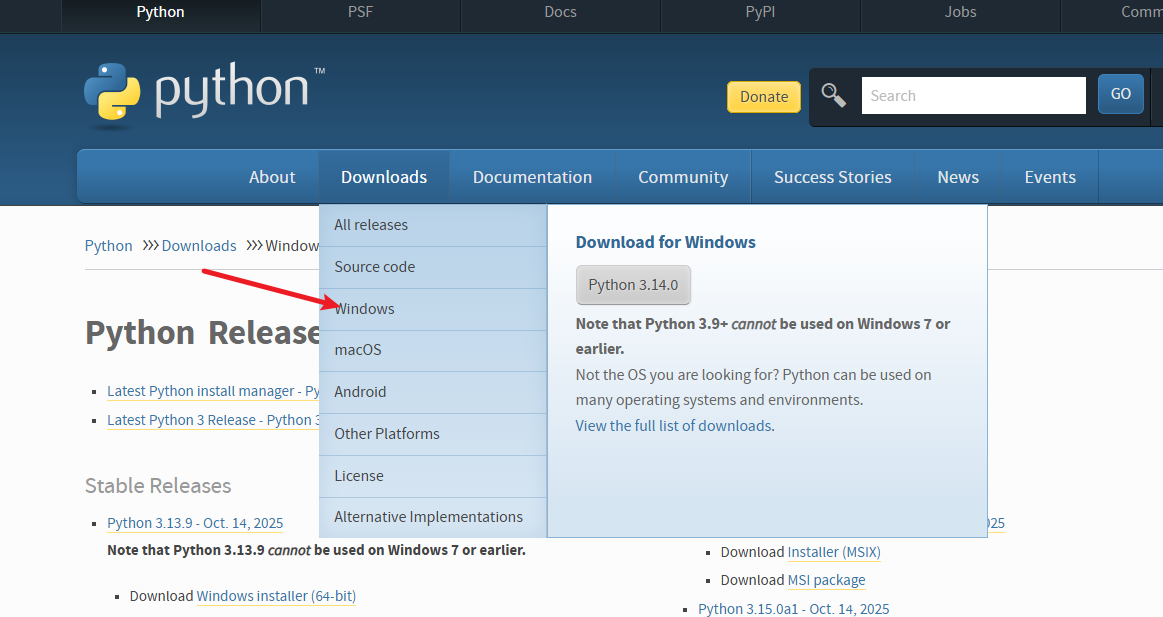
地址 https://www.python.org/downloads/release/python-3913/
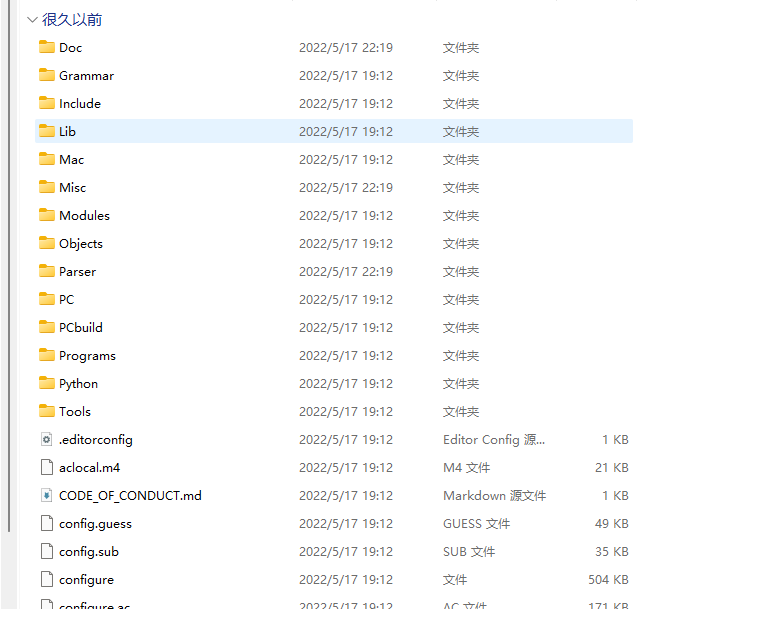
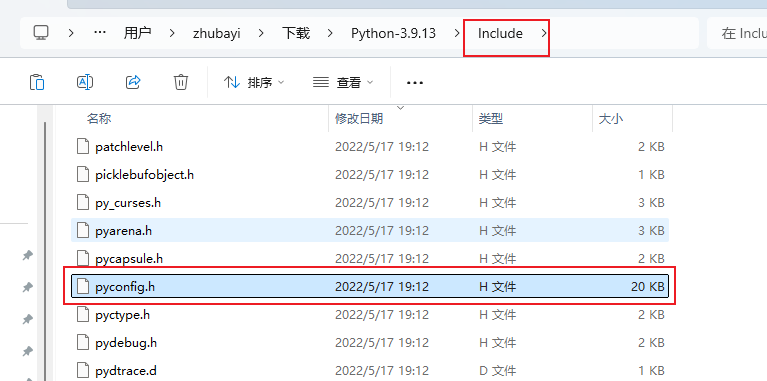
目录结构
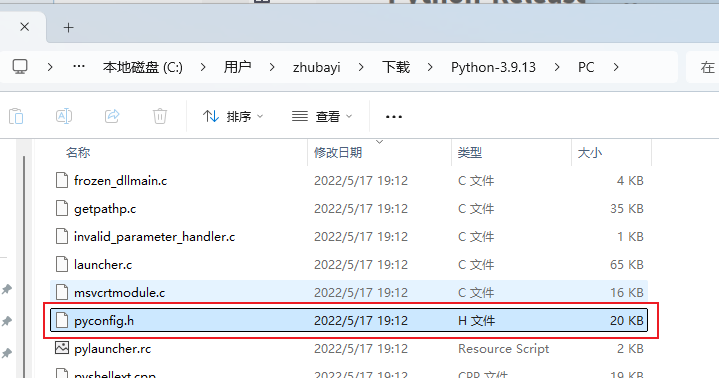
2.下载了之后先把PC目录下面的pyconfig.h文件复制到include文件夹内
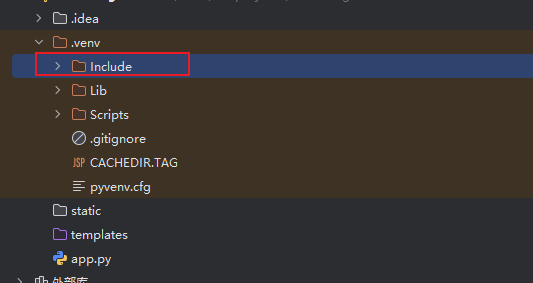
3.再把include文件夹复制到.venv目录下
再次运行pip install insightface
on\mesh_core.obj build\temp.win-amd64-cpython-39\Release\insightface\thirdparty\face3d\mesh\cython\mesh_core_cython.obj /OUT:build\lib.win-amd64-cpython-39\insightface\thirdparty\face3d\mesh\cython\mesh_core_cython.cp39-win_amd64.pyd /IMPLIB:build\temp.win-amd64-cpython-39\Release\insightface\thirdparty\face3d\mesh\cython\mesh_core_cython.cp39-win_amd64.lib
      LINK : fatal error LNK1104: 无法打开文件“python39.lib”
      error: command 'D:\\devsoft\\Microsoft Visual Studio\\2022\\Community\\VC\\Tools\\MSVC\\14.44.35207\\bin\\HostX86\\x64\\link.exe' failed with exit code 1104
      [end of output]

  note: This error originates from a subprocess, and is likely not a problem with pip.
  ERROR: Failed building wheel for insightface
因为缺少python39.lib这个库文件
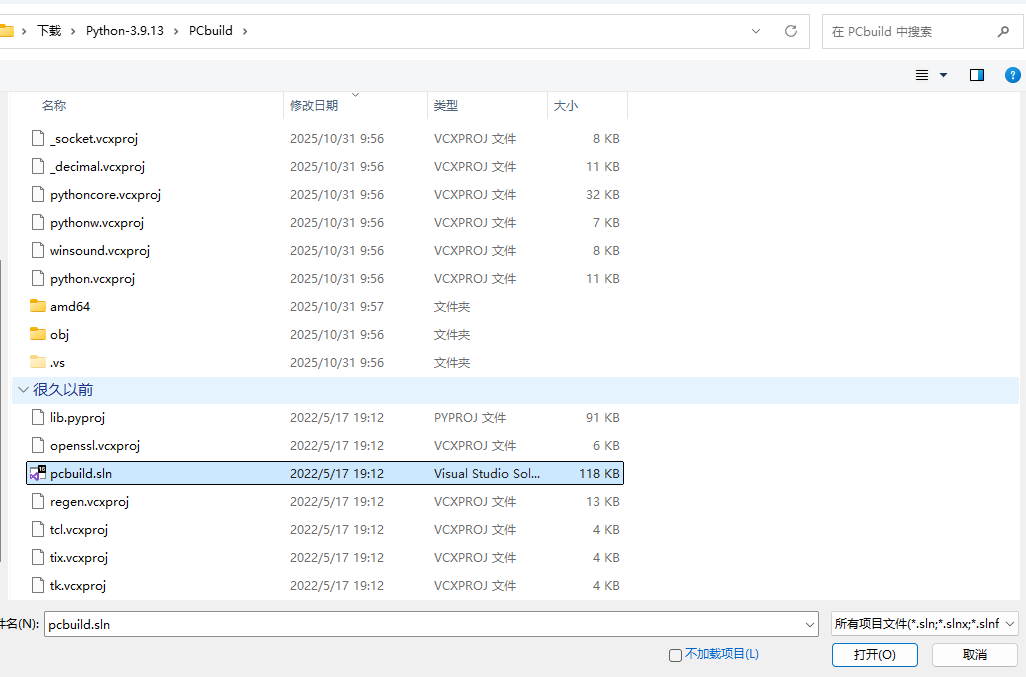
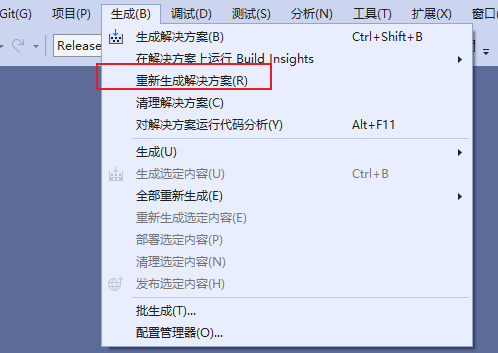
4.使用vs2022编译
在vs2022里面打开PCbuild
运行重新生成解决方法
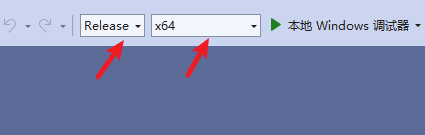
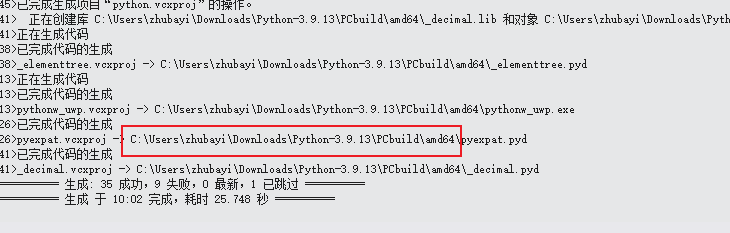
编译完成之后会在PCbuild/amd64下面生成python39.lib文件
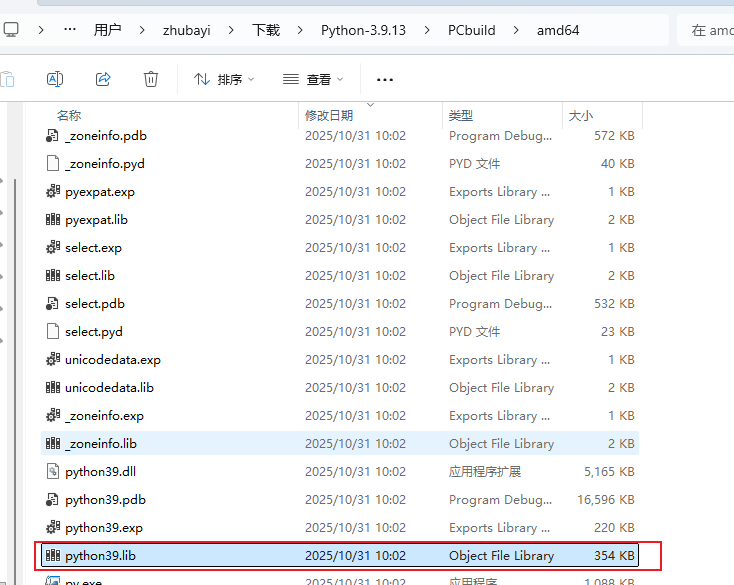
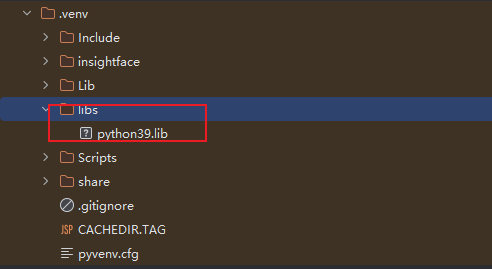
生产完成之后在.venv目录下面新建libs文件夹,然后把python39.lib文件复制到libs下面
然后运行pip install insightface
Building wheels for collected packages: insightface
  Building wheel for insightface (pyproject.toml) ... done
  Created wheel for insightface: filename=insightface-0.7.3-cp39-cp39-win_amd64.whl size=881359 sha256=bf96cacbc04eb4aa85ff7b2cde8ad25ac70ef98eed210944029bdb44d5296918
  Stored in directory: c:\users\zhubayi\appdata\local\pip\cache\wheels\d6\be\88\2f1e66180d7ff4f4c04447d425fd63dde9fd547659a5e73044
Successfully built insightface
Installing collected packages: simsimd, easydict, zipp, wcwidth, urllib3, typing-extensions, threadpoolctl, stringzilla, six, PyYAML, pyparsing, protobuf, Pillow, packaging, numpy, networkx, kiwisolver, joblib, idna, fonttools, eval-type-backport, cython, cycler, colorama, charset_normalizer, certifi, annotated-types, typing-inspection, tqdm, tifffile, scipy, requests, python-dateutil, pydantic-core, prettytable, opencv-python-headless, ml_dtypes, lazy-loader, importlib-resources, imageio, contourpy, scikit-learn, scikit-image, pydantic, onnx, matplotlib, albucore, albumentations, insightface
Successfully installed Pillow-11.3.0 PyYAML-6.0.3 albucore-0.0.24 albumentations-2.0.8 annotated-types-0.7.0 certifi-2025.10.5 charset_normalizer-3.4.4 colorama-0.4.6 contourpy-1.3.0 cycler-0.12.1 cython-3.1.6 easydict-1.13 eval-type-backport-0.2.2 fonttools-4.60.1 idna-3.11 imageio-2.37.0 importlib-resourc
es-6.5.2 insightface-0.7.3 joblib-1.5.2 kiwisolver-1.4.7 lazy-loader-0.4 matplotlib-3.9.4 ml_dtypes-0.5.3 networkx-3.2.1 numpy-2.0.2 onnx-1.19.1 opencv-python-headless-4.12.0.88 packaging-25.0 prettytable-3.16.0 protobuf-6.33.0 pydantic-2.12.3 pydantic-core-2.41.4 pyparsing-3.2.5 python-dateutil-2.9.0.post0 requests-2.32.5 scikit-image-0.24.0 scikit-learn-1.6.1 scipy-1.13.1 simsimd-6.5.3 six-1.17.0 stringzilla-4.2.3 threadpoolctl-3.6.0 tifffile-2024.8.30 tqdm-4.67.1 typing-extensions-4.15.0 typing-inspection-0.4.2 urllib3-2.5.0 wcwidth-0.2.14 zipp-3.23.0
安装insightface成功

Agent 垂直技术社区,欢迎活跃、内容共建。
更多推荐



 10
10 0
0- 0


 已为社区贡献3条内容

所有评论(0)