Vue3 + TypeScript 实现文本差异高亮(diff viewer)
·
一、背景与需求
在最近的项目中,需要实现文章内容对比功能,以便清晰展示文本中新增、删除和修改的部分。
于是,我决定基于 diff-match-patch 库,封装一个轻量级的 Diff 文本对比组件,用以直观地展示两段文字之间的差异。
二、实现效果
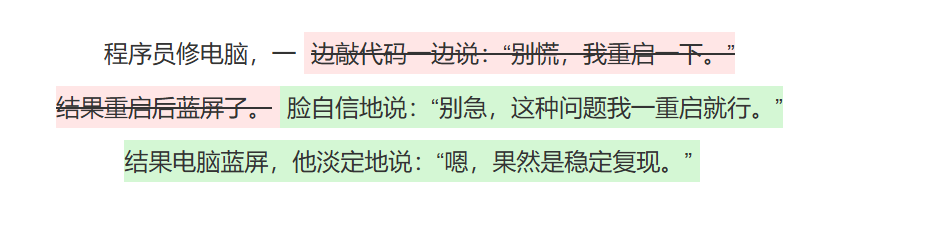
三、实现思路
实现文本差异高亮的关键步骤:
1.引入 diff-match-patch 库
这是 Google 开源的文本差异算法库,能快速计算出两个字符串的差异。
2.对比原文与修改后的文本
使用 diff_main(original, polished) 得到差异数组。
3.优化结果
通过 diff_cleanupSemantic 合并相邻的小改动,让结果更符合人类阅读逻辑。
4.用不同颜色渲染差异部分
- 新增文字:绿色背景
- 删除文字:红色删除线
- 未修改:正常显示
四、安装引入插件
yarn add diff-match-patch
或
pnpm add diff-match-patch
或
npm add diff-match-patch
五、完整代码
<template>
  <div class="diff-viewer" v-html="diffHtml"></div>
</template>

<script setup lang="ts">
import { computed } from 'vue';
import { diff_match_patch, DIFF_INSERT, DIFF_DELETE, DIFF_EQUAL } from 'diff-match-patch';

interface Props {
  original: string;
  polished: string;
}
const props = defineProps<Props>();

// 渲染 diff
const diffHtml = computed(() => {
  const dmp = new diff_match_patch(); // 创建 diff 对象
  const diffs = dmp.diff_main(props.original, props.polished); // 计算差异
  dmp.diff_cleanupSemantic(diffs); // 优化 diff 结果,使结果更符合语义(比如合并相邻的小修改)

  return diffs
    .map(([type, text]) => {
      switch (type) {
        case DIFF_INSERT:
          return `<span class="diff-insert">${text}</span>`; // 新增文本:绿色背景
        case DIFF_DELETE:
          return `<span class="diff-delete">${text}</span>`; // 删除文本:红色背景+删除线
        case DIFF_EQUAL:
          return `<span class="diff-equal">${text}</span>`;  // 未修改文本:保持原样
      }
    })
    .join('');
});
</script>

<style lang="scss">
$line-height-base: 36px;
.diff-viewer {
  line-height: $line-height-base;
  font-size: 16px;
  color: #333;
  white-space: pre-wrap; /* 保留换行和空格 */
}

/* 新增内容 */
.diff-insert {
  background-color: #d4f7d4;
  padding: 5px; /* 上下撑开背景 */
  line-height: $line-height-base;
}

/* 删除内容 */
.diff-delete {
  text-decoration: line-through;
  background: #ffe6e6;
  padding: 5px; /* 上下撑开背景 */
  line-height: $line-height-base;
}

/* 相同内容 */
.diff-equal {
  color: inherit;
  padding: 5px; /* 上下撑开背景 */
  line-height: $line-height-base;
}
</style>
六、父组件引用
<template>
  <div>
    <DiffViewer :original="original" :polished="polished" />
  </div>
</template>
<script lang="ts" setup>
import DiffViewer from '@/components/DiffViewer/index.vue';
const original = `
程序员修电脑,一边敲代码一边说:“别慌,我重启一下。”
结果重启后蓝屏了。
`;

const polished = `
程序员修电脑,一脸自信地说:“别急,这种问题我一重启就行。”
结果电脑蓝屏,他淡定地说:“嗯,果然是稳定复现。”
`;
</script>

Agent 垂直技术社区,欢迎活跃、内容共建。
更多推荐


 8
8 0
0- 0


 已为社区贡献2条内容

所有评论(0)