How to import from yourself files in Python
When i learnt the source code of the PyPacman pygame (click here for more) , i found the first line was “from src.runner import GameRun” in the “main.py”. Maybe you usually see the style “from … import …” in other places, but have you thought about how to import from yours in Python? Let me have a trial.
For example:
cd ~/Desktop
mkdir src # do not name it "test" which conflict with module test
touch main.py
touch src/trial.py # do not name it "try" which conflict with keyword in Python
vim main.py
vim src/trial.py
# main.py
from src import trial
trial.feb(1000)
trial.guess()
trial.cont(10,11,12)
# trial.py
# ========

# feb function
def feb(n):
		a,b=0,1
		while a<n:
				print(a, end=" ")
				a,b=b,a+b
		print()

# guess function
import random # do not forget import module
x=random.randint(0,10)  # .randit is one attribute of module 'random'
def guess():
		while True:
		    y=int(input('Enter a number between 0~10: '))
		    if y>x:
		        print('bigger')
		    elif y<x:
		        print('smaller')
		    else:
		        print('yes')
		        break

# cont function
def cont(x,y,z):
	if x<y and x<z:print(x,' is least') # print('int', 'str')
	elif y<z:print(y,' is least')   # as above
	else:print(z,' is least')   # as above
You can write them all in a trial.sh :
#!/usr/bin/bash
cd ~/Desktop
mkdir src # do not name it "test" which conflict with module test
touch main.py
touch src/trial.py
cat > main.py << 'EOF'
#!/usr/bin/python3
from src import trial
trial.feb(1000)
trial.guess()
trial.cont(10,11,12)
input()
EOF
chmod +x main.py
cat > src/trial.py << 'EOF'
# trial.py
# ========

# feb function
def feb(n):
		a,b=0,1
		while a<n:
				print(a, end=" ")
				a,b=b,a+b
		print()

# guess function
import random # do not forget import module
x=random.randint(0,10)  # .randit is one attribute of module 'random'
def guess():
		while True:
		    y=int(input('Enter a number between 0~10: '))
		    if y>x:
		        print('bigger')
		    elif y<x:
		        print('smaller')
		    else:
		        print('yes')
		        break

# cont function
def cont(x,y,z):
	if x<y and x<z:print(x,' is least') # print('int', 'str')
	elif y<z:print(y,' is least')   # as above
	else:print(z,' is least')   # as above
EOF
./main.py
Then give the privilege to the file:
chmod +x trial.sh
And then you can run the trial.sh as a program. You will see a new clear window:
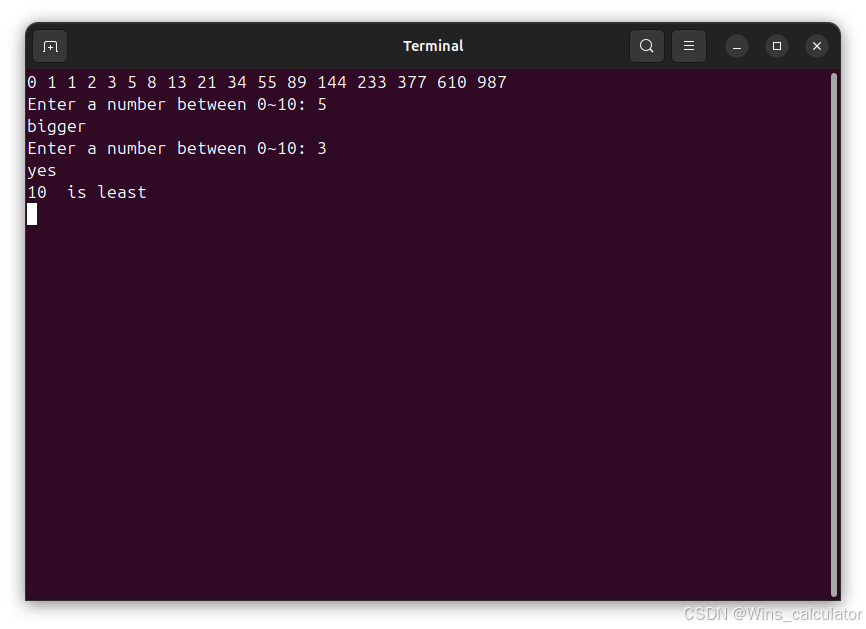
I do not know why the clear window can not show again when i run the script again after moving the main.py and src folder to the trash.
If you want run it again and again, you can run the command in the terminal:
rm -rf main.py src
./trail.sh
And maybe the best way is doing all the job in the bash terminal after you finished the script:
chmod +x trial.sh
./trial.sh
rm -rf main.py src
./trail.sh # you can run it again and again, if you do not want to use rm command.
./trail.sh # just ignore the error "mkdir: cannot create directory ‘src’: File exists"
Amazing happened when i move the trial.sh from the Desktop to the other documents folder, it worked normally when you repeat to click for running as a program.
? I don’t know why. Maybe the CLI proved more stable than GUI program, click here for more. Just mark it.

Agent 垂直技术社区,欢迎活跃、内容共建。
更多推荐


 4
4 0
0- 0


 已为社区贡献5条内容

所有评论(0)