Java Swing测试下拉框和列表
·
一、效果图
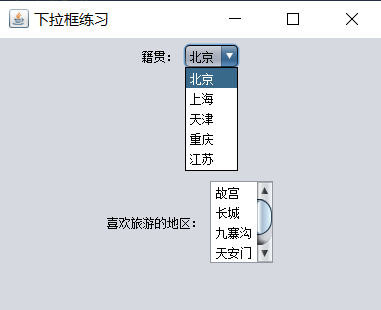
二、主要代码
1、下拉框用"JComboBox(Object[] 元素数组)"来初始化。
2、列表用"JList(Object[] 元素数组)"来初始化。
3、最终用add()方法添加到JPanel对象中。
import javax.swing.*;
import javax.swing.plaf.nimbus.NimbusLookAndFeel;
import java.awt.*;

public class ComboBoxTest extends JFrame {

    // 定义组件
    private JPanel jPanel1, jPanel2;

    //定义标签
    private JLabel jLabel1, jLabel2;

    //定义下拉框
    private JComboBox jComboBox1;

    //定义列表
    private JList jList1;

    //定义卷面板
    private JScrollPane jscrollPane;

    public ComboBoxTest(){
        try {
            UIManager.setLookAndFeel(new NimbusLookAndFeel());
        } catch (UnsupportedLookAndFeelException e) {
            e.printStackTrace();
        }

        jPanel1 = new JPanel();
        jPanel2= new JPanel();

        jLabel1 = new JLabel("籍贯:");
        jLabel2 = new JLabel("喜欢旅游的地区:");

        String[] jg = {"北京", "上海", "天津", "重庆", "江苏"};
        jComboBox1 = new JComboBox(jg);

        String[] jg2 = {"故宫", "长城", "九寨沟", "天安门", "火星"};
        jList1 = new JList(jg2);

        // 设置你希望显示多少个选项
        jList1.setVisibleRowCount(4);


        jscrollPane = new JScrollPane(jList1);

        // 布局管理
        this.setLayout(new GridLayout(2, 1));

        // 添加组件
        jPanel1.add(jLabel1);
        jPanel1.add(jComboBox1);

        jPanel2.add(jLabel2);
        jPanel2.add(jscrollPane);

        //加入JFrame
        this.add(jPanel1);
        this.add(jPanel2);


        this.setSize(400, 320);
        this.setLocation(825,545);
        this.setTitle("下拉框练习");
        this.setDefaultCloseOperation(JFrame.EXIT_ON_CLOSE);
        this.setVisible(true);
    }


    public static void main(String[] args) {
        ComboBoxTest test = new ComboBoxTest();
    }
}

Agent 垂直技术社区,欢迎活跃、内容共建。
更多推荐


 2
2 0
0- 0


 已为社区贡献8条内容

所有评论(0)