快速入门 Claude Code
·
Claude Code 原生安装教程(Windows & 多平台)
原生安装是推荐的方法,主要优点有:
- 只需要一个自包含的可执行文件
- 无需 Node.js 依赖
- 自动更新器稳定性更佳
如果你之前已经安装过 Claude Code,可以使用原生安装程序进行迁移(命令:claude install)。
一、原生安装命令(含高级选项,注意挂代理走全局+tun)
macOS、Linux、WSL
1. 安装稳定版本(默认)
curl -fsSL https://claude.ai/install.sh | bash
2. 安装最新版本
curl -fsSL https://claude.ai/install.sh | bash -s latest
3. 安装指定版本号
curl -fsSL https://claude.ai/install.sh | bash -s 1.0.58
4. Alpine Linux 及其他基于 musl/uClibc 的发行版
原生安装需要 libgcc、libstdc++、ripgrep。
apk add libgcc libstdc++ ripgrep
export USE_BUILTIN_RIPGREP=0
Homebrew 用户
通过 Homebrew 安装的 Claude Code 会在 brew 目录外自动更新,除非用环境变量明确禁用。
禁用自动更新:
export DISABLE_AUTOUPDATER=1
二、Windows 安装命令
PowerShell
1. 安装稳定版
irm https://claude.ai/install.ps1 | iex
2. 安装最新版
& ([scriptblock]::Create((irm https://claude.ai/install.ps1))) latest
3. 安装特定版本
& ([scriptblock]::Create((irm https://claude.ai/install.ps1))) 1.0.58
CMD
1. 安装稳定版
curl -fsSL https://claude.ai/install.cmd -o install.cmd && install.cmd && del install.cmd
2. 安装最新版
curl -fsSL https://claude.ai/install.cmd -o install.cmd && install.cmd latest && del install.cmd
3. 安装特定版本
curl -fsSL https://claude.ai/install.cmd -o install.cmd && install.cmd 1.0.58 && del install.cmd
注意:安装前务必先移除过时的别名或符号链接。
三、二进制完整性 & 代码签名
-
所有平台的 SHA256 校验和均发布在发布清单(manifest)中
例如:manifest.json
(将{VERSION}替换为你的实际版本号,如2.0.30) -
签名说明
- macOS:由 “Anthropic PBC” 签名,苹果公证
- Windows:由 “Anthropic, PBC” 签名
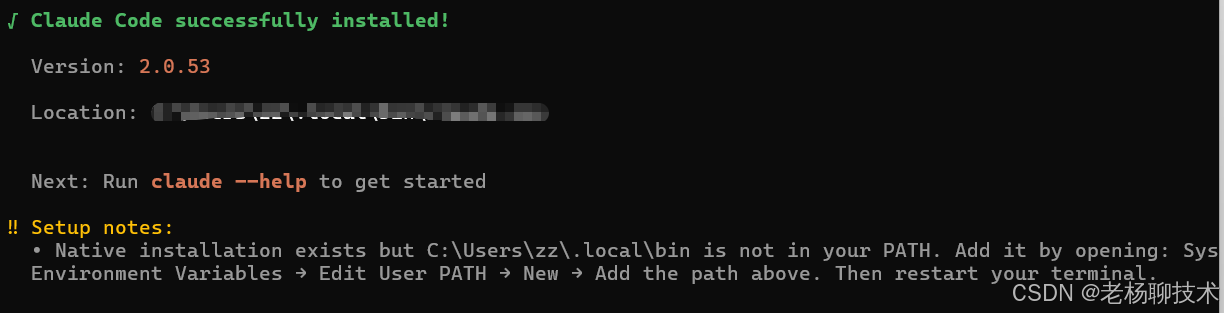
四、配置环境变量
注意:Claude Code安装完,要根据下方的提示去配置环境变量
五、Claude Code 资源包免费申领指南
五、中转站自动切换端点推荐
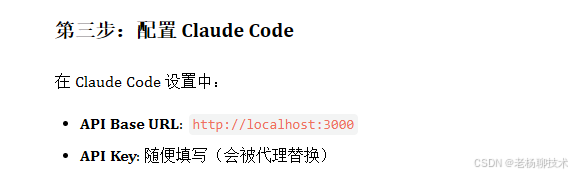
- 推荐使用 ccNexus,可以自动切换 Claude Code 端点
- 使用文档:查看微信文档
- 重要:务必先配置代理,否则无法正常转发
如有其它疑问可留言或参考 Claude 官方文档 。

Agent 垂直技术社区,欢迎活跃、内容共建。
更多推荐


 8
8 0
0- 0


 已为社区贡献2条内容

所有评论(0)