swing 修改实体 Java swing弹框
·
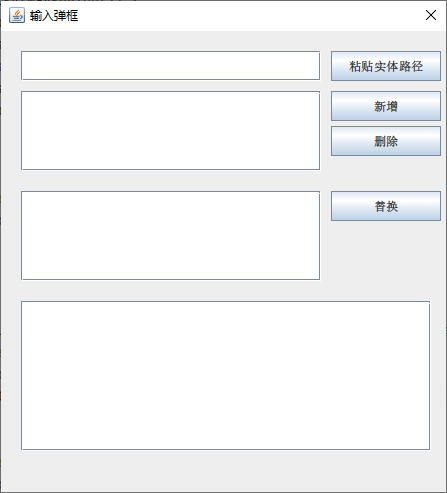
package org.me.swing.test.t8;

import javax.swing.*;
import java.awt.*;

public class TextDialogDemo {

    public static void main(String[] args) {
        SwingUtilities.invokeLater(TextDialogDemo::showDialog);
    }

    public static void showDialog() {

        JDialog dialog = new JDialog();
        dialog.setTitle("输入弹框");
        dialog.setSize(461, 500);
        dialog.setLayout(null); // 绝对布局
        dialog.setModal(true);  // 模态

        // ------- 第 1 行:单行输入框 + 粘贴按钮 -------
        JTextField tfInput = new JTextField();
        tfInput.setBounds(20, 20, 250 + 50, 30);
        dialog.add(tfInput);

        JButton btnPaste = new JButton("粘贴实体路径");
        btnPaste.setBounds(280 + 50, 20, 110, 30);
        dialog.add(btnPaste);

        // 点击粘贴取内容粘入 tfInput
        btnPaste.addActionListener(e -> {
            try {
                String clip = Toolkit.getDefaultToolkit()
                        .getSystemClipboard()
                        .getData(java.awt.datatransfer.DataFlavor.stringFlavor)
                        .toString();
                tfInput.setText(clip);
                System.out.println("粘贴内容:" + clip);
            } catch (Exception ex) {
                ex.printStackTrace();
            }
        });

        // ------- 第 2 行:文本框 + 新增按钮 -------
        JTextArea taAdd = createTextArea();
        JScrollPane spAdd = new JScrollPane(taAdd);
        spAdd.setBounds(20, 60, 250 + 50, 80);
        dialog.add(spAdd);

        JButton btnAdd = new JButton("新增");
        btnAdd.setBounds(280 + 50, 60, 110, 30);
        dialog.add(btnAdd);

        btnAdd.addActionListener(e -> {
            System.out.println("新增内容:");
            System.out.println(taAdd.getText());
        });

        JButton btnDel = new JButton("删除");
        btnDel.setBounds(280 + 50, 95, 110, 30);
        dialog.add(btnDel);

        btnDel.addActionListener(e -> {
            System.out.println("删除内容:");
            System.out.println(taAdd.getText());
        });

        // ------- 第 3 行:文本框 + 替换按钮 -------
        JTextArea taReplace = createTextArea();
        JScrollPane spReplace = new JScrollPane(taReplace);
        spReplace.setBounds(20, 160, 250 + 50, 80 + 10);
        dialog.add(spReplace);

        JButton btnReplace = new JButton("替换");
        btnReplace.setBounds(280 + 50, 160, 110, 30);
        dialog.add(btnReplace);

        btnReplace.addActionListener(e -> {
            System.out.println("替换内容:");
            System.out.println(taReplace.getText());
        });

        // ------- 第 4 行:大文本框 -------
        JTextArea taBig = createTextArea();
        JScrollPane spBig = new JScrollPane(taBig);
        spBig.setBounds(20, 270, 360 + 50, 150);
        dialog.add(spBig);

        // 让对话框居中
        dialog.setLocationRelativeTo(null);

        dialog.setVisible(true);
    }

    private static JTextArea createTextArea() {
        JTextArea ta = new JTextArea();
        ta.setLineWrap(true);       // 自动换行
        ta.setWrapStyleWord(true);  // 以单词为边界换行
        return ta;
    }
}

Agent 垂直技术社区,欢迎活跃、内容共建。
更多推荐



 3
3 0
0- 0


 已为社区贡献8条内容

所有评论(0)