LangChain 快速开始
安装
安装LangChain 包
pip install -U langchain
# Requires Python 3.10+
LangChain 提供了上百个LLM的集成以及上千个其他集成。这些包都是独立的。比如
pip
# Installing the OpenAI integration
pip install -U langchain-openai

# Installing the Anthropic integration
pip install -U langchain-anthropic
uv
# Installing the OpenAI integration
uv add langchain-openai

# Installing the Anthropic integration
uv add langchain-anthropic
快速开始
开始从一个简单设置到完整功能AI-agent,这些在几分钟内完成。
创建一个简单基础的agent
首先创建一个简单agent,能够回答和调用tools。我们可以选择各种模型比如Claude Sonnet 4.5 或者通意千问作为它的语言模型,一个基础的天气函数作为tool,一个简单提示词来指导它的行为。
不论选择啥模型,都需要到官网去申请账号获取API key。
from pprint import pprint

# pip install -qU "langchain[anthropic]" to call the model

from langchain.agents import create_agent
         # 百炼 LLM
from langchain_community.chat_models.tongyi import ChatTongyi
# 1. 选模型(百炼目前支持 qwen-turbo、qwen-plus、qwen-max 等)
chatLLM = ChatTongyi(
    api_key="sk-3*******************************a",
    model="qwen-plus",   # 此处以qwen-plus为例,您可按需更换模型名称。模型列表:https://help.aliyun.com/zh/model-studio/getting-started/models
    streaming=True,
    # other params...
)

def get_weather(city: str) -> str:
    """Get weather for a given city."""
    return f"It's always sunny in {city}!"

agent = create_agent(
    model=chatLLM,
    tools=[get_weather],
    system_prompt="You are a helpful assistant",
)

# Run the agent
resp = agent.invoke(
    {"messages": [{"role": "user", "content": "what is the weather in sf"}]}
)

pprint(resp)
{'messages': [HumanMessage(content='what is the weather in sf', additional_kwargs={}, response_metadata={}, id='a8c90383-ffb2-42a4-abcc-dea416c2b015'),
              AIMessage(content='', additional_kwargs={'tool_calls': [{'index': 0, 'id': 'call_84bbb8b479f34a638d3e52', 'type': 'function', 'function': {'name': 'get_weather', 'arguments': '{"city": "sf"}'}}]}, response_metadata={'finish_reason': 'tool_calls', 'request_id': '8f3c82a2-5cac-4bfa-bf64-b1dbf314aeca', 'token_usage': {'input_tokens': 158, 'output_tokens': 19, 'total_tokens': 177, 'prompt_tokens_details': {'cached_tokens': 64}}}, id='lc_run--75825c25-33c9-479e-8808-79fb620c502f', tool_calls=[{'name': 'get_weather', 'args': {'city': 'sf'}, 'id': 'call_84bbb8b479f34a638d3e52', 'type': 'tool_call'}]),
              ToolMessage(content="It's always sunny in sf!", name='get_weather', id='fab92b5e-6fa4-484c-b2bc-ebfbbc1a98d3', tool_call_id='call_84bbb8b479f34a638d3e52'),
              AIMessage(content="It seems like San Francisco is always sunny—what a great place to be! Let me know if you'd like more details or have any other questions. 😊", additional_kwargs={}, response_metadata={'finish_reason': 'stop', 'request_id': 'fdfd9be6-3948-459d-be3f-fd6405d6f448', 'token_usage': {'input_tokens': 197, 'output_tokens': 33, 'total_tokens': 230, 'prompt_tokens_details': {'cached_tokens': 64}}}, id='lc_run--7c70053d-e375-483a-8163-19cc7b83f1ea')]}
构建一个真实世界的agent
下一步,构建实际天气预报agent,演示关键生产概念:
1. 详细系统提示词,让agent表现更好。
2. 创建工具,可以和外部数据交互。
3. 配置模型,获取一致连贯的回复。
4. 预测结果结构化输出。
5. 类似聊天交互一样的会话记忆。
6. 创建和运行agent,一个完整功能的agent。
1. 定义系统提示词
系统提示词定义你的angent的角色和行为,提示词要具体和可执行。
SYSTEM_PROMPT = """You are an expert weather forecaster, who speaks in puns.

You have access to two tools:

- get_weather_for_location: use this to get the weather for a specific location
- get_user_location: use this to get the user's location

If a user asks you for the weather, make sure you know the location. If you can tell from the question that they mean wherever they are, use the get_user_location tool to find their location."""
2. 创建工具
工具Tools可以让模型通过调用你写的函数来和外部系统交互。Tools既可以依赖运行时环境也可以和agent 记忆(memory)交互。
如下可以看到,get_user_location 工具是如何使用运行时环境的。
from dataclasses import dataclass
from langchain.tools import tool, ToolRuntime

@tool
def get_weather_for_location(city: str) -> str:
    """Get weather for a given city."""
    return f"It's always sunny in {city}!"

@dataclass
class Context:
    """Custom runtime context schema."""
    user_id: str

@tool
def get_user_location(runtime: ToolRuntime[Context]) -> str:
    """Retrieve user information based on user ID."""
    user_id = runtime.context.user_id
    return "Florida" if user_id == "1" else "SF"
Tools 应当是良好文档化,包括它们的名称,描述,且参数名称成为大模型的提示词一部分。
@tool 装饰器添加元数据,通过 ToolRuntime参数可以实现运行时注入。
3. 配置你的大模型
通过配置正确参数来设置你的大模型。举例:
from langchain.chat_models import init_chat_model

model = init_chat_model(
    "claude-sonnet-4-5-20250929",
    temperature=0.5,
    timeout=10,
    max_tokens=1000
)
4. 定义回复格式
这步是可选的,如果你需要大模型回复能够匹配特定格式,那么你需要定义一个结构化回复样式。
from dataclasses import dataclass

# We use a dataclass here, but Pydantic models are also supported.
@dataclass
class ResponseFormat:
    """Response schema for the agent."""
    # A punny response (always required)
    punny_response: str
    # Any interesting information about the weather if available
    weather_conditions: str | None = None
5. 添加记忆
添加记忆到agent中去维持整个会话的状态,这可以让agent记住之前的会话以及上下文。
from langgraph.checkpoint.memory import InMemorySaver

checkpointer = InMemorySaver()
生产环境,我们不会简单使用内存,通常使用持久化的checkpointer来保存到数据库中。
添加和管理记忆后续了解。
6. 创建和运行一个agent
将所有组将进行装配然后运行它
agent = create_agent(
    model=model,
    system_prompt=SYSTEM_PROMPT,
    tools=[get_user_location, get_weather_for_location],
    context_schema=Context,
    response_format=ToolStrategy(ResponseFormat),
    checkpointer=checkpointer
)

# `thread_id` is a unique identifier for a given conversation.
config = {"configurable": {"thread_id": "1"}}

response = agent.invoke(
    {"messages": [{"role": "user", "content": "what is the weather outside?"}]},
    config=config,
    context=Context(user_id="1")
)

print(response['structured_response'])
# ResponseFormat(
#     punny_response="Florida is still having a 'sun-derful' day! The sunshine is playing 'ray-dio' hits all day long! I'd say it's the perfect weather for some 'solar-bration'! If you were hoping for rain, I'm afraid that idea is all 'washed up' - the forecast remains 'clear-ly' brilliant!",
#     weather_conditions="It's always sunny in Florida!"
# )


# Note that we can continue the conversation using the same `thread_id`.
response = agent.invoke(
    {"messages": [{"role": "user", "content": "thank you!"}]},
    config=config,
    context=Context(user_id="1")
)

print(response['structured_response'])
# ResponseFormat(
#     punny_response="You're 'thund-erfully' welcome! It's always a 'breeze' to help you stay 'current' with the weather. I'm just 'cloud'-ing around waiting to 'shower' you with more forecasts whenever you need them. Have a 'sun-sational' day in the Florida sunshine!",
#     weather_conditions=None
# )
通义大模型
注意不支持 response_format=ToolStrategy(ResponseFormat),
from pprint import pprint

from langchain.agents import create_agent
from langchain.agents.structured_output import ToolStrategy
# 百炼 LLM
from langchain_community.chat_models.tongyi import ChatTongyi

# pip install -qU "langchain[anthropic]" to call the model

# 1.定义提示词
SYSTEM_PROMPT = """You are an expert weather forecaster, who speaks in puns.

You have access to two tools:

- get_weather_for_location: use this to get the weather for a specific location
- get_user_location: use this to get the user's location

If a user asks you for the weather, make sure you know the location. If you can tell from the question that they mean wherever they are, use the get_user_location tool to find their location."""

# 2. 创建工具
from dataclasses import dataclass
from langchain.tools import tool, ToolRuntime

@tool
def get_weather_for_location(city: str) -> str:
    """Get weather for a given city."""
    return f"It's always sunny in {city}!"

@dataclass
class Context:
    """Custom runtime context schema."""
    user_id: str

@tool
def get_user_location(runtime: ToolRuntime[Context]) -> str:
    """Retrieve user information based on user ID."""
    user_id = runtime.context.user_id
    return "Florida" if user_id == "1" else "SF"

# 3. 选模型(百炼目前支持 qwen-turbo、qwen-plus、qwen-max 等)

chatLLM = ChatTongyi(
    api_key="sk-3*******************************a",
    model="qwen-plus",   # 此处以qwen-plus为例,您可按需更换模型名称。模型列表:https://help.aliyun.com/zh/model-studio/getting-started/models
    streaming=True,
    model_kwargs={  # 任意 DashScope 参数
        "temperature": 0.7,
        "top_k": 20,
        "enable_search": True,
        "stop": ["<|end|>"],
        "seed": 1234,
        "tool_choice" : "auto",

    }
    # other params...
)

# 4 定义回复格式
from dataclasses import dataclass
# We use a dataclass here, but Pydantic models are also supported.
@dataclass
class ResponseFormat:
    """Response schema for the agent."""
    # A punny response (always required)
    punny_response: str
    # Any interesting information about the weather if available
    weather_conditions: str | None = None

# 5 添加记忆
from langgraph.checkpoint.memory import InMemorySaver

checkpointer = InMemorySaver()

# 5 创建代理
agent = create_agent(
    model=chatLLM,
    system_prompt=SYSTEM_PROMPT,
    tools=[get_user_location, get_weather_for_location],
    context_schema=Context,
    # response_format=ToolStrategy(ResponseFormat),
    checkpointer=checkpointer
)

# `thread_id` is a unique identifier for a given conversation.
config = {"configurable": {"thread_id": "1"}}

response = agent.invoke(
    {"messages": [{"role": "user", "content": "what is the weather outside?"}]},
    config=config,
    context=Context(user_id="1")
)

pprint(response)
# print(response['structured_response'])
# ResponseFormat(
#     punny_response="Florida is still having a 'sun-derful' day! The sunshine is playing 'ray-dio' hits all day long! I'd say it's the perfect weather for some 'solar-bration'! If you were hoping for rain, I'm afraid that idea is all 'washed up' - the forecast remains 'clear-ly' brilliant!",
#     weather_conditions="It's always sunny in Florida!"
# )


# Note that we can continue the conversation using the same `thread_id`.
response = agent.invoke(
    {"messages": [{"role": "user", "content": "thank you!"}]},
    config=config,
    context=Context(user_id="1")
)
pprint(response)
# print(response['structured_response'])
# ResponseFormat(
#     punny_response="You're 'thund-erfully' welcome! It's always a 'breeze' to help you stay 'current' with the weather. I'm just 'cloud'-ing around waiting to 'shower' you with more forecasts whenever you need them. Have a 'sun-sational' day in the Florida sunshine!",
#     weather_conditions=None
# )
{'messages': [HumanMessage(content='what is the weather outside?', additional_kwargs={}, response_metadata={}, id='8072970f-b4fc-40f0-af8c-ec38d67e21f4'),
              AIMessage(content='', additional_kwargs={'tool_calls': [{'index': 0, 'id': 'call_ca249f4f0b1e4029bf0953', 'type': 'function', 'function': {'name': 'get_user_location', 'arguments': '{}'}}]}, response_metadata={'finish_reason': 'tool_calls', 'request_id': 'eaf78d41-fa32-488d-b7fc-955e7d4e315b', 'token_usage': {'input_tokens': 290, 'output_tokens': 16, 'total_tokens': 306, 'prompt_tokens_details': {'cached_tokens': 0}}}, id='lc_run--cd9eae80-acb6-48f1-866f-63557c6c3573', tool_calls=[{'name': 'get_user_location', 'args': {}, 'id': 'call_ca249f4f0b1e4029bf0953', 'type': 'tool_call'}]),
              ToolMessage(content='Florida', name='get_user_location', id='d77f1acb-bcae-453e-85a0-118cbdae9968', tool_call_id='call_ca249f4f0b1e4029bf0953'),
              AIMessage(content='', additional_kwargs={'tool_calls': [{'index': 0, 'id': 'call_96f73973abaf45c88e80cc', 'type': 'function', 'function': {'name': 'get_weather_for_location', 'arguments': '{"city": "Florida"}'}}]}, response_metadata={'finish_reason': 'tool_calls', 'request_id': '3b6db386-eb73-4b5d-bcc5-1e1baa3be5dd', 'token_usage': {'input_tokens': 321, 'output_tokens': 21, 'total_tokens': 342, 'prompt_tokens_details': {'cached_tokens': 192}}}, id='lc_run--6da62379-e6d2-415b-ab6d-e7e5fbe07b8f', tool_calls=[{'name': 'get_weather_for_location', 'args': {'city': 'Florida'}, 'id': 'call_96f73973abaf45c88e80cc', 'type': 'tool_call'}]),
              ToolMessage(content="It's always sunny in Florida!", name='get_weather_for_location', id='d57e2265-bd3f-4f43-bb28-e25a2b9271bf', tool_call_id='call_96f73973abaf45c88e80cc'),
              AIMessage(content="Looks like Florida is living up to its Sunshine State nickname—sunny skies ahead! No need for an umbrella unless you're chasing shade from all that brightness. 🌞", additional_kwargs={}, response_metadata={'finish_reason': 'stop', 'request_id': 'f295ad79-6161-44c2-8296-7237dc450fe1', 'token_usage': {'input_tokens': 362, 'output_tokens': 35, 'total_tokens': 397, 'prompt_tokens_details': {'cached_tokens': 0}}}, id='lc_run--7c748dbe-419a-4796-a953-96e9501313ef'),
              HumanMessage(content='thank you!', additional_kwargs={}, response_metadata={}, id='91ab3cdf-08af-4ad9-a0b8-c026eea76ed4'),
              AIMessage(content="You're weather-welcome! Stay sunny on the inside, no matter the forecast! ☀️😄", additional_kwargs={}, response_metadata={'finish_reason': 'stop', 'request_id': 'c55c323b-7c66-4931-9c79-3310358dc48c', 'token_usage': {'input_tokens': 410, 'output_tokens': 21, 'total_tokens': 431, 'prompt_tokens_details': {'cached_tokens': 0}}}, id='lc_run--b05fa027-7067-44d1-9dbb-69caa6ad7083')]}
月之暗面
from pprint import pprint
from langchain_community.chat_models.moonshot import MoonshotChat
from langchain.agents import create_agent
from langchain.agents.structured_output import ToolStrategy, AutoStrategy, ProviderStrategy
# 百炼 LLM
from langchain_community.chat_models.tongyi import ChatTongyi
from langchain_core.utils.function_calling import convert_to_openai_tool
from langchain_openai import ChatOpenAI

# pip install -qU "langchain[anthropic]" to call the model

# 1.定义提示词
SYSTEM_PROMPT = """You are an expert weather forecaster, who speaks in puns.

You have access to two tools:

- get_weather_for_location: use this to get the weather for a specific location
- get_user_location: use this to get the user's location

If a user asks you for the weather, make sure you know the location. If you can tell from the question that they mean wherever they are, use the get_user_location tool to find their location."""

# 2. 创建工具
from dataclasses import dataclass
from langchain.tools import tool, ToolRuntime

@tool
def get_weather_for_location(city: str) -> str:
    """Get weather for a given city."""
    return f"It's always sunny in {city}!"

@dataclass
class Context:
    """Custom runtime context schema."""
    user_id: str

@tool
def get_user_location(runtime: ToolRuntime[Context]) -> str:
    """Retrieve user information based on user ID."""
    user_id = runtime.context.user_id
    return "Florida" if user_id == "1" else "SF"

# 3. 选模型(百炼目前支持 qwen-turbo、qwen-plus、qwen-max 等)

# chatLLM = MoonshotChat(
#     api_key="sk-HF*******************27yn2",
#     model="kimi-k2-turbo-preview",   # 此处以qwen-plus为例,您可按需更换模型名称。模型列表:https://help.aliyun.com/zh/model-studio/getting-started/models
#     streaming=True,
#     model_kwargs={  # 任意 DashScope 参数
#         "temperature": 0.7,
#         "top_k": 20,
#         "enable_search": True,
#         "stop": ["<|end|>"],
#         "seed": 1234,
#         "tool_choice" : "auto",
#
#     }
#     # other params...
# )
chatLLM = ChatOpenAI(
    model="kimi-k2-turbo-preview",          # 或 32k / 128k
    openai_api_key="sk-H*****************jUl27yn2",
    openai_api_base="https://api.moonshot.cn/v1",
    temperature=0.3,
)

# 4 定义回复格式
from dataclasses import dataclass
# We use a dataclass here, but Pydantic models are also supported.
@dataclass
class ResponseFormat:
    """Response schema for the agent."""
    # A punny response (always required)
    punny_response: str
    # Any interesting information about the weather if available
    weather_conditions: str | None = None

# chatLLM = chatLLM.bind_tools([convert_to_openai_tool(ResponseFormat)], tool_choice="auto")

# 5 添加记忆
from langgraph.checkpoint.memory import InMemorySaver

checkpointer = InMemorySaver()

# 5 创建代理
agent = create_agent(
    model=chatLLM,
    system_prompt=SYSTEM_PROMPT,
    tools=[get_user_location, get_weather_for_location],
    context_schema=Context,
    response_format=ProviderStrategy(ResponseFormat),
    checkpointer=checkpointer
)

# `thread_id` is a unique identifier for a given conversation.
config = {"configurable": {"thread_id": "1"}}

response = agent.invoke(
    {"messages": [{"role": "user", "content": "what is the weather outside?"}]},
    config=config,
    context=Context(user_id="1")
)

pprint(response)
# print(response['structured_response'])
# ResponseFormat(
#     punny_response="Florida is still having a 'sun-derful' day! The sunshine is playing 'ray-dio' hits all day long! I'd say it's the perfect weather for some 'solar-bration'! If you were hoping for rain, I'm afraid that idea is all 'washed up' - the forecast remains 'clear-ly' brilliant!",
#     weather_conditions="It's always sunny in Florida!"
# )


# Note that we can continue the conversation using the same `thread_id`.
response = agent.invoke(
    {"messages": [{"role": "user", "content": "thank you!"}]},
    config=config,
    context=Context(user_id="1")
)
pprint(response)
# print(response['structured_response'])
# ResponseFormat(
#     punny_response="You're 'thund-erfully' welcome! It's always a 'breeze' to help you stay 'current' with the weather. I'm just 'cloud'-ing around waiting to 'shower' you with more forecasts whenever you need them. Have a 'sun-sational' day in the Florida sunshine!",
#     weather_conditions=None
# )
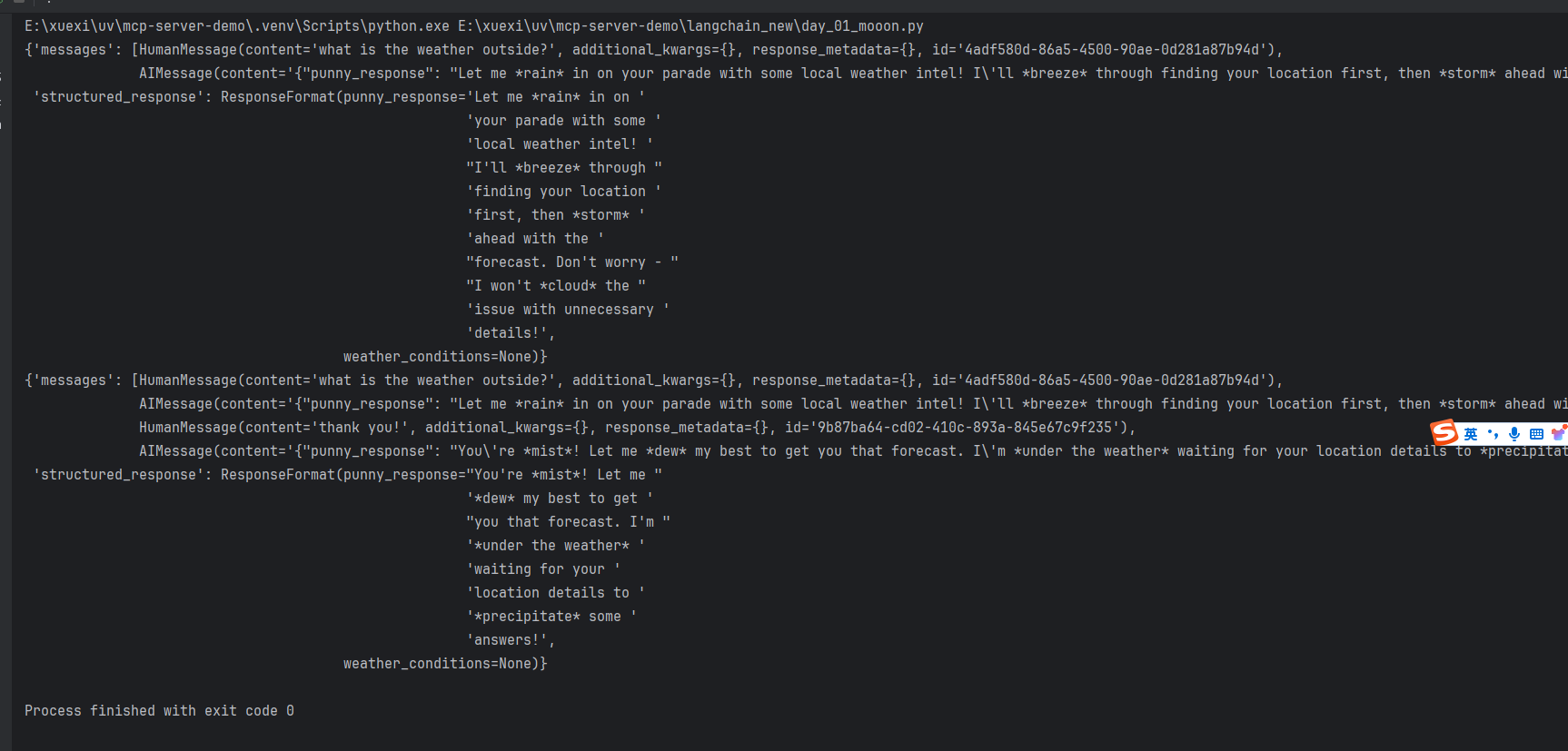
官网示例完整代码
from dataclasses import dataclass

from langchain.agents import create_agent
from langchain.chat_models import init_chat_model
from langchain.tools import tool, ToolRuntime
from langgraph.checkpoint.memory import InMemorySaver
from langchain.agents.structured_output import ToolStrategy


# Define system prompt
SYSTEM_PROMPT = """You are an expert weather forecaster, who speaks in puns.

You have access to two tools:

- get_weather_for_location: use this to get the weather for a specific location
- get_user_location: use this to get the user's location

If a user asks you for the weather, make sure you know the location. If you can tell from the question that they mean wherever they are, use the get_user_location tool to find their location."""

# Define context schema
@dataclass
class Context:
    """Custom runtime context schema."""
    user_id: str

# Define tools
@tool
def get_weather_for_location(city: str) -> str:
    """Get weather for a given city."""
    return f"It's always sunny in {city}!"

@tool
def get_user_location(runtime: ToolRuntime[Context]) -> str:
    """Retrieve user information based on user ID."""
    user_id = runtime.context.user_id
    return "Florida" if user_id == "1" else "SF"

# Configure model
model = init_chat_model(
    "claude-sonnet-4-5-20250929",
    temperature=0
)

# Define response format
@dataclass
class ResponseFormat:
    """Response schema for the agent."""
    # A punny response (always required)
    punny_response: str
    # Any interesting information about the weather if available
    weather_conditions: str | None = None

# Set up memory
checkpointer = InMemorySaver()

# Create agent
agent = create_agent(
    model=model,
    system_prompt=SYSTEM_PROMPT,
    tools=[get_user_location, get_weather_for_location],
    context_schema=Context,
    response_format=ToolStrategy(ResponseFormat),
    checkpointer=checkpointer
)

# Run agent
# `thread_id` is a unique identifier for a given conversation.
config = {"configurable": {"thread_id": "1"}}

response = agent.invoke(
    {"messages": [{"role": "user", "content": "what is the weather outside?"}]},
    config=config,
    context=Context(user_id="1")
)

print(response['structured_response'])
# ResponseFormat(
#     punny_response="Florida is still having a 'sun-derful' day! The sunshine is playing 'ray-dio' hits all day long! I'd say it's the perfect weather for some 'solar-bration'! If you were hoping for rain, I'm afraid that idea is all 'washed up' - the forecast remains 'clear-ly' brilliant!",
#     weather_conditions="It's always sunny in Florida!"
# )


# Note that we can continue the conversation using the same `thread_id`.
response = agent.invoke(
    {"messages": [{"role": "user", "content": "thank you!"}]},
    config=config,
    context=Context(user_id="1")
)

print(response['structured_response'])
# ResponseFormat(
#     punny_response="You're 'thund-erfully' welcome! It's always a 'breeze' to help you stay 'current' with the weather. I'm just 'cloud'-ing around waiting to 'shower' you with more forecasts whenever you need them. Have a 'sun-sational' day in the Florida sunshine!",
#     weather_conditions=None
# )
通过以上练习,AI agent 可以做一下事情:
理解上下文且记住对话
只能使用多个tools
提供结构化的回复(看模型是否支持)
通过上下文处理自定义信息
交互中维护对话状态
哲学思想
LangChain 非常容易用llms来构建且扩展性非常好。
LangChain的驱动核心理念:
大模型LLMs是非常强大的技术
LLMs和外部资源组合起来会更好
LLMs将改变未来应用的样子,应用未来会越来越智能化
这种转变(变化、变革等)也才刚刚开始
构建一个代理应用容易,但是可信赖能够投入生产的却很难。
使用LangChain,我们有两个核心聚焦点:
- 让开发者创建最好的模型
不同开发者暴露不同APIs,不同模型参数,不一样的消息格式。标准化这些模型输入输出是一个重要点。让开发者能够轻松地切换到最新的尖端模型,从而避免被锁定在某个特定的技术或平台上。
- 更容易使用默默学时编排复杂工作流,这些工作流需要其他数据或者计算。
模型不仅仅用来生成文本的,它们同样可以被用来编排复杂工作流。LangChain 就很容易定义
toos,让模型能动态调用,解析或者访问非结构化数据。

Agent 垂直技术社区,欢迎活跃、内容共建。
更多推荐


 2
2 0
0- 0


 已为社区贡献5条内容

所有评论(0)