Vue.js + Element UI构建智能案件串并分析系统深度解析
·
项目概述
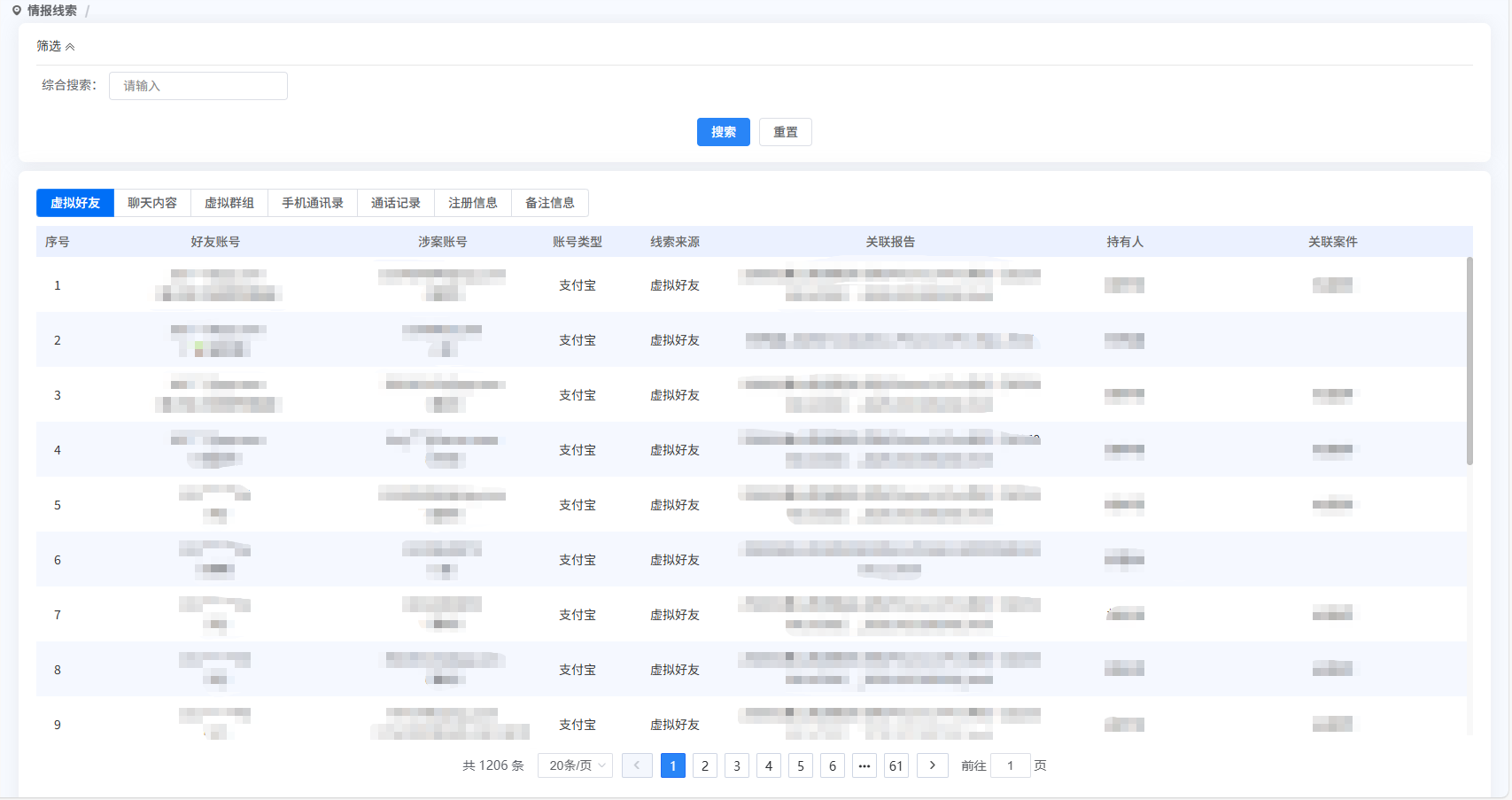
这是一个基于Vue.js和Element UI开发的智能案件串并分析系统前端模块,实现了多维度的数据关联分析、智能筛选和可视化展示。该系统在公安信息化建设中具有重要应用价值,能够有效提升案件串并分析的效率和准确性。
系统架构设计
模块化布局结构
<template>
  <div class="operation-box">
    <el-card shadow="never">
      <!-- 筛选区域 -->
      <template #header>
        <div class="filter-header">
          <!-- 筛选内容 -->
        </div>
        <div class="filter-body" v-show="isFilterOpen">
          <!-- 筛选内容 -->
        </div>
      </template>

      <!-- 主内容区 -->
      <div class="content-area">
        <!-- 标签页切换 -->
        <div class="tab-switcher">
          <el-button-group>
            <el-button @click="changeType(1)">虚拟好友</el-button>
            <el-button @click="changeType(2)">聊天内容</el-button>
            <!-- 其他标签 -->
          </el-button-group>
        </div>

        <!-- 数据表格 -->
        <el-container class="main-content">
          <el-main>
            <el-table :data="tableList" stripe>
              <el-table-column
                v-for="(col, index) in currentColumns"
                :key="`${col.id}_${index}`"
                :prop="col.prop"
                :label="col.label">
                <template #default="scope">
                  <!-- 插槽内容 -->
                </template>
              </el-table-column>
            </el-table>
          </el-main>
        </el-container>
      </div>
    </el-card>
  </div>
</template>
核心技术实现
动态列表格渲染系统
系统最大的亮点在于其高度灵活的动态表格列渲染机制:
data() {
  return {
    columnConfig: {
      // 虚拟好友配置
      1: [
        {
          prop: "friendsNumber",
          propTwo: "friendsNick",
          label: "好友账号",
          isHref: true,
          slotName: "friendAccount"
        },
        // ... 其他列配置
      ],
      // 聊天内容配置
      2: [
        { prop: "sensitiveContent", label: "要素信息" },
        // ... 其他列配置
      ],
      // 注册信息(多级配置)
      6: {
        1: [...], // 通讯录
        2: [...], // 通话记录
        3: [...], // 要素信息
      }
    }
  };
},
computed: {
  currentColumns() {
    if (this.type === 6) {
      const registerConfig = this.columnConfig[6];
      return registerConfig[this.searchForm.registerType] || registerConfig[1];
    }
    return this.columnConfig[this.type] || [];
  }
}
技术优势:
-
配置化驱动,易于维护和扩展
-
支持多级嵌套配置
-
动态计算属性实现实时响应
-
TypeScript友好,可做类型安全
智能筛选系统
<el-form :model="searchForm" ref="searchForm" :inline="true">
  <!-- 综合搜索 -->
  <el-form-item label="综合搜索:" prop="content"
    v-if="type === 1 || type === 3 || type === 4 || type === 5 || type === 7">
    <el-input v-model.trim="searchForm.content" placeholder="请输入"></el-input>
  </el-form-item>

  <!-- 条件搜索 -->
  <el-form-item label="案件名称:" prop="caseName" v-if="type === 2">
    <el-input v-model.trim="searchForm.caseName" placeholder="请输入案件名称"></el-input>
  </el-form-item>

  <!-- 类型筛选 -->
  <el-form-item label="类型:" prop="registerType" v-if="type === 6">
    <el-select v-model="searchForm.registerType" @change="changeRegisterType">
      <el-option label="通讯录" :value="1"></el-option>
      <el-option label="通话记录" :value="2"></el-option>
      <el-option label="要素信息" :value="3"></el-option>
    </el-select>
  </el-form-item>
</el-form>
数据关联与展示
复杂数据格式化
<template slot-scope="scope">
  <!-- 好友账号(带昵称) -->
  <template v-if="col.propTwo && col.isHref">
    <div class="href" @click="toResultInfo(scope.row, 'phone_number', scope.row[col.prop])">
      <div>{{ scope.row[col.prop] }}</div>
      <div v-if="scope.row[col.propTwo]">({{ scope.row[col.propTwo] }})</div>
    </div>
  </template>

  <!-- 关联案件(可点击查看) -->
  <template v-else-if="col.slotName === 'caseSlot'">
    <div class="glaj">
      <div v-for="(item, idx) in scope.row.case_name" :key="idx">
        <span @click="showCaseInfo(scope.row, idx)">{{ item }}</span>
      </div>
    </div>
  </template>

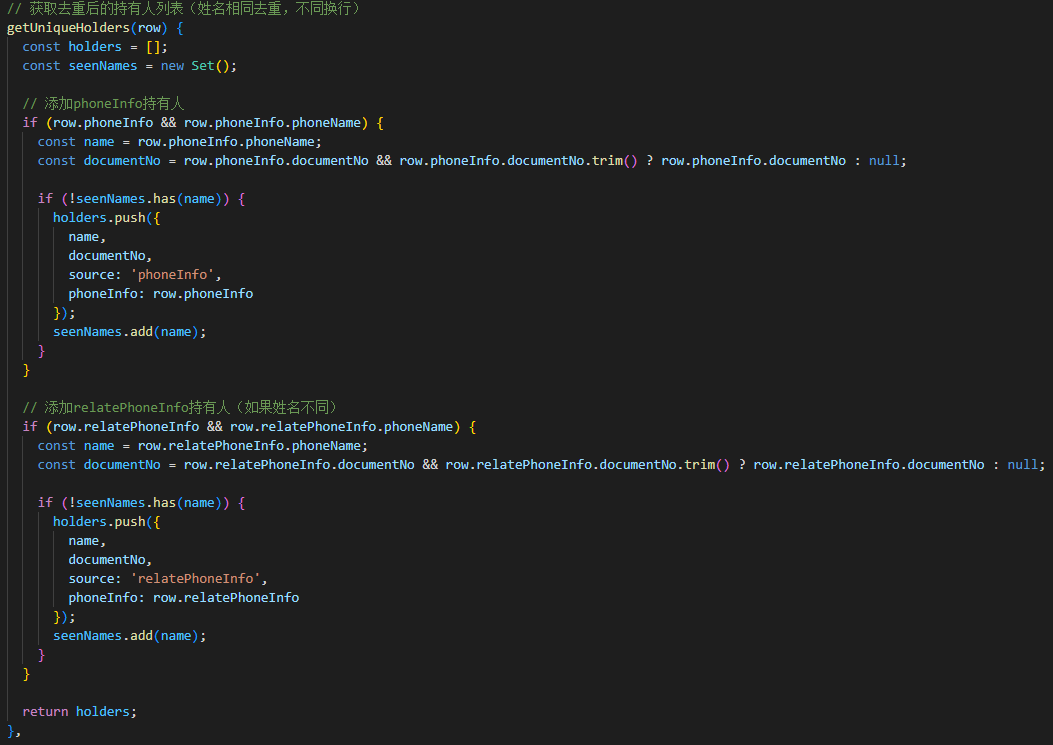
  <!-- 持有人信息(智能去重) -->
  <template v-else-if="col.slotName === 'phoneName'">
    <template v-for="(holder, index) in getUniqueHolders(scope.row)">
      <div :key="index" :class="{ 'mt-5': index > 0 }">
        <span class="href" @click="handleHolderClick(scope.row, holder, index)">
          {{ holder.name }}
        </span>
        <span v-if="holder.documentNo">({{ holder.documentNo }})</span>
      </div>
    </template>
  </template>
</template>
持有人去重算法
getUniqueHolders(row) {
  const holders = [];
  const seenNames = new Set();

  // 添加phoneInfo持有人
  if (row.phoneInfo && row.phoneInfo.phoneName) {
    const name = row.phoneInfo.phoneName;
    const documentNo = row.phoneInfo.documentNo;

    if (!seenNames.has(name)) {
      holders.push({
        name,
        documentNo,
        source: 'phoneInfo',
        phoneInfo: row.phoneInfo
      });
      seenNames.add(name);
    }
  }

  // 添加relatePhoneInfo持有人
  if (row.relatePhoneInfo && row.relatePhoneInfo.phoneName) {
    const name = row.relatePhoneInfo.phoneName;
    const documentNo = row.relatePhoneInfo.documentNo;

    if (!seenNames.has(name)) {
      holders.push({
        name,
        documentNo,
        source: 'relatePhoneInfo',
        phoneInfo: row.relatePhoneInfo
      });
      seenNames.add(name);
    }
  }

  return holders;
}
分页与数据加载
async page(page_data) {
  this.loadingInstance = this.openLoading();
  this.curPage = page_data;
  if (page_data == 1) this.reset_pagenum++;

  let data = {
    ...this.searchForm,
    pageNum: page_data,
    pageSize: this.page_size,
    labelType: this.type,
  };

  let res = {};
  this.tableList = [];

  try {
    // 根据type调用不同接口
    switch(this.type) {
      case 1:
      case 3:
      case 4:
      case 5:
        res = await getIntelligenceClueListGrouping(data);
        break;
      case 2:
        res = await queryByMultiCondition(data);
        break;
      case 6:
        data.type = this.type;
        if (this.searchForm.registerType) {
          data.tabType = this.searchForm.registerType;
        }
        res = await getCaseAnalysisList(data);
        break;
      case 7:
        data.phoneNumber = this.searchForm.content;
        res = await getPhoneAggregateList(data);
        break;
    }

    if (res.data.code == 1) {
      this.tableList = res.data.data || [];
      this.parentMsg = res.data.count || 0;
    }
    this.loadingInstance.close();
  } catch (e) {
    this.parentMsg = 0;
    this.loadingInstance.close();
  }
}
详情抽屉组件
<!-- 抽屉式详情展示 -->
<SerialDetail
  :showDrawer="showSerialDrawer"
  :caseIds="caseIds"
  :type="type"
  :content="curContent"
  :sourceType="curSourceType"
  @drawerClose="drawerClose">
</SerialDetail>

<!-- 案件信息弹窗 -->
<CaseInfo
  ref="caseInfo"
  :caseId="caseId"
  :sampleIdList="sampleIdList"
  :type="type"
  :content="curContent">
</CaseInfo>
底部详情面板
messageInfo(row) {
  this.curObj = { ...row };
  this.deployList[3].note = this.curObj.sensitiveType;
  this.deployList[4].note = this.curObj.sensitiveContent;
  this.deployList[5].hight = this.curObj.sensitiveContent;
  this.getMessageList(1);
  this.isShowBottom = true;
  setTimeout(() => this.packUp());
}

// 平滑的加载动画控制
startBottomListLoading() {
  if (this.bottomListLoadingTimer) {
    clearTimeout(this.bottomListLoadingTimer);
    this.bottomListLoadingTimer = null;
  }
  this.bottomListLoading = true;
  this.bottomListLoadingStart = Date.now();
}

finishBottomListLoading() {
  const MIN_DURATION = 1000;
  const start = this.bottomListLoadingStart || 0;
  const elapsed = Date.now() - start;
  const remaining = Math.max(0, MIN_DURATION - elapsed);

  if (remaining === 0) {
    this.bottomListLoading = false;
  } else {
    this.bottomListLoadingTimer = setTimeout(() => {
      this.bottomListLoading = false;
      this.bottomListLoadingTimer = null;
    }, remaining);
  }
}
样式设计与优化
响应式布局:
.operationBox {
  .main_content {
    height: calc(100vh - 70px - (#{contentT}px));
  }

  .glaj {
    max-height: 115px;
    overflow-y: auto;

    div {
      white-space: nowrap;
      overflow: hidden;
      text-overflow: ellipsis;
    }
  }
}
交互效果
.href {
  cursor: pointer;

  &:hover {
    text-decoration: underline;
    color: #409EFF;
  }
}

// 底部面板动画
.aby_table_box {
  transition: all 0.5s ease-in;
  position: fixed;
  left: 210px;
  right: 0;
  bottom: 0;
  z-index: 2;

  &.sidebar-collapsed {
    left: 54px;
  }

  &.bt-leave-to {
    transform: translate(0, 522px);
  }
}
加载状态设计
.friend_wrap__loading {
  position: absolute;
  top: 0;
  left: 0;
  right: 0;
  bottom: 0;
  display: flex;
  align-items: center;
  justify-content: center;
  background: rgba(255, 255, 255, 0.75);
  z-index: 5;

  .el-icon-loading {
    font-size: 24px;
    margin-right: 8px;
    color: #409eff;
  }
}
性能优化策略
虚拟滚动优化
<el-table
  :data="tableList"
  stripe
  height="100%"
  v-el-table-infinite-scroll="loadMore">
</el-table>
内存管理
destroyed() {
  this.loadingInstance.close();
  // 清理定时器
  if (this.bottomListLoadingTimer) {
    clearTimeout(this.bottomListLoadingTimer);
  }
}
请求优化
-
接口按需调用,根据类型动态选择API
-
搜索防抖处理
-
分页加载,避免大数据量一次性加载
业务逻辑亮点
系统实现了复杂的数据关联逻辑:
-
多维度数据关联(案件、检材、人员)
-
智能去重与合并
-
跨类型数据贯通
权限安全
-
数据访问权限控制
-
操作权限验证
-
敏感信息保护
用户体验优化
-
渐进式信息展示
-
智能提示与引导
-
操作反馈及时
最后,这个智能案件串并分析系统前端模块展示了如何构建一个复杂的企业级应用前端。其核心价值在于:
-
架构设计的先进性:采用配置化、组件化的架构设计
-
技术实现的深度:结合了Vue.js的最新特性和最佳实践
-
用户体验的极致:从交互细节到性能优化都经过精心设计
-
业务理解的深度:深入理解公安业务需求,功能设计贴合实际工作场景
对于想要学习复杂Vue.js应用开发、企业级前端架构设计的开发者来说,这个项目具有很高的参考价值。特别是其动态表格渲染系统、复杂数据处理逻辑和用户体验优化策略,都值得在实际项目中借鉴和应用。

Agent 垂直技术社区,欢迎活跃、内容共建。
更多推荐

 19
19 0
0- 0


 已为社区贡献5条内容

所有评论(0)