解决 VS Code 中 Python 虚拟环境无法激活的问题
·
问题描述
在 Windows PowerShell 中使用 conda activate 命令激活虚拟环境失败,导致无法使用环境中安装的包(如 numpy)。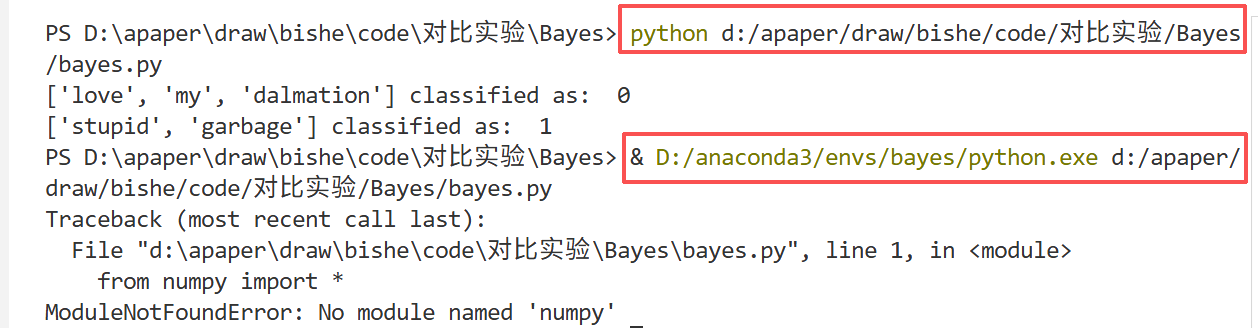
症状:
- 运行
conda activate bayes后,提示符前没有出现(bayes)前缀 - 导入模块时显示
ModuleNotFoundError python -c "import sys; print(sys.executable)"输出的是系统 Python 路径,而不是虚拟环境路径
后面在vscode的终端看到下面的红色提醒,想着去掉它,后面就成功进入我的虚拟环境了,不知道是不是这个起作用了,大家可以试一试
. : 无法加载文件 C:\Users\23222\Documents\WindowsPowerShell\profile.ps1,因为在此系统上禁止运行脚本。有关详
细信息,请参阅 https:/go.microsoft.com/fwlink/?LinkID=135170 中的 about_Execution_Policies。
所在位置 行:1 字符: 3
+ . 'C:\Users\23222\Documents\WindowsPowerShell\profile.ps1'
+   ~~~~~~~~~~~~~~~~~~~~~~~~~~~~~~~~~~~~~~~~~~~~~~~~~~~~~~~~
    + CategoryInfo          : SecurityError: (:) [],PSSecurityException
    + FullyQualifiedErrorId : UnauthorizedAccess
根本原因(可能的)
- PowerShell 执行策略限制 - 脚本无法运行
- conda 初始化不完整 - 环境变量未正确设置
- PowerShell 配置未生效 - 需要重新打开 shell
解决方案
步骤 1:修改 PowerShell 执行策略
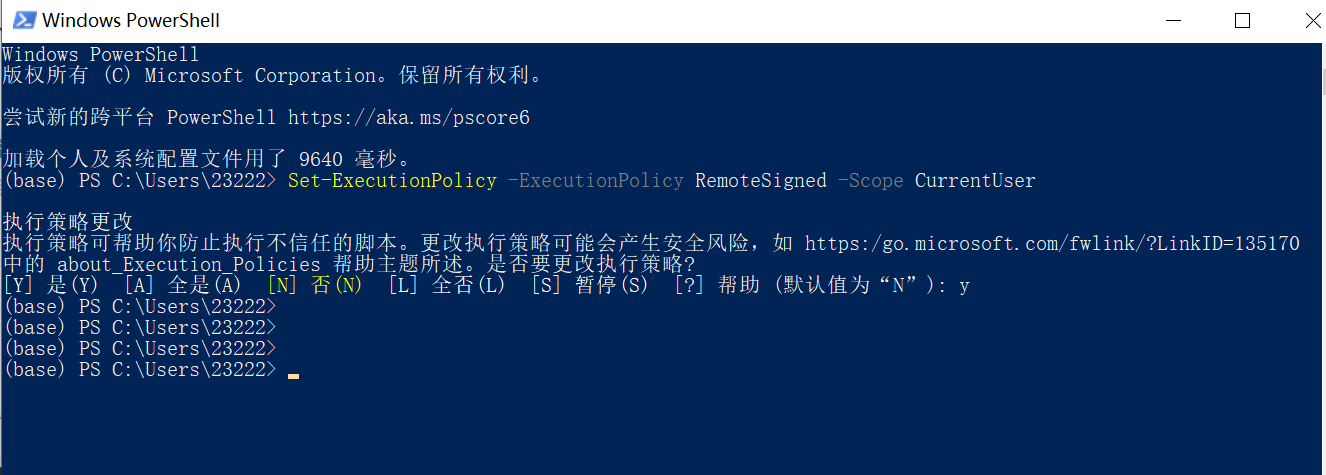
在 PowerShell 中运行:
Set-ExecutionPolicy -ExecutionPolicy RemoteSigned -Scope CurrentUser
选择 Y 确认。
步骤 2:初始化 conda
conda init powershell
等待命令完成,会看到类似输出:
==> For changes to take effect, close and re-open your current shell. <==
步骤 3:关闭并重新打开 PowerShell
- 关闭当前 PowerShell 窗口
- 重新打开 PowerShell(或按
Ctrl + ~打开 VS Code 集成终端)
步骤 4:激活虚拟环境

conda activate bayes
现在提示符前应该显示 (bayes):
(bayes) PS D:\path\to\your\project>
步骤 5:验证(可选)
python -c "import sys; print(sys.executable)"
应该输出虚拟环境的 Python 路径,如:
D:\anaconda3\envs\bayes\python.exe
完成以上步骤后,虚拟环境应该能正常激活和使用。

Agent 垂直技术社区,欢迎活跃、内容共建。
更多推荐



 5
5 0
0- 0


 已为社区贡献2条内容

所有评论(0)