ROS2 项目 vscode 必配.vscode文件
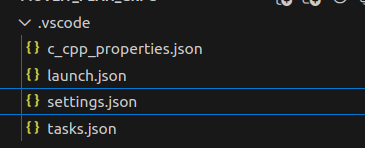
前置条件: 安装好 C++ ROS2 CMAKE插件
1、settings.json + c_cpp_properties.json文件
实现:(可以查看/跳进库函数)
"cmake.buildDirectory": "build",
"cmake.generator": "Unix Makefiles",
"cmake.configureSettings": {
"CMAKE_C_COMPILER": "/usr/bin/gcc",
"CMAKE_CXX_COMPILER": "/usr/bin/g++"
}
+
{
"configurations": [
{
"name": "ROS",
"includePath": [
"${workspaceFolder}/**",
"/opt/ros/humble/include",
"/home/dong/ws_moveit/install"
],
"intelliSenseMode": "gcc-x64",
"compilerPath": "/usr/bin/gcc",
"cStandard": "gnu11",
"cppStandard": "gnu++14"
}
],
"version": 4
}
2、launch.json
实现: 可以打断点调试
{
"version": "0.2.0",
"configurations": [
{
"name": "Debug moveit_plan_grpc node",
"type": "cppdbg",
"request": "launch",
"program": "/home/dong/ws_moveit/install/moveit_plan_grpc/lib/moveit_plan_grpc/robot_server_node",
"args": [],
"cwd": "/home/dong/ws_moveit",
"stopAtEntry": false,
"environment": [],
"MIMode": "gdb",
"setupCommands": [
{
"description": "Enable pretty printing for STL containers",
"text": "-enable-pretty-printing",
"ignoreFailures": true
}
]
}
]
}

Agent 垂直技术社区,欢迎活跃、内容共建。
更多推荐


 5
5 0
0- 0


 已为社区贡献2条内容

所有评论(0)