<script setup> 语法糖【Vue 3】
·
背景 Vue
一个 Vue 组件 = 模板(Template) + 逻辑(Script) + 样式(Style)
<script>的作用是告诉Vue这个组件需要哪些数据、哪些方法,以及他们是如何工作的。
Vue有两种写逻辑的方式
选项式API - Vue 2 主流写法
按选项组织代码。
<script>
export default {
  // 数据
  data() {
    return {
      count: 0
    }
  },
  // 方法
  methods: {
    add() {
      this.count++
    }
  }
}
</script>
按选项组织代码(data、methods、computed…)
当逻辑复杂时,相关代码被分散在不同选项中,难以维护。
比如用户登录功能:
data 里有 username, password
methods 里有 login()
watch 里可能监听输入
computed 里可能有 isFormValid
→ 一个功能被拆得七零八落!
组合式API - Vue 3
把数据+方法组合在一起
按功能组织代码,而不是按选项。
// 所有登录相关逻辑集中在一起
const username = ref('')
const password = ref('')
const login = () => { ... }
const isFormValid = computed(() => ...)
组合式 API
函数式API,把相关逻辑组织在一起,而不是分散在 data/methods 等选项中。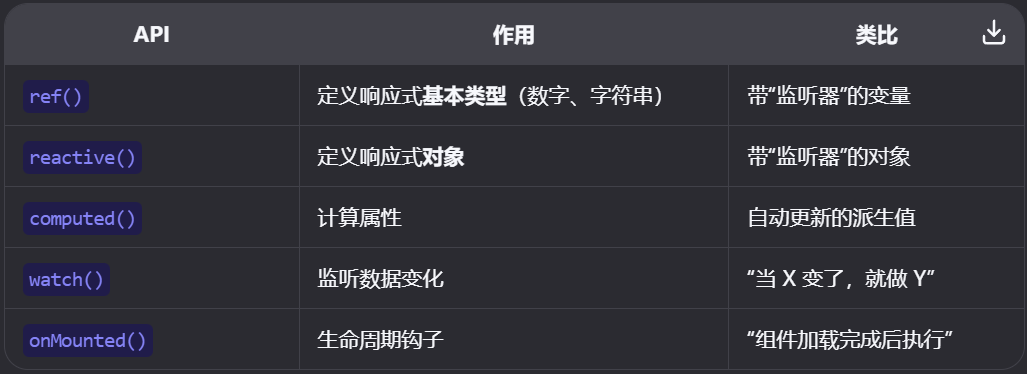
在现代前端开发中,每个.js或.vue文件都是一个独立的模块,模块之间想要共享代码,必须显式导出(export)和导入(import)。
以“用户资料编辑”功能为例:
选项式API
export default {
	data(){
		return {
			name:'',
			email:'',
			isLoading:false
		}
	},
	computed:{
		isEmailValid(){
			return this.email.including('@')
		}
	},
	method:{
		async save(){
			this.isLoading = true
			await api.uodateUser({name: this.name, email: this.email})
			this.isLoading = false
		}
	},
	watch:{
		email(newVal){
			console.log('邮箱修改: ',newVal)
		}
	}
}
组合式 API
<script setup>
import { ref, computed, watch} from 'vue'

// 所有用户资料相关的逻辑放在一起
const name = ref('')
const email = ref('')
const isLoading = ref(false)

const isEmailValid = computed(() => email.value.includes('@'))

watch(email, (newVal) => {
  console.log('邮箱变了:', newVal)
})

async function save() {
  isLoading.value = true
  await updateUser({ name: name.value, email: email.value })
  isLoading.value = false
}
</script>
ref 返回一个带 .value属性的对象

Agent 垂直技术社区,欢迎活跃、内容共建。
更多推荐



 3
3 0
0- 0


 已为社区贡献2条内容

所有评论(0)