React Native for OpenHarmony 实战:贷款计算实现
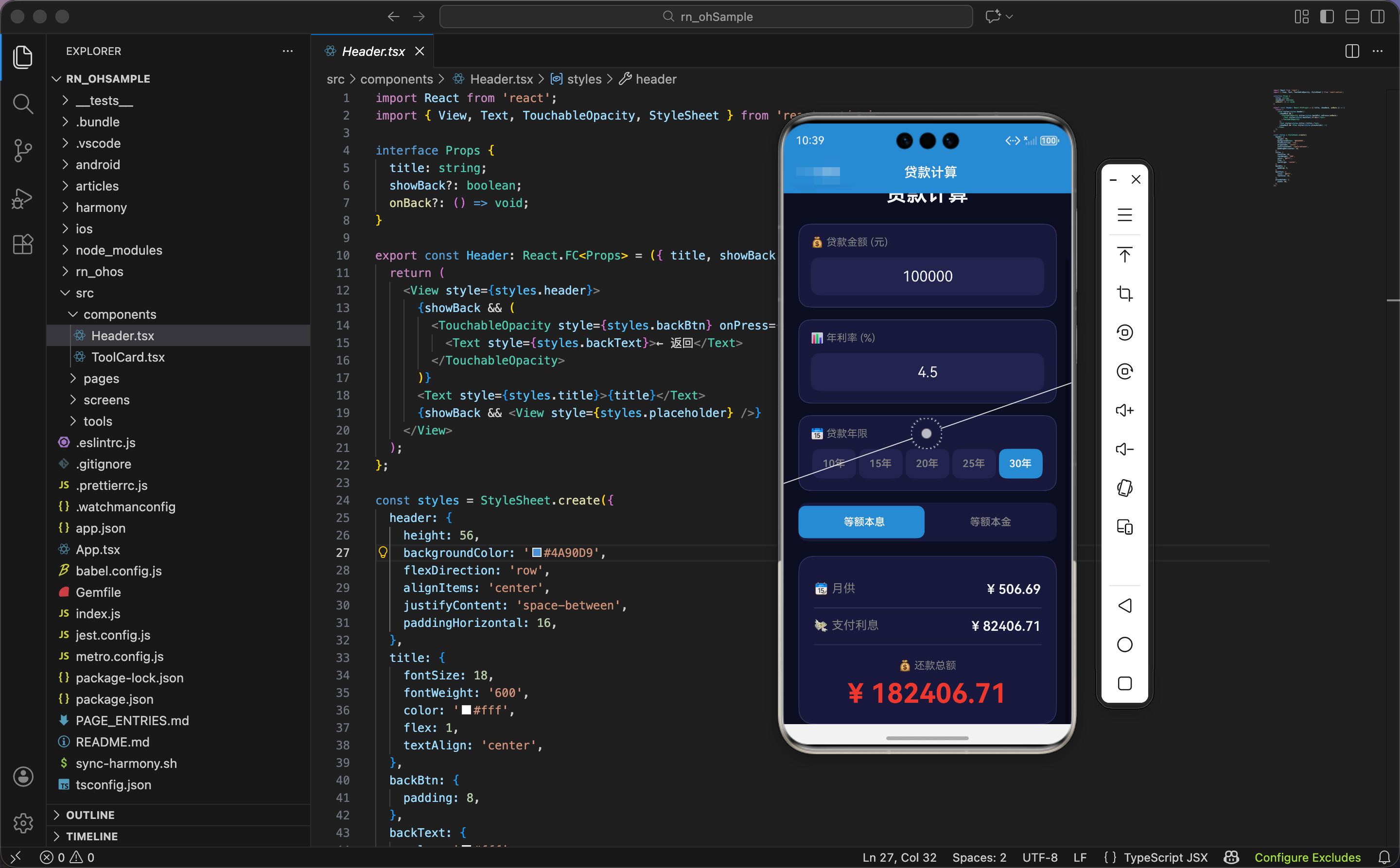
今天我们用 React Native 实现一个贷款计算工具,支持等额本息和等额本金两种还款方式。
状态设计
import React, { useState, useRef, useEffect } from 'react';
import { View, Text, TextInput, TouchableOpacity, StyleSheet, ScrollView, Animated } from 'react-native';

export const LoanCalculator: React.FC = () => {
  const [principal, setPrincipal] = useState('100000');
  const [rate, setRate] = useState('4.5');
  const [years, setYears] = useState('30');
  const [method, setMethod] = useState<'equal' | 'principal'>('equal');

  const resultAnim = useRef(new Animated.Value(1)).current;
  const methodAnim = useRef(new Animated.Value(0)).current;
  const pulseAnim = useRef(new Animated.Value(1)).current;
状态设计包含贷款金额、年利率、贷款年限、还款方式、动画值。
贷款金额:principal 是字符串类型,默认值 '100000'(10 万元)。
年利率:rate 是字符串类型,默认值 '4.5'(4.5%)。
贷款年限:years 是字符串类型,默认值 '30'(30 年)。
还款方式:method 是字面量类型,'equal'(等额本息)或 'principal'(等额本金)。
三个动画值:
resultAnim:结果卡片的缩放动画methodAnim:还款方式指示器的位置动画pulseAnim:还款总额的脉冲动画
为什么默认值是 10 万、4.5%、30 年?因为这是常见的房贷参数。10 万是小额贷款,4.5% 是当前房贷利率,30 年是最长贷款期限。
脉冲动画
  useEffect(() => {
    Animated.loop(
      Animated.sequence([
        Animated.timing(pulseAnim, { toValue: 1.02, duration: 1500, useNativeDriver: true }),
        Animated.timing(pulseAnim, { toValue: 1, duration: 1500, useNativeDriver: true }),
      ])
    ).start();
  }, []);
组件挂载时,启动还款总额的脉冲动画。循环动画让还款总额不断放大缩小,吸引用户注意力。
输入变化动画
  useEffect(() => {
    Animated.timing(methodAnim, {
      toValue: method === 'equal' ? 0 : 1,
      duration: 200,
      useNativeDriver: false,
    }).start();

    Animated.sequence([
      Animated.timing(resultAnim, { toValue: 0.95, duration: 100, useNativeDriver: true }),
      Animated.spring(resultAnim, { toValue: 1, friction: 4, useNativeDriver: true }),
    ]).start();
  }, [principal, rate, years, method]);
监听所有输入变化,触发动画。
还款方式指示器动画:
- 等额本息:动画值 0(左边)
- 等额本金:动画值 1(右边)
useNativeDriver: false:因为要改变left属性
结果卡片动画:序列动画,缩小到 95% 再弹回到 100%。
为什么监听四个输入?因为这四个值都会影响结果。任何一个变化,月供、利息、总额都会变化。
计算函数:等额本息
  const calculate = () => {
    const p = parseFloat(principal) || 0;
    const r = (parseFloat(rate) || 0) / 100 / 12;
    const n = (parseInt(years) || 1) * 12;

    if (method === 'equal') {
      const monthly = p * r * Math.pow(1 + r, n) / (Math.pow(1 + r, n) - 1);
      const total = monthly * n;
      const interest = total - p;
      return { monthly: monthly.toFixed(2), total: total.toFixed(2), interest: interest.toFixed(2) };
等额本息计算公式。
解析输入:
p:贷款本金(元)r:月利率(年利率 / 100 / 12)n:还款月数(年数 × 12)
月供公式:monthly = p * r * (1 + r)^n / ((1 + r)^n - 1)
这是等额本息的标准公式。每月还款额固定,包含本金和利息。
还款总额:total = monthly * n,月供乘以月数。
支付利息:interest = total - p,还款总额减去本金。
为什么用这个公式?因为等额本息的特点是"每月还款额相同"。公式推导基于等比数列求和,保证每月还款额固定。
举例:贷款 10 万,年利率 4.5%,30 年。
- p = 100000
- r = 4.5 / 100 / 12 = 0.00375
- n = 30 × 12 = 360
- monthly = 100000 × 0.00375 × (1.00375)^360 / ((1.00375)^360 - 1) ≈ 506.69
- total = 506.69 × 360 ≈ 182408.4
- interest = 182408.4 - 100000 = 82408.4
计算函数:等额本金
    } else {
      const monthlyPrincipal = p / n;
      const firstMonth = monthlyPrincipal + p * r;
      const lastMonth = monthlyPrincipal + monthlyPrincipal * r;
      const totalInterest = (p * r * (n + 1)) / 2;
      return {
        monthly: `${firstMonth.toFixed(0)} ~ ${lastMonth.toFixed(0)}`,
        total: (p + totalInterest).toFixed(2),
        interest: totalInterest.toFixed(2)
      };
    }
  };

  const result = calculate();
  const methodPosition = methodAnim.interpolate({ inputRange: [0, 1], outputRange: ['0%', '50%'] });
等额本金计算公式。
每月还本金:monthlyPrincipal = p / n,本金平均分摊到每个月。
首月还款:firstMonth = monthlyPrincipal + p * r,本金 + 首月利息。
末月还款:lastMonth = monthlyPrincipal + monthlyPrincipal * r,本金 + 末月利息。
总利息:totalInterest = (p * r * (n + 1)) / 2,等差数列求和公式。
月供显示:"首月 ~ 末月",因为每月还款额递减。
为什么用等差数列求和?因为等额本金的特点是"每月还本金相同,利息递减"。每月利息 = 剩余本金 × 月利率,剩余本金每月减少,利息也每月减少,形成等差数列。
举例:贷款 10 万,年利率 4.5%,30 年。
- monthlyPrincipal = 100000 / 360 ≈ 277.78
- firstMonth = 277.78 + 100000 × 0.00375 = 652.78
- lastMonth = 277.78 + 277.78 × 0.00375 ≈ 278.82
- totalInterest = (100000 × 0.00375 × 361) / 2 = 67687.5
指示器位置插值:把动画值 0-1 映射到位置 0%-50%。
界面渲染:头部和输入
  return (
    <ScrollView style={styles.container}>
      <View style={styles.header}>
        <Text style={styles.headerIcon}>🏦</Text>
        <Text style={styles.headerTitle}>贷款计算</Text>
      </View>

      <View style={styles.inputCard}>
        <Text style={styles.label}>💰 贷款金额 (元)</Text>
        <View style={styles.inputWrapper}>
          <TextInput style={styles.input} value={principal} onChangeText={setPrincipal} keyboardType="numeric" placeholderTextColor="#666" />
        </View>
      </View>

      <View style={styles.inputCard}>
        <Text style={styles.label}>📊 年利率 (%)</Text>
        <View style={styles.inputWrapper}>
          <TextInput style={styles.input} value={rate} onChangeText={setRate} keyboardType="numeric" placeholderTextColor="#666" />
        </View>
      </View>
头部显示标题,输入卡片包含贷款金额和年利率。
头部:
- 图标:🏦 银行
- 标题:贷款计算
贷款金额:
- 标签:💰 贷款金额 (元)
- 输入框:字号 20,居中对齐
年利率:
- 标签:📊 年利率 (%)
- 输入框:字号 20,居中对齐
贷款年限选择
      <View style={styles.inputCard}>
        <Text style={styles.label}>📅 贷款年限</Text>
        <View style={styles.yearBtns}>
          {[10, 15, 20, 25, 30].map(y => (
            <TouchableOpacity key={y} style={[styles.yearBtn, years === String(y) && styles.yearBtnActive]} onPress={() => setYears(String(y))} activeOpacity={0.7}>
              <Text style={[styles.yearText, years === String(y) && styles.yearTextActive]}>{y}年</Text>
            </TouchableOpacity>
          ))}
        </View>
      </View>
贷款年限卡片包含快速选择按钮。
快速选择按钮:
- 5 个按钮:10、15、20、25、30 年
- 横向布局,每个按钮占相同宽度(
flex: 1) - 当前选中的按钮用蓝色背景
为什么这 5 个年限?因为这是常见的贷款年限。10 年(短期)、15 年(中期)、20 年(中长期)、25 年(长期)、30 年(最长期)。
还款方式切换
      <View style={styles.methodContainer}>
        <Animated.View style={[styles.methodIndicator, { left: methodPosition }]} />
        <TouchableOpacity style={styles.methodBtn} onPress={() => setMethod('equal')} activeOpacity={0.7}>
          <Text style={[styles.methodText, method === 'equal' && styles.methodTextActive]}>等额本息</Text>
        </TouchableOpacity>
        <TouchableOpacity style={styles.methodBtn} onPress={() => setMethod('principal')} activeOpacity={0.7}>
          <Text style={[styles.methodText, method === 'principal' && styles.methodTextActive]}>等额本金</Text>
        </TouchableOpacity>
      </View>
还款方式切换器包含指示器和两个按钮。
指示器:
- 绝对定位,宽度 50%
- 位置由动画值控制
- 蓝色背景,圆角
两个按钮:
- 等额本息:左边
- 等额本金:右边
- 当前选中的按钮文字用白色
为什么用滑动指示器?因为滑动指示器能清楚地显示"当前选择哪个"。指示器从左滑到右,或从右滑到左,动画效果让切换更生动。
结果显示
      <Animated.View style={[styles.result, { transform: [{ scale: resultAnim }] }]}>
        <View style={styles.resultItem}>
          <Text style={styles.resultLabel}>📆 月供</Text>
          <Text style={styles.resultValue}>¥ {result.monthly}</Text>
        </View>
        <View style={styles.resultItem}>
          <Text style={styles.resultLabel}>💸 支付利息</Text>
          <Text style={styles.resultValue}>¥ {result.interest}</Text>
        </View>
        <Animated.View style={[styles.resultItemMain, { transform: [{ scale: pulseAnim }] }]}>
          <Text style={styles.resultLabelMain}>💰 还款总额</Text>
          <Text style={styles.resultValueMain}>¥ {result.total}</Text>
        </Animated.View>
      </Animated.View>
    </ScrollView>
  );
};
结果卡片显示月供、支付利息、还款总额。
结果卡片动画:应用缩放动画,输入变化时缩小再弹回。
月供:
- 标签:📆 月供
- 金额:白色文字,字号 18
- 等额本金显示范围(“首月 ~ 末月”)
支付利息:
- 标签:💸 支付利息
- 金额:白色文字,字号 18
还款总额:
- 标签:💰 还款总额
- 金额:红色文字,字号 36,应用脉冲动画
- 居中对齐
为什么还款总额用红色?因为红色代表"支出",提醒用户"这是要付的总金额"。红色 + 大字号 + 脉冲动画,让还款总额成为视觉焦点。
鸿蒙 ArkTS 对比:贷款计算
@State principal: string = '100000'
@State rate: string = '4.5'
@State years: string = '30'
@State method: string = 'equal'

calculate() {
  const p = parseFloat(this.principal) || 0
  const r = (parseFloat(this.rate) || 0) / 100 / 12
  const n = (parseInt(this.years) || 1) * 12

  if (this.method === 'equal') {
    const monthly = p * r * Math.pow(1 + r, n) / (Math.pow(1 + r, n) - 1)
    const total = monthly * n
    const interest = total - p
    return { monthly: monthly.toFixed(2), total: total.toFixed(2), interest: interest.toFixed(2) }
  } else {
    const monthlyPrincipal = p / n
    const firstMonth = monthlyPrincipal + p * r
    const lastMonth = monthlyPrincipal + monthlyPrincipal * r
    const totalInterest = (p * r * (n + 1)) / 2
    return {
      monthly: `${firstMonth.toFixed(0)} ~ ${lastMonth.toFixed(0)}`,
      total: (p + totalInterest).toFixed(2),
      interest: totalInterest.toFixed(2)
    }
  }
}
ArkTS 中的贷款计算逻辑完全一样。核心是两个公式:等额本息用复利公式,等额本金用等差数列求和。parseFloat()、parseInt()、Math.pow()、toFixed() 都是标准 JavaScript API,跨平台通用。
样式定义
const styles = StyleSheet.create({
  container: { flex: 1, backgroundColor: '#0f0f23', padding: 20 },
  header: { alignItems: 'center', marginBottom: 24 },
  headerIcon: { fontSize: 50, marginBottom: 8 },
  headerTitle: { fontSize: 28, fontWeight: '700', color: '#fff' },
  inputCard: { backgroundColor: '#1a1a3e', borderRadius: 16, padding: 16, marginBottom: 16, borderWidth: 1, borderColor: '#3a3a6a' },
  label: { fontSize: 14, color: '#888', marginBottom: 12 },
  inputWrapper: { backgroundColor: '#252550', borderRadius: 12 },
  input: { padding: 14, fontSize: 20, color: '#fff', textAlign: 'center' },
  yearBtns: { flexDirection: 'row' },
  yearBtn: { flex: 1, padding: 12, backgroundColor: '#252550', borderRadius: 10, marginHorizontal: 2, alignItems: 'center' },
  yearBtnActive: { backgroundColor: '#4A90D9' },
  yearText: { color: '#888', fontWeight: '600' },
  yearTextActive: { color: '#fff' },
  methodContainer: { flexDirection: 'row', backgroundColor: '#1a1a3e', borderRadius: 12, padding: 4, marginBottom: 20, position: 'relative' },
  methodIndicator: { position: 'absolute', width: '50%', height: '100%', backgroundColor: '#4A90D9', borderRadius: 10, top: 4 },
  methodBtn: { flex: 1, padding: 14, alignItems: 'center', zIndex: 1 },
  methodText: { color: '#888', fontWeight: '600' },
  methodTextActive: { color: '#fff' },
  result: { backgroundColor: '#1a1a3e', padding: 20, borderRadius: 20, borderWidth: 1, borderColor: '#3a3a6a' },
  resultItem: { flexDirection: 'row', justifyContent: 'space-between', paddingVertical: 14, borderBottomWidth: 1, borderBottomColor: '#3a3a6a' },
  resultLabel: { fontSize: 16, color: '#888' },
  resultValue: { fontSize: 18, color: '#fff', fontWeight: '600' },
  resultItemMain: { paddingTop: 20, alignItems: 'center' },
  resultLabelMain: { fontSize: 14, color: '#888', marginBottom: 8 },
  resultValueMain: { fontSize: 36, color: '#e74c3c', fontWeight: '700' },
});
容器用深蓝黑色背景。年限按钮横向布局,每个按钮占相同宽度。还款方式切换器用相对定位,指示器用绝对定位。还款总额字号 36,红色。
小结
这个贷款计算工具展示了复杂金融计算的实现。等额本息用复利公式,等额本金用等差数列求和。滑动指示器让还款方式切换更生动。脉冲动画让还款总额更醒目。
欢迎加入开源鸿蒙跨平台社区:https://openharmonycrossplatform.csdn.net

Agent 垂直技术社区,欢迎活跃、内容共建。
更多推荐


 28
28 0
0- 0


 已为社区贡献1条内容

所有评论(0)