Angular demo(简化版,但保留选中、取消、Filter 应用、再次查看的逻辑)代码详细介绍
·
业务逻辑梳理
业务流程:
- 初始化:
-
可能有历史选中值(previousAppliedFilters)
-
把历史值 normalize 成对象数组 { name, value, checked }
- 选中 / 取消 Test Type:
-
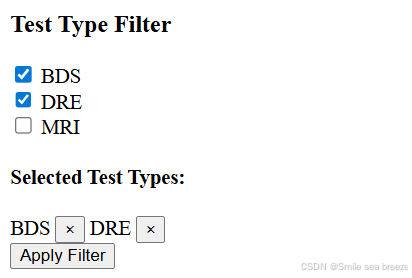
点击 checkbox 或标签上的 ×
-
对象的 checked 属性同步更新
-
选中列表 selectedTestType / selectedLocationTestType 同步更新
- 应用 Filter:
-
点击 “Apply Filter”
-
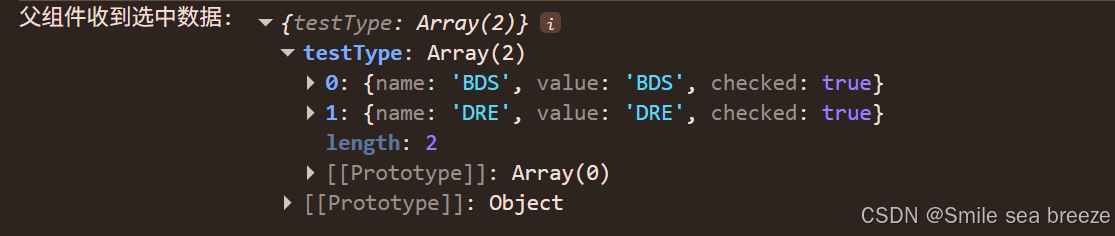
将选中值整理(可选择发送给后端,或者 emit 给父组件)
-
可以保存为 previousAppliedFilters 方便下次打开初始化
- 再次查看:
-
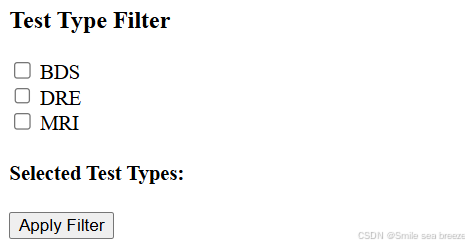
Filter 应用后,重新打开弹窗
-
初始化逻辑会用 previousAppliedFilters 恢复选中状态
-
UI 显示已选项(标签 + ×)
scheduling-filter.component.html
<!-- scheduling-filter.component.html -->
<div>
  <h3>Test Type Filter</h3>

  <div *ngFor="let item of testTypeList">
    <input type="checkbox" [checked]="item.checked" (change)="onChecked(item, 'testType')" />
    {{ item.name }}
  </div>

  <div>
    <h4>Selected Test Types:</h4>
    <span *ngFor="let item of selectedTestType">
      {{ item.name }}
      <button (click)="removeTestType(item)">×</button>
    </span>
  </div>

  <button (click)="applyFilter()">Apply Filter</button>
</div>
scheduling-filter.component.ts
// scheduling-filter.component.ts
import { Component, OnInit, Output, EventEmitter } from '@angular/core';

@Component({
  selector: 'app-scheduling-filter',
  templateUrl: './scheduling-filter.component.html',
  styleUrls: ['./scheduling-filter.component.css']
})
export class SchedulingFilterComponent implements OnInit {
  @Output() appliedFilter = new EventEmitter<any>();

  // 模拟 Test Type 数据
  testTypeList = [
    { name: 'BDS', value: 'BDS', checked: false },
    { name: 'DRE', value: 'DRE', checked: false },
    { name: 'MRI', value: 'MRI', checked: false }
  ];

  selectedTestType: any[] = [];
  searchedTestType: any[] = [];

  previousAppliedFilters: any = {
    testType: ['BDS'] // 历史选中
  };

  ngOnInit(): void {
    // 初始化历史值
    if (this.previousAppliedFilters.testType?.length) {
      this.selectedTestType = this.previousAppliedFilters.testType
        .map((t: any) => {
          if (typeof t === 'string') return { name: t, value: t, checked: true };
          if (t?.name) return { ...t, checked: true };
          return null;
        })
        .filter(Boolean);

      // 同步 testTypeList checked
      this.testTypeList.forEach(item => {
        item.checked = this.selectedTestType.some(sel => sel.name === item.name);
      });

      this.searchedTestType = [...this.testTypeList];
    }
  }

  onChecked(event: any, selectedFilter: string) {
    const targetList = selectedFilter === 'testType' ? this.selectedTestType : [];
    this.testTypeList.forEach(item => {
      if (item.name === event.name) {
        item.checked = !item.checked;
      }
    });

    // 更新 selectedTestType
    this.selectedTestType = this.testTypeList.filter(item => item.checked);
  }

  removeTestType(item: any) {
    item.checked = false;
    this.selectedTestType = this.selectedTestType.filter(sel => sel.name !== item.name);
  }

  applyFilter() {
    console.log('Apply Filter Selected:', this.selectedTestType);
    this.appliedFilter.emit({
      testType: this.selectedTestType.map(t => ({ ...t })) // 深拷贝
    });

    // 保存历史选中
    this.previousAppliedFilters.testType = this.selectedTestType.map(t => t.name);
  }
}
app.component.html
<app-scheduling-filter
  (appliedFilter)="onAppliedFilter($event)">
</app-scheduling-filter>
app.component.ts
  onAppliedFilter(selected: any[]){
     console.log('父组件收到选中数据:', selected);


}

Agent 垂直技术社区,欢迎活跃、内容共建。
更多推荐


 3
3 0
0- 0


 已为社区贡献2条内容

所有评论(0)