Flutter & OpenHarmony OA系统考勤打卡组件开发指南
前言
考勤管理是OA系统中的基础功能模块,打卡组件作为考勤功能的核心交互界面,需要提供便捷的打卡操作、清晰的打卡状态展示、准确的位置定位等功能。本文将详细介绍如何使用Flutter和OpenHarmony开发一个功能完善的考勤打卡组件,帮助企业实现高效的考勤管理。
组件设计要点
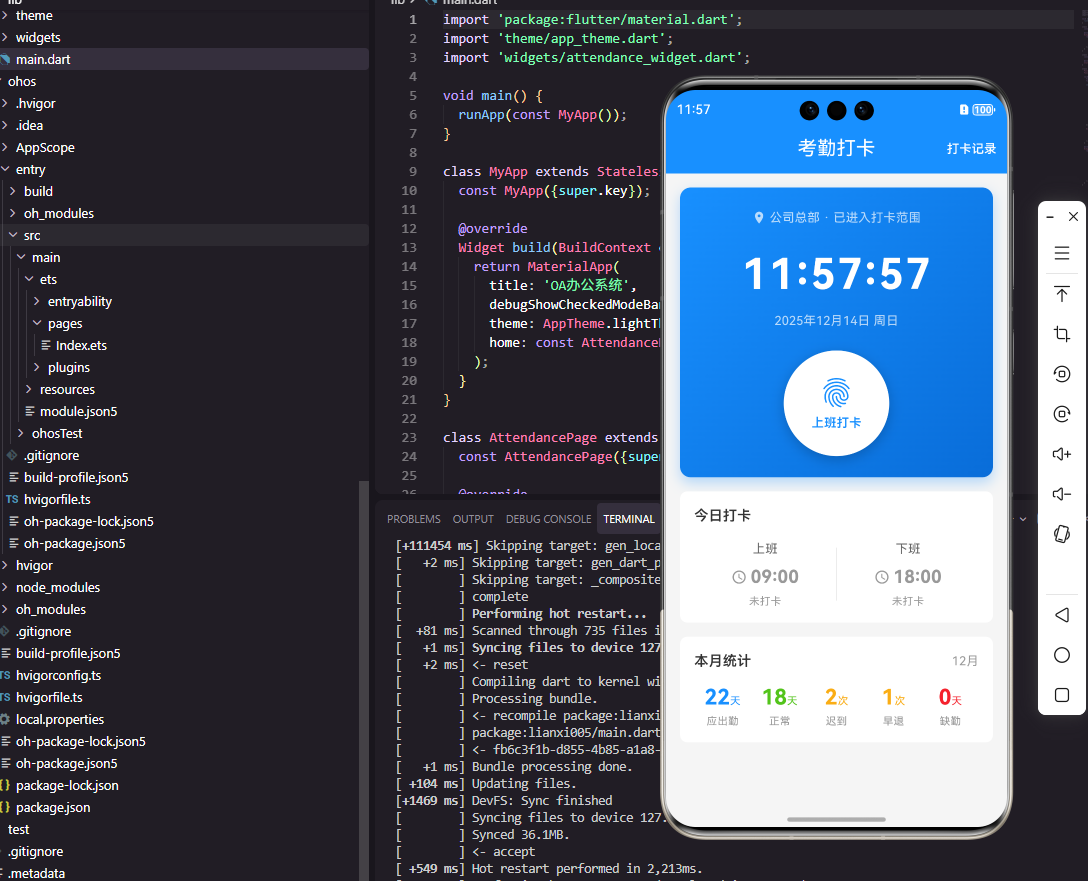
考勤打卡组件的核心是打卡按钮,需要根据当前时间和打卡状态显示不同的样式和文案。组件还需要展示当日的打卡记录、当前位置信息、是否在打卡范围内等信息。在交互设计上,打卡按钮要足够醒目,打卡成功后要有明确的反馈。同时需要处理各种异常情况,如定位失败、网络错误等。
Flutter端实现
定义打卡记录数据模型:
class AttendanceRecord {
  final String id;
  final DateTime time;
  final String type; // clockIn or clockOut
  final String location;
  final double latitude;
  final double longitude;
  final String status; // normal, late, early, outside

  AttendanceRecord({
    required this.id,
    required this.time,
    required this.type,
    required this.location,
    required this.latitude,
    required this.longitude,
    required this.status,
  });
}
打卡记录模型包含打卡时间、类型、位置坐标和状态信息。status字段记录打卡状态,如正常、迟到、早退、外勤等,用于后续的考勤统计和异常处理。位置信息包含地址文本和经纬度坐标,便于在地图上展示和距离计算。
打卡组件的基础结构:
class AttendanceWidget extends StatefulWidget {
final Function(AttendanceRecord) onClockIn;
final Function(AttendanceRecord) onClockOut;
const AttendanceWidget({
Key? key,
required this.onClockIn,
required this.onClockOut,
}) : super(key: key);
State<AttendanceWidget> createState() => _AttendanceWidgetState();
}
组件通过回调函数将打卡结果传递给父组件处理,父组件负责将打卡记录提交到服务器。这种设计使打卡组件专注于UI交互,业务逻辑由上层处理。
状态类中的关键变量:
class _AttendanceWidgetState extends State<AttendanceWidget> {
AttendanceRecord? _clockInRecord;
AttendanceRecord? _clockOutRecord;
String _currentLocation = '正在定位...';
bool _isInRange = false;
bool _isLoading = false;
void initState() {
super.initState();
_getCurrentLocation();
_loadTodayRecords();
}
}
状态类管理上下班打卡记录、当前位置、是否在打卡范围内等信息。initState中初始化定位和加载当日打卡记录,确保组件显示时数据已准备好。
打卡按钮的构建:
Widget _buildClockButton() {
  final now = DateTime.now();
  final isClockInTime = now.hour < 12;
  final hasClocked = isClockInTime ? _clockInRecord != null : _clockOutRecord != null;

  return GestureDetector(
    onTap: hasClocked ? null : _handleClock,
    child: Container(
      width: 160,
      height: 160,
      decoration: BoxDecoration(
        shape: BoxShape.circle,
        gradient: LinearGradient(
          colors: hasClocked
            ? [Colors.grey, Colors.grey.shade600]
            : [Colors.blue, Colors.blue.shade700],
          begin: Alignment.topLeft,
          end: Alignment.bottomRight,
        ),
        boxShadow: [
          BoxShadow(
            color: (hasClocked ? Colors.grey : Colors.blue).withOpacity(0.3),
            blurRadius: 20,
            offset: Offset(0, 10),
          ),
        ],
      ),
      child: Column(
        mainAxisAlignment: MainAxisAlignment.center,
        children: [
          Text(
            hasClocked ? '已打卡' : (isClockInTime ? '上班打卡' : '下班打卡'),
            style: TextStyle(color: Colors.white, fontSize: 18),
          ),
          Text(
            _formatTime(now),
            style: TextStyle(color: Colors.white70, fontSize: 14),
          ),
        ],
      ),
    ),
  );
}
打卡按钮使用圆形设计,通过渐变色和阴影创造立体效果。根据当前时间和打卡状态显示不同的文案和颜色,已打卡状态显示灰色并禁用点击。按钮中央显示打卡类型和当前时间。
OpenHarmony鸿蒙端实现
定义打卡记录接口:
interface AttendanceRecord {
  id: string
  time: number
  type: 'clockIn' | 'clockOut'
  location: string
  latitude: number
  longitude: number
  status: 'normal' | 'late' | 'early' | 'outside'
}
使用联合类型定义打卡类型和状态,提供更好的类型安全。时间使用时间戳格式,便于计算和比较。
打卡组件的基础结构:
@Component
struct AttendanceWidget {
  @State clockInRecord: AttendanceRecord | null = null
  @State clockOutRecord: AttendanceRecord | null = null
  @State currentLocation: string = '正在定位...'
  @State isInRange: boolean = false
  @State isLoading: boolean = false

  private onClockIn: (record: AttendanceRecord) => void = () => {}
  private onClockOut: (record: AttendanceRecord) => void = () => {}
}
使用@State管理打卡记录和位置状态,回调函数用于通知父组件打卡结果。null类型表示尚未打卡的状态。
打卡按钮的构建:
@Builder
ClockButton() {
  Column() {
    Text(this.getButtonText())
      .fontSize(20)
      .fontColor(Color.White)
      .fontWeight(FontWeight.Medium)

    Text(this.getCurrentTime())
      .fontSize(14)
      .fontColor('#FFFFFFB3')
      .margin({ top: 4 })
  }
  .width(160)
  .height(160)
  .borderRadius(80)
  .linearGradient({
    angle: 135,
    colors: this.hasClocked()
      ? [['#9E9E9E', 0], ['#757575', 1]]
      : [['#1890FF', 0], ['#096DD9', 1]]
  })
  .shadow({
    radius: 20,
    color: this.hasClocked() ? '#4D9E9E9E' : '#4D1890FF',
    offsetY: 10
  })
  .justifyContent(FlexAlign.Center)
  .onClick(() => {
    if (!this.hasClocked()) {
      this.handleClock()
    }
  })
}
鸿蒙使用linearGradient属性创建渐变背景,angle设置渐变角度,colors数组定义渐变色和位置。shadow属性创建阴影效果,颜色使用带透明度的十六进制值。
位置信息展示:
@Builder
LocationInfo() {
  Row() {
    Image($r('app.media.location'))
      .width(16)
      .height(16)

    Text(this.currentLocation)
      .fontSize(14)
      .fontColor('#666666')
      .margin({ left: 4 })

    if (this.isInRange) {
      Text('范围内')
        .fontSize(12)
        .fontColor('#52C41A')
        .backgroundColor('#F6FFED')
        .padding({ left: 8, right: 8, top: 2, bottom: 2 })
        .borderRadius(4)
        .margin({ left: 8 })
    } else {
      Text('范围外')
        .fontSize(12)
        .fontColor('#F5222D')
        .backgroundColor('#FFF1F0')
        .padding({ left: 8, right: 8, top: 2, bottom: 2 })
        .borderRadius(4)
        .margin({ left: 8 })
    }
  }
  .width('100%')
  .justifyContent(FlexAlign.Center)
  .margin({ top: 16 })
}
位置信息区域显示当前地址和是否在打卡范围内。范围内显示绿色标签,范围外显示红色标签,让用户清楚了解当前打卡状态。这种视觉反馈对于外勤打卡场景尤为重要。
打卡记录展示:
@Builder
RecordCard(record: AttendanceRecord, title: string) {
  Row() {
    Column() {
      Text(title)
        .fontSize(14)
        .fontColor('#999999')
      Text(this.formatTime(record.time))
        .fontSize(24)
        .fontWeight(FontWeight.Medium)
        .margin({ top: 4 })
    }
    .alignItems(HorizontalAlign.Start)

    Blank()

    Text(this.getStatusText(record.status))
      .fontSize(12)
      .fontColor(this.getStatusColor(record.status))
      .backgroundColor(this.getStatusBgColor(record.status))
      .padding({ left: 8, right: 8, top: 4, bottom: 4 })
      .borderRadius(4)
  }
  .width('100%')
  .padding(16)
  .backgroundColor(Color.White)
  .borderRadius(8)
}
打卡记录卡片展示打卡时间和状态,状态标签根据正常、迟到、早退等不同状态显示不同颜色。Blank组件实现两端对齐布局,使时间靠左、状态标签靠右。
获取当前位置的方法:
private async getCurrentLocation() {
  try {
    const location = await geoLocationManager.getCurrentLocation()
    const addresses = await geoLocationManager.getAddressesFromLocation({
      latitude: location.latitude,
      longitude: location.longitude
    })
    if (addresses.length > 0) {
      this.currentLocation = addresses[0].placeName || '未知位置'
    }
    this.checkInRange(location.latitude, location.longitude)
  } catch (error) {
    this.currentLocation = '定位失败'
  }
}
使用鸿蒙的geoLocationManager获取当前位置坐标,然后通过逆地理编码获取地址文本。checkInRange方法计算当前位置与公司位置的距离,判断是否在打卡范围内。异常处理确保定位失败时给用户明确提示。
总结
本文详细介绍了Flutter和OpenHarmony平台上考勤打卡组件的开发方法。打卡组件是OA系统中使用频率最高的功能之一,其设计质量直接影响员工的使用体验。通过醒目的打卡按钮、清晰的状态展示、准确的位置定位,可以帮助员工快速完成每日打卡。两个平台都提供了定位服务API,开发者需要注意处理权限申请和异常情况。
欢迎加入开源鸿蒙跨平台社区:https://openharmonycrossplatform.csdn.net

Agent 垂直技术社区,欢迎活跃、内容共建。
更多推荐


 13
13 0
0- 0


 已为社区贡献25条内容

所有评论(0)