Flutter & OpenHarmony OA系统会议室预约组件开发指南
前言
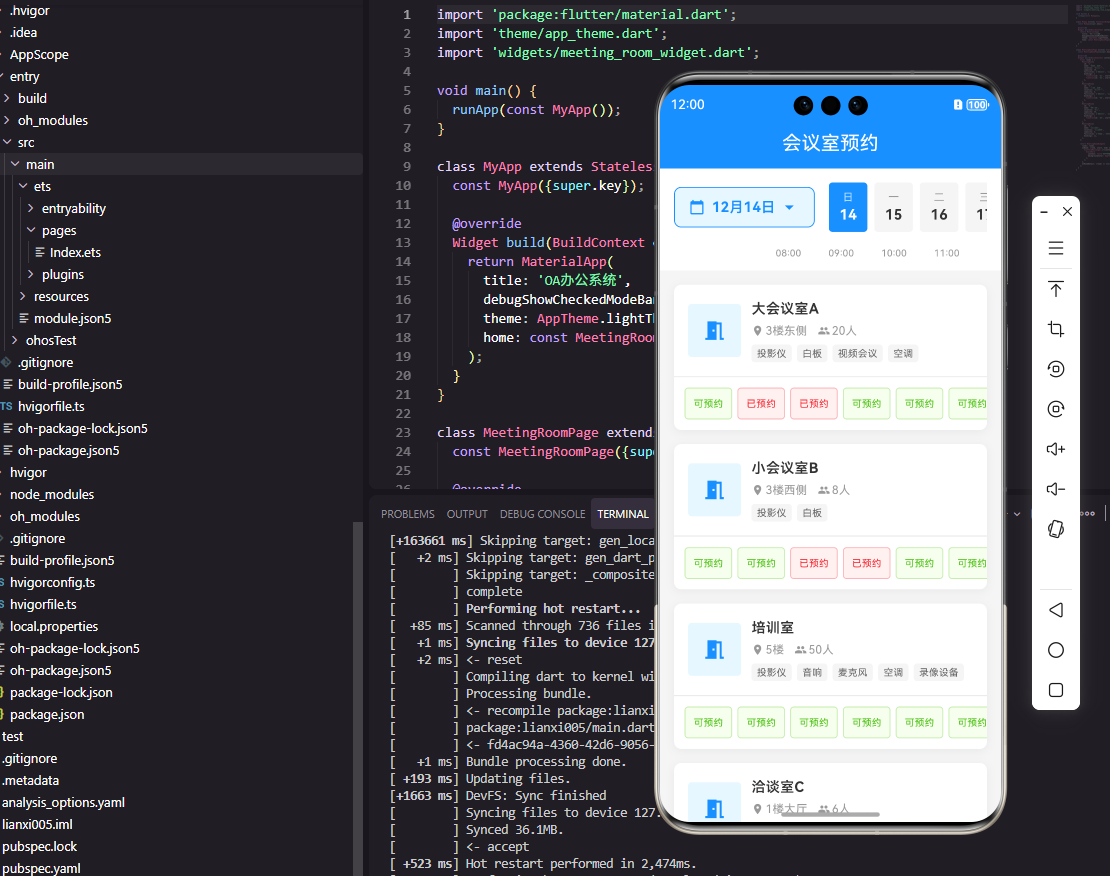
会议室预约是OA系统中的高频功能,它帮助企业合理分配会议资源,避免会议室冲突。一个优秀的会议室预约组件需要直观展示会议室的可用状态、支持时间段选择、提供预约冲突检测等功能。本文将详细介绍如何使用Flutter和OpenHarmony开发一个功能完善的会议室预约组件,提升企业的会议管理效率。
组件功能设计
会议室预约组件的核心是时间轴视图,横轴表示时间,纵轴表示不同的会议室。已预约的时间段用色块标识,用户可以在空闲时间段点击或拖拽选择预约时间。组件还需要支持日期切换、会议室筛选、预约详情查看等功能。在交互设计上,要让用户能够快速了解会议室的整体使用情况。
Flutter端实现
定义会议室和预约数据模型:
class MeetingRoom {
  final String id;
  final String name;
  final int capacity;
  final List<String> facilities;
  final String location;

  MeetingRoom({
    required this.id,
    required this.name,
    required this.capacity,
    required this.facilities,
    required this.location,
  });
}

class Reservation {
  final String id;
  final String roomId;
  final String title;
  final DateTime startTime;
  final DateTime endTime;
  final String organizer;

  Reservation({
    required this.id,
    required this.roomId,
    required this.title,
    required this.startTime,
    required this.endTime,
    required this.organizer,
  });
}
MeetingRoom模型包含会议室的基本信息,capacity表示容纳人数,facilities列出设备设施如投影仪、白板等。Reservation模型记录预约信息,包含预约时间段和组织者信息。两个模型通过roomId关联。
预约组件的基础结构:
class MeetingRoomBooking extends StatefulWidget {
final List<MeetingRoom> rooms;
final List<Reservation> reservations;
final Function(Reservation) onBook;
const MeetingRoomBooking({
Key? key,
required this.rooms,
required this.reservations,
required this.onBook,
}) : super(key: key);
State<MeetingRoomBooking> createState() => _MeetingRoomBookingState();
}
组件接收会议室列表、已有预约列表和预约回调函数。这种设计使组件专注于UI展示和交互,预约的业务逻辑由父组件处理,便于与不同的后端服务集成。
状态类中的关键变量:
class _MeetingRoomBookingState extends State<MeetingRoomBooking> {
  DateTime _selectedDate = DateTime.now();
  TimeOfDay? _startTime;
  TimeOfDay? _endTime;
  String? _selectedRoomId;

  List<Reservation> get _todayReservations {
    return widget.reservations.where((r) =>
      r.startTime.year == _selectedDate.year &&
      r.startTime.month == _selectedDate.month &&
      r.startTime.day == _selectedDate.day
    ).toList();
  }
}
状态类管理选中的日期、时间段和会议室。_todayReservations是计算属性,根据选中日期过滤出当天的预约记录,用于在时间轴上显示已预约的时间段。
时间轴视图的构建:
Widget _buildTimelineView() {
  return SingleChildScrollView(
    scrollDirection: Axis.horizontal,
    child: Row(
      children: List.generate(24, (hour) {
        return Container(
          width: 60,
          child: Column(
            children: [
              Text('${hour.toString().padLeft(2, '0')}:00'),
              ...widget.rooms.map((room) => _buildTimeSlot(room, hour)),
            ],
          ),
        );
      }),
    ),
  );
}
时间轴使用水平滚动的Row构建24个小时列,每列包含时间标签和各会议室的时间槽。padLeft方法确保小时数显示为两位数格式。这种布局让用户能够直观地看到所有会议室在各时间段的使用情况。
时间槽的构建:
Widget _buildTimeSlot(MeetingRoom room, int hour) {
  final reservation = _getReservationAt(room.id, hour);
  final isSelected = _selectedRoomId == room.id &&
    _startTime?.hour == hour;

  return GestureDetector(
    onTap: () => _selectTimeSlot(room.id, hour),
    child: Container(
      height: 40,
      margin: EdgeInsets.all(2),
      decoration: BoxDecoration(
        color: reservation != null
          ? Colors.blue.withOpacity(0.3)
          : (isSelected ? Colors.green.withOpacity(0.3) : Colors.grey.shade100),
        borderRadius: BorderRadius.circular(4),
        border: isSelected ? Border.all(color: Colors.green, width: 2) : null,
      ),
    ),
  );
}
时间槽根据预约状态和选中状态显示不同颜色,已预约显示蓝色,选中显示绿色边框,空闲显示灰色。点击空闲时间槽可以选择预约时间,这种交互方式直观易用。
OpenHarmony鸿蒙端实现
定义会议室和预约接口:
interface MeetingRoom {
  id: string
  name: string
  capacity: number
  facilities: string[]
  location: string
}

interface Reservation {
  id: string
  roomId: string
  title: string
  startTime: number
  endTime: number
  organizer: string
}
使用interface定义数据结构,时间使用时间戳格式便于计算。facilities使用字符串数组存储设备列表,如[‘投影仪’, ‘白板’, ‘视频会议’]。
预约组件的基础结构:
@Component
struct MeetingRoomBooking {
  @Prop rooms: MeetingRoom[] = []
  @Prop reservations: Reservation[] = []
  @State selectedDate: Date = new Date()
  @State selectedRoomId: string = ''
  @State startHour: number = -1
  @State endHour: number = -1

  private onBook: (reservation: Reservation) => void = () => {}
}
使用@State管理选中状态,startHour和endHour初始值为-1表示未选择。@Prop接收会议室和预约数据,回调函数用于提交预约。
日期选择器的构建:
@Builder
DateSelector() {
  Row() {
    Image($r('app.media.arrow_left'))
      .width(24)
      .onClick(() => this.changeDate(-1))

    Text(this.formatDate(this.selectedDate))
      .fontSize(16)
      .fontWeight(FontWeight.Medium)
      .margin({ left: 16, right: 16 })

    Image($r('app.media.arrow_right'))
      .width(24)
      .onClick(() => this.changeDate(1))
  }
  .width('100%')
  .justifyContent(FlexAlign.Center)
  .padding(16)
}
日期选择器使用左右箭头切换日期,中间显示当前选中的日期。这种设计简洁直观,用户可以快速浏览不同日期的会议室使用情况。
时间轴视图的构建:
@Builder
TimelineView() {
  Scroll(this.scroller) {
    Row() {
      ForEach(this.generateHours(), (hour: number) => {
        Column() {
          Text(`${hour.toString().padStart(2, '0')}:00`)
            .fontSize(12)
            .fontColor('#999999')

          ForEach(this.rooms, (room: MeetingRoom) => {
            this.TimeSlot(room, hour)
          })
        }
        .width(60)
      })
    }
  }
  .scrollable(ScrollDirection.Horizontal)
  .scrollBar(BarState.Auto)
}
鸿蒙使用Scroll组件实现水平滚动,scrollable设置滚动方向。ForEach嵌套渲染时间列和会议室行,形成时间轴网格。padStart方法确保小时数格式统一。
时间槽的构建:
@Builder
TimeSlot(room: MeetingRoom, hour: number) {
  Stack() {
    Column()
      .width('100%')
      .height(40)
      .backgroundColor(this.getSlotColor(room.id, hour))
      .borderRadius(4)
      .border(this.isSelected(room.id, hour) ?
        { width: 2, color: '#52C41A' } : {})

    if (this.hasReservation(room.id, hour)) {
      Text(this.getReservationTitle(room.id, hour))
        .fontSize(10)
        .fontColor(Color.White)
        .maxLines(1)
    }
  }
  .width(56)
  .height(40)
  .margin(2)
  .onClick(() => this.selectSlot(room.id, hour))
}
时间槽使用Stack叠加背景色和预约标题。getSlotColor方法根据预约状态和选中状态返回对应颜色。已预约的时间槽显示预约标题,帮助用户了解会议内容。
预约表单的构建:
@Builder
BookingForm() {
  Column() {
    Text('预约信息')
      .fontSize(16)
      .fontWeight(FontWeight.Medium)

    TextInput({ placeholder: '会议主题' })
      .width('100%')
      .height(44)
      .margin({ top: 12 })
      .onChange((value: string) => {
        this.meetingTitle = value
      })

    Row() {
      Text(`时间:${this.startHour}:00 - ${this.endHour + 1}:00`)
        .fontSize(14)
      Text(`会议室:${this.getSelectedRoomName()}`)
        .fontSize(14)
        .margin({ left: 16 })
    }
    .margin({ top: 12 })

    Button('确认预约')
      .width('100%')
      .height(44)
      .margin({ top: 16 })
      .onClick(() => this.submitBooking())
  }
  .padding(16)
  .backgroundColor(Color.White)
  .borderRadius(8)
}
预约表单在用户选择时间段后显示,包含会议主题输入框和选中的时间、会议室信息。确认按钮提交预约,submitBooking方法会进行冲突检测并调用回调函数。
冲突检测逻辑:
private checkConflict(): boolean {
  const startTime = this.getTimestamp(this.selectedDate, this.startHour)
  const endTime = this.getTimestamp(this.selectedDate, this.endHour + 1)

  return this.reservations.some(r =>
    r.roomId === this.selectedRoomId &&
    r.startTime < endTime &&
    r.endTime > startTime
  )
}
冲突检测通过比较时间段是否重叠来判断,如果新预约的时间段与已有预约有交集则存在冲突。这种检测在提交前进行,避免无效的服务器请求。
总结
本文详细介绍了Flutter和OpenHarmony平台上会议室预约组件的开发方法。会议室预约是OA系统中的重要功能,时间轴视图的设计让用户能够直观了解会议室的使用情况。两个平台都提供了灵活的布局组件来实现复杂的时间轴界面,开发者需要注意处理时间计算和冲突检测的逻辑。
欢迎加入开源鸿蒙跨平台社区:https://openharmonycrossplatform.csdn.net

Agent 垂直技术社区,欢迎活跃、内容共建。
更多推荐


 8
8 0
0- 0


 已为社区贡献25条内容

所有评论(0)