Vue.js终极指南:从核心原理到实战应用
·
一、Vue.js核心概念深度解析
1.1 响应式数据系统
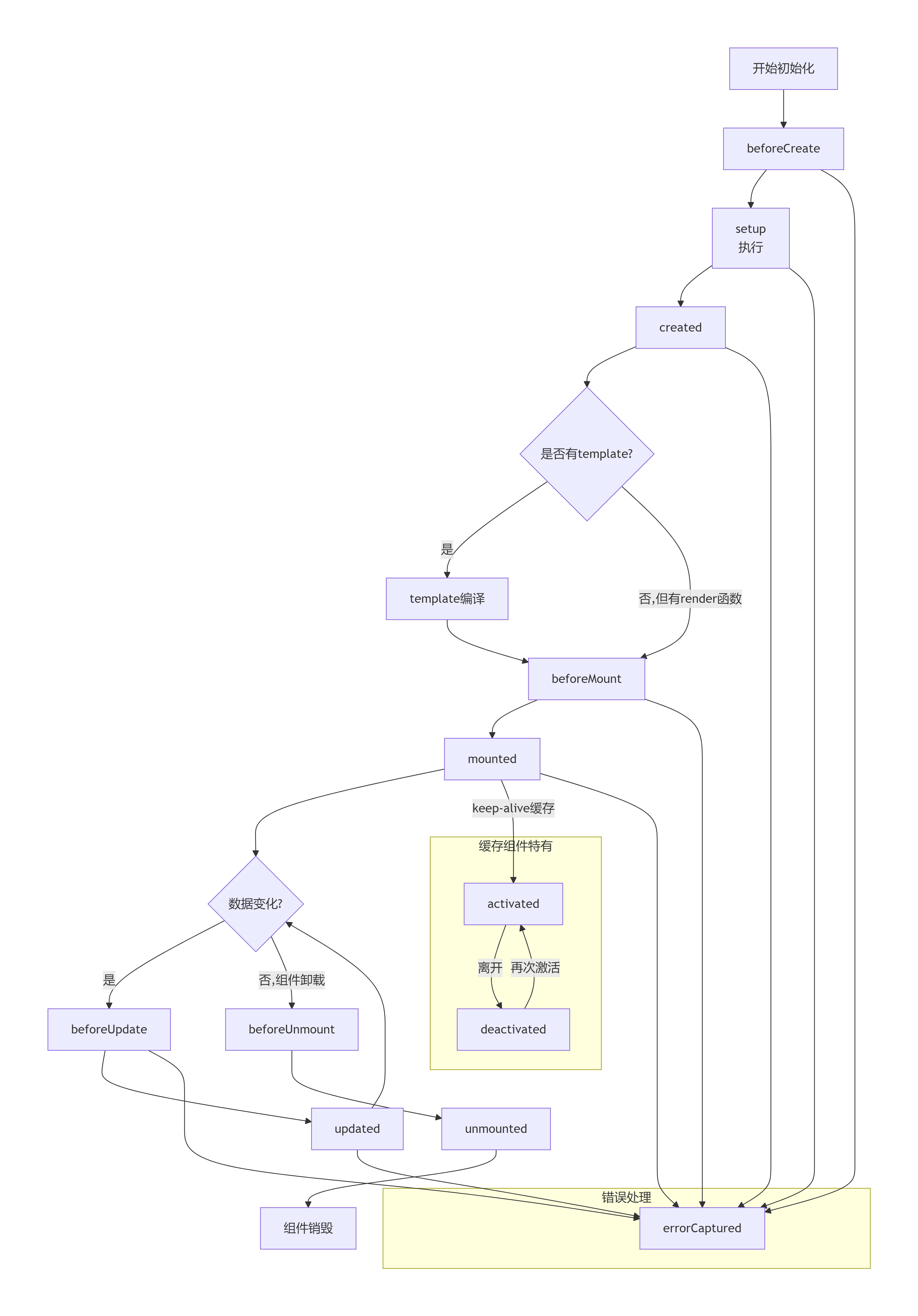
Vue.js的核心特性之一是其响应式数据绑定系统,通过Object.defineProperty(Vue 2)或Proxy(Vue 3)实现:
// Vue 3响应式原理示例
const reactiveHandler = {
  get(target, property) {
    console.log(`获取属性 ${property}`);
    return Reflect.get(target, property);
  },
  set(target, property, value) {
    console.log(`设置属性 ${property} 为 ${value}`);
    return Reflect.set(target, property, value);
  }
};

const state = new Proxy({ count: 0 }, reactiveHandler);
state.count = 1; // 触发响应式更新
1.2 组件化架构设计
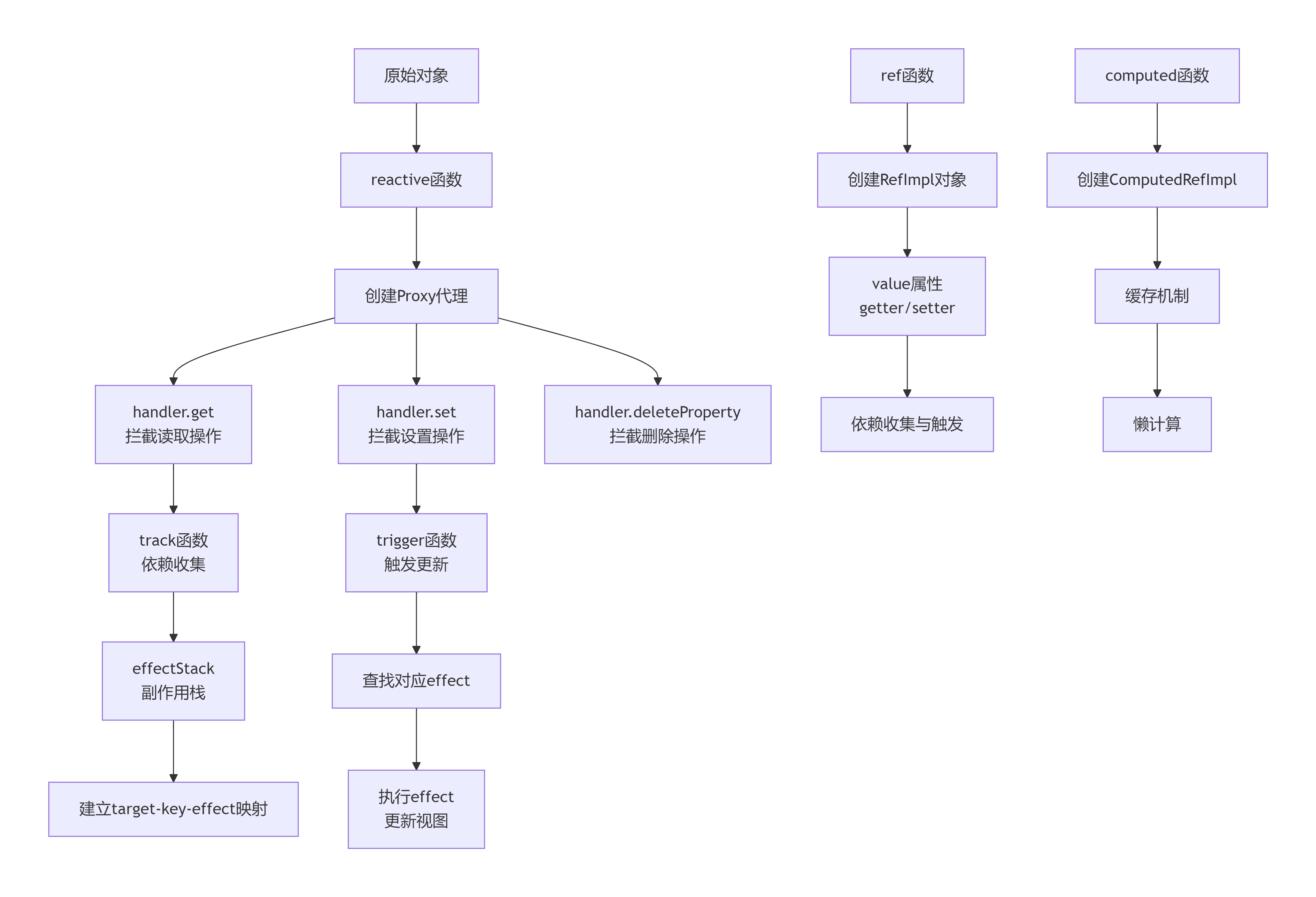
Vue组件是可复用的Vue实例,具有完整的生命周期:
<template>
  <div class="custom-component">
    <h2>{{ title }}</h2>
    <button @click="increment">点击次数: {{ count }}</button>
  </div>
</template>

<script>
export default {
  name: 'CustomComponent',
  props: {
    title: {
      type: String,
      default: '默认标题'
    }
  },
  data() {
    return {
      count: 0
    };
  },
  methods: {
    increment() {
      this.count++;
      this.$emit('incremented', this.count);
    }
  },
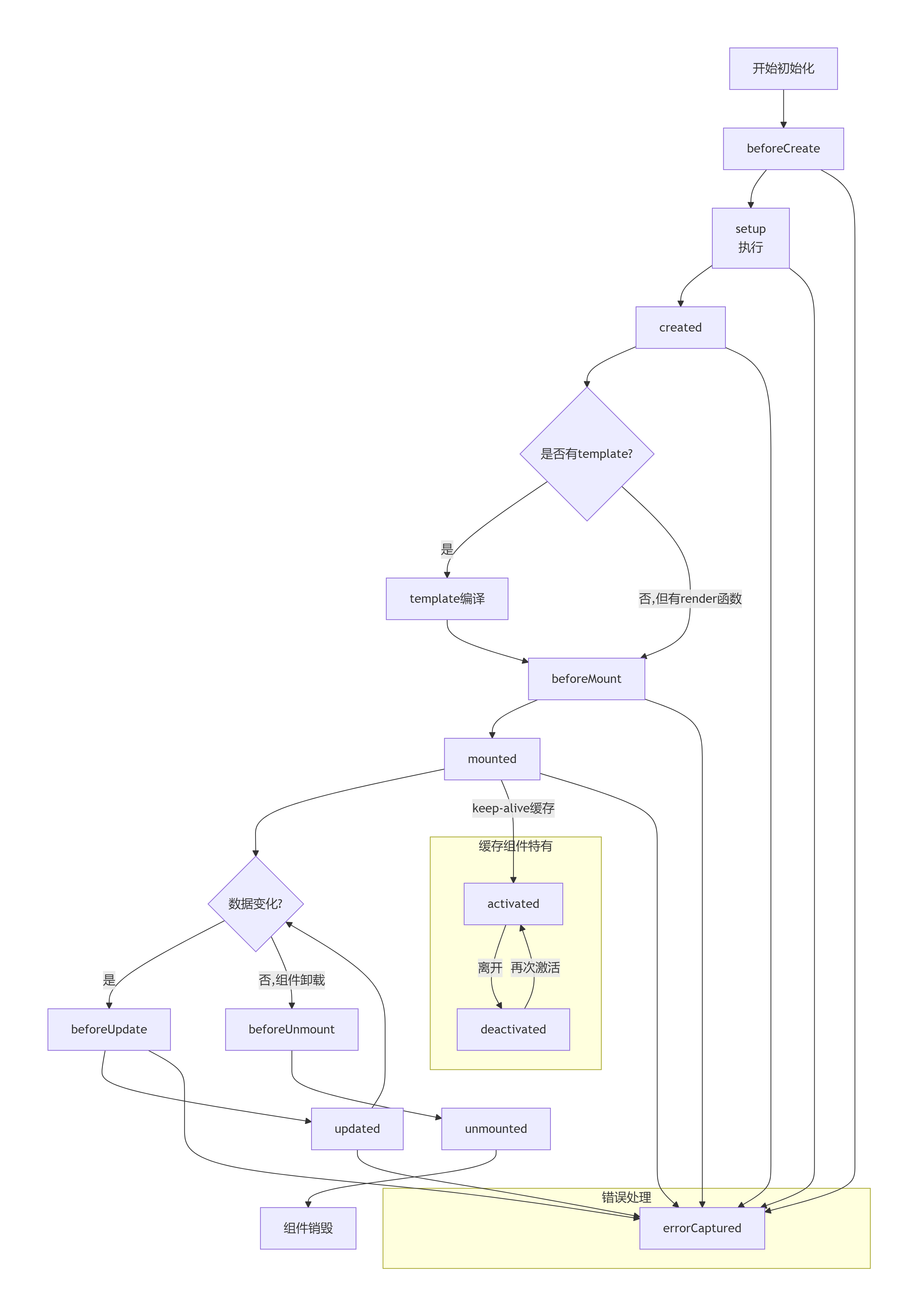
  mounted() {
    console.log('组件已挂载');
  }
};
</script>

<style scoped>
.custom-component {
  padding: 20px;
  border: 1px solid #eaeaea;
}
</style>
1.3 虚拟DOM与Diff算法
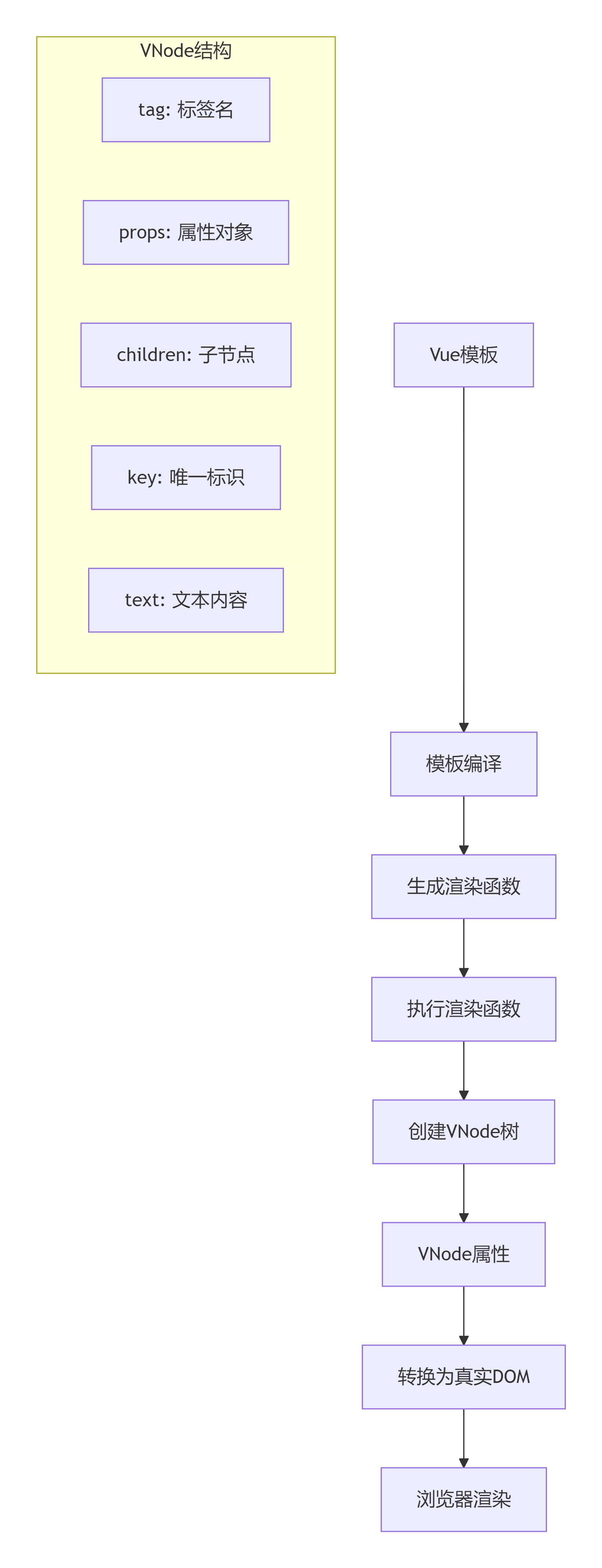
Vue通过虚拟DOM优化渲染性能,其Diff算法主要特点:
-
同层比较,降低复杂度至O(n)
-
通过key属性识别可复用节点
-
批量异步更新策略
二、Vue 3革命性新特性
2.1 Composition API
<script setup>
import { ref, computed, onMounted } from 'vue';

// 响应式状态
const count = ref(0);
const todos = ref([]);

// 计算属性
const doubleCount = computed(() => count.value * 2);

// 方法
function increment() {
  count.value++;
}

// 生命周期钩子
onMounted(() => {
  console.log('组件已挂载');
});

// 组合式函数复用逻辑
function useUser() {
  const user = ref(null);
  const fetchUser = async () => {
    // API调用逻辑
  };
  return { user, fetchUser };
}
</script>
2.2 Teleport、Suspense等新特性
<template>
  <!-- 将内容渲染到body -->
  <teleport to="body">
    <div class="modal">
      模态框内容
    </div>
  </teleport>

  <!-- 异步组件加载 -->
  <suspense>
    <template #default>
      <AsyncComponent />
    </template>
    <template #fallback>
      加载中...
    </template>
  </suspense>
</template>
三、Vue生态系统完整指南
3.1 状态管理(Vuex/Pinia)
javascript
// Pinia示例 - Vue 3推荐状态管理
import { defineStore } from 'pinia';

export const useCounterStore = defineStore('counter', {
  state: () => ({
    count: 0,
    user: null
  }),
  getters: {
    doubleCount: (state) => state.count * 2
  },
  actions: {
    increment() {
      this.count++;
    },
    async fetchUser() {
      const response = await api.getUser();
      this.user = response.data;
    }
  }
});
3.2 路由管理(Vue Router 4)
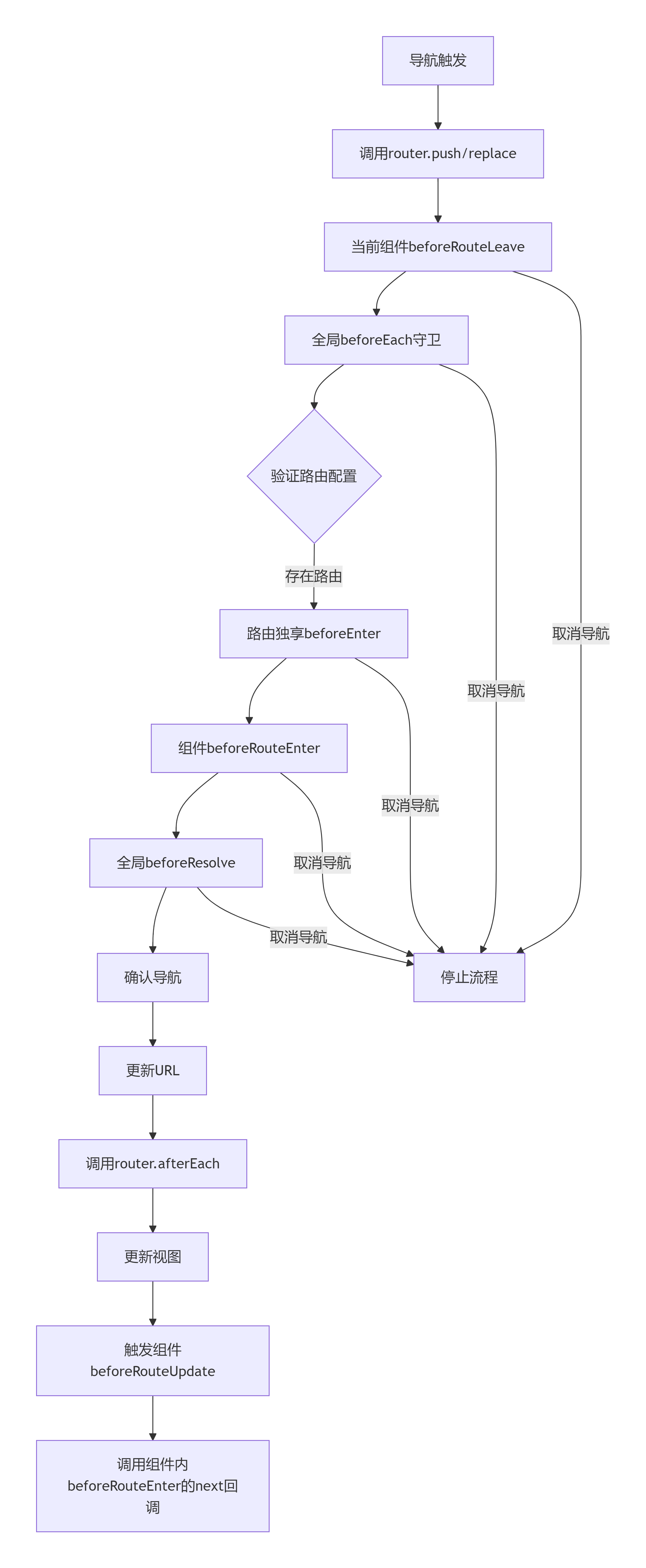
import { createRouter, createWebHistory } from 'vue-router';

const routes = [
  {
    path: '/',
    component: Home,
    meta: { requiresAuth: true }
  },
  {
    path: '/user/:id',
    component: User,
    props: true,
    children: [
      {
        path: 'profile',
        component: Profile
      }
    ]
  }
];

const router = createRouter({
  history: createWebHistory(),
  routes,
  scrollBehavior(to, from, savedPosition) {
    if (savedPosition) {
      return savedPosition;
    } else {
      return { top: 0 };
    }
  }
});
3.3 构建工具链
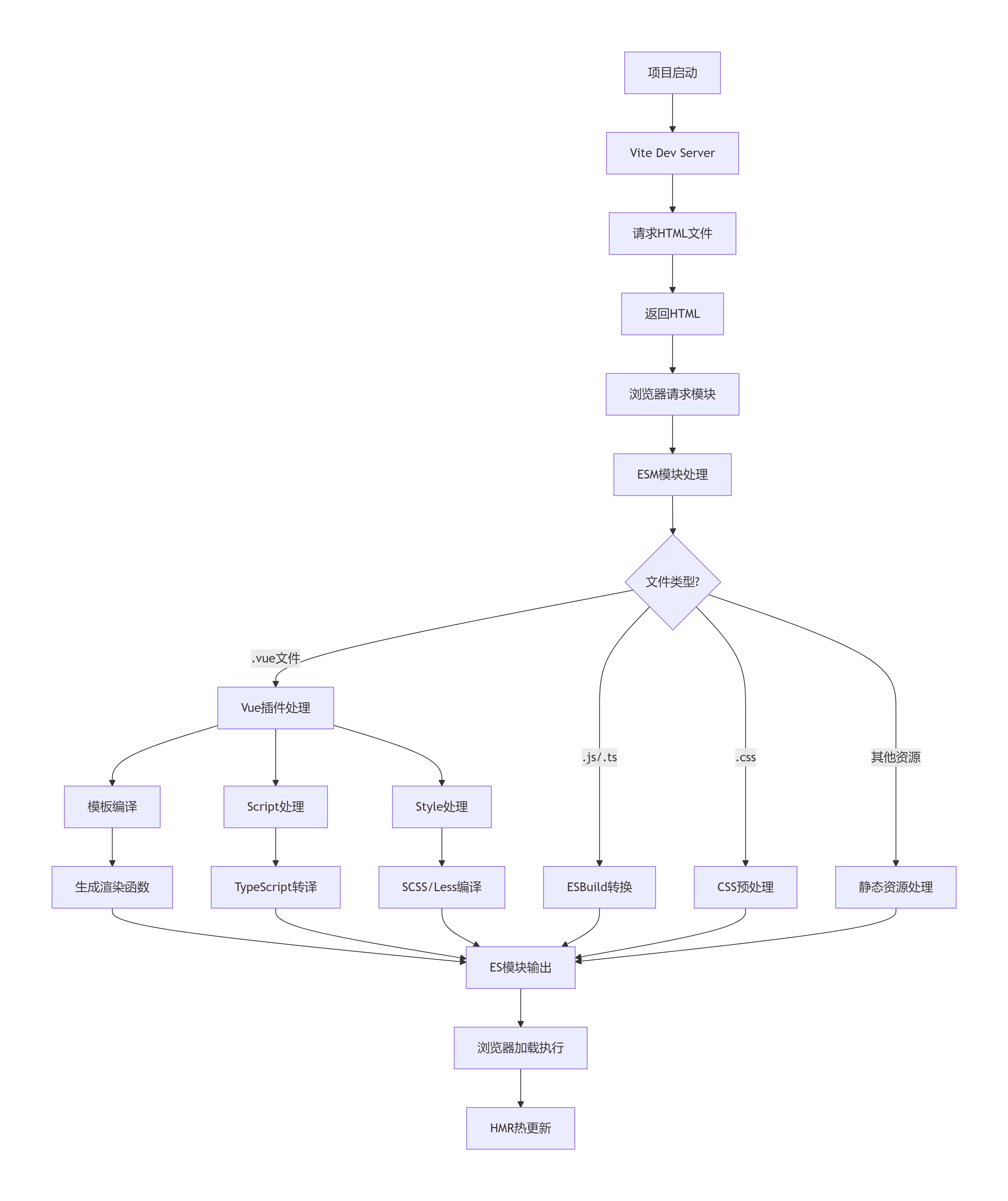
-
Vite:下一代前端构建工具,极速热更新
-
Vue CLI:功能齐全的脚手架工具
-
Vue DevTools:浏览器开发者工具扩展
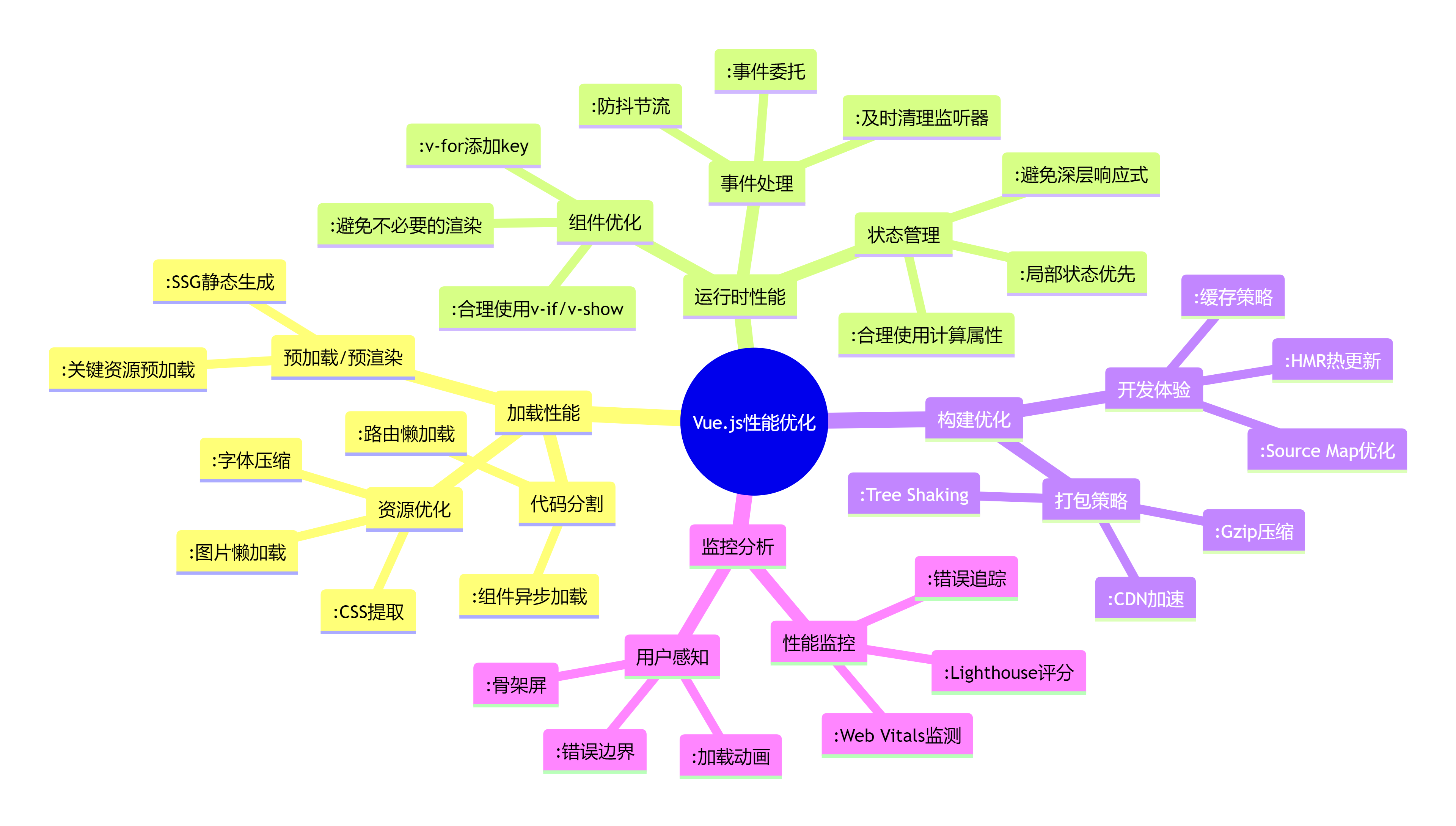
四、性能优化实战策略
4.1 代码分割与懒加载
// 路由懒加载
const UserProfile = () => import('./components/UserProfile.vue');

// 组件异步加载
defineAsyncComponent(() =>
  import('./components/HeavyComponent.vue')
);
4.2 渲染优化技巧
<template>
  <!-- v-once 静态内容优化 -->
  <div v-once>
    {{ staticContent }}
  </div>

  <!-- v-memo 条件性更新 -->
  <div v-memo="[dependency]">
    {{ expensiveCalculation() }}
  </div>

  <!-- 虚拟滚动长列表 -->
  <VirtualList :items="largeArray" />
</template>
4.3 服务端渲染(SSR)与静态站点生成(SSG)
// Nuxt.js配置示例
export default {
  target: 'static', // 静态生成
  // 或 'server' 服务端渲染

  generate: {
    routes: dynamicRoutes
  },

  render: {
    bundleRenderer: {
      runInNewContext: false
    }
  }
};
五、企业级项目最佳实践
5.1 项目结构规范
text
src/
├── assets/           # 静态资源
├── components/       # 组件
│   ├── common/      # 通用组件
│   ├── layout/      # 布局组件
│   └── feature/     # 功能组件
├── composables/      # 组合式函数
├── store/           # 状态管理
├── router/          # 路由配置
├── views/           # 页面组件
├── utils/           # 工具函数
├── api/             # API接口
├── types/           # TypeScript类型
└── styles/          # 全局样式
5.2 TypeScript集成
// Nuxt.js配置示例
export default {
  target: 'static', // 静态生成
  // 或 'server' 服务端渲染

  generate: {
    routes: dynamicRoutes
  },

  render: {
    bundleRenderer: {
      runInNewContext: false
    }
  }
};
5.3 测试策略
// 单元测试示例(Vitest + Vue Test Utils)
import { mount } from '@vue/test-utils';
import Counter from './Counter.vue';

describe('Counter.vue', () => {
  it('increments count when button is clicked', async () => {
    const wrapper = mount(Counter);
    await wrapper.find('button').trigger('click');
    expect(wrapper.find('button').text()).toContain('点击次数: 1');
  });
});

// E2E测试(Cypress)
describe('用户登录流程', () => {
  it('成功登录并跳转到主页', () => {
    cy.visit('/login');
    cy.get('[data-test="username"]').type('testuser');
    cy.get('[data-test="password"]').type('password123');
    cy.get('[data-test="submit"]').click();
    cy.url().should('include', '/dashboard');
  });
});
六、Vue.js未来发展趋势
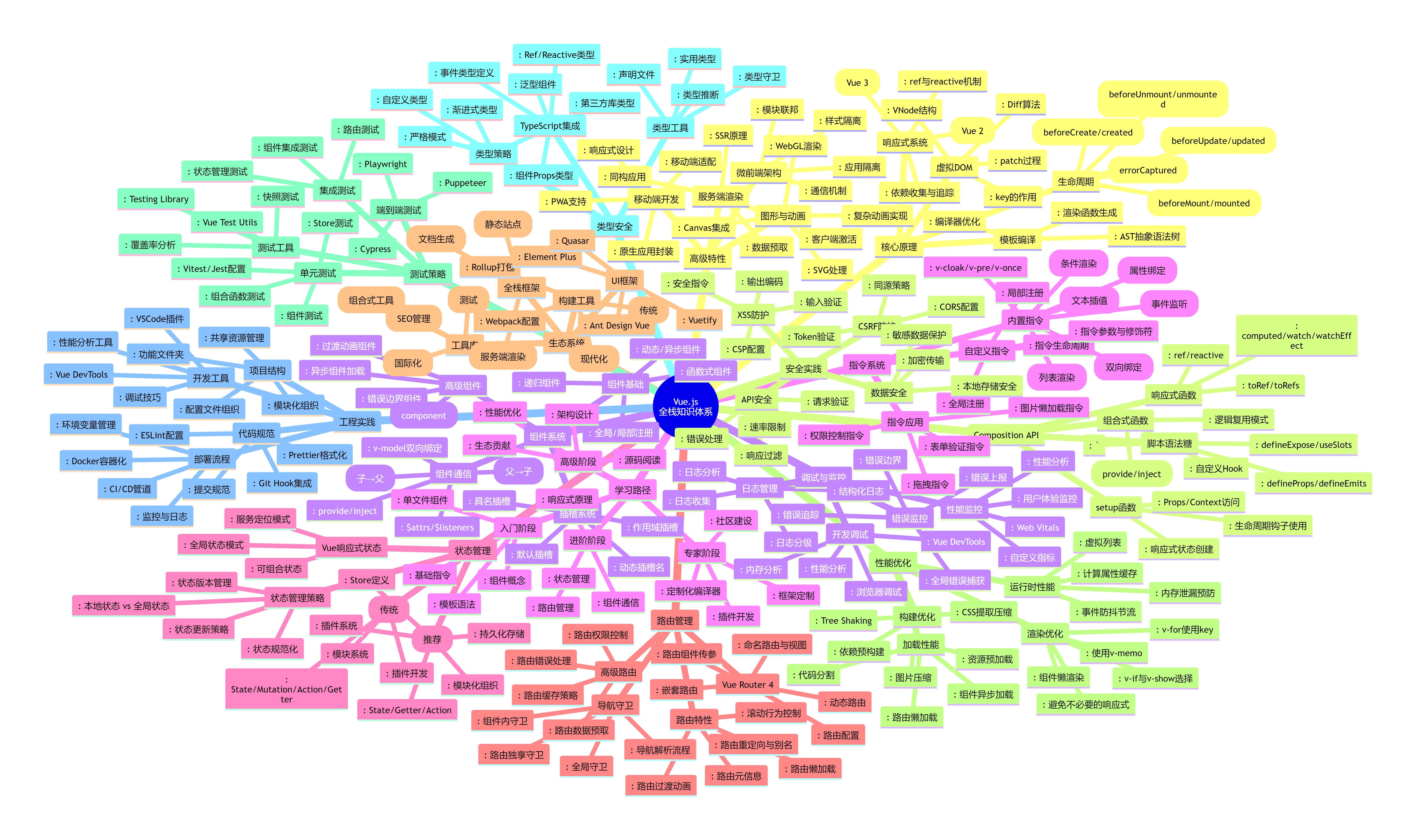
6.1 Vue 3生态完善
-
Vite成为官方推荐构建工具
-
Composition API广泛应用
-
TypeScript支持更加完善
6.2 微前端架构支持
-
基于Vue的微前端解决方案
-
Module Federation集成
-
跨框架组件通信
6.3 全栈开发演进
-
Nuxt.js 3正式发布
-
VitePress静态站点生成器
-
服务端组件探索
结语
Vue.js以其渐进式的设计理念、优秀的学习曲线和强大的生态系统,为前端开发者提供了完整的解决方案。无论是小型项目还是大型企业应用,Vue.js都能提供合适的工具和模式。随着Vue 3生态的成熟和周边工具的完善,Vue.js将继续在前端开发领域发挥重要作用。

Agent 垂直技术社区,欢迎活跃、内容共建。
更多推荐


 5
5 0
0- 0


 已为社区贡献1条内容

所有评论(0)