.NET8 MVC 接入DeepSeek(DeepSeek.ApiClient) AJAX调用
·
①先安装这两个 NuGet包:
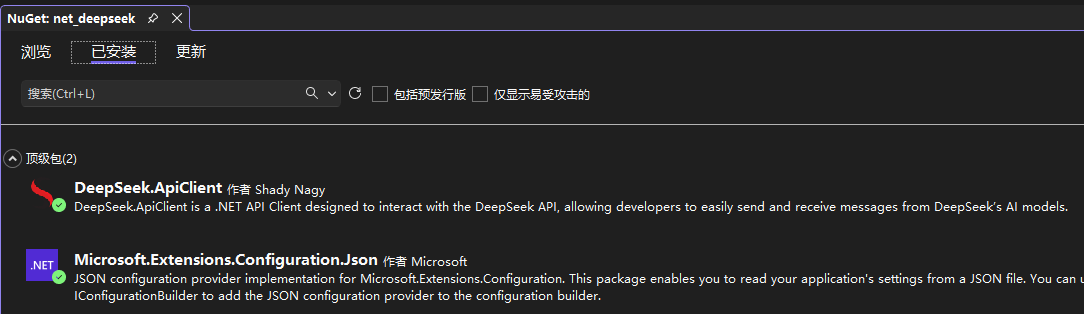
dotnet add package DeepSeek.ApiClient
dotnet add package Microsoft.Extensions.Configuration.Json
②appsettings.json 添加DeepSeek的Key(Key自己申请):
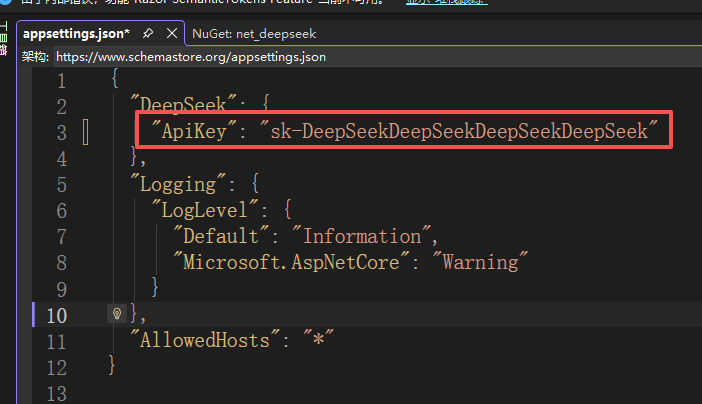
{
"DeepSeek": {
"ApiKey": "sk-你的DeepSeekAPI密钥"
}
}
③Program.cs 文件全部内容:
using DeepSeek.ApiClient.Extensions;
using DeepSeek.ApiClient.Interfaces;
using DeepSeek.ApiClient.Models;
using Microsoft.Extensions.Configuration;
using Microsoft.Extensions.DependencyInjection;

class Program
{
    static async Task Main(string[] args)
    {
        //读取deepseek的key以及创建deepseek客户端,如下(需自己添加):
        // 加载配置文件
        var configuration = new ConfigurationBuilder()
            .SetBasePath(Directory.GetCurrentDirectory())
            .AddJsonFile("appsettings.json")
            .Build();

        var services = new ServiceCollection();

        // 从配置中读取API密钥
        var apiKey = configuration["DeepSeek:ApiKey"];
        services.AddDeepSeekClient(apiKey);

        var serviceProvider = services.BuildServiceProvider();
        var deepSeekClient = serviceProvider.GetRequiredService<IDeepSeekClient>();

        var builder = WebApplication.CreateBuilder(args);
        // 添加控制器等服务
        builder.Services.AddControllers();

        // ⭐ 在这里注册 DeepSeek 客户端!
        builder.Services.AddDeepSeekClient(apiKey); //重要!

        // Add services to the container.
        builder.Services.AddControllersWithViews();


        //下面是创建MVC自己生成的:
        var app = builder.Build();

        // Configure the HTTP request pipeline.
        if (!app.Environment.IsDevelopment())
        {
            app.UseExceptionHandler("/Home/Error");
            // The default HSTS value is 30 days. You may want to change this for production scenarios, see https://aka.ms/aspnetcore-hsts.
            app.UseHsts();
        }

        app.UseHttpsRedirection();
        app.UseStaticFiles();

        app.UseRouting();

        app.UseAuthorization();

        app.MapControllerRoute(
            name: "default",
            pattern: "{controller=Home}/{action=Index}/{id?}");

        app.Run();
    }
}
④HomeController.cs 控制器文件:
using DeepSeek.ApiClient.Interfaces;
using DeepSeek.ApiClient.Models;
using Microsoft.AspNetCore.Mvc;
using Newtonsoft.Json;
using System.Text;

namespace net_deepseek.Controllers
{
    public class HomeController : Controller
    {
        private readonly IDeepSeekClient _deepSeekClient;
        private static string deepSeekKey = "";//deepseek的key
        //构造函数
        public HomeController(IDeepSeekClient deepSeekClient)
        {
            _deepSeekClient = deepSeekClient;

            var configuration = new ConfigurationBuilder().SetBasePath(Directory.GetCurrentDirectory()).AddJsonFile("appsettings.json").Build();//读取配置文件,appsettings.json
            deepSeekKey = configuration["DeepSeek:ApiKey"];//获取配置文件DeepSeek下的ApiKey值
        }
        //DEMO页面:/Home/Index
        public IActionResult Index()
        {
            return View();
        }
        //方法一:用 DeepSeek.ApiClient 简单实现
        [HttpPost]
        public async Task<string> Chat(string message)
        {
            // 直接使用注入的客户端
            object obj = await _deepSeekClient.SendMessageAsync(message);
            return obj.ToString();
        }
        //方法二:可选择 DeepSeek的模型版本方法
        [HttpPost]
        public async Task<string> Chat2(string message)
        {
            var request = new DeepSeekRequestBuilder()
                .SetModel(DeepSeekModel.V3) // 直接使用枚举选择模型
                .AddUserMessage(message)
                .Build();

            return await _deepSeekClient.SendMessageAsync(request);
        }
        //方法三:原生方法,不需要 DeepSeek.ApiClient 等第三方组件,但速度慢
        [HttpPost]
        public async Task<string> Chat3(string message)
        {
            var apiKey = deepSeekKey;
            var client = new HttpClient();
            client.DefaultRequestHeaders.Add("Authorization", $"Bearer {apiKey}");//deepseek的key,见配置文件

            var requestBody = new
            {
                model = "deepseek-chat",
                messages = new[] { new { role = "user", content = message } },
                temperature = 0.7f
            };

            var jsonContent = new StringContent(
                System.Text.Json.JsonSerializer.Serialize(requestBody),
                Encoding.UTF8,
                "application/json");

            var response = await client.PostAsync("https://api.deepseek.com/v1/chat/completions", jsonContent);//调用deepseek的API
            response.EnsureSuccessStatusCode();

            var jsonResponse = await response.Content.ReadAsStringAsync();//deepseek的API返回值
            Root chat3 = JsonConvert.DeserializeObject<Root>(jsonResponse);//json转实体
            if (chat3 != null)
            {
                if (chat3.choices != null && chat3.choices.Any())
                {
                    if (!string.IsNullOrWhiteSpace(chat3.choices[0].message.content))
                    {
                        return chat3.choices[0].message.content;
                    }
                }
            }
            //return string.Empty;//返回空字符串
            return jsonResponse;//返回原始json
        }
    }
    #region DeepSeek返回值实体
    public class Root
    {
        public string id { get; set; }
        //public string object { get; set; }
        public int created { get; set; }
        public string model { get; set; }
        public List<Choices> choices { get; set; }
        public Usage usage { get; set; }
        public string system_fingerprint { get; set; }
    }
    public class Choices
    {
        public int index { get; set; }
        public Message message { get; set; }
        public string logprobs { get; set; }
        public string finish_reason { get; set; }
    }
    public class Message
    {
        public string role { get; set; }
        //deepseek返回的内容
        public string content { get; set; }
    }
    public class Usage
    {
        public int prompt_tokens { get; set; }
        public int completion_tokens { get; set; }
        public int total_tokens { get; set; }
        public Prompt_tokens_details prompt_tokens_details { get; set; }
        public int prompt_cache_hit_tokens { get; set; }
        public int prompt_cache_miss_tokens { get; set; }
    }
    public class Prompt_tokens_details
    {
        public int cached_tokens { get; set; }
    }
    #endregion

}
⑤Index.cshtml 页面文件:
@{
    Layout = null;
}
@* <script src="https://code.jquery.com/jquery-3.7.1.min.js"></script> *@
<script src="~/js/jquery.min.js.js"></script>

<input type="text" id="msg" style="width:300px;" value="上海市今天天气预报" />
<input type="button" id="btn" value="确定" onclick="deepseek()" />
<br />
<textarea id="txt" style="width:100%; height:500px; display:none;"></textarea>
<script>
    function deepseek(){
       var msg = $("#msg").val();
       console.log(msg);
       if(msg){
           $.ajax({
            type:"POST",
            //url:"/Home/Chat",//方法一
            //url:"/Home/Chat2",//方法二
            url:"/Home/Chat3",//方法三
            data:{"message":msg},
            success:function(txt){
                if(txt){
                    $("#txt").html(txt);
                    $("#txt").show();
                }
            }
           });
       }
    }
</script>
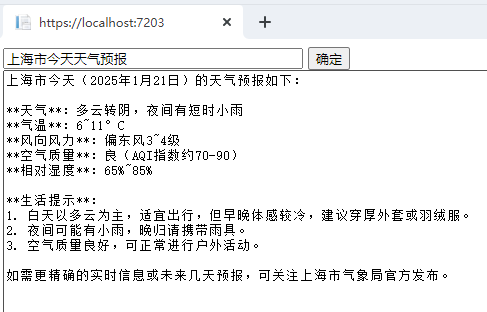
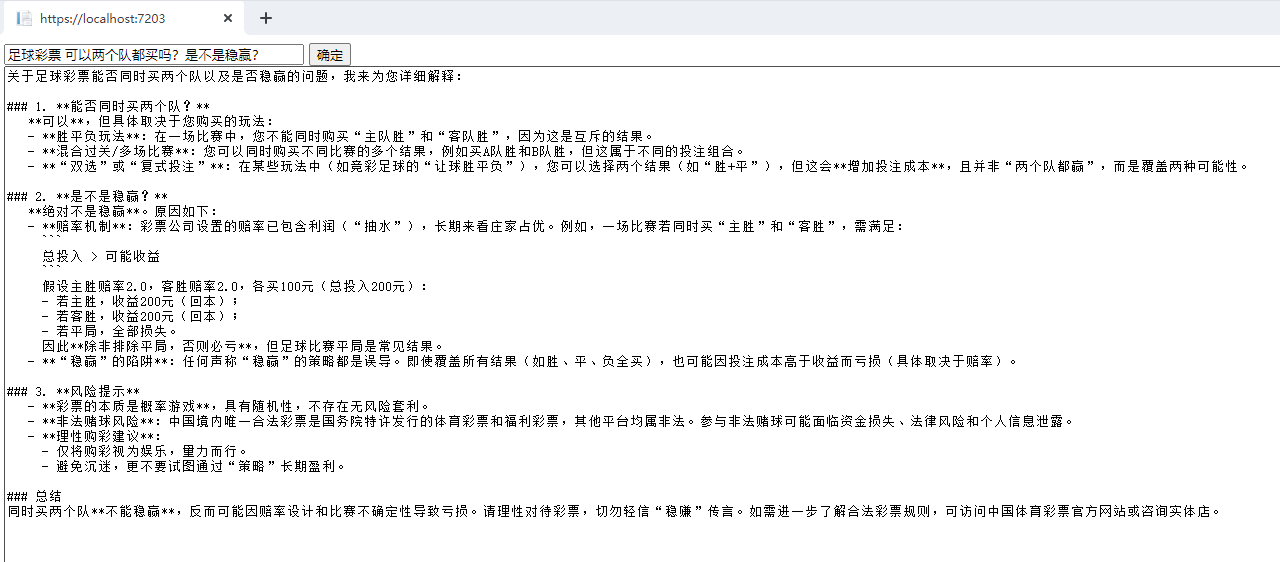
⑥效果如图:

Agent 垂直技术社区,欢迎活跃、内容共建。
更多推荐


 1
1 0
0- 0


 已为社区贡献1条内容

所有评论(0)