Agent 工具设计原则:什么样的工具 Agent 用得好,什么样的工具坑死你
摘要: 在 AI Agent 工程化落地中,工具设计是决定 Agent 能力上限的核心因素。一个设计良好的工具能让 Agent 准确理解意图、稳定执行任务、优雅处理异常;而一个设计糟糕的工具则会导致 Agent 频繁调用错误、参数传递混乱、错误恢复失败,最终让整个 Agent 系统形同虚设。本文从粒度、描述、参数、返回格式、错误处理、工具组合六个维度,系统阐述 Agent 工具设计的核心原则,配合大量代码示例和决策流程图,帮助开发者在工程实践中避开常见陷阱。无论你是用 LangChain、OpenAI Function Calling 还是自研 Agent 框架,这些原则都同样适用。
版本声明: 本文基于 2024-2025 年主流 Agent 框架(OpenAI Function Calling、LangChain Tools、Claude Tool Use、MCP 协议)的工程实践总结,适用于 GPT-4o、Claude 3.5 Sonnet、DeepSeek V3 等主流大模型。文中代码示例以 Python 为主,核心原则与语言无关。
适用边界: 本文聚焦于 LLM Agent 的工具(Tool/Function)设计,不涉及模型训练、Prompt 工程的通用技巧,也不涉及多 Agent 协作中的工具分配策略。适用于单 Agent 或多 Agent 系统中单个工具的设计与评审。
文章目录
一、工具设计为什么是 Agent 工程的核心问题
在 AI Agent 的架构中,大模型是"大脑",工具是"手脚"。大脑再聪明,如果手脚不听使唤,这个 Agent 也做不了什么实事。
但"手脚不听使唤"这件事,在 Agent 工程中比在传统软件工程中要复杂得多。传统软件的函数调用是确定性的——调用方明确知道要调什么函数、传什么参数、返回什么格式。而 Agent 的工具调用是非确定性的——大模型根据自然语言描述来决定调用哪个工具、填写什么参数,这就引入了一系列独特的设计问题。
# 一个典型的 Agent 工具定义(OpenAI Function Calling 格式)
{
    "type": "function",
    "function": {
        "name": "search_hotels",
        "description": "Search for hotels based on location, check-in and check-out dates.",
        "parameters": {
            "type": "object",
            "properties": {
                "location": {"type": "string", "description": "City name or coordinates"},
                "check_in": {"type": "string", "description": "Check-in date in YYYY-MM-DD format"},
                "check_out": {"type": "string", "description": "Check-out date in YYYY-MM-DD format"},
                "max_price": {"type": "number", "description": "Maximum price per night in USD"}
            },
            "required": ["location", "check_in", "check_out"]
        }
    }
}
上面这段代码定义了一个搜索酒店的工具。看起来很简单对吧?但就是这个简单的定义,藏着至少五个设计决策:
- 粒度问题:这个工具只搜酒店,要不要把预订也合进来?要不要把搜机票也合进来?
- 描述问题:
"Search for hotels"这个描述够不够清楚?Agent 能不能从这句话判断什么时候该用这个工具? - 参数问题:
location用城市名还是坐标?日期格式要不要在 description 里写清楚?max_price是必选还是可选? - 返回格式问题:返回一个酒店列表就完了,还是要返回每个酒店的评价摘要?要不要返回总数?
- 错误处理问题:如果搜不到酒店,返回空列表还是返回错误?如果是日期格式错误,怎么让 Agent 知道该怎么修正?
这些问题不是"锦上添花"——它们直接决定了 Agent 能不能正确使用这个工具。在实际工程中,80% 的 Agent 调用错误不是因为模型不够聪明,而是因为工具设计有问题。
# 一个真实生产环境中的"坑死你"工具定义
{
    "name": "api_call",
    "description": "Call the API",  # ← Agent 根本不知道这是什么 API,什么时候该用
    "parameters": {
        "type": "object",
        "properties": {
            "endpoint": {"type": "string", "description": "endpoint"},  # ← Agent 不知道有哪些合法值
            "method": {"type": "string", "description": "HTTP method"},  # ← 没有 enum 限制
            "body": {"type": "object", "description": "request body"}    # ← Agent 不知道 body 结构
        },
        "required": ["endpoint", "method", "body"]  # ← body 居然是必选,GET 请求怎么办?
    }
}
上面这个真实的反面案例,几乎违反了本文将要讨论的所有原则。"Call the API" 这种描述等于没说——Agent 无法判断什么时候该调用它,也无法正确填写参数。endpoint 没有合法值约束,Agent 只能瞎猜。body 设为必选但 GET 请求不需要 body,这会让 Agent 陷入矛盾。
如图所示,Agent 的每一次工具调用都是一个"理解→选择→填参→执行→处理"的循环。这个循环中的每一个环节都依赖工具设计的质量。任何一个环节出问题,都会导致整个循环断裂,Agent 要么报错退出,要么陷入无意义的重试。
接下来,我们逐一拆解每个环节的设计原则。
图:Agent 工具调用的完整生命周期及各环节设计原则总览
二、粒度原则:太粗 vs 太细,如何找到合适的粒度
工具粒度是工具设计的第一个也是最重要的决策。粒度太粗,一个工具做太多事情,Agent 不知道什么时候该用它;粒度太细,工具数量爆炸,Agent 在选择时迷失方向。
2.1 太粗的陷阱:万能工具综合症
新手设计 Agent 工具时最容易犯的错误,就是设计一个"万能工具"——把所有功能塞进一个函数里,用参数来区分行为。
# 反面案例:万能数据库工具
def database_tool(operation: str, table: str, data: dict = None,
                  condition: dict = None, limit: int = None):
    """
    万能数据库操作工具

    Args:
        operation: 操作类型 - "insert", "update", "delete", "select", "create_table", "drop_table"
        table: 表名
        data: 插入或更新的数据
        condition: 查询或删除条件
        limit: 返回结果数量限制
    """
    if operation == "select":
        # 查询逻辑
        pass
    elif operation == "insert":
        # 插入逻辑
        pass
    elif operation == "delete":
        # 删除逻辑 - 这个很危险!
        pass
    elif operation == "drop_table":
        # 删表逻辑 - 更危险!
        pass
    # ... 更多操作
解释: 上面这个 database_tool 是一个典型的"万能工具"。它把增删改查甚至删表都塞进一个函数,用 operation 参数来区分。问题在于:Agent 在面对"删除过期数据"这个需求时,无法判断应该用 delete 还是 drop_table;而且 drop_table 这种危险操作和 select 这种安全操作混在一起,没有任何权限隔离。实际效果是 Agent 经常调用错误,甚至误删表。
万能工具的核心问题:
| 问题 | 表现 | 后果 |
|---|---|---|
| 描述模糊 | 一个 description 要覆盖六七种操作 | Agent 无法精确匹配意图 |
| 参数耦合 | 不同操作需要的参数不同,但都混在一起 | Agent 不知道当前操作该填哪些参数 |
| 权限失控 | 安全操作和危险操作在同一个工具里 | 无法做细粒度权限控制 |
| 错误处理混乱 | 不同操作的错误类型完全不同 | Agent 无法统一处理错误 |
2.2 太细的陷阱:工具爆炸
另一个极端是把每个小功能都拆成独立工具。一个 REST API 有 20 个端点,就定义 20 个工具。
# 反面案例:工具爆炸
tools = [
    {"name": "get_user_by_id", "description": "Get user by ID"},
    {"name": "get_user_by_email", "description": "Get user by email"},
    {"name": "get_user_by_phone", "description": "Get user by phone"},
    {"name": "get_user_by_username", "description": "Get user by username"},
    {"name": "create_user_basic", "description": "Create user with basic info"},
    {"name": "create_user_with_profile", "description": "Create user with profile"},
    {"name": "create_user_with_address", "description": "Create user with address"},
    {"name": "update_user_name", "description": "Update user name"},
    {"name": "update_user_email", "description": "Update user email"},
    {"name": "update_user_phone", "description": "Update user phone"},
    # ... 还有 10 个
]
解释: 当 Agent 面对这么多工具时,每次调用都要从 20 个工具中选择,选择空间过大导致准确率下降。而且很多工具的描述高度相似(get_user_by_id vs get_user_by_email),Agent 很容易选错。研究表明,当工具数量超过 15-20 个时,大多数 LLM 的工具选择准确率会显著下降。
2.3 找到合适粒度的原则
# 正面案例:合理粒度的用户查询工具
def search_users(query: str, field: str = "all", limit: int = 10):
    """
    Search users by keyword. Supports searching by ID, email, phone,
    or username. Returns a list of matching users with basic info.

    Args:
        query: The search keyword (user ID, email, phone, or username)
        field: Which field to search - "id", "email", "phone", "username",
               or "all" for searching across all fields. Default: "all"
        limit: Maximum number of results to return. Default: 10
    """
    pass

# 正面案例:合理粒度的用户创建工具
def create_user(name: str, email: str, phone: str = None,
                address: str = None, profile: dict = None):
    """
    Create a new user account. Requires name and email.
    Phone, address, and profile are optional.
    """
    pass

# 正面案例:合理粒度的用户更新工具
def update_user(user_id: str, updates: dict):
    """
    Update an existing user's information. Only the fields
    provided in 'updates' will be modified.

    Args:
        user_id: The unique identifier of the user to update
        updates: Dictionary of fields to update. Valid keys:
                 "name", "email", "phone", "address", "profile"
    """
    pass
解释: 上面三个工具把之前的 20 个工具合并成了 3 个:search_users 用 field 参数替代了 4 个查询变体;create_user 用可选参数替代了 3 个创建变体;update_user 用 updates 字典替代了多个更新工具。每个工具的职责清晰、描述明确,Agent 选择起来毫无歧义。
粒度判断的黄金法则:
- 一个工具做一件事:如果一个工具的 description 需要用"和"来连接两个动作,它可能太粗了。"搜索和预订酒店"应该拆成两个工具。
- 工具之间正交:两个工具不应该有重叠的功能。如果
get_user_by_email和get_user_by_phone可以合并成search_users,就合并。 - 工具数量控制在 5-15 个:这是一个经验区间。超过 15 个考虑用工具分组或两阶段选择(先选类别,再选具体工具)。
- 按业务领域分组:如果有 30 个工具,分成"用户管理"、“订单管理”、"内容管理"三组,每组 10 个,用工具组名做前缀(
user_search,order_create,content_publish)。
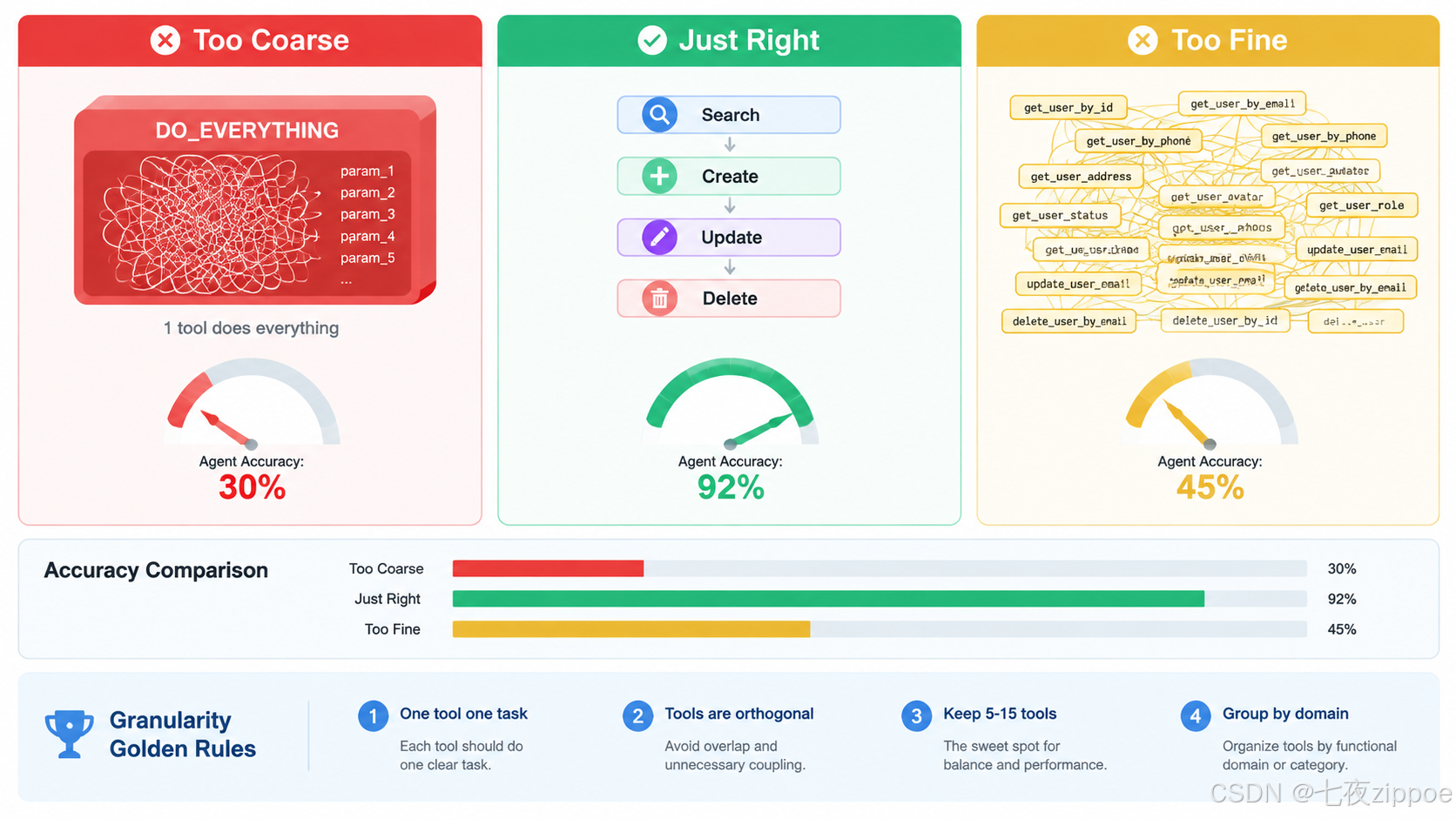
图:工具粒度太粗、合适、太细三种情况的对比及 Agent 调用准确率
三、描述原则:description 字段是 Agent 选择工具的唯一依据
在 Agent 的工具调用流程中,大模型选择工具的依据只有一条:工具的 description 字段。不是函数名,不是参数名,不是返回类型——就是那段描述文字。
这意味着,description 写得好不好,直接决定了 Agent 能不能选对工具。
3.1 好描述的标准
一个好的工具描述应该回答三个问题:
- 这个工具做什么(What)
- 什么时候应该用它(When)
- 什么时候不应该用它(When NOT)
# 反面案例:模糊描述
{
    "name": "send_email",
    "description": "Send an email"  # ← 太模糊,没有说什么时候用
}

# 正面案例:完整描述
{
    "name": "send_email",
    "description": "Send an email to a specified recipient. Use this tool when the user explicitly asks to send an email, reply to an email, or forward content to someone via email. Do NOT use this tool for chat messages, SMS, or notifications - use send_message instead. The sender address is fixed as the agent's email account."
}
解释: 反面案例的 "Send an email" 只回答了"做什么",没有回答"什么时候用"和"什么时候不用"。Agent 在面对"帮我回复一下这个消息"这种请求时,可能不知道该用 send_email 还是 send_message。正面案例明确说明了使用场景(用户明确要求发邮件时)和排除场景(不要用于聊天消息、短信、通知),这样 Agent 就能做出正确选择。
3.2 描述中应该包含的信息
# 一个信息完整的工具描述模板
{
    "name": "search_product",
    "description": (
        "Search for products in the catalog by keyword, category, or price range. "
        "Returns a list of matching products with ID, name, price, and availability. "
        "Use this when the user wants to find, browse, or compare products. "
        "Do NOT use this for placing orders - use create_order instead. "
        "Maximum 50 results per search."
    ),
    "parameters": {
        "type": "object",
        "properties": {
            "keyword": {
                "type": "string",
                "description": "Search keyword. Searches across product name and description. Example: 'wireless mouse'"
            },
            "category": {
                "type": "string",
                "description": "Product category to filter by. Must be one of: 'electronics', 'clothing', 'food', 'books', 'home', 'toys'"
            },
            "min_price": {
                "type": "number",
                "description": "Minimum price filter in USD. Use 0 for no minimum."
            },
            "max_price": {
                "type": "number",
                "description": "Maximum price filter in USD. Use null or omit for no maximum."
            }
        },
        "required": ["keyword"]
    }
}
解释: 这个描述包含了所有关键信息:工具做什么(搜索产品)、返回什么(产品列表含哪些字段)、什么时候用(用户想查找、浏览、比较产品时)、什么时候不用(下单用另一个工具)、限制条件(最多 50 条结果)。参数描述也遵循同样原则——keyword 有示例值,category 有合法值列表,价格参数说明了单位和无限制时的处理方式。
3.3 描述的常见反模式
# 反模式 1:描述太短
{"name": "calc", "description": "Calculate"}  # 计算什么?Agent 完全不知道

# 反模式 2:描述太长,淹没关键信息
{"name": "get_weather", "description": "This is a versatile and comprehensive weather information retrieval tool that can fetch current weather conditions, historical weather data, weather forecasts for up to 15 days, severe weather alerts, and UV index information for any location worldwide. The tool leverages multiple data sources including satellite imagery, ground stations, and meteorological models to provide the most accurate and up-to-date weather information available. It supports queries by city name, postal code, geographic coordinates, or IP address. The response includes temperature, humidity, wind speed, precipitation, cloud cover, pressure, visibility, dew point, and more."}
# ↑ Agent 读完这段话已经忘了用户要什么了

# 反模式 3:描述和功能不匹配
{"name": "format_date", "description": "Process date and time information"}  # ← 叫 format_date 但描述说"process",Agent 不确定是不是能解析日期

# 反模式 4:多个工具描述重叠
{"name": "search_docs", "description": "Search documents by keyword"}
{"name": "find_docs", "description": "Find documents using keywords"}
# ← Agent 根本不知道这两个有什么区别,会随机选一个
解释: 这四个反模式覆盖了最常见的描述错误。反模式 1 太短,Agent 无法判断使用场景。反模式 2 太长,关键信息被淹没在冗长的文字中——研究表明工具描述超过 200 个词时,Agent 的理解准确率开始下降。反模式 3 描述与功能不匹配,导致 Agent 错误调用。反模式 4 是最隐蔽但也最致命的——两个工具描述几乎相同,Agent 选哪个都"看起来对",但实际上可能行为差异很大。
描述撰写的实践建议:
- 长度控制在 30-100 个词:足够说明问题,又不至于淹没关键信息。
- 前 10 个词最重要:很多模型在做工具选择时,对描述开头的权重更高。
- 用"Do NOT"明确边界:当两个工具容易混淆时,在描述中明确说"Do NOT use this for X, use Y instead"。
- 给参数加示例:特别是字符串类型的参数,一个示例值胜过十行描述。
- 约束条件显式写出:最大返回数、合法值范围、格式要求等,都要在描述中写清楚。
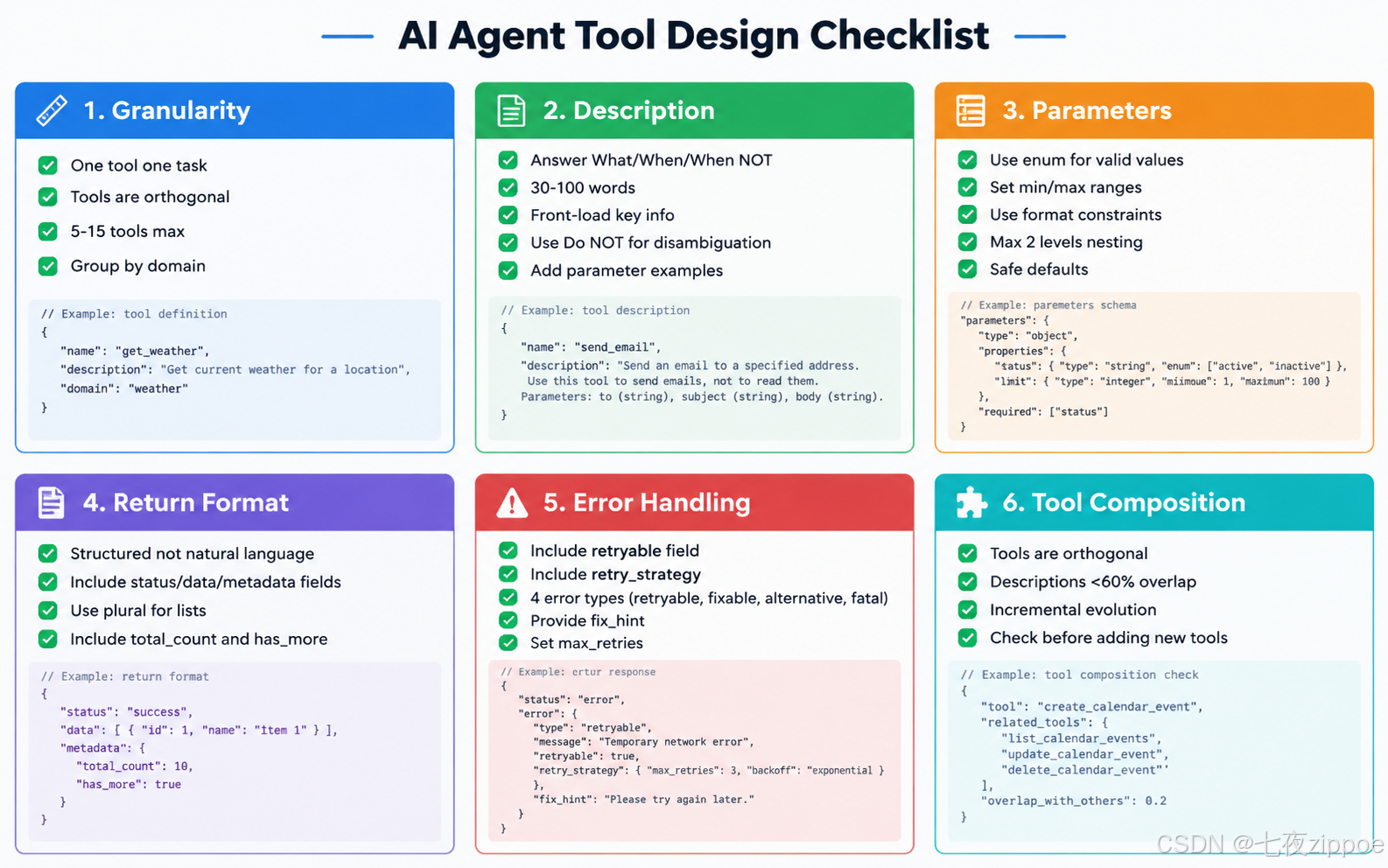
图:Agent 工具设计六大维度的完整检查清单与最佳实践汇总
四、参数设计:类型选择、必选 vs 可选、默认值策略
参数是 Agent 与工具之间的接口。参数设计得好,Agent 填参准确率高;设计得差,Agent 就会反复出错。
4.1 类型选择原则
# 反面案例:类型选择不当
{
    "name": "book_meeting",
    "description": "Book a meeting room",
    "parameters": {
        "type": "object",
        "properties": {
            "room": {"type": "string", "description": "Meeting room"},  # ← 应该用 enum
            "date": {"type": "string", "description": "Meeting date"},  # ← 没有格式说明
            "time": {"type": "string", "description": "Meeting time"},  # ← 和 date 分开,容易出错
            "duration": {"type": "string", "description": "Meeting duration"}  # ← 字符串还是数字?
        }
    }
}

# 正面案例:类型选择得当
{
    "name": "book_meeting",
    "description": "Book a meeting room for a specified time slot.",
    "parameters": {
        "type": "object",
        "properties": {
            "room": {
                "type": "string",
                "enum": ["A101", "A102", "B201", "B202", "C301"],
                "description": "Meeting room ID. Available rooms: A101 (8 people), A102 (12 people), B201 (6 people), B202 (20 people), C301 (30 people, has projector)."
            },
            "start_time": {
                "type": "string",
                "format": "date-time",
                "description": "Meeting start time in ISO 8601 format. Example: '2025-01-15T14:00:00'"
            },
            "duration_minutes": {
                "type": "integer",
                "description": "Meeting duration in minutes. Must be between 15 and 480 (8 hours). Default: 60",
                "default": 60,
                "minimum": 15,
                "maximum": 480
            }
        },
        "required": ["room", "start_time"]
    }
}
解释: 正面案例中,room 使用 enum 列出所有合法值并在 description 中标注每个房间的容量和设备——这样 Agent 不仅能选对房间,还能根据参会人数选择合适的房间。start_time 使用 date-time 格式并给出示例,避免 Agent 用各种不同的日期格式。duration_minutes 用 integer 而非 string,并设置了 minimum、maximum 和 default——Agent 知道合法范围,也知道不传时默认 60 分钟。这些约束大幅减少了 Agent 犯错的可能性。
4.2 必选 vs 可选的决策框架
# 参数必选/可选的决策原则

# 原则 1:影响工具核心行为的参数设为必选
def search_flights(origin: str, destination: str, date: str):
    """
    Search for flights. origin, destination, date are required
    because a flight search is meaningless without them.
    """
    pass

# 原则 2:有合理默认值的参数设为可选
def search_flights(origin: str, destination: str, date: str,
                   passengers: int = 1,           # 默认1人
                   cabin_class: str = "economy",  # 默认经济舱
                   max_stops: int = 2):            # 默认最多2次中转
    pass

# 原则 3:没有合理默认值的参数宁可设为必选,也不要给一个荒谬的默认值
def transfer_money(account_from: str, account_to: str, amount: float):
    # 不要给 amount 设默认值!Agent 可能不传,导致转账0元
    pass

# 原则 4:可选参数的默认值要"安全"——不会产生意外的副作用
def send_notification(message: str, channel: str = "email"):
    # "email" 是安全默认值。如果默认值是 "sms",用户可能被意外扣费
    pass
解释: 这段代码展示了必选/可选参数的四个决策原则。核心原则是:如果一个参数是工具完成核心功能所必需的,就设为必选;如果有合理且安全的默认值,就设为可选。特别值得注意的是原则 3——不要给关键参数设默认值。transfer_money 的 amount 如果给了默认值 0,Agent 在不确定金额时可能不传这个参数,导致转账 0 元的荒谬结果。原则 4 强调默认值要"安全"——send_notification 的默认渠道是 email 而不是 sms,因为 email 是免费的而 sms 可能产生费用。
4.3 参数设计的检查清单
| 检查项 | 好的设计 | 坏的设计 | 影响 |
|---|---|---|---|
| 枚举值 | room: enum["A101", "A102"] | room: string | 防止 Agent 瞎编房间号 |
| 数值范围 | duration: min=15, max=480 | duration: number | 防止 Agent 传 0 或负数 |
| 格式约束 | date: format="date-time" | date: string | 统一日期格式 |
| 默认值安全性 | channel: default="email" | channel: default="sms" | 避免意外副作用 |
| 参数示例 | keyword: "Example: 'wireless mouse'" | keyword: "Search keyword" | 帮助 Agent 理解期望的输入 |
| 必选/可选 | 核心参数必选,有安全默认的设可选 | 全部必选或全部可选 | 平衡灵活性和安全性 |
4.4 复杂参数结构:嵌套 vs 扁平
# 反面案例:过度嵌套的参数结构
{
    "name": "create_order",
    "parameters": {
        "type": "object",
        "properties": {
            "order": {
                "type": "object",
                "properties": {
                    "customer": {
                        "type": "object",
                        "properties": {
                            "name": {"type": "string"},
                            "contact": {
                                "type": "object",
                                "properties": {
                                    "email": {"type": "string"},
                                    "phone": {"type": "string"}
                                }
                            }
                        }
                    },
                    "items": {
                        "type": "array",
                        "items": {
                            "type": "object",
                            "properties": {
                                "product_id": {"type": "string"},
                                "quantity": {"type": "integer"}
                            }
                        }
                    }
                }
            }
        }
    }
}
# ↑ Agent 需要构造 4 层嵌套的 JSON,错误率极高

# 正面案例:扁平化参数结构
{
    "name": "create_order",
    "parameters": {
        "type": "object",
        "properties": {
            "customer_name": {"type": "string", "description": "Customer full name"},
            "customer_email": {"type": "string", "description": "Customer email address"},
            "customer_phone": {"type": "string", "description": "Customer phone number"},
            "product_ids": {
                "type": "array",
                "items": {"type": "string"},
                "description": "List of product IDs to order. Example: ['P001', 'P002']"
            },
            "quantities": {
                "type": "array",
                "items": {"type": "integer"},
                "description": "Quantities for each product. Must match length of product_ids. Example: [2, 1]"
            }
        },
        "required": ["customer_name", "customer_email", "product_ids", "quantities"]
    }
}
解释: 嵌套的参数结构是 Agent 填参错误的头号原因。反面案例中,Agent 需要构造 4 层嵌套的 JSON 对象,每一层都可能出错。正面案例把嵌套结构拍平——客户信息用 customer_name、customer_email、customer_phone 三个独立参数,商品信息用两个平行的数组 product_ids 和 quantities。虽然语义上不如嵌套结构优雅,但 Agent 填参的准确率会高得多。原则是:参数嵌套不超过 2 层,能用扁平结构就不用嵌套。
五、返回格式:结构化返回 vs 非结构化返回的影响
工具的返回格式直接决定了 Agent 能不能正确理解执行结果,并基于结果进行下一步操作。返回格式的设计重要性不亚于参数设计。
5.1 非结构化返回的陷阱
# 反面案例:非结构化返回
def search_hotels_bad(location: str, check_in: str, check_out: str):
    """Search for hotels"""
    # 查询数据库...
    results = [
        {"name": "Hilton", "price": 200, "available": True},
        {"name": "Marriott", "price": 180, "available": True},
        {"name": "Holiday Inn", "price": 120, "available": False}
    ]

    # 直接返回字符串
    return "Found 3 hotels in Beijing. Hilton: $200/night, available. Marriott: $180/night, available. Holiday Inn: $120/night, not available."
解释: 这个工具返回一个自然语言字符串。看起来对人很友好,但对 Agent 来说是噩梦——如果 Agent 需要从结果中提取酒店名称和价格来做比较,它必须"解析"这段自然语言,这个过程容易出错。更糟糕的是,如果用户问"把最便宜的可用酒店预订一下",Agent 需要从字符串中提取"Marriott"这个名字,然后传给预订工具的参数——这个提取过程可能出错。
5.2 结构化返回的优势
# 正面案例:结构化返回
def search_hotels_good(location: str, check_in: str, check_out: str):
    """Search for hotels"""
    results = [
        {"name": "Hilton", "price_per_night": 200, "currency": "USD", "available": True},
        {"name": "Marriott", "price_per_night": 180, "currency": "USD", "available": True},
        {"name": "Holiday Inn", "price_per_night": 120, "currency": "USD", "available": False}
    ]

    return {
        "status": "success",
        "total_found": 3,
        "available_count": 2,
        "hotels": results,
        "search_params": {
            "location": location,
            "check_in": check_in,
            "check_out": check_out
        }
    }
解释: 正面案例返回一个结构化的字典,包含 status(执行状态)、total_found(总数)、available_count(可用数)、hotels(酒店列表,每个酒店有明确的字段名)和 search_params(回显查询参数)。Agent 可以直接通过字段名访问数据,不需要"解析"自然语言。如果用户问"最便宜的可用酒店",Agent 可以直接遍历 hotels 数组,找 available=True 且 price_per_night 最小的那个,然后把 name 传给预订工具——全程不需要"理解"自然语言。
5.3 返回格式的最佳实践
# 一个完整的返回格式最佳实践
def get_user_orders(user_id: str, status: str = "all", limit: int = 10):
    """
    Get user's order history.
    """
    orders = query_database(user_id, status, limit)

    return {
        "status": "success",          # 1. 状态字段:success / error
        "data": {                       # 2. 数据包裹在 data 字段中
            "orders": [                  # 3. 列表数据用复数名词命名
                {
                    "order_id": "ORD-001",
                    "product_name": "Wireless Mouse",
                    "quantity": 2,
                    "total_price": 59.98,
                    "currency": "USD",
                    "order_date": "2025-01-15",
                    "delivery_status": "shipped",    # 4. 状态用枚举值
                    "tracking_number": "TRK123456789"
                }
            ],
            "total_count": 1,            # 5. 返回总数,即使只有一页
            "has_more": False           # 6. 分页信号
        },
        "metadata": {                    # 7. 元数据放在单独字段
            "query_params": {
                "user_id": user_id,
                "status": status,
                "limit": limit
            },
            "execution_time_ms": 45
        }
    }
解释: 这个返回格式遵循了结构化返回的七条最佳实践:1) 顶层有 status 字段标识执行状态;2) 实际数据包裹在 data 字段中,与元数据分离;3) 列表数据用复数名词命名;4) 状态字段使用枚举值("shipped"、"pending" 等),而不是自由文本;5) 返回总数,让 Agent 知道是否还有更多数据;6) 提供 has_more 分页信号;7) 元数据(查询参数、执行时间)放在单独的 metadata 字段中。这种格式让 Agent 能够精确理解结果并做出正确的下一步决策。
六、错误返回设计:可重试 vs 不可重试的信号机制
错误处理是 Agent 工具设计中最容易被忽视、但影响最大的部分。好的错误返回设计能让 Agent 自动恢复并完成任务;差的错误返回会让 Agent 陷入无意义的重试循环或直接崩溃。
6.1 错误返回的核心原则:给 Agent 可操作的信息
# 反面案例:无法恢复的错误返回
def book_flight(origin: str, destination: str, date: str):
    try:
        result = api.book_flight(origin, destination, date)
        return {"status": "success", "data": result}
    except Exception as e:
        return {"status": "error", "message": str(e)}
        # ↑ Agent 看到这个错误信息,不知道该怎么办

# 正面案例:可恢复的错误返回
def book_flight(origin: str, destination: str, date: str):
    try:
        result = api.book_flight(origin, destination, date)
        return {"status": "success", "data": result}
    except NoSeatsAvailableError:
        return {
            "status": "error",
            "error_type": "no_seats_available",
            "error_code": "FLIGHT_FULL",
            "message": f"No seats available on flight {origin} to {destination} on {date}.",
            "retryable": False,           # ← 不需要重试同一个航班
            "alternative_actions": [        # ← 给出替代方案
                "Try a different date using the same parameters",
                "Search for alternative flights using search_flights tool",
                "Try a different class using cabin_class parameter"
            ]
        }
    except InvalidDateError:
        return {
            "status": "error",
            "error_type": "invalid_date",
            "error_code": "BAD_DATE_FORMAT",
            "message": f"Date '{date}' is invalid or in the past.",
            "retryable": True,            # ← 可以重试,但需要修正参数
            "fix_hint": "Use ISO 8601 format (YYYY-MM-DD) and ensure the date is in the future.",
            "corrected_format_example": "2025-03-15"
        }
    except RateLimitError:
        return {
            "status": "error",
            "error_type": "rate_limit",
            "error_code": "TOO_MANY_REQUESTS",
            "message": "API rate limit exceeded.",
            "retryable": True,            # ← 可以重试
            "retry_after_seconds": 60,     # ← 告诉 Agent 等多久
            "retry_hint": "Wait 60 seconds before calling this tool again."
        }
解释: 这是本文最重要的代码示例之一。反面案例返回 {"status": "error", "message": str(e)},Agent 看到这个错误后完全不知道该怎么办——是重试?是换个参数?还是放弃?正面案例为每种错误类型设计了不同的返回结构,关键在于 retryable 字段和 alternative_actions/fix_hint 字段。retryable: False 告诉 Agent"不要再试同样的参数了";retryable: True 加上 fix_hint 告诉 Agent"你可以重试,但要先修正这个问题";alternative_actions 给 Agent 提供了具体的替代策略。retry_after_seconds 则让 Agent 知道要等多久才能重试。
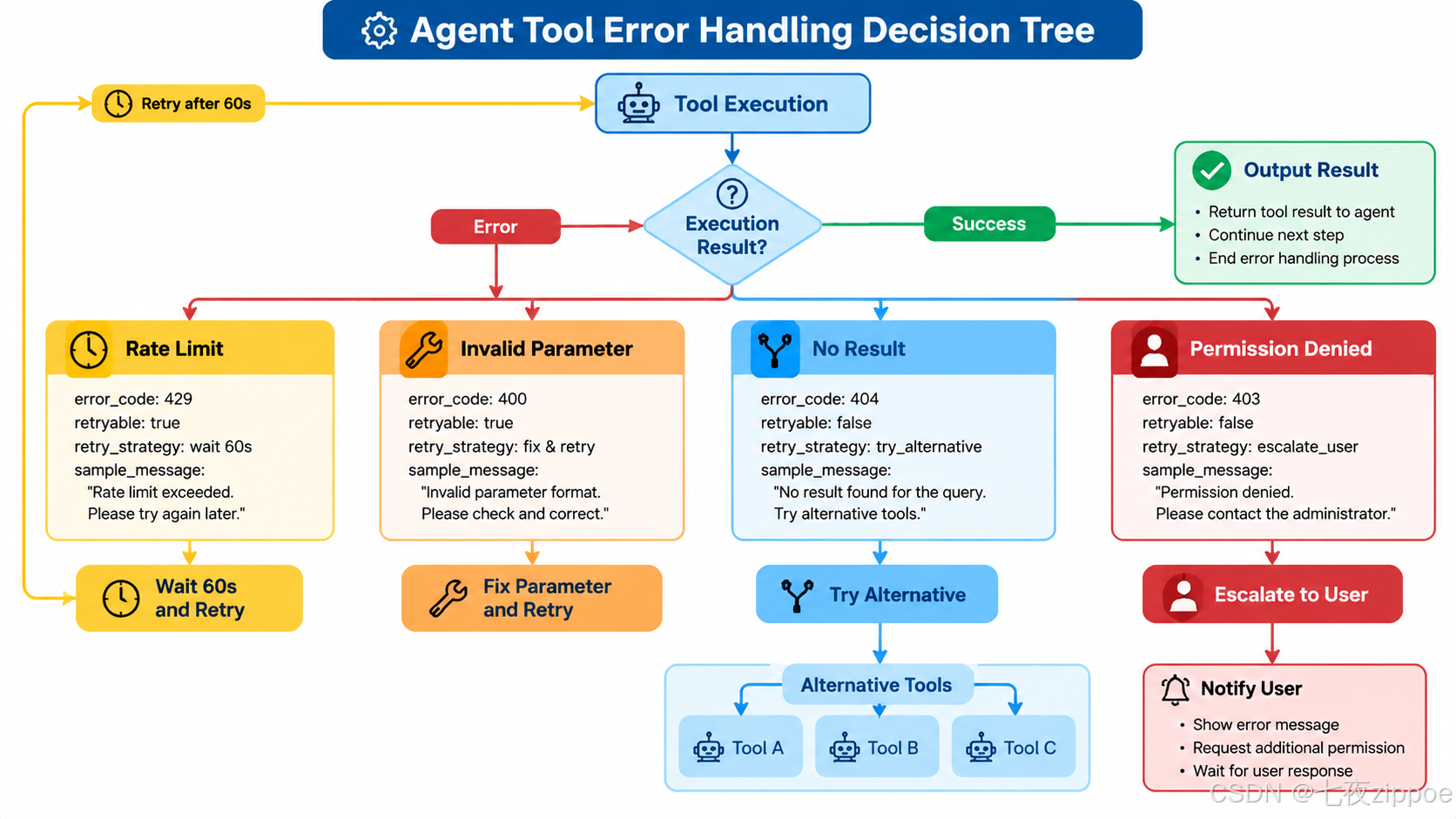
6.2 错误分类与处理策略
# 错误分类的完整框架
class ToolError:
    """Agent 工具错误的基础分类"""

    # 1. 可重试错误 - 参数不变,稍后重试
    RATE_LIMIT = {
        "error_type": "rate_limit",
        "retryable": True,
        "retry_strategy": "wait_and_retry",
        "retry_after_seconds": 60
    }

    # 2. 可修正错误 - 修改参数后重试
    INVALID_PARAM = {
        "error_type": "invalid_parameter",
        "retryable": True,
        "retry_strategy": "fix_param_and_retry",
        "fix_hint": "Date must be in YYYY-MM-DD format"
    }

    # 3. 不可重试但可替代 - 不改参数,换路径
    NO_RESULT = {
        "error_type": "no_result",
        "retryable": False,
        "retry_strategy": "try_alternative",
        "alternative_actions": ["Try broader search criteria", "Use a different tool"]
    }

    # 4. 不可恢复错误 - 无法继续
    PERMISSION_DENIED = {
        "error_type": "permission_denied",
        "retryable": False,
        "retry_strategy": "escalate_to_user",
        "user_message": "You don't have permission to perform this action."
    }
解释: 这个错误分类框架把工具执行错误分为四类。第一类是"可重试错误"(如限流),Agent 只需要等待后用相同参数重试即可。第二类是"可修正错误"(如参数格式错误),Agent 需要根据 fix_hint 修正参数后重试。第三类是"不可重试但可替代"(如查不到结果),Agent 不应该重试相同参数,而应该尝试更宽泛的搜索条件或换一个工具。第四类是"不可恢复错误"(如权限不足),Agent 无法自行解决,应该把问题报告给用户。这个分类让 Agent 的错误恢复行为变得确定和可控。
6.3 错误返回的完整规范
| 错误类型 | retryable | Agent 应该做什么 | 必须包含的字段 | 示例 |
|---|---|---|---|---|
| 限流 | True | 等待后重试 | retry_after_seconds | API 调用太频繁 |
| 参数格式错误 | True | 修正参数后重试 | fix_hint, example | 日期格式不对 |
| 参数值无效 | True | 修正值后重试 | valid_values | 枚举值不在列表中 |
| 资源不存在 | False | 换条件或换工具 | alternative_actions | 用户 ID 不存在 |
| 状态冲突 | False | 换条件或报告用户 | conflict_reason | 会议室已被占用 |
| 权限不足 | False | 报告用户 | user_message | 无权操作此资源 |
| 系统错误 | True | 重试一次 | retry_after_seconds | 内部服务器错误 |
6.4 实践中的错误处理流程
# 一个完整的、生产可用的工具错误处理实现
def search_products(keyword: str, category: str = None, limit: int = 10):
    """
    Search products in the catalog.
    """
    # 参数验证
    if not keyword or len(keyword.strip()) == 0:
        return {
            "status": "error",
            "error_type": "invalid_parameter",
            "error_code": "EMPTY_KEYWORD",
            "message": "Search keyword cannot be empty.",
            "retryable": True,
            "fix_hint": "Provide a non-empty search keyword.",
            "retry_strategy": "fix_param_and_retry"
        }

    if category and category not in VALID_CATEGORIES:
        return {
            "status": "error",
            "error_type": "invalid_parameter",
            "error_code": "INVALID_CATEGORY",
            "message": f"Category '{category}' is not valid.",
            "retryable": True,
            "fix_hint": f"Use one of: {', '.join(VALID_CATEGORIES)}",
            "valid_values": VALID_CATEGORIES,
            "retry_strategy": "fix_param_and_retry"
        }

    try:
        results = product_db.search(keyword, category, limit)

        if not results:
            return {
                "status": "success",
                "data": {
                    "products": [],
                    "total_count": 0,
                    "has_more": False
                },
                "message": f"No products found for '{keyword}'. Try broader keywords or different category.",
                "suggestions": [
                    f"Try searching without category filter",
                    f"Try shorter or more general keywords"
                ]
            }

        return {
            "status": "success",
            "data": {
                "products": results,
                "total_count": len(results),
                "has_more": len(results) == limit
            },
            "metadata": {
                "query_params": {"keyword": keyword, "category": category, "limit": limit}
            }
        }

    except RateLimitError:
        return {
            "status": "error",
            "error_type": "rate_limit",
            "error_code": "TOO_MANY_REQUESTS",
            "message": "Search rate limit exceeded.",
            "retryable": True,
            "retry_after_seconds": 30,
            "retry_strategy": "wait_and_retry"
        }
    except DatabaseTimeoutError:
        return {
            "status": "error",
            "error_type": "system_error",
            "error_code": "DB_TIMEOUT",
            "message": "Database query timed out.",
            "retryable": True,
            "retry_after_seconds": 5,
            "retry_strategy": "wait_and_retry",
            "max_retries": 2
        }
解释: 这个完整的实现展示了错误处理的三个层次。第一层是参数验证——在调用数据库之前,先验证 keyword 非空、category 在合法值列表中,如果验证失败,返回"可修正错误"让 Agent 修正参数后重试。第二层是业务逻辑处理——即使数据库查询成功,如果没有结果,也返回一个"成功但空"的结果,并附上建议。第三层是系统异常处理——捕获限流和超时异常,返回"可重试错误"并告诉 Agent 等多久。注意每个错误返回都包含 retry_strategy 字段,明确告诉 Agent 应该用什么策略来恢复。
七、工具组合策略:正交工具 vs 重叠工具
当 Agent 拥有多个工具时,工具之间的关系直接影响了 Agent 的整体表现。好的工具组合应该像一套精心设计的工具箱——每件工具各司其职;差的工具组合像一堆功能重叠的瑞士军刀——看起来什么都能做,用起来什么都不顺手。
7.1 正交工具:理想的设计
# 正交工具集示例:一个旅行助手 Agent 的工具设计

tools = [
    # 搜索类工具 - 只读,不改变状态
    {
        "name": "search_flights",
        "description": "Search for available flights between two cities on a specific date. Returns flight options with prices, times, and airlines. Use when user wants to find or compare flights."
    },
    {
        "name": "search_hotels",
        "description": "Search for available hotels in a city for given dates. Returns hotel options with prices, ratings, and amenities. Use when user wants to find or compare hotels."
    },
    {
        "name": "search_cars",
        "description": "Search for available rental cars in a city for given dates. Returns car options with prices and types. Use when user wants to find or compare rental cars."
    },

    # 预订类工具 - 写操作,改变状态
    {
        "name": "book_flight",
        "description": "Book a specific flight that was found via search_flights. Requires the flight_id returned from search results. Use when user explicitly confirms they want to book a flight."
    },
    {
        "name": "book_hotel",
        "description": "Book a specific hotel that was found via search_hotels. Requires the hotel_id returned from search results. Use when user explicitly confirms they want to book a hotel."
    },
    {
        "name": "book_car",
        "description": "Book a specific rental car that was found via search_cars. Requires the car_id returned from search results. Use when user explicitly confirms they want to book a car."
    },

    # 管理类工具 - 查询已有预订
    {
        "name": "list_bookings",
        "description": "List all existing bookings for the current user. Returns flight, hotel, and car bookings with their status. Use when user wants to check their reservations."
    },
    {
        "name": "cancel_booking",
        "description": "Cancel an existing booking by booking ID. Use when user explicitly asks to cancel a reservation."
    }
]
解释: 这是一个正交工具集的典型示例。8 个工具分为三类:搜索类(只读)、预订类(写操作)、管理类(查询和取消)。每个工具的职责完全不重叠——search_flights 只搜航班,search_hotels 只搜酒店,book_flight 只订航班。Agent 面对用户需求时,选择路径非常清晰:用户要搜 → 用 search 类工具;用户要订 → 用 book 类工具;用户要查或取消 → 用管理类工具。没有任何"选择困难"。
7.2 重叠工具:灾难的设计
# 反面案例:重叠工具集
tools = [
    {
        "name": "search_all",
        "description": "Search for flights, hotels, and rental cars. Returns combined results."
    },
    {
        "name": "search_flights_and_hotels",
        "description": "Search for flights and hotels in a combined query. Returns package deals."
    },
    {
        "name": "search_flights_only",
        "description": "Search for flights only."
    },
    {
        "name": "search_hotel_deals",
        "description": "Search for hotel deals and packages."
    },
    {
        "name": "find_travel_options",
        "description": "Find all travel options including flights, hotels, and cars."
    }
]
# ↑ Agent: "用户要搜航班...我该用 search_all, search_flights_and_hotels,
#           search_flights_only, 还是 find_travel_options?"
解释: 这五个工具的功能高度重叠。当用户说"帮我搜一下北京的航班"时,Agent 面临选择困难——至少有三个工具可以用(search_all、search_flights_only、find_travel_options),还有两个可能可以用(search_flights_and_hotels、search_hotel_deals)。即使 Agent 选对了工具,不同的工具可能返回不同格式的结果,导致后续处理也不一致。这种设计在实际项目中非常常见,通常是因为不同开发者在不同时期添加了功能重叠的工具。
7.3 工具正交性检查
# 工具正交性检查清单

def check_tool_orthogonality(tools: list) -> dict:
    """
    检查工具集的正交性。

    检查项:
    1. 是否有两个工具的描述语义重叠
    2. 是否有一个工具的功能是另一个工具的子集
    3. 是否有两个工具对同一输入产生不同结果
    4. 是否有工具可以被其他工具的组合替代
    """
    issues = []

    for i, tool_a in enumerate(tools):
        for j, tool_b in enumerate(tools):
            if i >= j:
                continue

            # 检查 1: 描述关键词重叠
            words_a = set(tool_a["description"].lower().split())
            words_b = set(tool_b["description"].lower().split())
            overlap = words_a & words_b
            overlap_ratio = len(overlap) / min(len(words_a), len(words_b))

            if overlap_ratio > 0.6:  # 超过 60% 的词重叠
                issues.append({
                    "issue": "description_overlap",
                    "tools": [tool_a["name"], tool_b["name"]],
                    "overlap_ratio": overlap_ratio,
                    "suggestion": "Consider merging or clarifying the distinction"
                })

    return {
        "total_tools": len(tools),
        "issues_found": len(issues),
        "issues": issues,
        "is_orthogonal": len(issues) == 0
    }
解释: 这是一个简单的工具正交性自动检查脚本。它通过计算两个工具描述的词语重叠率来检测语义重叠——如果重叠率超过 60%,说明两个工具可能功能重叠。在实际项目中,可以扩展这个检查:用 LLM 来判断两个工具的描述是否语义重叠、检查是否有工具是另一个的子集、检查是否两个工具对相同输入返回不同结果。这种自动检查应该在工具注册时执行,及早发现设计问题。
7.4 工具组合的演进策略
解释: 上图展示了工具集的演进策略。V1 版本只包含核心工具(搜索+预订),这是最小可用工具集。V2 版本增加了管理能力(查看和取消预订),这些工具与 V1 的工具完全正交。V3 版本增加了辅助工具(天气和汇率查询),这些工具服务于用户新的需求场景,但与现有工具不重叠。关键原则是:每次增加新工具时,先检查它是否与现有工具重叠。如果重叠,考虑合并而不是新增。
八、适用边界与风险提示
8.1 本文原则的适用范围
本文讨论的工具设计原则适用于以下场景:
- LLM Agent 的 Function Calling / Tool Use 场景:包括 OpenAI Function Calling、Claude Tool Use、LangChain Tools、MCP(Model Context Protocol)工具等。
- 工具数量在 1-30 个之间的 Agent 系统:当工具数量超过 30 个时,需要引入工具分组、两阶段选择、RAG 工具检索等额外机制,这些不在本文讨论范围内。
- 主流大模型(GPT-4o、Claude 3.5、DeepSeek V3 等):不同模型对工具描述的理解能力有差异,但本文原则是通用的。
8.2 不适用场景
- 传统的 API 设计:传统 API 面向人类开发者,有文档、示例、SDK 辅助理解;Agent 工具面向 LLM,只有 description 和 schema。两者设计原则不同。
- 模型微调场景:如果你通过微调让模型记住特定工具的使用方式,description 的重要性会降低。但即便如此,好的工具设计仍然能提升微调效果。
- 多模态工具(图像、音频处理):这类工具的参数设计中涉及二进制数据的处理,有额外的复杂性,本文的原则需要适当调整。
8.3 风险提示
| 风险 | 描述 | 缓解措施 |
|---|---|---|
| 过度设计 | 花太多时间优化工具描述,但模型本身能力不足 | 先用简单描述测试,根据实际错误率优化 |
| 框架差异 | 不同框架对工具 schema 的支持不同 | 以目标框架的文档为准,本文原则做参考 |
| 模型差异 | 不同模型对相同工具描述的理解不同 | 在目标模型上测试,不要假设通用 |
| 工具数量幻觉 | 以为加更多工具就能让 Agent 做更多事 | 工具数量和 Agent 能力不是线性关系,超过临界点反而下降 |
| 安全风险 | 工具描述暴露了系统内部信息 | 在 description 中不要写敏感信息,用脱敏后的示例 |
8.4 安全注意事项
在 Agent 工具设计中,安全是一个容易被忽视但极其重要的维度。以下几点需要特别注意:
# 安全设计要点

# 1. 危险操作要显式确认
def delete_user(user_id: str):
    """
    Delete a user account. This action is IRREVERSIBLE.
    The tool will return a confirmation token that must be passed
    to confirm_deletion to complete the deletion.
    """
    return {
        "status": "confirmation_required",
        "message": f"To delete user {user_id}, call confirm_deletion with token: ABC123",
        "confirmation_token": "ABC123",
        "expires_in_seconds": 300
    }

# 2. 不要在 description 中暴露内部实现
# 反面案例
{"description": "Query the users_postgres_db_v2 table using SQL-like filters"}
# 正面案例
{"description": "Search users by name, email, or status. Returns user profiles."}

# 3. 限制工具的副作用范围
def send_bulk_email(recipients: list, subject: str, body: str):
    """
    Send an email to up to 50 recipients.
    MAX 50 recipients per call. For larger batches, use schedule_bulk_email.
    """
    if len(recipients) > 50:
        return {
            "status": "error",
            "error_type": "invalid_parameter",
            "message": f"Too many recipients: {len(recipients)}. Maximum is 50 per call.",
            "retryable": True,
            "fix_hint": "Split into multiple calls or use schedule_bulk_email tool."
        }
解释: 安全设计的三个要点。第一,危险操作(如删除用户)要采用两步确认机制——先返回一个确认令牌,Agent 需要再次调用确认工具才能执行,这防止了 Agent 误调用导致的数据丢失。第二,工具描述中不要暴露内部实现细节(如数据库表名、内部 API 路径),这些信息可能被攻击者利用。第三,对有副作用的工具(如批量发邮件)要设置上限,并在工具描述中明确标注上限值,防止 Agent 一次性触发大量操作。
九、总结
Agent 工具设计不是一个纯技术问题,而是连接大模型能力和业务需求的桥梁。一个设计良好的工具集,能让中等能力的模型表现出色;一个设计糟糕的工具集,能让最强的模型频频出错。
回顾本文讨论的六个核心维度:
粒度原则 是工具设计的第一个决策。太粗的"万能工具"让 Agent 不知道何时使用、如何填参;太细的"工具爆炸"让 Agent 在选择时迷失。合适的粒度是:一个工具做一件事,工具之间正交,总数量控制在 5-15 个。判断方法很简单——如果一个工具的描述需要用"和"连接两个动作,就该拆分;如果两个工具的描述 60% 以上相似,就该合并。
描述原则 是 Agent 选择工具的唯一依据。好的描述回答三个问题:做什么、什么时候用、什么时候不用。描述长度控制在 30-100 个词,前 10 个词最重要,关键信息前置。用 “Do NOT use this for X” 来消歧义,用示例来帮助 Agent 理解参数。
参数设计 直接影响 Agent 填参的准确率。核心原则是:用 enum 约束合法值,用 minimum/maximum 约束数值范围,用 format 约束字符串格式,参数嵌套不超过 2 层。必选与可选的决策基于"是否核心功能必需"和"是否有安全默认值"。不要给关键参数(如转账金额)设默认值。
返回格式 决定 Agent 能否理解和利用工具执行结果。始终返回结构化数据,包含 status、data、metadata 三个顶层字段。列表数据用复数名词命名,附带 total_count 和 has_more。避免返回自然语言字符串作为主要结果。
错误返回 是最被忽视但影响巨大的设计点。好的错误返回包含 error_type、retryable、retry_strategy 三个关键字段。错误分为四类:可重试(等待后重试)、可修正(修正参数后重试)、可替代(换路径)、不可恢复(报告用户)。给 Agent 提供可操作的信息,而不是只给一个错误消息。
工具组合 决定 Agent 的整体能力。工具集应该正交——每个工具职责不重叠,描述不相似。用正交性检查来发现重叠工具。工具集应该渐进式演进,每次新增工具先检查是否与现有工具重叠。
这些原则不是理论推导,而是从大量工程实践中总结出来的。它们也不是一成不变的——随着模型能力的提升(特别是推理能力的增强),某些设计约束可能会放松。但核心思想不会变:Agent 工具设计的本质,是为一个非确定性的调用方设计一个确定性的接口。理解这一点,你就掌握了 Agent 工程化的关键。
参考资料
- OpenAI. “Function Calling Guide.” OpenAI Documentation, 2024. https://platform.openai.com/docs/guides/function-calling
- Anthropic. “Tool Use with Claude.” Anthropic Documentation, 2024. https://docs.anthropic.com/en/docs/build-with-claude/tool-use
- LangChain. “Tools and Toolkits.” LangChain Documentation, 2024. https://python.langchain.com/docs/modules/agents/tools/
- Anthropic. “Model Context Protocol (MCP) Specification.” 2024. https://modelcontextprotocol.io/
- Patil, S. et al. “Gorilla: Large Language Model Connected with Massive APIs.” arXiv:2305.15334, 2023.
- Qian, C. et al. “ToolLLM: Facilitating Large Language Models to Master 16000+ Real-world APIs.” arXiv:2307.16789, 2023.
- Schick, T. et al. “Toolformer: Language Models Can Teach Themselves to Use Tools.” NeurIPS 2023.
- Microsoft. “Semantic Kernel - Functions & Plugins.” Microsoft Learn, 2024. https://learn.microsoft.com/en-us/semantic-kernel/concepts/plugins/
- Kim, S. et al. “Language Models can Solve Computer Tasks.” NeurIPS 2024.
- Hsieh, C. et al. “Tool Documentation Enables Zero-Shot Tool-Usage in Large Language Models.” ACL 2024.

Agent 垂直技术社区,欢迎活跃、内容共建。
更多推荐


 1
1 0
0- 0



 已为社区贡献28条内容

所有评论(0)