vscode 引用System.Windows.Forms +获得选中文件夹下所有文件名
·
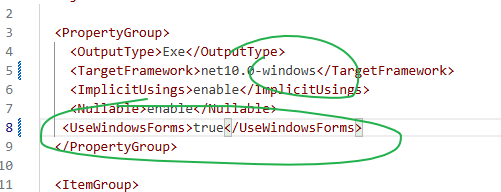
  <PropertyGroup>
    <OutputType>Exe</OutputType>
    <TargetFramework>net10.0-windows</TargetFramework>
    <ImplicitUsings>enable</ImplicitUsings>
    <Nullable>enable</Nullable>
   <UseWindowsForms>true</UseWindowsForms>
  </PropertyGroup>
using System.IO;
using System.Collections.Generic;
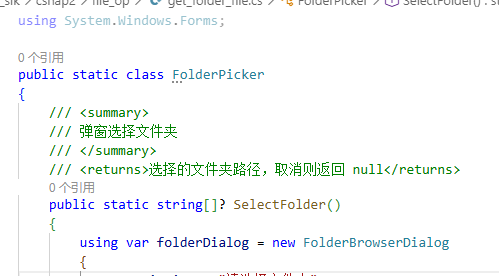
using System.Windows.Forms;

public static class FolderPicker
{
    /// <summary>
    /// 弹窗选择文件夹
    /// </summary>
    /// <returns>选择的文件夹路径,取消则返回 null</returns>
    public static string? SelectFolder() // 修正返回类型为 string?
    {
        using var folderDialog = new FolderBrowserDialog
        {
            Description = "请选择文件夹",
            UseDescriptionForTitle = true,
            ShowNewFolderButton = true
        };

        DialogResult result = folderDialog.ShowDialog();

        if (result == DialogResult.OK && !string.IsNullOrEmpty(folderDialog.SelectedPath))
        {
            return folderDialog.SelectedPath;
        }

        return null;
    }

    /// <summary>
    /// 获取选中文件夹下的所有文件名称
    /// </summary>
    /// <returns>文件名称列表,如果取消选择则返回 null</returns>
    public static List<string>? GetFileNamesFromSelectedFolder()
    {
        string? folderPath = SelectFolder();
        if (string.IsNullOrEmpty(folderPath))
        {
            return null;
        }

        // 获取所有文件路径
        string[] filePaths = Directory.GetFiles(folderPath);
        List<string> fileNames = new List<string>();

        foreach (string path in filePaths)
        {
            // 提取文件名
            fileNames.Add(Path.GetFileName(path));
        }

        return fileNames;
    }
}
Agent 垂直技术社区,欢迎活跃、内容共建。
更多推荐


 0
0 0
0- 0


 已为社区贡献20条内容

所有评论(0)