
Agent Skills:让通用llm原地变身领域专家的绝妙设计

最近,最让你兴奋的ai新功能是什么?
对我来说,是claude刚发布的agent skills。

都说“一图胜千言”。可以这样解释 agent skills:
想象一下:你是the matrix里面的neo,你刚读完了 kungfu/SKILL.md …… 🤣
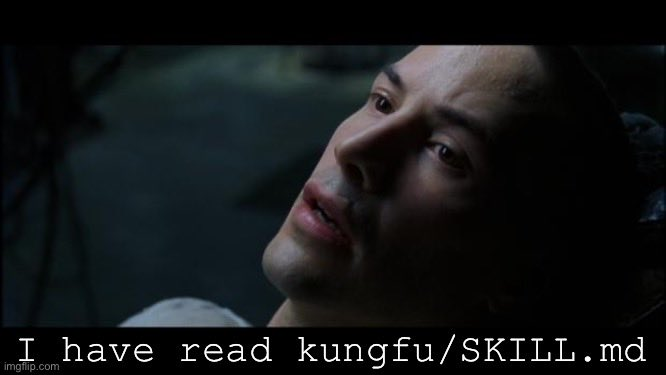
严肃一点的总结:agent skill就是把人类在特定领域、特定主题上的经验、知识和技能,创建为一个个模块化的、高度压缩的技能(例如,“500字费曼”作为一个agent skill,一个“技能模块”),让agent在任何地方都可以随时、方便地调用。
你创建好一个skill之后,可以在claude web、ios端使用,也可以让claude code 作为general agent来调用,甚至让codex等其他agent调用。
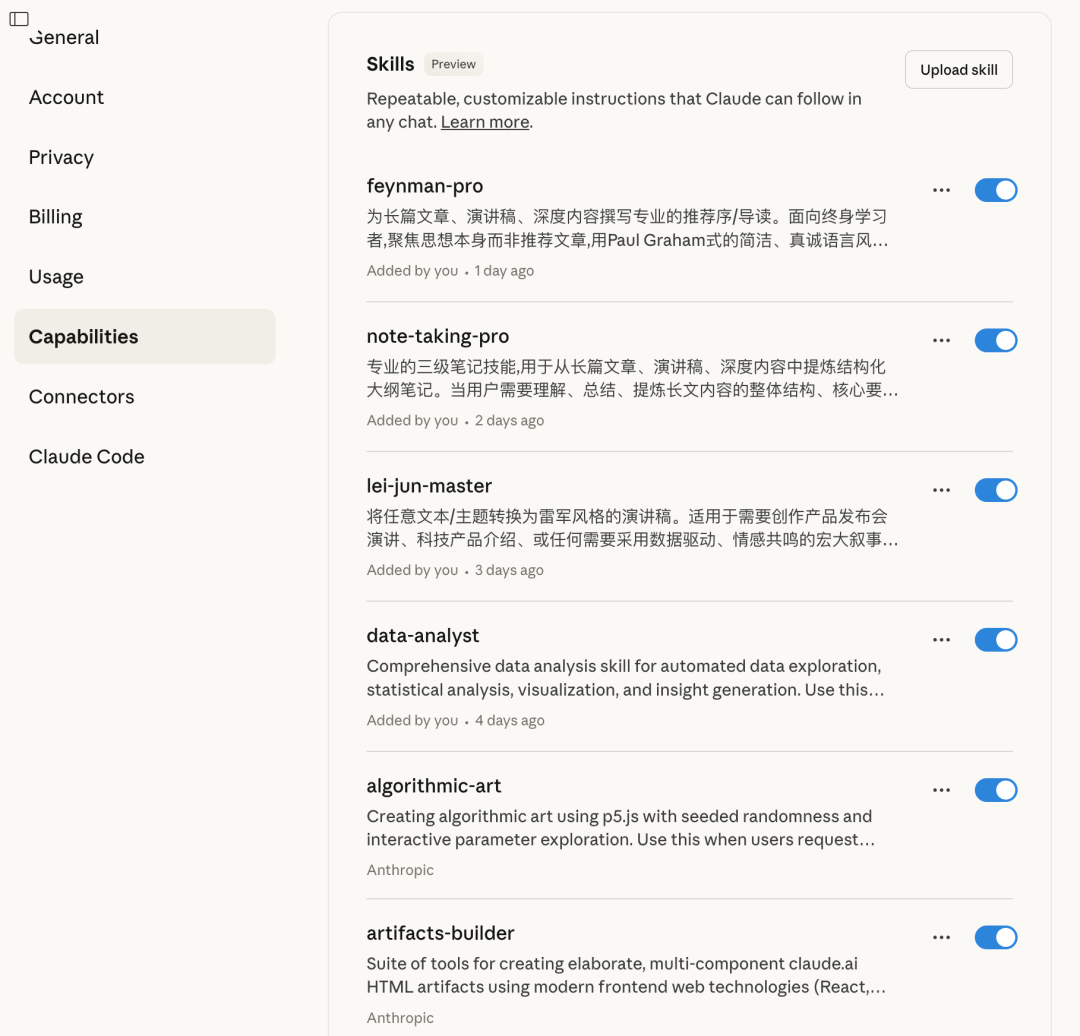
claude web中的skills
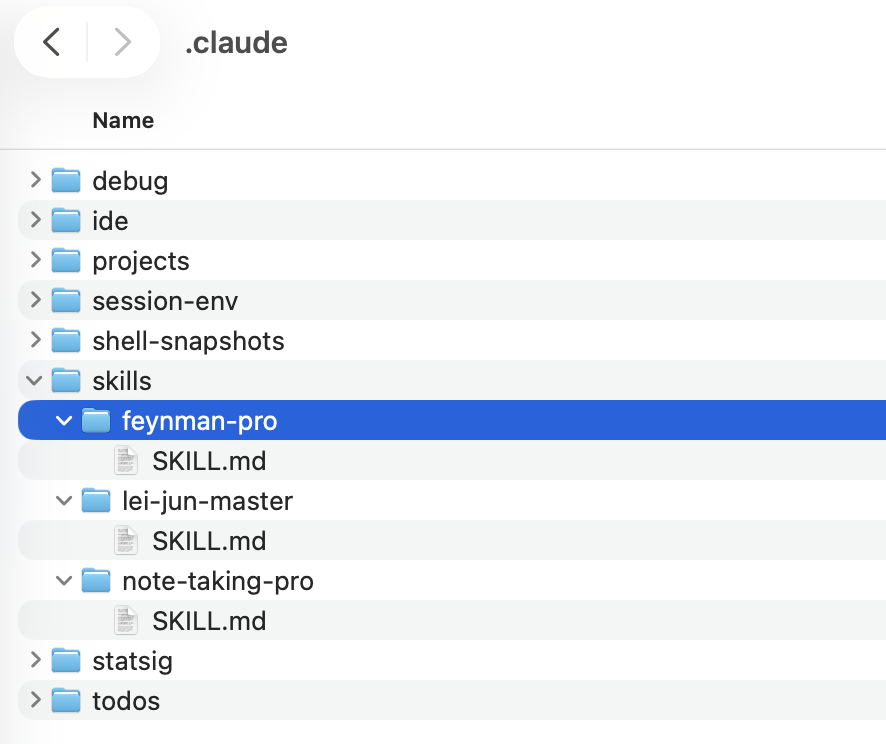
给claude code安装的几个自定义skill
理解agent skill和agent之间的关系,下面这张图也很清楚:
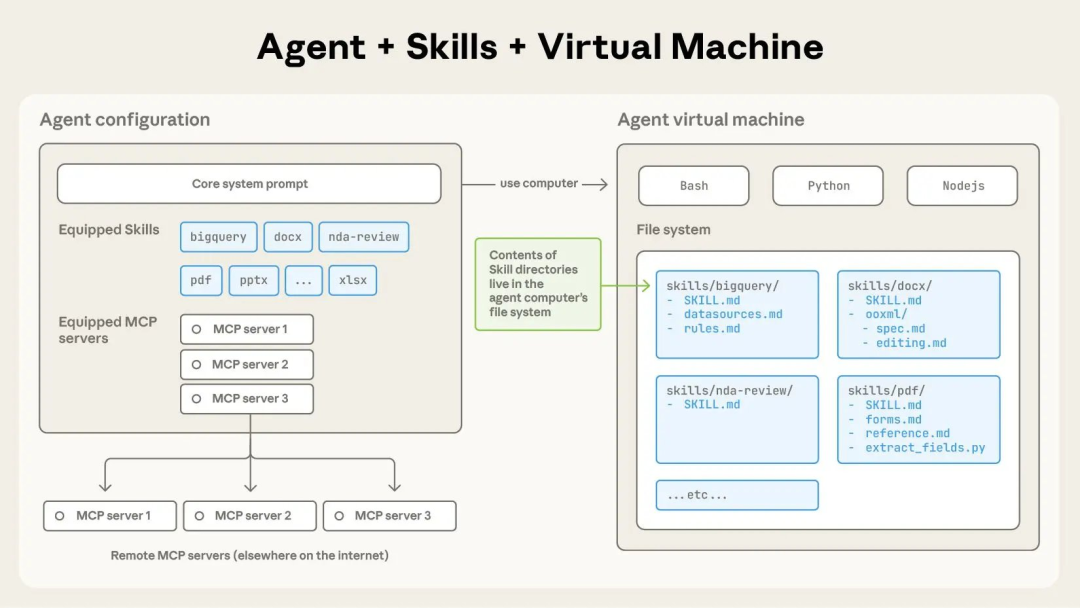
agent skill 专题讲座
agent skill这个主题,一方面极其重要,一方面极其有趣。从它发布开始,我就一直在琢磨,在学习,在实践……
(期间的其他ai噪音我基本都忽略了。为了SKILL.md茶饭不思了🤣)
所以,本周四晚上,开一个专题直播,和你聊一聊这个主题!
识别二维码,或者点击“阅读原文”,预约直播~

直播会聚焦实操,分享自己的(尽可能深入和本质的)思考,一些基础概念、基础知识点就不想赘述了。
例如,这篇官方文档,就可以提前发出来,有需要随时读。原文是英文版,我让agent做成了中文版,分享给你。祝阅读愉快~
agent skills 构建最佳实践
学习如何编写有效的 claude Skills。
优秀的 Skill 内容简洁、结构清晰,并经过实战验证。本指南提供实用的skill写作最佳实践,帮你写出 Claude 能准确发现并有效使用的 Skills。
核心原则
简洁为先(Concise is key)
上下文窗口(context window)是公共资源。你的 Skill 要与 Claude 需要知道的其他一切共享同一个上下文窗口。包括:
-
系统提示(system prompt)
-
对话历史(conversation history)
-
其他 Skills 的元数据(metadata)
-
你的实际请求
并非 Skill 中的每个 token 都会立即产生成本。启动时,只有所有 Skills 的元数据(name 与 description)会被预加载。Claude 仅在 Skill 变得相关时才读取 SKILL.md,并按需读取额外文件。不过,一旦 Claude 加载了 SKILL.md,其每个 token 都要与对话历史和其他上下文竞争,因此仍应保持简洁。
默认前提:Claude 已经很聪明。
只添加 Claude 尚不具备的上下文。逐条质疑信息的必要性:
-
“Claude 真的需要这个解释吗?”
-
“我能否假设 Claude 已经知道这点?”
-
“这段文字是否值得它的 token 成本?”
好的例子:简洁(约 50 tokens):
## Extract PDF text

Use pdfplumber for text extraction:

```python
import pdfplumber

with pdfplumber.open("file.pdf") as pdf:
    text = pdf.pages[0].extract_text()
```
坏的例子:过于冗长(约 150 tokens):
## Extract PDF text

PDF (Portable Document Format) files are a
common file format that contains
text, images, and other content. To extract
text from a PDF, you'll need to
use a library. There are many libraries
available for PDF processing, but we
recommend pdfplumber because it's easy to use
and handles most cases well.
First, you'll need to install it using pip.
Then you can use the code below...
简洁版本假设 Claude 已经知道什么是 PDF,以及如何使用库。
设定恰当的自由度
将说明的具体程度与任务的脆弱性与可变性匹配。
高自由度(文本型指令)。适用情形:
-
多种方法都可行
-
决策依赖上下文
-
由启发式(heuristics)引导方法
示例:
## Code review process

1. Analyze the code structure and organization
2. Check for potential bugs or edge cases
3. Suggest improvements for readability and
maintainability
4. Verify adherence to project conventions
中等自由度(伪代码或带参数脚本)。适用情形:
-
存在首选模式
-
允许一定变化
-
配置会影响行为
示例:
## Generate report

Use this template and customize as needed:

```python
def generate_report(data, format="markdown",
include_charts=True):
    # Process data
    # Generate output in specified format
    # Optionally include visualizations
```
低自由度(固定脚本、很少或没有参数)。适用情形:
-
操作脆弱、易错
-
一致性至关重要
-
必须遵循特定的顺序
示例:
## Database migration

Run exactly this script:

```bash
python scripts/migrate.py --verify --backup
```

Do not modify the command or add additional flags.
类比:把 Claude 想象成在路径上探索的机器人:
-
两侧悬崖的窄桥:只有一条安全路。提供精准护栏和确切指令(低自由度)。示例:必须严格按序执行的数据库迁移。
-
无遮拦的旷野:通往成功的路很多。给出大致方向,信任 Claude 找到最佳路径(高自由度)。示例:代码评审,具体做法取决于上下文。
使用不同的底层模型测试skill
作为模型附加技能,skill的效果依赖底层模型。用你计划使用的所有模型来测试你的 Skill。
不同模型的测试关注点:
-
Claude Haiku(快速、经济):Skill 是否提供足够引导?
-
Claude Sonnet(均衡):Skill 是否清晰而高效?
-
Claude Opus(强推理):Skill 是否避免过度解释?
对 Opus 完美有效的内容,可能需要在 Haiku 上补充细节。如果打算跨模型使用,目标应是对三者都适用的说明密度。
Skill 结构
YAML Frontmatter(YAML 头部):SKILL.md 的 frontmatter 仅支持两个字段:
-
name- 人类可读的 Skill 名(最多 64 字符) -
description- 一句话描述 Skill 做什么、何时用(最多 1024 字符)
skill的命名
使用一致的命名模式,便于引用与讨论。推荐使用动名词(gerund) 形式(动词 + -ing)作为 Skill 名,能清楚表达该 Skill 提供的活动或能力。
好例子(动名词):
-
"Processing PDFs"
-
"Analyzing spreadsheets"
-
"Managing databases"
-
"Testing code"
-
"Writing documentation"
可接受的替代:
-
名词短语:"PDF Processing", "Spreadsheet Analysis"
-
行动导向:"Process PDFs", "Analyze Spreadsheets"
避免:
-
含糊:"Helper", "Utils", "Tools"
-
过于泛化:"Documents", "Data", "Files"
-
在同一技能集内不一致的命名模式
一致命名的好处:
-
在文档与对话中更易引用 Skills
-
一眼看懂 Skill 做什么
-
更好地组织与搜索多个 Skills
-
维持专业、统一的技能库
撰写有效的skill描述
description 字段用于 Skill 发现,应包含 Skill 做什么与何时使用。
始终使用第三人称。description 会注入系统提示(system prompt),若视角不一致会导致发现问题。
-
好:"Processes Excel files and generates reports"
-
避免:"I can help you process Excel files"
-
避免:"You can use this to process Excel files"
要具体,并包含关键术语。既要写清 Skill 做什么,也要写清触发它的具体场景/上下文。
每个 Skill 只有一个 description。描述对技能选择至关重要:Claude 会在可能 100+ 个 Skills 中用它来挑选合适者。你的描述必须提供足够细节,让 Claude 知道何时选择该 Skill;而实现细节在 SKILL.md 的其余内容中给出。
有效示例:
PDF文件处理 skill:
description: ExtracttextandtablesfromPDF
files,fillforms,mergedocuments.Usewhen
workingwithPDFfilesorwhentheuser
mentionsPDFs,forms,ordocumentextraction.
Excel 分析 skill:
description: AnalyzeExcelspreadsheets,
createpivottables,generatecharts.Usewhen
analyzingExcelfiles,spreadsheets,tabular
data,or.xlsxfiles.
Git 助手 skill:
description: Generatedescriptivecommit
messagesbyanalyzinggitdiffs.Usewhenthe
userasksforhelpwritingcommitmessagesor
reviewingstagedchanges.
避免这类含糊描述:
description: Helps with documents
description: Processes data
description: Does stuff with files
渐进式披露
SKILL.md 的作用像一份“总览”,按需指向详细材料,就像入职手册中的目录。
实用建议:
-
将 SKILL.md 正文控在 500 行以内以获得最佳性能
-
接近该上限时,将内容拆分到独立文件
-
使用以下模式有效组织指令、代码与资源
视觉总览:从简单到复杂
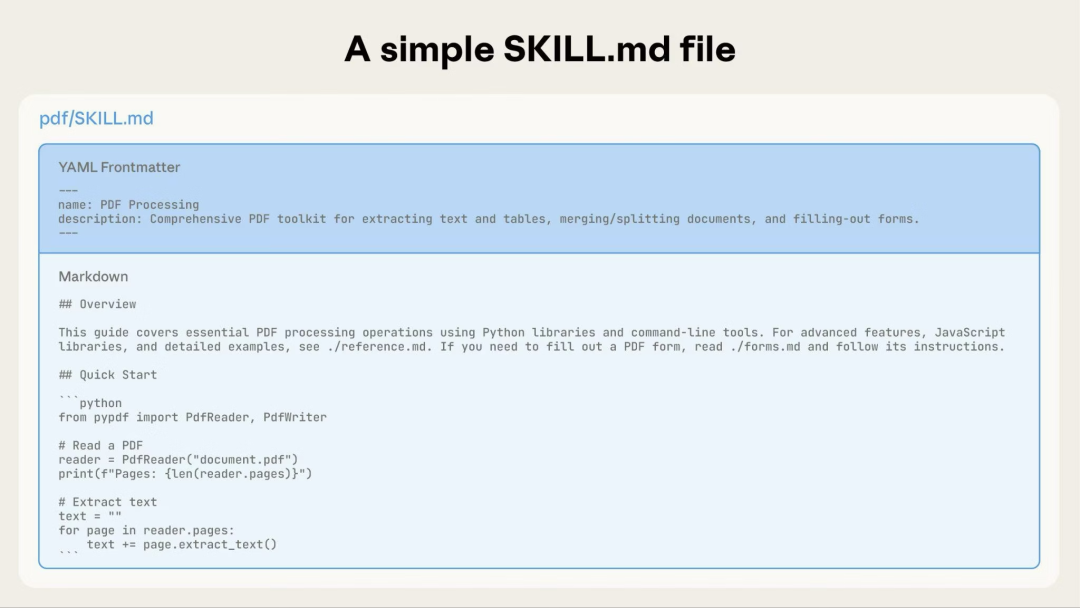
最基本的 Skill 只有一个包含元数据与指令的 SKILL.md 文件:
随着 Skill 的发展,你可以打包更多内容,Claude 仅在需要时才加载:
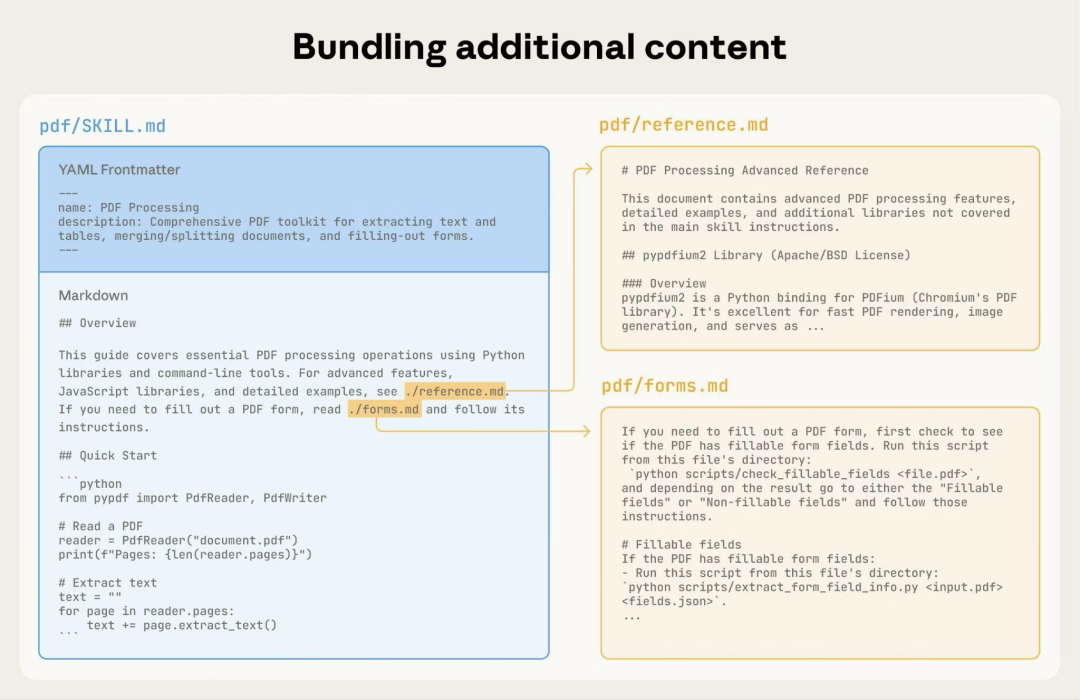
完整的 Skill 目录结构可能如下:
pdf/
├── SKILL.md              # Main instructions (loaded when triggered)
├── FORMS.md              # Form-filling guide (loaded as needed)
├── reference.md          # API reference (loaded as needed)
├── examples.md           # Usage examples (loaded as needed)
└── scripts/
    ├── analyze_form.py   # Utility script (executed, not loaded)
    ├── fill_form.py      # Form filling script
    └── validate.py       # Validation script
模式 1:高层次指南 + 参考
---
name: PDF Processing
description: Extracts text and tables from PDF \
files, fills forms, and merges documents. Use \
when working with PDF files or when the user \
mentions PDFs, forms, or document extraction.
---

# PDF Processing

## Quick start

Extract text with pdfplumber:
```python
import pdfplumber
with pdfplumber.open("file.pdf") as pdf:
    text = pdf.pages[0].extract_text()
```

## Advanced features

**Form filling**: See [FORMS.md](FORMS.md) for complete guide
**API reference**: See [REFERENCE.md](REFERENCE.md) for all methods
**Examples**: See [EXAMPLES.md](EXAMPLES.md) for common patterns
Claude 仅在需要时才加载 FORMS.md、REFERENCE.md 或 EXAMPLES.md。
模式 2:领域分区
Domain-specific organization
对于包含多个领域的 Skills,按领域组织内容,避免加载无关上下文。当用户询问销售指标时,Claude 只需要读取与销售相关的 schema,而非财务或市场数据。这样能保持 token 使用低、上下文聚焦。
bigquery-skill/
├── SKILL.md (overview and navigation)
└── reference/
    ├── finance.md (revenue, billing metrics)
    ├── sales.md (opportunities, pipeline)
    ├── product.md (API usage, features)
    └── marketing.md (campaigns, attribution)
# BigQuery Data Analysis

## Available datasets

**Finance**: Revenue, ARR, billing \
→ See [reference/finance.md](reference/finance.md)
**Sales**: Opportunities, pipeline, accounts \
→ See [reference/sales.md](reference/sales.md)
**Product**: API usage, features, adoption \
→ See [reference/product.md](reference/product.md)
**Marketing**: Campaigns, attribution, email \
→ See [reference/marketing.md](reference/marketing.md)

## Quick search

Find specific metrics using grep:

```bash
grep -i "revenue" reference/finance.md
grep -i "pipeline" reference/sales.md
grep -i "api usage" reference/product.md
```
模式 3:条件化细节
Conditional details
展示基础内容,链接到进阶内容:
# DOCX Processing

## Creating documents

Use docx-js for new documents. \
See [DOCX-JS.md](DOCX-JS.md).

## Editing documents

For simple edits, modify the XML directly.

**For tracked changes**: See [REDLINING.md](REDLINING.md)
**For OOXML details**: See [OOXML.md](OOXML.md)
Claude 仅在用户需要这些功能时才读取 REDLINING.md 或 OOXML.md。
避免深层嵌套引用
当一个引用文件再去引用其他文件时,Claude 可能只做部分读取;例如用 head -100 预览,而不是读全,导致信息不完整。
保持“从 SKILL.md 起一层深度”的引用。所有参考文件应直接由 SKILL.md 链接,确保 Claude 在需要时能完整读取。
坏例子:过深:
# SKILL.md
See [advanced.md](advanced.md)...

# advanced.md
See [details.md](details.md)...

# details.md
Here's the actual information...
好例子:一层深度:
# SKILL.md

**Basic usage**: [instructions in SKILL.md]
**Advanced features**: See [advanced.md](advanced.md)
**API reference**: See [reference.md](reference.md)
**Examples**: See [examples.md](examples.md)
用目录组织较长的参考文件
对于超过 100 行的参考文件,在顶部加目录。即使在部分预览时,也能让 Claude 看全信息结构。
示例:
# API Reference

## Contents
- Authentication and setup
- Core methods (create, read, update, delete)
- Advanced features (batch operations, webhooks)
- Error handling patterns
- Code examples

## Authentication and setup
...

## Core methods
...
随后 Claude 可以按需读全或跳到特定章节。
关于这种基于文件系统的架构如何支持 progressive disclosure(渐进式披露),参见下文高级部分的Runtime environment。
工作流与反馈循环
Workflows and feedback loops
在复杂任务中使用工作流
将复杂操作拆解为清晰、顺序的步骤。尤其复杂的流程,可提供一份检查清单(checklist),让 Claude 复制到响应中并逐步勾选。
示例 1:研究综合工作流(无代码的 Skills):
## Research synthesis workflow

Copy this checklist and track your progress:

```
Research Progress:
- [ ] Step 1: Read all source documents
- [ ] Step 2: Identify key themes
- [ ] Step 3: Cross-reference claims
- [ ] Step 4: Create structured summary
- [ ] Step 5: Verify citations
```

**Step 1: Read all source documents**

Review each document in the `sources/` \
directory. Note the main arguments and \
supporting evidence.

**Step 2: Identify key themes**

Look for patterns across sources. What themes \
appear repeatedly? Where do sources agree or \
disagree?

**Step 3: Cross-reference claims**

For each major claim, verify it appears in the \
source material. Note which source supports \
each point.

**Step 4: Create structured summary**

Organize findings by theme. Include:
- Main claim
- Supporting evidence from sources
- Conflicting viewpoints (if any)

**Step 5: Verify citations**

Check that every claim references the correct \
source document. If citations are incomplete, \
return to Step 3.
这个例子展示了如何将工作流用于不需要代码的分析任务。清单模式适合任何复杂的多步骤流程。
示例 2:PDF 表单填充工作流(含代码的 Skills):
## PDF form filling workflow

Copy this checklist and check off items as you \
complete them:

```
Task Progress:
- [ ] Step 1: Analyze the form (run analyze_form.py)
- [ ] Step 2: Create field mapping (edit fields.json)
- [ ] Step 3: Validate mapping (run validate_fields.py)
- [ ] Step 4: Fill the form (run fill_form.py)
- [ ] Step 5: Verify output (run verify_output.py)
```

**Step 1: Analyze the form**

Run: `python scripts/analyze_form.py input.pdf`

This extracts form fields and their locations, \
saving to `fields.json`.

**Step 2: Create field mapping**

Edit `fields.json` to add values for each field.

**Step 3: Validate mapping**

Run: `python scripts/validate_fields.py fields.json`

Fix any validation errors before continuing.

**Step 4: Fill the form**

Run: `python scripts/fill_form.py input.pdf fields.json output.pdf`

**Step 5: Verify output**

Run: `python scripts/verify_output.py output.pdf`

If verification fails, return to Step 2.
清晰的步骤可防止 Claude 跳过关键验证。勾选清单还能帮助双方跟踪多步骤工作进度。
实施反馈循环
常见模式:运行验证器(validator)→ 修复错误 → 重复。
这个模式能显著提升输出质量。
示例 1:风格指南合规(无代码的 Skills):
## Content review process

1. Draft your content following the guidelines \
in STYLE_GUIDE.md
2. Review against the checklist:
   - Check terminology consistency
   - Verify examples follow the standard format
   - Confirm all required sections are present
3. If issues found:
   - Note each issue with specific section reference
   - Revise the content
   - Review the checklist again
4. Only proceed when all requirements are met
5. Finalize and save the document
这里的验证循环使用参考文档而非脚本。“验证器”即 STYLE_GUIDE.md,Claude 通过阅读并比对来执行检查。
示例 2:文档编辑流程(含代码的 Skills):
## Document editing process

1. Make your edits to `word/document.xml`
2. **Validate immediately**: \
`python ooxml/scripts/validate.py unpacked_dir/`
3. If validation fails:
   - Review the error message carefully
   - Fix the issues in the XML
   - Run validation again
4. **Only proceed when validation passes**
5. Rebuild: `python ooxml/scripts/pack.py unpacked_dir/ output.docx`
6. Test the output document
验证循环越早介入,越能及时捕捉错误。
内容指引
Content guidelines
避免时效性信息
避免写会随着时间失效的信息:
坏例子:时间敏感(会变错):
If you're doing this before August 2025, use \
the old API.
After August 2025, use the new API.
好例子(使用 “old patterns” 部分):
## Current method

Use the v2 API endpoint: `api.example.com/v2/messages`

## Old patterns

<details>
<summary>Legacy v1 API (deprecated 2025-08)</summary>

The v1 API used: `api.example.com/v1/messages`

This endpoint is no longer supported.
</details>
“旧模式”部分提供历史背景,但不会干扰主内容。
评估与迭代
Evaluation and iteration
先构建评估
Build evaluations first
在撰写大量文档之前先创建评估。 这能确保你的 Skill 解决真实问题,而不是记录想象中的需求。
评估驱动开发(Evaluation-driven development):
-
识别缺口:在无 Skill 情况下让 Claude 执行代表性任务。记录具体失败或缺失上下文
-
创建评估:构建三个场景测试这些缺口
-
建立基线(baseline):测量无 Skill 时的表现
-
撰写最小指令:仅添加足以弥补缺口并通过评估的内容
-
迭代:执行评估、与基线对比并改进
这种方法确保你解决的是实际问题,而非臆测需求。
评估结构:
{
  "skills": ["pdf-processing"],
  "query": "Extract all text from this PDF \
file and save it to output.txt",
  "files": ["test-files/document.pdf"],
  "expected_behavior": [
    "Successfully reads the PDF file using an \
appropriate PDF processing library or command-line tool",
    "Extracts text content from all pages in \
the document without missing any pages",
    "Saves the extracted text to a file named \
output.txt in a clear, readable format"
  ]
}
该示例展示了基于数据的评估与简易测试量表。我们当前不提供内置评估运行方式;用户可自建评估系统。评估是衡量 Skill 有效性的事实依据。
与 Claude 协作迭代开发 Skills
最有效的 Skill 开发过程需要直接借助 Claude。本质上,与一个 Claude 实例(“Claude A”)一起创建将被其他实例(“Claude B”)使用的 Skill:Claude A 帮你设计并精炼指令,Claude B 在真实任务中测试。之所以有效,是因为 Claude 模型既懂如何编写有效的代理指令,也懂代理需要哪些信息。
创建新 Skill:
-
在无 Skill 情况下完成一次任务:与 Claude A 用普通提示完成一个问题。在过程中,你会自然地提供上下文、偏好与流程知识。注意哪些信息被反复提供。
-
识别可复用模式:任务完成后,识别哪些上下文适用于未来的相似任务。
示例:如果你做过一次 BigQuery 分析,你可能提供了表名、字段定义、过滤规则(比如“总是排除测试帐号”)以及常见查询模式。
-
请 Claude A 生成 Skill:例如:“为刚才的 BigQuery 分析模式创建一个 Skill,包含表 schema、命名规范和排除测试帐号的规则。” Claude 模型原生理解 Skill 的格式与结构。你不需要特殊系统提示或“writing skills”这类 Skill 来帮助编写。只需直接让 Claude 创建 Skill,它会生成结构正确、包含前言与正文的 SKILL.md 内容。
-
审查简洁性:检查 Claude A 是否添加了不必要的解释。比如:“移除关于 win rate 含义的解释——Claude 已经知道。”
-
改进信息架构:让 Claude A 以更有效的方式组织内容。例如:“把表 schema 放在单独参考文件里;后面可能会新增更多表。”
-
在相似任务上测试:用加载了 Skill 的 Claude B 在相关用例上测试。观察它是否能找到正确信息、正确执行规则,并顺利完成任务。
-
基于观察迭代:若 Claude B 存在困难或遗漏,带着细节回到 Claude A:“我让 Claude B 生成区域销售报告时,它忘了按 Q4 过滤。是否应添加关于按日期过滤的说明?”
改进既有 Skills 改进过程同样层次化:
-
与 Claude A 合作(帮助精炼 Skill 的专家)
-
用 Claude B 测试(在真实任务中使用该 Skill 的代理)
-
观察 Claude B 行为,将洞见带回 Claude A
-
在真实流程中使用该 Skill:给加载了该 Skill 的 Claude B 真正的任务,而非测试场景
-
观察 Claude B 行为:记录它在哪些地方遇到困难、做得好或做出意外选择
示例观察:“我让 Claude B 生成区域销售报告时,它写了查询,但忘了排除测试帐号,尽管 Skill 提到这个规则。”
-
回到 Claude A 讨论改进:分享当前 SKILL.md 并描述观察。比如:“Claude B 忘了过滤测试帐号。Skill 虽然提到了过滤,但可能不够显眼?”
-
审阅 Claude A 的建议:Claude A 可能建议让规则更显眼,用更强的措辞(比如用 “MUST filter” 代替 “always filter”),或重组工作流章节。
-
应用并测试改动:更新 Skill 后,用 Claude B 在相似请求上再次测试。
-
基于使用持续迭代:随着遇到新场景,重复“观察—精炼—测试”的循环。每次迭代都基于真实代理行为,而非臆测。
通用skill模式
模板模式
Template pattern
为输出格式提供模板,并根据需求设定严格程度。
严格要求(比如 API 响应或数据格式):
## Report structure

ALWAYS use this exact template structure:

```markdown
# [Analysis Title]

## Executive summary
[One-paragraph overview of key findings]

## Key findings
- Finding 1 with supporting data
- Finding 2 with supporting data
- Finding 3 with supporting data

## Recommendations
1. Specific actionable recommendation
2. Specific actionable recommendation
```
灵活引导(当需要适配时):
## Report structure

Here is a sensible default format, but use \
your best judgment based on the analysis:

```markdown
# [Analysis Title]

## Executive summary
[Overview]

## Key findings
[Adapt sections based on what you discover]

## Recommendations
[Tailor to the specific context]
```

Adjust sections as needed for the specific analysis type.
示例模式
Examples pattern
对于输出质量依赖范例的 Skills,像常规提示一样提供输入/输出样例:
## Commit message format

Generate commit messages following these examples:

**Example 1:**
Input: Added user authentication with JWT tokens
Output:
```
feat(auth): implement JWT-based authentication

Add login endpoint and token validation middleware
```

**Example 2:**
Input: Fixed bug where dates displayed incorrectly in reports
Output:
```
fix(reports): correct date formatting in timezone conversion

Use UTC timestamps consistently across report generation
```

**Example 3:**
Input: Updated dependencies and refactored error handling
Output:
```
chore: update dependencies and refactor error handling

- Upgrade lodash to 4.17.21
- Standardize error response format across endpoints
```

Follow this style: type(scope): brief description, then detailed explanation.
示例比纯描述更能让 Claude 领会期望的风格与细节。
条件工作流模式
Conditional workflow pattern
引导 Claude 通过决策点:
## Document modification workflow

1. Determine the modification type:

   **Creating new content?** → Follow "Creation workflow" below
   **Editing existing content?** → Follow "Editing workflow" below

2. Creation workflow:
   - Use docx-js library
   - Build document from scratch
   - Export to .docx format

3. Editing workflow:
   - Unpack existing document
   - Modify XML directly
   - Validate after each change
   - Repack when complete
如果工作流变得庞大或复杂,考虑将它们拆到单独文件,并告知 Claude 根据任务读取相应文件。
高级主题:运行时环境
本节解释文件系统架构如何支持 progressive disclosure(渐进式披露),以及与命令执行的配合方式。
文件系统优先与按需加载
Claude 能使用 bash 在“文件系统”中读取与执行。你可以把大量细节放在文件中,Claude 只有在需要时才去读取——节省上下文。
实践建议:
-
引用层级:从 SKILL.md 只链接一层参考文件(避免多层链路)
-
示例与脚本:把长代码和示例放在独立文件中,必要时再读取
-
清晰导航:在 SKILL.md 中指向正确文件,如 “参见 scripts/analyze_form.py 获取提取算法”(读取为参考)
-
测试文件访问:通过真实请求验证 Claude 能正确导航你的目录结构
示例:
bigquery-skill/
├── SKILL.md (overview, points to reference files)
└── reference/
    ├── finance.md (revenue metrics)
    ├── sales.md (pipeline data)
    └── product.md (usage analytics)
当用户询问 revenue,Claude 读取 SKILL.md,看见指向 reference/finance.md 的链接,并用 bash 只读取该文件。sales.md 与 product.md 留在文件系统中,在需要前不消耗任何上下文 token。这种基于文件系统的模型让渐进式披露成为可能,Claude 能精确加载每个任务所需的信息。
MCP 工具引用
若你的 Skill 使用 MCP(Model Context Protocol)工具,务必使用“带服务器前缀”的全名,以避免 “tool not found”。
格式:ServerName:tool_name
示例:
Use the BigQuery:bigquery_schema tool to \
retrieve table schemas.
Use the GitHub:create_issue tool to create \
issues.
其中:
-
BigQuery与GitHub是 MCP 服务器名 -
bigquery_schema与create_issue是各服务器内的工具名
若没有服务器前缀,尤其在存在多个 MCP 服务器时,Claude 可能找不到工具。
避免假设工具已安装
不要假设所需包一定可用:
**Bad example: Assumes installation**:\
"Use the pdf library to process the file."

**Good example: Explicit about dependencies**:\
"Install required package: `pip install pypdf`

Then use it:
```python
from pypdf import PdfReader
reader = PdfReader("file.pdf")
```"
技术备注
YAML frontmatter 要求
SKILL.md 的 frontmatter 仅包含 name(最多 64 字符)与 description(最多 1024 字符)。
Token 预算
为获得最佳性能,将 SKILL.md 正文控制在 500 行以内。若超过该范围,请按前述渐进式披露模式拆分到独立文件。
有效 Skill 检查清单
在分享 Skill 前,逐项确认:
核心质量
-
[ ] 描述具体且包含关键术语
-
[ ] 描述包括 Skill 做什么与何时用
-
[ ] SKILL.md 正文少于 500 行
-
[ ] 额外细节移到独立文件(如有必要)
-
[ ] 无时间敏感信息(或放入 “old patterns” 部分)
-
[ ] 术语一致
-
[ ] 示例具体而非抽象
-
[ ] 文件引用仅一层深度
-
[ ] 正确使用渐进式披露
-
[ ] 工作流步骤清晰
代码与脚本
-
[ ] 脚本真正解决问题,而非把工作丢回 Claude
-
[ ] 明确且有帮助的错误处理
-
[ ] 无“巫术常量”(每个值都能说明来由)
-
[ ] 指令中列出并验证所需包可用
-
[ ] 脚本文档清晰
-
[ ] 不使用 Windows 风格路径(全部使用正斜杠)
-
[ ] 关键操作具有验证/校验步骤
-
[ ] 对质量关键任务包含反馈循环
测试
-
[ ] 至少创建三个评估
-
[ ] 在 Haiku、Sonnet、Opus 上测试过
-
[ ] 用真实使用场景测试过
-
[ ] 融合团队反馈(如适用)
英文版原文:
https://docs.claude.com/en/docs/agents-and-tools/agent-skills/best-practices
从0到1!大模型(LLM)最全学习路线图,建议收藏!
想入门大模型(LLM)却不知道从哪开始? 我根据最新的技术栈和我自己的经历&理解,帮大家整理了一份LLM学习路线图,涵盖从理论基础到落地应用的全流程!拒绝焦虑,按图索骥~~
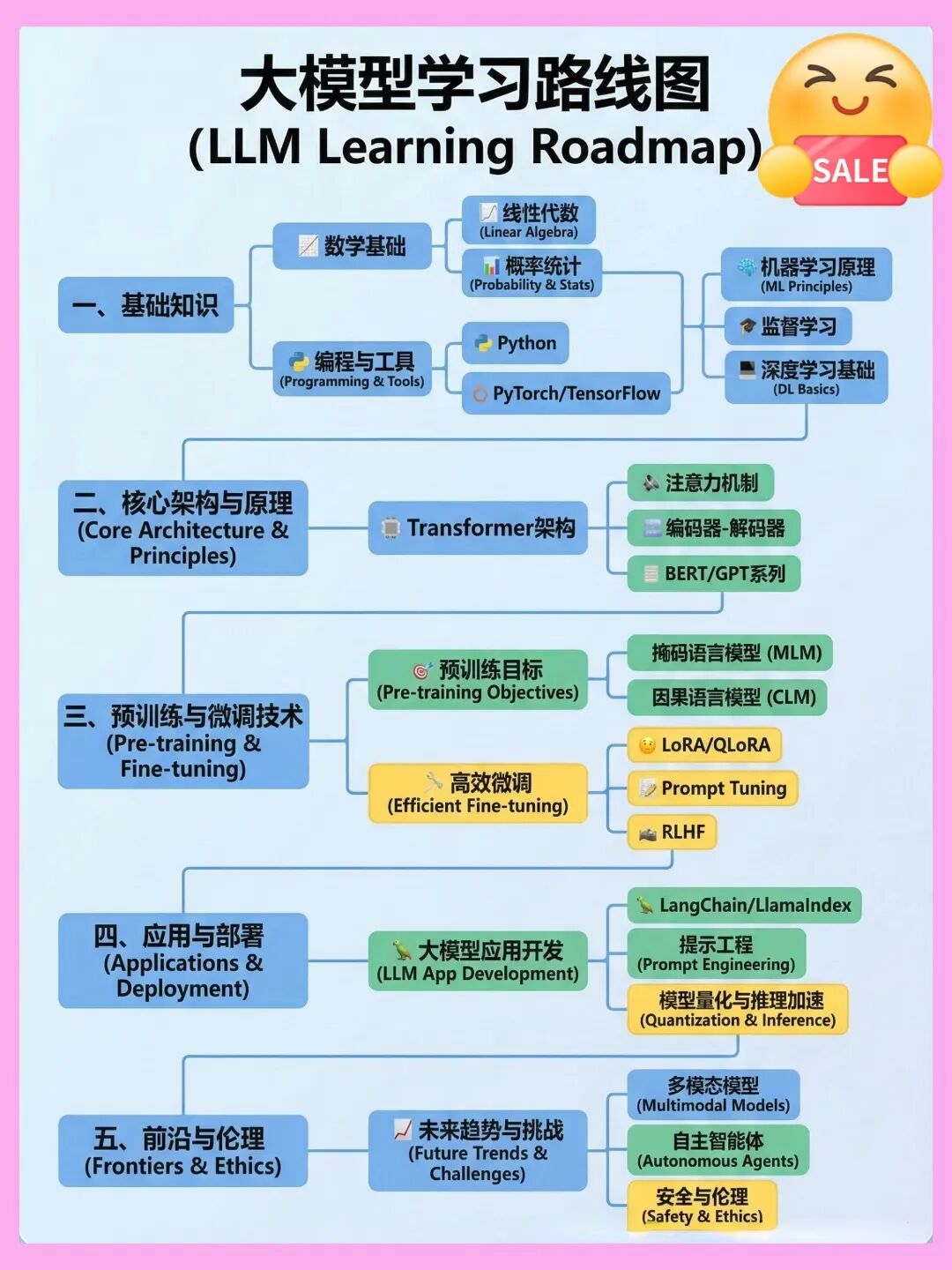
因篇幅有限,仅展示部分资料,需要点击下方链接即可前往获取